
Monday is launch day for the spring campaign, and the media budget is already booked. On Wednesday the paid social specialist asks for a vertical version of the video for stories, a format nobody put on the asset list. The landing page never got a review date, so the product manager sees it for the first time on Friday and wants a different offer in the headline.
Campaign management prevents that kind of launch week. Before the first draft, it fixes every asset with its format and owner, the review dates counted back from the launch and the person who decides when feedback conflicts.
What is campaign management?
Campaign management is the planning, coordination and evaluation of a marketing campaign: a set of activities across several channels that pursue one goal within a fixed period. It covers the campaign from goal and budget through asset production and approval to launch and final analysis.
A marketing workflow is the fixed process your team follows for recurring work, such as each newsletter. Campaign management applies that kind of structure to a single project with its own goal, budget and launch date.
Why campaigns go off track
Campaigns go off track when a phase ends without a clear result or nobody owns the next step, and the fixed launch date leaves no room to catch up. A strategy never turned into an asset list leaves designers guessing about formats, and a review that never made it into the timeline gets squeezed into the last two days before launch.
The second cause is feedback without a decision-maker. When the brand team, the sales director and the client comment in different channels, the designer has to merge contradictory notes and work out which version they mean.
The 6 phases of campaign management
A campaign runs through six phases, and each one ends with a result the next phase needs. The campaign owner checks that result before work moves on.
1. Set goals and budget
Start with one main goal and the KPI that shows whether you reached it. Write the goal so that it is specific, measurable, achievable, relevant and time-bound (SMART), and describe the audience and the one message it should remember.
Split the budget between production and media, with a reserve for formats that come up later. The budget holder signs off goal and budget together.
2. Plan channels, timeline and roles
Planning turns the goal into a list of work. Choose the channels, then list every asset they need, from each ad format to the landing page, with an owner and a due date for each.
Count the timeline back from the launch date and fix the review dates as milestones. A short creative brief per asset group gives designers and copywriters the goal, the message and the formats in one document. Name the reviewers and approvers now, not when the first file is ready. A line like “Marketing will approve” leaves open who clicks approve, and that question then turns up on the Friday before launch.
3. Produce the assets
In production, the creative team turns the brief into drafts. The campaign owner tracks progress per asset rather than per person, so a missing banner size shows up before the review starts. Keep every draft in one place with version numbers: if version 3 of a key visual sits in a chat, an inbox and a shared folder at once, the next review starts with the question of which file is current.
4. Review and approve
Here the team checks each asset against the brief, the brand and any legal requirements, and named people sign it off. Plan two stages, an internal review first and then the approval by the client or the executive who owns the budget.
Decide who approves and who only comments, and let one person settle conflicting feedback. A brand compliance check in the internal stage catches a wrong logo or colour before the client sees the file. Which questions each reviewer answers, from facts to channel fit, is set out in the content review guide.
5. Launch
At launch, the approved assets go live on every channel at the agreed time. Test links, tracking, targeting and the landing page on desktop and mobile beforehand, and check that each channel uses the approved version, not an earlier export.
Try it yourself: In the demo you work in a real draftgo workspace with sample data.
6. Measure and adjust
Measurement compares the results with the KPIs from phase 1, during the campaign and after it. Agree in planning which report comes when, for example a weekly check of spend and cost per result and a final report two weeks after the end. Shift budget towards the channels that perform, and note in the final report which formats and review dates you would plan differently.
Roles in campaign management
A campaign needs one owner from goal to report and clear roles for everyone who contributes or approves. In a small team, one person holds several of them.
| Role | Responsible for | Decides |
|---|---|---|
| Campaign owner | Goal, budget, timeline, final report | Conflicting feedback, go or no-go for launch |
| Marketing lead or strategist | Audience, message, channel mix | Channels and budget split |
| Creative team | Drafts and revisions of all assets | How the brief is carried out |
| Channel specialists | Set-up, targeting, tracking per channel | Timing and targeting |
| Internal reviewers (brand, legal) | Brand and legal checks | Whether an asset may go to the client |
| Approver (client or executive) | Sign-off of goal, budget and final assets | Final approval of each asset |
Tools for campaign management
Campaign teams combine several types of tools, each covering one part of the campaign. Which ones you need depends on the number of channels and reviewers.
| Tool type | Covers | Phases |
|---|---|---|
| Project management | Tasks, owners, timeline | Planning, production |
| Online proofing and approval | Comments on the asset, versions, approvals | Production, review |
| Ad platforms and social schedulers | Set-up, scheduling, targeting, spend | Launch, measurement |
| Email marketing and CRM | Contact lists, mailings, leads | Launch, measurement |
| Analytics and reporting | KPIs, dashboards, final report | Measurement |
Give each tool one job and decide where the current version of each asset lives. The guide to online proofing explains how review tools handle comments, versions and approvals.
Common mistakes and better practice
Four planning mistakes surface as delays shortly before launch: no single owner, an asset list with gaps, reviews without dates and files sent as loose exports. The table shows what each one causes and what to plan instead.
| Mistake | What happens | Better practice |
|---|---|---|
| No single campaign owner | Conflicting feedback waits for the next meeting | One owner who settles conflicts and decides on launch |
| Asset list without every format | A story or banner size turns up in launch week | One list per channel with every format, owner and due date |
| No review dates in the timeline | Reviews pile up before launch | Review dates as milestones, counted back from launch |
| Files sent as exports | Reviewers comment on an old version | One file with versions |
Campaign management checklist
Go through this list at the kick-off and again before launch.
- Goal: One main goal with a KPI and a deadline is written down.
- Budget: The budget is approved and split between production, media and a reserve.
- Asset list: Every asset has a format, a channel, an owner and a due date.
- Roles: Campaign owner, reviewers and approvers are named.
- Timeline: Review and approval dates are milestones before launch.
- Approval: Every asset is approved in its final version.
- Launch check: Links, tracking and targeting are tested.
- Reporting: Dates for interim checks and the final report are set.
Example: a trade fair campaign in a three-person in-house team
Take the three-person marketing team of a mid-sized machine builder that prepares its campaign for a trade fair eight weeks away: LinkedIn ads in two formats, two invitation emails, a landing page for booking meetings at the stand, a 60-second product video and five printed stand panels. The head of marketing owns the campaign, the managing director approves, and the product manager checks every technical figure.
The head of marketing counts back from the printer’s deadline for the panels, ten working days before the fair, so the panels and the video get the first review dates. The product manager marks two wrong values in the panel PDF, the designer uploads the corrected file as a new version, and the managing director approves it two days before the print deadline. After the fair, the team compares booked meetings with the goal from phase 1 and notes which ad format brought more bookings.
How it works in draftgo
In draftgo, you run the production, review and approval phases of a campaign in one project, and clients join by link without an account. Stored data is kept on EU servers in the Frankfurt data centre.
- One project per campaign: Upload images, PDFs and videos into one project and group them in sections, for example paid social, video and print.
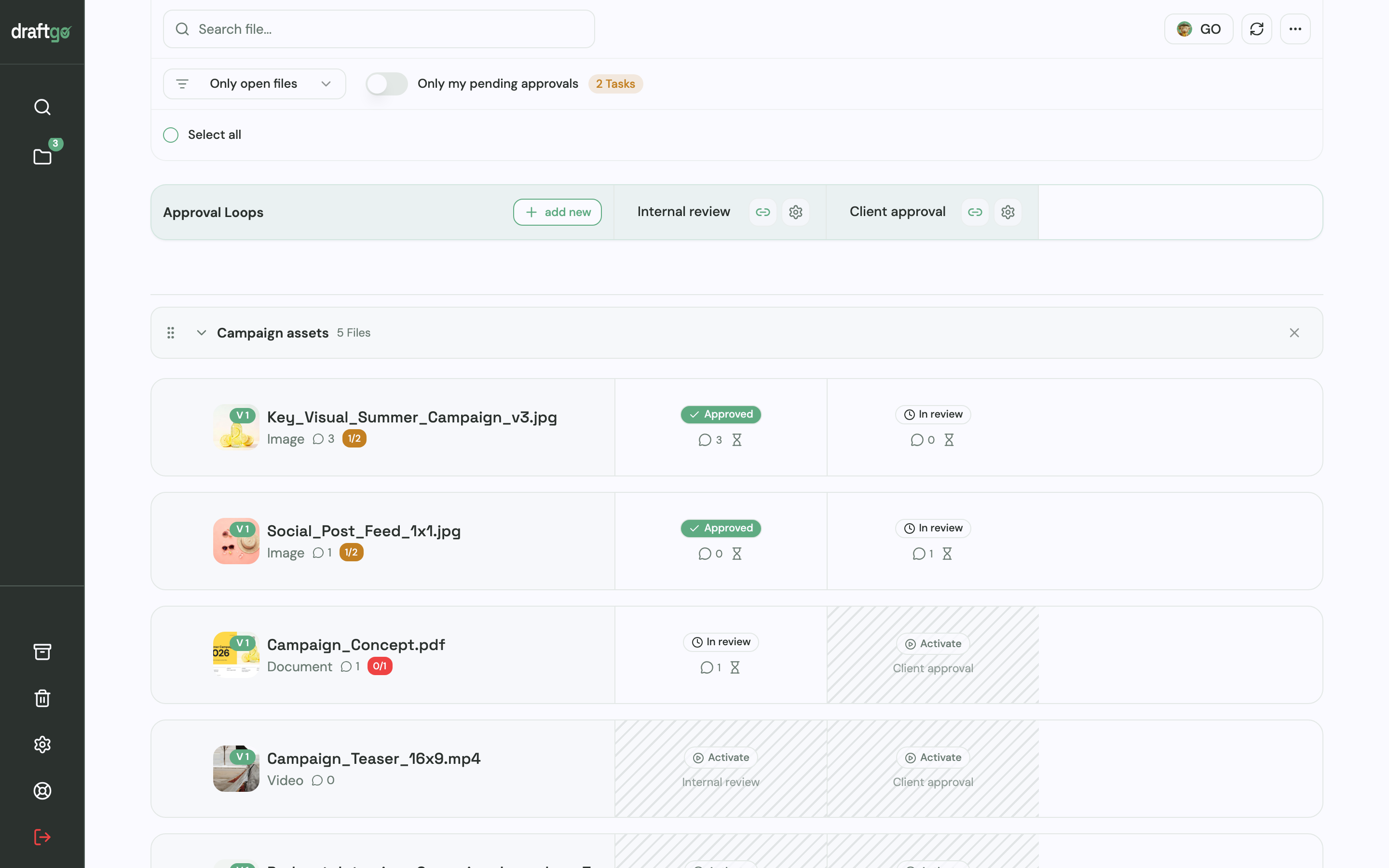
- A loop per review stage: Create the loops “Internal review” and “Client approval”. In each loop you choose whether all approvers, a set number or any one of them must approve, with separate settings for your team and for guests. Two loops in one project need Freelancer or higher: Free holds one loop per project, Freelancer three, Agency and Team as many as you need (see plans and pricing).
- Reviewers by link: Whoever gives the final approval gets a personal approver link and approves without an account. Colleagues who should only add comments open the loop’s viewer link.
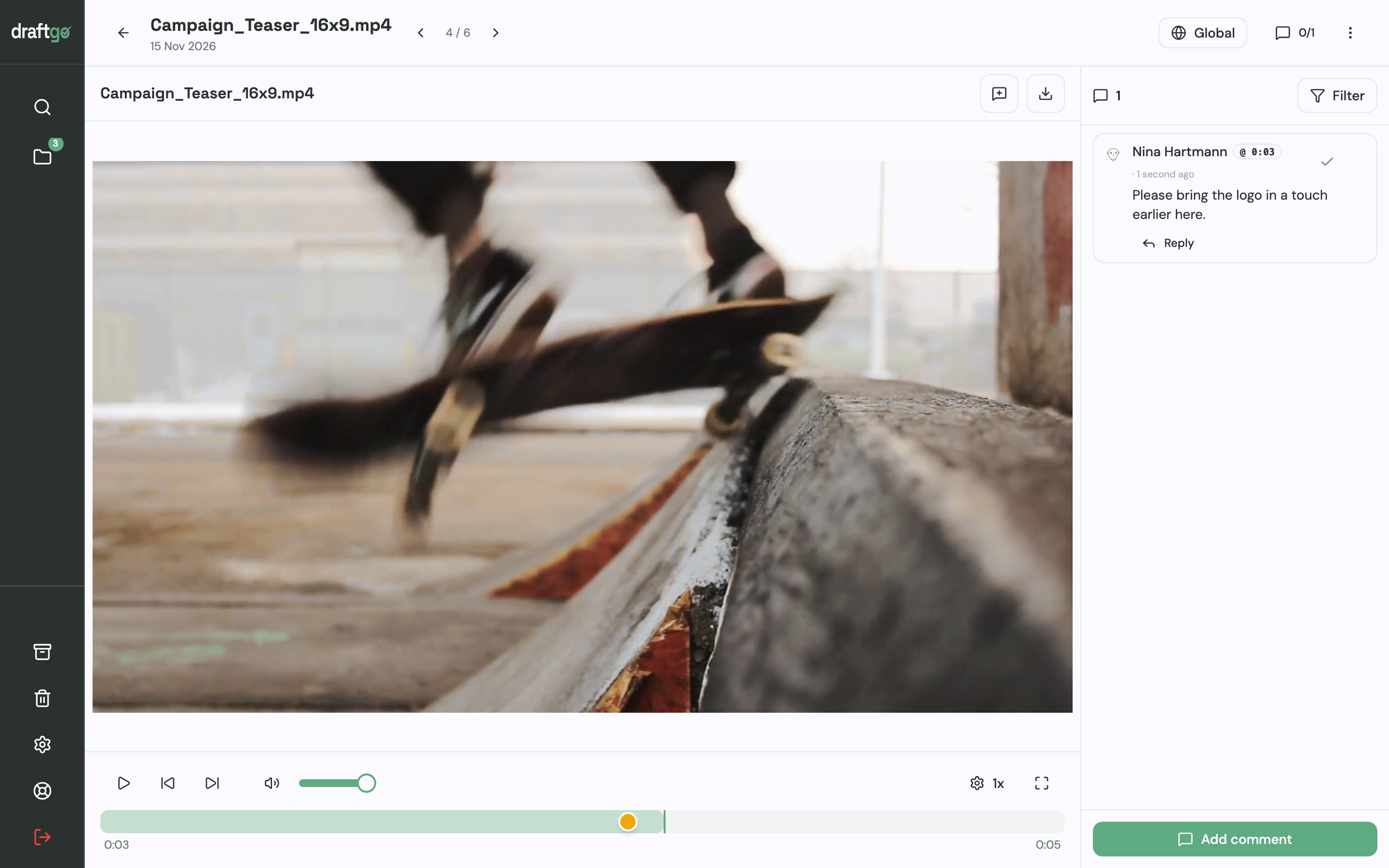
- Comments on the spot: Reviewers mark images with pins or rectangles, highlight text in PDFs and comment at a point on a video’s timeline. A comment can become a to-do with an assignee and a due date.
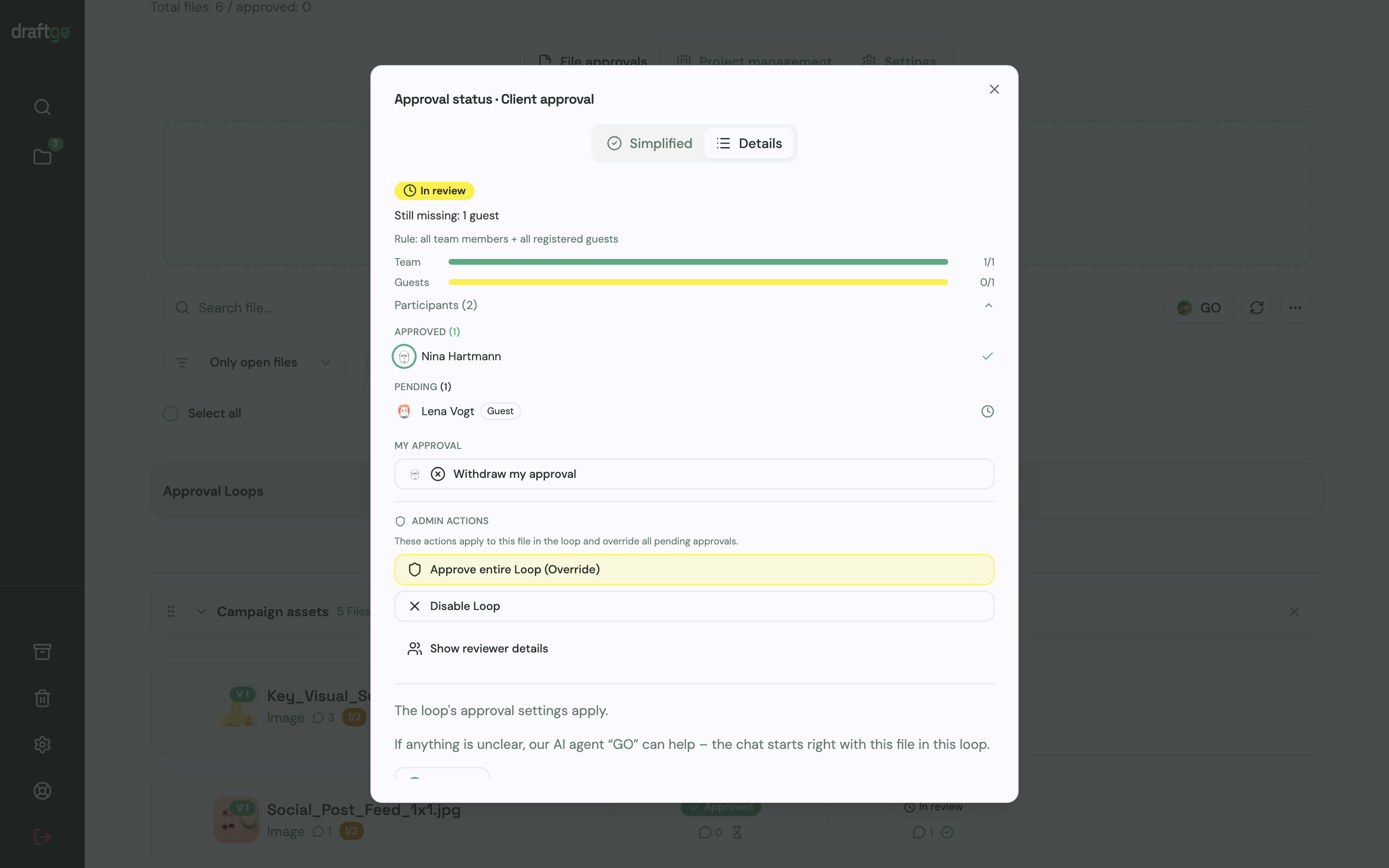
- Versions and status: Corrections go up as a new version of the same file, and its approvals start again. You see who has approved and who is pending, and after the internal review you activate the file in the client loop.
- A record for later: The activity log keeps approvals, comments and versions with person and time, exportable as CSV, JSON or PDF.
Our AI agent “GO” answers questions about a file or loop, and from the Freelancer plan on you can start the AI review, which checks PDFs, images and social posts for errors like typos or cut-off text. Media planning and ad scheduling stay in your other tools.
Internal approvals across departments are covered on the page draftgo for in-house creative teams.
FAQ
What is the difference between campaign management and project management?
Campaign management is project management applied to a marketing campaign. It adds channel planning, the production and approval of creative assets and measurement against marketing KPIs, and the whole plan counts back from a fixed launch date.
What does a campaign manager do?
A campaign manager owns the campaign from goal to final report. They agree goal and budget, build the timeline, coordinate the people involved, settle conflicting feedback and decide when the campaign is ready to launch.
Which KPIs should a campaign track?
The KPIs follow from the goal. A lead campaign tracks leads and cost per lead, a sales campaign revenue and return on ad spend, an awareness campaign reach and engagement. Pick one main KPI and set up its tracking before launch.
Conclusion
Campaign management works when each of the six phases ends with a result, an owner and a check before the next one starts. For your next campaign, start with the asset list: give every format an owner, a due date and a review date, and name the one person who decides when feedback conflicts. Try it free – draftgo is free for 14 days, no credit card needed.
Written by
Emilia
Content Producer
Ready to streamline your approval processes?
Get started with draftgo today and see how easy professional collaboration can be.