
It is Thursday afternoon, and the article that should go live tomorrow has comments from five people. The sales director has rewritten the first paragraph, the designer wants a new headline, and the proofreader has polished three sentences that the product manager now says are wrong. Legal has not replied at all. Everyone meant well, yet nobody knew what to look at, or in which order.
What is a content review?
A content review is the step between a finished draft and publication in which named people check the content against agreed criteria and approve it. It covers the text and everything around it: images, video, captions, links and the format of the channel where the piece appears.
Proofreading is one part of it and looks at language alone. The final approval is the last part, in which one person confirms that this version may go live.
What a content review checks
Every content review answers five questions, and each usually belongs to a different person. Splitting them up keeps the feedback short and easy to act on.
| Check area | The question | Typical reviewer |
|---|---|---|
| Accuracy | Are facts, figures, product details, names and links correct? | Subject-matter expert |
| Brand | Does it follow the style guide, tone and agreed terms? | Editor or content lead |
| Legal | Are claims backed up, ads labelled and image rights cleared? | Legal or compliance |
| Accessibility | Are alt text, captions and contrast in place? | Designer or editor |
| Channel fit | Do length, crop, first line and link work on the channel? | Channel owner |
Legal checks for US and UK audiences
Legal review matters most for paid partnerships, testimonials and product claims. In the US, the Federal Trade Commission says advertisers need reasonable programmes in place to train and monitor the influencers and other endorsers in their network (FTC: Endorsement Guides, what people are asking, 2023). In the UK, the CAP Code requires marketing to be obviously identifiable as marketing, also when an ad looks like editorial content (ASA: Recognising ads, 2023).
This article is general information, not legal advice.
Accessibility checks
Accessibility has thresholds a reviewer can check. The Web Content Accessibility Guidelines ask for a contrast ratio of at least 4.5:1 for normal text and 3:1 for large text (W3C: Understanding WCAG 2.2, Contrast (Minimum)). Recorded video with sound needs captions (W3C: Captions (Prerecorded)), and images that carry meaning need alt text that says what they show (W3C: An alt decision tree, 2024).
Why content reviews stall
Most content reviews stall because nobody agreed who checks what, in which order and by when.
- Everyone reviews everything. Five people comment on the whole piece, and nobody knows whose word counts.
- Feedback arrives everywhere. Comments come by email, in Slack and on calls, and someone has to merge them by hand.
- There is no review window. Without an agreed date, a draft waits in an inbox and holds up the next one.
- Legal sees the claims too late. A claim rejected on publishing day sends the piece back through every stage.
The content review process in 6 steps
A good content review moves from the broad to the detailed: direction first, then facts, then wording, then the checks on the final format. Each step has one goal and one or two reviewers.
1. Agree the review plan before anyone writes
Decide per format which stages apply, who reviews in each, who gives the final approval and how long each stage may take. Agencies settle this at the start of a client relationship, as part of their client onboarding.
2. Check the draft against the brief
The client or the marketing lead checks the direction: goal, audience, key message and format. Commas can wait. With a written creative brief, this takes minutes, because the reviewer compares the draft with a document rather than with their memory.
Try it yourself: In the demo you work in a real draftgo workspace with sample data.
3. Review facts and claims
A subject-matter expert checks figures, product details, prices, names and links, and asks for a source wherever a number appears. Changes here rewrite whole sentences, so the language edit waits.
4. Edit for language and brand voice
Now the editor works on spelling, grammar, readability and the style guide. They also check that product names and agreed terms are written the same way throughout.
5. Run the legal, accessibility and channel checks
Legal sees the final wording, ideally just the passages with claims, comparisons or testimonials. For video and print, where every change is expensive, those passages go to legal before production starts. Then someone checks the piece where it will appear: the post with caption and crop on a phone, the PDF page by page, the landing page on desktop and mobile. How this stage runs for posts and reels is covered in the guide to choosing a social media approval tool.
6. Approve the final version
The final approver signs off one specific version. After that, nobody changes it without a new approval, even for a small fix.
Who reviews what: roles and stages
Each role owns one question, and only some roles approve. This is a typical split for a marketing or agency team:
| Role | Reviews | Approves? |
|---|---|---|
| Creator | works in the feedback | no |
| Marketing lead or client | direction against the brief | often, as final approver |
| Subject-matter expert | facts and figures | no |
| Editor | language and brand voice | no |
| Legal or compliance | claims, disclosures, rights | yes, for their part |
| Channel owner | format, links, call to action | no |
In small teams one person often covers several roles. Keep the stages separate anyway, and go through them one at a time. Name exactly one final approver, and if two people could approve, agree beforehand who decides when they disagree.
How to keep review rounds short
Rounds get shorter when each reviewer knows what to look at and where to leave feedback. One consolidated set of comments per stage gets a piece through faster than five parallel ones.
| Common mistake | Better practice |
|---|---|
| “Any thoughts?” as the request | One concrete question, such as “Please check only the figures in section 2” |
| Proofreading before facts are final | Language edit after the expert review |
| Acting on every comment at once | Comments for a later stage wait for it |
| Contradictions go back to the writer | The person who decides picks one answer |
| Corrections pasted into the old file | Every correction as a new version |
| A third round in the same stage | Back to the brief, which usually left a question open |
How to document the outcome
Document a content review by keeping the approved version with the names of its approvers, the time of each approval and the resolved comments. That record answers later questions, such as why a claim was softened or which version the client saw.
- the approved file with its version number
- each approver with date and time
- the comments and how conflicts were decided
- for legal points, the source of each claim
For influencer posts you check before they go live, keep the same record.
Practical example: a monthly content package for a skincare client
Take a five-person agency that produces a monthly package for a skincare brand: a blog article as a PDF, a carousel with caption and a short reel. In the first month everything goes to the client's marketing manager, product manager and legal adviser at once. The reel is edited three times, because the legal adviser objects to a claim after the cut is finished.
In the second month the agency splits the review. On Monday the marketing manager checks the article and carousel against the brief. On Tuesday the product manager checks ingredients and figures, while the legal adviser gets only the three sentences with product claims, before the reel goes into the edit. On Wednesday the agency's editor does the language pass and checks alt text and captions. On Thursday the marketing manager approves, and the reel is cut once.
How it works in draftgo
In draftgo, the stages of your content review become approval loops, for example one inside your team and one for the client, and every comment sits on its file. The guide to online proofing explains this way of reviewing in general.
One approval loop per stage
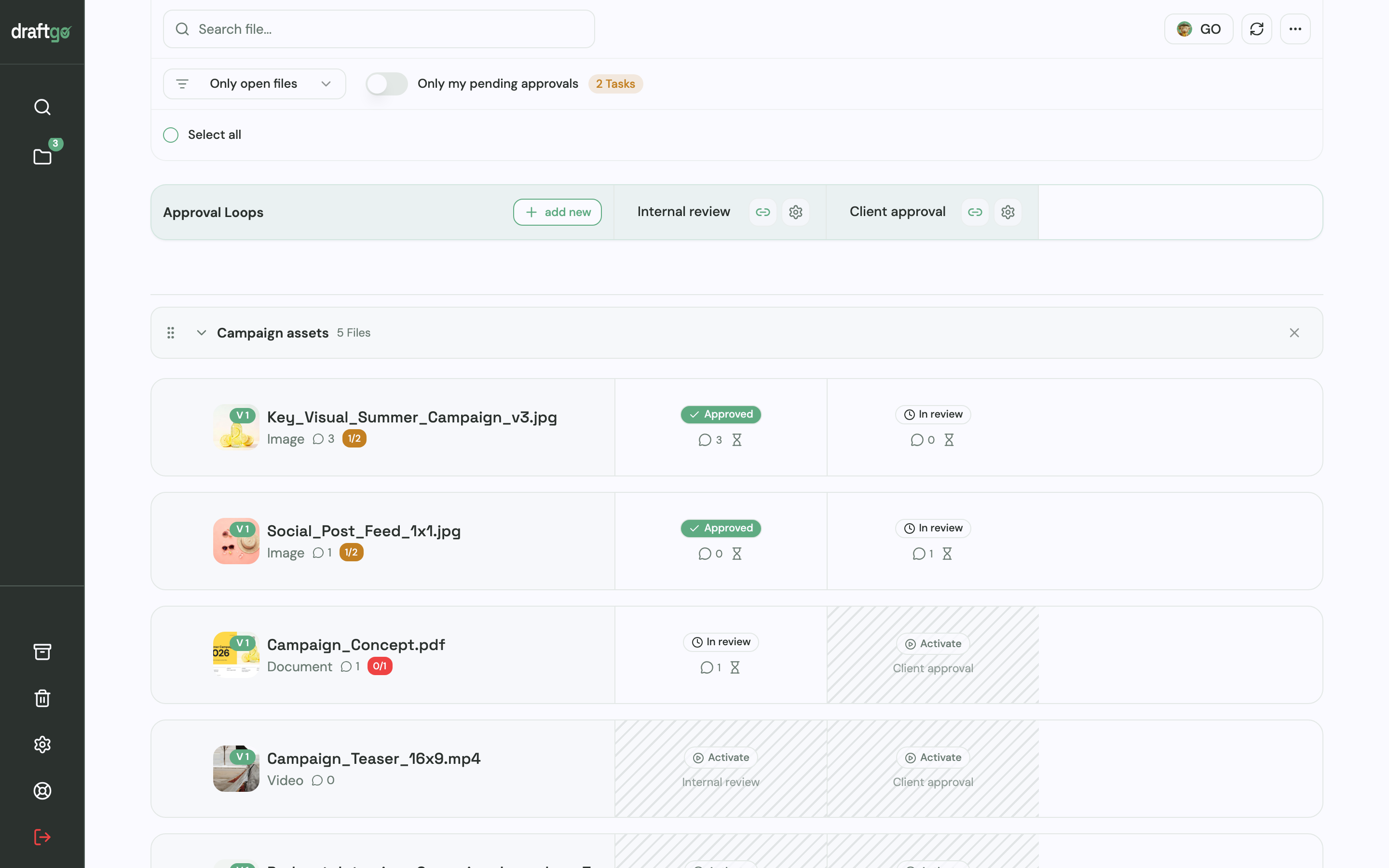
You set up loops such as “Internal review” and “Client approval”. For each loop you decide whether everyone, a set number of people or any one of them has to approve, separately for your team and for guests. The project page shows every file with its status in each loop.
Reviewers without an account
Clients open the file through a personal approver link, without an account. An external expert who should only comment gets the shared viewer link of the loop or file, enters a name and comments without approving. Peter Schönherr, founder and managing director of Loloson Media in Portugal, produces image and video content, mainly e-commerce assets for an international hair care manufacturer. He puts it this way: “With 70, 80 or more open assets, our client can now review flexibly in between other tasks instead of having to clear time for a whole mountain of them.”
Comments at the exact spot
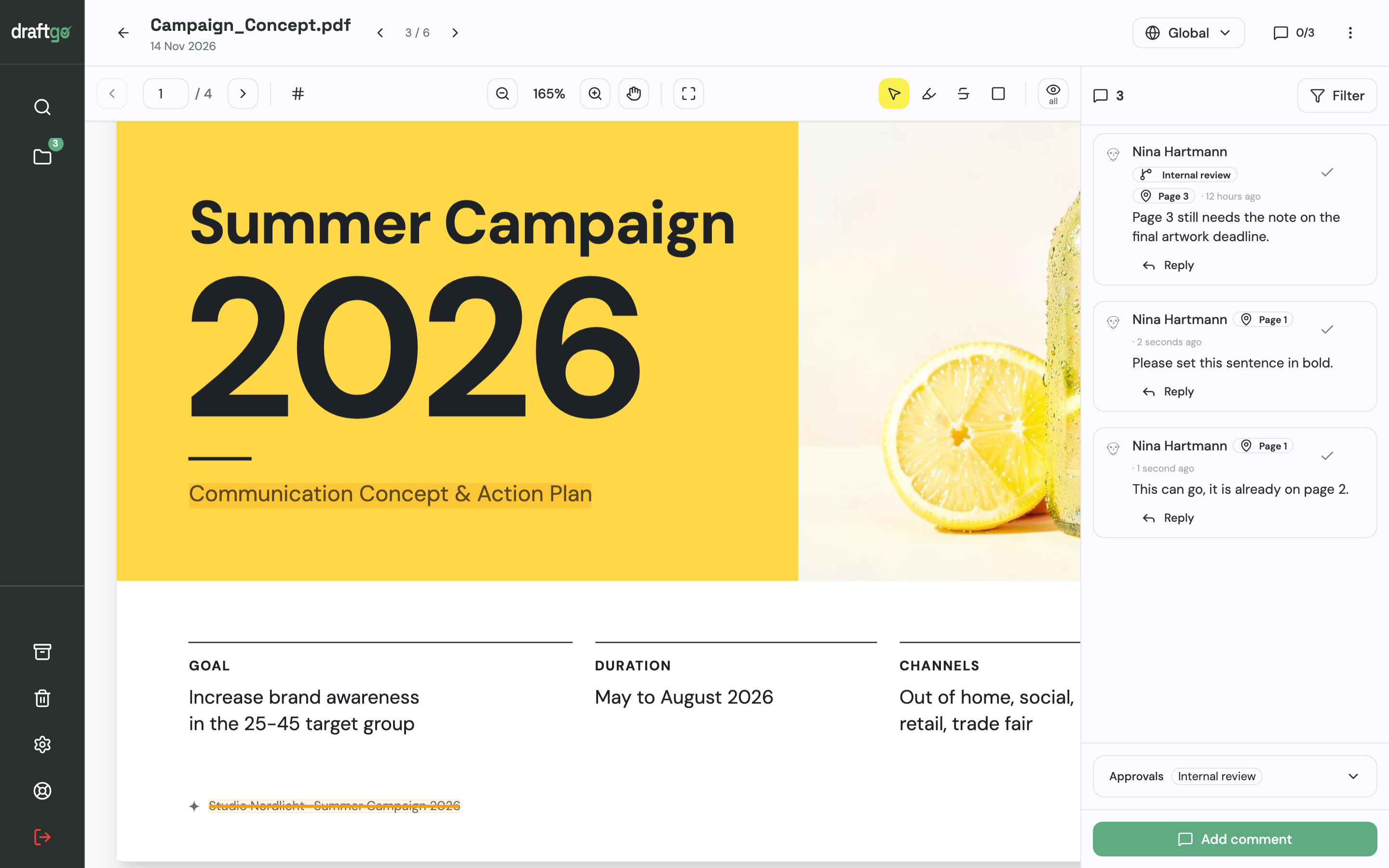
Reviewers highlight or strike through text in a PDF, place a pin on an image, or comment at a point in a video and on a social post with its caption. Replies and @mentions settle contradictions at the comment, and whoever makes a change marks the comment as resolved.
AI review before the client sees it
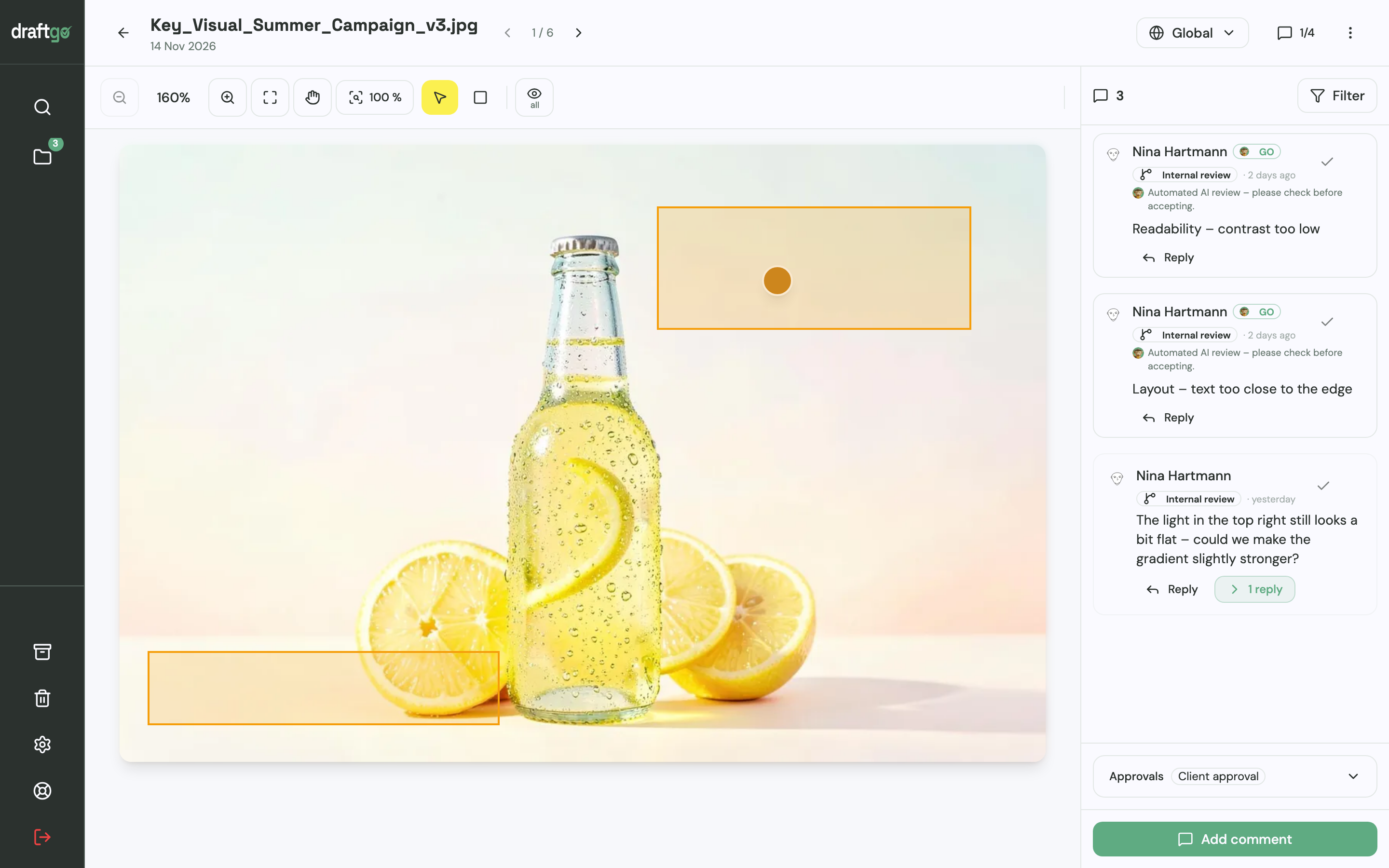
Before a file goes out, you can start the AI review by our AI agent “GO” on PDFs, images and social media posts. GO looks for errors such as spelling mistakes, cut-off text or very small type, places its findings as comments, and you decide what changes. Brand voice and legal claims stay with the people in your loops.
New versions and a record of every approval
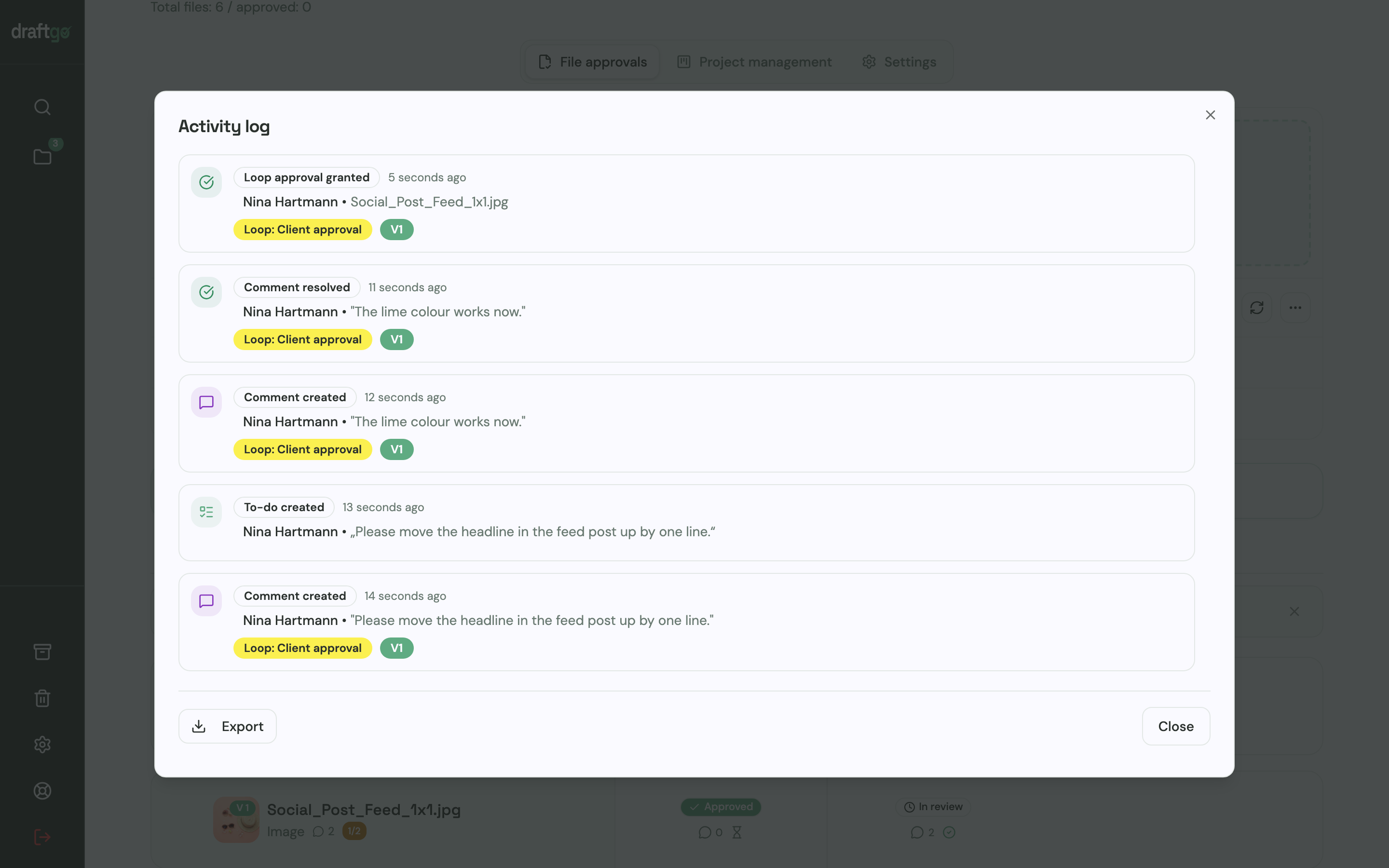
A corrected file uploaded as a new version starts its approvals again, and earlier versions stay available. The activity log records approvals, comments, versions and downloads with person and time, and you can export it as CSV, JSON or PDF.
More on reviews for posts, reels and campaigns is on the page draftgo for social media and content teams.
FAQ
How long should a content review take?
It depends on the format and the number of stages. If you give each stage one to two working days, a blog post with four stages takes about a week and a social post two or three days.
What is the difference between content review and content approval?
The content review is the whole process of checking content against agreed criteria, often with several rounds of feedback. The approval is its last step, in which one named person confirms that a specific version may be published.
Does every piece of content need every review stage?
No. A short social post can skip the subject-matter stage, while a whitepaper, a product page or a paid partnership needs the facts and legal stages. Define the stages per format once, so nobody decides it piece by piece.
Who should approve content in an agency?
Inside the agency, the account or content lead approves before anything goes to the client. On the client side, one named person gives the final approval and settles conflicting feedback from colleagues.
Conclusion
A content review works when the five checks are split across named people and run in a fixed order, from direction to facts to wording to the final format. Take your next piece of content, write down which checks it needs, who covers each one and who approves at the end, then send the draft to one stage at a time.
Try it free – draftgo is free for 14 days, no credit card needed.
Written by
Emilia
Content Producer
Ready to streamline your approval processes?
Get started with draftgo today and see how easy professional collaboration can be.