
The creator sends her unboxing video as a download link on Tuesday night. The brand manager answers in Instagram DMs, product marketing emails a note about the battery-life claim, and the brand’s lawyer asks in a separate thread whether the ad label appears early enough. The creator works through her DMs, never sees the email, and the video goes live with the old battery claim and “#ad” at the end of the caption.
Influencer content needs the same approval as any other ad, plus two checks of its own: the label that tells viewers it is an ad, and the claims the creator makes in their own words. When everyone knows beforehand who checks what, the creator keeps their voice and the brand knows which version goes live.
This article is general information, not legal advice.
Why influencer approvals go wrong
Influencer approvals go wrong when feedback travels through private channels and nobody owns the final yes. The brand then loses track of the version that went live.
- Feedback lands in the creator’s inbox piece by piece. Three people at the brand send notes by DM, email and chat, and their notes contradict each other.
- The label is nobody’s job. Everyone assumes the creator or the platform will handle the disclosure, so it gets checked late or not at all.
Disclosure rules for paid influencer posts in the US and UK
In both markets, the regulators expect a post that a brand paid for, or gave free products for, to be recognisable as an ad. The US guidance comes from the Federal Trade Commission (FTC), the UK guidance from the Advertising Standards Authority (ASA) and the Competition and Markets Authority (CMA).
United States: what the FTC says
The FTC tells influencers to disclose any financial, employment, personal or family relationship with a brand (FTC: Disclosures 101 for social media influencers, 2019). Financial relationships are not limited to money: free or discounted products and other perks count too. The disclosure should be hard to miss, written in simple language and in the same language as the endorsement. A hashtag such as #ad or #sponsored is fine but not necessary, and the FTC warns against assuming that a platform’s disclosure tool is good enough. In a video, the disclosure belongs in the video, not just in the description, and influencers can’t talk about their experience with a product they haven’t tried.
For brands, the FTC’s answers on its Endorsement Guides state that advertisers need reasonable programmes in place to train and monitor members of their network (FTC: Endorsement Guides, what people are asking, 2023).
United Kingdom: what the ASA and the CMA say
Rule 2.1 of the CAP Code requires marketing communications to be obviously identifiable as such. For influencer posts, the ASA expects a prominent “Ad” label upfront, early enough that people notice it before they click, watch or otherwise engage with the content (ASA: Recognising ads, social media and influencer marketing, 2026). A label buried in a list of hashtags at the end, set in a colour with poor contrast or hidden under “See more” is not sufficient, and neither is tagging the brand alone. The ASA holds both brands and influencers responsible.
The CMA asks brands to take responsibility for the labels on endorsements that promote them (CMA: Social media endorsements, guidance for brands, 2025). Gifts, discounts and commissions count as payment, so a brand that sends free products should include clear instructions that any resulting post must be labelled as an “Ad”. Brands should also check posts that refer to them and work with creators to correct a missing label promptly. The CMA recommends a label that is clear, upfront, prominent and timely, such as “Ad” or “Advert”.
On its guidance page, the CMA notes that the guidance predates the unfair commercial practices provisions of the Digital Markets, Competition and Consumers Act 2024, in force since 6 April 2025, which contain broadly similar prohibitions. The ASA’s influencers’ guide to making clear that ads are ads, developed with the CMA, is in its fourth edition (2026) and also covers affiliate marketing.
Try it yourself: In the demo you work in a real draftgo workspace with sample data.
Influencer content approval in 5 stages
An influencer content approval runs from a brief that already names the label to a recorded sign-off of the final version, with the disclosure check as a stage of its own.
1. Write the label and the claims into the brief
The brief decides how many corrections you need later. Write down:
- the goal of the partnership, one or two key messages and the call to action
- the label for each market and where it goes, for example in the first seconds of the video and at the start of the caption
- the product claims the creator may use, in the wording your product team has approved
- how many feedback rounds the contract includes and who gives the final approval
Our creative brief template has room for most of these points.
2. Let the creator make the draft
The creator produces the video, the carousel or the story. Leave room for their style, because their audience follows them for it, and for video ask for the script or a rough cut first, so the claims are settled before the final edit.
3. Give one round of combined feedback
Collect every comment from the brand in one place, on the spot it refers to: at the timecode in a video or on an area of an image. One person settles contradictions and releases the round, so the creator gets one list instead of messages from three channels. Our guide to choosing a video feedback tool shows how comments at the timecode work.
4. Check the label and the claims
Before the approval, one named reviewer checks the disclosure and the product claims:
- the label is visible at the start, on a phone, without tapping “more”
- in a video, the label appears in the video itself, not only in the caption
- every claim matches the approved wording, and the creator has used the product they describe
For products with strict advertising rules, such as health or financial products, your legal adviser joins this stage.
5. Record the sign-off and check the live post
The final approver approves one specific version in the tool, not with a thumbs-up in a chat. Any later edit by the creator is a new version that needs a new approval. Once the post is live, compare it with the approved version. Our guide to the audit trail for creative approvals explains what the record of an approval should contain.
Feedback mistakes and better practice
Creators can act on feedback that refers to the brief and to a spot in the file. These habits cost extra rounds:
| Mistake | Better practice |
|---|---|
| “Can it feel less like an ad?” | “Keep the ‘Ad’ label in the first seconds, and open with the moment you first use the product.” |
| “I don’t like it.” | A reference to the brief: “The key message is missing from the first three seconds.” |
| The label is checked after the post is live | The label is in the brief and in every version check |
| “Say it’s the best one you’ve ever used.” | Let the creator describe their own experience, and give them the approved wording for product claims |
Start with what works and say why a change matters. Creators know their audience, and a reason makes a change easier to accept.
Practical example: a product launch with four creators
Take a freelance campaign manager who runs the launch of a trail running shoe for a sportswear brand with four creators, two in the UK and two in the US. The brand’s marketing lead decides, the product manager checks the claims about the grip of the sole, and an outside lawyer reviews the labels.
The campaign manager uploads the creators’ drafts to one project with two loops, “Label and claims” and “Brand approval”. The product manager and the lawyer comment at the timecode through the shared viewer link, and the campaign manager approves the first loop once their comments are resolved. Only the marketing lead gets a personal approver link, and she approves in the second loop. When a UK creator re-records the opening to move the “Ad” label into the first seconds, the new cut goes up as a new version and the approvals start again.
How it works in draftgo
draftgo keeps the drafts and approvals of an influencer campaign in one project, and everyone outside your team reviews through a link, without an account. Our overview of social media approval tools shows where such a dedicated approval tool differs from a scheduler.
Drafts and comments on the spot
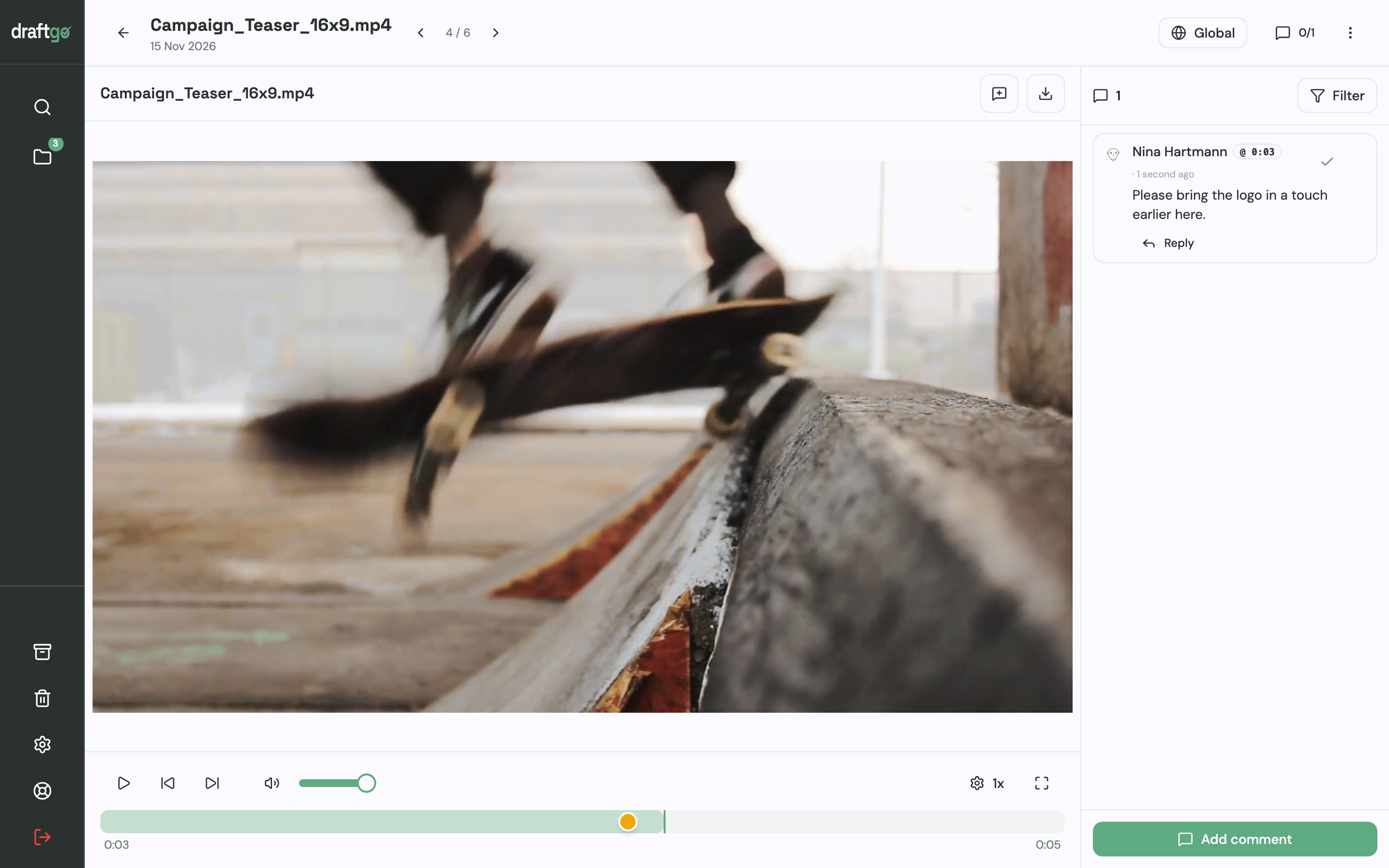
You upload each creator’s draft to the campaign’s project. A social media post holds up to 20 images as a carousel with a caption of up to 2,200 characters. With video, a comment sits at a point on the timeline; on images, reviewers place a pin or draw a rectangle.
The right link for each person
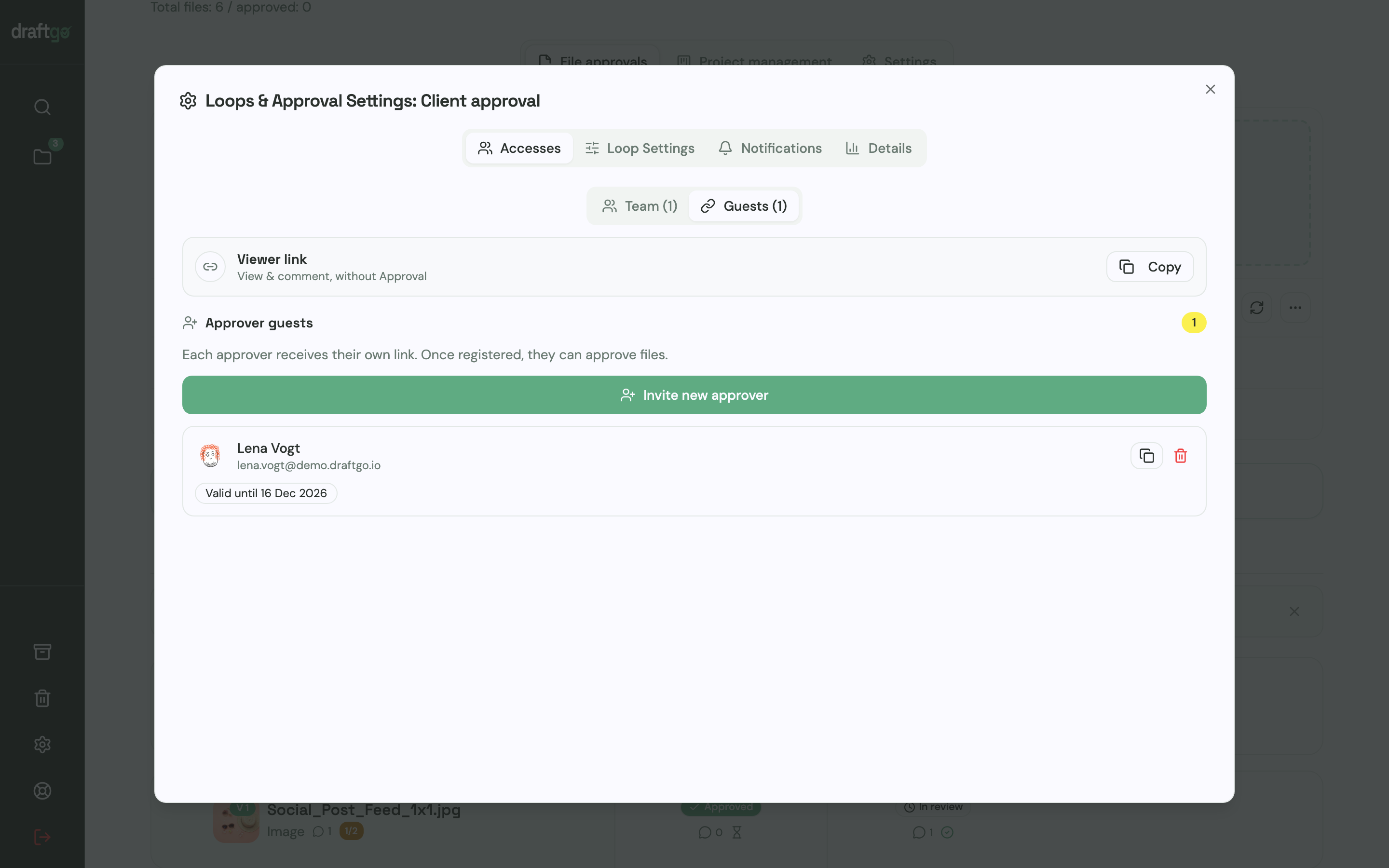
Only the person who decides gets a personal approver link, which asks for a name and email address and lets them approve. Everyone else who should comment uses the shared viewer link of the loop or file: they enter a name and comment, but cannot approve.
Two loops: label check and brand approval
Set up one loop for the label and claims check and a second one for the brand’s approval, such as “Label and claims” and “Brand approval”. For each loop, a rule says whether all approvers, a set number or any one of them must approve, separately for your team and for guests. A project holds one loop on the Free plan, three on Freelancer and any number on Agency and Team, so a two-loop setup starts with Freelancer. Once a file has passed the first loop, you activate it in the second.
From the Freelancer plan, you can also start the AI review on social media posts and images. It looks for errors such as spelling mistakes, cut-off text or very small type, and its findings appear as comments from our AI agent “GO”. Whether a label and a claim meet the rules stays a human check, because draftgo is not a legal tool.
New version, new approval
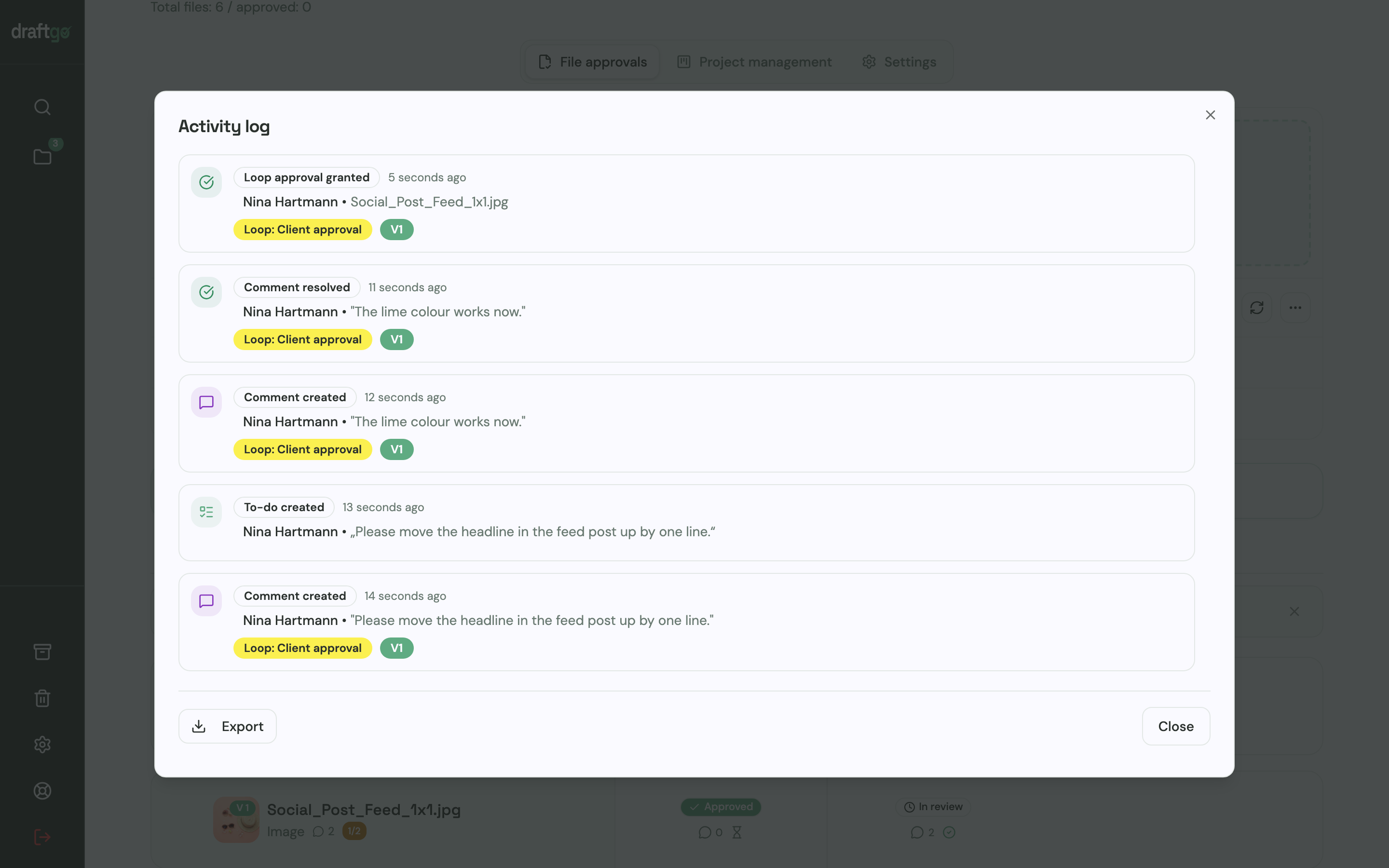
A corrected cut goes up as a new version of the same file, comments stay with their version, and the approvals start again. The activity log records approvals, comments, versions and downloads with person and time, and you can export it as CSV, JSON or PDF.
More on reviews of posts, reels and campaigns is on the page draftgo for social media and content teams.
FAQ
Who is responsible for the ad label on an influencer post?
Both the brand and the creator. In the UK, the ASA holds brands and influencers responsible for making ads obviously identifiable. In the US, the FTC says advertisers need reasonable programmes to train and monitor members of their network.
Is the platform’s paid partnership label enough?
Not on its own. The FTC warns against assuming that a platform’s disclosure tool is good enough and suggests using it in addition to your own clear disclosure. In the UK, the ASA expects a prominent “Ad” label upfront.
Should the brand check the post after it goes live?
Yes. Compare the live post with the approved version, including the label and the caption. In the UK, the CMA asks brands to check content that refers to them and to have a missing label corrected.
Conclusion
Influencer content gets through approval when the brief names the label and the claims, feedback arrives in one round on the file, and one person signs off the exact version. Before your next partnership, write the label for each market, the number of feedback rounds and the name of the final approver into the brief.
Try it free – draftgo is free for 14 days, no credit card needed.
Written by
Emilia
Content Producer
Ready to streamline your approval processes?
Get started with draftgo today and see how easy professional collaboration can be.