
The client has signed off the budget, the launch is five weeks away and the kick-off call ended with plenty of ideas. Ten days later the designer asks which offer the ads should show, and three people have sent comments on the first banner by email, two of which contradict each other. Nothing has gone wrong yet, but the plan never said who decides what, or when.
Creating a marketing campaign means taking those decisions in a fixed order, with the approval of the assets planned from day one.
What is a marketing campaign?
A marketing campaign is a set of coordinated activities with a start date, an end date and one goal, aimed at a defined audience. Ads, social posts, emails and a landing page carry the same message during that period, so each one supports the others. An ad campaign is the version built mainly on paid ads, and you plan it with the same steps.
A single campaign runs inside your wider marketing workflow, which runs from request to report.
Why marketing campaigns stall before launch
Campaigns stall when decisions that belong in the plan are left to production. Here are five such gaps and the fix for each.
| Mistake | What to do instead |
|---|---|
| A goal without a number or a date | One goal with a metric, a target and an end date |
| An audience of “everyone” | One core audience with its problem and its channels |
| A new message for each channel | One core message, adapted to each format |
| Approval left until the end, with comments by email, chat and phone | Approvers and review rounds named in the brief |
| No review after the campaign | A one-page report with results and lessons |
How to create a marketing campaign in 8 steps
Each step builds on the one before, so the goal shapes the audience and the audience shapes the message. As a running example, take a four-person agency that plans a six-week launch campaign for a client’s new refill line of cleaning products, sold in the client’s online shop.
1. Set one measurable goal
Start with one goal that has a metric, a target and an end date. “More awareness” is a direction, while “500 starter kits sold in the online shop by the end of the campaign” is a goal you can check. Add one supporting metric, such as visits to the product page, and note where you will read it. The SMART criteria (specific, measurable, achievable, relevant, time-bound) help you test the wording.
2. Describe the audience
Describe the people you want to reach precisely enough that a copywriter can picture one of them: their situation, the problem your offer solves, what stops them from buying and where they spend time online. One core audience per campaign keeps the message sharp, and a second group gets its own ads.
For the refill line, the core audience is households that already buy eco-friendly products and find the bottles too bulky to store.
3. Write the message and the offer
The core message says in one sentence what changes for the audience, and the offer gives them a reason to act now, such as a starter kit or free delivery. Every asset repeats the message in its own format, and the offer stays the same in every channel.
The agency writes “One bottle for life, refills by post” and builds the offer around a starter kit with the bottle and two refills.
4. Set the budget and choose the channels
Split the budget into media spend, production, working time and a reserve for surprises such as an extra shooting day. Then choose the channels by where the audience already spends time, mixing owned channels like your newsletter, paid ones like social ads and earned ones like press coverage. Two or three channels you can staff properly are easier to steer than six you can only half fill.
The refill campaign runs on Instagram posts and ads, a search campaign, two newsletters and a landing page. Posts, carousels and reels need their own approval step, and our comparison of social media approval tools shows how teams handle it.
Try it yourself: In the demo you work in a real draftgo workspace with sample data.
5. Write the creative brief
The creative brief turns steps 1 to 4 into one document for the people who produce the assets: goal, audience, message, offer, deliverables with formats, deadlines, budget and the names of the approvers. Ask the client to confirm it in writing, so every later comment can be checked against it. Our creative brief template has the sections as a free Word and PDF download.
6. Produce and approve the assets
Production and approval run in rounds rather than as one handover at the end. Plan at least two: an internal review of message, brand and spelling, then the client approval of the corrected version. Keep all comments on the file itself and add each correction as a new version, so every reviewer sees the current draft.
For each round, settle who approves, who only comments and when the round closes. Our guide to brand compliance has a checklist for the internal round, and the content review process covers what reviewers check per channel.
7. Launch with a test
Before launch, check every link, price and tracking parameter on the final versions. Tag each link with utm_source, utm_medium and utm_campaign so Google Analytics can show which campaign sent a visit, as Google’s guide to campaign URLs explains. Then test one variable at a time, for example two headlines for the same ad. For Search campaigns in Google Ads, ad variations on the Experiments page compare modified ads with your original ads.
The agency tests one headline about saving plastic against one about saving cupboard space and moves the budget to the stronger one after the first week.
8. Measure and review the results
Measure the campaign against the goal from step 1, not against whichever numbers look good. Check the metrics weekly and shift budget to what works. After the end, write a one-page report with the result, what worked and what you would change, and file it with the brief so the next campaign starts from there.
A simple campaign plan as a table
A campaign plan puts the eight steps on one page, each with a week, a result and an owner. Here is the plan for the refill campaign; copy the rows and change the weeks to fit your timeline.
| Week | Step | Result | Owner |
|---|---|---|---|
| 1 | Goal, audience, message and offer | Goal with metric and date, audience profile, core message | Account manager with the client |
| 2 | Budget, channels and brief | Brief confirmed by the client in writing | Account manager |
| 3–4 | Production | First drafts of every asset | Designer, copywriter, video editor |
| 4 | Internal review | Comments resolved, corrected versions uploaded | Creative lead |
| 5 | Client approval | Every asset approved in its current version | Client’s marketing manager |
| 6 | Launch and test | Assets live, links tagged, headline test running | Channel manager |
| 6–11 | Run and adjust | Weekly check of the metrics, budget shifted | Account manager |
| 12 | Review | Results and lessons shared with the client | Account manager |
In the four-person agency some people hold two of these roles, and a freelancer working alone holds most of them; the order stays the same.
Practical example: approving the refill campaign assets
Back to the four-person agency. For the launch it produces six Instagram posts, a carousel, a short video, two newsletter layouts as PDFs and a draft of the landing page. In week 4 the designer uploads everything into one project, and the creative lead runs the internal round. One post still shows last season’s bottle, so the corrected post goes up as a new version of the same file.
In week 5 the client’s marketing manager and managing director get their links. The marketing manager comments on the video at the second where the logo appears too late, and the managing director approves the posts without a comment. When the campaign starts in week 6, the agency can show which version of each asset was approved, and by whom.
How it works in draftgo
In draftgo, step 6 runs in one project per campaign, and clients review and approve without creating an account:
- Upload the assets. Add images, PDFs, videos and social media posts, including carousels of up to 20 images with a caption. A landing page draft on a public URL goes in as a screenshot that draftgo captures for you.
- Set up one loop per round. Create the loops “Internal review” and “Client approval” and choose the approvers for each. A rule per loop decides whether all approvers, a set number or any one of them must approve, separately for the team and for guests. A project holds one loop on the Free plan, three on Freelancer and as many as you need on Agency and Team, as the plans and limits show.
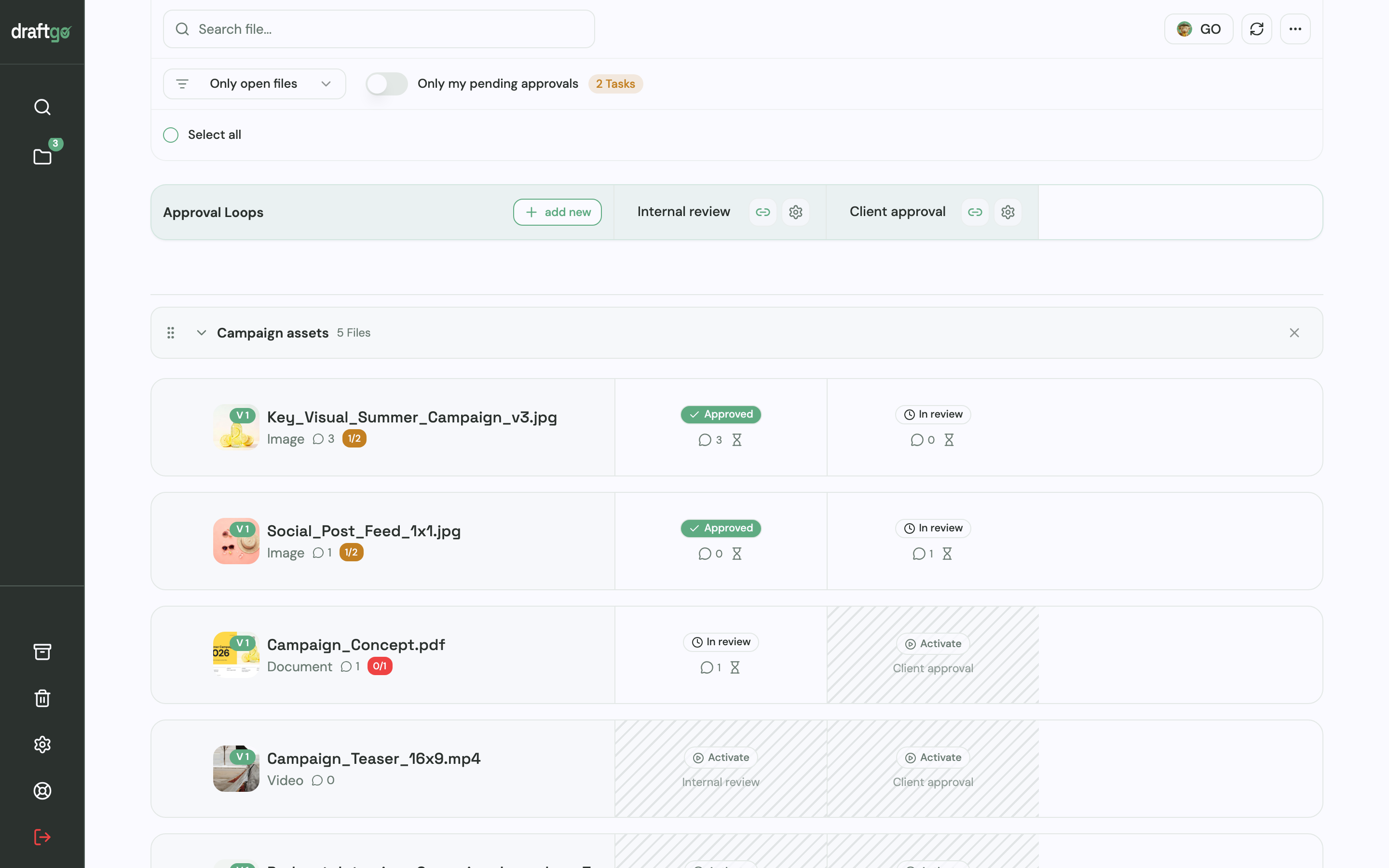
- Share the links. Once the internal round has approved a file, you activate it in “Client approval”. The client’s decision-maker gets a personal approver link, and colleagues who should only comment use the shared viewer link. Comments sit as a pin on the image, as a highlight in the PDF or at the exact second of the video.
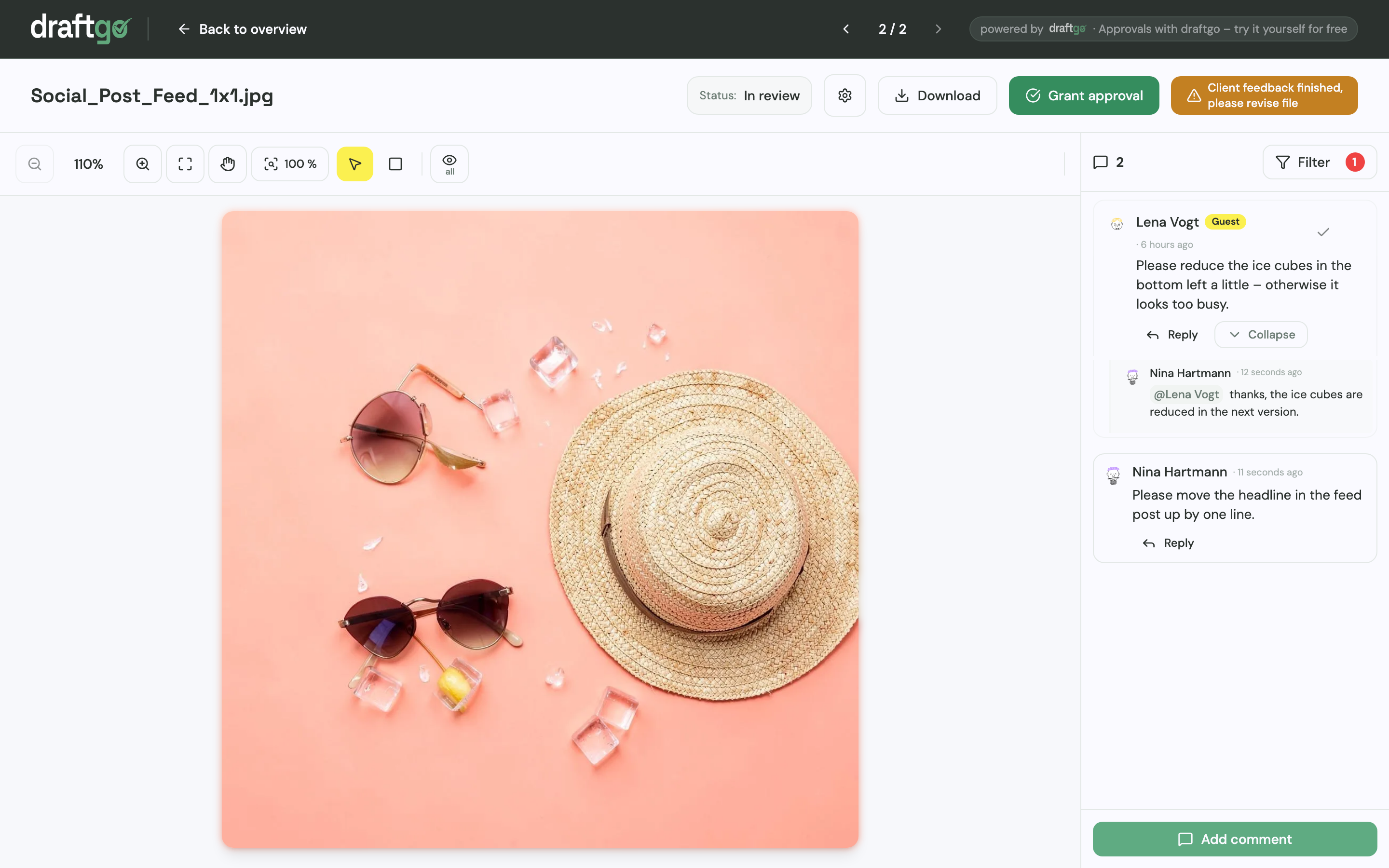
- Upload corrections as new versions. Earlier versions stay available, comments stay with their version and the approvals start again.
- Check files before the client sees them. You can start the AI review, in which our AI agent “GO” checks PDFs, images and social media posts for errors such as spelling mistakes or cut-off text and leaves its findings as comments. Freelancer, Agency and Team include a monthly allowance of pages for it.
- Keep the record. The activity log lists every approval, comment and version with person and time, and you can export it as CSV, JSON or PDF for your report.
Loloson Media in Portugal produces image and video content, mainly e-commerce assets for an international hair care manufacturer. Its founder and managing director, Peter Schönherr, says: “With draftgo, our approval rounds are around 50% faster. Instead of endless PowerPoints, my client sees every new version straight away and approves it directly.” The page on draftgo for agencies shows the client side in more detail.
FAQ
How long does it take to create a marketing campaign?
It depends on the number of assets and on how quickly approvals come back. A small campaign with social posts, ads and a landing page can be planned and produced in a few weeks, while a video shoot or a printed mailing adds lead time. Put the review rounds into the timeline from the start.
How do you plan an ad campaign?
You plan an ad campaign with the same steps as any marketing campaign, with more weight on budget and testing. Set a goal with a metric, define the audience you will target, write the ads around one offer and set a budget per platform. Launch with two versions of the ad and move the budget to the one that performs better.
Who should approve campaign assets?
The final approval comes from the person who answers for the brand and the budget, on the client’s side for example the marketing manager. Specialists such as legal review only their part, in an earlier round. Name every approver in the brief so nobody turns up with new requests the day before launch.
Conclusion
Create your next marketing campaign in the order of its decisions: goal, audience, message and offer, budget and channels, then the brief. Name the approvers and plan the review rounds before production starts, and use the campaign plan table as your timeline.
Try it free – draftgo is free for 14 days, no credit card needed.
Written by
Emilia
Content Producer
Ready to streamline your approval processes?
Get started with draftgo today and see how easy professional collaboration can be.