
The kick-off call went well, the client agreed with your notes, and a week later you send the first concepts. The reply comes from someone who wasn't on the call. The managing director wants a different headline and has added Instagram Stories to the formats. Even “fresh and modern” turns out to mean something else. Nothing in your notes was wrong. The answers were simply never written down in a form both sides confirmed.
A creative brief template closes that gap. It asks the same questions on every project and gets the client to answer them before anyone designs. Later, when feedback drifts, it is the document you both point to.
What is a creative brief?
A creative brief is a short document, usually one or two pages, that tells the creative team what to make, for whom, why, by when and who approves it. It turns a client's wishes into a task a designer, copywriter or video editor can work from, and it sets the criteria the finished work is judged against.
The term overlaps with several others. In practice you will meet these kinds of brief:
| Type of brief | Who writes it | What it covers |
|---|---|---|
| Client brief | The client | Business problem, background, budget, deadline |
| Creative brief | Agency or freelancer, with the client | Objective, audience, one key message, deliverables, approval |
| Design brief | Designer or art director | Visual direction, formats, technical specifications |
| Advertising brief | Agency or in-house team | Campaign message, media, channels, call to action |
| Video brief | Producer or video editor | Story, length, formats, music, voice-over |
Creative brief vs client brief
The client brief is what you receive. It describes the client's situation in their words: a product launch, a new location, a website that no longer brings in enquiries. The creative brief is what you write from it. You sharpen the client's material into one objective and one message, add the deliverables and the timeline, and name the person who signs off.
Large agencies keep the two apart: account management takes the client brief, strategy writes the creative brief, and the creative team works from it. A small agency or a freelancer rarely has those roles, so the most practical approach is one shared document that the client starts and you finish together. The template in this article is built that way.
Why use a creative brief template?
A template makes sure every project starts with the same questions answered. Without one, the brief depends on who runs the kick-off and how much time there was, and the gaps show up later as extra revision rounds.
The problem is widespread. In research published in 2022 by BetterBriefs in partnership with the Institute of Practitioners in Advertising (IPA), based on 508 UK marketers and agency staff, 73% of UK agencies said the briefs they receive from clients aren't good enough, and only 38% of UK creative agencies were clear on the target group in those briefs (IPA, 2022).
Typical problems a template prevents:
- Vague answers: “modern” means something different to everyone in the room.
- Missing information: formats, mandatory elements or the approver come up for the first time in feedback.
- Every project starts differently: one kick-off covers the budget, the next forgets it.
- No yardstick for feedback: when nothing was agreed in writing, every comment carries the same weight.
The workflow changes as well. The client collects the answers in their own time, and every answer later becomes a checkpoint for drafts and approval. For agencies, the brief belongs to client onboarding, where access, contacts and review rules are settled too.
What is in a creative brief: the nine sections
A complete creative brief covers nine areas: project and background, objective, audience, key message, tone and references, deliverables, timeline, feedback and approval, and budget. Each section below lists what to ask and how a usable answer differs from a vague one.
1. Project and background
- Project name, client and contact person
- What the company offers and how it differs from competitors
- The main competitors
- Why the project is happening now
This tells the team whether it is sharpening an existing brand or preparing a new direction. “We're relaunching because our biggest competitor redesigned last spring” gives more useful context than a company history.
2. Objective
- What should the project achieve, ideally in measurable terms?
- How will you measure success?
“The landing page should be better” can't be checked. “More bookings for the new workshop format” can, once the page is live.
3. Target audience
- Role, daily routine, prior knowledge and typical objections
- The channels the audience uses
- What the audience should think, feel or do afterwards
“SMEs” is too broad to design for. “Marketing managers at mid-sized firms who have little time and want to see quickly whether the offer fits” gives a designer a person to picture.
4. Key message and mandatory elements
- The key message in one sentence
- Reasons to believe: facts that make the message credible
- Mandatory elements such as logo, claim, required text and call to action
If the client needs three sentences for the key message, the project probably has more than one objective. Settle that before the first draft.
5. Tone, style and references
- How the result should feel, in three adjectives
- Two or three references and what exactly the client likes about them
- No-gos: imagery, colours or wording that doesn't fit
- Existing brand guidelines for colours, fonts and logo use
References make taste discussable. “Make it look premium” says little; “the white space on this page and the calm product photos on that one” gives the designer something to work with.
6. Deliverables and specifications
- Every deliverable on its own line, with channel, size or aspect ratio and file format
- Technical requirements such as colour mode, resolution, bleed and exports
A design can be approved visually and still fail because a format or a variant is missing. List the small items as well, such as the 9:16 version of a social ad or the black-and-white logo for a sponsor board.
7. Timeline
- Milestones from the client's material to final approval and delivery
- A date and a responsible person for each milestone
- Fixed dates you can't move, such as a trade fair or a print deadline
Put the approval of the brief itself into the timeline as a milestone, due before work on the first draft starts.
8. Feedback and approval
- Who gives final approval?
- Who else gives feedback, and in what order?
- How many revision rounds are included in the quote?
- Where is feedback collected?
This section decides whose comments count and in which order. If the managing director has the final word but only sees the work at the end, every earlier round can be overturned in one meeting.
9. Budget
- Budget range
- What is included and what is billed separately
Even a rough range helps. It tells the team whether a photo shoot is realistic or whether the job has to be built from existing images.
Try it yourself: In the demo you work in a real draftgo workspace with sample data.
The creative brief template to copy and download
The template follows the nine sections above, with fields to fill in, a table for deliverables, a timeline with milestones and a short checklist before sign-off. You can copy the structure from the table below or download the file as Word or PDF, free and without an email address.
Who fills in which section
The client answers most of the questions, because only they know the business, the audience and who decides. You add the parts that need craft knowledge, such as formats and the timeline, and you check that every answer is specific enough to design from.
| Section | Filled in by | Checked by | When |
|---|---|---|---|
| Project and background | Client | Agency or freelancer | before the call |
| Objective and audience | Client | Agency or freelancer | before the call |
| Key message and mandatory elements | Client | Strategy or copywriter | before the call |
| Tone, style and references | Client with the agency | Design | in the call |
| Deliverables and specifications | Agency or freelancer | Client | in the call |
| Timeline | Agency or freelancer | Client | in the call |
| Feedback and approval | Client | Agency or freelancer | in the call |
| Budget | Client | Agency or freelancer | before the quote |
| The finished brief | Agency or freelancer | Approved by the client's approver | after the call |
A brief that the person with the final word has never seen is only half agreed, which is why the last row ends with the client's approver.
The template at a glance
| Section | Questions to answer |
|---|---|
| 1. Project and background | Project name, client and contact, offer and market position, main competitors |
| 2. Objective | What should the project achieve? How will we measure success? |
| 3. Target audience | Who are we talking to? Which channels do they use? What should they think, feel or do afterwards? |
| 4. Key message | Key message in one sentence, reasons to believe, mandatory elements |
| 5. Tone, style and references | Three adjectives, references and what you like about them, no-gos, existing guidelines |
| 6. Deliverables | Each deliverable with channel, size or aspect ratio and file format; technical requirements |
| 7. Timeline | Milestones with date and responsible person, including approval of the brief |
| 8. Feedback and approval | Final approver, other reviewers and their order, included revision rounds, where feedback is collected |
| 9. Budget | Budget range, what is included and what is billed separately |
| Sign-off | Open points settled, brief sent back, approved in writing |
Creative brief template for design and creative projects
Free template to download
Adapt the template to your own work: add fields for story, music and voice-over on video projects, or for pages and screen sizes on a website.
How to write a creative brief in 7 steps
Writing a brief is mostly asking and sharpening: the client supplies the raw material, and you turn it into something a creative team can work from. These seven steps work for a one-day social media job as well as for a three-month campaign; only the depth changes.
1. Send the template before the kick-off
Send the template a few days before the call and ask the client to fill in what they can. Tell them that “not sure yet” is a valid answer. A gap you know about is easier to handle than a guess.
2. Read the answers and mark the gaps
Go through every section and mark anything vague, contradictory or missing. Typical candidates are the objective (“more visibility”), the audience (“everyone”) and the approver (left blank). If you use an AI chat to sort the answers or suggest follow-up questions, check each suggestion yourself: a model fills gaps with plausible guesses, and those guesses then look like client decisions.
3. Use the briefing call for the gaps
Spend the call on the marked points rather than reading the form aloud. Ask follow-up questions until each answer is concrete, for example: “If we can only reach one of these three goals, which one matters most?”
4. Write one key message
Condense everything the client wants to say into one sentence the audience should remember. Supporting points go into the reasons to believe. If you can't get down to one sentence, go back to the objective.
5. Turn wishes into criteria
Rewrite every adjective as something you can check in a draft. “Modern” becomes “sans-serif type, plenty of white space, no stock photos of handshakes”. These criteria are what you compare feedback against later.
6. Size the brief to the project
A single social post needs half a page: objective, message, format, date and approver. A campaign needs every section in full. On small jobs, leave sections out instead of padding them.
7. Send the brief back and get it approved
Send the finished brief to the client as a re-brief and ask the approver to confirm it in writing. Only then does it become the shared reference for the project. The section on approval below shows how.
Creative brief examples for a small agency and a freelancer
The two examples below show filled-in briefs in short form. They are typical scenarios rather than real clients, and they show the level of detail that makes a brief usable.
Example 1: small agency, spring campaign for a garden centre
A five-person agency prepares a spring campaign for a regional garden centre with three locations.
| Section | Answer |
|---|---|
| Project | Spring campaign “Ready for the garden”; contact: the marketing manager |
| Objective | More visits on the first two weekends in April, measured by the coupon codes redeemed at the tills |
| Audience | Homeowners within a 30-minute drive who plan garden projects in March and compare offers online |
| Key message | Everything for your spring garden in one place, with advice from trained gardeners |
| Reasons to believe | Three locations, in-store advice every Saturday, plants from the centre's own nursery |
| Mandatory elements | Logo, addresses of all three locations, coupon code, opening hours |
| Tone | Warm, practical and local; no glossy lifestyle images |
| Deliverables | A1 poster, half-page newspaper ad, Instagram feed post 4:5 and Story 9:16, Facebook ad 1:1 |
| Timeline | Brief approved 3 February, first drafts 14 February, final approval 7 March, print files 10 March |
| Feedback and approval | The marketing manager collects all comments; the managing director gives final approval |
| Budget | Fixed fee as quoted, two revision rounds included |
Two lines in this brief prevent the usual surprises. The managing director is named as the approver, so the agency plans a short review with him after the first drafts instead of meeting his opinion for the first time at the end. The coupon code is a mandatory element, so nobody finds out in the last round that it doesn't fit on the Story format. How the review of posts and Stories works in practice is explained in our guide to choosing a social media approval tool.
Example 2: freelancer, explainer video for a software product
A freelance motion designer produces an explainer video for the product page of a software company.
| Section | Answer |
|---|---|
| Project | 60-second explainer video for the new reporting feature; contact: the product marketing manager |
| Objective | Visitors understand the feature without reading the page; measured by demo requests from the product page |
| Audience | Finance teams in mid-sized companies who build their monthly reports in spreadsheets today |
| Key message | Monthly reports without copying figures between spreadsheets |
| Reasons to believe | A screen recording of the feature, two short customer statements supplied by the client |
| Mandatory elements | Product name, logo animation at the end, call to action “Book a demo” |
| Tone | Calm, precise and friendly; flat illustrations in the brand colours, no stock footage |
| Deliverables | 16:9 master with subtitles, 1:1 cut for LinkedIn, MP4 files and a subtitle file |
| Timeline | Brief approved in week 1, script and storyboard in week 2, animatic in week 3, final video in week 5 |
| Feedback and approval | The product manager checks the facts; the head of marketing approves the script, the animatic and the final cut |
| Budget | Fixed price for the 16:9 master; the 1:1 cut is billed separately |
The decisive line is the approval at three stages. Once the head of marketing has signed off the script, a later wish for a different storyline counts as a change to the approved brief, and the freelancer can quote it as extra work. For animatics and cuts, comments tied to a point in the video make the review precise; our guide to video feedback tools explains how that works with clients.
Common mistakes in creative briefs
Briefs tend to fail in the same few places, and you can spot them before the kick-off. The table lists the usual mistakes, what they cause later and a better practice for each.
| Mistake | What happens | Better practice |
|---|---|---|
| Adjectives without references | Everyone pictures something different | Two or three references with what exactly to take from each |
| No named approver | The final decision-maker overturns earlier rounds | One person with the final word, named in the feedback section |
| Many reviewers in no particular order | Contradicting comments in the same round | Agree who reviews when: internal first, then the client |
| Incomplete list of deliverables | New formats appear during feedback | Every deliverable on its own line, with size and file format |
| Several objectives at once | The draft serves several goals and none of them clearly | One main objective, the others marked as secondary |
| A brief nobody confirmed | Each side remembers the call differently | A re-brief sent back and approved in writing |
| A brief forgotten after the kick-off | Feedback is judged by personal taste | Every review round checks the draft against the brief |
| Ten pages for a small job | Nobody reads it to the end | A brief sized to the project |
Getting the creative brief approved and using it for feedback
A brief only works as a yardstick once the client has approved it. Until then it is your summary of a conversation, and any later comment can contradict it without anyone noticing.
In practice, the brief is often missing when the work is judged. The BetterIdeas Project, published in 2025 by BetterBriefs in partnership with the IPA and the World Federation of Advertisers (WFA), asked 1,034 agency, marketer and in-house respondents in 54 countries. Only 23% of agencies and 15% of marketers agreed that their organisations always use briefs when evaluating ideas, and it typically takes five rounds of creative development to get to a signed-off idea (IPA, 2025).
How to get the brief approved
- Send the finished brief as a PDF to the person named as approver in the feedback section, not only to your day-to-day contact.
- Ask for an explicit approval. A comment directly on the document and a recorded approval are easier to find later than a “looks good” somewhere in an email thread.
- Treat any change after approval as a new version of the brief, with the date and what changed.
How to use the brief in every review round
Before you send a draft, check it against the brief yourself: objective, audience, key message, mandatory elements and formats. When feedback arrives, sort each comment into one of three groups:
- The draft misses the brief: you fix it in the next version.
- The comment fits the brief but is a matter of taste: you discuss it and decide together.
- The comment contradicts the approved brief: it is a change of brief, and you agree on time and budget before you work on it.
This sorting keeps revision rounds from multiplying, and it gives you a factual way to talk about scope without arguing about taste. Sorting is much easier with online proofing, where comments sit on the draft at the spot they refer to, instead of being spread across emails, chat messages and phone notes. For web projects, our comparison of website feedback tools explains how clients can comment on a page layout.
How it works in draftgo
In draftgo the approved brief and the drafts live in the same project, so whoever sorts the comments can look up the brief without searching an inbox. Your client reviews through a link and doesn't need an account.
- Create a project and upload the brief. Upload the brief as a PDF or Word file; Word files are converted to PDF on upload. Add the drafts to the same project as they come in.
- Get the brief approved. Put the brief into a loop such as “Brief approval” and invite the client's approver with a personal approver link. The approver opens the brief in the browser, comments directly on the page and approves it.
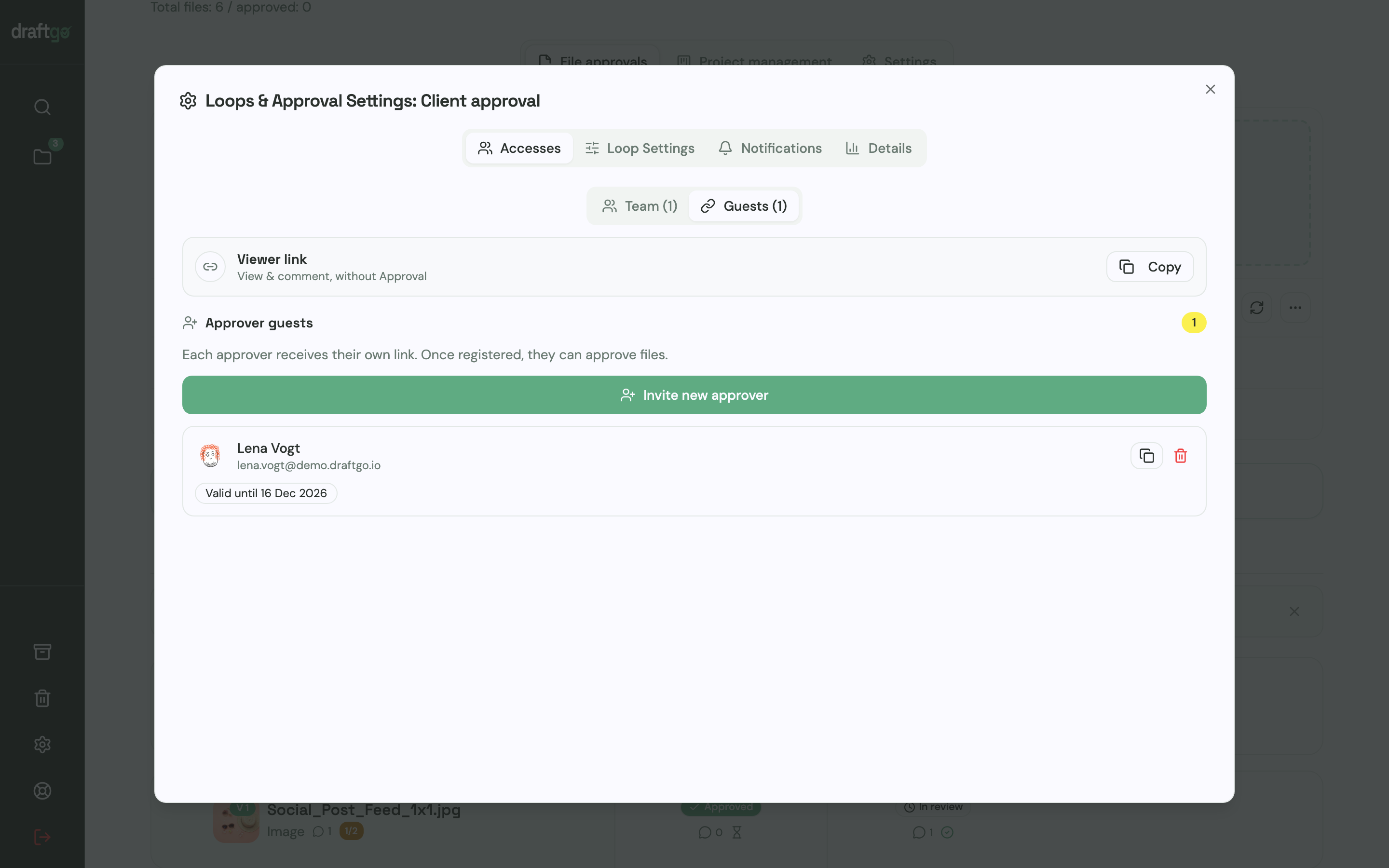
- Set up loops for the drafts. Create one loop for the internal review and one for the client, with exactly the approvers from the feedback section of the brief. For each loop, a rule sets whether everyone, a certain number of people or one person has to approve, separately for the team and for guests.
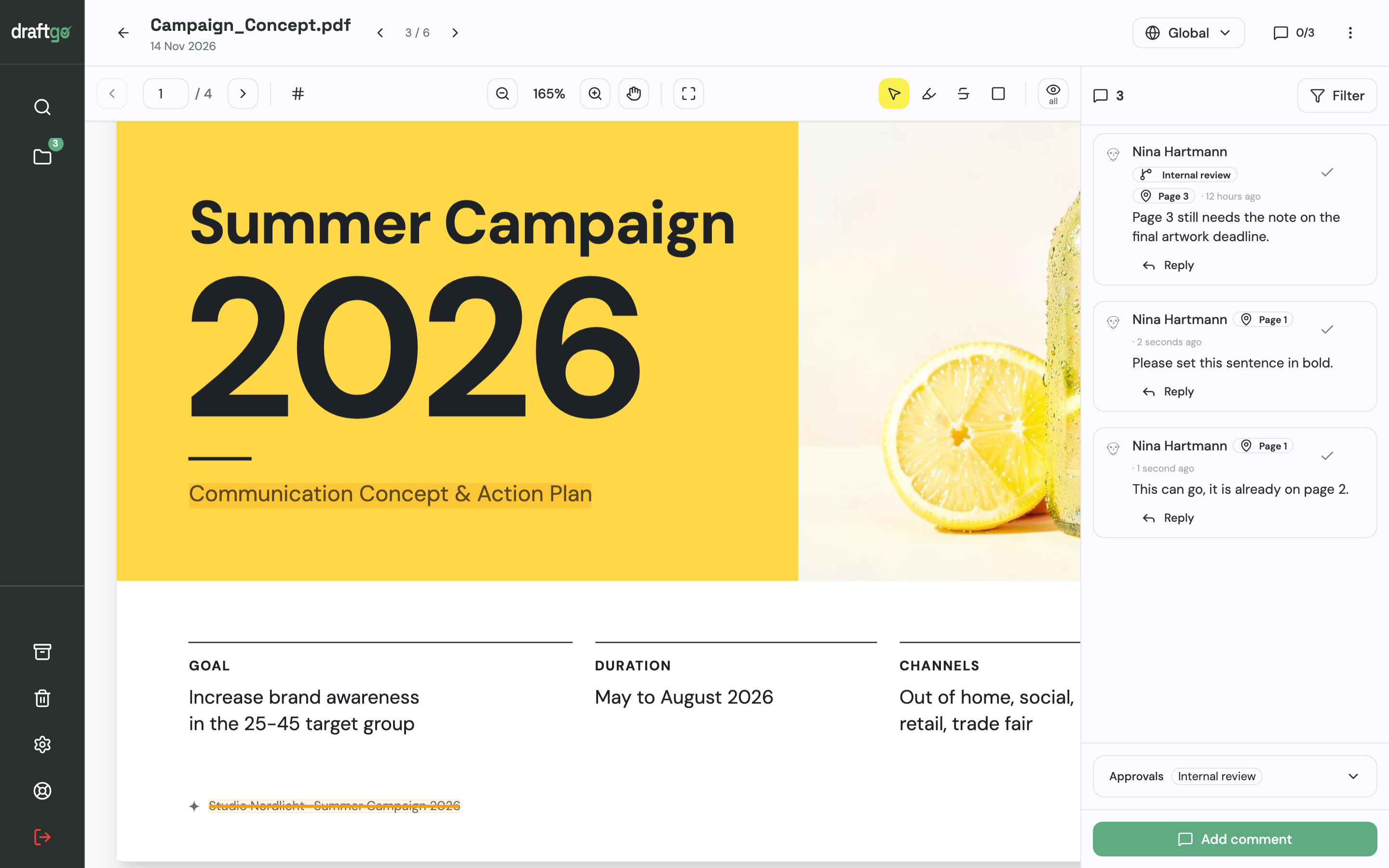
- Collect feedback on the draft. Reviewers mark the spot they mean: a pin or a rectangle on an image, a highlight or strikethrough in a PDF, a comment at a point in time in video and audio. You reply in the thread and mark a comment as resolved once it's done.
- Upload corrections as new versions. Each revision goes to the same file as a new version. Earlier versions stay available, comments stay with their version, and the new version starts the approvals again.
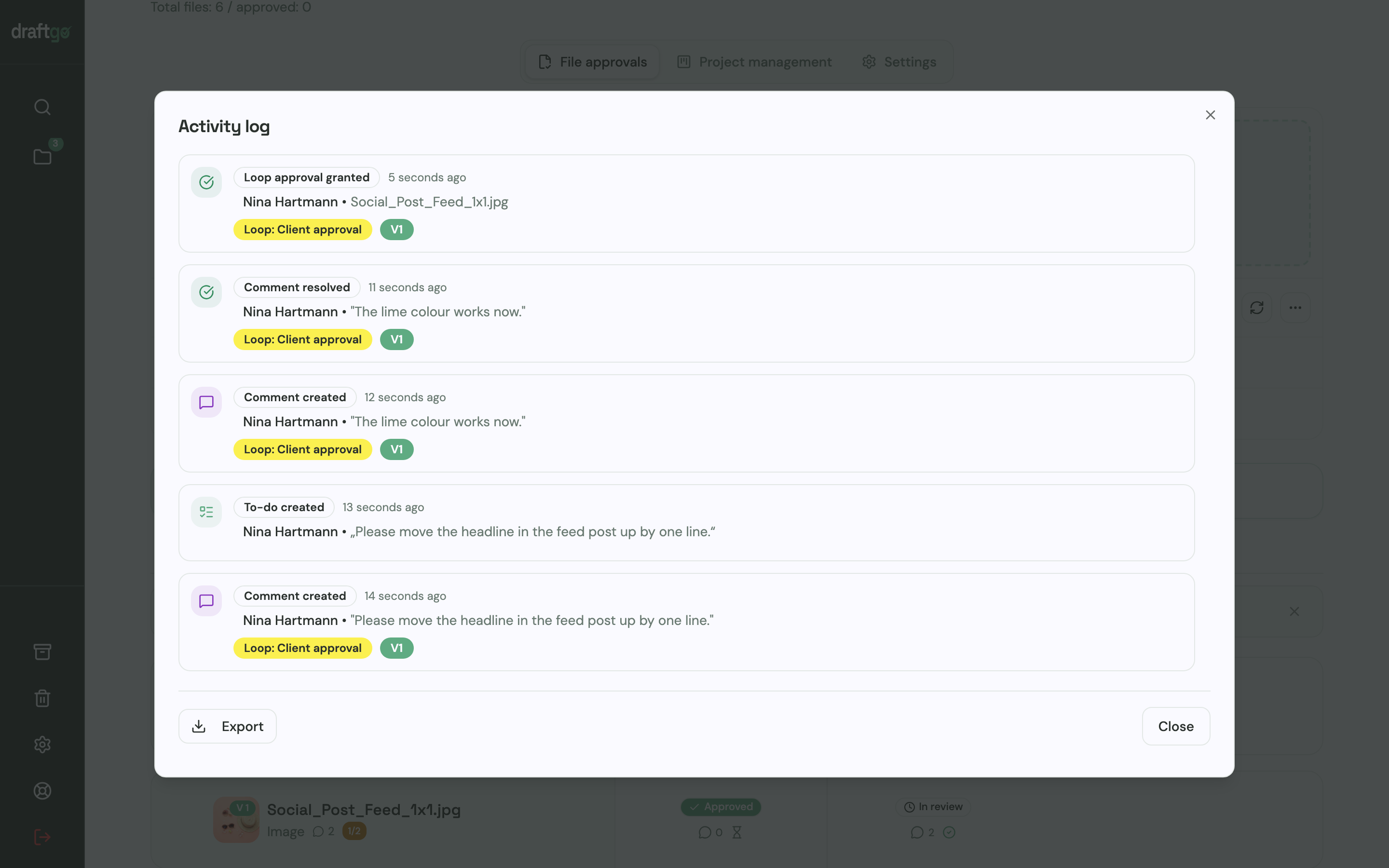
- Keep the record. The activity log records approvals, comments, versions and downloads with person and time, and you can export it as CSV, JSON or PDF. If the client asks months later who approved the final layout, the answer is in one export.
Before a draft goes to the client, the AI review can check PDFs, images and social media posts for errors such as spelling mistakes, cut-off text or very small type. Its findings appear as comments from our AI agent “GO”, and you decide what to change. How many pages GO checks each month depends on your plan, as listed on the plans and pricing page.
The page draftgo for agencies shows how agency teams organise the whole process. If you work on your own, draftgo for freelancers explains how approvals run with clients who don't want yet another account.
FAQ
What is the difference between a creative brief and a client brief?
The client brief is what the client sends: their situation, goals, budget and deadline in their own words. The creative brief is what the agency or freelancer writes from it, with one objective, one key message, the deliverables and the approver. In small teams both often live in one shared document.
How long should a creative brief be?
One to two pages are enough for most projects. A single social post needs half a page, while a campaign needs every section of the template. If a brief grows much longer, it usually contains several projects or objectives that should be separated.
Who should write the creative brief?
The client provides most of the answers, because they know the business, the audience and who decides. The agency or freelancer adds deliverables and the timeline, sharpens the key message and makes every answer concrete. The client's approver then confirms the finished brief.
Is the creative brief template free?
Yes. You can download it as a Word file or PDF without signing up or entering an email address, and adapt it to your own projects.
Can I use the template for video or social media projects?
Yes. The nine sections apply to any creative project. For video, add fields for story, length, music and voice-over; for social media, list every format and aspect ratio as a separate deliverable.
What should I do if the client wants to change the brief mid-project?
Update the brief as a new version with the date and the change, and have the approver confirm it. Then agree whether the change affects the timeline or the budget before you continue. Drafts approved under the old brief are only reopened if both sides agree.
Conclusion
Download the creative brief template, send it to your client before the kick-off and use the call only for the gaps. Then have the client's approver confirm the finished brief, and check every draft and every comment against it. That makes the brief the reference for the whole project instead of a kick-off formality.
Try it free – draftgo is free for 14 days, no credit card needed.
Creative brief template for design and creative projects
Free template to download
Written by
Emilia
Content Producer
Ready to streamline your approval processes?
Get started with draftgo today and see how easy professional collaboration can be.