
The carousel exists in four places. The designer posted it in the agency's Slack, the account manager forwarded it to the client by email, the client's marketing lead answered with a voice note about slide four, and their managing director wrote "looks good" in a WhatsApp group. On Thursday someone schedules version three, although the client had approved version two, and nobody can say who approved the caption.
A social media approval tool replaces that chain with one place. Every post, carousel and reel appears the way followers will see it, each comment sits on the slide or the moment it refers to, and every approval is recorded with a name and a time. Before you compare tools, decide whether the tool should also schedule and publish your posts, because that question splits the market in two.
What does a social media approval tool do?
A social media approval tool collects feedback on social content before it goes live and records who approved which version. Your team and your clients look at the same post, so a comment such as "swap the second image" points at an actual image instead of a description in an email.
Most tools in this category cover the same jobs:
- Preview: the post appears with its images or video, the caption and the hashtags, close to how it will look in the feed.
- Feedback on the spot: reviewers comment on a single slide of a carousel, on an area of an image or at a moment in a video.
- Approval status: each post shows whether it is waiting, approved or back with the creator.
- Approval order: an internal check happens before the client sees anything, and a named person at the client signs off last.
- Versions: a corrected post replaces the old one without losing what was said about it.
- History: comments and approvals stay on record, which helps when a client asks months later who signed off a claim.
- Client access: clients review in the browser, ideally without creating yet another account.
Whether a vendor calls it social media approval software or a social media content approval tool, it differs from a shared folder or a chat group in one way: it ties the exact version of the post to the feedback on it and to the decision about it.
Scheduler with approvals or dedicated approval tool?
Social media approval tools come in two kinds: planning and publishing tools with an approval step, and dedicated approval tools that only handle review and sign-off. Which kind you choose decides how much of your current setup changes.
Hootsuite, Planable, Kontentino, PostFlow and Cloud Campaign are planners. You write and schedule posts in them, and the approval is a status a post passes through before it is published. Gain publishes too, but builds its product around the approval workflow. A dedicated approval tool such as draftgo keeps the review separate: you upload the post, collect feedback and approvals, and publish with the scheduler you already use.
| Question | Scheduler with approvals | Dedicated approval tool |
|---|---|---|
| Where is the post created? | In the tool, connected to the social accounts | In your design tool, then uploaded |
| What happens after approval? | The tool schedules and publishes | You publish in your existing planner |
| Who needs access to the social accounts? | Everyone who works in the tool | Nobody involved in the review |
| What else can be reviewed? | Mostly social posts | Often videos, PDFs, images and websites as well |
| When does it suit you? | You want planning and approval in one place | You keep your planner, or social posts are one of several formats you approve |
If your team is happy with its scheduler, a separate approval tool spares you a migration. If you are choosing a scheduler anyway, put its approval features on your list of criteria.
Criteria for choosing a social media approval tool
The first two criteria decide whether your clients actually use the tool; the others decide how much work each approval round costs your team.
1. Client access without an account
Clients approve faster when they open a link and see the post. A tool that asks every client to register, remember a password and learn a dashboard adds friction to every round. Check two things: whether clients can comment through a link, and whether they can also give the formal approval there. In some tools the comment works without an account, but the approval does not.
2. The formats you actually post
Single images are easy. Look at how the tool shows a carousel (all slides in order, with comments per slide), a reel or short video (comments at a moment in the video) and the caption with its hashtags, links and tagged accounts. A reviewer who only sees a thumbnail cannot approve slide seven.
3. Approval rules and stages
A small account may need one approver. Agencies usually need two stages: an internal check by the account lead, then the client. On the client side, check whether you can require that everyone approves, that a set number of people is enough or that one named person has the last word.
4. Versions
Corrections create new versions. A good tool keeps them together, shows which version was approved and starts the approval again when the post changes, so nobody publishes a version the client never saw.
5. A record of who approved what
For brands with strict internal guidelines, for claims and prices that must be right, or simply for agency billing, an activity history with an export saves arguments later. Check whether comments, versions and approvals are logged with the person and the time.
6. Where publishing happens
If the approval tool also publishes, approved posts can go live without another handover. If it doesn't, the handover to your planner is one step in your process. Both work; decide which one you want before you compare feature lists.
7. Data protection
Client content often contains unreleased products, campaign dates or personal data. Ask where stored data is kept and whether you get a data processing agreement, and read the provider's privacy policy before your first client project.
Social media approval tools compared (as of November 2026)
The seven tools below cover both kinds: five planners with approvals, one approval-first platform that also publishes, and one dedicated approval tool.
How we compared the tools
We checked each vendor's own product and help pages in November 2026 against the seven criteria above, with the most weight on client access, approval rules and where publishing happens. The list is alphabetical, not a ranking. Prices change often and depend on team size, so this comparison names none; each entry links the vendor's pricing page. draftgo is our product.
| Tool | Type | Suited for | Client approves without an account | Schedules and publishes |
|---|---|---|---|---|
| Cloud Campaign | Planner with approvals | Agencies managing many client brands | Yes, via a tokenised link | Yes |
| draftgo | Dedicated approval tool | Agencies that keep their scheduler | Yes, via a personal approver link | No |
| Gain | Approval-first platform with publishing | Agencies with multi-step client approvals | Yes, via a secure email link | Yes, after the last approval |
| Hootsuite | Social media management platform | Larger teams with internal approval chains | Not described on the feature page | Yes |
| Kontentino | Planner with approvals | Agencies and brands planning in one calendar | Client approval through client roles; posts can be shared by link | Yes |
| Planable | Planner with approvals | Teams that want adjustable approval levels | Comment via share link yes, formal approval needs an account | Yes |
| PostFlow | Planner with approvals | Small teams that schedule and approve in one place | Clients are invited into PostFlow | Yes |
Try it yourself: In the demo you work in a real draftgo workspace with sample data.
1. Cloud Campaign: suited for agencies managing many client brands
Cloud Campaign is a social media management platform for agencies. According to its own page on client approvals, approvals without a login are included in every plan: clients open a secure tokenised link and approve without signing in. On the Team and Agency plans, the approval links and dashboards carry your branding.
- Pro: no-login client approval in every plan; white-labelled links on the higher plans.
- Contra: approval is part of a full publishing platform, so you would move your scheduling there as well.
- Pricing: Cloud Campaign plans
2. draftgo: suited for agencies that keep their scheduler
draftgo is an online proofing platform for agencies, freelancers and in-house teams. A social media post is uploaded as a carousel with its caption, a reel as a video, and team and guests comment directly on them. Clients approve through a personal approver link without an account, and the approval rules are set per loop, separately for your team and for guests.
- Pro: posts, reels, PDFs, images and website screenshots in one review; approval rules per loop.
- Contra: draftgo does not schedule or publish posts, so the approved post goes to your planner.
- Pricing: draftgo pricing, with a free plan and a 14-day trial of the paid plans.
3. Gain: suited for agencies with multi-step client approvals
Gain describes itself as content approval software for marketing teams and agencies. On its website, approval workflows are set per brand, client or campaign, with several rounds and reviewers in a fixed order. Clients receive an email with a secure link and approve without a password or account, reviewers get automatic reminders, and approved posts can be scheduled and published once the last approval is in.
- Pro: the workflow is built around approval, with reminders and publishing only after the final sign-off.
- Contra: the product is designed around its own publishing, so a team that schedules elsewhere uses only part of it.
- Pricing: Gain pricing
4. Hootsuite: suited for larger teams with internal approval chains
In Hootsuite, posts are created, approved and scheduled in one platform. Its social media approval tool lets admins decide who creates and who approves; Super Admins can set up to three layers of approvers in a fixed order, and approvers can view, edit, approve or reject a post. The feature page lists approvals for the Advanced plan with multiple users, Business and Enterprise. Since a product update in March 2026, users with the right permission can document an approval given outside Hootsuite in the approval history.
- Pro: approval layers in a fixed order; an approval history that includes approvals given outside the tool.
- Contra: approvals come only with the higher plans, and the feature page describes approval by team members rather than by clients through a link.
- Pricing: Hootsuite plans
5. Kontentino: suited for agencies and brands that plan in one calendar
Kontentino is a social media management tool for agencies and brands that schedules and publishes from one calendar. In its help centre, a post is sent either for internal approval to admins and managers or for client approval to client roles; the client then approves or asks for rework with feedback. Posts can also be shared by link with people outside Kontentino, and internal and client feedback run in separate threads.
- Pro: a clear split between internal and client approval, with separate comment threads.
- Contra: the help article mentions no automatic approval reminders; if a client misses a request, you send it again by hand.
- Pricing: Kontentino pricing
6. Planable: suited for teams that want adjustable approval levels
Planable plans, schedules and publishes social content and offers four approval settings. According to its guide to content approvals, None and Optional are available on every plan, Required from the Pro plan and Multi-level on Enterprise. Clients can view and comment through a public share link without an account; for the formal approval they need a Planable account with approval permissions. We compare the two tools in detail on draftgo vs Planable.
- Pro: the approval setting ranges from none to multi-level; comments through a share link without an account.
- Contra: formal client approval needs an account, and multi-level approval is limited to Enterprise.
- Pricing: Planable pricing
7. PostFlow: suited for small teams that schedule and approve in one place
PostFlow schedules and publishes posts to networks such as Instagram, LinkedIn, TikTok and YouTube. Its content approval tool shows posts in a live preview and offers three workflows. In loose approval anyone with permission approves, strict approval adds several approvers and lets you require all of them or one, and in the client process the client is notified last, after the internal approval. Clients are invited into PostFlow to preview, comment and approve.
- Pro: approval modes from loose to strict, with the client step after the internal one.
- Contra: clients work inside PostFlow; the page does not describe approval through a link without an account.
- Pricing: PostFlow pricing
Which tool fits your team?
- You want planning, approval and publishing in one tool: Hootsuite, Kontentino, Planable or PostFlow. Check how each one gives clients access before you migrate.
- Clients must approve without logging in, and you want publishing included: Cloud Campaign or Gain.
- You keep your current scheduler, or you approve videos, PDFs and print files alongside social posts: a dedicated approval tool such as draftgo.
How a social media approval workflow works in 6 steps
A social media approval workflow fixes who checks a post, in which order and on which version, from the first draft to the scheduled post. These six steps work in any of the tools above.
1. Agree on roles and order
Write down who creates, who checks internally, who approves for the client and who publishes. Name one final approver at the client. Several approvers work too, as long as the tool can require all of them or a set number. Settle this when you start with a new client, as part of your client onboarding for agencies, together with the time a client has to reply.
2. Prepare the post as it will appear
Upload the final images or the video together with the caption, hashtags, links and tagged accounts. Reviewers can only approve what they see; a caption sent separately by email is not part of the approval.
3. Review internally first
The account lead or a second designer checks spelling, brand guidelines, image crops and links before the client sees anything. A typo found here costs one correction instead of a client round.
4. Send the post to the client
The client opens a link, sees the post and comments on the slide, the area of the image or the moment in the reel. Ask for all feedback in the tool, so a voice note or a chat message does not become a second version of the truth.
5. Correct and upload a new version
Changes go into a new version of the same post. The client sees what changed, earlier comments stay with the earlier version, and the approval starts again.
6. Approve and hand over to publishing
Once the final approver signs off, the post is scheduled, in the same tool or in your planner. Publish exactly the version that was approved, not a file from someone's desktop.
Template for your approval workflow
Copy this table into your process document and adjust the roles to your team.
| Step | Who | Checks | Done when |
|---|---|---|---|
| Brief | Account lead | Goal, channel, format, date | The client confirms the brief |
| Draft | Designer, copywriter | Visuals, caption, hashtags, links | The post is uploaded in full |
| Internal review | Account lead or second team member | Spelling, brand guidelines, crops, links | Internal approval is given |
| Client review | Marketing contact at the client | Content, offer, tone, required labels | All comments are resolved |
| Final approval | Named approver at the client | The final version | The approval is recorded |
| Publishing | Social media manager | Approved version, date and time | The post is scheduled |
Typical mistakes and better practice
| Mistake | Better practice |
|---|---|
| The client approves in a chat message | Approval only in the tool, on the exact version |
| Caption and images are approved separately | Upload the post with its caption as one unit |
| Several people at the client give conflicting feedback | One named final approver, others comment |
| A corrected post is sent as a new file | Upload it as a new version of the same post |
| Nobody checks before the client | An internal review step before every client round |
Example: a carousel and a reel for a café chain
A small agency looks after the Instagram account of a regional café chain. For the autumn menu it prepares a carousel with eight images and a short reel. The client's marketing lead reviews everything; the managing director wants to approve anything that mentions prices.
The designer uploads the carousel with its caption and the reel. In the internal review, the account lead notices that slide five shows last season's price and that the caption links to an old menu page. Both are fixed before the client sees the post.
The marketing lead comments on slide three that the crop cuts off the cup, and on the reel that the logo appears too late. Because the rule for the client side says both people must approve, the post stays in review until the managing director has seen it too. The designer uploads corrected versions of both files, the earlier comments stay with the earlier versions, and the approval starts again. Two days later both have approved, and the social media manager schedules the posts in the agency's planner.
Three weeks later a franchise owner asks who approved the autumn slogan. The account lead opens the history and sees the name, the version and the time of the approval.
How it works in draftgo
draftgo is a dedicated approval tool: your team uploads the post, your client reviews it in the browser, and you keep scheduling in the planner you already use.
- Posts and carousels: a social media post holds up to 20 images as a carousel, with a caption of up to 2,200 characters. Team and guests comment on the post, and on an image a comment sits as a pin or a rectangle on the exact spot.
- Reels: you upload a reel as a video, and comments sit at a timecode, so "the logo comes too late" points at the right moment.
- Clients without an account: a personal approver link asks for a name and email address and lets the client approve. A shared viewer link per loop or file lets further people comment without approving.
- Approval rules per loop: run an internal loop first and the client loop second. For each loop you decide whether everyone, a set number of people or one specific person must approve, separately for your team and for guests. A file in a loop is "Inactive", "Under review" or "Approved".
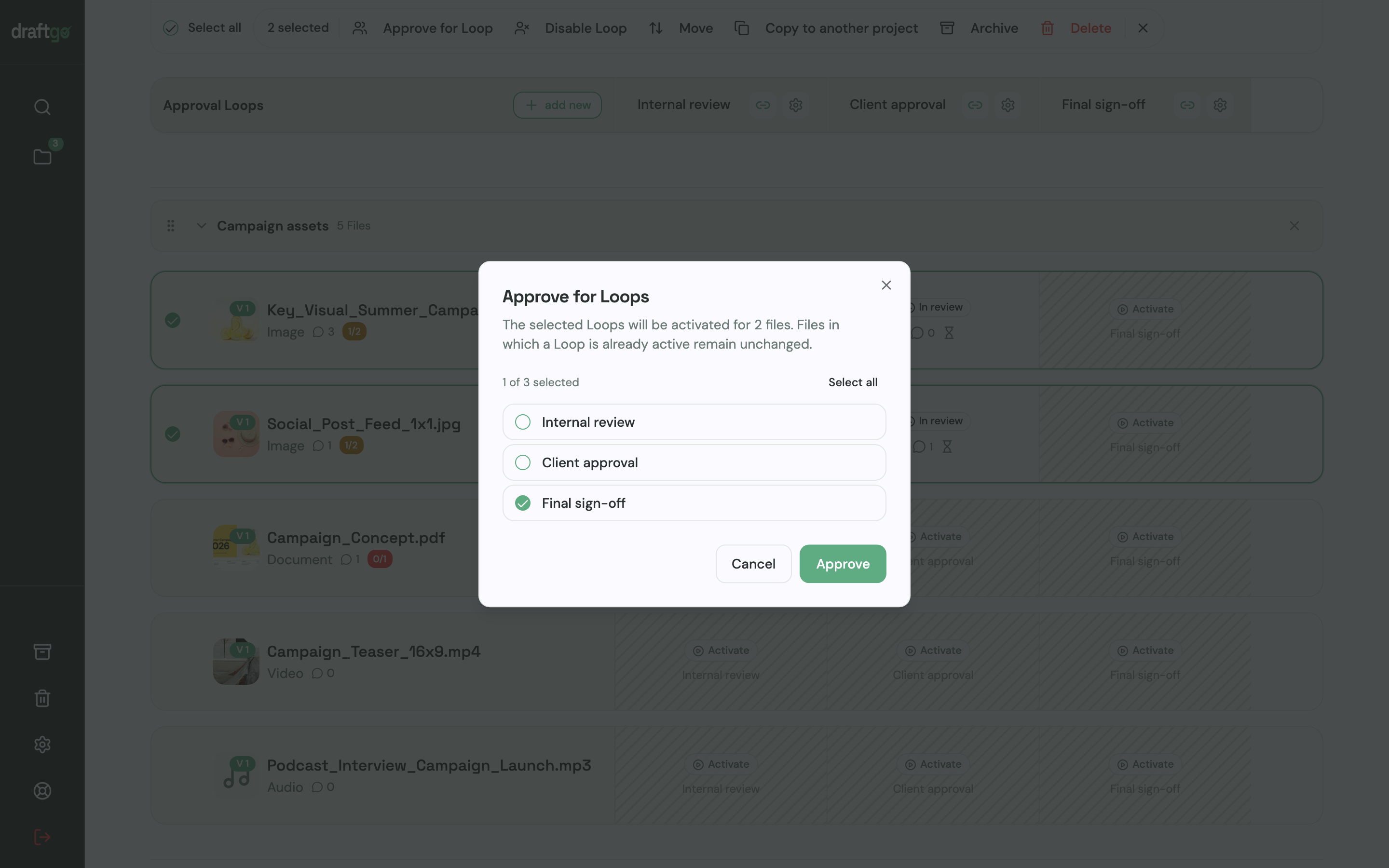
- Versions: a corrected post becomes a new version of the same file. Earlier versions stay available, comments belong to their version, and a new version starts the approvals again.
- History: the activity log keeps approvals, comments, versions and downloads with person and time, and you export it as CSV, JSON or PDF.
- AI review: from the Freelancer plan, the AI review checks social media posts, PDFs and images for errors such as spelling mistakes, cut-off text or very small type before your client sees them. Its comments carry the name of our AI agent “GO”, and the add-on "AI Assistant" makes the AI review unlimited.
- Notifications: anything that concerns a person directly arrives by email straight away; subscribed projects, loops and files come as a summary every 30 minutes or as a daily or weekly overview.
Pricing is per company, not per user or guest, and guests are unlimited from the Freelancer plan. Stored data is kept on EU servers in the Frankfurt data centre. More on the setup for social content is on draftgo for social media and content teams, and agencies with several clients find the overview on draftgo for agencies.
FAQ
What is the difference between a social media approval tool and a scheduler?
A scheduler plans and publishes posts on your social accounts. A social media approval tool collects feedback and approvals before a post goes live. Many schedulers include an approval step, while dedicated approval tools leave publishing to the planner you already use.
Do clients need an account to approve social media posts?
That depends on the tool. Cloud Campaign, Gain and draftgo let clients approve through a link without an account. In Planable, clients can comment through a share link, but the formal approval needs an account.
Who should approve social media content?
At least two people: someone in your team who checks the post internally and one named approver at the client. Larger brands add product or compliance teams for certain claims. Set the rule in the tool so that it is clear whether everyone, a set number or one person must approve.
What should be checked before a social media post is approved?
Spelling and grammar in the caption and on the images, links, hashtags and tagged accounts, the crop of each image on the target platform and the brand's colours and logo. Prices, dates and claims need a second look. Labels the platform or the client requires, for example for paid partnerships, belong on the checklist too.
How long should a client have to approve a post?
Agree on a reply time when you start working together and write it into your content plan. Posts tied to an event or a launch need an earlier deadline, so plan them further ahead. A fixed day for approvals each week helps busy clients keep up.
Conclusion
Decide first whether your approval tool should also publish. If you are choosing a new scheduler anyway, compare the approval features of Hootsuite, Kontentino, Planable, PostFlow, Cloud Campaign and Gain alongside their planning features. If your scheduler works and you want clients to approve posts, reels and other formats in one place without an account, add a dedicated approval tool and keep publishing where it is.
Try it free – draftgo is free for 14 days, no credit card needed.
Written by
Emilia
Content Producer
Ready to streamline your approval processes?
Get started with draftgo today and see how easy professional collaboration can be.