
It’s Monday, 9:15. Over the weekend three requests reached the marketing team: the product manager asked in Slack for a launch email, sales emailed for an updated brochure “by Thursday”, and the managing director forwarded an idea for a LinkedIn post. Nobody knows which comes first, so whoever chases hardest gets served. On Thursday the brochure goes out on time, with last quarter’s price on page 3, because the final check happened in a corridor conversation nobody wrote down.
All three slips happened in the handovers between tasks. A clear marketing workflow gives every request the same route through the team, with a named person at each handover.
What is a marketing workflow?
A marketing workflow is a defined sequence of steps for recurring marketing work, with one person responsible for each step and a fixed point where someone approves the result. A single banner follows the same route as a full campaign.
The workflow covers the whole department, from the moment someone asks for something to the report on the results. A content workflow, which takes one piece of content from idea to publication, runs inside it. A project plan lists the dates of one project, while the workflow describes how every project of that kind runs.
Once it is written down, a new colleague finds their way in the first week, and quality depends less on who happens to be in the office.
The marketing workflow process in 5 stages
Most marketing work, in-house or at an agency, passes through the same five stages, even if each team names them a little differently.
1. Request intake and briefing
Every request comes in through one channel, usually a short form or a request board, never through private chats. The form asks for the goal, audience, format, channel, deadline, budget and the person who approves the result.
- Steps: submit the request, check it for gaps, turn it into a brief, confirm the brief with the requester.
- Responsible: marketing operations or the project manager; at an agency, the account manager.
- Done when: the requester has confirmed the brief in writing.
Our creative brief template covers the questions a brief should answer and comes as a free download.
2. Planning and prioritising
In planning, one person decides what the team works on this week and what waits.
- Steps: estimate the effort, set dates for each review round and the launch, assign the work.
- Responsible: the head of marketing or a team lead; at an agency, the account manager with the project manager.
- Done when: the work has an owner, a launch date and planned review dates.
A request without a confirmed brief gets no slot. If legal needs two days for a check, those two days belong in the schedule from the start.
3. Production
Production is where copywriters, designers and video editors create the texts, visuals, videos and landing pages. A quick internal look at a rough draft catches a wrong direction before anyone spends a day on details.
- Steps: concept, first draft, internal check by a colleague, revision, handover to review.
- Responsible: the creative lead or the person producing the asset.
- Done when: reviewers can judge the asset, with no placeholder text left.
Keep one file per asset and add each revision as a new version, instead of saving “final_v3_new.pdf” next to “final_v2.pdf”.
4. Review and approval
Review and approval is where many marketing workflows stall, because several people with different priorities look at the same asset. It runs best in rounds: an internal review first, then specialists such as product or legal, then the final sign-off by the decision-maker or the client.
- Steps: share the file in one place, invite the reviewers of this round, collect comments on the file, upload the corrected version, get the final approval.
- Responsible: the project manager runs the rounds; the approver named in the brief decides.
- Done when: the approver has approved the current version, on record.
Feedback is clearest when it sits on the asset itself, as a pin on the image or a comment at the right second of the video. That is the idea behind online proofing. Posts, carousels and reels add their own steps, which our guide to social media approval tools explains.
Try it yourself: In the demo you work in a real draftgo workspace with sample data.
5. Launch and reporting
At launch the approved assets go live as ads, emails, landing pages and posts. A go-live checklist catches the classic slips such as broken links, old prices, missing tracking parameters or the wrong audience in the email tool.
- Steps: check against the list, publish, check the live version, measure, report.
- Responsible: the channel manager for the launch; the head of marketing or an analyst for the report.
- Done when: the report says what happened, why, and what changes next time.
Landing pages need their review before launch, while changes are still cheap. Our comparison of website feedback tools explains two ways to collect comments on a web page.
Sample marketing department workflow with roles
The table shows a sample workflow for an in-house team preparing a product launch; in a small team, one person often holds several of these roles. At an agency, the client usually becomes the final approver, and the account manager handles intake and planning.
| Stage | What happens | Responsible | Involved | Done when |
|---|---|---|---|---|
| Intake and briefing | Request form submitted, brief written | Marketing operations | Product manager | Brief confirmed in writing |
| Planning | Slot in the calendar, review dates set | Head of marketing | Copywriter, designer | Owner and dates fixed |
| Production | Email copy, page layout, post visuals | Creative lead | Copywriter, designer, web developer | Internal check passed |
| Internal review | Message, tone and brand checked | Team lead | Copywriter, designer | Comments resolved |
| Specialist review | Facts, prices and claims checked | Project manager | Product manager, legal | Corrections in a new version |
| Final approval | Current versions approved | Head of marketing | Project manager | Approval recorded |
| Launch | Checklist, publishing, live check | Channel manager | Web developer | Everything live and checked |
| Reporting | Results after two weeks | Analyst | Head of marketing | Report with decisions shared |
Every stage has exactly one responsible person, and only the final approver can close the review. Agencies settle who that approver is when the project starts, and client onboarding is a good moment to put the name in writing.
Common bottlenecks in marketing workflows and how to fix them
Most bottlenecks appear where work changes hands, from the requester to the team or from one review round to the next. Each of the five below has a fix you can try on your next project.
| Bottleneck | What you notice | Fix |
|---|---|---|
| Too many reviewers in one round | Ten people comment on the first draft and contradict each other | Fewer reviewers per round, specialists only in their own round |
| A decision-maker appears at the end | The managing director first sees the campaign the day before launch | Name every decision-maker in the brief and give them an early round |
| New ideas during review | A correction round turns into a new briefing | Corrections stay in the review, new ideas go back to intake |
| Waiting for a busy reviewer | Files sit for days without a decision | Review dates agreed in planning, rounds small enough to fit between other tasks |
| Status checks eat the week | Meetings and messages just to find out what is approved | One place that shows the status of every asset |
Practical example: a product launch in a six-person in-house team
Picture a six-person marketing team at a mid-sized software company. Requests reach it from sales, product and management through every channel, and the spring release needs an email, a landing page and three LinkedIn posts within four weeks.
The team doesn’t introduce all five stages at once. In week one it sets up a request form and agrees that the head of marketing sets priorities every Monday. Two weeks later the product manager and the legal adviser comment on the same files in one place instead of in three email threads, and the head of marketing approves the corrected versions. In week four the go-live checklist finds a broken link in the email footer before anything is sent. After the launch the team adds its next workflow, a one-page report template.
At agencies with many open assets, the review stage sets the pace. Loloson Media in Portugal produces image and video content, mainly e-commerce assets for an international hair care manufacturer, and runs its approvals in draftgo. Founder and managing director Peter Schönherr describes the client’s side: “With 70, 80 or more open assets, our client can now review flexibly in between other tasks instead of having to clear time for a whole mountain of them.”
How it works in draftgo
In draftgo, the review and approval stage of your marketing workflow runs in one project per campaign, with files, comments, versions and approvals in the same place:
- Set up one loop per review round. Create a project for the launch and add approval loops such as “Internal review” and “Client approval”. For each loop you decide who approves and whether everyone, a set number of people or any one of them has to agree, separately for the team and for guests.
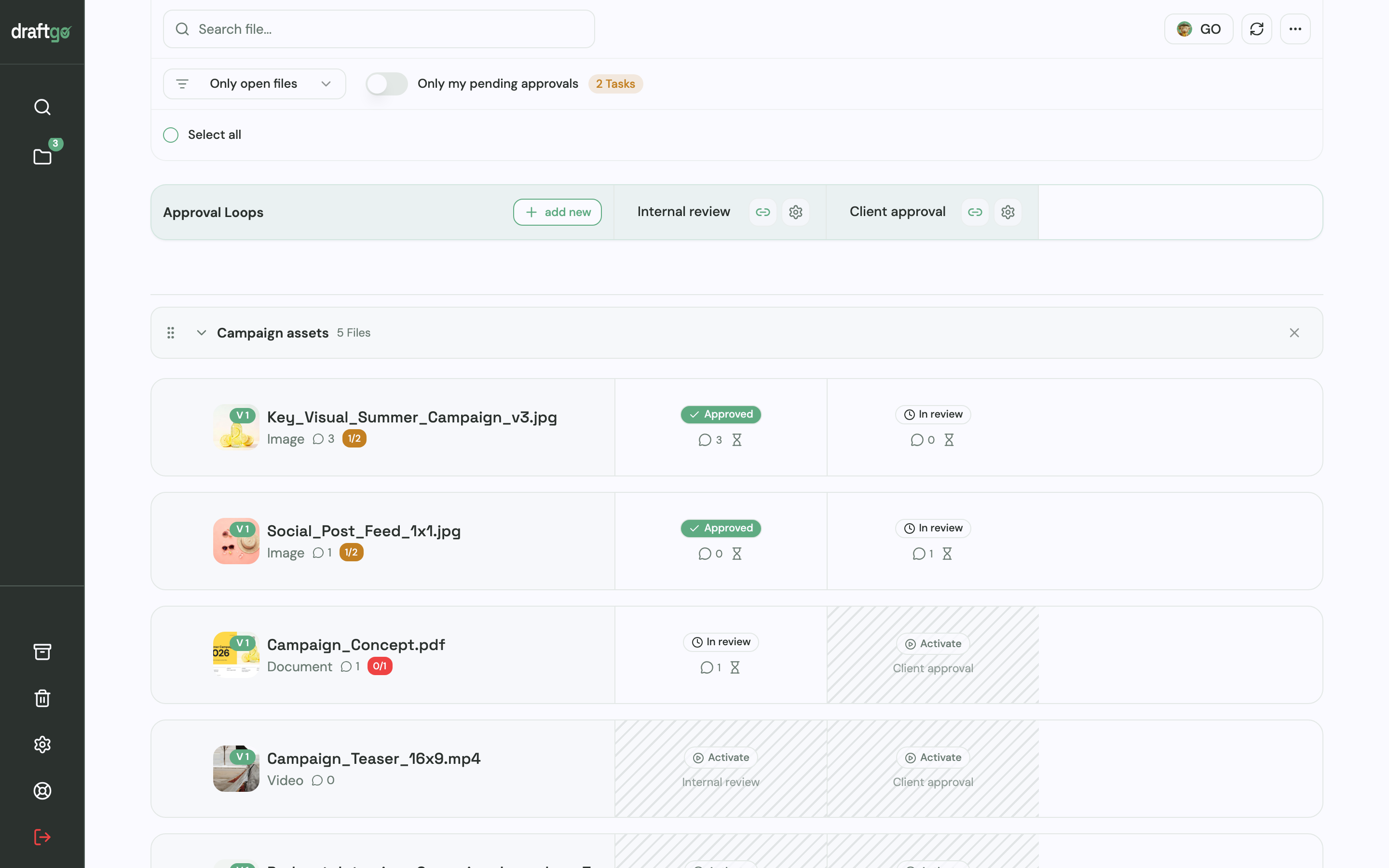
- Let reviewers comment on the file. Colleagues work in the team, while other departments or the client comment through a guest link without an account. Comments sit on the image, as a highlight in the PDF or at the exact point in the video, and a change request is simply a comment.
- Turn feedback into tasks. A comment becomes a to-do on the project management board, where you give it one assignee and a due date, and “My to-dos” shows each person their tasks across all projects.
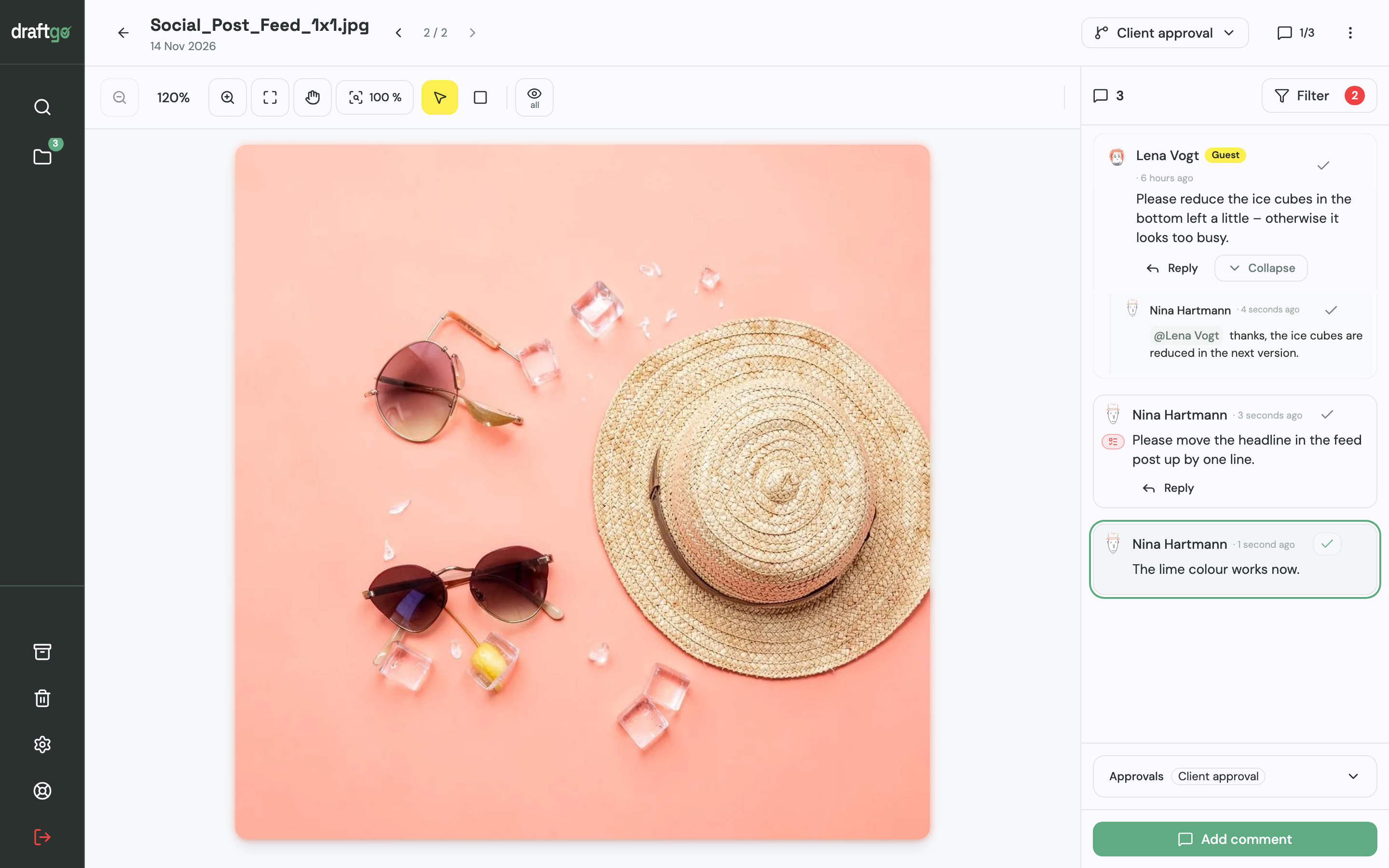
- Upload a new version. The corrected file goes up as a new version of the same file. Comments stay with their version and the approvals start again, so nobody approves an outdated draft.
- Catch mistakes before the client does. The AI review by our AI agent “GO” checks PDFs, images and social media posts for errors such as spelling mistakes, cut-off text or very small type.
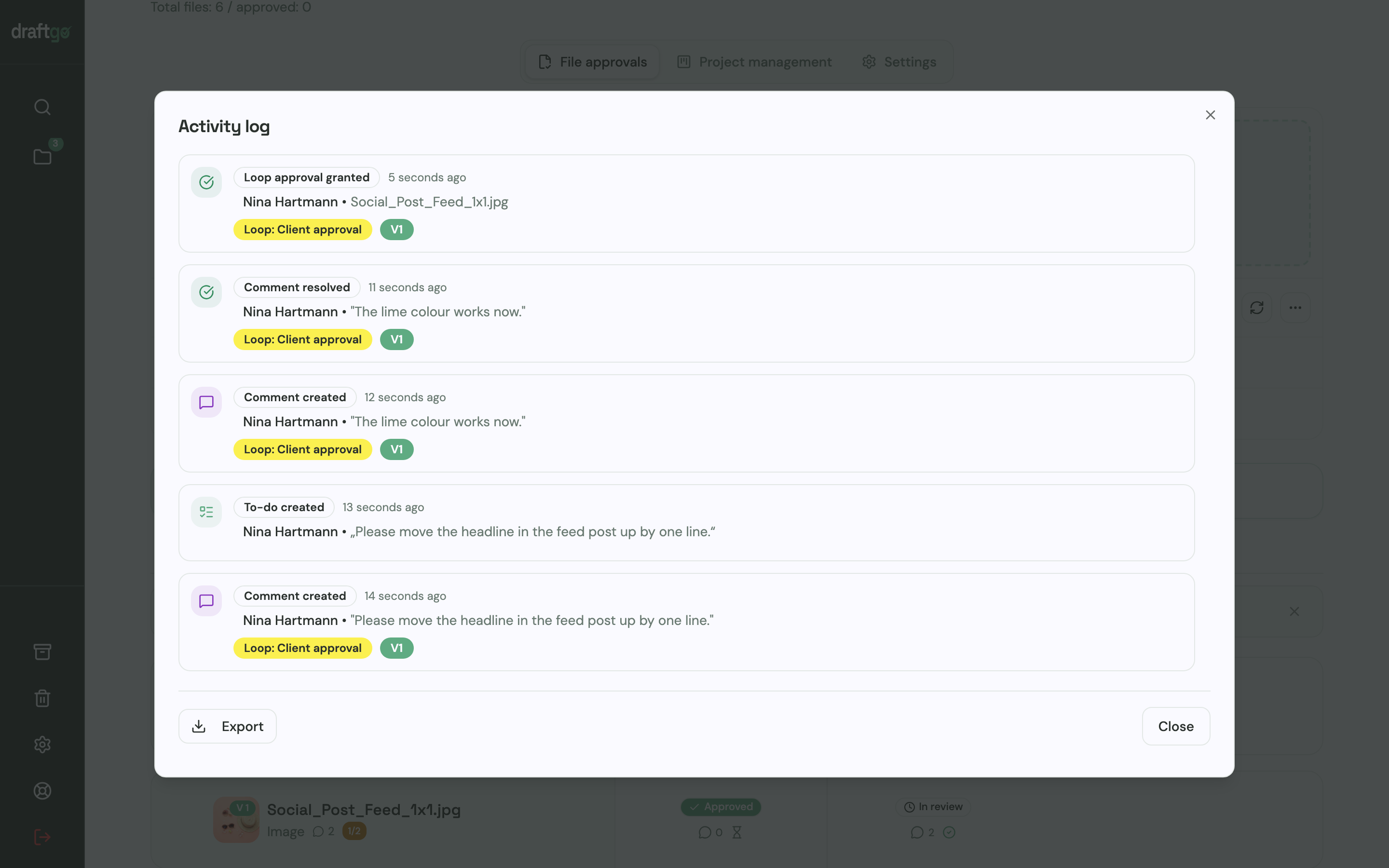
- Keep the record for your report. The activity log lists approvals, comments, versions and downloads with person and time, and you can export it as CSV, JSON or PDF.
Scheduling and publishing stay in the tools you already use, and draftgo covers the review and approval in between. The pages for in-house teams and agencies show each setup in detail.
FAQ
What is the difference between a marketing workflow and a content workflow?
A marketing workflow covers all recurring work of a marketing department, from the first request to the final report. A content workflow follows a single piece of content from idea to publication and usually runs inside the production and review stages.
Who should own the marketing workflow?
One person owns the workflow as a whole, often the head of marketing or a marketing operations manager. They keep the written version up to date and decide when a stage changes, while each stage keeps its own responsible person.
How do agencies set up a marketing workflow with clients?
Agencies agree on the workflow with the client when the project starts: how requests come in, how many review rounds the budget covers and who gives the final approval on the client’s side. Writing this into the brief or the statement of work gives both sides something to refer to later.
How can I tell whether a new workflow is working?
Watch for fewer follow-up questions after the brief, fewer review rounds per asset and fewer mistakes after launch. After a month, ask the team where work still gets stuck and change that stage first.
Conclusion
A marketing workflow gives every request the same route from intake to report, with one responsible person per stage and one approver per review round. Start with the stage your team complains about most, often review and approval, write it down on one page this week and test it on your next project.
Try it free – draftgo is free for 14 days, no credit card needed.
Written by
Emilia
Content Producer
Ready to streamline your approval processes?
Get started with draftgo today and see how easy professional collaboration can be.