
It’s Thursday afternoon at a small agency. The client has sent feedback on the brochure as a marked-up PDF by email, the designer has already saved version four to a shared folder, and this month’s hours sit in three people’s notes. Nobody can say for sure which version the client approved, or whether the retainer is over budget.
Agency software is meant to close these gaps. This guide sorts nine tools into five categories and shows how to choose your first one, with plans and prices as of 17 November 2026.
What is agency software?
Agency software is any program built around how creative and marketing agencies work: client projects with budgets, hours to bill, drafts to approve and files to store. Some tools cover several of these jobs, others do one well.
| Category | What it handles | Tools in this comparison |
|---|---|---|
| Agency management (PSA) | Time tracking, budgets, resourcing, quotes and invoices | Productive, Scoro |
| Work management | Tasks, projects, timelines and workload | Asana, monday.com |
| Online proofing and approval | Comments on drafts, versions and a record of who approved what | draftgo, Filestage, Ziflow |
| Digital asset management (DAM) | A searchable library of finished files | Air |
| Accounting | Bookkeeping, bank feeds, VAT or sales tax | Xero |
PSA stands for professional services automation: software that ties time, resources and billing to client projects. The edges overlap, as Productive and Scoro also manage tasks.
How we compared the tools
draftgo is our product. To keep the comparison fair, we describe every tool by the same open criteria: what it is built for, its free plan or trial, the entry price and pricing model, the key limits of the entry plan and, for the tools clients work in, how they take part.
All plans and prices come from each vendor’s own pricing page, checked on 17 November 2026, in the currency and billing period the page shows a visitor from the EU. Xero sells by country, so we quote its UK and US pages. The list follows the five categories, alphabetical within each, and is not a ranking.
Agency software compared: 9 tools at a glance
The table compares each tool’s focus, free plan and entry price; pros and cons follow below.
| Tool | Suited to | What sets it apart | Free plan | Entry price (as of 17 November 2026) |
|---|---|---|---|---|
| Productive | Budgets, hours and invoices | Clients join free | No, 14-day trial | €9.50 per user a month billed yearly, at least 3 seats (pricing) |
| Scoro | Quotes, time and invoices | Price depends on chosen apps | No, 14-day trial | from €15 per user a month, at least 5 users (pricing) |
| Asana | Tasks, projects and timelines | Free guests from Starter | Yes, up to 2 users | $10.99 per user a month billed annually (pricing) |
| monday.com | Boards for tasks and timelines | Free viewers from Basic | Yes, up to 2 seats | €9 per seat a month billed annually, from 3 seats (pricing) |
| draftgo | Client approvals without client accounts | Approval loops with rules | Yes, permanently | one price per company, not per user |
| Filestage | Internal and external review rounds | Reviewer groups, due dates | Yes, 1 active project | €199 a month billed yearly (pricing) |
| Ziflow | Proofing workflows in several stages | Parallel workflow stages | Yes, 2 users | $199 a month billed annually (pricing) |
| Air | Asset library with reviews | Search by asset content | Yes, 3 users | $100 a month billed yearly for 5 users (pricing) |
| Xero | Invoices, bank feeds and tax | HMRC VAT returns | No, one month free | £18 a month excl. VAT in the UK (UK pricing), $27 a month in the US (US pricing) |
1. Productive: agency management for budgets and utilisation
Productive brings budgets, time tracking, resource planning, tasks and client invoices into one system. On its pricing page, Essential costs €9.50 per user a month billed yearly or €11 billed monthly, Professional €23 or €27, with at least three seats and a 14-day trial without a credit card.
- Pros: hours, budgets and invoices in the same project; clients join free of charge; recurring budgets for retainers on Professional.
- Cons: every employee and contractor needs a paid seat; markup and approval on design files are not part of its feature list.
2. Scoro: modular agency management
Scoro consists of eight apps, from tasks and time tracking to CRM, quotes and invoices, which you combine as needed. Its pricing page shows combinations from €15 per user a month (time tracking with invoicing) and €52 for all eight apps (End-to-end), with a minimum of five users; it names no billing period for these rates. The trial runs 14 days without a credit card.
- Pros: you pay only for the apps you use; quotes, time and invoices are connected; retainer management is built in.
- Cons: the five-user minimum is a big step for very small teams; proofing of creative files is not one of the apps.
3. Asana: work management with free guests
Asana organises tasks, projects, timelines and workload. Its pricing page lists Personal free for up to 2 users, Starter at $10.99 per user a month billed annually ($13.49 monthly) with unlimited free guests, and Advanced at $24.99 per user ($30.49 monthly), which adds approvals and proofing on PDFs and images, built-in time tracking and resource management.
- Pros: clients and contractors join as free guests from Starter; list, board and timeline views of the same project; markup on PDFs and images on Advanced.
- Cons: pricing per user; proofing and built-in time tracking only on Advanced, while the lower plans sync with separate time-tracking tools; no client invoicing of its own.
Try it yourself: In the demo you work in a real draftgo workspace with sample data.
4. monday.com: boards for tasks and timelines
monday.com work management organises tasks on boards you set up yourself. Its pricing page shows Free for up to 2 seats, Basic at €9 per seat a month billed annually, Standard at €12 with guest access, timeline and Gantt views, and Pro at €19 with time tracking. Paid plans start at three seats, and yearly billing saves 18%.
- Pros: boards adapt to client projects, retainers or content calendars; unlimited free viewers from Basic; a 14-day trial of Pro.
- Cons: guest access only from Standard and time tracking only from Pro; a three-seat minimum.
5. draftgo: client approvals on the file, priced per company
draftgo is an online proofing tool for agencies, freelancers and in-house teams. Clients comment through a link without an account, on the image, the PDF page or a website screenshot, or at a timecode in video and audio. Approvals run in loops with a rule, and draftgo logs every approval, comment and version with a timestamp. From the Freelancer plan on, you can start the AI review, in which our AI agent “GO” checks PDFs, images and social posts for errors such as typos or cut-off text. The basics are in the guide to online proofing.
- Pros: clients need no account; unlimited guests from the Freelancer plan; one price per company instead of per user or guest; your own logo and colours in the guest view from the Agency plan; GDPR-compliant, data stored on EU servers (Frankfurt data centre).
- Cons: no time tracking or invoices; no deadlines or reminders in loops; no ready-made integrations such as Asana or Figma; internal users capped per plan.
- Price: a permanent Free plan, and the paid plans are free for 14 days without a credit card; amounts on plans and pricing.
6. Filestage: review rounds with reviewer groups
Filestage handles videos, images, designs, documents, websites and audio. Reviewers comment and approve without an account, and reviewer groups keep internal and external rounds apart. On its pricing page, Free allows one active project, five new files a month and two reviewer groups. Starter costs €199 a month billed yearly or €249 monthly and adds unlimited projects, due dates and reminders, version comparison and password-protected links.
- Pros: unlimited reviewers on every plan; due dates, reminders and side-by-side version comparison from Starter.
- Cons: Free fits one project at a time; custom workflows with three reviewer groups start on Business.
A detailed comparison with draftgo is on the page draftgo vs Filestage.
7. Ziflow: proofing workflows in stages
Ziflow reviews more than 1,200 file types with unlimited proofs and reviewers on every plan. Its pricing page lists Free for 2 users with 2 GB, one workflow stage and proofs kept for 60 days. Standard costs $199 a month billed annually ($249 monthly) for 15 users and 1 TB, with two workflow stages, proof deadlines and manual reminders.
- Pros: pixel-level version comparison and Adobe Creative Cloud plugins already in Free; integrations with Asana and monday.com on Pro.
- Cons: proofs on Free stay available for 60 days only; the first paid plan bundles 15 users at one flat price, with no smaller paid tier.
draftgo and Ziflow are compared feature by feature on draftgo vs Ziflow.
8. Air: an asset library with reviews
Air is a digital asset management tool for creative teams: a visual, searchable library with comments, annotation and approvals. Per its pricing page, Free includes 3 users and 10 GB. Starter costs $100 a month billed yearly or $125 month to month for 5 users and 200 GB, and Business $900 a month billed yearly for unlimited users and 2 TB.
- Pros: a free plan without a time limit; search by what an asset shows, not only its file name; review in the same place as the library.
- Cons: user caps on Free and Starter; unlimited users start on Business, a large price step from Starter.
9. Xero: accounting for invoices, bank feeds and tax
Xero handles bookkeeping, invoices, bank reconciliation and tax. On the UK pricing page, Ignite costs £18 a month excl. VAT with 20 invoices, project tracking comes with Ultimate at £70, and new UK customers get 90% off for six months. The US page starts at $27 a month for Early, with 80% off for three months for new customers.
- Pros: VAT returns to HMRC in the UK and sales tax in the US; document capture for bills and receipts; no per-user licence fees on the US plans.
- Cons: the entry plans cap invoices; project tracking only on the top plan.
Which agency software should you start with?
Pick the category that fixes the step where work stalls today:
- Client feedback is scattered across email and chat: an online proofing tool such as draftgo, Filestage or Ziflow keeps comments and approvals on the file.
- Hours go unbilled or retainers run over budget: Productive or Scoro ties time to budgets and invoices.
- Nobody knows who is working on what: Asana or monday.com shows owners and due dates. The guide to marketing workflows helps you map the stages first.
- Finished files are hard to find: a DAM such as Air helps once you manage many brands.
- Invoices and tax returns are done by hand: accounting software such as Xero.
Practical example: a six-person agency picks its first tool
Take a six-person agency in Bristol that runs social and print campaigns for ten retainer clients. Hours go into a spreadsheet, and feedback arrives by email, in WhatsApp and as comments in three different PDF readers. Each review round starts with someone collecting comments by hand.
The agency starts with approvals and leaves everything else as it is. Clients comment on the draft through a link, the designer uploads the next version to the same file, and the account manager sees who approved which version. The review rules go into the client onboarding checklist for every new account. When two retainers keep running over budget a few months later, the agency trials an agency management tool on its next two projects.
How it works in draftgo
draftgo covers the proofing part of the stack:
- Create a project per client or campaign and upload images, PDFs, videos, audio files or a website captured as a screenshot.
- Set up loops, such as an internal review followed by client approval. Each loop has a rule for who has to approve: all approvers, a set number or any one of them, separately for team and guests. A project holds 1 loop on Free, 3 on Freelancer and unlimited loops on Agency and Team.
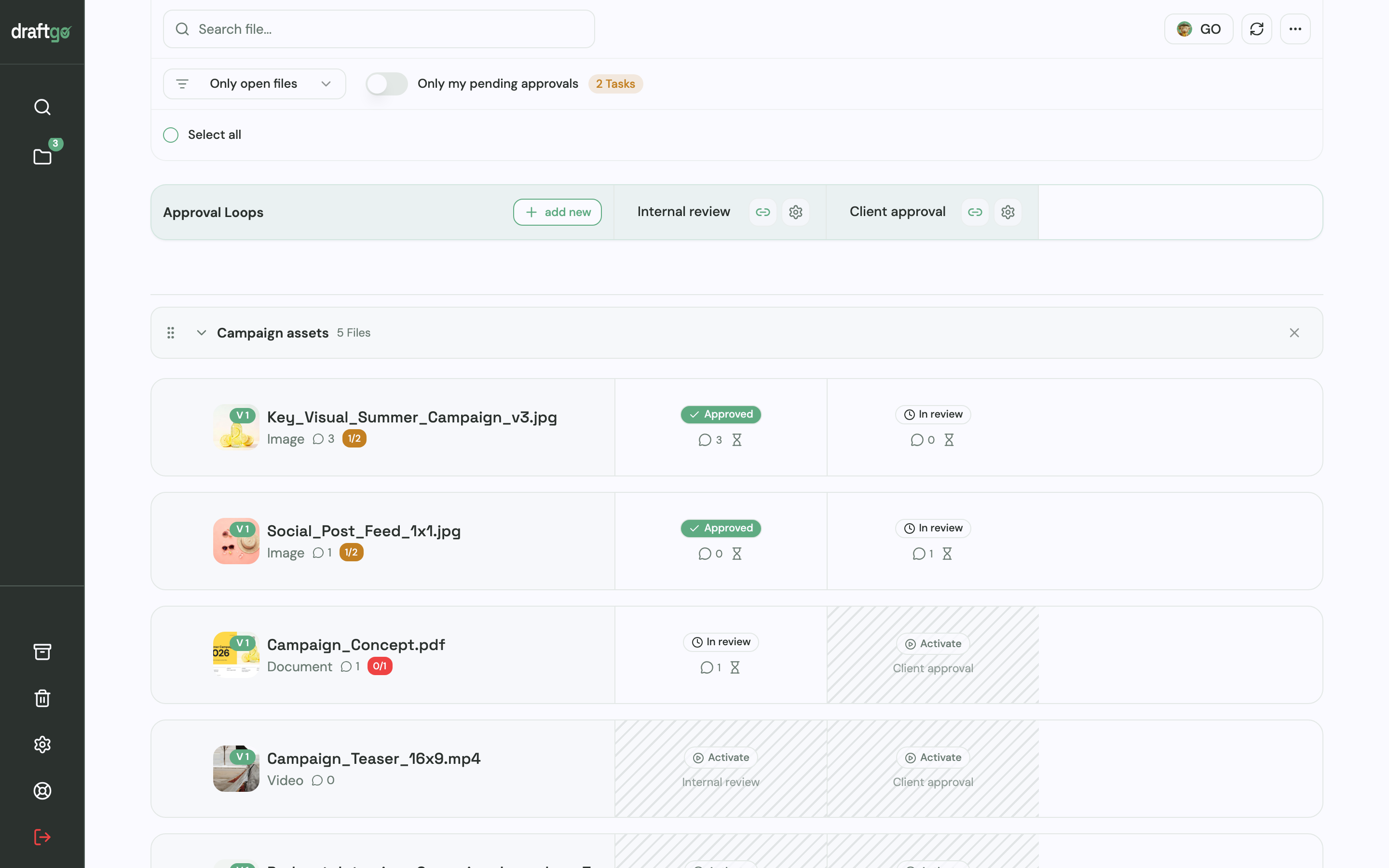
- Invite the client by link. The approver link is personal and lets that person approve; the viewer link is shared and allows comments only. Neither needs an account.
- Collect feedback at the spot: on the image, the PDF page or at a timecode. Each new version starts the approvals again.
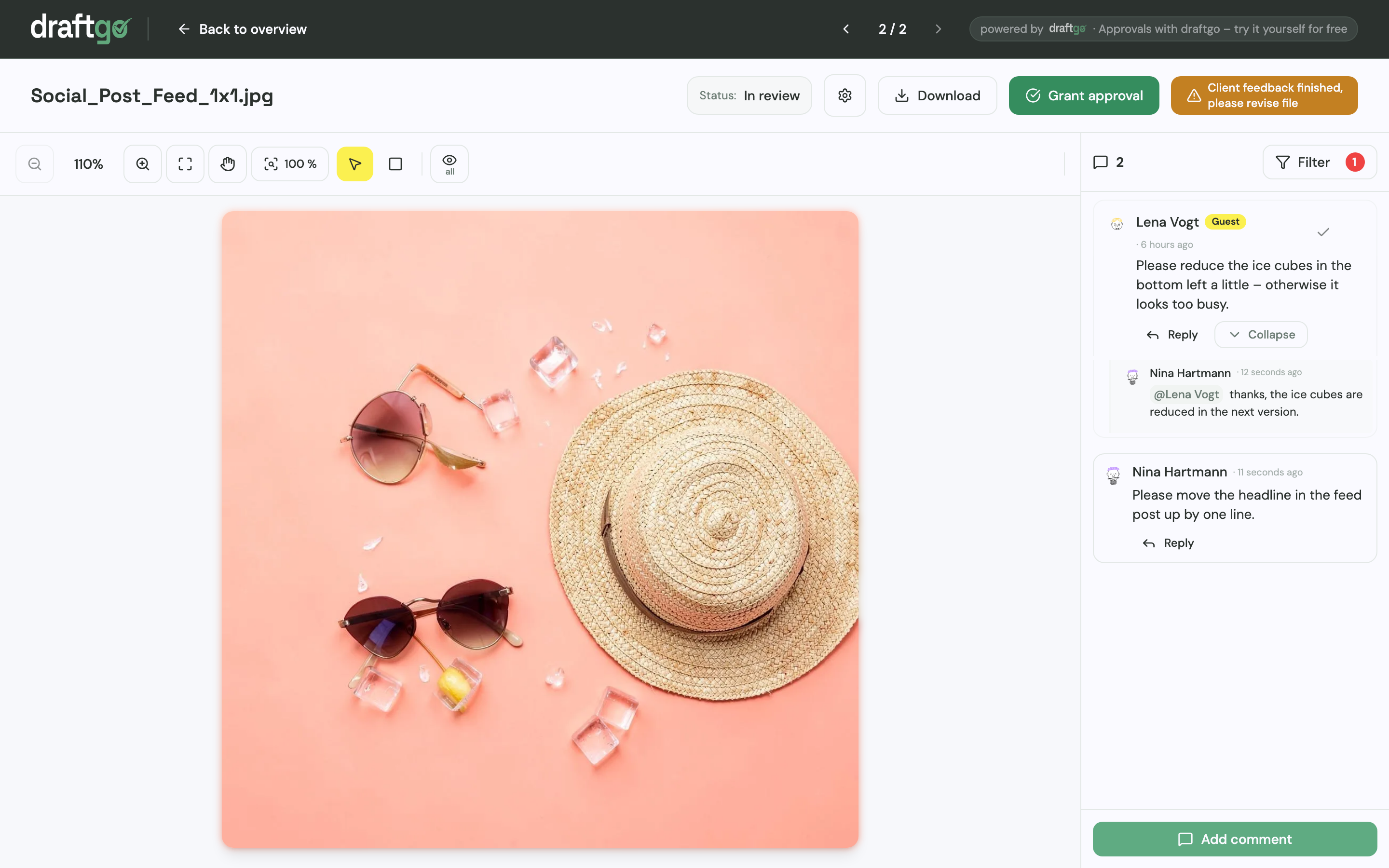
- Turn comments into to-dos on the project board, each with one person responsible.
- Keep the record. The activity log holds approvals, comments and versions with person and time; export it as CSV, JSON or PDF and file it with the job. What such a record should contain is in the guide to an approval audit trail.
Time, budgets and invoices stay in your agency management tool, and draftgo holds the review and the approval record. On the Agency and Team plans, the guest view carries your own logo and colours, which matters if you deliver client work under your own brand. How agencies use draftgo is on draftgo for agencies.
Peter Schönherr, founder and managing director of the Portuguese image and video producer Loloson Media LDA., says: “With draftgo, our approval rounds are around 50% faster. Instead of endless PowerPoints, my client sees every new version straight away and approves it directly.”
FAQ
Can one all-in-one tool replace the whole agency stack?
Not among the nine tools here. Productive and Scoro bring time, budgets, tasks and invoices together, and Asana’s Advanced plan adds proofing, but none of them also covers asset management and accounting. Plan for two or three tools that share data.
Should agency software be priced per user or per company?
That depends on how many people log in. At a per-user price, an eight-person team pays 8 × €10 = €80 a month, and the bill grows with every hire or freelancer. Per-company pricing, as in draftgo, stays the same as the team grows within a plan.
Do clients need an account to give feedback?
Not in every tool. In draftgo and Filestage, clients comment and approve through a link without an account, and Ziflow adds outside reviewers as guests through a proof’s shareable link. Asana invites clients as free guests from Starter, and monday.com offers guest access from Standard.
Conclusion
Agency software works as a small stack that you build one category at a time. Find the step where your work stalls, test one tool for it with a live client project, and add the next category once the first is in daily use. If client feedback is that step, start with proofing.
Try it free – draftgo is free for 14 days, no credit card needed.
Written by
Emilia
Content Producer
Ready to streamline your approval processes?
Get started with draftgo today and see how easy professional collaboration can be.