
The licence renewal is on the agenda, and someone has listed what the marketing team actually does in Adobe Workfront. Projects are planned in another tool and hours are tracked somewhere else. What runs through Workfront every week are proofs: brochures, banners and product videos that go round for comments and wait for a final yes. Could that part run in a tool built only for review and approval, with a price you can read on its website?
What Workfront proofing covers today
Workfront proofing is the review and approval part of Adobe Workfront, and it currently comes in two forms. Organisations on legacy Workfront storage use the Workfront Proof viewer by default, while organisations on Adobe cloud storage review in the Frame.io viewer under the name “unified review and approval” (Adobe Experience League: unified review and approval, as of 17 November 2026).
Proofing comes with every Workfront licence, and the licence decides what a user can do. In the Workfront Proof viewer, proofs are made from documents or URLs, and two versions of a proof can be compared (Adobe: access to proofing functionality). An automated workflow splits a proof into stages that run one after another or at the same time, and a stage can be private, for example when an agency reviews a proof before sharing it with its client and keeps those comments from the client (Adobe: automated workflow stages).
Unified review and approval connects Workfront with the Frame.io viewer, and Adobe says it replaces Workfront Proof once it is enabled; projects created before that keep their proofing. One approval can hold up to 30 parallel paths and 100 stages, and reminder emails go out 72 hours and 24 hours before a deadline and on the deadline itself. An AI Reviewer can check assets against brand guidelines (Adobe Experience League).
Access runs through Adobe: your account representative confirms whether your contract covers unified review and approval, and Adobe Professional Services configure it. The documentation we read names no prices. For organisations that plan, produce and approve inside Adobe’s tools, that depth is the point.
Why teams look for a Workfront proofing alternative
Teams look for a Workfront proofing alternative when they use the review part far more than the rest of the platform, or when a change inside Workfront changes how their reviewers work:
- One part of a large platform. If projects are planned elsewhere and Workfront mainly carries proofs, a standalone tool covers what you use.
- A login for outside reviewers. In unified review and approval, external users can use the Frame.io viewer at no extra cost, but they are prompted to create a Frame.io login before they review (Adobe Experience League). For a client who approves twice a year, that is one more account to set up.
- A cap on video reviews. Video proof requests have an annual cap of 10% of an organisation’s paid Workfront user licences, unless it has Frame.io Enterprise (Adobe Experience League).
How we compared the alternatives
We read each provider’s pricing page on 17 November 2026 and took only what it states: free plan, approval stages, outside reviewers and entry price, in the currency and billing period shown to a visitor from the EU. The order is not a ranking. draftgo is our product. Like the other three, it gets pros and cons.
| Tool | Suited for | Free plan | Approval stages | Entry price |
|---|---|---|---|---|
| Ziflow | teams that review many formats in fixed stages | 2 users, 1 workflow stage, 60 days of review history | 2 on Standard, 3 on Pro, unlimited on Enterprise | Standard, $199 a month billed annually (Ziflow pricing) |
| Filestage | marketing teams with separate internal and external rounds | 1 active project, 5 new files a month | 2 reviewer groups on Free and Starter, 3 on Business | Starter, €199 a month billed yearly (Filestage pricing) |
| Aproove | regulated teams that need audit-ready review | none listed | linear, looping or parallel workflows | Team, $12,000 a year with 5 users (Aproove pricing) |
| draftgo | agencies and in-house teams approving files with clients | 1 user, 2 GB, 2 projects, permanently free | loops: 1 per project on Free, 3 on Freelancer, unlimited on Agency and Team | priced per company, see the pricing page |
Four Workfront proofing alternatives
The four differ in how they route approvals, how outside reviewers take part and what they charge.
1. Ziflow: for teams that review many formats in fixed stages
Ziflow’s pricing page lists more than 1,200 reviewable file types and pixel-level version comparison from the free plan on, and reviewers inside and outside your organisation are unlimited on every plan (Ziflow pricing). Workflow stages run in sequence or in parallel, and their number grows with the plan.
- Pros: unlimited reviewers, version comparison on the free plan, integrations with Asana, monday.com, Slack and Microsoft Teams on Pro
- Cons: proof deadlines with manual reminders start on Standard, automatic deadline reminders and electronic signatures come only with Enterprise, and proofs on the free plan stay available for 60 days
- Price: Standard $199 and Pro $329 a month, both billed annually, Enterprise on request (Ziflow pricing)
Our Ziflow comparison shows where it differs from draftgo.
Try it yourself: In the demo you work in a real draftgo workspace with sample data.
2. Filestage: for marketing teams with separate internal and external rounds
Filestage organises reviews in reviewer groups for internal and external reviews, and you invite different people to each group. Reviewers need no account to give feedback, and the free plan covers one active project and five new files a month (Filestage pricing).
- Pros: unlimited reviewers on every plan, due dates and reminders, version comparison and password-protected review links from Starter
- Cons: one active project at a time on Free, automations and review agents only from Business, single sign-on with your own identity provider as an add-on on Business and included on Enterprise, audit logs only on Enterprise
- Price: Starter €199 and Business €329 a month billed yearly, or €249 and €399 billed monthly, Enterprise without a listed price (Filestage pricing)
Filestage and draftgo stand side by side on our Filestage comparison page.
3. Aproove: for regulated teams that need audit-ready review
Aproove describes its Team plan as made for one regulated team that needs audit-ready review. Electronic signatures under 21 CFR Part 11, an audit trail and free, unlimited external reviewers and guests are standard on every plan, and workflows run linear, looping or parallel (Aproove pricing).
- Pros: signatures, audit trail and free guests on every plan, 12 hours of implementation services on Team, SOC 2 Type II compliant and ISO 27001 certified, as the page states, with HIPAA-compliant infrastructure on every plan
- Cons: no free plan or trial on the pricing page, only a demo, and the entry price is an annual platform fee
- Price: Team $12,000 a year with 5 users, then $35 per added user a month, Multi-Team $20,000 a year, Enterprise priced on request (Aproove pricing)
4. draftgo: for agencies and in-house teams approving files with clients
draftgo is an online proofing tool for images, PDFs, videos, audio files, website screenshots and social media posts. Guests review through a link without an account and comment on a spot in an image, a text passage in a PDF or a timecode in a video. Approvals run in loops, for example an internal loop followed by a client loop, each with its own rule for who must approve. Stored data is kept on EU servers in the Frankfurt data centre.
- Pros: guests need no account, unlimited guests from the Freelancer plan, one price per company instead of per user, AI review of PDFs and images from the Freelancer plan
- Cons: no deadlines or reminder emails in loops, and no single sign-on (SSO, SAML) with a company’s identity provider
- Price: the Free plan costs nothing for as long as you use it; the paid plans have one price per company and come with a 14-day free trial
Workfront and draftgo side by side
Workfront joins planning, production and approval, while draftgo covers review and approval with clients. The table compares the review part, as of 17 November 2026.
| Adobe Workfront (unified review and approval) | draftgo | |
|---|---|---|
| Stages | up to 30 paths and 100 stages per approval (Adobe Experience League) | loops with one rule each, set separately for team and guests |
| Outside reviewers | external users review in the Frame.io viewer at no extra cost after creating a Frame.io login | guests by link without an account, approvers with a personal link |
| Decisions | “Approve” or “Needs work” | approve or withdraw an approval, change requests as comments |
| Deadlines | deadlines with reminder emails | none in loops, a daily or weekly summary lists pending approvals |
| AI | AI Reviewer checks assets against brand guidelines | AI review flags errors such as spelling, cut-off text or very small type |
Which Workfront proofing alternative fits your team?
The choice depends on who reviews and what your approvals have to prove later. Our guide to online proofing covers the basics of choosing software.
| Your situation | Good fit |
|---|---|
| You plan, produce and approve in Adobe’s tools and need many parallel stages | Workfront |
| You review many formats in fixed stages and want integrations with your project tool | Ziflow |
| You run separate internal and external rounds and want due dates | Filestage |
| Your approvals need electronic signatures and an audit trail for regulators | Aproove |
| Clients and managers approve files by link, and you want to start this week | draftgo |
If most of your proofs are videos, see our comparison of video feedback tools.
How to move your reviews out of Workfront in 5 steps
Move project by project, so approvals that are already running stay in one tool.
- Export the record first. Workfront’s change tracking logs capture approval decisions and can be exported from Setup, but comments in the Frame.io viewer are not part of them (Adobe Experience League). What a usable record contains is in our guide to the approval audit trail.
- Write down your stages. List who approves what and in which order, and check that the new tool can map your parallel paths.
- Start with one pilot project. Pick a client who answers quickly and run the project only in the new tool, so nobody approves the same file in two places.
- Tell reviewers what changes. Two sentences are enough: where the link comes from and how they approve. Our guide to feedback management helps you keep comments in one place.
- Settle the contract and privacy. Ask for the data processing agreement and check where files are stored before client work moves.
Practical example: datasheet approvals outside Workfront
Take a seventeen-person marketing team at a maker of solar inverters whose parent group runs Workfront. The team uses Workfront mainly to approve datasheets, installation guides and training videos for installers. Each file needs an approval from the head of engineering and then from the managing director, while a freelance technical writer comments on the wording.
The team moves these reviews to draftgo on the Team plan, which covers 15 users and unlimited loops. Six of the seventeen prepare the files and get their own accounts. They upload the spring datasheets and videos to one project and set up an internal loop for the head of engineering, who also has an account. The managing director decides in a second loop through a personal approver link. The technical writer gets the shared viewer link, questions two phrases in the installation guide and cannot approve.
Once the head of engineering has approved a datasheet, a team member activates it in the managing director’s loop. She approves through her link between two meetings, and the activity log shows which version she approved and when.
How it works in draftgo
In draftgo the review runs on the file itself, from the first upload to the last approval.
- Set up a project and add the files. Upload PDFs, images, videos or audio files; a Word file becomes a PDF on upload.
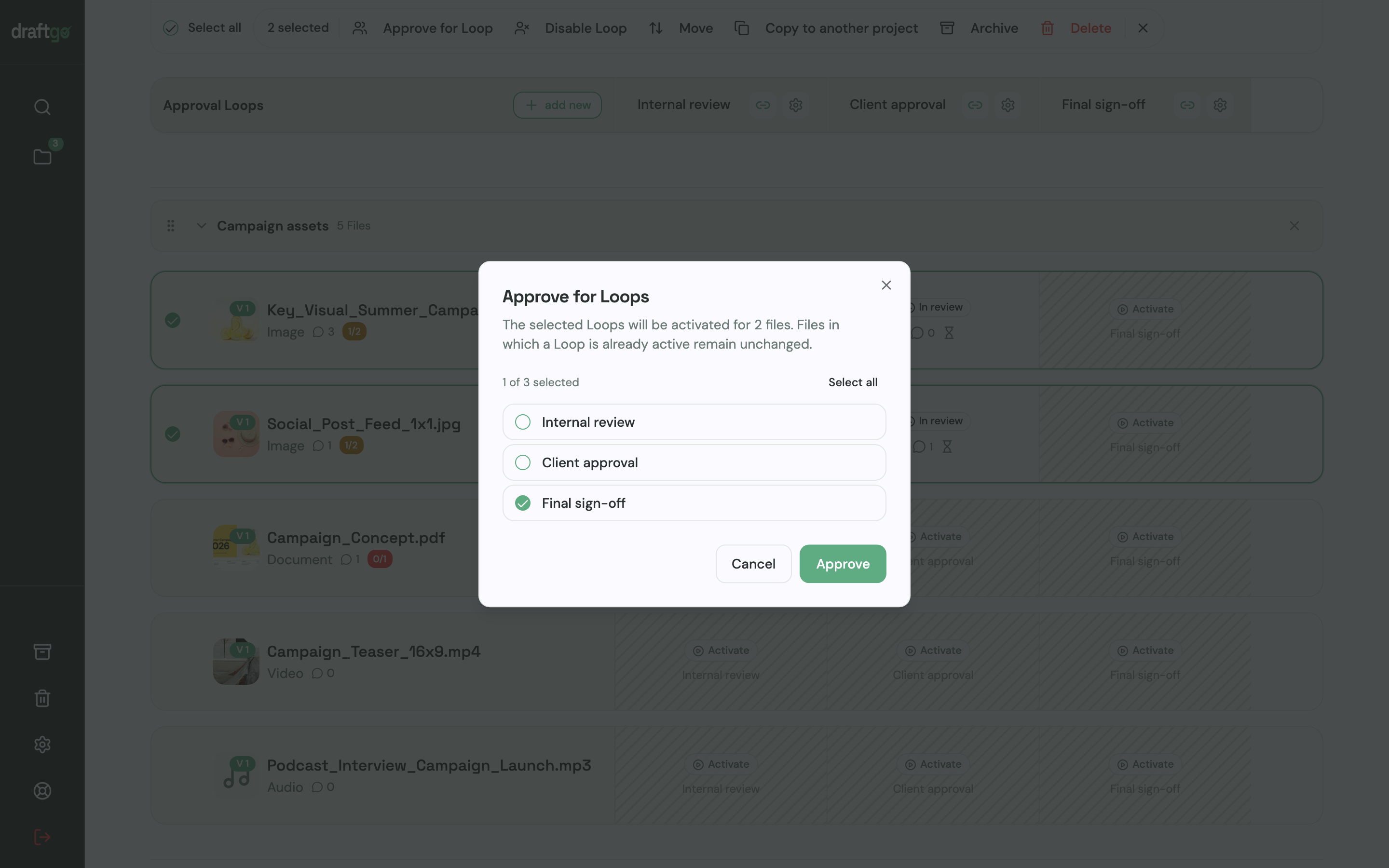
- Create the loops and decide who approves. Add an internal loop and a client loop and set each rule: all approvers, a set number or any one of them, separately for team and guests. A project holds 1 loop on Free, 3 on Freelancer and as many as you need on Agency and Team. Then select the files and activate them in the loop.
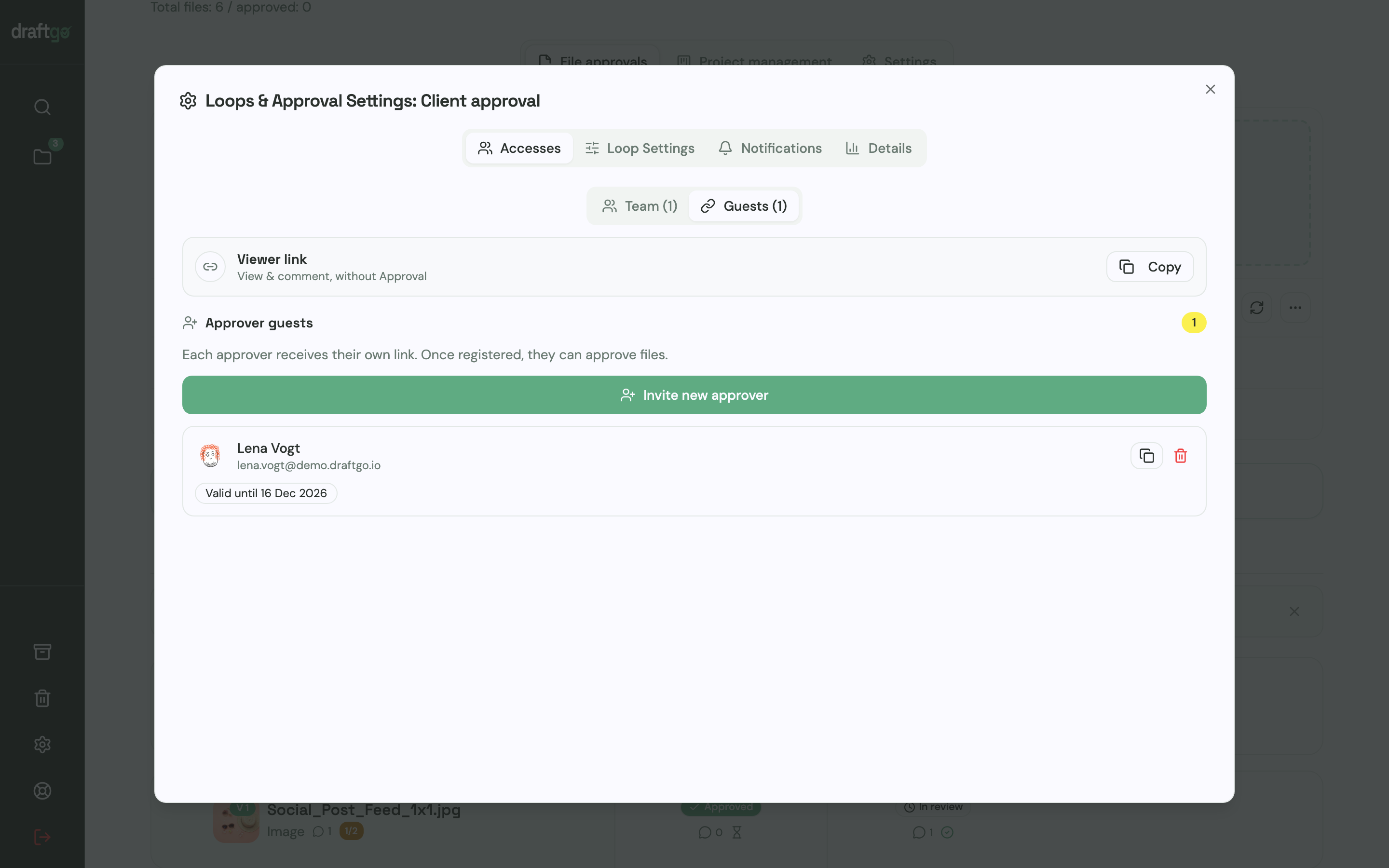
- Share the links. In the loop settings you copy the shared viewer link for people who only comment and invite approver guests, who each get a personal link with their name and email address. Guests need no account; team members sign in with their own.
- Work through feedback and upload the next version. Comments belong to the version they were made on, earlier versions stay available, and a new version starts the approvals again. Before a PDF or image goes to the client, you can start the AI review on the Freelancer plan and above; its findings appear as comments from our AI agent “GO”.
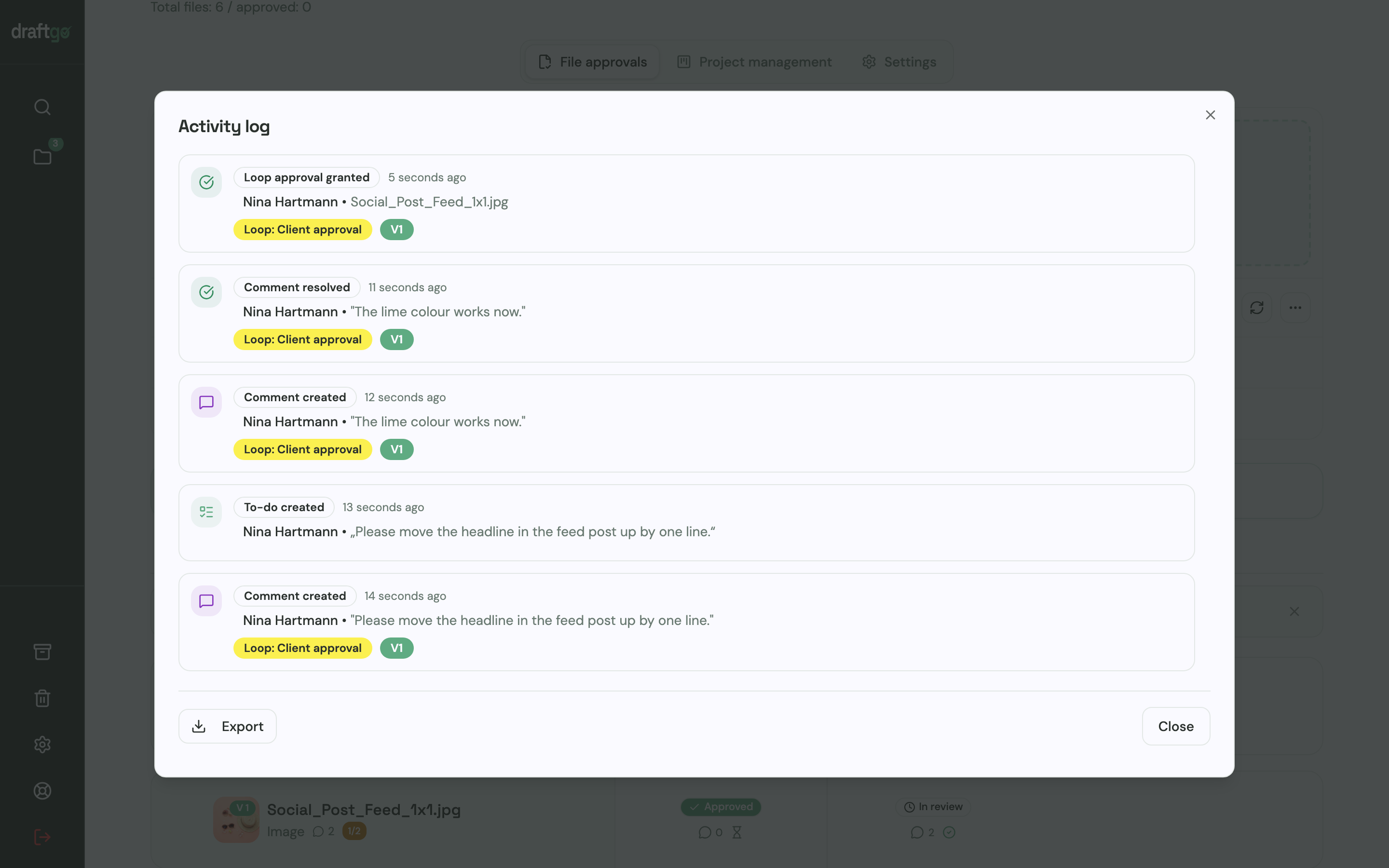
- Keep the record. The activity log holds approvals, comments, versions and downloads with person and time, and you export it as CSV, JSON or PDF.
More on internal sign-offs is on the page for in-house creative teams.
FAQ
Is Workfront Proof being replaced?
For organisations that enable unified review and approval, yes: Adobe says the Frame.io viewer then replaces Workfront Proof as the review surface. Projects created before the switch keep their proofing, and legacy Workfront storage continues to use the Workfront Proof viewer (Adobe Experience League).
Do clients need an account in a Workfront proofing alternative?
That depends on the tool. Filestage states that reviewers need no account to give feedback, and in draftgo approver guests and viewer-link guests both work without one. In Workfront’s unified review and approval, external users are prompted to create a Frame.io login.
Can I keep Workfront for planning and use another tool for proofing?
Yes, as long as each project has one review route. Workfront and draftgo have no ready-made connection, so you upload exported files to draftgo and keep the approval record there.
Conclusion
Stay with Workfront if your organisation plans, produces and approves in Adobe’s tools and needs many parallel stages. If your team mostly sends files round for comments and a final yes, pick by reviewer: Ziflow for many formats in fixed stages, Filestage for separate rounds with due dates, Aproove for approvals with signatures and an audit trail, and draftgo for clients and managers who approve by link. Run one real project in the new tool before you move the rest.
Try it free – draftgo is free for 14 days, no credit card needed.
Written by
Emilia
Content Producer
Ready to streamline your approval processes?
Get started with draftgo today and see how easy professional collaboration can be.