
The client's new marketing lead sends you a photo of a printed brochure with a red circle around the product name on page four. It is the old name, dropped in spring, and she wants to know who approved it. Your inbox holds three threads with the same subject line, a PDF called brochure_final_v3 and a "fine by us" sent from a phone that names no file. You are fairly sure her predecessor asked for the old name back, but you can't show it.
An audit trail would answer her in a minute. Below you'll find what an approval record has to contain to hold up months later, where such records break, when clients or regulated industries ask for one and five steps to set it up.
What is an audit trail?
An audit trail is a chronological record of activities that lets someone reconstruct, step by step, how an operation or event came about, from its start to its result. That is how the NIST glossary of security terms defines it.
In creative work, the event is an approval. An approval audit trail ties together the file, its version, the feedback on it and the decision, each with a person and a time. A folder of exported PDFs shows that several drafts existed, while the audit trail shows how the last one came about and who agreed to it. Together with comments on the spot and versions on the same file, it is a building block of online proofing.
What an approval audit trail should record
A useful approval record answers six questions for every entry. A timestamp on its own only tells you that something happened, not what it was or which version it concerned.
| Question | What the record holds | Example |
|---|---|---|
| Who? | The person, under their own name | Name and email address of the client's approver |
| What? | The action: comment, new version, approval, withdrawn approval, download | "Version 3 uploaded" |
| When? | Date and time | 14 October, 10:42 |
| Which file and version? | The asset and its version number | Spring brochure, version 3 |
| Where in the file? | The spot a comment refers to | Highlight on the product name, page 4 |
| Why? | The comment or the reason for a change | "Please use the name from the new price list" |
Keep the steps in between as well. Resolved comments, withdrawn approvals and earlier versions are often the entries that settle a dispute, because they show who asked for what before the final version existed.
Where approval records fall apart
Approval records break where feedback arrives through several channels and the approval itself is vague.
| Gap | What goes wrong later | Better practice |
|---|---|---|
| Approval as a line in an email ("looks good") | Nobody can tell which file or version it meant | A separate approval action tied to one version |
| Feedback spread over email, chat and calls | Comments lose their context, and some never reach the designer | One place for all feedback, on the file itself |
| New files instead of new versions | The route from first draft to final can't be rebuilt | Corrections uploaded as a new version of the same file |
| Approval kept after a "quick change" | The approved version is not the one that went to print | A new version starts the approval again |
Transfer links add a gap of their own, because the approval still happens somewhere else. Our comparison of WeTransfer alternatives shows when a sending tool is enough and when you need a review tool.
Try it yourself: In the demo you work in a real draftgo workspace with sample data.
When clients and regulated industries ask for an audit trail
An agency needs its audit trail when a client disputes what they approved, for example over who pays for a correction. Regulated clients also need one because their own rules require them to document who approved which material.
This article is general information, not legal advice.
Disputes with clients
When a client refuses to pay for a reprint or an extra round of changes, the record shows which version they approved and what they asked for before it. The question can come up long after the project. In England and Wales, a claim founded on a simple contract can generally be brought within six years of the date the cause of action accrued, under section 5 of the Limitation Act 1980. In the US, the period depends on the state.
In-house teams face the same question from their own legal or brand department, which wants to see who in marketing approved a campaign before it went out. As an agency, write into the contract where approvals happen, ideally during client onboarding, so both sides rely on the same record.
Pharmaceuticals and medical devices
If your client is regulated by the US Food and Drug Administration, records that FDA rules require them to keep fall under 21 CFR Part 11 when they are kept in electronic form. For closed systems, 21 CFR 11.10(e) requires secure, computer-generated, time-stamped audit trails that record the date and time of entries and actions that create, change or delete electronic records, and changes must not obscure what was recorded before. FDA's 2003 guidance on the scope of Part 11 reads the rule narrowly and says FDA intends to use enforcement discretion on the audit trail requirements, while the underlying FDA rules that require records of dates, times or the order of events still apply. Whether a given record is covered is for your client's regulatory team to decide.
The client's quality system then holds the regulated record, and your log of comments, versions and approvals shows how the draft developed.
Financial services
In US financial services, FINRA Rule 2210 requires an appropriately qualified registered principal of a broker-dealer to approve each retail communication, such as an ad or a brochure, before it is used or filed, with a few exceptions the rule lists. The firm's records must include a copy of the communication, the dates of its first and last use, and the name of the principal who approved it with the date of approval. If you produce marketing for such a firm, expect questions about which version the principal approved and when. The page draftgo for legal and compliance reviews shows how a review with legal and management stages runs.
5 steps to an approval audit trail that holds up
An audit trail comes from a routine that everyone on the project follows. These five steps set it up.
1. Rebuild one finished project
Take a project you closed last month and try to reconstruct which version was approved, by whom and when. Note every channel the feedback came through on the way.
2. Agree one place for files and approvals
Choose one place where files, versions, comments and approvals come together, and say so in your proposal. The creative brief is a good place to name the person who approves on the client side.
3. Name the approvers before the first round
Decide for each project who comments, who approves and who only needs to be kept informed. Everyone acts under their own name, because a shared client login turns every entry into "the client". Feedback from a call goes into the file as a comment straight afterwards, for example "agreed in today's call: keep the old product name".
4. Upload corrections as new versions
Upload every correction as a new version of the same file instead of placing a "final_new" next to it, and let the new version start the approval again. The earlier version keeps its comments.
5. Export the record and file it
When the project closes, export the log and store it with the contract, the brief and the final files. A PDF suits the client, a CSV or JSON export your own archive.
The log also holds names and email addresses. The GDPR's storage limitation principle, here in Article 5(1)(e) of the UK GDPR, says personal data should be kept no longer than necessary for its purpose, so delete old logs once no claim can arise from the project.
Practical example: the product name on page four
A three-person design studio produces a brochure for a kitchen manufacturer. After the print run, the client's new marketing lead spots the old product name on page four and asks the studio to pay for a reprint.
- The studio opens the activity log of the file. On version 2, the client's product manager asked in a comment on page four for the new name. The studio changed it in version 3 and marked the comment as resolved.
- On version 3, the request was reversed. The former marketing lead commented that the new name was not registered yet and asked for the old one back. The studio made that change in version 4, and she approved exactly that version through her approver link.
- The studio exports the log as a PDF and sends it. The client sees their own team's request next to the approval of version 4 and pays for the reprint.
How it works in draftgo
In draftgo, the audit trail builds up while your team and the client work on the file, and nobody keeps a separate log. Every plan keeps the full history. Stored data is kept on EU servers in the Frankfurt data centre.
1. Upload files as versions
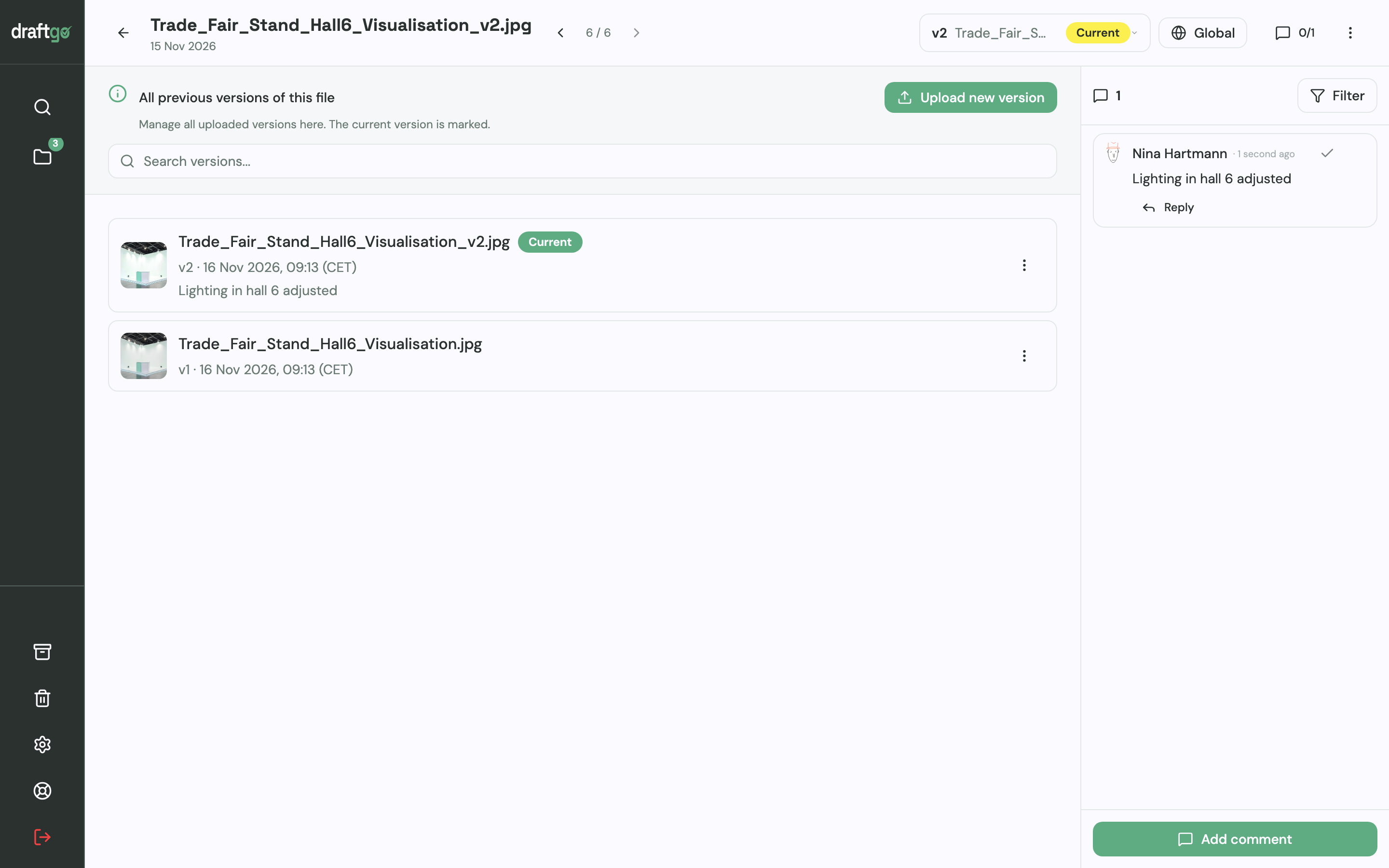
Images, PDFs, videos and audio files go into the project. Each correction goes onto the same file as a new version, earlier versions stay available one by one, and every comment belongs to its version.
2. Comment on the spot
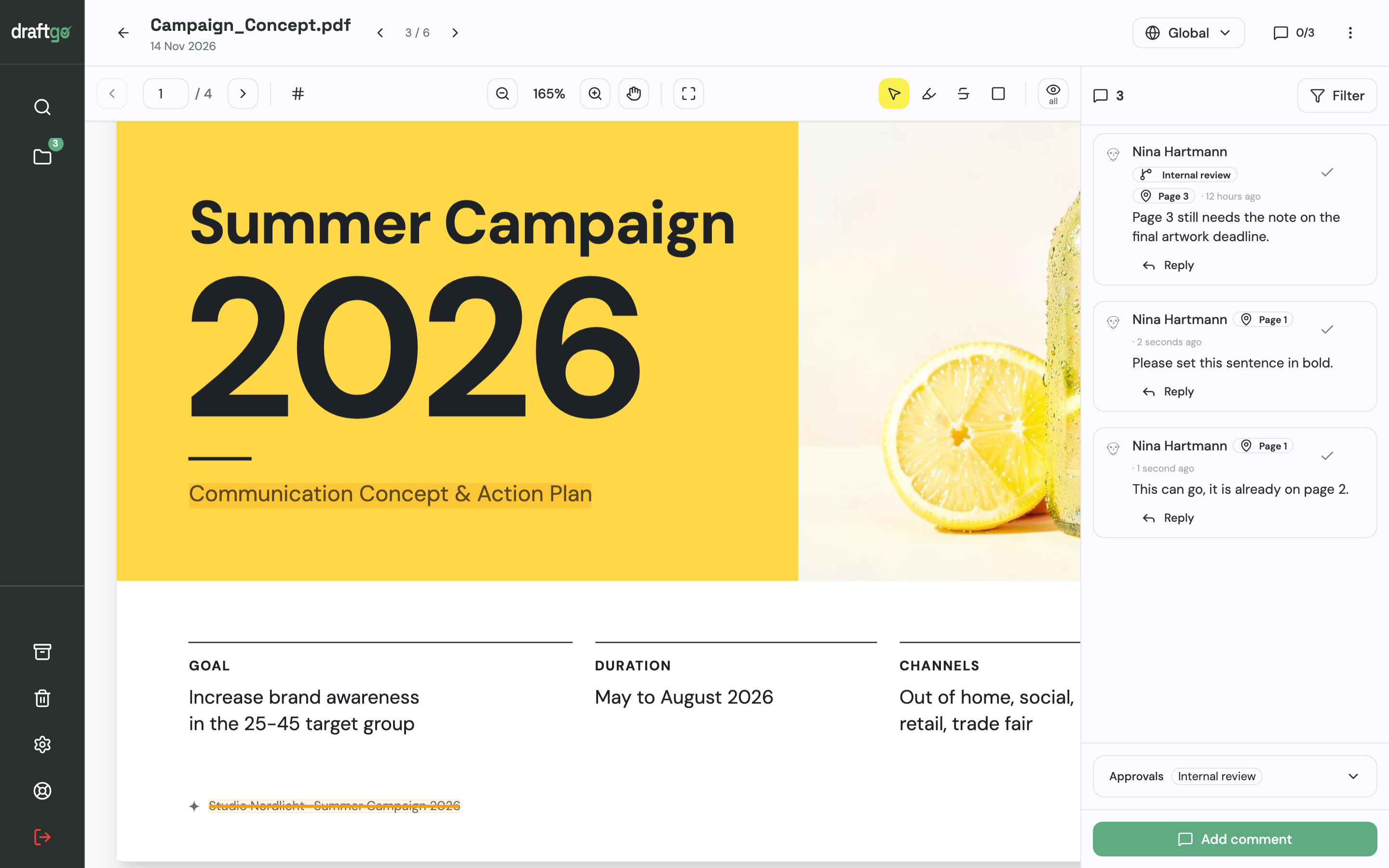
Comments sit as pins or rectangles on images and PDF pages, as text highlights or strikethroughs in PDFs, or at a timecode in video and audio. Reviewers reply in the thread, and a resolved comment is ticked off and stays in the file.
3. Approve in a loop
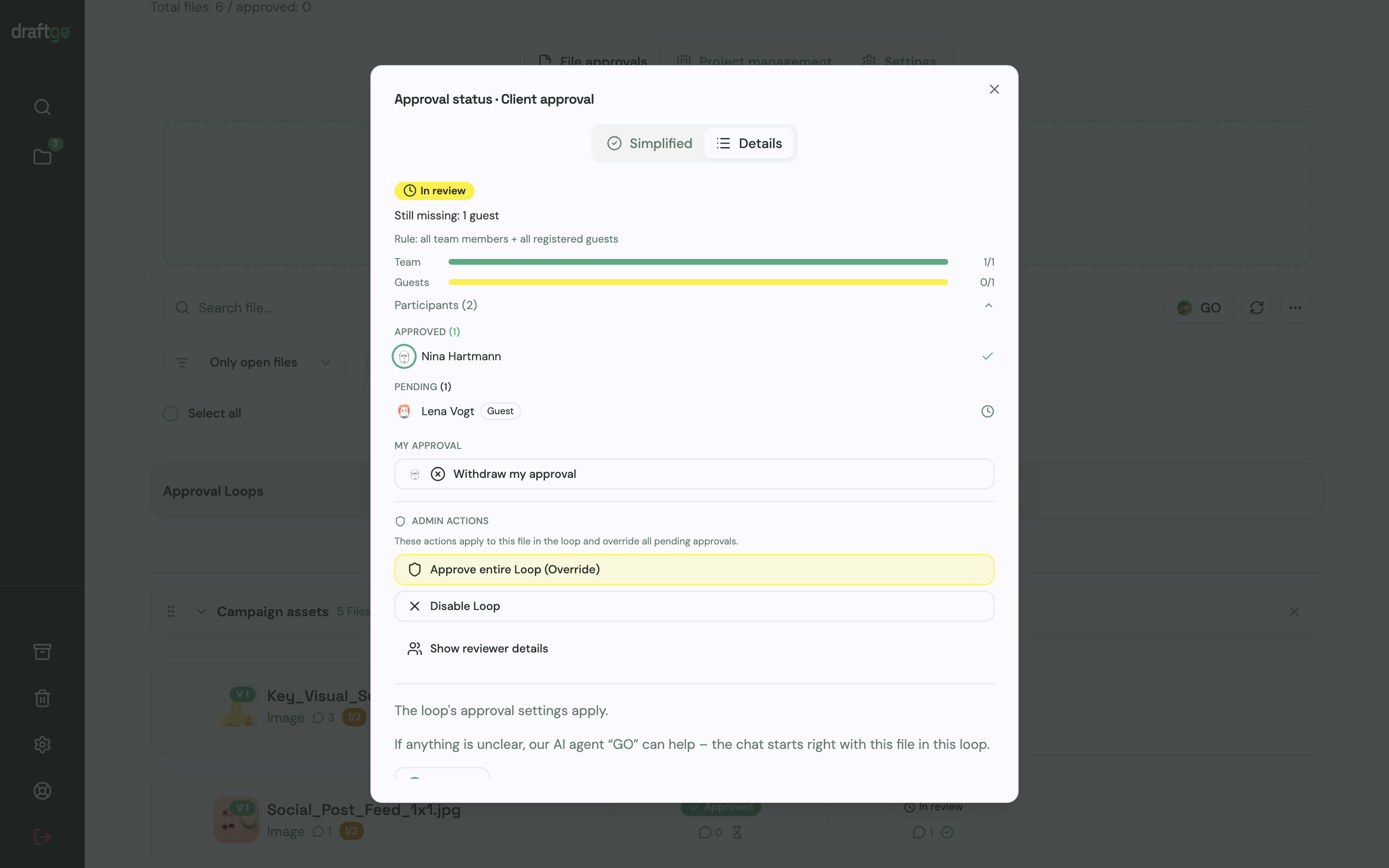
For each approval loop you decide whether everyone, a set number of people or any one of them must approve, separately for your team and for guests. Clients approve through a personal approver link with their name and email address, without an account, and a new version starts the approvals again. The approval status shows who has approved and who is still pending.
4. Export the activity log
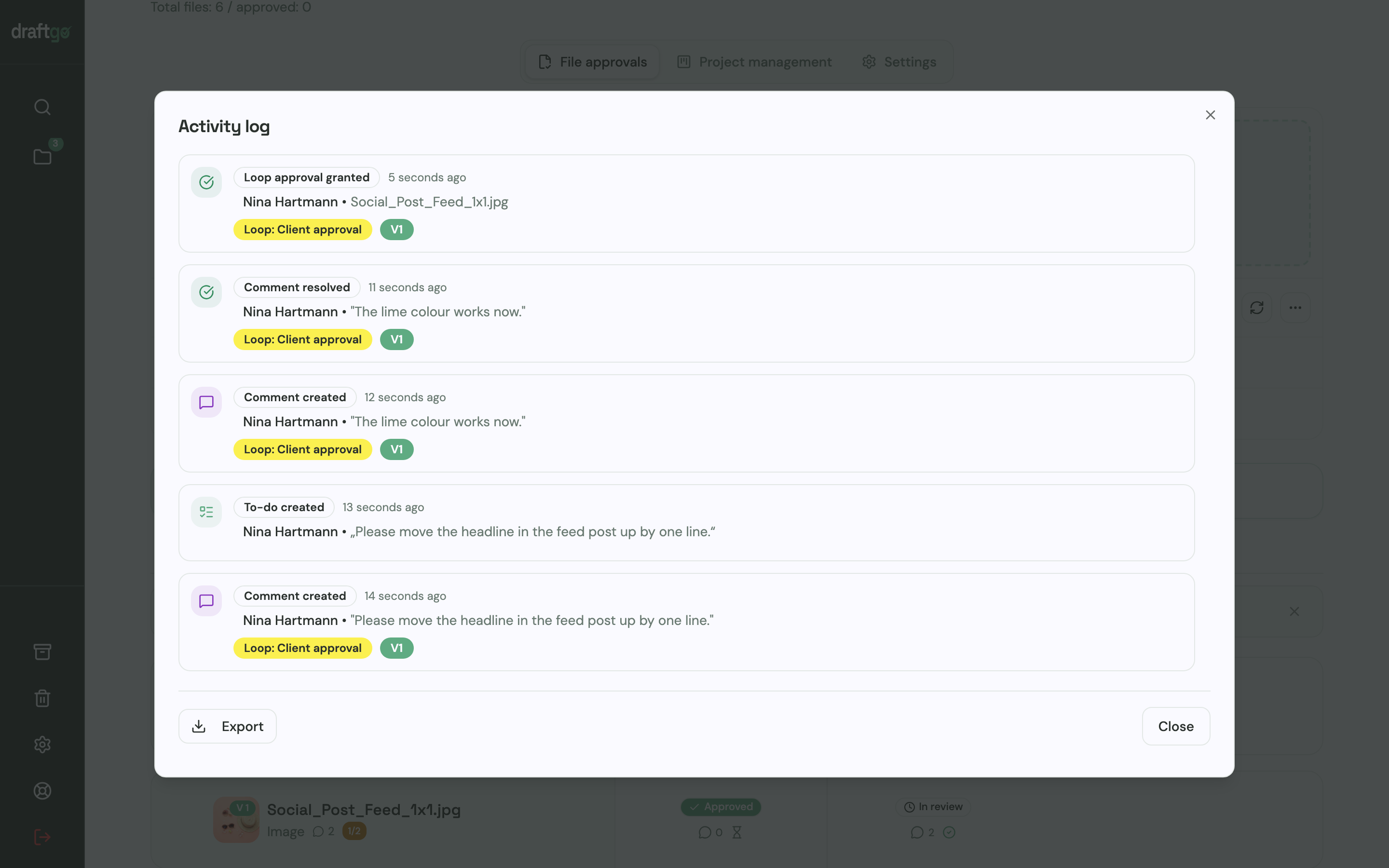
The activity log records approvals, comments, versions and downloads with the person and the time, and you export it as CSV, JSON or PDF. For a single file there is also its review documentation as PDF and CSV.
FAQ
What is the difference between an audit trail and version history?
Version history shows which states of a file exist. An audit trail links those states to comments, people, times and approvals, so you can see why a version changed and who agreed to it.
Is an approval by email enough as proof?
An email can serve as proof if it names the file and the version, for example "We approve the spring brochure, version 4". A "looks good" without a file reference is hard to match to anything, so a log that ties each approval to a person, a time and a version is the clearer record.
Is an approval the same as a signature or acceptance of the work?
Not necessarily. An approval records that a person agreed to one version at a certain time. Whether it also counts as acceptance of the work or as a signature depends on your contract and the law that governs it, so state in the contract what an approval means. For documents that need a formal signature, use a dedicated e-signature service.
How long should I keep approval records?
Keep them as long as a claim about the project could still be brought, which depends on the law of your contract and, in the US, on the state. A contract or a client's own record-keeping rules can ask for longer. Since the records hold names and email addresses, delete them once none of these reasons applies.
Conclusion
An audit trail is the quickest answer to "we never approved that". Run your next project with one place for feedback, named approvers and an exported log at the end. If a colleague who wasn't involved can read the approved version, its approver and the date off that export, make it your routine for every client.
Try it free – draftgo is free for 14 days, no credit card needed.
Written by
Emilia
Content Producer
Ready to streamline your approval processes?
Get started with draftgo today and see how easy professional collaboration can be.