
The website relaunch for a physiotherapy practice was quoted at 60 hours. When the agency owner prepares the invoice at the end of the month, the timesheets show 85. Part of the gap went into a third round of homepage changes the client sent as voice messages. More went into a header the designer rebuilt from an outdated file, because the current one sat in a colleague’s downloads folder. Two calls were spent finding out who at the practice had actually agreed the menu structure.
The 25 extra hours trace back to three rules nobody had agreed: where feedback goes, how files are named and who approves. An agency workflow writes those rules down.
What is an agency workflow?
An agency workflow is the fixed sequence of steps a client job follows in your agency, from the first enquiry and the quote to delivery and the final invoice. Each step has an owner and a result that is finished before the job moves on.
It is wider than the creative process alone. Our guide to the five stages of a marketing workflow follows marketing requests from intake and planning through production and review to launch and reporting. The agency workflow adds the business side around that work: the quote, onboarding a new client, the hours you track and the invoice.
An agency workflow can be split into seven stages:
| Stage | Result | Owner | What can go wrong |
|---|---|---|---|
| 1. Enquiry and quote | Signed quote with scope and included revision rounds | Account lead | Scope agreed on the phone and never written down |
| 2. Onboarding and kick-off | Contacts, access and the client’s approver named | Account lead | Nobody asks who on the client side signs off |
| 3. Brief | Brief confirmed by the client in writing | Account lead or strategist | Goal, audience or mandatory content missing |
| 4. Production | First draft ready for review | Creative lead | Work starts from an outdated file |
| 5. Review and approval | Approved version, internal check first, then the client | Project manager | Feedback arrives by email, chat and phone |
| 6. Delivery | Final files in the agreed formats | Project manager | The client gets an older version |
| 7. Invoice and wrap-up | Invoice sent, job archived | Agency owner or finance | Hours never booked to the job |
Why agency workflows break down
Agency workflows break down where a step has no agreed rule, so each person handles it their own way. Four patterns are behind hours like these:
- Knowledge in one head: only the senior designer knows where the source files are, so the job stops when they are on holiday.
- No named approver: three people on the client side comment, and nobody is entitled to settle their contradictions.
- Feedback in too many places: someone has to collect comments from email, chat and phone before the designers can continue.
- Hours nobody books: meetings and extra rounds never reach the timesheet, so the next quote repeats the gap.
8 levers to improve your agency workflow
The eight levers below close these gaps, and you can introduce them one at a time. Start with the one that matches the sticking point on your last job.
1. Write down your standard processes
Questions such as “Where are the project files?” or “How do we name versions?” interrupt work whenever nobody has written the answer down. Document your core processes in one shared place, such as an internal wiki:
- Project start: the same folder structure for each new job.
- File names: one rule, for example
Client_Asset_v03_2026-11-17. Our guide to version control for creative files has naming and numbering tables you can copy. - Archive: when and where finished jobs are stored.
A test for each process: could a new team member do this task using only the documentation? If yes, it no longer depends on one person.
2. Name an owner and one approver per client
A job stalls when everyone assumes someone else is handling the next step. A responsibility matrix such as RACI settles this per stage: who does the work (Responsible), who owns the result (Accountable), who gives input (Consulted) and who is kept up to date (Informed). For client work, put the name of the person who gives final approval into the quote or the brief, so conflicting feedback has one person who decides.
Try it yourself: In the demo you work in a real draftgo workspace with sample data.
3. Use fewer tools
When feedback comes by email, questions in chat, files from a cloud drive and tasks from a separate board, information has four places to get lost. List the tools you use at each stage and check where one can replace two. Our overview of agency software by category shows which job each type of tool covers.
4. Give feedback and approval one route
Feedback by email can leave comments spread over long threads, with no clear record of what the client approved. Agree on one place for comments, directly on the file, with corrections uploaded as new versions and a record of who approved which version. Plan the approval in rounds, an internal check first and then the client, so the client sees drafts your team has already checked.
5. Track time against jobs and tasks
Time records do more than feed the invoice. Book hours to the job and the task, including meetings, internal reviews and extra feedback rounds, and look at the figures once a month. You then see which clients are profitable, which tasks take longer than quoted and how many rounds to include in the next quote.
6. Brief with a template
The first draft can only be as clear as the brief behind it. A template for the job types you handle again and again asks for the goal, audience, key message, formats, mandatory content, no-gos, deadline and approver. Our creative brief template is a free download as Word or PDF, with nine sections to fill in.
7. Standardise onboarding for clients and new hires
New clients and new team members both need a clear start. A new colleague gets a short guide to tools, processes and contacts, and a new client gets a welcome pack that names their contact and explains how feedback and approval run. Our client onboarding guide for agencies covers the steps from signed contract to first approval.
8. Look back after each project
After larger projects, or once a month, hold a short retrospective with three questions: What went well? What went badly? Which one change do we make next time? Write that change into the documentation from lever 1, so it reaches the next job.
Common mistakes and better practice
These are the mistakes that undo a workflow change, with what to do instead.
| Mistake | Effect | Better practice |
|---|---|---|
| Changing everything at once | The team drops back into old habits | One lever at a time, tested in a pilot project |
| Several client reviewers without a decider | Contradicting comments in the same round | One named approver per client, everyone else comments |
| Revision rounds left out of the quote | Extra rounds are done for free | Included rounds in the quote, extra ones tracked |
| A new tool on top of the old ones | Feedback now arrives in four places instead of three | Retire one channel for each tool you add |
Practical example: a nine-person studio takes on two new clients
Take a nine-person branding studio that designs labels and packaging for food and drink brands. It is about to take on two retainer clients, and its account manager still spends hours each week copying feedback from emails into one list.
In the first week, the studio writes down its folder structure and naming rule and adds the included revision rounds to its quote template. For both new clients it names one approver in the brief: the head of marketing at one, the managing director at the other.
The first label job runs as a pilot. The client’s approver gets a personal link to approve, the brand manager and the product developer get a shared link to comment, and the creative director checks each draft first. In the retrospective afterwards, the team adds a field for the ingredients list to its brief template, because the product developer only sent it in round two.
How it works in draftgo
In draftgo, lever 4 runs in one project per job: clients comment on the file, corrections arrive as versions and approvals follow the rounds you set up.
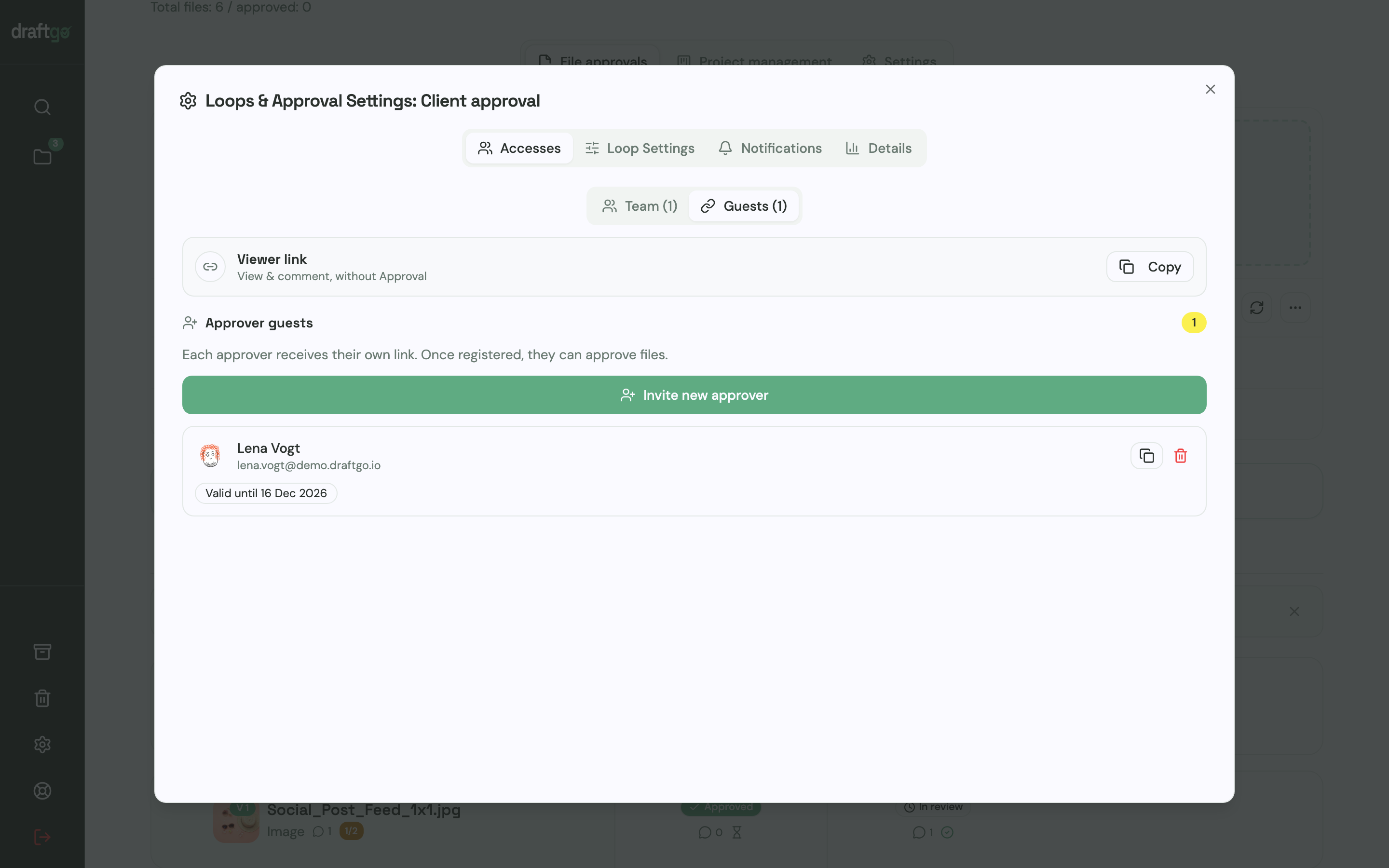
- Set up your rounds as loops. Add an internal loop and a client loop to the project. For each loop you decide who approves and whether all approvers, a set number or any one of them have to agree, separately for the team and for guests. A project holds one loop on Free, three on Freelancer and as many as you need on Agency and Team, as the plans and prices show.
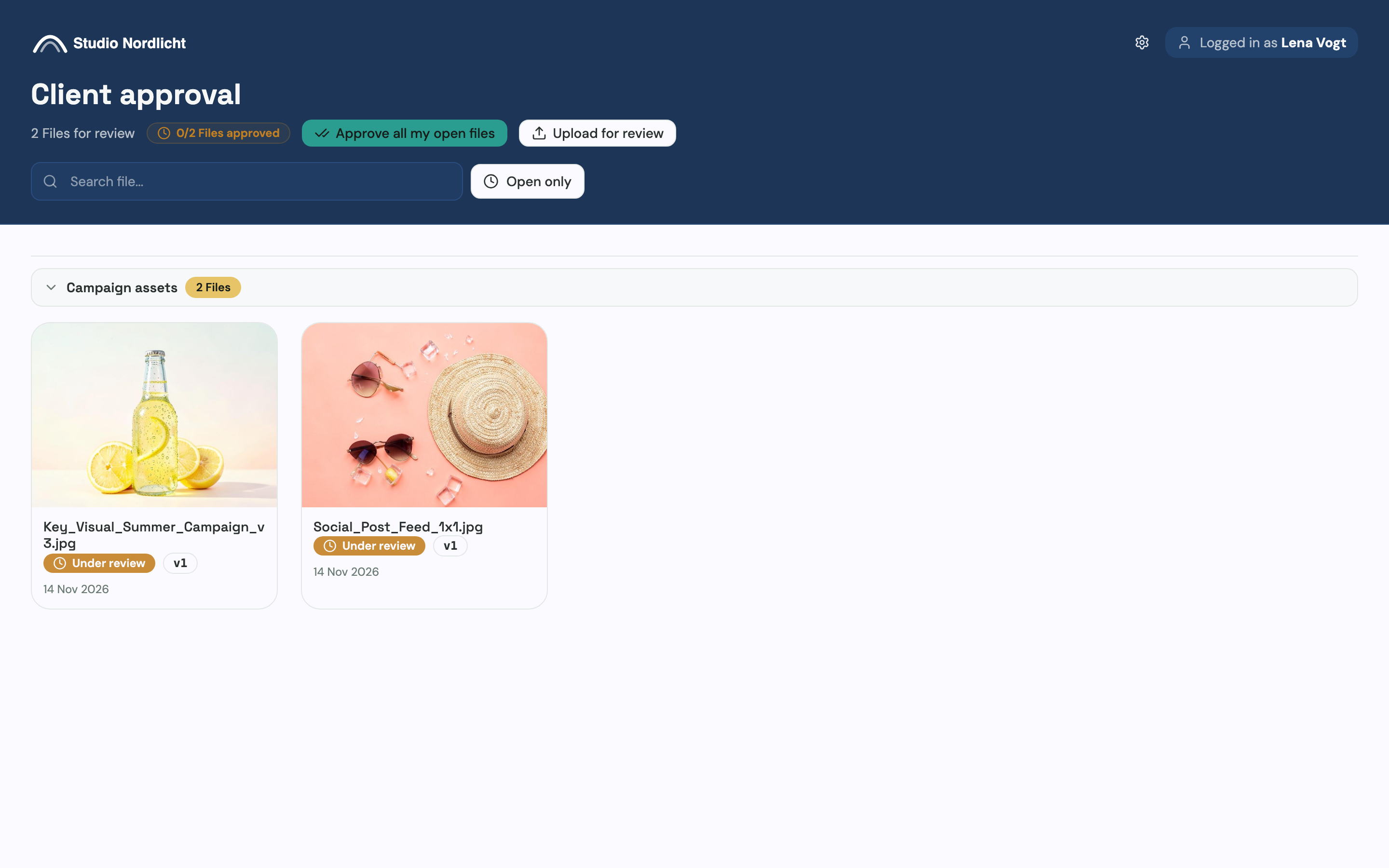
- Invite the client without an account. The person who decides gets a personal approver link. Everyone else who should comment gets the shared viewer link, which lets them comment but not approve.
- Collect feedback on the file. Clients place a pin or a rectangle on images and PDF pages, highlight text in a PDF or comment at a point in a video. You reply in the thread, mention colleagues with @ and turn a comment into a to-do on the project board.
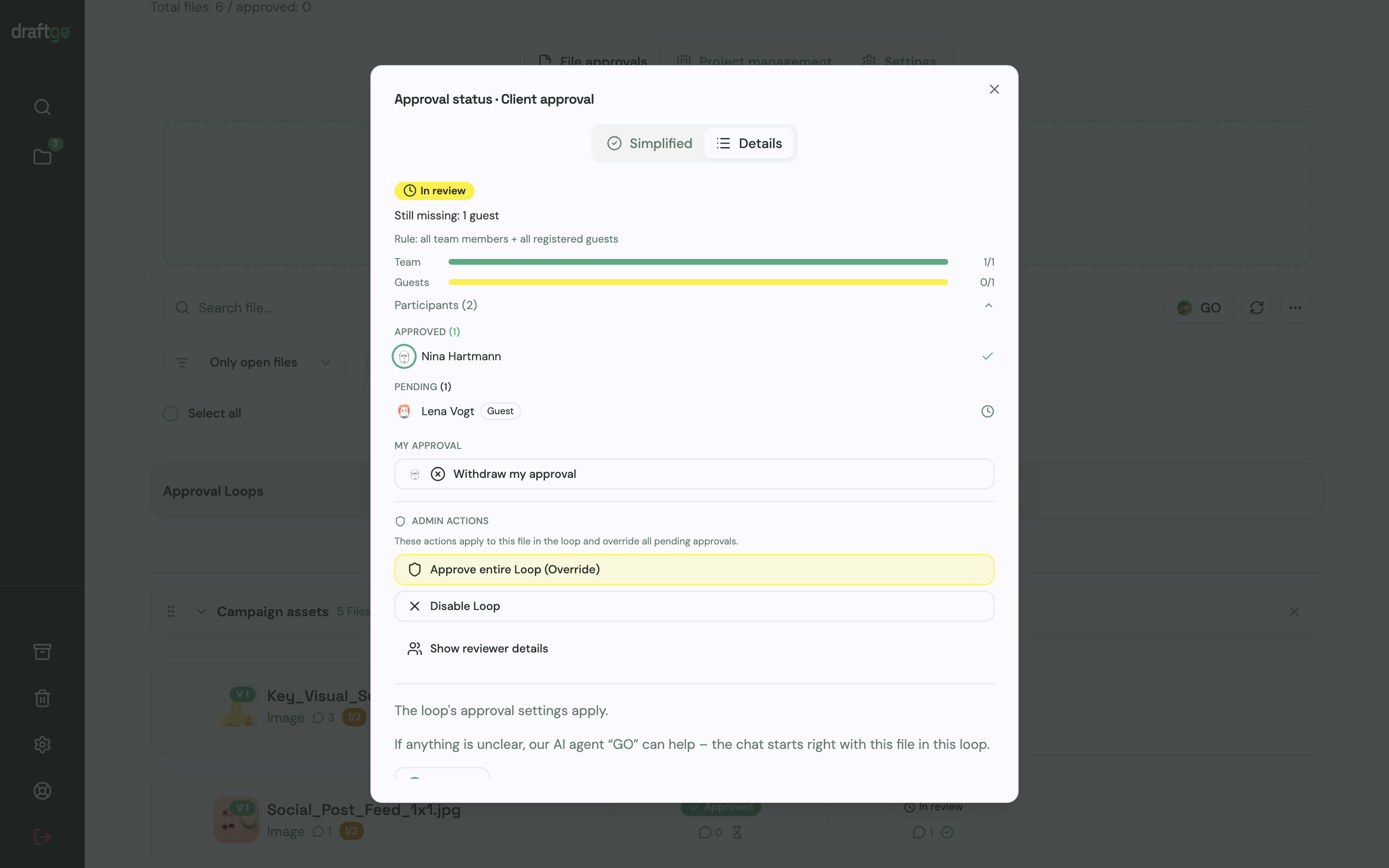
- Upload corrections as a new version. Earlier versions stay available and the approvals start again. Once the internal loop has approved the file, you activate it in the client loop, where the approval status shows who has approved and who is still pending.
- Show the client your own brand. From the Agency plan on, the app and the guest view carry your logo and colours, without the “powered by draftgo” notice.
- Keep the record. When a client asks who approved the final label, you export the activity log as CSV, JSON or PDF. It lists approvals, comments, versions and downloads with person and time.
Hours and invoices stay in the tools you already use for them. The page draftgo for agencies shows the setup for client work.
FAQ
What goes wrong when agencies change their workflow?
Changing everything at once can overwhelm the team and create resistance. Change one lever, let the new routine settle in a pilot project, then move on to the next sticking point.
How do I get my team to follow a new workflow?
Explain what the change saves them, such as searching for files or copying feedback from emails into lists. Involve the people who do the work when you write the rule, and start with one pilot project where they see the difference themselves.
Do I need software to improve my agency workflow?
No. File naming rules, brief templates and named approvers work without a new tool. Stages with many people involved, such as feedback and approval, are easier with a tool built for them, because comments, versions and approvals stay together on the file.
When should a small agency or freelancer formalise its workflow?
From the first client. Templates for quotes, briefs and approvals help a freelancer as well, and once you take on your first employee, they let that person work the way you do without asking.
Conclusion
You improve an agency workflow one lever at a time, starting with the stage where your hours went missing. Pick the lever for the sticking point that cost you time on your last job and test it in a single pilot project this month.
Try it free – draftgo is free for 14 days, no credit card needed.
Written by
Emilia
Content Producer
Ready to streamline your approval processes?
Get started with draftgo today and see how easy professional collaboration can be.