
The marketing manager of three independent cinemas watches the trailer for the winter season in Frame.io and leaves her notes at the exact frames. Twenty minutes later she prints the season programme, circles two wrong screening times with a pen and emails a photo of the page. Only the agency’s two editors have Frame.io seats, so the designers never upload their PDFs there, and the producer ends up typing notes from a phone photo into a task list.
That split is one reason to look for a Frame.io alternative. You want one place where clients review the cut, the poster and the programme, at a price that does not rise with every colleague on the account.
Why teams look for a Frame.io alternative
Frame.io’s own pricing page shows two things that matter in a comparison. It charges per member, and its extras centre on video production. The free plan covers up to 2 members, 2 GB of storage and 2 projects. Billed monthly, Pro costs $15 per member per month plus tax for up to 5 members and Team $25 per member per month plus tax for up to 15 members; billed annually, they cost $156 and $264 per member a year plus tax, which Frame.io calls a 13% discount (Frame.io pricing, as of 17 November 2026). Each member you add raises the bill, and a sixth member means moving from Pro to Team.
The second point is focus. Even the free plan includes Camera to Cloud, which uploads takes straight from the set, and Frame.io names integrations with Premiere, Final Cut Pro and Lightroom. It also shows photos and design files and lists document markup (Frame.io Review & Approval), but if most of your client work is print PDFs, key visuals and social posts, a tool built around online proofing and client approval can fit better, with set rules for who signs off at which stage.
How we evaluated the alternatives
We read each vendor’s pricing and product pages on 17 November 2026 and used only what they state there. Our criteria were the pricing model, the free plan, file types, reviewers without an account, approval stages and integration with editing software. The order follows how close each tool stays to Frame.io’s focus on video production, so it is not a ranking. draftgo is our product.
| Tool | Suited for | Free plan | Difference from Frame.io | Entry price (17 Nov 2026) |
|---|---|---|---|---|
| Dropbox Replay | Teams on a paid Dropbox plan | Limited Replay features on Dropbox Basic | Part of Dropbox, live review sessions, uploads up to 150 GB | Add-on at €9 per user a month, billed annually (Dropbox Replay) |
| Filestage | Teams with internal and external review rounds | 1 active project, 5 new files a month | Price per plan with 10 seats included, reviewer groups | Starter at €199 a month, billed yearly (Filestage pricing) |
| Ziflow | Teams that review many formats in stages | 2 users, 2 GB, 60 days of review history | More than 1,200 file types, workflow stages, live websites | Standard at $199 a month, billed annually (Ziflow pricing) |
| draftgo | Agencies and freelancers approving videos, PDFs and images with clients | Permanently free: 1 user, 2 GB, 2 projects | One price per company, loops with rules for team and guests | One price per company, see the entry below |
4 Frame.io alternatives compared
1. Dropbox Replay: suited for teams on a paid Dropbox plan
Replay is the review and approval tool of Dropbox. Its product page lists video, image, audio, PSD and PDF projects, uploads of up to 150 GB and audio and video of up to 12 hours, and it says that files uploaded to Replay count towards your Dropbox storage, while files already in Dropbox do not count a second time (Dropbox Replay). In a live review session, everyone watches the same video or audio file in sync and comments at the same moment (Replay overview).
- Pro: editors stay in their editing app, from Premiere Pro to DaVinci Resolve; very large uploads; live review sessions with the client.
- Contra: priced per user, like Frame.io; the add-on needs Dropbox Plus or a higher plan and is not available on the Family plan.
- Price: the Replay add-on costs €9 a month per user billed annually (€108 a year) or €11 a month per user billed monthly (Dropbox Replay), and it adds password protection for shared links, video transcription and captions and large file transfers (Replay overview). Plus, Standard and Advanced include Replay for 4 file uploads (Dropbox plans).
2. Filestage: suited for teams with internal and external review rounds
Filestage reviews videos, images, designs, documents, websites, interactive HTML and audio files in one platform. Reviewer groups keep internal and external rounds apart, and reviewers give feedback without creating an account (Filestage pricing). Starter adds due dates and reminders, a side-by-side comparison of two versions, team-only comments and password-protected review links. For video work, Filestage connects to Premiere Pro, where comments appear in the timeline, and to After Effects (Filestage integrations).
- Pro: every plan includes 10 team seats instead of a price per member; unlimited reviewers; due dates and reminders from Starter.
- Contra: a team of two pays the same Starter price as a team of ten; overlay and text comparison come only with Business (Filestage pricing).
- Price: Starter at €199 a month and Business at €329 a month, each billed yearly; further seats come in bundles of 5 (Filestage pricing). Our draftgo vs Filestage comparison goes into more detail.
Try it yourself: In the demo you work in a real draftgo workspace with sample data.
3. Ziflow: suited for teams that review many formats in stages
Ziflow names more than 1,200 reviewable file types, from Office documents and Adobe Creative Cloud files to live websites and HTML5 banners, and takes feedback on video and audio down to the second (Ziflow pricing). Proofs move through workflow stages that run one after another or in parallel: one stage on the free plan, two on Standard and three on Pro. Plugins create and share proofs from Premiere Pro and After Effects, and an extension shows feedback in Final Cut Pro X.
- Pro: unlimited reviewers on every plan; pixel-level version comparison and Adobe Creative Cloud plugins already on the free plan; 15 users included on Standard.
- Contra: the free plan keeps review history for 60 days; Standard has proof deadlines with manual reminders, while automatic deadline reminders come with Enterprise.
- Price: Standard at $199 a month and Pro at $329 a month, each billed annually (Ziflow pricing). Details are in our draftgo vs Ziflow comparison.
4. draftgo: suited for agencies and freelancers approving videos, PDFs and images with clients
draftgo is an online proofing platform for images, PDFs, videos, audio files, website screenshots and social media posts. Clients comment through a link without an account: on the image, as a text highlight in the PDF, or at a timecode in a video or audio file. Approvals run in loops, for example an internal loop and then a client loop, and each loop has its own rule for who has to approve. A project holds one loop on Free, three on Freelancer and as many as you need on Agency and Team. Stored data is kept on EU servers in the Frankfurt data centre.
- Pro: one price per company instead of per member; unlimited guests from the Freelancer plan; approval rules per loop, separately for team and guests; from the Freelancer plan you can start the AI review on PDFs, images and social posts, and its findings appear as comments from our AI agent “GO”.
- Contra: no integration with Premiere Pro or Final Cut Pro, so editors upload exported files; no version comparison; files of up to 500 MB, with videos of up to 800 MB compressed in the browser before the upload.
- Price: a permanently free plan and paid plans priced per company, shown on draftgo pricing.
Frame.io and draftgo compared
Both tools review video with clients; they differ on pricing, editing integrations and how an approval works.
| Criterion | Frame.io | draftgo |
|---|---|---|
| Pricing model | Per member: Pro $15, Team $25 per member per month plus tax, billed monthly (Frame.io pricing) | One price per company; users per plan: Free 1, Freelancer 1, Agency 5, Team 15 |
| External reviewers | Public share links; passphrase and expiry from Pro | Guests without an account, unlimited from Freelancer, 5 guest accesses on Free |
| Video comments | Frame-accurate and range-based comments | Comments at a timecode |
| Other formats | Photos, design files, document markup | Images, PDFs with text highlights, audio on a waveform, website screenshots, social posts |
| Editing software | Premiere, Final Cut Pro, Lightroom, Camera to Cloud | Exported files, no integration |
| Versions | Version stacks and a comparison viewer | Versions on the same file, comments stay with their version |
| Approval | Review workflows with metadata and Collections, assigned reviewers are notified | Loops with a rule per loop: all approvers, a set number or any one of them |
Sources for Frame.io: its pricing page and the Review & Approvals page, as of 17 November 2026.
Which Frame.io alternative fits your team?
- You shoot with Camera to Cloud and cut in Premiere Pro or Final Cut Pro: stay with Frame.io, as those integrations are its strength.
- Your media lives in Dropbox and you need live sessions or very large files: Dropbox Replay adds review to the storage you already pay for.
- You run internal and external rounds with due dates and reminders: Filestage.
- You review live websites, banners and Office files in several stages: Ziflow.
- You approve videos next to PDFs, images and social posts and want one price for the company: draftgo. The draftgo vs Frame.io comparison covers the details.
If video is all you review, our video feedback tool comparison covers seven tools for that job.
Practical example: a regional airport’s seasonal campaign
Take a fifteen-person agency that produces seasonal videos and posters for a regional airport. The winter campaign consists of a 30-second spot for the terminal screens, three posters as print PDFs and four social images. So far, the editors have reviewed the spot in Frame.io, and the designers have emailed poster proofs.
Eight of the fifteen upload or manage files. That is more than the 5 members of Frame.io Pro, so Frame.io would bill its next plan up, for up to 15 members, at $25 per member a month, billed monthly (Frame.io pricing). The agency moves every client review into one draftgo project instead, on draftgo’s Team plan for up to 15 users at one price for the company, and the editors keep cutting in Premiere Pro. The project gets an internal loop, in which the creative director approves, and a client loop; two loops in one project need a paid plan. After the internal approval, the account manager activates the files in the client loop.
On the airport’s side, the head of marketing decides and gets the personal approver link. The operations manager, who checks check-in times, gets the shared viewer link and comments without approving. At 0:18 in the spot, the head of marketing notes that the lower third still lists a destination the airport no longer serves, and the operations manager highlights a wrong check-in time on one poster. The editor and the designer each upload version 2, and the approvals in the client loop start again for both files. When the head of marketing approves, the activity log records her approval with the version and the time.
How it works in draftgo
Your editors keep their editing setup, and the client review moves to draftgo.
- Bring the exports into one project. Upload the rendered cut next to the PDFs, images and social posts of the same job.
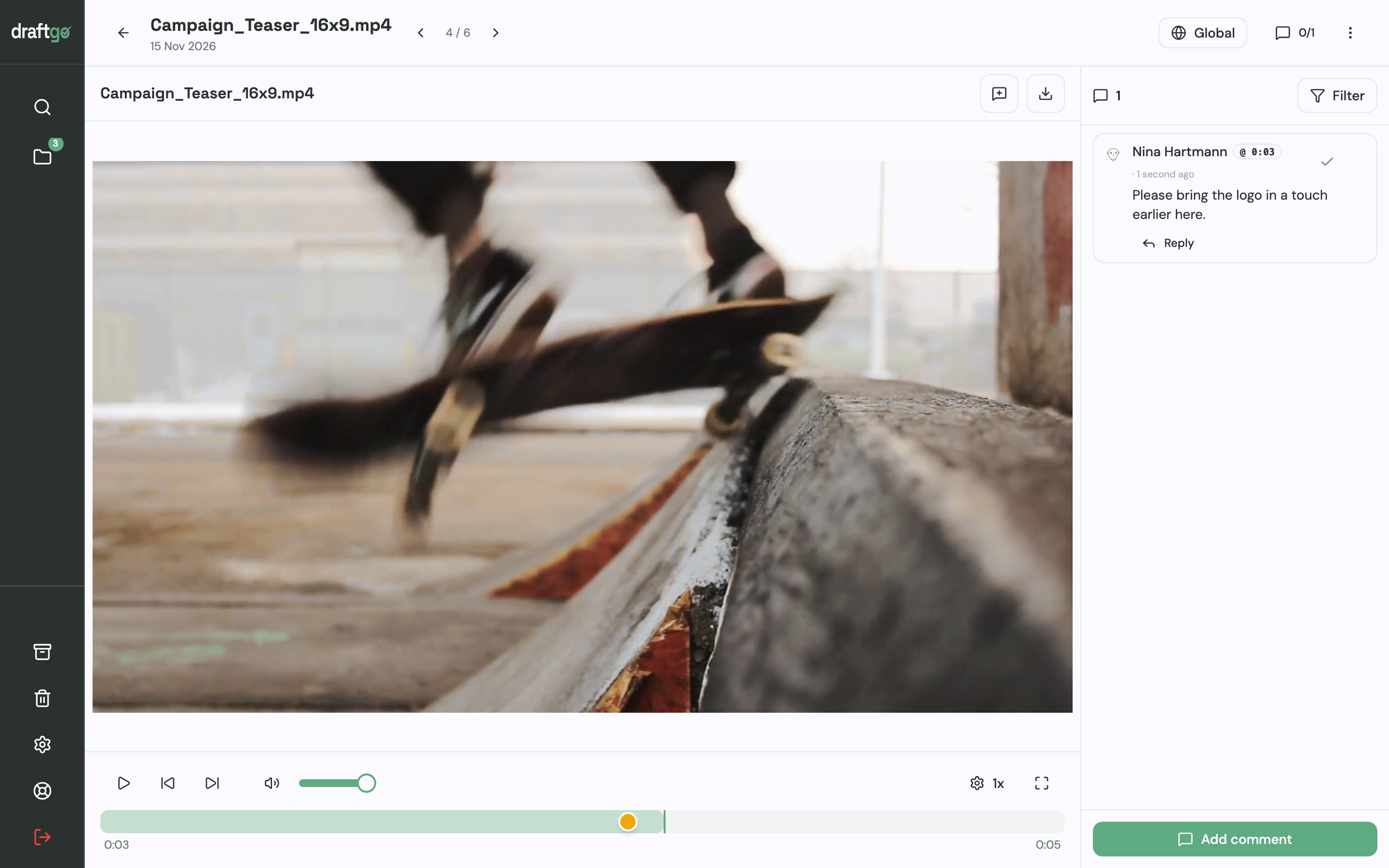
- Comment where the change belongs. Team and guests comment at a timecode in videos and audio files, highlight or strike through text in PDFs and pin notes on images.
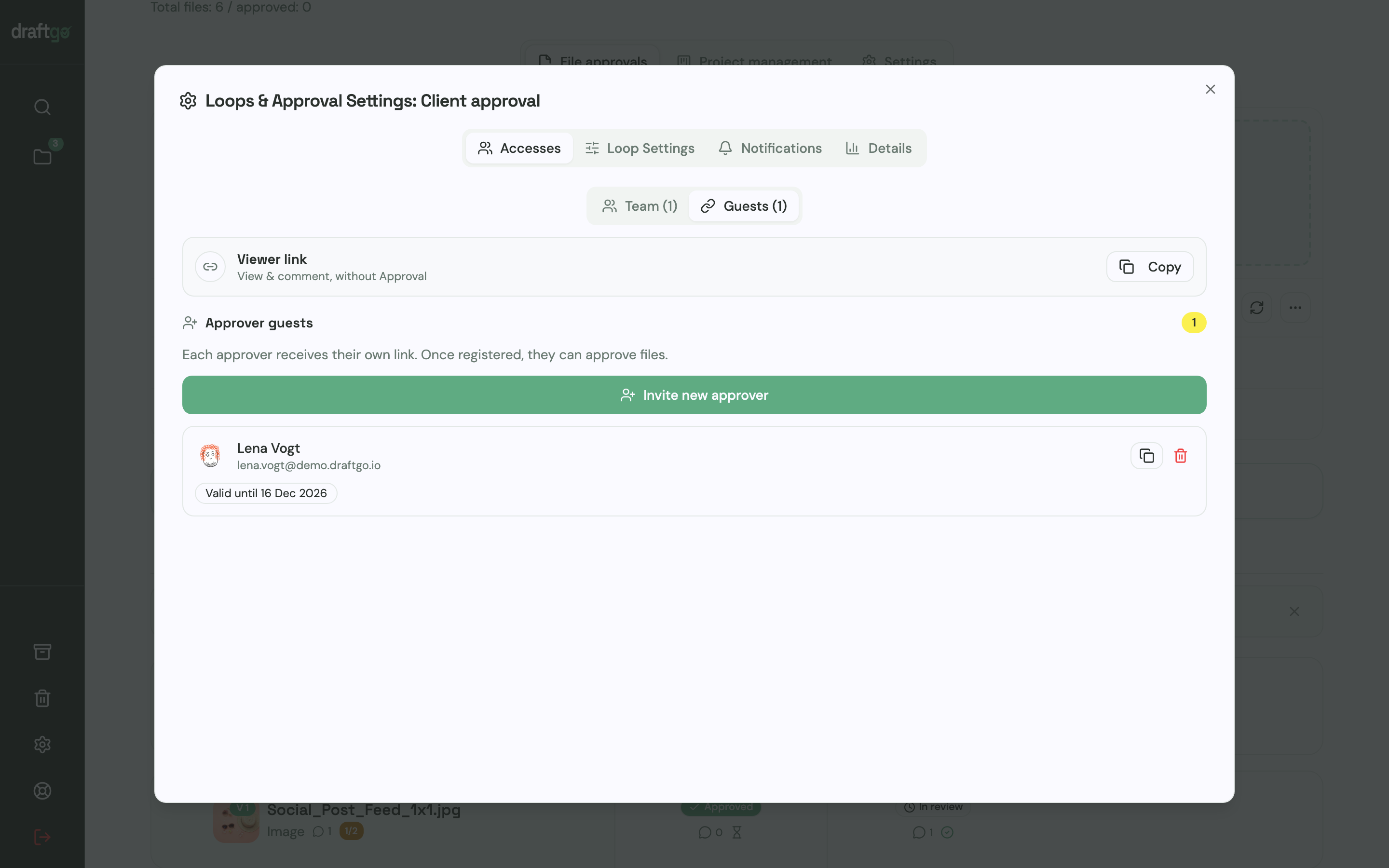
- Set who signs off in each loop. In the loop settings you decide how many approvals a file needs: every approver, a fixed number of them or any one of them, with one rule for your team and another for guests. Our video production workflow shows which phase needs which sign-off.
- Send each client the right link. The person who decides gets a personal approver link. Colleagues who should only comment use the shared viewer link, which cannot approve, and guests need no account for either.
- Upload the next cut as a version. It stays on the same file, earlier versions keep their comments, and the approvals start again. A note on the version tells the client what changed.
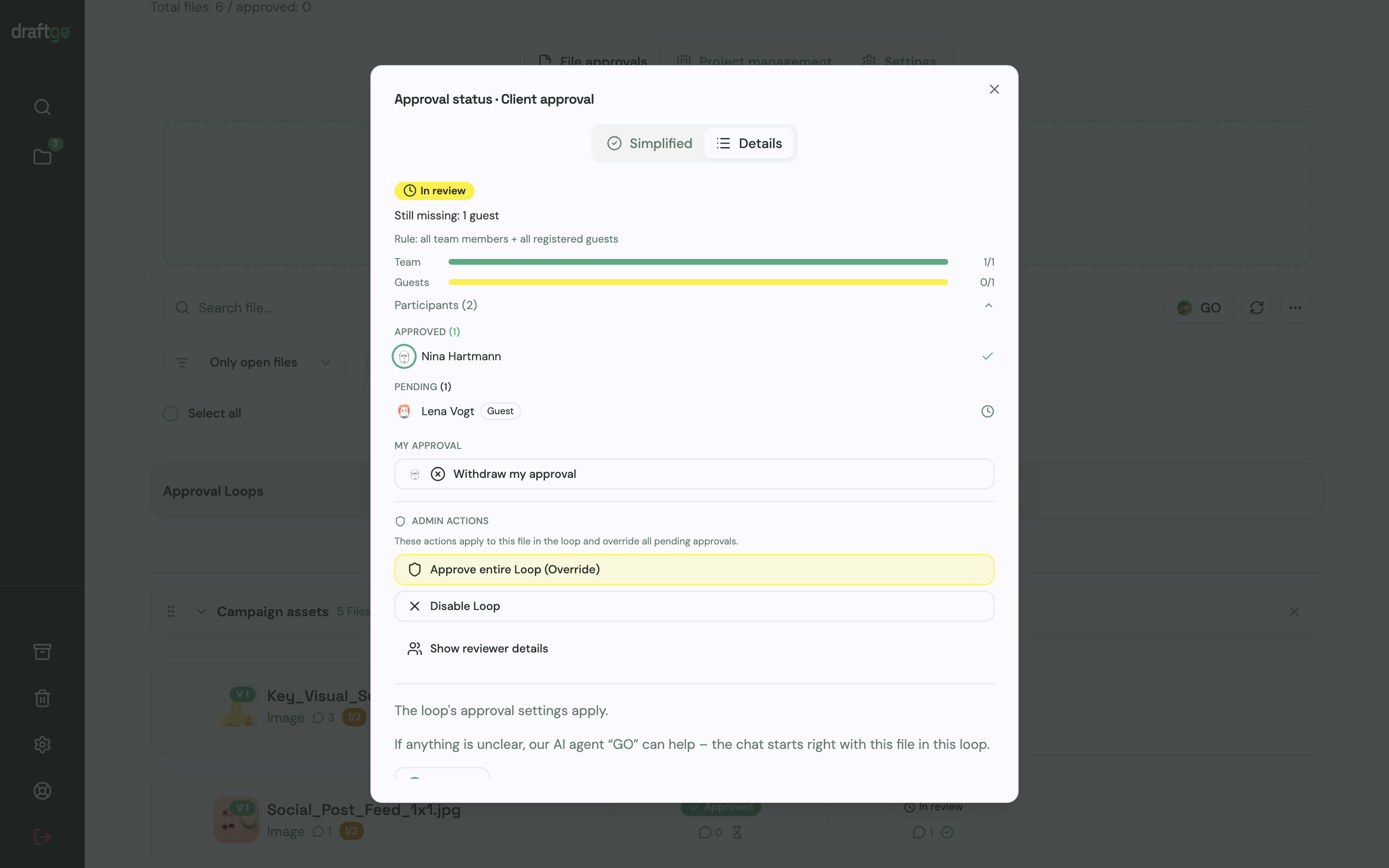
- Check who is still pending. The approval status of a loop shows who has approved and who has not yet. Approvals, comments, versions and downloads stay in the activity log with the person and the time, and you can export the log as CSV, JSON or PDF.
There is no panel inside Premiere Pro or Final Cut Pro, so every new cut arrives as an exported file. How agencies set this up for video is described on draftgo for video production.
FAQ
Is there a free Frame.io alternative?
Yes, each tool in this comparison has a free entry. Filestage’s free plan allows 1 active project and 5 new files a month (Filestage pricing), and Ziflow’s covers 2 users, 2 GB and 60 days of review history (Ziflow pricing). draftgo’s Free plan is permanently free with 1 user, 2 GB and 2 projects, and Dropbox offers Replay with limited features on its free Basic plan (Dropbox Replay).
Can editors keep working in Premiere Pro after leaving Frame.io?
Yes. Dropbox Replay, Filestage and Ziflow each name an integration with Premiere Pro on the pages linked in the comparison above, so editors share cuts or see comments without leaving their editing software. draftgo works with exported files: the editor uploads each render as a new version of the same file.
Do clients need an account to review files?
Not in Filestage, Dropbox Replay or draftgo. Filestage states that reviewers need no account to give feedback (Filestage pricing), and Dropbox says browser reviews need no Dropbox account (Replay overview). In draftgo, clients open a personal approver link or the shared viewer link, and only the approver link can approve.
Is Frame.io still the better choice for post-production?
If you shoot with Camera to Cloud and edit in Premiere Pro or Final Cut Pro, Frame.io keeps the review inside that chain, and its plan comparison lists frame-accurate and range-based comments (Frame.io pricing). An alternative makes more sense when much of your client work is not video, or when the price per member no longer fits your team.
Conclusion
Before you switch, count how many people need their own seat and list the file types your clients approve in a typical month. If the answer is mostly video and an editing suite, stay with Frame.io or test Dropbox Replay; if video sits next to PDFs, images and social posts, run one live client job through draftgo.
Try it free – draftgo is free for 14 days, no credit card needed.
Written by
Emilia
Content Producer
Ready to streamline your approval processes?
Get started with draftgo today and see how easy professional collaboration can be.