
A retainer client asks why this month’s report shows far more hours than last month’s. The account manager goes through the team’s calendars and finds that much of the extra time went into a set of display banners that went back and forth with the client five times. None of those rounds were logged as such, so the answer to the client is a guess.
Agency time tracking replaces the guess with figures per client, project and task. This guide covers what to record, what US, UK and EU law asks of employers, six steps to set it up and how to cut the hours that go into review rounds.
What is agency time tracking?
Agency time tracking is the logging of hours per person against a client, a project and a type of task, such as design, copywriting, account management or revisions. It covers billable hours you charge to a client and non-billable hours for pitches, admin, internal meetings or training.
Two records are easy to mix up here. Working-time records show when and how long employees worked, and the law can require them. Project time shows what the hours went into and whether a job made money.
Do agencies have to track employees’ working time?
For many employees, yes, but the rules depend on where your staff work. None of these rules says how to log time against clients and projects.
- United States: Under the Fair Labor Standards Act, every covered employer must keep records for each non-exempt worker, including the hours worked each day and the total hours worked each workweek. Employers may use any timekeeping method they choose, and the records on which wage computations are based, such as time cards, should be kept for two years (US Department of Labor, Fact Sheet #21, revised 2008).
- United Kingdom: The weekly limit is 48 hours on average, normally averaged over 17 weeks, and employers need to keep some records about working hours (GOV.UK: Maximum weekly working hours). In England, Wales and Scotland, those records must be adequate to show compliance with the limits and be kept for two years, and since 1 January 2024 employers need not record each worker’s daily hours if they can show compliance without doing so (Working Time Regulations 1998, regulation 9).
- European Union: On 14 May 2019, in Case C-55/18, the Court of Justice of the EU ruled that member states must require employers to set up an objective, reliable and accessible system that measures the time each worker works each day. Each country defines the form, which can take account of the sector or the size of a company (Court of Justice of the EU, press release No 61/19, 2019), so check the national rules where your staff work.
This article is general information, not legal advice.
What agency time data tells you
Logged against clients and task types, the hours answer four questions that otherwise rest on gut feeling. The answers feed into your next quotes, contracts and staffing plans.
Which projects earn their fee?
Compare the estimate with the hours logged when a project closes. On a fixed fee, the effective hourly rate shows the result: £6,000 ÷ 60 hours = £100 an hour, while 80 logged hours make it £6,000 ÷ 80 = £75. The comparison only works if the scope was written down first, which is what a creative brief template is for.
When does a retainer run over?
A retainer is heading for an overrun when its hours are used up faster than the month goes by. If two-thirds of them are gone by the middle of the month, the log tells you while there is still time to talk to the client.
How much time goes into feedback and revisions?
Give feedback rounds a task type of their own. Otherwise the hours spent collecting comments from emails, settling contradictions and making the changes disappear into production time, and the next quote misses them again. How to keep rounds short is covered in the guide to feedback management.
Who has too much on their plate?
Utilisation compares billable hours with available hours: someone who bills 28 of 35 available hours in a week works at four-fifths utilisation. Per person over a month, it shows who is overloaded and who has room for the next project.
Try it yourself: In the demo you work in a real draftgo workspace with sample data.
Why agency time tracking breaks down
Time tracking fails when the entries stop being accurate or nobody uses them. These are the causes to watch for:
- Logging from memory: entries written up at the end of the week are estimates, and short tasks such as a client call vanish.
- It feels like surveillance: without a stated purpose, people can start rounding their hours to look busy.
- Too many task types: a list of 40 options turns every entry into a search.
- Figures nobody reads: when the data never leads to a decision, the entries get sloppier.
How to set up agency time tracking in 6 steps
Set up tracking so that it answers your questions with as little effort per entry as possible, from the first decision to a monthly routine.
1. Decide which questions the data should answer
Write down two or three questions before you look at tools, for example which project types run over budget or how many revision hours each client needs. Share them with the team, so everyone knows the figures are about jobs and quotes.
2. Keep the list of task types short
Add a handful of task types that match how you quote, such as concept, design, copy, artwork, account management and feedback and revisions, plus internal types such as pitches and admin. Merge any type that never changes a decision.
3. Agree simple rules for entries
Log every working day, not once a week. Agree on an increment such as 15 minutes, a short note on what the time was for and who fills the gaps when someone forgets.
4. Choose a tool that fits the way you work
A spreadsheet can work for two or three people. Beyond that, a tool with timers and reports per client saves the manual adding up, and agency management tools tie the hours to budgets and invoices. Our comparison of agency software sorts the options by what they do.
5. Pilot with one team or one client
Run the setup with one team or one client for four to six weeks. Then adjust the task types and rules before the whole agency starts.
6. Review the figures every month and act on them
Put estimate against actual for each finished project and look at revision hours per client. Then change something: the hours in the next quote, the revision rounds included in the contract or the review rules you agree with a new client during client onboarding.
Common time tracking mistakes and what works better
| Mistake | What happens | Better practice |
|---|---|---|
| Only billable hours are logged | Rates leave out pitches and admin | Log internal time in a few fixed task types |
| Calls and emails go into a general bucket | The client who causes the work never sees it on a report | Log them against the client they belong to |
| Timers keep running when someone switches jobs | Hours land on the wrong client | Stop the timer at each switch and correct entries the same day |
| Retainer hours are added up at month end | The client hears about the overrun too late | Keep a running total and check it weekly |
Practical example: a packaging studio counts its revision hours
Take a seven-person design studio that creates packaging for food and drink brands on fixed fees. So far it logs hours only for clients it bills by the hour, so its fixed-fee jobs have no figures. For one quarter, everyone logs every job, with feedback and revisions as a separate task type.
The first project is a set of labels for a range of herbal teas, quoted at 40 hours. The log shows 50, and 14 of them sit under feedback and revisions. According to the notes on the entries, the client’s brand manager, head of sales and an external labelling consultant send comments in separate emails, partly contradicting each other, and the artwork goes through six rounds. The effective rate falls from £4,000 ÷ 40 = £100 an hour to £4,000 ÷ 50 = £80 an hour.
For the next quote, the studio includes two rounds of revisions, asks the client to name the one person who approves and prices any further round separately. It also moves the review out of email.
How it works in draftgo
In draftgo, the client reviews the artwork in one place, and every comment, version and approval is recorded with person and time. The hours stay in your timesheet tool, and the review record sits next to them.
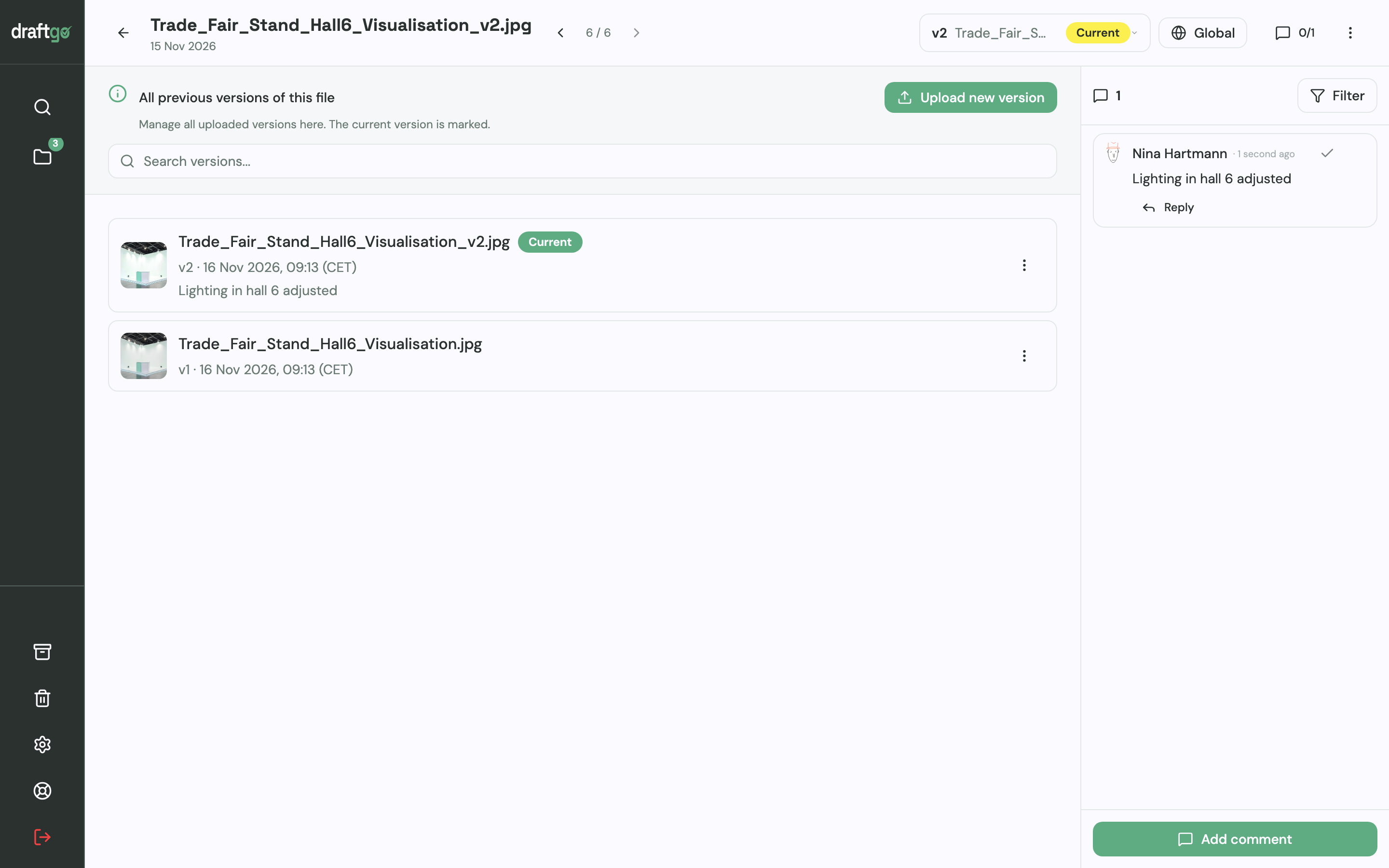
- Upload the artwork to a project. Each correction becomes a new version of the same file, and the version history lists every version with date and note. The six rounds from the example are six versions your team can open.
- Invite the reviewers by link, without accounts. The person who decides gets the personal approver link. The other two reviewers comment through the shared viewer link, which allows comments but no approval. Their comments sit on the label itself, as a pin, a rectangle or a highlight in the PDF, so contradicting requests appear side by side.
- Set the approval rule. Each loop has a rule for who has to approve: all approvers, a set number or any one of them, separately for team and guests.
- Check the artwork first. From the Freelancer plan on, you can start the AI review before the client sees a file; its findings, such as typos or very small type, appear as comments from our AI agent “GO”.
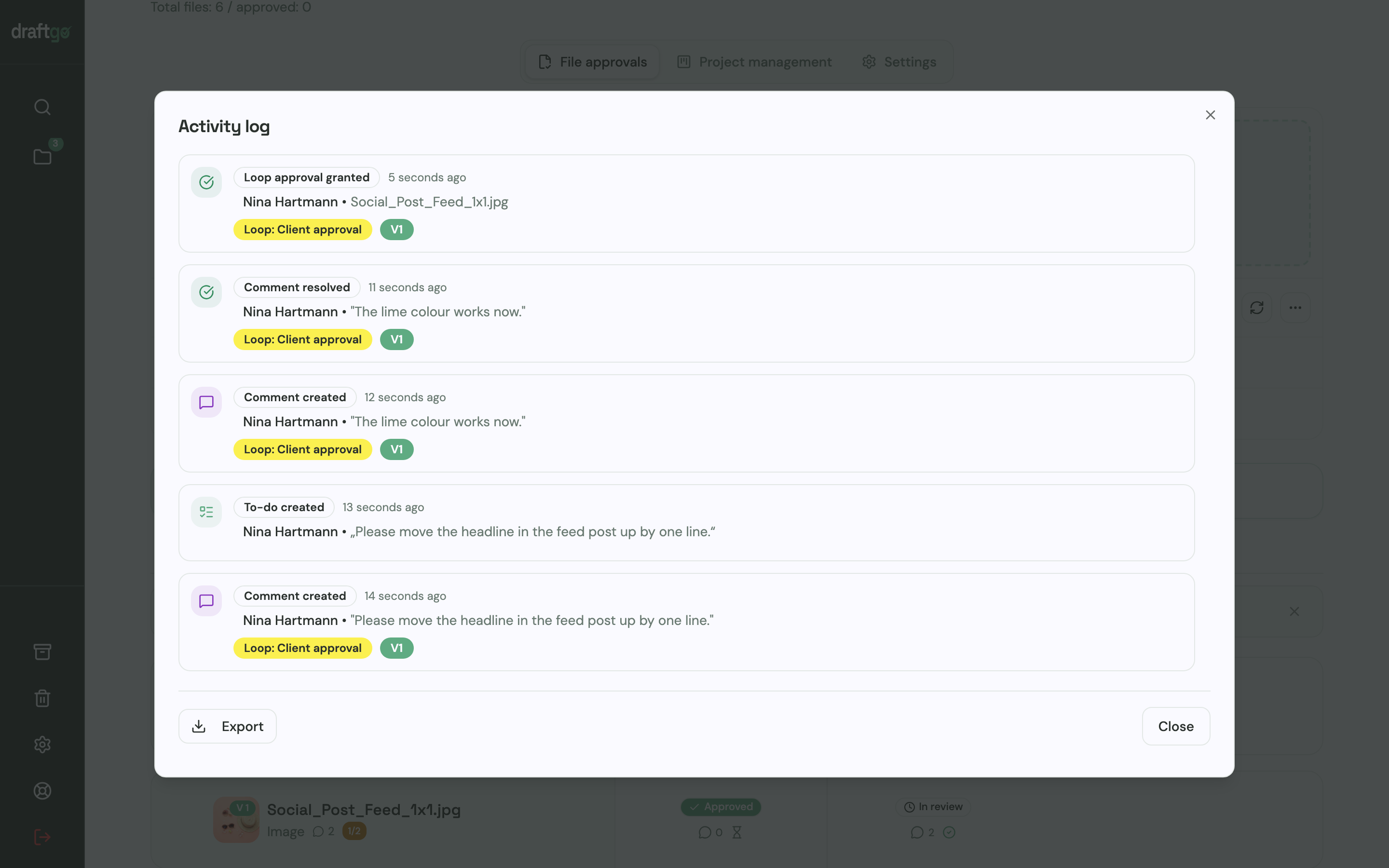
- Export the record. The activity log holds approvals, comments, versions and downloads with person and time and exports as CSV, JSON or PDF. Next to the time log, it shows when each version came in and when the file was approved. What such a record should contain is covered in the guide to an approval audit trail.
Julia Krüger, a freelance designer, puts it this way: “draftgo easily saves me two hours on every project.” How agencies run client approvals with draftgo is on the page draftgo for agencies.
FAQ
Should freelancers track their time too?
Yes, even without employees. For a freelancer, the log mainly helps with pricing: it shows how long a logo, a landing page or a brochure really takes and which clients need more rounds than the quote allows.
Should clients see your time reports?
That depends on how you bill. With hourly billing or a retainer of hours, a summary per task type shows the client what the hours went into. On fixed fees, the log is an internal tool, and sharing it can turn a conversation about results into a debate about hours.
What counts as non-billable time in an agency?
Everything you cannot charge to a client: pitches and new business, admin, internal meetings, training and work on your own brand. Revision rounds beyond the contract belong here too if you decide not to charge for them. Log this time in fixed task types, because your rates have to cover it.
Conclusion
Start agency time tracking with the questions you want answered and a short list of task types, and test the setup with one team before the whole agency logs. Give feedback and revisions their own task type from day one, so the hours of extra rounds show up in the figures. Then move the review rounds onto the file, where every version and approval is recorded with person and time.
Try it free – draftgo is free for 14 days, no credit card needed.
Written by
Emilia
Content Producer
Ready to streamline your approval processes?
Get started with draftgo today and see how easy professional collaboration can be.