
The storyboard goes to the client on Tuesday with a friendly “let us know what you think”. On Friday the first reply arrives from the product manager, a second one follows on Monday from someone in sales, and the person who signs off is travelling until Wednesday. Your own work is on time. The delivery date has still lost a week, and nothing in the schedule says how long the client needs to look.
In client work, meeting deadlines depends on two clocks: the hours your team needs to produce, and the days a draft waits for comments and approval. A schedule that only counts the first one can run late even when nobody on your team works slowly.
Why deadlines slip in client work
Deadlines in client work slip in the days between your handover and the client’s answer, and in rounds nobody counted. Five gaps can push a delivery date back:
- The estimate is too optimistic. Roger Buehler, a social psychologist who studies the planning fallacy, describes it as a bias in which people underestimate how long a task will take them, even though similar tasks have taken them much longer in the past (SPSP, 2019).
- Review time is invisible. The draft goes out without a date for comments, so the client fits it in whenever there is a gap.
- Feedback arrives in pieces. Comments trickle in from several people over several days, and your team cannot start the changes until the last one is in.
- Nobody counted the rounds. Each new idea opens another round, and none of them was in the schedule.
- The risk is reported late. The client hears that the date will slip on the day it slips, when the only option left is to move it.
How to meet deadlines in 6 steps
The six steps below build the client’s review time into the plan and keep each round short. Steps 1 to 4 belong in the kick-off, and steps 5 and 6 run through every round of the job.
1. Plan backwards from the delivery date
Start with the date that cannot move, such as a launch, a print slot or an event, and work back to today. Mark when the final approval has to be in, when the last round of changes starts and when the first draft goes out. Buehler describes strategies that may help people make more realistic predictions, among them comparing a new project with similar ones they have completed in the past, breaking the plan into smaller steps and planning in reverse-chronological order (SPSP, 2019). Your timesheets from the last similar job give you that comparison in numbers. If the backward plan already runs past today, you know it in the kick-off and not in week four.
2. Split the work into milestones with a review at each
Changes to a finished piece touch work that is already done, so they take longer than changes to a sketch. Split the job into stages where changes are still cheap, and get a decision at each one:
- Concept or script
- Storyboard, wireframe or layout sketch
- First full draft
- Final file
Once the client has approved the concept and the sketch, the structure of the final piece is settled. The later rounds can then focus on details, which are quicker to change than a structure. For video, our guide to the video production workflow sets an approval at the end of each of its nine phases.
3. Put the client’s review time into the schedule
Give every review its own line in the plan, with a start and an end date: the day the draft goes out and the day the comments are due. Agree these dates in the kick-off and repeat them with each handover, together with what a late reply does to delivery. For example: “The storyboard is ready for you today. If your comments reach us by Wednesday at 5 pm, the first full cut is with you on Friday next week.” The client can see how their reply moves the delivery date.
Try it yourself: In the demo you work in a real draftgo workspace with sample data.
4. Agree the rounds and one decider before the first draft
Write down how many rounds of changes the job includes and who on the client side gives the final approval. Everyone else can comment, and the decider settles comments that contradict each other. Our guide to stakeholder alignment shows how to assign decision rights per decision and get that agreement approved before production starts.
5. Collect feedback in one place, as one set
Ask the client to send one consolidated set of comments per round, and give them one place for it, directly on the file. Your team then starts the changes when the round closes instead of piecing together emails, chat messages and notes from a call. How to handle conflicting or vague comments once they arrive is covered in our guide to feedback management for creative projects.
6. Say early when a date is at risk
As soon as a milestone slips, tell the decider what it means for the delivery date and offer options: cut or simplify part of the scope, add people, or move the date. Put the agreed option in writing. A client who hears about a risk two weeks ahead can still choose, and one who hears about it on delivery day can only accept it.
Common mistakes and better practice
These mistakes cost days without anyone noticing them in the moment. Next to each one is the habit that prevents it.
| Mistake | Better practice |
|---|---|
| Estimating from the best case | Use the hours your last similar job took |
| Planning back from the event date | Plan back from the date the file has to be handed over |
| One buffer at the very end | Plan slack after each review round |
| Saying yes to a new request without checking the plan | Check the plan the same day and put the trade-off to the decider |
| Waiting for every reviewer separately | Ask for one consolidated set per round |
| Reporting a delay on delivery day | Flag the risk as soon as a milestone slips |
The broader route a job takes through your agency, from quote to invoice, is laid out in our guide to the seven stages of an agency workflow.
Practical example: an opening film with a fixed race date
Take a five-person video studio that makes a 90-second opening film for a city half marathon. The film runs on the big screen at the start before the runners set off, the race date cannot move, and the company that operates the screen needs the final file five working days before the race to test it.
The studio plans backwards from that hand-off, not from race day. The race is six weeks away, so the final approval has to be in by the end of week five, and the first full cut goes out at the end of week four. That leaves week five for the organiser’s review and one round of changes. Before that come the script in week one, the storyboard in week two and the shoot along the course in week three. Each review gets two working days, and every handover email names the date the comments are due.
In the kick-off, the organiser names its head of marketing as the decider. She gets the personal approver link and can approve, while the race director and the main sponsor’s marketing contact get the shared viewer link, so they can comment but not approve. When the sponsor asks in week four for its logo to appear in a second scene, the studio checks the plan the same day. The extra scene fits only if the drone shot along the course is shortened by five seconds, so the studio puts the choice to the decider in writing. She picks the shorter drone shot, and the hand-off date holds.
How it works in draftgo
In draftgo, the comments and approvals of a job sit on the files themselves, so nobody has to collect feedback from inboxes before the changes start.
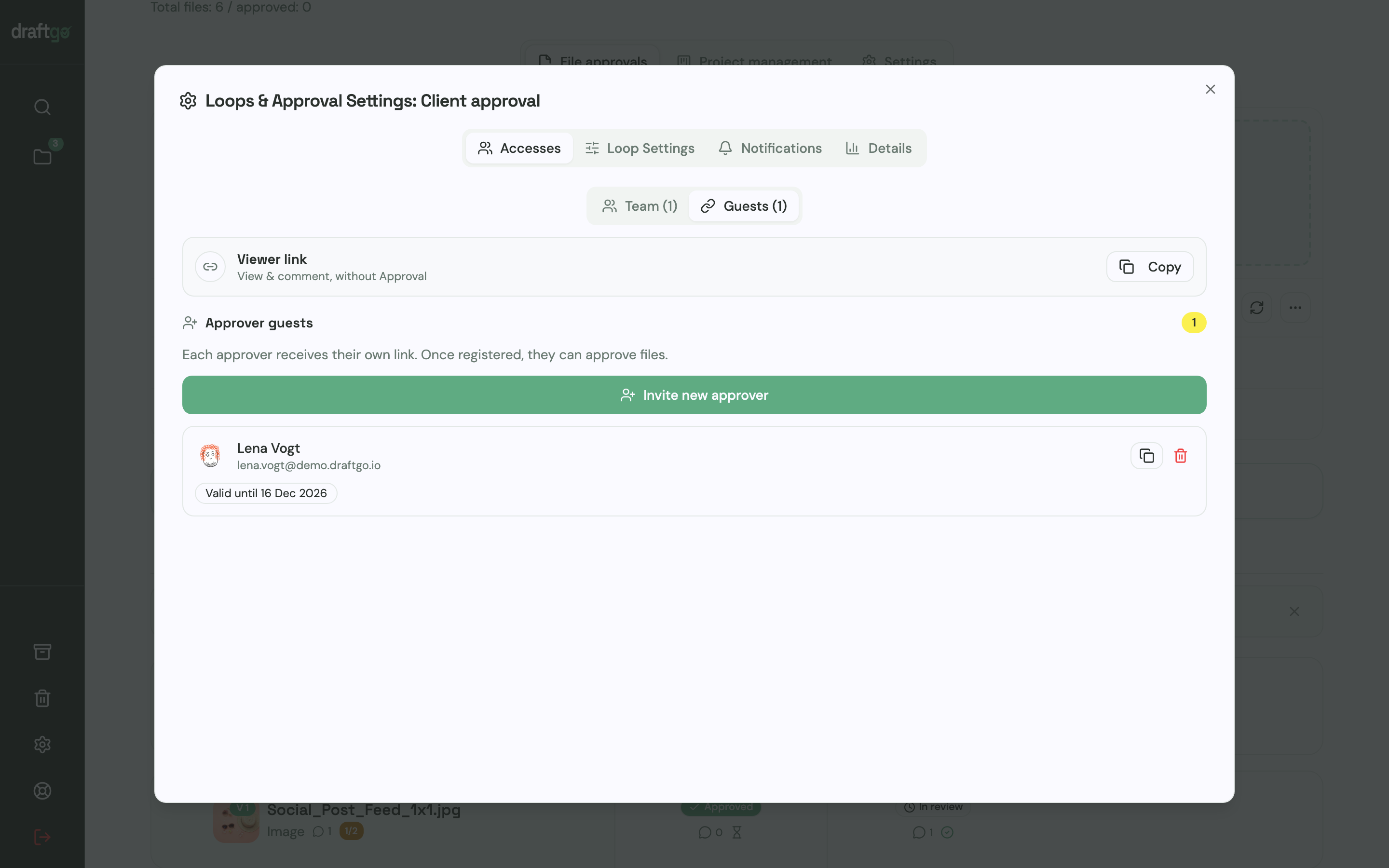
- Set up your rounds as loops. Create a loop for the internal check and one for the client. For each loop you choose whether all approvers, a set number or any one of them must approve, separately for your team and for guests. A project holds 1 loop on Free, 3 on Freelancer and as many as you need on Agency and Team, as the plans and prices show.
- Invite the client without an account. The decider gets a personal approver link with their name and email address and can approve. Everyone else who should comment gets the shared viewer link, which allows comments but no approval.
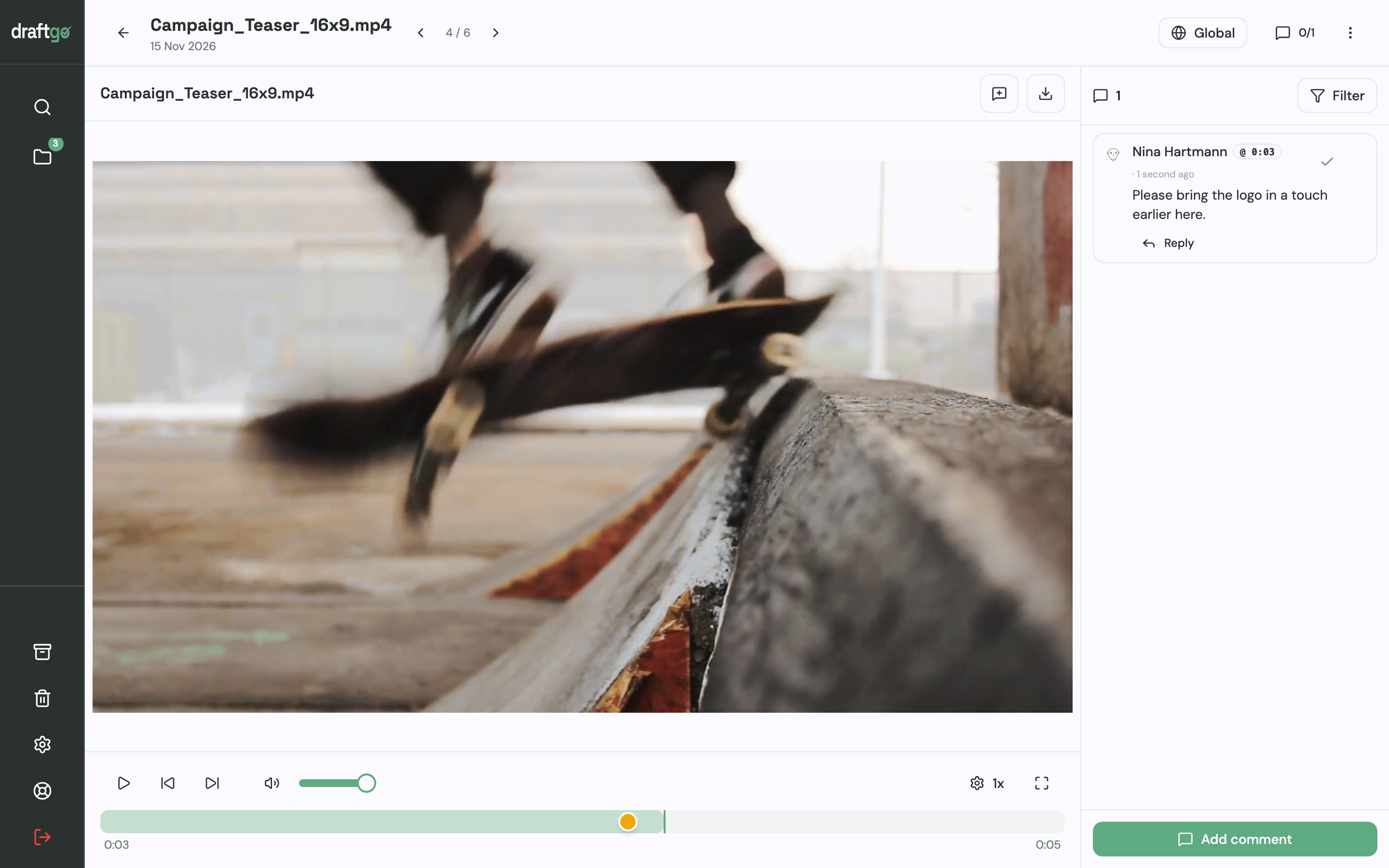
- Collect comments on the file. Reviewers place a pin or a rectangle on an image or a PDF page, highlight text in a PDF or comment at a point in a video. Each comment sits exactly where the change is meant.
- Let the client mark their feedback as complete. If you switch it on for the loop, guests can report that their feedback is complete. You then see that the client has finished commenting before you start the changes.
- Upload the changes as a new version. Earlier versions stay available, and the new version starts the approvals again, so nobody approves an outdated file by mistake. Once the internal loop has approved it, you activate the file in the client loop.
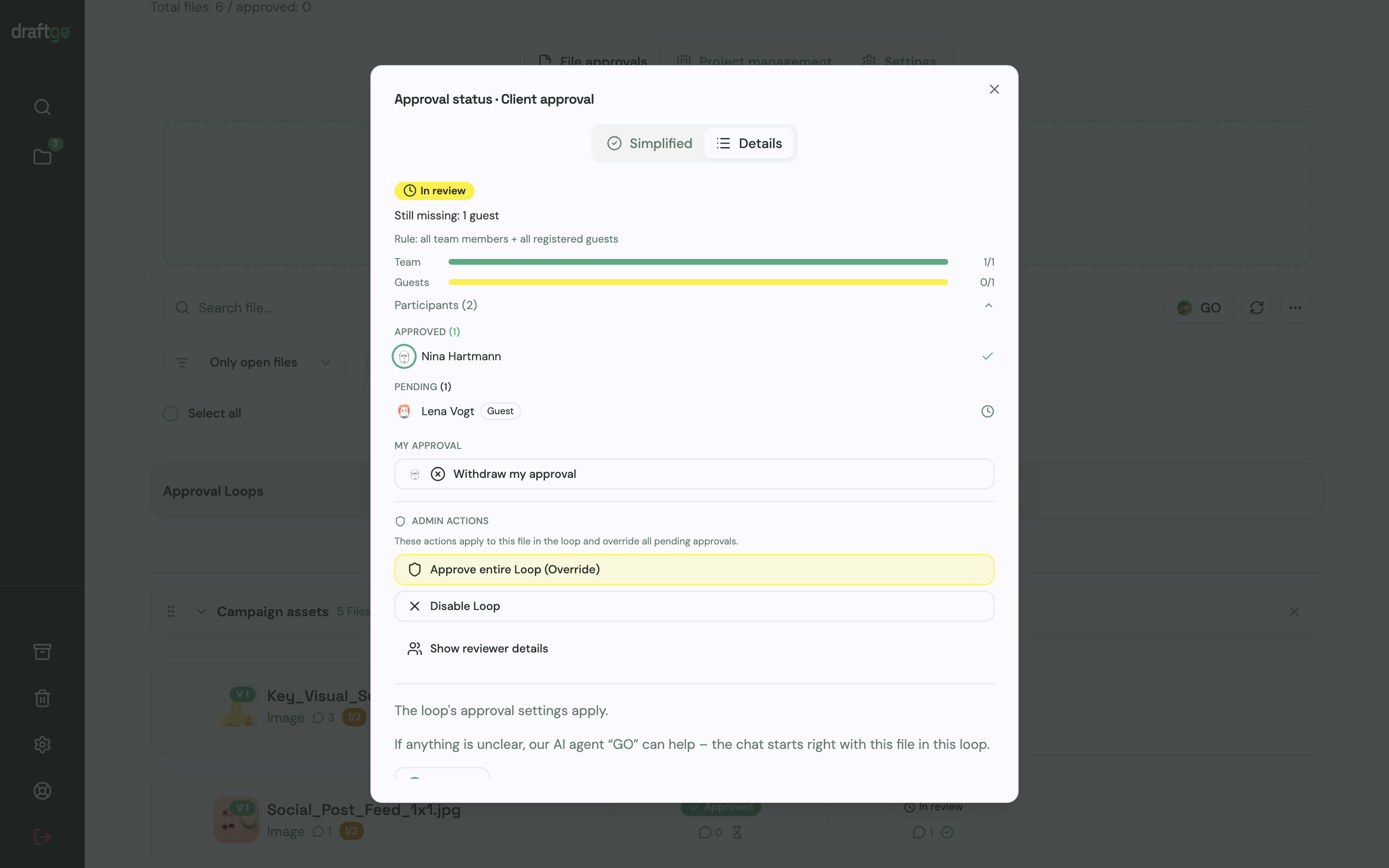
- See who is still pending. The approval status lists who has approved and who has not, for your team and for guests, along with the loop’s rule.
The dates for each review stay in your project plan and your handover emails. For more on how comments, versions and approvals fit together, read our guide to online proofing, and the page draftgo for agencies shows the setup for client work.
FAQ
How do you meet a tight deadline?
Cut the work down to what the deadline needs and agree that cut with the decider. Shorten each review by asking for one consolidated set of comments with a fixed date. If the deadline still does not fit, say so now and offer a smaller scope or a later date.
What should you do when client feedback is late?
Write to the client with the agreed date and what the delay does to delivery. Then agree a new delivery date or a smaller scope with the decider. The written note shows later why the date moved.
How much buffer should a project have?
There is no fixed number that fits every job. Look at how long reviews took on your last similar projects and plan that time in, then add slack after each review round rather than one block at the end. A late reply in the first round then does not use up the time for the last one.
How do you tell a client that a deadline will slip?
Tell them as soon as a milestone slips, not on the delivery date. Say what caused the delay, what it means for delivery and which options remain, such as a smaller scope or a new date. Let the decider choose and confirm the choice in writing.
Conclusion
You meet deadlines in client work by planning the client’s review time as carefully as your own production time. On your next job, plan backwards from the delivery date, give every review a date for comments and agree one decider in the kick-off.
Try it free – draftgo is free for 14 days, no credit card needed.
Written by
Emilia
Content Producer
Ready to streamline your approval processes?
Get started with draftgo today and see how easy professional collaboration can be.