
On Friday afternoon, the project manager of a small digital agency fills in the week’s timesheet and stops at a 40-minute call. The client used it to walk through feedback on a landing page that had already arrived by email, and a colleague of theirs added two requests about a version nobody was working on any more. Is that call client work or the agency’s own overhead?
The answer depends on what the agency agreed with the client, and it decides how much of the week reaches an invoice.
What are billable and non-billable hours?
Billable hours are the working hours you can charge to a client under the agreement you have with them. Non-billable hours are all other paid working time: pitches, admin, internal meetings, training and any client work the agreement does not cover.
Your contract draws the line, not the type of task. A revision round is billable when the quote includes it or prices extra rounds, and non-billable when you do it for free. The same goes for travel, meetings and project management.
Non-billable time comes in two kinds:
- Invested: new business, training, work on your own brand and the admin any business needs. Your rates have to cover it.
- Lost: searching for the latest file, copying feedback out of emails, settling contradicting comments and rounds nobody priced.
Plan the first kind and cut the second. How to log both against clients and tasks, and what US, UK and EU law asks of employers, is covered in our guide to agency time tracking.
Billable or non-billable? The grey areas
Some tasks sit between the two columns. Decide them once per type of client and write the decision into your quote.
| Task | Billable when … | Non-billable when … |
|---|---|---|
| Client calls and emails | the agreement includes account or project management | a fixed fee has no share for coordination |
| Revision rounds | they are within the included rounds or priced as extras | they go beyond the quote and you do them for free |
| Briefing and kick-off | the quote has a briefing or strategy phase | they happen before the contract is signed |
| Travel to a shoot or meeting | the contract names travel time or a day rate covers it | nothing about travel was agreed |
| Pitches and proposals | the client pays a pitch fee | there is no pitch fee |
| Extra file formats | delivery formats are part of the quote | the client asks for more after delivery and you do not charge |
How to calculate your billable ratio
The billable ratio is the share of your available working hours that you charge to clients: billable hours divided by available hours, multiplied by 100. The same figure is also called billable utilisation.
Available hours are contracted hours minus holidays, sick days and public holidays. Count them for the same period as the billable hours; for a small team, a month gives figures that do not jump with every short week.
For a reference point, SPI Research’s 2026 Professional Services Maturity Benchmark puts billable utilisation at 66.4% in 2025, down from 68.9% the year before and the lowest level SPI has recorded. The top 20% of firms billed 75.0% of their hours, the rest 64.9%. These figures describe professional services firms, not creative agencies alone (SPI Research, updated November 2026).
Calculate the ratio per person as well as for the team. An account lead who runs five clients spends more of the week coordinating than a designer on one project, so one target for every role hides where the time goes.
Then split the non-billable hours into invested and lost. Only the lost part is worth cutting, and it is the part you can turn back into billable work or free time.
Where lost non-billable time comes from
Lost time builds up between the tasks, while work waits for information or a decision. Five patterns cause it:
- No named decider on the client side: three people comment, and someone on your team spends a call settling their contradictions before anyone can continue.
- Feedback in several channels: emails, chat messages and call notes have to be copied into one list before the work starts.
- Vague comments: “can it feel a bit lighter?” needs a call to find out what is meant, and the next draft can still miss.
- Unpriced rounds: the quote names no number of rounds, so round four is done for free.
- The wrong version: someone corrects an older file, and the round has to be done again.
Try it yourself: In the demo you work in a real draftgo workspace with sample data.
How to cut non-billable time in 5 steps
Start with the step that matches your largest block of lost hours. Each step moves time into the billable column or takes it out of the week.
1. Sort one month of non-billable hours
Go through last month’s non-billable entries and mark each one as invested or lost. For the lost ones, note the cause from the list above, such as a missing decider or an unpriced round. The largest group shows where to start.
2. Put included rounds and the price of extras into the quote
State how many revision rounds the fee includes and what each further round costs, and agree the scope in a brief the client confirms. Our creative brief template has sections for goal, audience, formats and approver. An unpriced round then becomes a billable one, or a conversation before anyone starts work.
3. Agree one decider before work starts
Ask the client to name the one person who approves, and let everyone else comment. Contradicting requests then have someone who settles them, without a call on your time. How to agree goals and decision rights up front is explained in our guide to stakeholder alignment.
4. Collect feedback on the file itself
When comments arrive on the draft instead of in emails, nobody copies them into a list, and each comment points to the spot it is about. Ask for specific comments that name the spot, the change and the reason. Our guide to feedback management shows how to keep each round short.
5. Check drafts internally before the client sees them
An internal round can catch typos and missed points from the brief before a client round does. A client round spent fixing your own slips is one you cannot charge for.
Common mistakes and better practice
These mistakes hide non-billable time or cut the wrong part of it.
| Mistake | What happens | Better practice |
|---|---|---|
| Treating all non-billable time as waste | Pitches and training get cut and the pipeline thins out | Separate invested from lost time and cut only the lost part |
| Writing off extra rounds without a word | The client never learns that rounds cost money | List them on the invoice, as a no-charge item if you waive them |
| Counting only hours, not rounds | The next quote includes the same free rounds again | Note the number of rounds per job next to its hours |
| Raising the ratio by logging fewer hours | Lost time leaves the figures but not the week | Log all hours and remove the causes |
Practical example: a branding agency sorts its lost hours
Take an eight-person branding agency whose largest client is a regional chain of opticians: in-store posters, leaflets and a seasonal eyewear campaign, all on fixed fees. In October, its people have 1,120 available hours between them and bill 680, a ratio of 680 ÷ 1,120 × 100 = 61%. Of the 440 non-billable hours, 260 go into pitches, training and admin.
The other 180 go into the chain’s autumn campaign. Store managers phone in comments on the poster, the marketing lead forwards more by email, and one leaflet is corrected in an outdated version and has to be laid out again. The quote names no number of rounds, so the fourth and fifth are free.
For November, the agency changes three things. The quote now includes two rounds and a price per extra round, the chain’s marketing lead is the one person who approves, and every draft passes an internal check before the store managers comment on the file itself. If the agency wins back 70 of the 180 lost hours and fills them with paid work, the ratio rises to 750 ÷ 1,120 × 100 = 67%, and at the agency’s hourly rate that is 70 × $120 = $8,400 of work it can invoice.
How it works in draftgo
In draftgo, the review rounds from step 4 run on the file itself. Your timesheet or agency software keeps the hours, and draftgo keeps a record of who commented, uploaded and approved, and when.
- Upload the draft to a project. Each corrected draft becomes a new version of the same file. Earlier versions stay available, and the approvals start again with the new version.
- Send the right links. The chain’s marketing lead, who decides, gets the personal approver link. The store managers comment through the shared viewer link, which allows comments but no approval. Guests need no account.
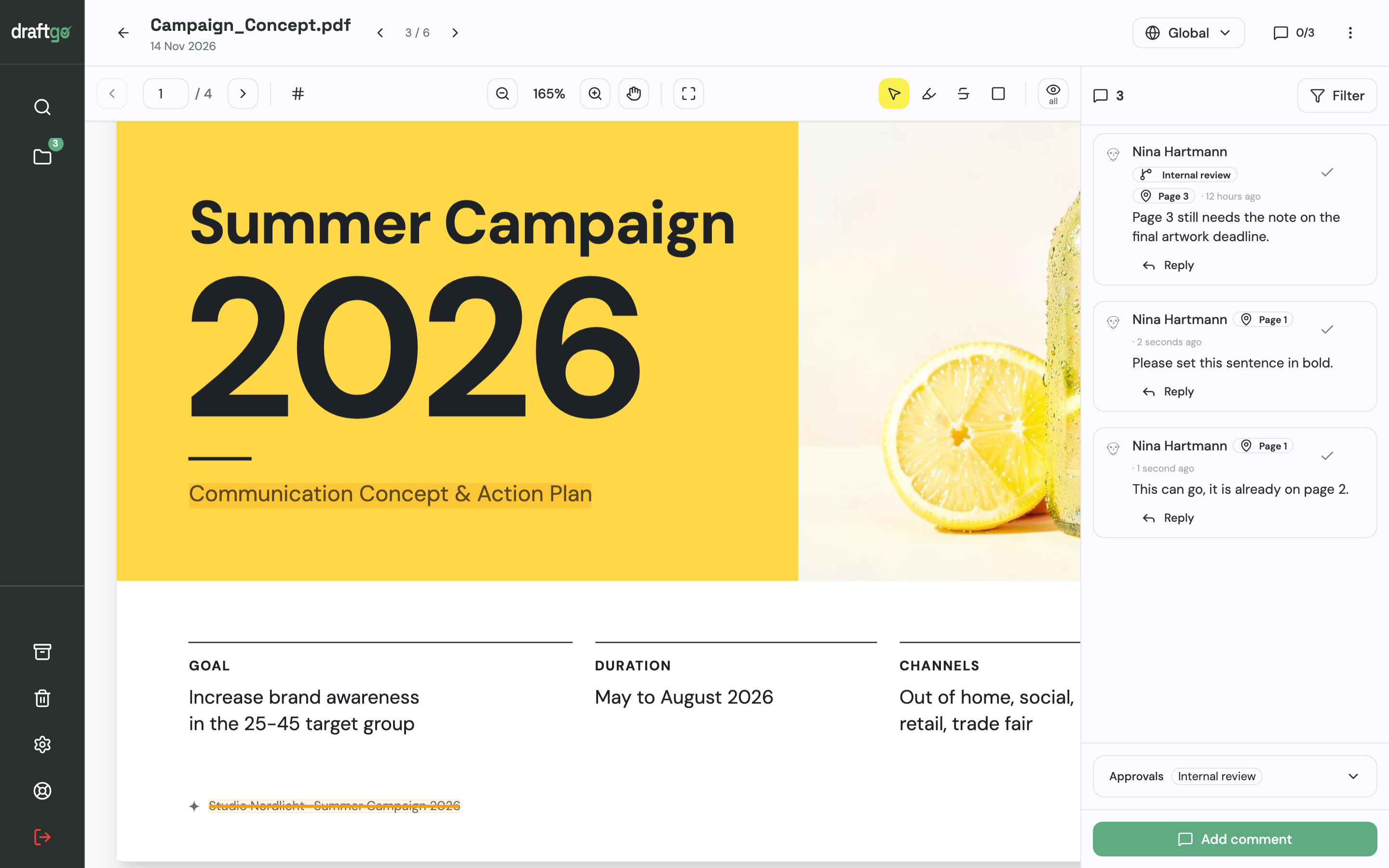
- Collect comments on the page. In a PDF, reviewers highlight or strike through text or place a point or a rectangle, and each comment carries its page number. Every comment belongs to the version it was made on, and you reply in the thread.
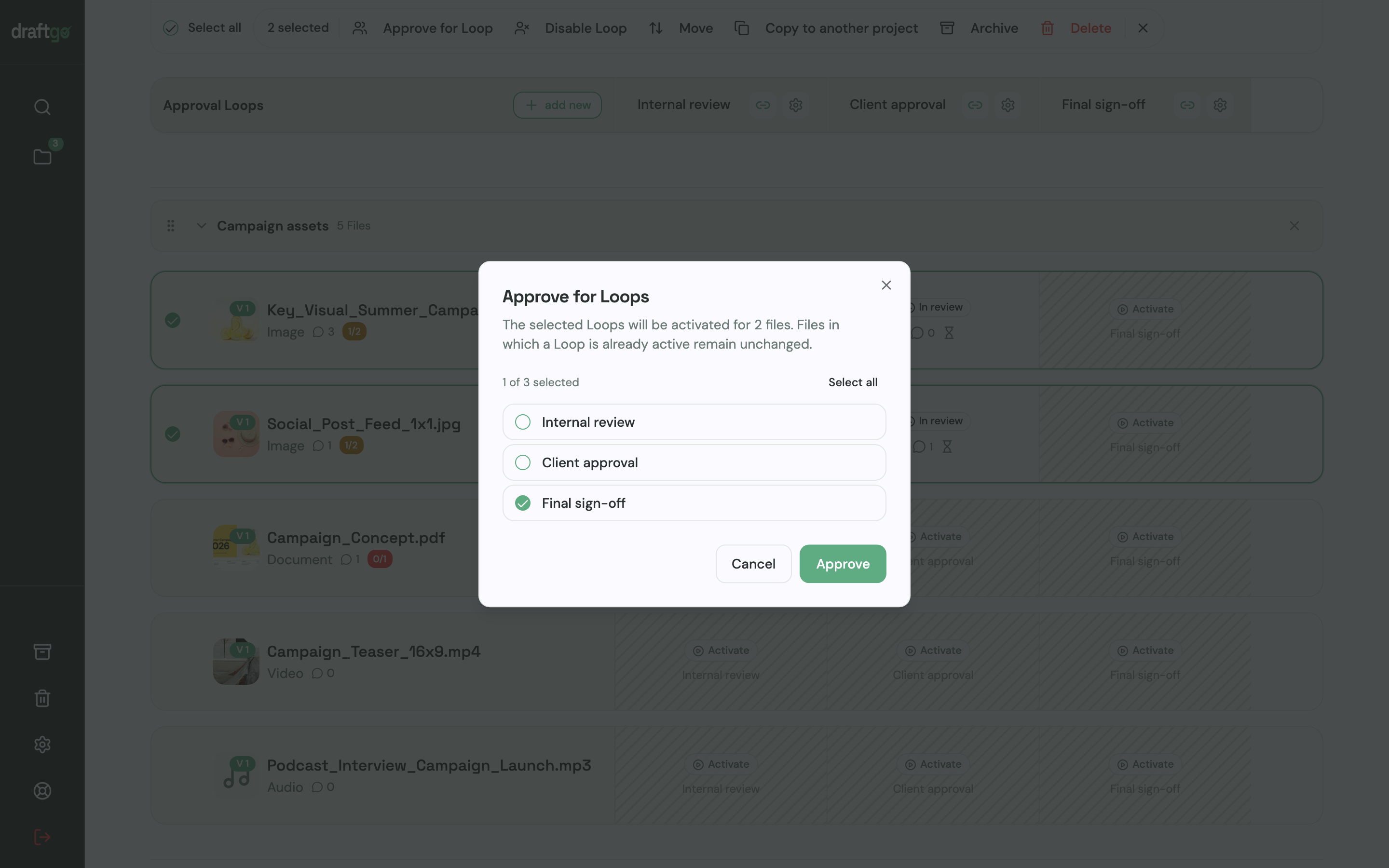
- Check internally, then send to the client. Set up an internal loop and a client loop, each with its rule: all approvers, a set number or any one of them, separately for the team and for guests. Once your team has approved a draft, you activate it in the client loop. A project holds one loop on Free, three on Freelancer and as many as you need on Agency and Team, as the plans and prices show.
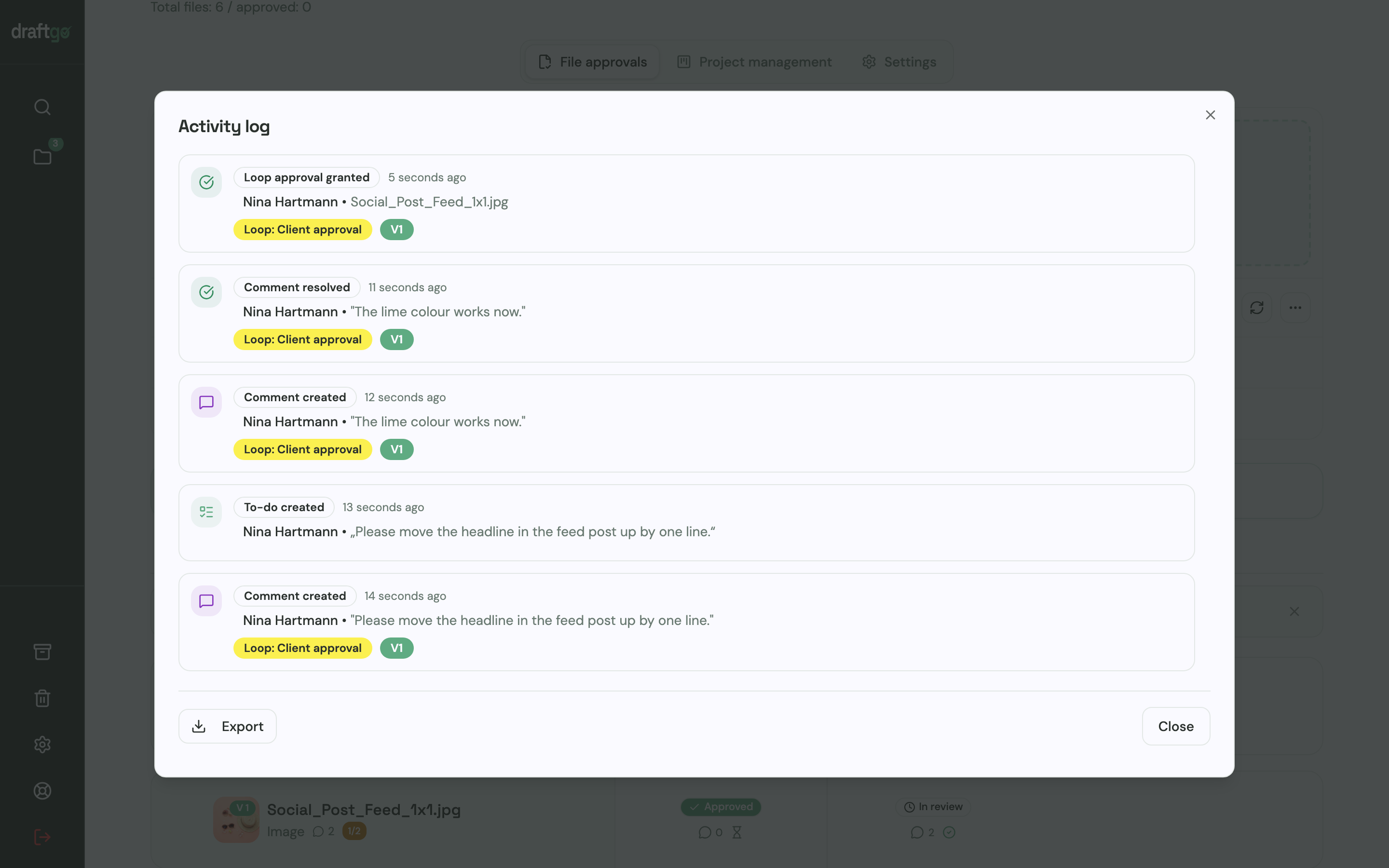
- Export the record. The activity log holds approvals, comments, versions and downloads with person and time, and it exports as CSV, JSON or PDF. When you invoice an extra round, the export lists the upload of each version, the comments on it and the approval, each with person and time.
Peter Schönherr runs Loloson Media in Portugal, which produces image and video content, mainly e-commerce assets for an international hair care manufacturer. He puts it this way: “With draftgo, our approval rounds are around 50% faster. Instead of endless PowerPoints, my client sees every new version straight away and approves it directly.”
The setup for client work is on the page draftgo for agencies, and our guide to online proofing explains how reviewing files online works in general.
FAQ
Are client calls and emails billable?
They are when your agreement covers account or project management, either as hours or as a share of the fee. On a fixed fee without that share, they are non-billable, so log them against the client anyway. The figures then show which clients need more coordination than the fee allows.
How do I charge for revision rounds beyond the quote?
Name the included rounds and the price of each extra round in the quote before work starts. When a client asks for another round, say that it is an extra and confirm it in writing before you begin. A record of what each round contained makes that conversation short.
Is non-billable time the same as unpaid time?
No. Your team is paid for its working hours, billable or not, so non-billable hours are a cost your rates have to cover. The difference is only whether a client is charged for them directly.
Conclusion
Decide in the quote which tasks are billable, and split your non-billable time into invested and lost. Measure your billable ratio per person for one month, then cut the largest block of lost hours first. If that block is feedback, put the included rounds into your next quote and move the next review onto the file.
Try it free – draftgo is free for 14 days, no credit card needed.
Written by
Emilia
Content Producer
Ready to streamline your approval processes?
Get started with draftgo today and see how easy professional collaboration can be.