
The second draft of a client brochure goes out on Monday morning. By lunchtime the marketing manager has sent back the PDF with sticky notes, the product manager has replied in a chat thread, and the managing director has left a voicemail asking for “more energy” on the cover. Two comments contradict each other, one refers to page 6 of the first draft, and nobody has said which changes the print run depends on.
Feedback management is how you turn that pile into a list your team can work through and an approval you can point to later. This guide is about feedback on creative work such as layouts, videos, documents and websites, given by clients and colleagues. It does not cover customer survey tools or NPS software that measure how customers feel about a product.
What is feedback management?
Feedback management is the process of collecting, clarifying, prioritising, implementing and recording feedback on a draft, from the first version to the approved final file. It starts when the first draft goes out and ends when the agreed people have signed off on one specific version.
You can run the whole process in the browser instead of through email attachments. The guide to how online proofing works explains how comments and versions stay together on one shared file.
Why feedback breaks down in creative projects
Feedback breaks down when nobody owns it. Comments then arrive through every channel at once and reach the designer unsorted, so each round produces new questions instead of a finished file.
The BetterIdeas Project, a 2025 study by BetterBriefs and the research agency Flood + Partners in partnership with the IPA and the WFA, found that it typically takes five rounds of creative development to reach a signed-off idea, up from three rounds in IPA research in the UK in 2007. Only 30% of agencies agreed that clients give clear and constructive feedback, and only 23% of agencies agreed that the current approval process works well (IPA, 4 March 2025).
Four causes come up again and again:
- Scattered channels: feedback comes by email, chat, phone and meeting, and nobody can say which points are done.
- Comments without context: “Make the headline bigger” helps little on a 12-page PDF with eight headlines.
- Feedback on an old version: someone reviews the file from last week's email while the team is already on the next draft.
- No record: three months later, nobody knows who approved the final version.
Each of these can add a round, and the guide to rendering feedback for architectural visualisation shows what that costs when a change means hours of render time.
Feedback management in 5 steps
These five steps take feedback from the first comment to the approved file, for a freelancer with one client as much as for an agency with several client reviewers.
1. Agree on one place for feedback
Before the first draft goes out, tell everyone where feedback belongs. The best place is the file itself: a pin on the image, a highlight on the PDF page, a note at the right moment in the video. Each comment then carries its context, and questions like “Which headline do you mean?” disappear.
Agree this when the project starts, together with who approves. The guide to client onboarding for agencies shows where these rules fit into the first weeks with a new client.
Try it yourself: In the demo you work in a real draftgo workspace with sample data.
2. Set an owner and a review date for each round
One person owns each round, usually the project manager or account manager, and decides what goes to the creative team. Put a date in every request (“Please comment by Thursday, 12:00”) and agree in the contract how many rounds of changes are included.
| Role | What they do | When |
|---|---|---|
| Feedback owner (project or account manager) | Sends the request with a date, consolidates comments, settles conflicts, sets priorities | Every round |
| Creative team | Makes the changes, closes comments, uploads the new version | After consolidation |
| Specialist reviewers (copy, product, legal) | Comment on their own area only | In the round they are invited to |
| Approvers | Sign off the final version | Last round |
3. Consolidate and settle conflicting comments
The owner reads all comments before anyone starts working. Where two comments contradict each other, they name the conflict, ask both people and let the person with the final say decide. Agree on who that is before the project starts.
The designer should never have to pick a side. Caught between marketing, who wants brighter colours, and the managing director, who wants a calmer look, they end up disappointing one of them, and the next round reopens the question.
4. Prioritise what blocks approval
Sort every comment into one of three groups before work starts:
- Must fix: without this change there is no approval, for example a wrong price or a misspelt product name.
- Should fix: improves the work and is done if it fits into the agreed round.
- Out of scope: a new request that is not in the brief, such as an extra format. It goes on a list for a separate quote or the next phase.
Check unclear cases against the agreed creative brief and its objectives. If a comment works against the brief's goal, raise it with the client before anyone changes the file.
5. Close every comment and approve the new version
The team makes the changes and marks each comment as resolved. Where they decided not to change something, they reply in the comment and say why. The new version goes onto the same file, and the previous one stays available.
Only the approvers you named in step 2 sign off, and only on the current version. Record who approved and when, so the decision holds up if questions come later.
Common mistakes and better practice
Extra rounds often trace back to a few habits. Here is each one next to what works better:
| Mistake | Better practice |
|---|---|
| Feedback by email, chat and phone | One agreed place, comments on the file |
| Every reviewer invited to every round | Specialists in their round only, approvers named in advance |
| Contradictions forwarded to the designer | The feedback owner settles them before work starts |
| All comments treated as equally urgent | Must fix, should fix, out of scope |
| A review request without a date | A date in every request and a fixed number of rounds in the contract |
| Approval by “looks good” in an email | Approval by named people on one specific version, with a record |
Practical example: a launch video with four reviewers
A two-person video studio produces a 45-second launch video for a client's trade fair stand. On the client side, the marketing manager, the product manager and a colleague from legal review it, and the managing director gives the final approval. On earlier jobs the studio sent a download link and collected feedback by email over several days.
This time the producer sets the rules before the rough cut goes out: comments on the video at the right point in the timeline, a review date of Thursday at noon, legal only on the product claims in round two, and the marketing manager settles conflicts.
The first round brings 23 comments. Two of them conflict, on the music and on the logo size in the end frame, and the marketing manager decides both. The rest split into 6 must-fix points, 11 should-fix points, 2 questions answered in the thread and 2 out-of-scope requests, a 15-second social cut and a subtitled version, which the studio quotes separately. Legal approves the claims on the second cut, and the managing director signs off on the third.
For video-heavy work, the comparison of video feedback tools with timecode comments goes into more detail.
How it works in draftgo
In draftgo, the whole feedback process happens on the file itself.
- Collect on the file: You upload images, PDFs, videos or audio files. Clients open a personal link without creating an account and comment with a pin or a rectangle on an image, a highlight or strikethrough in a PDF, or at a point on the video timeline.
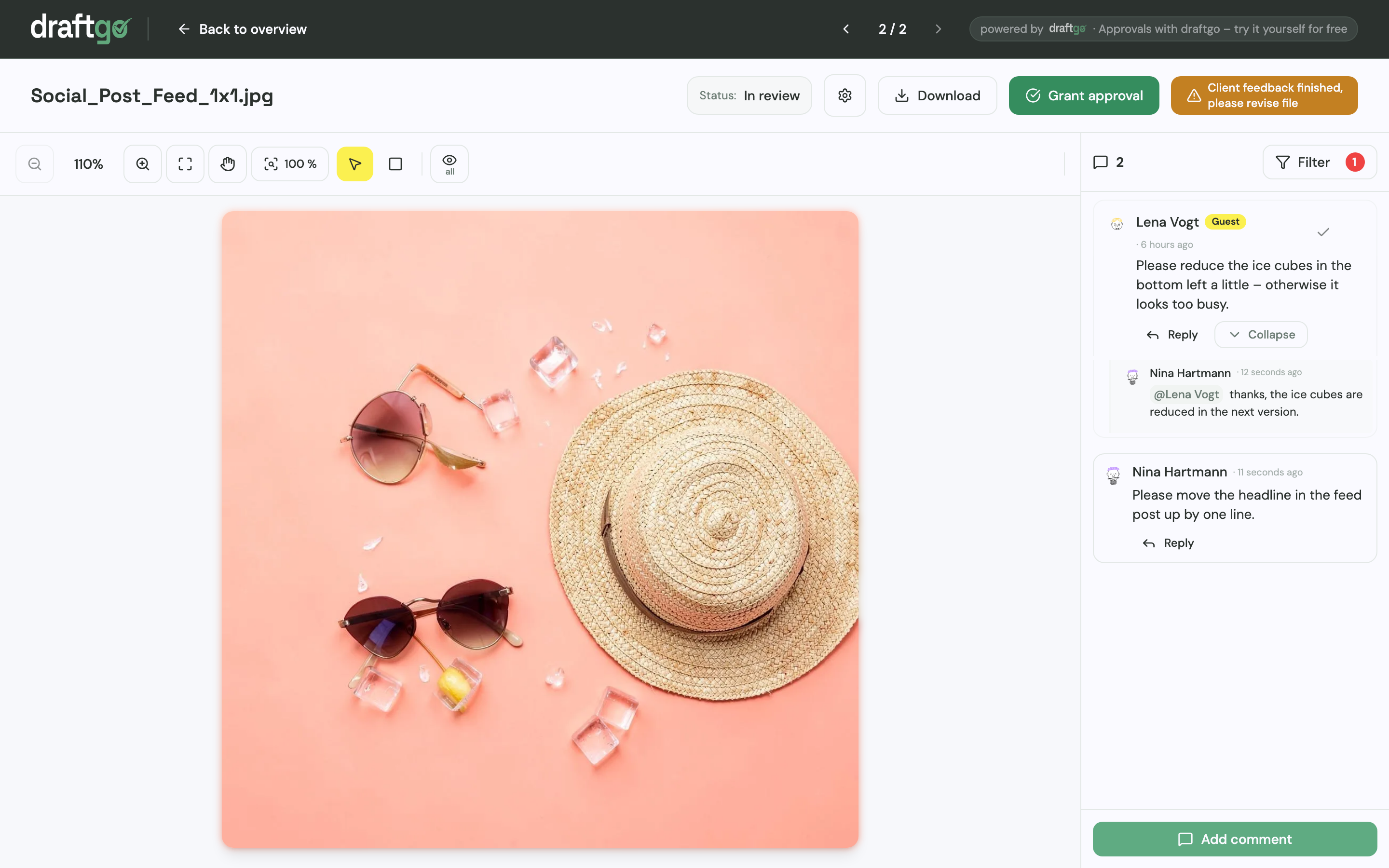
- Clarify in the thread: Each comment has its own thread for replies, and an @mention brings in the person who can answer. If you switch it on for a loop, guests can report that their feedback is complete, so the feedback owner knows when to start consolidating.
- Assign and close: A comment can become a to-do on the project board with one person responsible for it. Finished comments are marked as resolved.
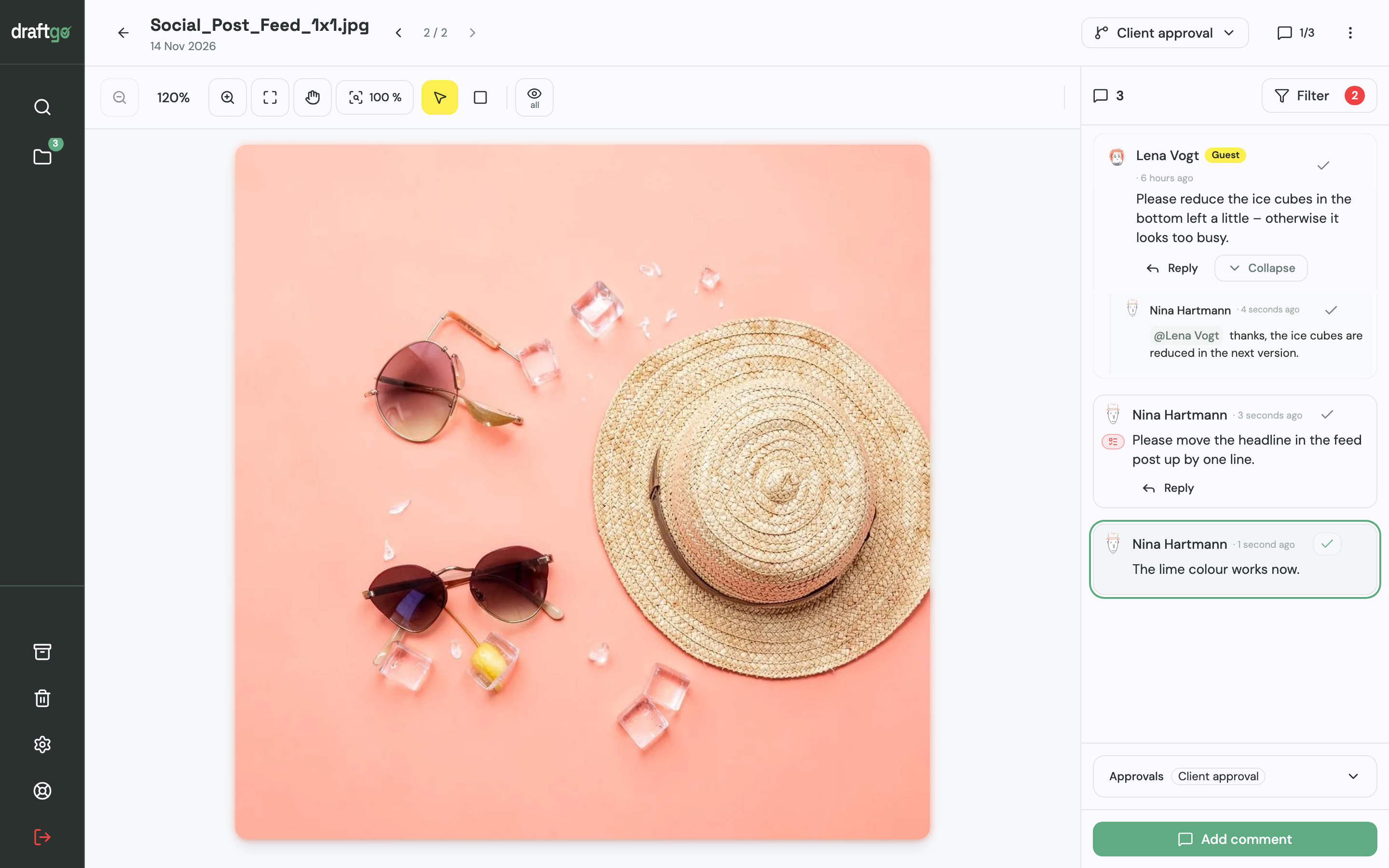
- Keep versions together: The new draft is uploaded as a new version of the same file. Earlier versions stay available, comments stay with the version they belong to, and a new version restarts the approvals.
- Approve in loops: You can run loops one after the other, for example an internal review first and the client approval after it. For each loop you set who approves and whether everyone, a set number or any one of them has to agree, separately for your team and for guests. The activity log records approvals, comments and versions with person and time, and you can export it as CSV, JSON or PDF.
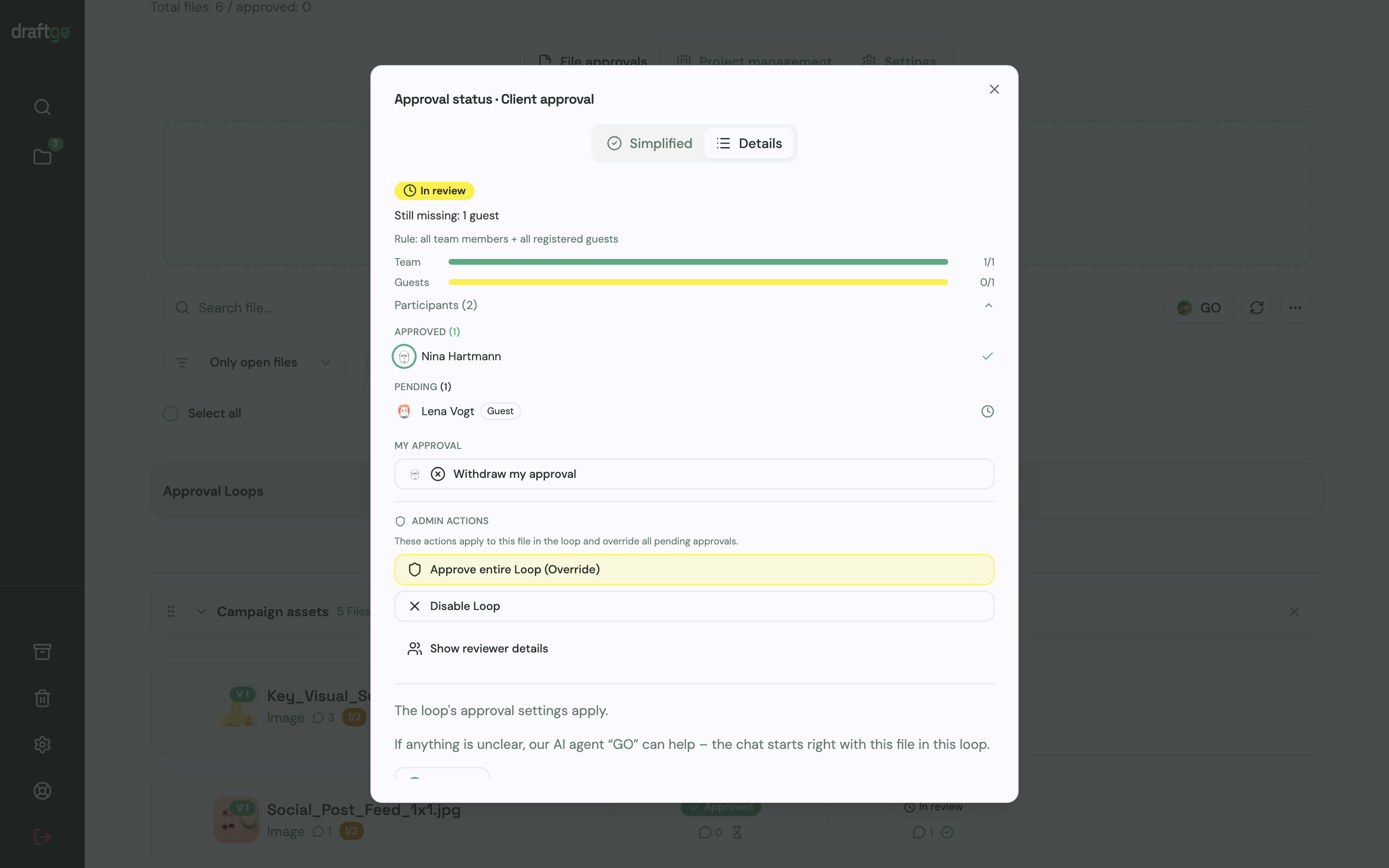
When you are not sure what is still open on a file, our AI agent “GO” answers questions about a chosen loop or file.
Reviewing on the file also helps when the list of assets gets long. Peter Schönherr, founder and managing director of Loloson Media in Portugal, whose team produces and edits image and video content, mainly e-commerce assets for an international hair care manufacturer, puts it like this: “With 70, 80 or more open assets, our client can now review flexibly in between other tasks instead of having to clear time for a whole mountain of them.” The page draftgo for agencies shows how agencies set this up for their clients.
FAQ
What is the difference between feedback management and customer feedback management?
Customer feedback management gathers opinions about a product or service, usually through surveys and NPS scores, and feeds them into product decisions. Feedback management in creative work deals with comments on a specific draft, such as a layout, a video cut or a web page, and ends with an approved file. Survey platforms serve the first, proofing tools the second.
Who should own feedback management on a project?
Usually the project manager or account manager, because they sit between the client and the creative team. On a freelance project, that is you. One named person consolidates the comments, and only settled feedback reaches the people who make the changes.
How do you handle conflicting feedback from a client?
Do not pass it on unresolved. Name the conflict, ask the people involved and let the person you agreed on at the start make the decision. Write the decision down in the comment thread so it does not come back in the next round.
How many revision rounds should a project include?
There is no standard number, so agree it in the contract and the brief before the work starts. You might, for example, include two rounds of changes plus a final check and quote any further round separately. A clear limit also encourages the client to send all comments in one go.
When is a feedback management tool worth it?
As soon as more than one person reviews a file, comments placed on the file itself give you more clarity than an email chain. The gap grows with every extra reviewer and with long documents or videos. For a single image and one client, a short call can still be enough.
Conclusion
Good feedback management comes down to one place for comments, one owner per round, a priority for every change and approvers named before the first draft. Before your next project starts, write these four points into the brief or the kick-off email and send them to everyone who will review.
Try it free – draftgo is free for 14 days, no credit card needed.
Written by
Emilia
Content Producer
Ready to streamline your approval processes?
Get started with draftgo today and see how easy professional collaboration can be.