
In October the renewal notice for Ziflow Standard reaches the operations lead of a twenty-person agency. Before she approves the payment, she opens the user list: the plan includes 15 users, and only five people at the agency ever create a proof. Clients review through public proof links and have never needed a seat. Would a smaller tool handle the same client approvals? Five tools answer that in different ways, each checked on the provider’s own pages on 17 November 2026.
Why teams look for a Ziflow alternative
Teams look for a Ziflow alternative when the plan structure, the feature set or the focus of the tool no longer matches their work. Ziflow is an online proofing platform for marketing and creative teams, and every plan on its pricing page comes with unlimited proofs and unlimited reviewers inside and outside your organisation.
On 17 November 2026 the page listed four plans. Free covers 2 users, 2 GB of storage, one workflow stage and 60 days of review history. Standard costs $199 a month billed annually or $249 a month billed monthly, with 15 users, 1 TB, two workflow stages, proof deadlines and manual reminders. Pro costs $329 a month billed annually or $399 billed monthly, with 20 users and integrations with Asana, monday.com, Slack and Microsoft Teams. Enterprise is priced on request and adds automatic deadline reminders, electronic signatures, ReviewAI and single sign-on. Extra users come in packs of five (Ziflow pricing).
Ziflow does a lot even on its Free plan, which reviews more than 1,200 file types and includes pixel-level version comparison and Adobe Creative Cloud plugins. Teams switch for other reasons:
- Seats in blocks: Standard bundles 15 users at one price, and there is no smaller paid plan. A team where four people manage proofs pays for the same block as a team of fifteen.
- Limits on Free: one workflow stage and 60 days of access to each proof suit a test more than ongoing client work.
- Feature depth: workflow templates, intake forms, colour separation and e-signatures serve large marketing departments, while a studio that mainly collects client comments uses a small part of them.
- Focus: a team that mostly cuts video may want a tool built around its editing software.
How we evaluated the alternatives
We compared each tool on five criteria: how it charges, what the free entry includes, how clients get access, how approvals and deadlines work, and which file types it focuses on. Our guide to online proofing and how to choose software explains these criteria in more depth. draftgo is our product. It gets pros and cons like every other tool in this list.
All details come from the providers’ own pricing and help pages as of 17 November 2026. Prices appear in the currency and billing period each page showed us. The order follows the pricing model, from per-member plans to flat plans for larger teams, and is not a ranking.
Ziflow alternatives compared
| Tool | Suited for | Free entry | Pricing model | Entry price, as of 17 Nov 2026 |
|---|---|---|---|---|
| Frame.io | video teams editing in Premiere Pro or Final Cut Pro | Free: up to 2 members, 2 GB, 2 projects | per member | Pro $15 per member a month plus tax, billed monthly (pricing) |
| GoVisually | small teams reviewing static designs | free trial, no free plan | per user | Lite $16 per user a month on annual billing (pricing) |
| draftgo | agencies and freelancers with client approvals | permanent Free plan | per company | plans per company, details in the draftgo entry below |
| Filestage | teams with review stages and due dates | Free: 1 active project, 5 new files a month | per plan, 10 seats included | Starter €199 a month on yearly billing (pricing) |
| PageProof | larger teams that want reviewing tools on every plan | trial on request | flat team plan | Team $2,999 a year or $299 a month (pricing) |
5 Ziflow alternatives in detail
1. Frame.io: for video teams that edit in Adobe or Apple tools
Frame.io is Adobe’s review platform with a clear focus on video. Its pricing page lists Pro at $15 per member a month plus tax for up to five members and Team at $25 for up to fifteen, both on monthly billing, with 13% off on annual plans. Pro adds passphrase-protected shares and expiring share links. Clients comment through a share link and enter their name and email address before the first comment (Frame.io help).
- Pros: frame-accurate comments, integrations with Premiere Pro and Final Cut Pro, a free plan for two members
- Cons: the price grows with every member, and the Team plan stops at fifteen members
- Price: Pro $15 and Team $25 per member a month plus tax, billed monthly (pricing)
More options are in our comparison of video feedback tools.
2. GoVisually: for small teams that review static designs
GoVisually charges per user. On its pricing page Lite costs $16 per user a month on annual billing ($20 monthly) for one to five users, with 15 active projects, up to 15 external reviewers and 50 GB, but without video or GIF support. Pro costs $33 per user a month on annual billing ($40 monthly) with a minimum of three users and adds unlimited external reviewers, video and integrations with Zapier, Slack and Adobe.
- Pros: low entry for a very small team, a free trial without a credit card
- Cons: no free plan, no video on Lite, reviewers capped at 15 on Lite
- Price: Lite $16 and Pro $33 per user a month on annual billing, $20 and $40 monthly (pricing)
Try it yourself: In the demo you work in a real draftgo workspace with sample data.
3. draftgo: for client approvals without an account
draftgo is an online proofing tool for agencies, freelancers and in-house teams. Your team uploads images, PDFs, videos and audio or captures a website, and clients leave comments on the exact spot through a link, with no account. Each approval loop has its own rule for who must approve, set separately for the team and for guests. You can start the AI review on PDFs, images and social posts from the Freelancer plan on; its findings appear as comments from our AI agent “GO”. Stored data is kept on EU servers in the Frankfurt data centre.
- Pros: one price per company, unlimited guests from the Freelancer plan, every draft a version of the same file
- Cons: no deadlines or reminders in loops, no version comparison, no ready-made integrations with project management tools
- Price: a permanent Free plan for one user, and paid plans priced per company that you can test free for 14 days; details on the pricing page
4. Filestage: for teams that need review stages and due dates
Filestage reviews videos, images, designs, documents, websites and audio. Its pricing page lists Free with one active project, five new files a month and two reviewer groups. Starter costs €199 a month on yearly billing or €249 on monthly billing and adds unlimited projects, due dates and reminders, version comparison and password-protected review links. Every plan includes 10 seats, with more in bundles of five from Starter on. Reviewers enter their email address instead of creating an account, and the page says files are backed up on ISO 27017 certified servers in Frankfurt.
- Pros: due dates with reminders and version comparison from Starter, reviewers without an account, servers in Frankfurt
- Cons: the Starter price sits close to Ziflow Standard, and Free fits one project at a time
- Price: Starter €199 and Business €329 a month on yearly billing (pricing)
5. PageProof: for teams that want reviewing tools on every plan
PageProof sells flat plans for a whole team. Its pricing page lists Team at $2,999 a year or $299 a month and Team Plus at $4,999 a year or $499 a month, each with unlimited reviewers, proofs and storage. According to the page’s FAQ, every plan includes automated workflows, compare mode, spell check and checklists. Team Plus adds single sign-on, and Enterprise adds digital signing and a choice of data location, including the US, the UK and Germany.
- Pros: compare mode and automated workflows from the entry plan, unlimited storage, a wide range of proof types
- Cons: no free plan, and Team costs more than Ziflow Standard on either billing period
- Price: Team $2,999 a year or $299 a month, a free trial on request (pricing)
Ziflow and draftgo compared
Ziflow is built for marketing departments that route proofs through several stages with templates and automation, draftgo for agencies and freelancers whose clients comment and approve without an account. The full feature comparison is on draftgo vs Ziflow.
| As of 17 November 2026 | Ziflow | draftgo |
|---|---|---|
| Pricing | plans with a block of users, Standard with 15, more in packs of five (pricing) | one price per company; 1 user on Free and Freelancer, 5 on Agency, 15 on Team |
| Clients | unlimited reviewers through public proof links | guests by link without an account, unlimited from the Freelancer plan |
| File types | more than 1,200 | images, PDFs, videos, audio, website screenshots, social media posts |
| Versions | pixel-level version comparison on every plan | each draft is a version of the same file, comments stay with their version |
| Deadlines | proof deadlines with manual reminders from Standard, automatic reminders on Enterprise | no deadlines; a daily or weekly summary lists pending approvals |
| AI | ReviewAI on Enterprise | AI review from the Freelancer plan, GO in every plan |
| Data | hosted with AWS, SOC 2 and ISO/IEC 27001 listed on its security page, a separate EU data centre | Stored data is kept on EU servers in the Frankfurt data centre. |
Ziflow leads on version comparison and deadlines. With draftgo you pay one price per company, and an approver opens a personal link and approves in the browser without signing up.
Which Ziflow alternative fits you?
Start with the number of people who create proofs: it decides whether per-member, per-company or flat pricing works out cheaper for you.
| Your situation | Good fit |
|---|---|
| Most of your reviews are video cuts from Premiere Pro or Final Cut Pro | Frame.io |
| Two or three designers review static artwork with a few clients | GoVisually |
| Clients should comment and approve without an account, at one price for the company | draftgo |
| You need due dates, reminders and version comparison in a mid-priced plan | Filestage |
| A larger team wants compare mode, spell check and automated workflows on every plan | PageProof |
| You need e-signatures, SSO and unlimited workflow stages | Ziflow Enterprise |
Our overview of agency software for each part of the stack shows where proofing sits next to project management and accounting, and the page on draftgo for agencies shows the client approval in detail.
Practical example: an agency tests two tools before the renewal
Take a twenty-person agency whose largest client is a regional group of car dealerships. Every month it delivers showroom posters as PDF and social images for tyre-change reminders, and twice a year a short video for the dealerships’ website. Five people at the agency upload drafts, the client’s marketing manager approves, and two showroom managers comment on the posters.
Before the renewal, the agency runs one live job through two shortlisted tools. Can the marketing manager approve without creating an account? Can the showroom managers comment without being able to approve? Does the record show who approved which version?
In draftgo the art director approves in an internal loop first. The marketing manager then gets a personal approver link for the client loop, and the two showroom managers share the viewer link, which lets them comment but not approve. One showroom manager asks for the opening hours in larger type, the designer uploads version 2 of the poster, and the marketing manager approves it. With five people uploading and two loops per project, the agency looks at the Agency plan: five users and unlimited loops, where Free holds one loop per project and Freelancer three.
How it works in draftgo
Moving a running client job from Ziflow into draftgo takes five steps.
- Start with the open jobs. Create a project for each running client job and upload the latest drafts.
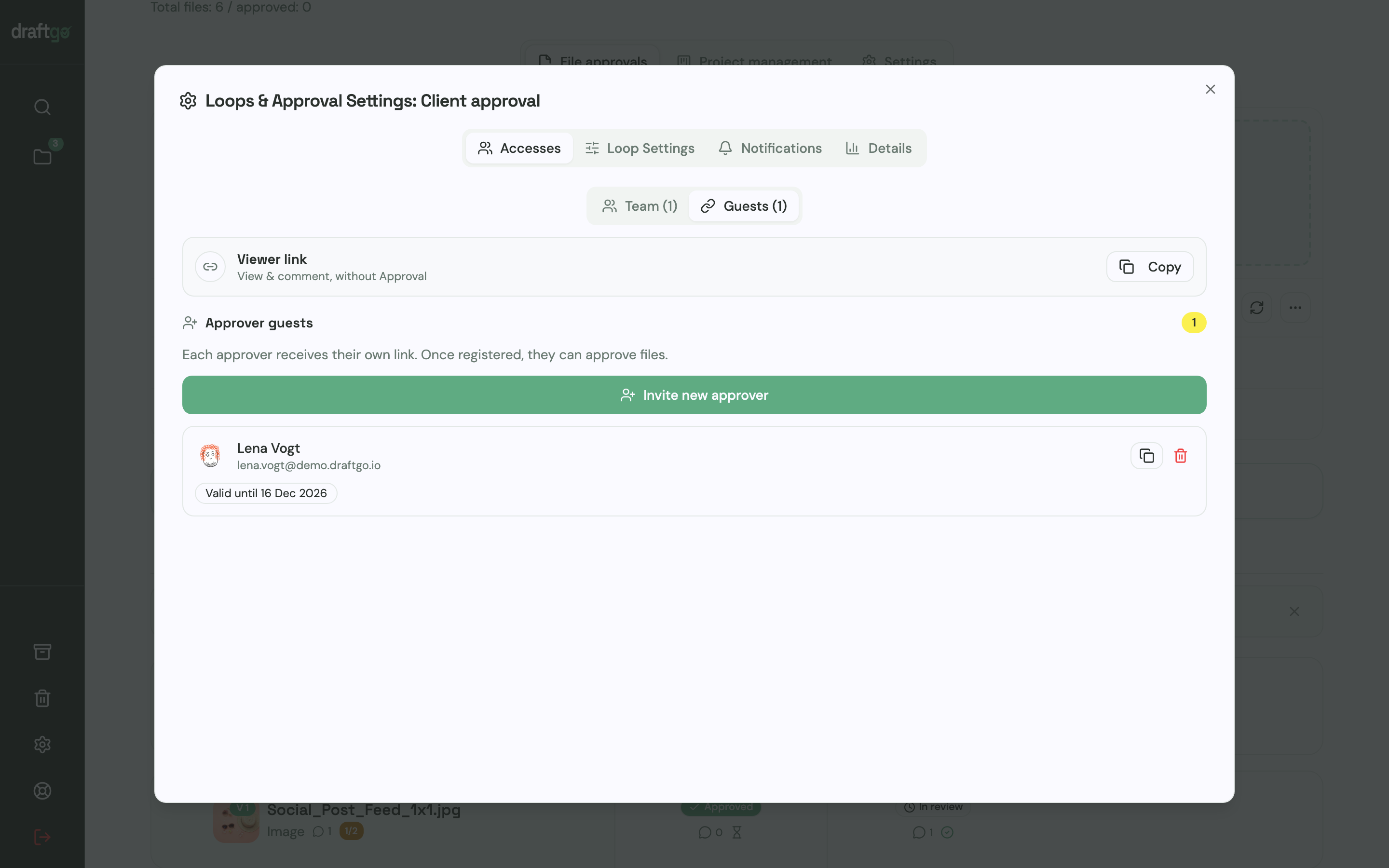
- Define the loops. Create an internal loop and a client loop. For each one you decide whether all approvers, a set number or any one of them must approve, separately for the team and for guests.
- Invite the client. The person who decides gets a personal approver link with name and email address. Everyone who should only comment shares the viewer link.
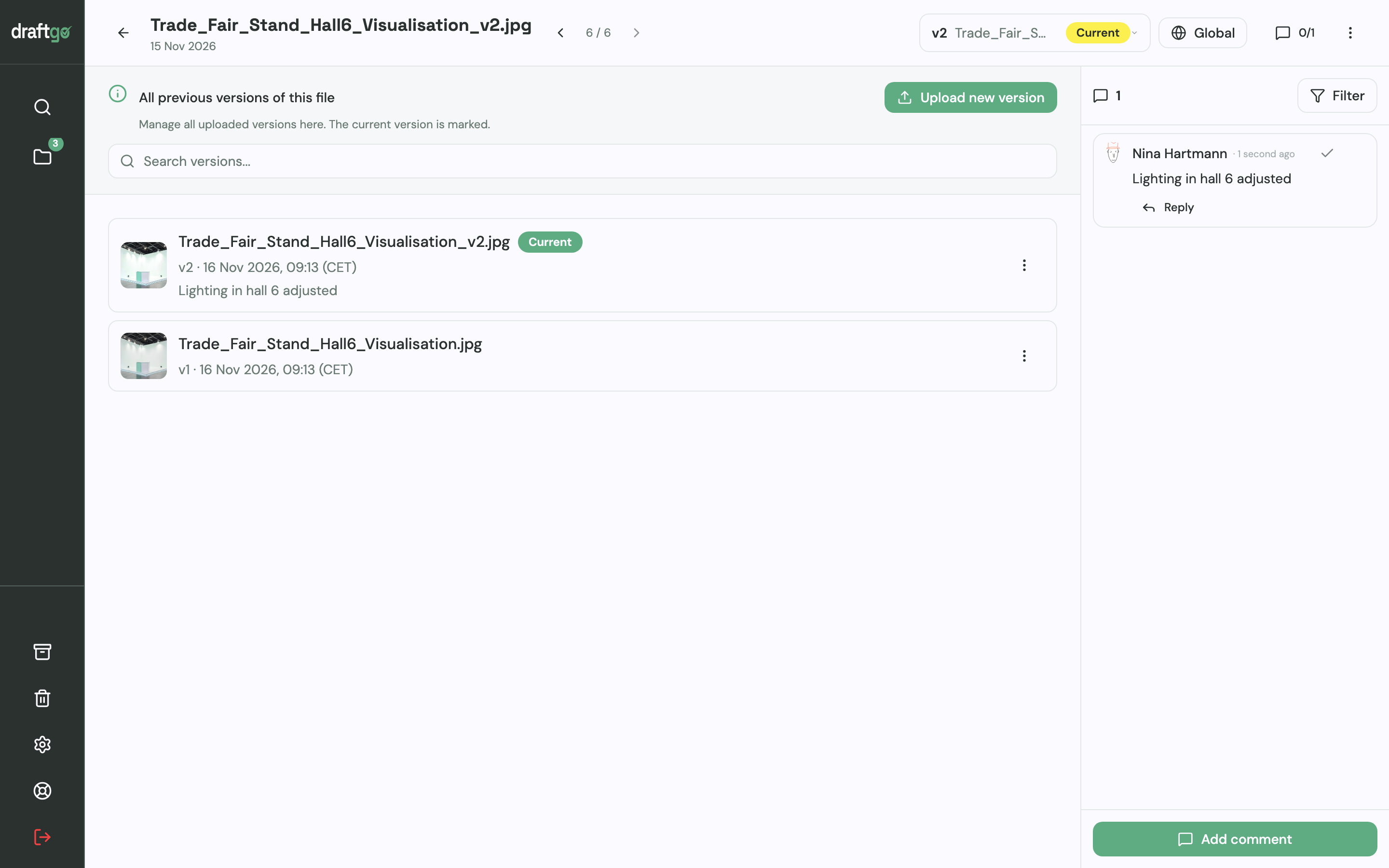
- Upload corrections as versions. A new draft goes onto the same file, earlier versions stay available, and a note says what changed. A new version starts the approvals again. After your team approves, you activate the file in the client loop.
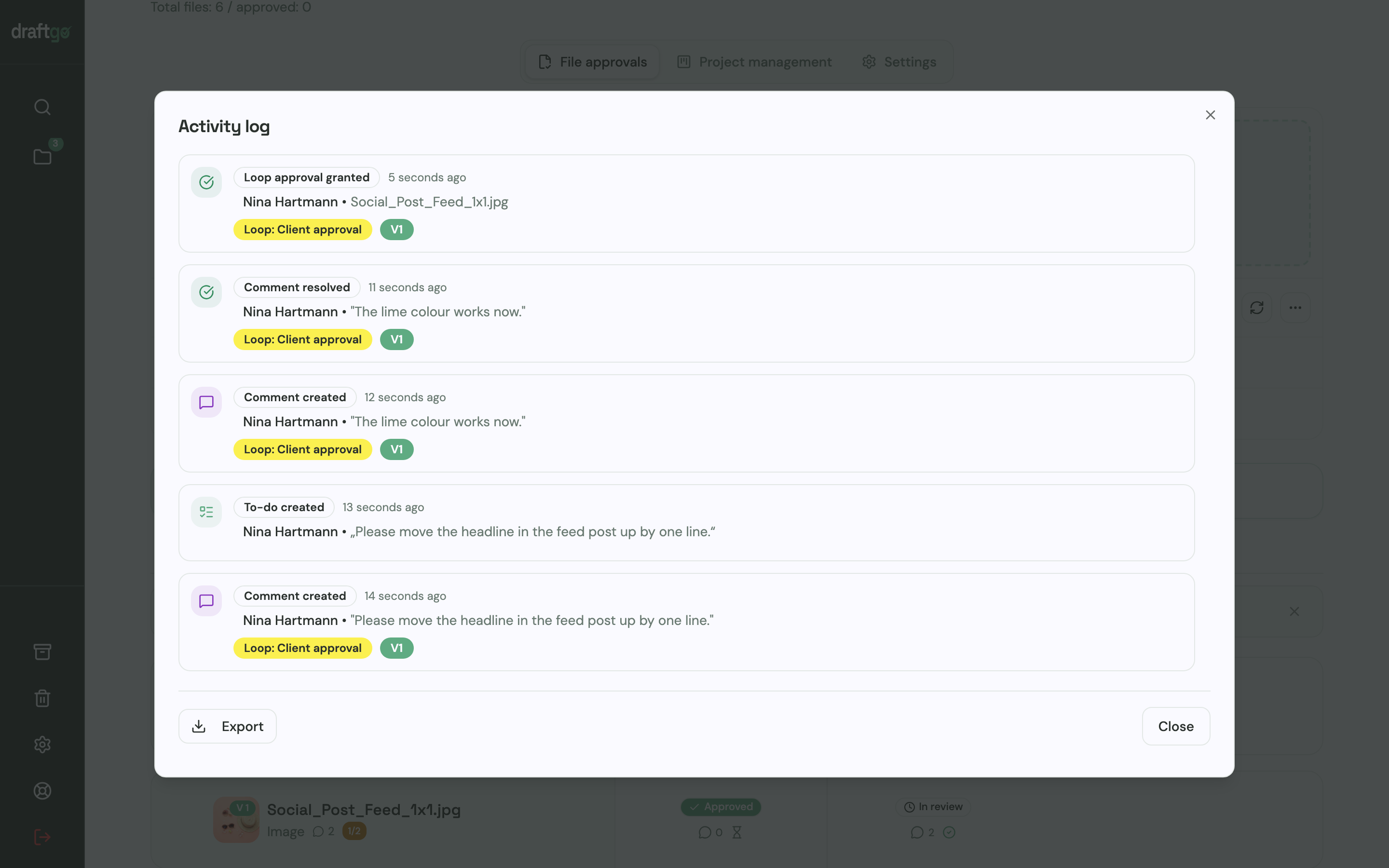
- Keep the record. The activity log lists approvals, comments, versions and downloads with person and time, and you export it as CSV, JSON or PDF. What belongs in that record is covered in our guide to the approval audit trail.
Loops carry no deadlines, so put the review date in your message to the client; the daily or weekly summary then shows which approvals are still open.
FAQ
How much does Ziflow cost?
On 17 November 2026 Ziflow’s pricing page listed Standard at $199 a month and Pro at $329 a month, both billed annually, or $249 and $399 on monthly billing. Enterprise is priced on request. A Free plan covers two users with 2 GB and 60 days of review history.
Do clients need a Ziflow account to review proofs?
No. Ziflow’s pricing page says an unlimited number of people inside and outside your organisation can review and approve proofs, and every plan includes public proof links. Only the users who create and manage proofs need a seat.
Is there a free Ziflow alternative?
Frame.io, Filestage and draftgo each have a free plan with limits on members, projects or files, and Ziflow’s own Free plan covers two users. GoVisually offers a free trial and PageProof a trial on request.
How do I move from Ziflow to another proofing tool?
Move the jobs that are still running first. Before the plan ends, download the final files and the reports you need to keep: on Ziflow’s pricing page the audit trail holds 90 days of data on Standard and one year on Pro.
Conclusion
Count the people who create proofs before you compare features. If most of your reviews are video, look at Frame.io; for a few designers with static artwork, GoVisually; for due dates and version comparison, Filestage; and for a larger team with flat pricing, PageProof. If your clients should comment and approve without an account at one price for the company, test draftgo with a live job before your Ziflow renewal.
Try it free – draftgo is free for 14 days, no credit card needed.
Written by
Emilia
Content Producer
Ready to streamline your approval processes?
Get started with draftgo today and see how easy professional collaboration can be.