
You have run a client job through a Filestage trial, the 14 days are nearly up, and someone now has to decide whether the team moves to Starter, Business or back to the free plan. Seats, active projects and the plan in which a feature starts decide which number you end up paying. All figures below come from Filestage’s pricing page, checked on 17 November 2026.
Filestage pricing at a glance
Filestage has four plans. On the pricing page each paid plan shows one price under “Yearly (2 months free)” and one under “Monthly”; Enterprise has no published price.
| Plan | Price on yearly billing | Price on monthly billing | Team members | Reviewer groups | Storage |
|---|---|---|---|---|---|
| Free | €0 | €0 | 10 | 2 | 2 GB |
| Starter | €199 a month | €249 a month | 10, more in bundles of 5 | 2 | 1 TB |
| Business | €329 a month | €399 a month | 10, more in bundles of 5 | 3 | 3 TB |
| Enterprise | on request | on request | 10, more in bundles of 5 | unlimited | 10 TB |
For a visitor from the EU the page shows every amount in euros with “/ month”, and the “Yearly (2 months free)” tab is selected when it opens. It gives no price in pounds and does not say whether VAT is included. As of 17 November 2026, every Filestage plan starts with 10 team members and unlimited reviewers, and its pricing FAQ says the price depends on the features you need plus the number of team members.
What each Filestage plan includes
Each paid plan includes everything in the plan before it and adds its own features.
Free
The free plan allows one active project at a time and five new files a month, and unused uploads do not carry over to the next month (Filestage pricing). It also includes unlimited reviewers and basic integrations with Slack, Microsoft Teams and Google Drive. Signing up includes a 14-day Business trial, after which the account switches to Free unless you upgrade.
Starter
Starter removes the project and file limits and adds due dates with automated reminders, side-by-side version comparison, password-protected review links, team-only comments and your own logo in the dashboard (Filestage pricing).
Business
Business adds review agents with 50 agent credits a month, automations, three reviewer groups, project templates, uploads by external partners, webhooks and API access, and integrations such as Jira, Monday and Zapier (Filestage pricing). Marking comments as resolved and exporting review reports as PDF also start on Business, and single sign-on is an add-on here.
Enterprise
Enterprise adds unlimited reviewer groups, audit logs, SSO, advanced reporting, a dedicated customer success manager, premium support and 10 TB of storage (Filestage pricing).
How to estimate your yearly Filestage cost
Your real cost depends on how many projects run at once, how many colleagues review internally and which features you need. These five steps turn the pricing page into a yearly figure.
- Count projects and files. Free fits one active project and five new files a month. If you run two client jobs in parallel, you need a paid plan.
- Count internal team members. Ten are included; beyond that you add bundles of five, whose price the page does not publish (Filestage pricing).
- Choose the billing period. On Starter, yearly billing saves (€249 − €199) × 12 = €600 a year. Payment is taken in advance, the subscription renews automatically unless you cancel before your notice period, and educational institutions and nonprofits can ask for custom discounts (Filestage pricing).
- Find the plan where your must-have feature starts. Due dates and version comparison start on Starter, resolved comments, review reports and the API on Business, audit logs on Enterprise.
- Ask about add-ons. Custom integrations, intake forms and multiple teams are add-ons without a published price, so ask for a quote before you compare totals.
Who Filestage pricing suits
Filestage pricing suits marketing and creative teams in which several people review internally, files come in different formats and approvals follow fixed dates.
Teams that plan reviews by date get reminders from Starter on, and our guide to keeping review rounds on schedule shows how to set those dates. Integrations on Business help when Filestage has to fit into a larger tool set; our overview of software for each part of an agency stack maps such a set.
A solo freelancer or two-person studio pays for 10 Starter seats while using one or two, so the question is whether due dates and version comparison justify that.
Try it yourself: In the demo you work in a real draftgo workspace with sample data.
Filestage and draftgo compared
draftgo is our product. The table compares both on open criteria, with Filestage’s figures from its pricing page and draftgo’s from our plans and pricing, as of 17 November 2026.
| Criterion | Filestage | draftgo |
|---|---|---|
| Pricing model | price per plan by features; 10 team members included, more in bundles of 5 (bundle price not published) | one price per company; internal users per plan: Free 1, Freelancer 1, Agency 5, Team 15 |
| Reviewers | no account needed, unlimited on every plan | guests by link without an account, unlimited from Freelancer; Free has 5 guest accesses, counted as links |
| Free plan | 1 active project, 5 new files a month, 2 GB | permanent Free plan with 2 projects and 2 GB |
| Due dates and reminders | from Starter | no due dates or reminders in loops; the optional daily or weekly summary of subscribed projects also lists waiting approvals |
| Version comparison | side by side from Starter | versions on the same file, earlier ones open one at a time |
| Review decisions | “Approve” and “Request changes” on every plan, file status “Needs changes” | approve or withdraw an approval; change requests are comments |
| Password-protected review links | from Starter | no password protection for links |
| Integrations and API | Slack, Microsoft Teams, Google Drive and Adobe apps on every plan; Jira, Monday, Zapier, webhooks and API from Business | no ready-made integrations and no public API |
| AI checks | review agents with 50 credits a month from Business | AI review pages a month: Freelancer 50, Agency 200, Team 500 |
| Single sign-on | Enterprise, add-on on Business | No single sign-on (SSO, SAML) with a company’s identity provider. |
| Certification | “ISO 27001-certified”, according to its pricing page | No certification such as ISO 27001 or SOC 2. |
| Data location | files backed up on ISO 27017 certified servers in Frankfurt, Germany, according to its pricing FAQ; Germany as dedicated data residency is an add-on on Business and Enterprise | Stored data is kept on EU servers in the Frankfurt data centre. |
Filestage, pros: 10 team members on every plan; due dates, reminders and version comparison from Starter; many integrations. Cons: one active project on Free; resolved comments and review reports only from Business.
draftgo, pros: one price for the company; unlimited guests from Freelancer; approvals in loops with a rule per loop; AI review pages included from Freelancer. Cons: no due dates, reminders or version comparison; no password-protected links, ready-made integrations or public API; internal users capped per plan (1 on Free and Freelancer, 5 on Agency, 15 on Team).
More detail is on draftgo vs Filestage.
Practical example: a brewery’s marketing team works out its yearly cost
Take the in-house marketing team of a regional brewery: a brand manager, a designer and a social media editor. They produce about 20 new files a month: tap-room menus, event posters and short Instagram videos. The managing director approves every file, the sales manager comments on menus, and the print shop checks each poster before it goes to press.
Free covers five of those 20 files, so the team prices the paid plans (Filestage pricing):
- Starter, yearly billing: €199 × 12 = €2,388 a year
- Starter, monthly billing: €249 × 12 = €2,988 a year
- Business, yearly billing, for the review agents: €329 × 12 = €3,948 a year
On Starter they would use three of 10 seats. Then they map the same month onto draftgo: the three of them fit the Agency plan with five users, the managing director gets a personal approver link, and the sales manager and the print shop comment through the shared viewer link. Agency has unlimited loops, so each project can run an internal loop and a sign-off loop for the managing director and the print shop. They set the Agency price from the pricing page against the Starter figure. If reminders before print deadlines matter, Filestage’s Starter covers them; if three internal users and approvals by link are enough, draftgo’s Agency plan fits.
How it works in draftgo
In draftgo the company pays one price, team members sign in with their own account, and reviewers outside the team join by link.
- Create a project and upload the files. Images, PDFs, videos and audio files go into one project, and a website can be captured as a screenshot.
- Decide who approves in which loop. An internal loop comes first, then one for the people outside the team. Each loop has its rule, all approvers, a set number or any one of them, set separately for team and guests. Free allows 1 loop per project, Freelancer 3, Agency and Team as many as you need.
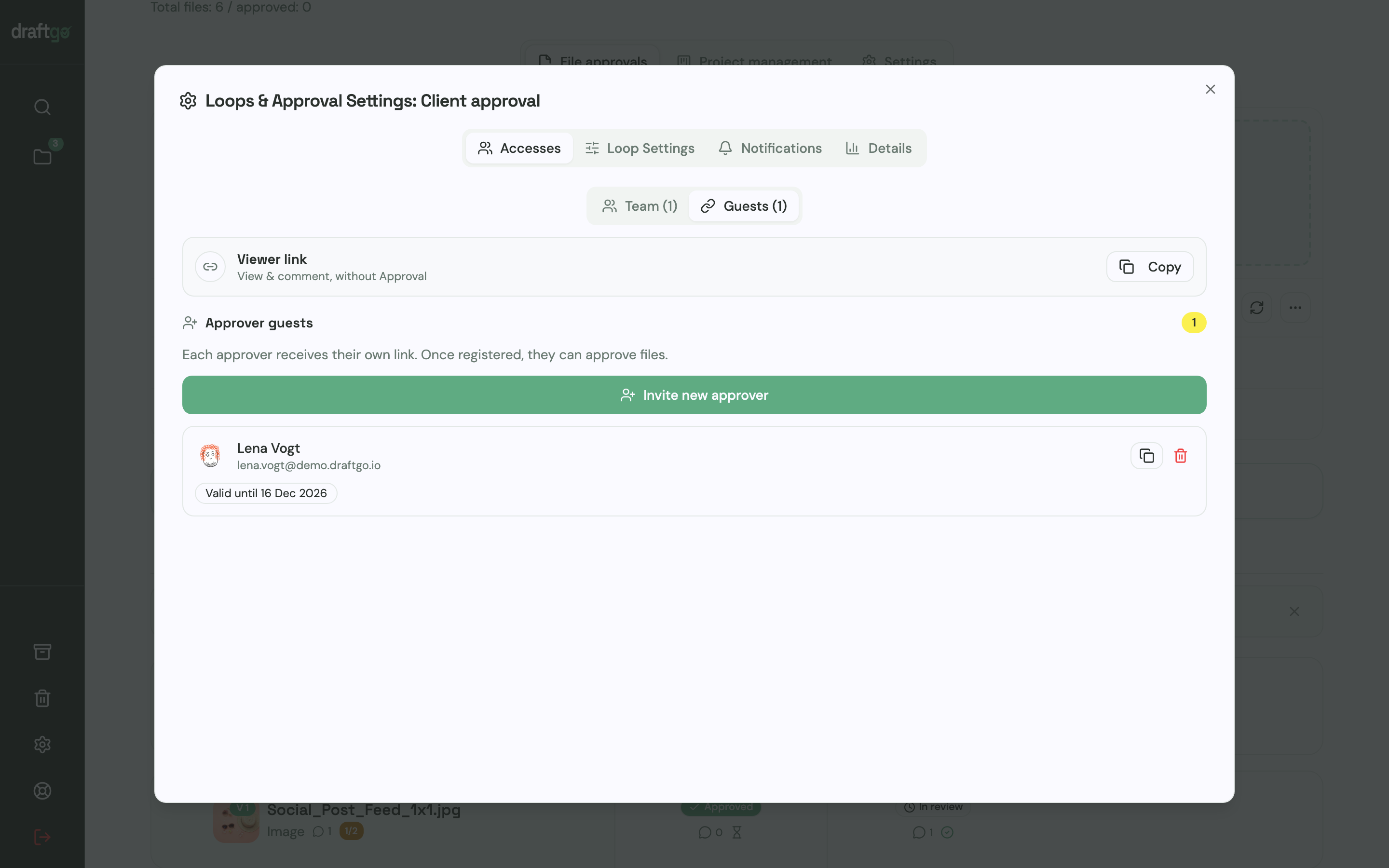
- Send the links. Whoever gives the final yes receives a personal approver link that carries their name and email address. Colleagues and partners who only add remarks open the shared viewer link, which lets them comment but not approve. Guests create no account.
- Gather feedback on the file. Comments sit as pins on an image, as marks on a PDF page or at a point in a video. You can start the AI review before a draft leaves the team; its findings show up as comments from our AI agent “GO”, and its pages come with the plans from Freelancer on. Uploading the fix as a new version of that file resets its approvals.
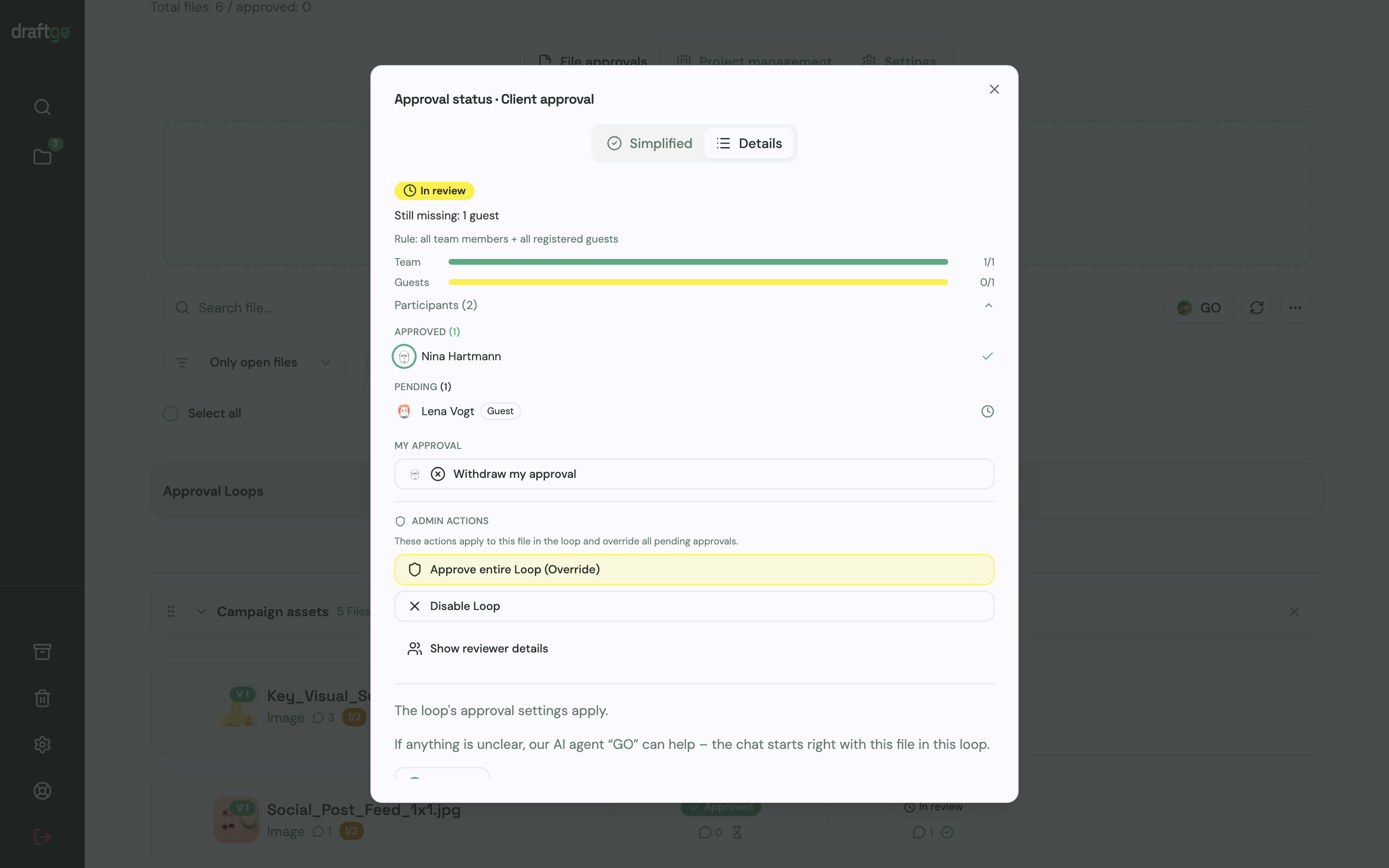
- Check the approval status. One dialog shows, for team and guests separately, who has approved and who is still pending. draftgo sets no due dates or reminders in loops; waiting approvals also appear in the optional daily or weekly summary of the projects you subscribe to.
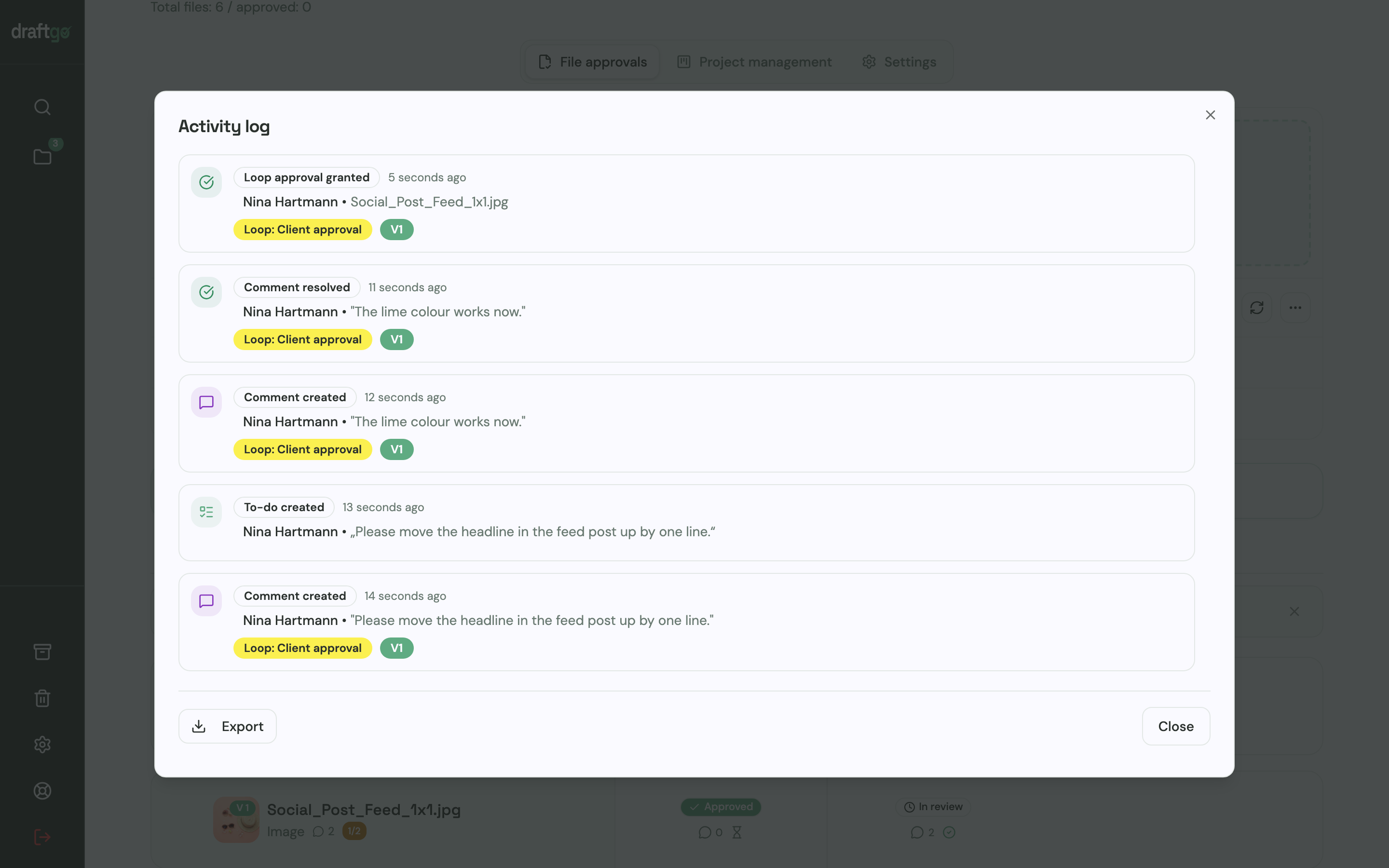
- Keep the proof. Approvals, comments, versions and downloads land in the activity log with person and time, and an export gives you a CSV, JSON or PDF copy. Our guide to an approval audit trail lists what such a record should hold.
Our page for in-house teams covers internal approvals, and our guide to online proofing explains the method behind it.
FAQ
Is there a free version of Filestage?
Yes. As of 17 November 2026, the free plan includes one active project, five new files a month, 10 team members and 2 GB of storage (Filestage’s pricing page). Sign-ups start with a 14-day Business trial and move to Free afterwards unless they upgrade.
How much does Filestage cost per user?
Filestage lists no price per user. Each plan includes 10 team members, the pricing FAQ says the price depends on the features and the number of team members, and more seats come in bundles of five with an extra 1 TB of storage each (Filestage pricing). The page does not show what a bundle costs.
Can I pay for Filestage monthly?
Yes. Filestage offers monthly and yearly subscriptions, and on the pricing page Starter costs €249 a month on monthly billing instead of €199 on yearly billing.
Do reviewers need a Filestage account?
No. Reviewers comment and approve without an account, and every plan includes unlimited reviewers. They enter an email address for notifications, and a free reviewer account is optional (Filestage pricing FAQ).
Conclusion
Filestage starts free, and Starter costs €199 a month on yearly billing, with 10 team members (Filestage pricing). The price fits teams that fill those seats and need due dates, version comparison or Business integrations. Before you choose, put your number of parallel projects and internal reviewers next to the plan where your must-have feature starts, then test a leaner tool on one real job.
Try it free – draftgo is free for 14 days, no credit card needed.
Written by
Emilia
Content Producer
Ready to streamline your approval processes?
Get started with draftgo today and see how easy professional collaboration can be.