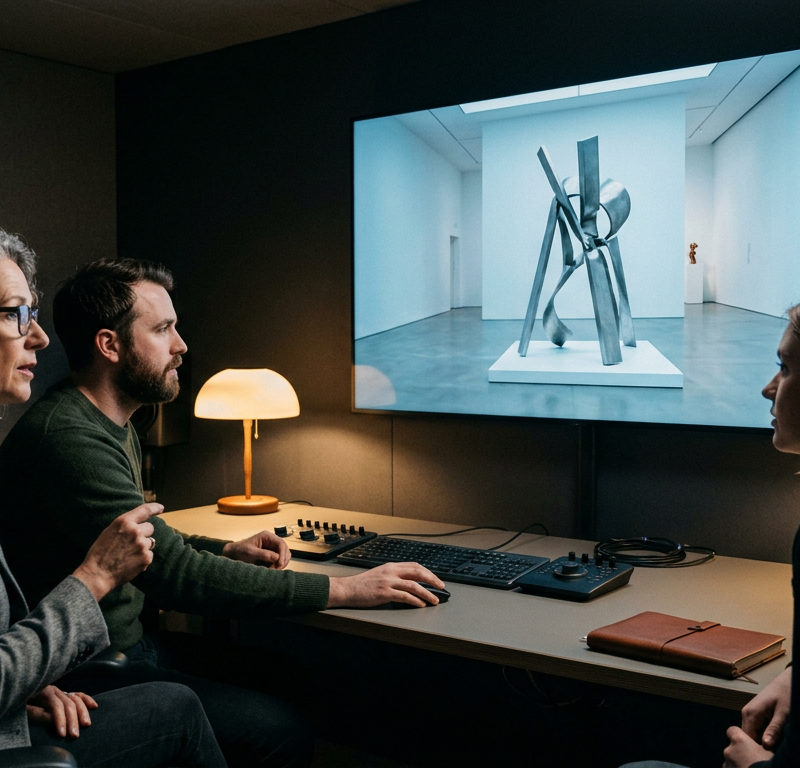
Your studio keeps every project in Dropbox, and the editor who joined last month still has a Frame.io login from her previous job. The first cut for your museum client is due before its board meeting, and the team wants notes and sign-off in one place rather than two. Both tools let a client open a link and comment on a frame, so the choice comes down to where your files live, which editing apps you use and what each plan costs per person.
Dropbox Replay vs Frame.io at a glance
Frame.io is Adobe’s review platform for video and creative files, with a Free plan and paid plans priced per member. Dropbox Replay is the review tool built into Dropbox, open on every Dropbox plan in a limited form with a paid add-on per user for the full feature set.
We read both tools’ own pages on 17 November 2026: the Frame.io pricing page, the Dropbox Replay page and Dropbox’s help articles on Replay. The table lists only what those pages state, with the plan each feature needs. draftgo is our product. It appears further down as a third option for teams whose work goes beyond video.
| Frame.io | Dropbox Replay | |
|---|---|---|
| What it is | review and collaboration platform from Adobe | review and approval tool inside Dropbox |
| Free start | Free plan with 2 members, 2 GB and 2 projects (pricing) | Replay on every Dropbox plan, limited to 4 or 10 file uploads (Replay FAQ) |
| Paid entry | Pro, $15 per member a month plus tax on monthly billing, up to 5 members (pricing) | Replay add-on, €9 per user a month billed annually, on Dropbox Plus or higher (Replay) |
| Comments | frame-accurate and range-based comments with annotations, every plan | frame-by-frame comments and markups, live review sessions (overview) |
| Version comparison | version stacks and comparison viewer, every plan | side-by-side video comparison, add-on (add-on) |
| Transcripts and captions | every plan, Free included (pricing) | add-on (add-on) |
| Link security | passphrase, expiry date and share permissions, from Pro (pricing) | password-protected links, add-on (sharing) |
| Notes clients do not see | internal comments, from Team (pricing) | editor-only comments, add-on (add-on) |
| Watermark | one static template from Pro, session-based on Enterprise (pricing) | watermark that tracks viewer IP, date and time, add-on (add-on) |
| Editing apps | Premiere, Final Cut Pro, Lightroom (pricing), After Effects, LumaFusion (integrations) | Premiere Pro, After Effects, Final Cut Pro, DaVinci Resolve, Pro Tools, LumaFusion (overview) |
| Stands out for | Camera to Cloud, from the Free plan (pricing) | files stored in your own Dropbox account (Replay) |
Review, versions and approval in both tools
Both tools pin comments to a frame and keep every version of a file together. They differ in which plan each part of the review needs.
Frame.io lists frame-accurate and range-based comments, annotations, document markup, version stacks and a comparison viewer in every plan, the Free plan included, along with transcription and captions (Frame.io pricing). To track reviews, Frame.io uses metadata: each plan has custom and default fields, and its review and approval page describes using metadata and Collections to group assets, assign specific reviewers and notify them.
Dropbox Replay tracks every version of a project and carries unresolved comments over from earlier versions. In a live review session everyone watches and comments on the same video at the same time, with playback kept in sync (Dropbox help, updated 13 August 2026). Files can carry an “Approved” status, and a project download can be limited to approved files (Dropbox help on projects). Due dates per file, transcripts and the side-by-side comparison of two video versions come with the paid add-on (Dropbox help on the add-on).
How a review moves from rough cut to final cut, and how five further tools handle it, is covered in our video feedback tool comparison.
Client links and security
Neither tool makes clients sign up. Frame.io says external clients open share links without signing up or logging in, then view and comment in the browser or in the free iPhone and iPad apps (Frame.io pricing FAQ). Dropbox says browser-based reviews let anyone leave frame-by-frame feedback and markups without a Dropbox account (Dropbox help).
The plan decides how tightly you can lock a link. On Frame.io, Pro adds passphrase-protected shares, an expiry date for share links and permissions that switch off downloads or comments and hide earlier versions. Team adds internal comments, so the crew can talk without the client reading along (Frame.io pricing).
Replay shares a file as “view and comment” or “view only”. Its link settings hide past comments or past versions, require a Dropbox login or allow downloads, and a password on the link needs the add-on (Dropbox help on sharing). Editor-only comments and a watermark that tracks the viewer’s IP address, date and time are add-on features as well.
Editing apps, file types and storage
Frame.io names Premiere, Final Cut Pro and Lightroom on its pricing page. Its integrations page adds After Effects and LumaFusion, Camera to Cloud hardware from makers such as RED, Canon and Atomos, automations through Zapier and Make, and a public API (Frame.io integrations). Camera to Cloud uploads takes from the set as soon as they are shot, and it is part of every plan. Final Cut Pro editors see Frame.io comments as markers on their timeline, and the viewer handles video, photos, design files and Adobe formats (Frame.io review and approval).
Try it yourself: In the demo you work in a real draftgo workspace with sample data.
Dropbox Replay accepts video, image, audio, PSD and PDF files of up to 150 GB, with audio and video up to 12 hours long (Dropbox Replay). Dropbox’s help centre lists previews of large files up to 150 GB among the add-on features (add-on). Editors in Premiere Pro, After Effects, Final Cut Pro, DaVinci Resolve or Pro Tools read feedback, resolve comments and upload a new cut without leaving their app. Uploads from your computer or another tool count towards your Dropbox storage, while files that already sit in Dropbox do not count a second time.
Replay’s help overview adds LumaFusion and exports comments as XML, FCP XML, JSON, CSV or plain text (Dropbox help). If you plan a whole production around one of the two tools, our video production workflow shows which phase needs whose sign-off.
Pricing per user and what each plan includes
Both tools charge for each person on your team, and clients reviewing through a link need no account. Frame.io bills in US dollars per member, Dropbox in euros per user for visitors from the EU, as of 17 November 2026.
| Frame.io plan | Price | Members | Storage | Added in this plan |
|---|---|---|---|---|
| Free | $0 (pricing) | up to 2 | 2 GB, 2 projects | Camera to Cloud, transcription and captions |
| Pro | $15 per member a month plus tax, or $156 per member a year on annual billing (pricing) | up to 5 | 2 TB plus 2 TB per additional member | passphrase and expiry on shares, share permissions, branded shares, comment attachments, one watermark template |
| Team | $25 per member a month plus tax, or $264 per member a year on annual billing (pricing) | up to 15 | 3 TB plus 2 TB per additional member | internal comments, restricted projects and folders |
| Enterprise | custom | custom | custom | single sign-on, several workspaces, session-based watermarking |
The Frame.io page offers annual billing with a saving of 13%. Its free trial of the paid plans asks for billing details and moves into a paid plan when it ends, unless you cancel first (Frame.io pricing).
The Replay add-on costs €9 per user a month billed annually (€108 a year) or €11 per user a month billed monthly (Dropbox Replay). It comes on top of a paid Dropbox plan: Basic users upgrade to Plus or higher first, Family plans cannot add it, and accounts in a trial cannot buy it (Dropbox help on the add-on). Without the add-on, Replay stays open with a limit of 4 or 10 file uploads depending on the plan, 10 on Essentials, Business and Business Plus (Replay FAQ). The plan prices themselves are on Dropbox’s plans page, and our comparison of Dropbox alternatives looks at the storage side.
On monthly billing, a team of five pays 5 × $15 = $75 a month for Frame.io Pro, or 5 × €11 = €55 a month for the Replay add-on plus the Dropbox plan underneath.
Which one fits your team?
Frame.io suits post-production teams that work in Adobe tools and want version comparison and transcripts without an add-on. Dropbox Replay suits teams whose projects already live in Dropbox and who review audio, PSD and PDF files next to their videos.
Frame.io fits when:
- your editors work in Premiere or Final Cut Pro and want Frame.io feedback inside the editing app
- takes should reach the cloud from the set through Camera to Cloud
- you want a comparison viewer and transcripts in every plan
- client shares need a passphrase, an expiry date or hidden earlier versions
Dropbox Replay fits when:
- your projects sit in Dropbox and should stay there
- you walk clients through a cut in a live review session
- your editors answer comments from DaVinci Resolve or Pro Tools
- you approve PSD and PDF files in the same tool as the video
Practical example: a twelve-person studio and a museum client
Take a twelve-person post-production studio that cuts eight short films for a natural history museum’s new exhibition. The curator signs off each film, and two people from the education team add comments.
With twelve members, Frame.io needs the Team plan, since Pro stops at five: 12 × $25 = $300 a month on monthly billing (Frame.io pricing). The studio would move its projects into Frame.io and gain the comparison viewer, plus transcription and captions for the films’ subtitles. With Replay, the films stay in the studio’s Dropbox, and the add-on costs 12 × €11 = €132 a month on monthly billing on top of the Dropbox plan (Dropbox Replay). Either way, the curator and the education team review through a link without an account.
| Tool | Pro | Contra |
|---|---|---|
| Frame.io | comparison viewer, transcripts and Camera to Cloud from the Free plan, passphrase, expiry and share permissions from Pro | priced per member, Pro limited to five members |
| Dropbox Replay | files stay in Dropbox, live review sessions, PSD and PDF next to video | password links, due dates and version comparison need the add-on on a paid Dropbox plan |
| draftgo | video, audio, images, PDFs and website screenshots in one project, clients without an account, approval loops with rules | files up to 500 MB, no panel inside editing apps |
How it works in draftgo
draftgo is an online proofing tool for teams whose video work sits next to print, web and social files that need the same client approval. For the museum job, that means the films, the wall texts and the exhibition poster run through one review.
- One project for the whole job. The films go in as videos, the wall texts as PDFs and the poster as an image. Raw footage and masters stay in your storage, as draftgo takes review files of up to 500 MB.
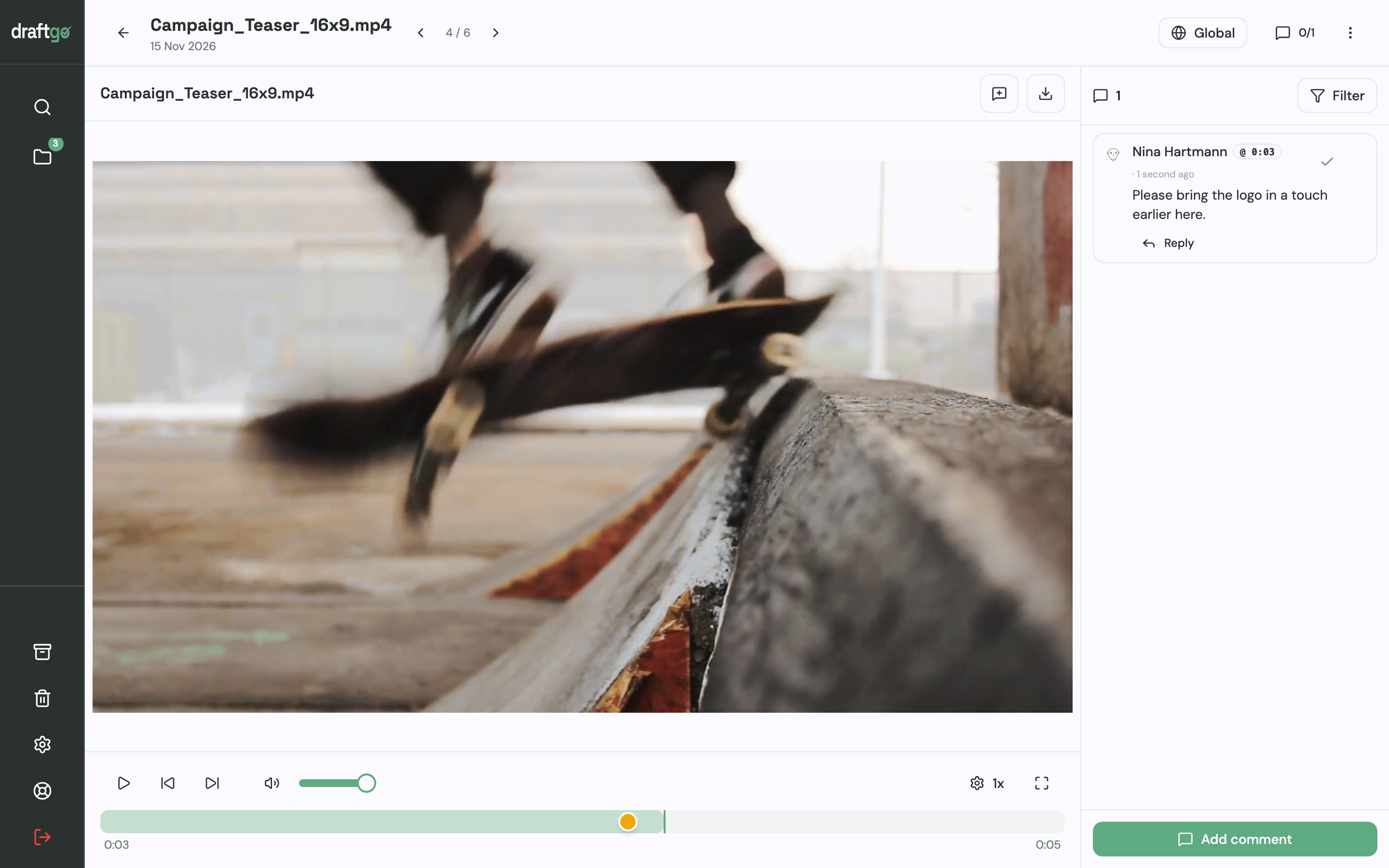
- Notes at the exact second. The curator pauses the film and types a comment, and draftgo stores the time with it. The team answers right under the note, tags a colleague with @ or attaches a reference, and marks the note resolved once the edit is done.
- An internal loop, then the museum’s loop. The producer approves a cut internally before a team member activates it in the client loop. The internal loop waits for all approvers on the team, and in the client loop the guest rule “any one of them” is enough, because the curator is the only approver guest. With 1 loop per project on Free, 3 on Freelancer and unlimited loops on Agency and Team, the two loops need Freelancer or higher.
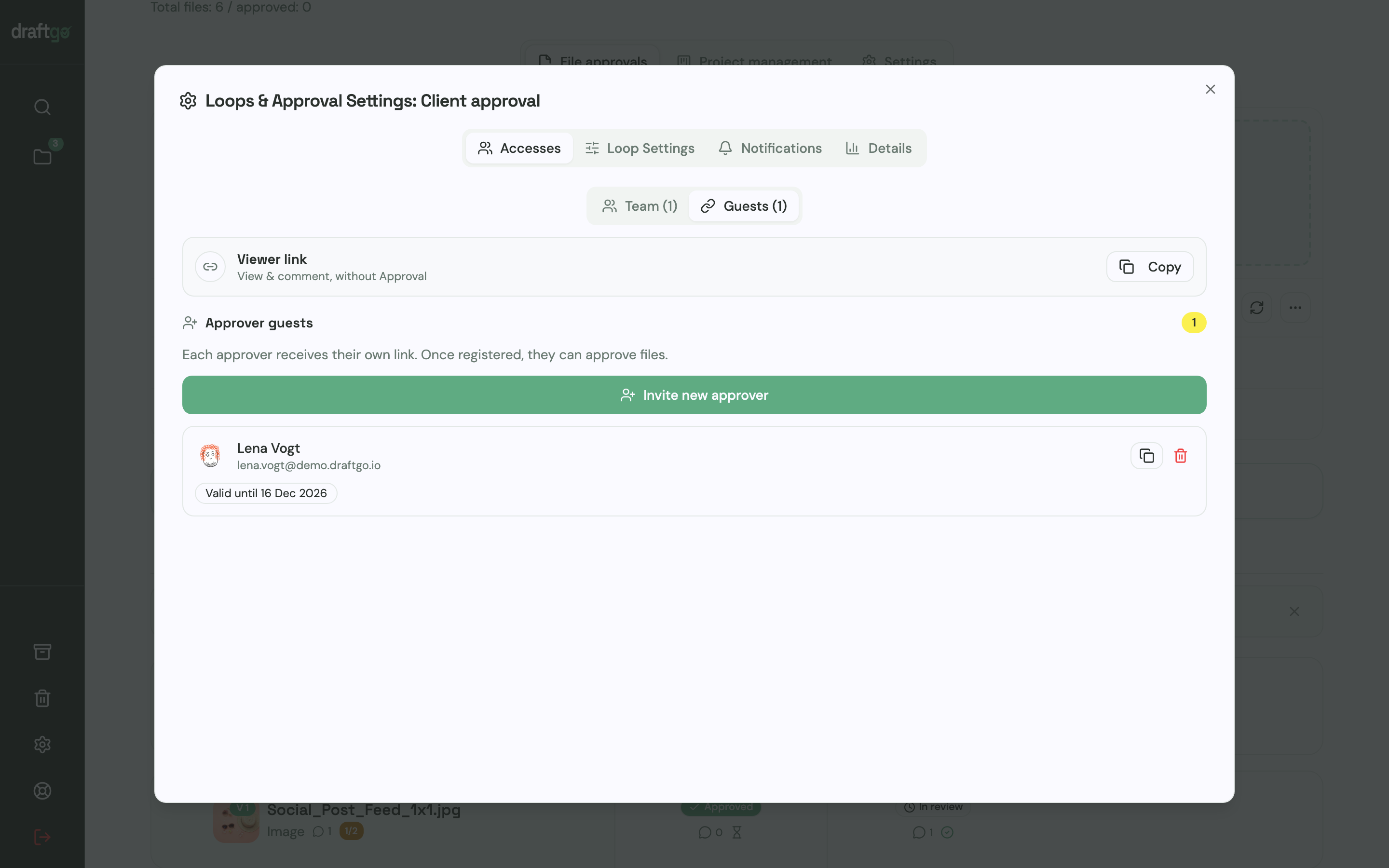
- The right link for each reviewer. The curator gets a personal approver link with her name and email address and can approve. The education team shares the loop’s viewer link, which lets them comment but not approve.
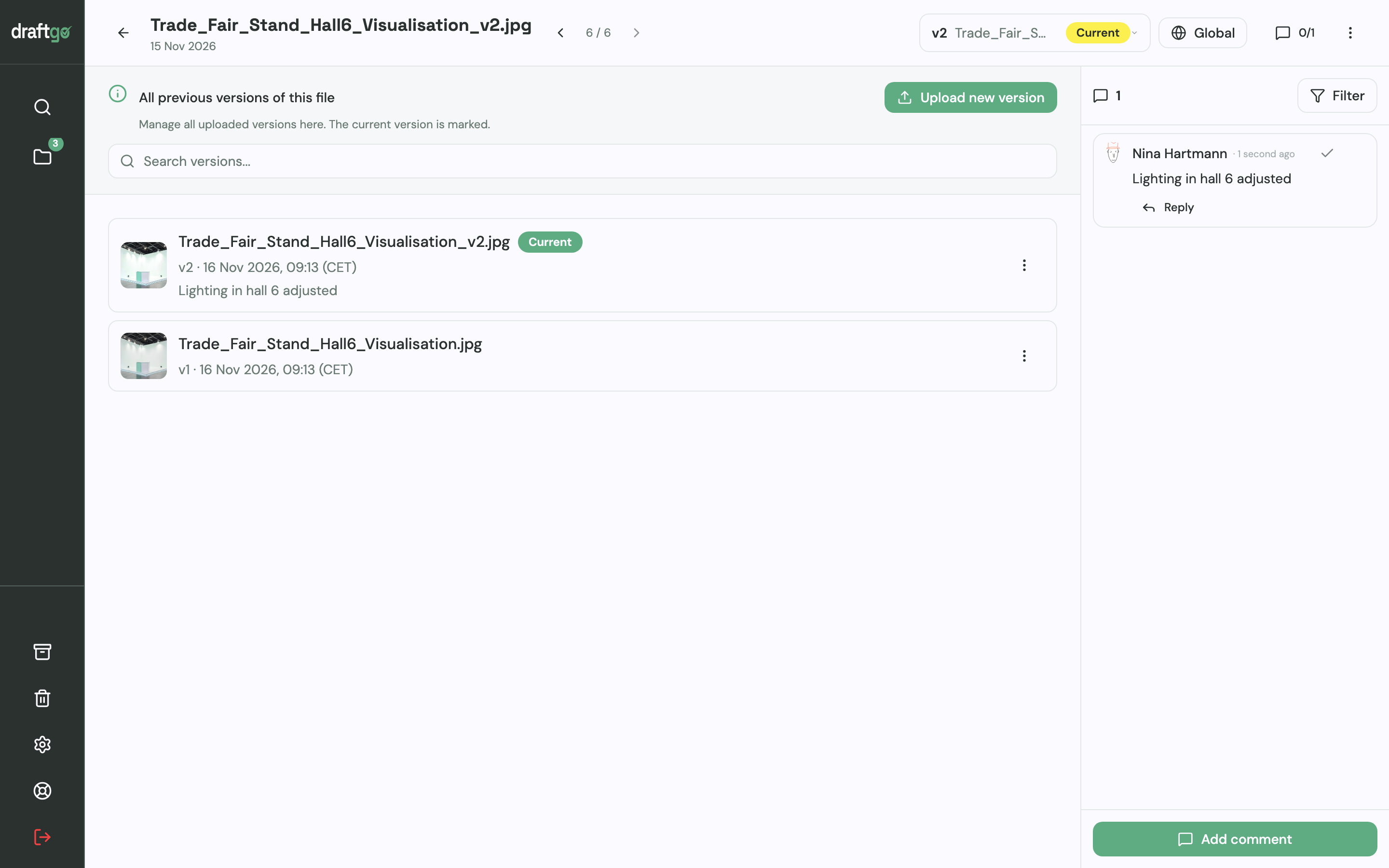
- Each recut lands on the same file. You upload it as a new version with a short note on what changed. Comments stay with their version, older cuts remain available, and the approvals start again.
- A record for the museum’s files. The museum’s record comes from the activity log, which lists approvals, comments, versions and downloads with person and time; you export it as a PDF, CSV or JSON file.
draftgo charges one price per company rather than per user; team members need an account, up to 5 on Agency and 15 on Team, and guests are unlimited from Freelancer upwards (pricing). Stored data is kept on EU servers in the Frankfurt data centre. The video production page shows the video features in detail, and draftgo compared with Frame.io goes through both tools point by point.
FAQ
Do clients need an account for Frame.io or Dropbox Replay?
No. Frame.io lets people outside your account open share links without signing up and comment in the browser (Frame.io pricing FAQ). Dropbox says anyone can leave frame-by-frame feedback in a Replay review without a Dropbox account (Dropbox help).
Can I use Dropbox Replay without the add-on?
Yes, with a limit. Replay is switched on for every Dropbox plan, but without the add-on you get 4 file uploads, or 10 on Essentials, Business and Business Plus, according to Dropbox’s Replay FAQ. Password-protected links, due dates, transcripts and version comparison also need the add-on.
Can both tools compare two versions?
Yes, on different plans. Frame.io lists version stacks and a comparison viewer in every plan, Free included (Frame.io pricing). Dropbox puts the side-by-side comparison of two video versions into the Replay add-on (Dropbox help).
Which one handles PDFs and images better?
Dropbox Replay names video, image, audio, PSD and PDF files as compatible. Frame.io’s viewer covers video, photos, design files and Adobe formats and lists document markup in every plan. If PDFs and images make up much of your work, test both with a real file, or look at a proofing tool built for mixed formats.
Conclusion
Choose Frame.io if your team edits in Adobe tools and wants version comparison, transcripts and Camera to Cloud without an add-on. Choose Dropbox Replay if your projects live in Dropbox and you want live reviews close to your files, and budget for the add-on plus a paid Dropbox plan. If you approve videos together with PDFs, images and websites in internal and client stages, run a real project through draftgo as well.
Try it free – draftgo is free for 14 days, no credit card needed.
Written by
Emilia
Content Producer
Ready to streamline your approval processes?
Get started with draftgo today and see how easy professional collaboration can be.