
A producer has Frame.io’s pricing page open in one tab and next season’s budget in the other. The plan price looks simple, but the budget needs a yearly total, and that total moves every time a freelance editor gets a login. Frame.io charges per member and caps the number of members on each plan, yet some of the people on a project never need a seat.
How much does Frame.io cost?
Frame.io costs $15 per member a month on Pro and $25 per member a month on Team with monthly billing, plus tax, according to Frame.io’s pricing page. On annual billing the page shows $156 per member a year for Pro and $264 for Team, also plus tax, and calls it a 13% saving. The Free plan costs nothing and needs no credit card, and Enterprise is priced on request. The page shows all prices in US dollars. All figures are as of 17 November 2026.
| Plan | Monthly billing | Annual billing | Members | Storage | Projects |
|---|---|---|---|---|---|
| Free | $0 | $0 | up to 2 | 2 GB | up to 2 |
| Pro | $15 per member a month | $156 per member a year | up to 5 | 2 TB included + 2 TB per additional member | unlimited |
| Team | $25 per member a month | $264 per member a year | up to 15 | 3 TB included + 2 TB per additional member | unlimited |
| Enterprise | custom | custom | custom | custom | unlimited |
Source for the table: Frame.io pricing, as of 17 November 2026. Prices are plus tax, which Frame.io calculates from your billing address.
Each plan also has Mounted Storage, a separate allocation for streaming assets to your desktop with Frame.io Drive: 2 GB on Free, 250 GB on Pro, 500 GB on Team (250 GB during the trial) and 2 TB on Enterprise, according to the same page.
What each Frame.io plan adds
The plans differ in two ways beyond members and storage: how you can control share links, and how much security and admin control you get. The plan cards on the pricing page list the following.
- Free: Camera to Cloud, transcription and captions, up to two projects.
- Pro: everything in Free, plus unlimited projects, custom-branded shares, passphrase-protected shares, share link expiration, share permissions (for example disabling downloads or comments and hiding previous versions), comment attachments and one static watermark template.
- Team: everything in Pro, plus restricted projects and folders and internal comments, which keep conversations inside the team apart from those with clients.
- Enterprise: everything in Team, plus single sign-on, multiple team workspaces, unlimited watermark templates, asset lifecycle management and priority in-app support.
Enterprise comes as Select, the standard package, or Prime, which adds Storage Connect for your own AWS S3 bucket, Secure Sharing, forensic watermarking and digital rights management. Session-based watermarking comes with Prime and is a paid add-on for Select.
Who counts as a member, and who reviews for free
A member is a paid user inside your Frame.io account, while people who only review through share links cost nothing. The pricing page’s FAQ says the Account Owner and Content Admins can add paid users, members can add more if a workspace or project gives them that permission, and each one raises the cost of the subscription.
The same FAQ on Frame.io’s pricing page says you can share assets with anyone outside your account for free through share links, and they do not need to sign up or log in. Reviewers can view and comment in the browser or in the free iPhone and iPad apps.
Everyone you add to the account as a member is billed, freelancers included, so count the editors and producers who work in your projects. Clients and stakeholders who only watch and comment can stay on share links.
Frame.io for Creative Cloud: what Adobe subscribers already have
Frame.io belongs to Adobe, and some Creative Cloud subscriptions include a basic version at no extra cost. According to Frame.io’s Creative Cloud page, it comes with a full Creative Cloud All Apps subscription, with individual Premiere and After Effects subscriptions, and with the Individual All Apps plan for students and teachers. For Creative Cloud Teams and Enterprise accounts, the page refers you to your IT admin or Adobe account executive.
Try it yourself: In the demo you work in a real draftgo workspace with sample data.
Frame.io for Creative Cloud covers two users, five concurrent projects, 100 GB of Frame.io storage, Camera to Cloud and free sharing with an unlimited number of reviewers. The same page offers Creative Cloud subscribers 30 days of the Frame.io Team plan, after which you upgrade or return to the included features. For a solo editor in Premiere that can be enough; a third user means a paid Frame.io plan, billed separately.
How to work out your Frame.io cost in 5 steps
The total depends on who needs a seat, which plan fits that number and how you pay.
1. List everyone who works inside the account
Write down every person who uploads, creates projects, organises folders or manages share links, including freelancers you book regularly.
2. Move pure reviewers to share links
Cross off clients and anyone else who only watches and comments. They work through share links without an account.
3. Match the number to a plan
Pro allows up to five members and Team up to 15. Above 15, Frame.io points you to Enterprise. If a sixth member is likely during the year, compare the Team price too.
4. Check storage and the features you need
Compare the plan’s storage with the footage you keep in Frame.io at one time, and check the plan cards for the features you rely on, such as passphrases and link expiry on Pro or internal comments on Team.
5. Choose monthly or annual billing
Multiply the members by the monthly or the annual price, then add tax.
| Mistake | Better practice |
|---|---|
| Counting only permanent staff | Count every freelancer you add to the account as a member |
| Giving clients a member seat | Send a share link; reviewers need no account |
| Choosing Pro for a team that is about to grow | Pro stops at five members; plan Team if a sixth person is likely |
| Starting a trial and forgetting it | The trial needs billing details and moves into the plan you chose when it ends |
Source for the table: the FAQ on Frame.io’s pricing page, as of 17 November 2026.
Practical example: an eleven-person sports video studio
Take an eleven-person studio that films and cuts match highlights and player interviews for a regional football club, and books two freelance editors for the weekends. Five people edit and upload, one producer manages projects and shares, and five handle camera, sound, graphics and drone shots but hand their files to the editors.
The studio counts eight people who work inside the account: five editors, the producer and the two freelancers. Eight is above the five members Pro allows, so Team applies. On monthly billing that is 8 × $25 = $200 a month, and on annual billing 8 × $264 = $2,112 a year, plus tax, based on the prices on Frame.io’s pricing page. The club’s media officer and the head coach review on share links and add nothing to the bill. Team also gives the studio internal comments, which the pricing page describes as separating internal conversations from those with clients and collaborators.
If the other five were added as members too, the count would rise to 13 and the monthly bill to 13 × $25 = $325. So the studio keeps the hand-over to the editors and checks the member list before each season.
When Frame.io pricing fits and when another model is cheaper
Frame.io pricing fits teams whose work is mostly video and whose editors work in Adobe tools. The Creative Cloud page describes frame-accurate commenting right inside Premiere, and the pricing page includes Camera to Cloud from the Free plan up. For a post-production team whose size stays the same, a price per member is easy to plan.
Per-member pricing gets harder to plan when the people working in your account change from project to project, or when you also review PDFs, images and websites with clients. Then a tool with one price per company can cost less. We compare both approaches on our draftgo vs Frame.io page; draftgo is our product. For a wider view of review tools for video, see our comparison of video feedback tools, and for the steps around the review, our guide to the video production workflow.
How it works in draftgo
draftgo charges one price per company and plan, not per member or reviewer. Guests are unlimited from the Freelancer plan on, the Free plan includes five guest accesses, and the number of team members depends on the plan. What each plan includes is on our pricing page.
- Upload the cut. Your editors export the cut and upload it to a project, because draftgo works with exported files rather than an Adobe integration. Files can be up to 500 MB, and the browser compresses videos of up to 800 MB before the upload.
- Collect comments on the timeline. Each comment sits at a point in the video, so the editor sees where a change belongs.
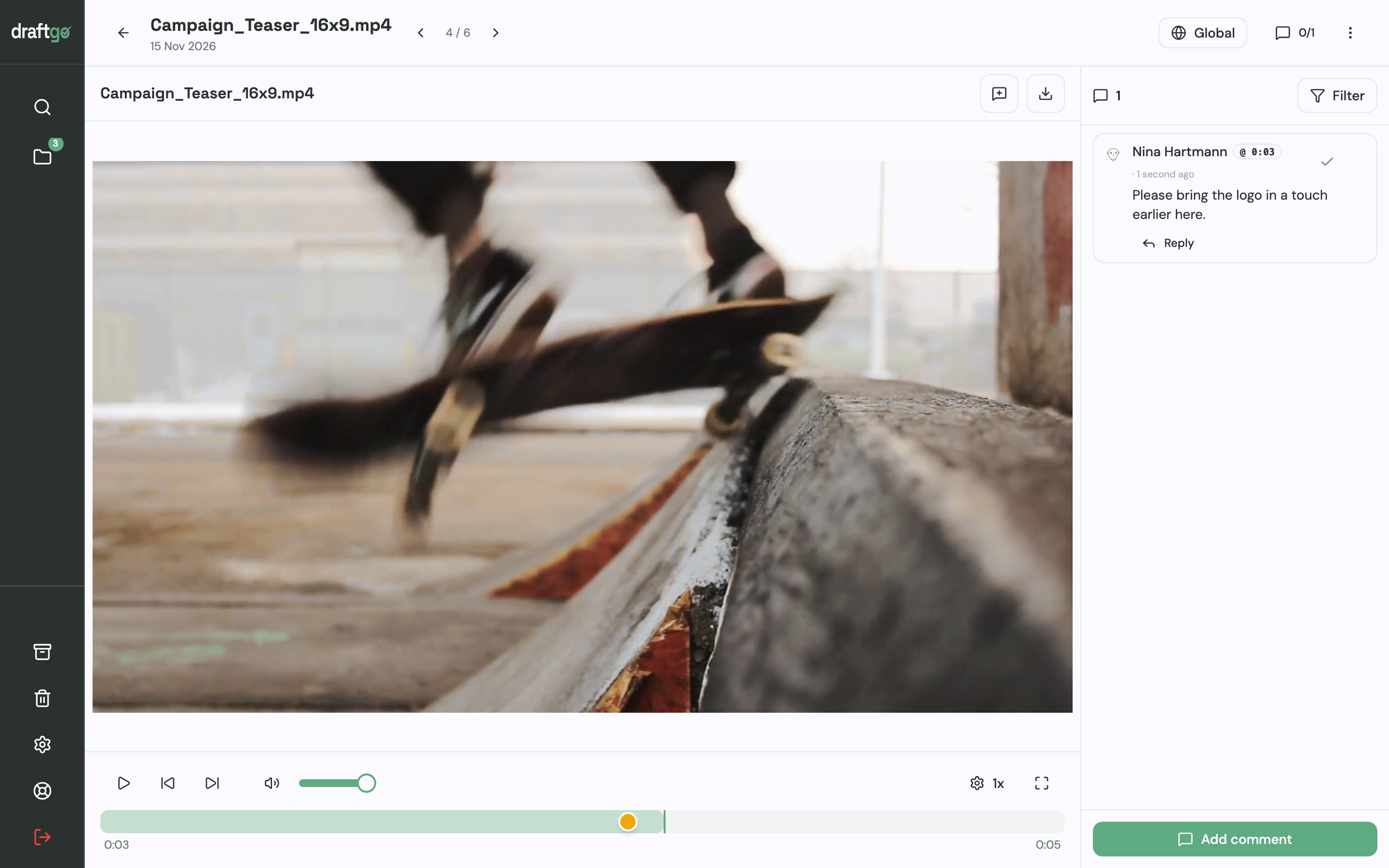
- Send the client its two kinds of link. In the client loop, the person who signs off opens a personal approver link and gives a name and email address once. Colleagues who only add notes share the viewer link: they comment at the timecode, cannot approve and need no account.
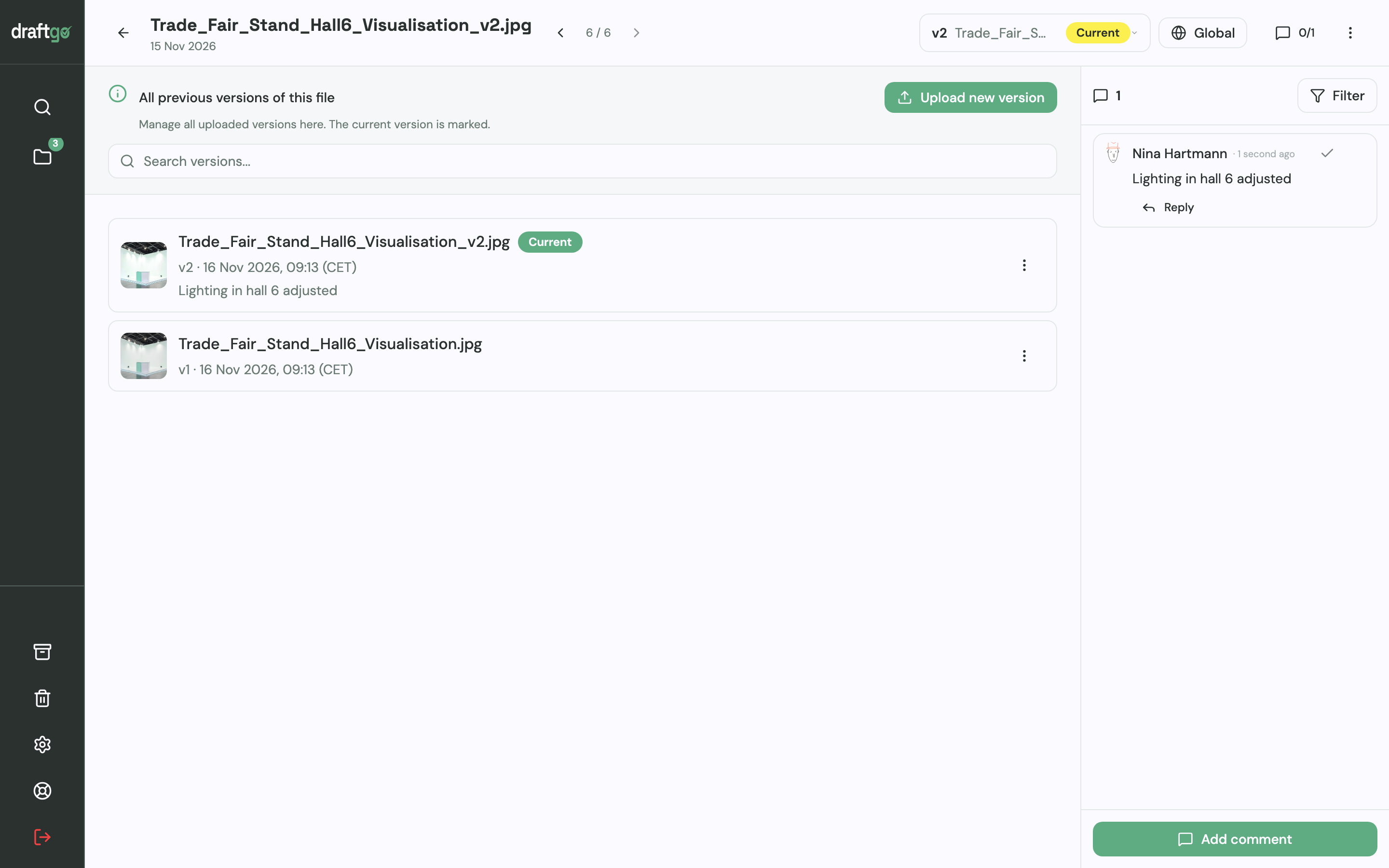
- Upload the next version. The new cut sits on the same file as version 2, the earlier one stays available, and the approvals start again.
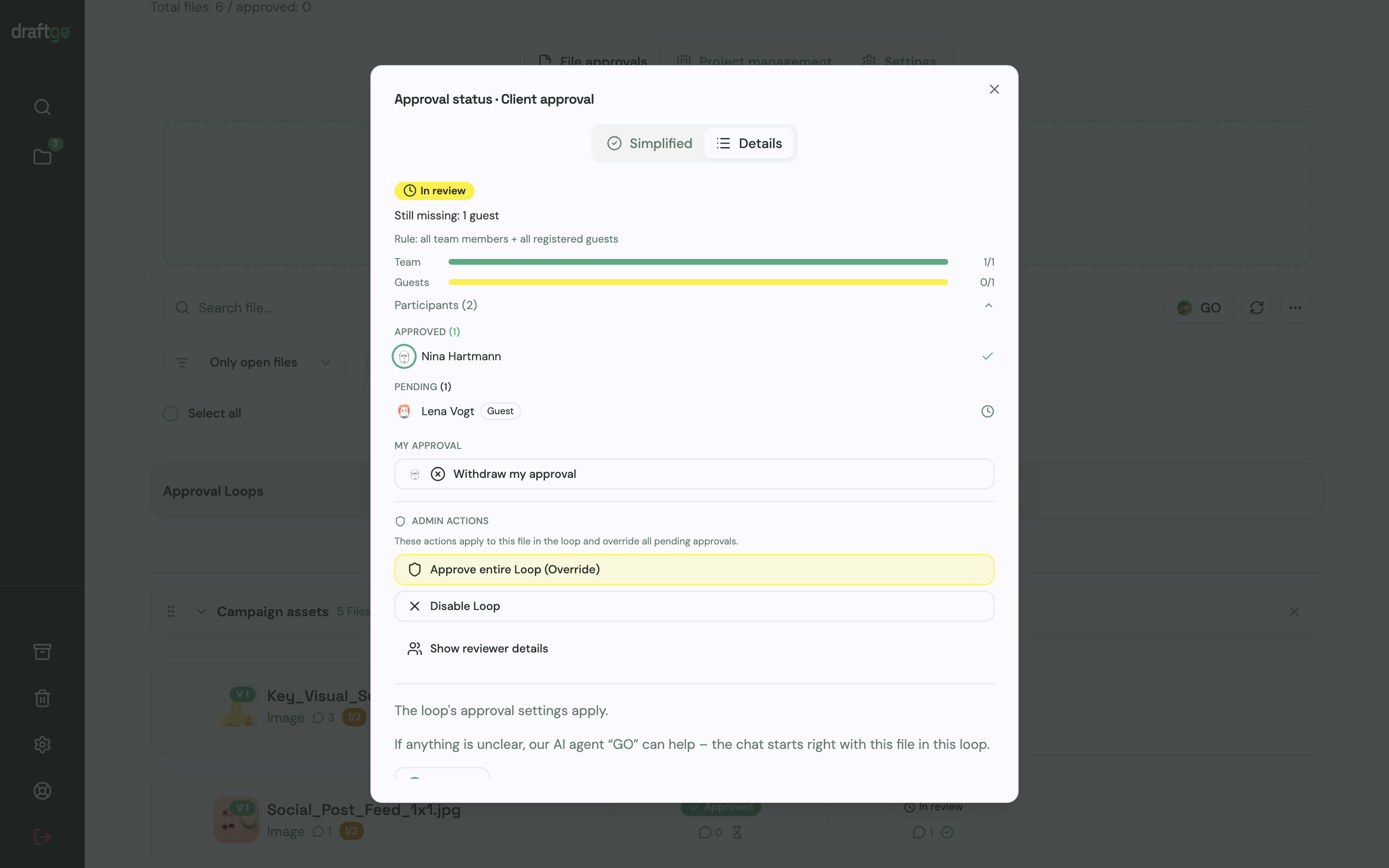
- Check the approval status. The loop lists each person under approved or pending, separately for the team and for guests, and the activity log records approvals, comments, versions and downloads with person and time.
The same project can hold PDFs, images and website captures next to the video. More on film work is on our page for video review and approval, and our online proofing guide covers review across file types.
FAQ
Do clients count as members on Frame.io?
No, not if they only view and comment. Frame.io’s FAQ says people outside your account can review through share links without signing up, and they appear as reviewers. Anyone you add to the account as a member counts towards the bill.
Is Frame.io free with Creative Cloud?
A basic version is included with a full Creative Cloud All Apps subscription and with individual Premiere and After Effects subscriptions, according to Frame.io’s Creative Cloud page. It covers two users, five concurrent projects and 100 GB of storage. For more people or storage, you need a paid Frame.io plan, billed separately.
How much does annual billing save on Frame.io?
Frame.io names a 13% discount on annual plans on its pricing page. Pro costs $156 per member a year against 12 × $15 = $180 on monthly billing, and Team $264 against 12 × $25 = $300, which works out at 12% on Team. The annual plan is charged once a year and renews until you cancel.
Can you cancel Frame.io mid-cycle?
Yes. According to the FAQ on Frame.io’s pricing page, you pay up front for the month or year, can cancel at any time and keep full access until the end of the billing cycle. An upgrade mid-cycle is charged pro rata.
Conclusion
Before you choose a Frame.io plan, list who uploads and manages work in your account and move everyone who only reviews to share links. Then pick Pro for up to five members or Team for up to 15, and compare the annual total with a tool that charges per company if your team changes often.
Try it free – draftgo is free for 14 days, no credit card needed.
Written by
Emilia
Content Producer
Ready to streamline your approval processes?
Get started with draftgo today and see how easy professional collaboration can be.