
The Filestage renewal lands in the inbox of a three-person design studio, and the studio manager opens the user list before she pays. Starter includes 10 team members, of whom three have a login, and the clients have never needed a seat, because Filestage reviewers work without an account. Filestage works for the studio. She only wants to know whether a smaller or differently priced tool would handle the same client approvals. Below are six Filestage alternatives, each checked on the vendor’s own pages on 23 November 2026.
Why teams look for a Filestage alternative
Teams look for a Filestage alternative when the plan no longer matches the number of people who upload drafts, or when a feature they need starts on a higher plan.
On its pricing page, Filestage lists Starter at €199 or $199 a month on yearly billing and €249 or $249 on monthly billing, and Business at €329 or $329 a month on yearly billing, as of 23 November 2026. Three points in how those plans are built can make a switch worth it:
- 10 seats in every plan: every plan, Free included, comes with 10 team members, and from Starter on more come in bundles of five. A studio of two pays the same Starter price as a team of ten.
- A narrow free plan: Free allows one active project and five new files a month, which suits a test better than ongoing client work.
- Features spread across plans: due dates, reminders and version comparison start on Starter, review reports, automations and the API on Business, audit logs on Enterprise.
Filestage does a lot well, too: reviewers are unlimited and need no account, Slack, Microsoft Teams and Google Drive connect from the free plan on, and its pricing FAQ names servers in Frankfurt (Filestage pricing). Our breakdown of Filestage pricing goes through each plan in detail.
How we evaluated the alternatives
We judged each tool as a small agency or freelancer that reviews creative files with clients, using five criteria:
- Pricing model: per user, per company, a block of seats or a flat team price.
- Free entry: a free plan without an end date, a trial, or neither.
- Client access: whether external reviewers need an account, and whether their number is capped.
- File types: what the entry plan reviews, especially video, PDF and images.
- Approvals and deadlines: review stages, approval rules, due dates and a record of decisions.
All details come from the vendors’ own pricing pages as of 23 November 2026, in the currency and billing period each page showed. draftgo is our product, and it gets pros and cons like every other tool here. The order follows the pricing model, from per-user plans to plans for larger teams, and is not a ranking.
Filestage alternatives compared
| Tool | Suited for | Free entry | Pricing model | Entry price, as of 23 Nov 2026 |
|---|---|---|---|---|
| ReviewStudio | small teams reviewing many media types | free plan: 3 active reviews, 5 GB | per user | Pro $12 per user a month, yearly billing |
| GoVisually | small teams reviewing static design and packaging | free trial, no free plan | per user | Lite $16 per user a month, annual billing |
| Frame.io | video teams editing in Premiere Pro or Final Cut Pro | free plan: 2 members, 2 GB, 2 projects | per member | Pro $15 per member a month plus tax |
| draftgo | agencies and freelancers with many clients and mixed files | permanent Free plan | per company | see the draftgo entry below |
| Ziflow | marketing departments with multi-stage workflows | free plan: 2 users, 2 GB | per plan, 15 users included | Standard $199 a month, billed annually |
| PageProof | larger teams that want one flat price | free trial on request | flat per team | Team $2,499 a year or $249 a month |
Try it yourself: In the demo you work in a real draftgo workspace with sample data.
6 Filestage alternatives in detail
1. ReviewStudio: suited for small teams that review many media types
ReviewStudio handles video, audio, images, documents, HTML, 3D files and 360-degree panoramas. On its pricing page, Pro costs $12 per user a month on yearly billing or $15 monthly, with 10 active reviews and 25 GB per user, and Advanced $20 per user a month on yearly billing for at least five users. Guests are unlimited on every plan and join through a review link with an optional password. Paid plans come with a 30-day trial.
- Pros: many media types in one tool, unlimited guests, a low entry price per user
- Cons: the bill grows with every internal user, and Pro limits active reviews per user
- Price: Pro $12 and Advanced $20 per user a month on yearly billing (ReviewStudio pricing)
2. GoVisually: suited for small teams that review static design and packaging
GoVisually is built for marking up artwork, layouts and packaging. Its pricing page lists Lite at $16 per user a month on annual billing for one to five users, with 15 active projects, up to 15 external reviewers and no video or GIF support. Pro costs $33 per user a month on annual billing for at least three users and adds unlimited external reviewers, video and integrations with Zapier, Slack and Adobe.
- Pros: a low entry for one to five designers, a trial without a credit card
- Cons: no free plan; Lite has no video and caps external reviewers at 15
- Price: Lite $16 and Pro $33 per user a month on annual billing (GoVisually pricing)
draftgo vs GoVisually lists the differences point by point.
3. Frame.io: suited for video teams that edit in Premiere Pro or Final Cut Pro
Frame.io belongs to Adobe and is built around video production. Its pricing page lists Pro at $15 per member a month plus tax for up to five members and Team at $25 for up to fifteen, with 13% off on annual plans. Clients view and comment through share links without signing up, Pro adds passphrase-protected and expiring shares, and Team adds internal comments that clients don’t see.
- Pros: made for video, Camera to Cloud from the free plan, integrations with Premiere Pro and Final Cut Pro
- Cons: the price grows with every member, and Pro stops at five members
- Price: Pro $15 and Team $25 per member a month plus tax (Frame.io pricing)
Our Frame.io alternative comparison covers the opposite move, and draftgo vs Frame.io puts the two side by side.
4. draftgo: suited for agencies and freelancers with many clients and mixed files
draftgo is an online proofing platform for agencies, freelancers and in-house teams. Your team uploads images, PDFs, videos and audio files or captures a publicly accessible website as a screenshot, and clients comment through a link without an account: as a pin on an image, as a highlight in a PDF or at a point on the timeline, to the second. Approvals run in loops, for example internal first and then with the client, and for each loop you decide whether all approvers, a set number or any one of them must approve.
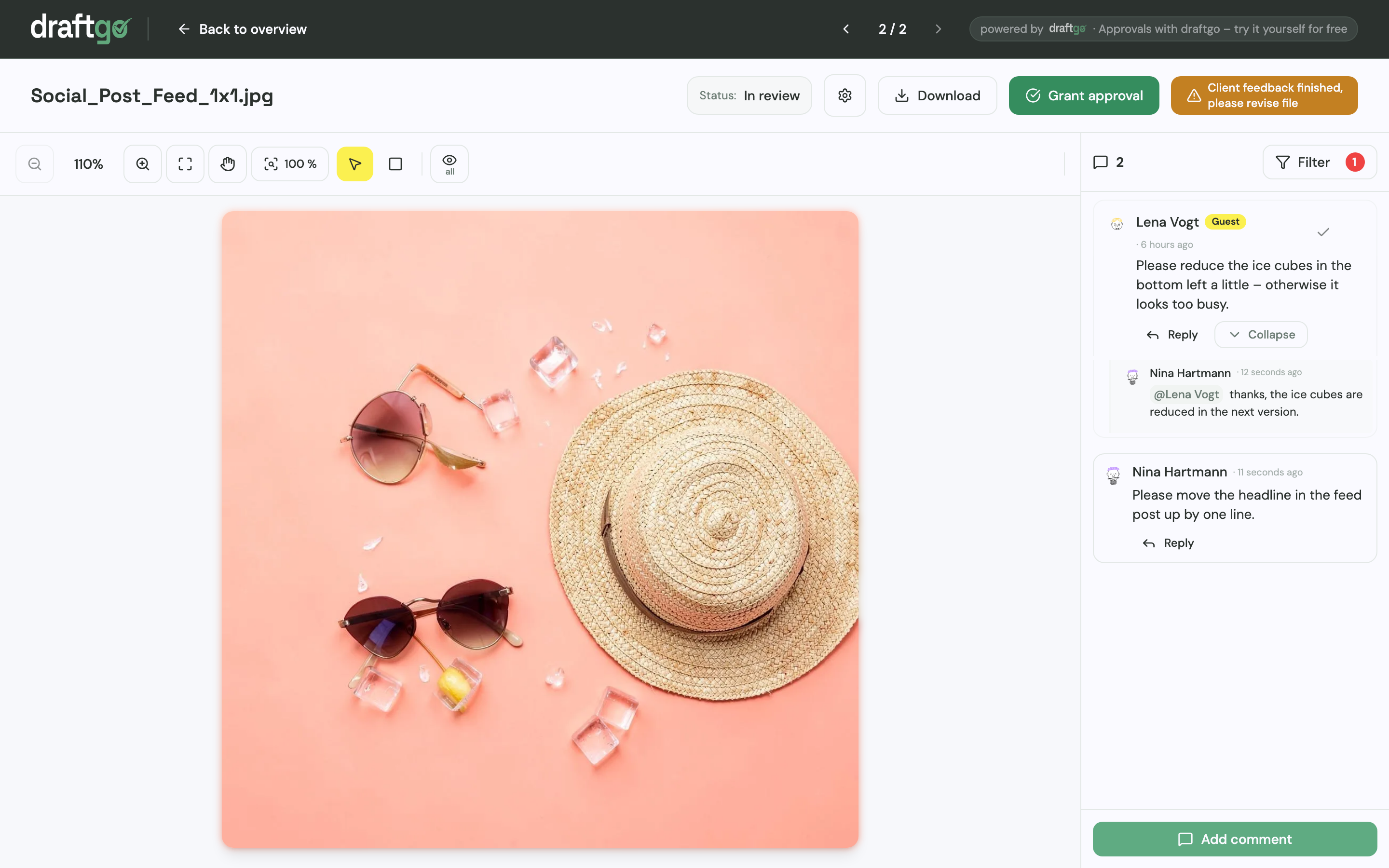
Pricing is per company, not per user or guest. Internal users are capped by plan (Free 1, Freelancer 1, Agency 5, Team 15), and guests are unlimited from the Freelancer plan. Stored data is kept on EU servers in the Frankfurt data centre.
- Pros: one price per company, unlimited guests from the Freelancer plan, images, PDFs, videos, audio and website screenshots in one project, an approval rule for each loop
- Cons: no due dates or reminders for approvals, no version comparison and no ready-made integrations
- Price: a permanent Free plan, and paid plans you can test free for 14 days, listed on draftgo pricing
5. Ziflow: suited for marketing departments with multi-stage workflows
Ziflow is built for proofs that move through several workflow stages. Its free plan reviews more than 1,200 file types with pixel-level version comparison, for two users and 60 days of review history. On the pricing page, Standard costs $199 a month billed annually with 15 users, two stages, proof deadlines and manual reminders, and Pro $329 a month with 20 users and integrations such as Asana and Slack. Reviewers are unlimited on every edition, and automatic reminders, e-signatures and single sign-on come with Enterprise.
- Pros: multi-stage workflows, a very wide range of file types, version comparison from the free plan
- Cons: the paid entry bundles 15 users at a price close to Filestage Starter
- Price: Standard $199 and Pro $329 a month, billed annually (Ziflow pricing)
Our Ziflow alternative comparison lists leaner options, and draftgo vs Ziflow sets out the differences.
6. PageProof: suited for larger teams that want one flat price
PageProof charges one price for a team rather than per user. Its pricing page lists Team at $2,499 a year or $249 a month and Team Plus at $4,999 a year or $499 a month, each with unlimited reviewers, proofs and storage. Every plan includes automated workflows, compare mode and spell check, Team Plus adds single sign-on, and Enterprise adds digital signing and a choice of data location.
- Pros: one flat price for the whole team, unlimited storage, compare mode and spell check from the entry plan
- Cons: no free plan, and the entry price is set for teams rather than freelancers
- Price: Team $2,499 a year or $249 a month, free trial on request (PageProof pricing)
draftgo vs PageProof lists where the two differ.
Filestage and draftgo compared
Filestage suits teams whose review rounds follow fixed dates, draftgo agencies and freelancers whose clients approve by link at one price for the company. Filestage’s details come from its pricing page, as of 23 November 2026.
| Criterion | Filestage | draftgo |
|---|---|---|
| Pricing model | price per plan, 10 team members included | one price per company; internal users: Free 1, Freelancer 1, Agency 5, Team 15 |
| Free plan | 1 active project, 5 new files a month | permanent Free plan with 2 projects |
| Reviewers | unlimited, no account needed | guests by link without an account, unlimited from Freelancer |
| Review decisions | “Approve” and “Request changes” | approve or withdraw an approval; change requests are comments |
| Due dates and version comparison | from Starter | not included; the optional daily or weekly summary lists waiting approvals |
| Integrations and API | Slack, Microsoft Teams and Google Drive on every plan, API from Business | no ready-made integrations and no public API |
| Data location | servers in Frankfurt, according to its pricing FAQ | Stored data is kept on EU servers in the Frankfurt data centre. |
Filestage leads on due dates, version comparison and integrations, and if your rounds run against print or launch dates, those features may decide. With draftgo you pay one price however many clients review, and an approver opens a personal link and approves in the browser without signing up. The full comparison is on draftgo vs Filestage.
Which Filestage alternative fits you?
Start with the number of people who upload drafts and the files you send most often.
| Your situation | Test first |
|---|---|
| One to three internal users review many media types | ReviewStudio |
| A few designers review static artwork and packaging | GoVisually Lite |
| Most reviews are cuts from Premiere Pro or Final Cut Pro | Frame.io |
| Clients approve without an account, at one price per company | draftgo |
| A marketing department routes proofs through several stages | Ziflow |
| A larger team wants one flat price with compare mode | PageProof |
| You need due dates and version comparison and fill most of the 10 seats | Filestage itself |
Our guide to online proofing explains the method and which features count when you choose.
Practical example: a three-person studio compares its options
Take the studio from the start: three designers who create labels for a craft distillery and run social media for a bike shop. Each month they send about a dozen print PDFs and social images, and twice a year a short product video. At the distillery the owner approves, and the head distiller checks alcohol content and bottle sizes.
On Filestage Starter the studio pays €199 × 12 = €2,388 a year on yearly billing for 10 seats, of which it uses three (Filestage pricing). ReviewStudio Pro would come to 3 × $12 = $36 a month on yearly billing (ReviewStudio pricing).
In draftgo the three designers fit the Agency plan with five users and unlimited loops. They run the spring label through it as a test: the art director approves in an internal loop, the owner gets a personal approver link for the client loop, and the head distiller comments through the viewer link without approving. He marks a wrong bottle size, the designer uploads version 2, and the owner approves it. Reminders before print dates would have pointed to Filestage. The studio mainly needs clients to approve by link, so it moves its client reviews to draftgo.
How it works in draftgo
You can move client reviews from Filestage one job at a time.
- Start with the running jobs. Create a project for each open job and upload the latest drafts: images, PDFs, videos, audio files or a website captured as a screenshot.
- Set up the loops. Create an internal loop and a client loop, and set who has to approve in each, separately for team and guests.
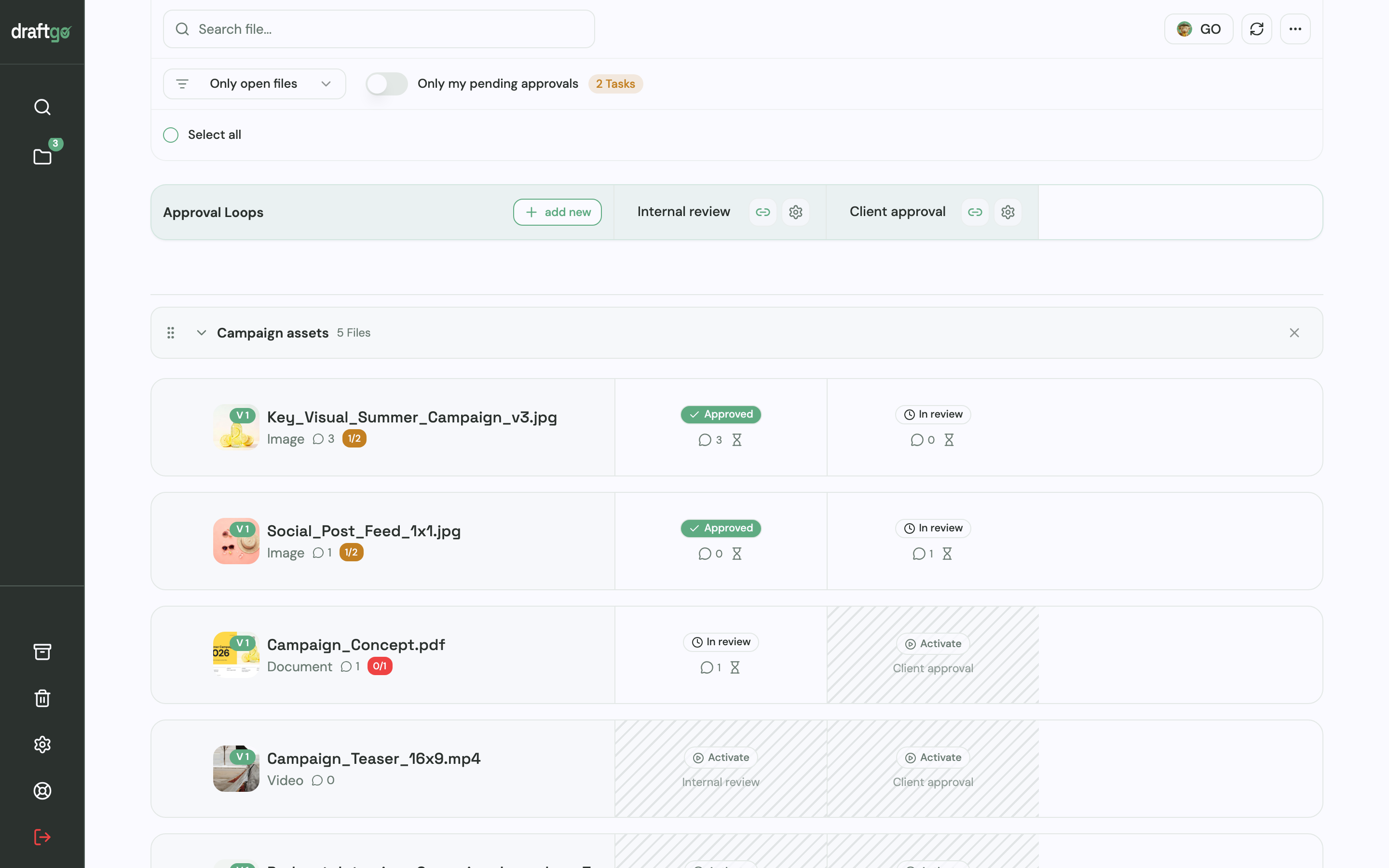
- Invite the client. The person with the final say gets a personal approver link, and colleagues who only add remarks share the viewer link. Nobody outside your team creates an account.
- Upload corrections as versions. The new draft sits on the same file, earlier versions stay available, and the approvals start again.
- Keep the record. Approvals, comments, versions and downloads land in the activity log with person and time, and you export it as CSV, JSON or PDF. Our guide to the approval audit trail explains what such a record should hold.
Loops carry no due dates, so put the review date in your message to the client.
FAQ
Is there a free Filestage alternative?
Yes, with limits. As of 23 November 2026, ReviewStudio, Frame.io, Ziflow and draftgo each have a free plan, capped by active reviews, members, projects or storage. GoVisually offers a free trial and PageProof a trial on request.
Do clients need an account in these tools?
Not in ReviewStudio, Frame.io or draftgo, where external reviewers work through a link. Ziflow says only people who create and manage proofs need a user licence, and PageProof includes unlimited reviewers on every plan. Test the review link with a colleague who plays the client before you choose.
How do I move from Filestage to another tool?
Start new jobs in the new tool and finish running projects in Filestage. Before your plan ends, download the final files and any review reports you want to keep. Then invite your first client to the new tool with a live job.
Conclusion
Count the people who upload drafts and list the files you send before you compare features. If due dates and version comparison decide, stay with Filestage or test Ziflow or PageProof. If your clients should comment and approve without an account at one price for your company, run one live job in draftgo.
Try it free – draftgo is free for 14 days, no credit card needed.
Written by
Emilia
Content Producer
Ready to streamline your approval processes?
Get started with draftgo today and see how easy professional collaboration can be.