Your agency keeps its projects on Google Drive, and a new client asks for the next cut in Dropbox Replay because the last agency used it. Or your team does work in Dropbox, but the Replay add-on for every editor now costs more than the rest of your review setup. That is when teams start comparing Dropbox Replay alternatives.
Dropbox Replay is a solid video review tool, especially when the files already sit in Dropbox. Below are five alternatives plus draftgo, with pros, cons and entry prices checked on 23 November 2026.
Why teams look for a Dropbox Replay alternative
Dropbox Replay is the video review tool built into Dropbox. Reviewers leave frame-by-frame feedback and on-screen markups in the browser without a Dropbox account, and in a live review several people comment on the same video with playback kept in sync (Dropbox help). The reasons to switch come from the plan around it.
- It sits on top of a paid Dropbox plan. The Replay add-on costs €9 per user a month billed annually or €11 billed monthly, in the currency the page showed us. Basic users must upgrade to Plus or higher first, and Family plans cannot add it (Dropbox Replay).
- Without the add-on, Replay stops at a few files. Replay is switched on for every Dropbox plan, but without the add-on you can upload 4 files, or 10 on Essentials, Business and Business Plus (Replay FAQ).
- Several review features need the add-on. Due dates per file, password-protected links, transcripts and the side-by-side comparison of two video versions come with it (Dropbox help on the add-on).
- Files from elsewhere use your Dropbox storage. Uploads from your computer, Google Drive or OneDrive count against your Dropbox plan, while files that already sit in Dropbox do not count a second time (Replay FAQ).
How we evaluated the alternatives
We used five criteria:
- Standalone or part of a platform: whether you need another subscription to use it.
- Video review: comments on the frame or the second, markup on the video and version comparison.
- Client access: comments through a link without an account.
- Other files: what the tool reviews next to video.
- Pricing model and free entry: per user, per seat or per plan, and whether a free plan exists.
All information comes from the vendors' own pages as of 23 November 2026, in the currency each page showed. draftgo is our product, and it gets pros and cons like every other tool here. The order is not a ranking: it runs from the two video review specialists to the review tool of a video platform, then to three proofing platforms that review video alongside other files.
Dropbox Replay alternatives compared
| Tool | Suited for | Free entry | Video comments | Pricing model | Entry price, as of 23 Nov 2026 |
|---|---|---|---|---|---|
| Dropbox Replay, for reference | teams whose projects sit in Dropbox | 4 or 10 files on every Dropbox plan | frame-by-frame, with markups | add-on per user on a paid Dropbox plan | €9 per user a month, billed annually |
| Frame.io | editors in Premiere Pro or Final Cut Pro | free plan: 2 members, 2 GB, 2 projects | frame-accurate, with annotations | per member | Pro $15 per member a month plus tax |
| Wipster | video teams with many reviewers | free trial, no free plan | frame-accurate, pinned to a spot | Light one price, Team per user | Light $9.95 a month, annual billing |
| Vimeo Review | teams that host finished videos on Vimeo | one review link per video on Free | time-coded | per seat | Starter $12 per seat a month, annual billing |
| Filestage | review rounds with due dates and reminders | free plan: 1 active project, 5 new files a month | timestamped, with drawing | per plan, 10 team members included | Starter $199 a month, yearly billing |
| Ziflow | many formats reviewed in fixed stages | free plan: 2 users, 2 GB | down to the second, frame-precise markup | per plan, 15 users on Standard | Standard $199 a month, billed annually |
| draftgo | agencies approving video together with PDFs and images | permanent Free plan | at a point on the timeline, to the second | per company | see the draftgo entry below |
The 6 Dropbox Replay alternatives in detail
1. Frame.io: suited for editors who work in Premiere Pro or Final Cut Pro
Frame.io belongs to Adobe and runs on its own, so it needs no storage plan underneath. Its pricing page lists frame-accurate and range-based comments, annotations, version stacks and a comparison viewer, plus integrations with Premiere, Final Cut Pro and Lightroom, and Camera to Cloud and transcription come with every plan, the Free plan included. Clients open share links without signing up. Our Dropbox Replay vs Frame.io comparison puts the two side by side.
- Pros: comparison viewer and transcription without an add-on, integrations with Premiere and Final Cut Pro, Camera to Cloud from the Free plan
- Cons: charged per member like the Replay add-on, and Pro stops at five members
- Price: Pro $15 and Team $25 per member a month plus tax, with 13% off on annual billing (Frame.io pricing)
2. Wipster: suited for video teams that want unlimited reviewers on every plan
Wipster reviews video, images, PDFs and audio, and reviewers leave frame-accurate, timestamped comments pinned to a frame or spot without an account (Wipster). Two versions can be compared side by side, multi-step approvals record who approved what and when, and a review panel opens inside the editing suite. The pricing page lists Premiere Pro and After Effects integrations and unlimited reviewers on every plan.
- Pros: unlimited reviewers on every plan, version comparison and multi-step approvals, one flat price on Light
- Cons: no free plan, and custom branding and team-only comments come with the per-user Team plan
- Price: Light $9.95 a month and Team $19.95 per user a month on annual billing, or $11.95 and $25 monthly (Wipster pricing)
More tools are compared in our Wipster alternatives.
Try it yourself: In the demo you work in a real draftgo workspace with sample data.
3. Vimeo Review: suited for teams that host finished videos on Vimeo
Vimeo Review is the feedback tool built into Vimeo. Reviewers open a review link without a Vimeo account, enter their name and email and leave time-coded comments, and with the “Change status” option switched on they can mark the video as approved (Vimeo help). The Free plan includes one review link per video. Vimeo's pricing page lists video review, version history and an Adobe Premiere Pro integration from Starter, at $12 per seat a month on annual billing or $20 monthly.
- Pros: the review happens where the finished film is hosted, reviewers can set the video to approved, Premiere Pro integration
- Cons: built around videos you host on Vimeo, and more than one review link per video needs a paid plan
- Price: Starter $12 per seat a month on annual billing (Vimeo pricing)
Plans and limits are in our article on Vimeo Review.
4. Filestage: suited for teams that run review rounds with due dates and reminders
Filestage reviews videos, images, designs, documents, websites, interactive HTML and audio in one platform, and reviewers give feedback without an account (Filestage pricing). On video, every annotation gets a timestamp, and reviewers can draw on the frame. Starter adds unlimited projects, due dates with automated reminders, version comparison and password-protected review links, and every plan includes 10 team members.
- Pros: due dates and automated reminders from Starter, video and documents in one review, 10 team members on every plan
- Cons: a team of three pays the same Starter price as a team of ten, and the free plan holds one active project at a time
- Price: Starter $199 a month on yearly billing or $249 monthly (Filestage pricing)
5. Ziflow: suited for teams that review many formats in fixed stages
Ziflow is an online proofing platform for more than 1,200 file types, with unlimited reviewers on every plan (Ziflow pricing). On video, feedback goes down to the second, and the feature list includes frame-precise markup tied to a frame or a time range. Versions can be compared side by side even on the Free plan, and Pro adds integrations with Dropbox, Google Drive and SharePoint. The pricing page also lists an Adobe Premiere plugin and a Final Cut Pro integration.
- Pros: more than 1,200 file types, version comparison on every plan, a Dropbox integration from Pro for teams that keep their files there
- Cons: Standard is sized for 15 users, which a small team may not need, and on the Free plan proofs stay accessible for 60 days
- Price: Standard $199 and Pro $329 a month, billed annually (Ziflow pricing)
6. draftgo: suited for agencies that approve videos together with PDFs and images
draftgo is an online proofing platform for agencies, freelancers and in-house teams, and it needs no storage subscription underneath. Your team uploads videos, audio files, images and PDFs, captures a publicly accessible website as a screenshot or adds a social media post. Clients comment through a link without an account, and in a video each comment sits at a point on the timeline, accurate to the second.
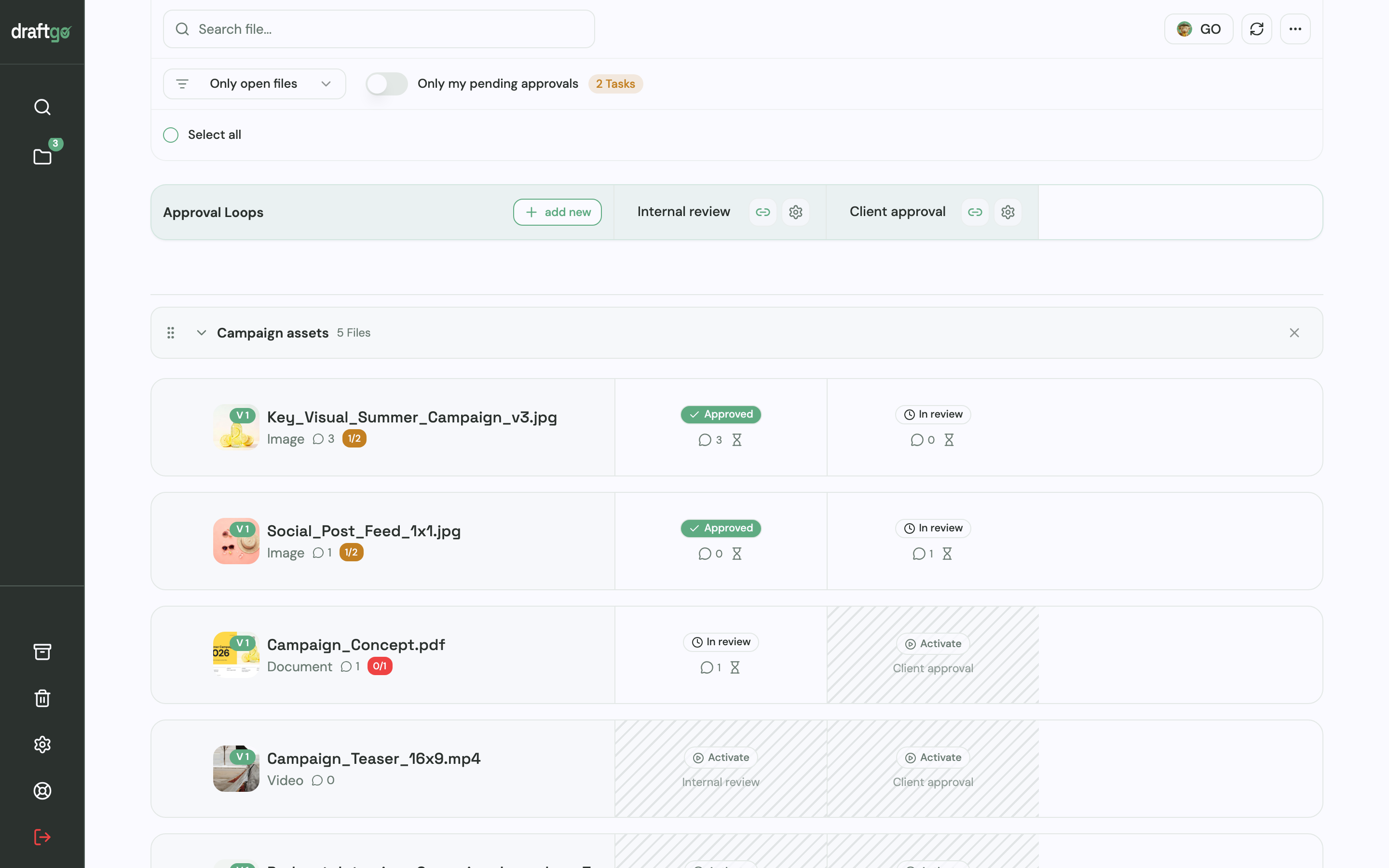
Approvals run in loops, for example internal first and client second. Each loop has its own rule, so all approvers, a set number or any one of them must approve, separately for your team and for guests. A recut becomes a new version of the same file and starts the approvals again, and the activity log keeps approvals, comments and versions with person and time.
Pricing is per company, not per user. Internal users are capped by plan (Free 1, Freelancer 1, Agency 5, Team 15), and guests are unlimited from the Freelancer plan. Stored data is kept on EU servers in the Frankfurt data centre.
- Pros: video, audio, PDFs, images, website screenshots and social posts in one project, an approval rule for each loop, one price per company, a permanent Free plan
- Cons: comments sit on the second rather than the frame, with no markings on the video image, and there is no panel inside editing software
- Price: a permanent Free plan and paid plans you can test free for 14 days, all listed on draftgo pricing
Dropbox Replay and draftgo compared
| Criterion | Dropbox Replay, as of 23 Nov 2026 | draftgo |
|---|---|---|
| Requirement | paid Dropbox plan from Plus for the add-on (Replay) | none, works on its own |
| File types | video, image, audio, PSD and PDF, uploads up to 150 GB (Replay) | video, audio, images, PDFs, website screenshots, social media posts, files up to 500 MB |
| Comments on video | frame-by-frame, with on-screen markups (help) | at a point on the timeline, to the second |
| Approval | files can carry an “Approved” status (projects) | loops with set approvers and a rule per loop, separately for team and guests |
| Versions | side-by-side comparison of two video versions with the add-on (add-on) | versions of the same file, a new version restarts the approvals, no side-by-side view |
| Editing apps | Premiere Pro, After Effects, Final Cut Pro, DaVinci Resolve, Pro Tools, LumaFusion (help) | no panel, editors upload exported files |
Replay is ahead when the files already live in Dropbox and editors answer notes from DaVinci Resolve or Pro Tools, with frame-by-frame comments and live sessions. draftgo fits better when there is no Dropbox plan to build on, when the client approves spots, PDFs and images in one round, and when internal and client approvals each need their own rule.
Which alternative fits you?
| Your situation | Tool to test first |
|---|---|
| Your editors want client notes inside Premiere Pro or Final Cut Pro | Frame.io or Wipster |
| Your finished films are hosted on Vimeo | Vimeo Review |
| Large review rounds need due dates and automated reminders | Filestage |
| Many formats, from video to live websites, go through fixed stages | Ziflow |
| Your projects live in Dropbox and should stay there | Dropbox Replay, or Ziflow with its Dropbox integration |
| An agency approves spots, PDFs and images with clients at one price per company | draftgo |
If what you really want to change is the storage, our comparison of Dropbox alternatives covers cloud storage services. More tools for comments on video are in our video feedback tool comparison, and draftgo compared with Frame.io goes through the two tools point by point.
Practical example: a four-person agency that stores its files on Google Drive
A four-person agency produces a product launch for a kitchenware brand: a 45-second film, three vertical cutdowns, a PDF sell sheet and a key visual. The project folders sit on Google Drive. The brand's marketing lead approves, and a product manager adds comments.
With Replay, the agency would first need a paid Dropbox plan and then the add-on for four people, 4 × €9 = €36 a month on annual billing on top of the plan (Dropbox Replay).
In draftgo, all six files go into one project with an internal loop for the creative director and a client loop for the marketing lead, which the Agency plan covers with five users and unlimited loops. The marketing lead gets a personal approver link, and the product manager opens the shared viewer link, so he can comment without approving. He notes at 0:21 of the film that the lid shown is the old design and sets a pin on the same lid in the key visual. The recuts go up as new versions, the creative director approves internally, and the marketing lead approves all six files in the client loop. How production teams set up such projects is shown on draftgo for video production.
FAQ
Is Dropbox Replay free?
Partly. Replay is switched on for every Dropbox plan, but without the add-on you can upload 4 files, or 10 on Essentials, Business and Business Plus (Replay FAQ). The add-on removes the limit and costs €9 per user a month billed annually or €11 billed monthly on Dropbox Plus or higher, as of 23 November 2026 (Dropbox Replay).
How does Dropbox video review work for clients?
You share a Replay link, and reviewers open it in the browser without special software or a Dropbox account. They leave frame-by-frame comments and on-screen markups, and several people can join a live review with synced playback (Dropbox help).
Which Dropbox Replay alternative works without a storage subscription?
Frame.io, Wipster, Filestage, Ziflow and draftgo are standalone review tools, so you need no Dropbox or other storage plan to use them. Frame.io, Filestage, Ziflow and draftgo also have a free plan, while Wipster offers a free trial. Vimeo Review is part of Vimeo's hosting plans.
Conclusion
If your projects live in Dropbox and your editors answer notes in DaVinci Resolve or Pro Tools, the Replay add-on stays the simplest choice. Outside Dropbox, choose by your editors' software and by what else the client approves: Frame.io or Wipster for work inside the edit, Filestage or Ziflow for large review rounds, and draftgo when spots, PDFs and images share one client approval at one price per company. Run one real cut through your shortlist before you decide.
Try it free – draftgo is free for 14 days, no credit card needed.
Written by
Emilia
Content Producer
Ready to streamline your approval processes?
Get started with draftgo today and see how easy professional collaboration can be.