
The summer sale opens in three days. The retouched product photos sit behind a download link that expires tomorrow, the product manager has sent copy corrections in a spreadsheet, and the homepage banner with the discount code has gone back and forth in two email threads and a team chat. Nobody can say which banner the head of ecommerce has signed off.
What is ecommerce content?
Ecommerce content is all the material an online shop uses to show and sell a product: in the shop itself, on marketplaces, in shopping ads, in newsletters and on social media. It ranges from a single packshot to a seasonal campaign with video, banners and posts.
In Baymard Institute’s product page usability study, 56% of the test subjects began by exploring the product images when they arrived on a new product page, before they read titles or descriptions (Baymard Institute, 2017).
Types of ecommerce content and what to check in each
For a product launch, ecommerce content falls into six types, and the approver checks something different in each.
| Content type | Where it appears | What the approver checks |
|---|---|---|
| Product photos (packshots) | product page, marketplaces, shopping ads | colour against the physical product, crop, background as the channel requires |
| Detail, in-scale and lifestyle shots | product page, campaigns | features visible, size easy to judge, look fits the brand |
| Product videos | product page, social media | product shown correctly, length, subtitles, end card |
| Product copy | product page, product feeds | dimensions, materials and care details, tone, search terms |
| Banners and ads | homepage, paid ads, newsletter | price, discount, code and dates, the required small print |
| Social media posts | brand channels | image, caption, hashtags and link |
Channels set their own technical rules, so the approver needs to know where a file will run. Shopify accepts product images up to 5000 x 5000 px and says that for square product images a size of 2048 x 2048 px usually displays best (Shopify Help Center, checked on 17 November 2026). Google Merchant Center requires the main product image to show an unobstructed, clean view of the item, without a border, and disapproves images with added text, marketing callouts or graphics. From 31 January 2027 it requires images of at least 500 x 500 pixels for all products (Google Merchant Center Help, checked on 17 November 2026).
For posts, carousels and reels, the guide to choosing a social media approval tool covers the review step by step.
Why ecommerce content approvals stall
Approvals stall when a lot of files and reviewers meet a fixed launch date and nobody has agreed the order. Four situations hold a launch up:
- Volume. One product with six photos, a video and a description means eight files to approve. A range of 20 products means 20 x 8 = 160, each with its own comments.
- Many contributors. Product management, marketing, a photographer, a copywriter and sometimes an agency or the legal team have a say, and their comments arrive by email, chat and phone.
- Formats and channel rules. Images, videos, PDFs and copy sit in different programs, and each channel wants its own crop.
- A fixed date. A sale or a newsletter starts on a set day, and one banner held up by an open question can push back the whole campaign.
What to agree before the shoot
Requirements that turn up after the first images are in can mean retouching or a reshoot. Settle them with product management and the photographer beforehand and write them into a short brief:
- the shot list per product: views, details and at least one in-scale or in-use shot, since 42% of the users in the same Baymard study attempt to gauge a product’s size from its images (Baymard Institute, 2017)
- background, crop and aspect ratio for each channel
- file format, pixel size and naming, for example the SKU at the start of every file name
- who judges colour against the physical sample, and under which light
- who reviews and who approves each content type
Keep the brief next to the files, so every reviewer checks against the same rules. Our creative brief template has sections for deliverables, timeline and approval that fit a product shoot.
Try it yourself: In the demo you work in a real draftgo workspace with sample data.
How to approve ecommerce content in 5 steps
These five steps take a launch from the first delivery to files that are approved and ready for the shop.
1. Name the reviewers for each content type
Decide per content type who checks what and who gives the final yes. Product management checks dimensions, materials and prices, marketing checks look and wording, and one person, such as the head of ecommerce, approves. A brand check of its own goes before the final approval, as the guide to brand compliance describes.
2. Collect every file of the launch in one place
Photos, videos, PDFs and copy go into one project per launch, not into email attachments and download links that expire. Group the files by product, so a reviewer can finish one product before starting the next.
3. Comment on the exact spot
Feedback sits on the image, at the second in the video or on the PDF page it refers to. “The handle should be black” placed on the handle needs no explanation, and contradictory comments show up before anyone retouches. For product videos, the guide to choosing a video feedback tool compares tools with comments at the timecode.
4. Bring in photographers, copywriters and agencies by link
External contributors open the files from a link and comment without creating an account. Decide beforehand who only comments and who may approve, and deactivate the links once the launch is live.
5. Keep corrections as versions and record each approval
Each correction goes up as a new version of the same file, so no “packshot_final_v3” reaches the shop. Record who approved which version and when, since exactly that version goes live. The guide to document version control covers naming and numbering.
Common mistakes and what to do instead
Each of these mistakes can cost an extra round or send the wrong file live.
| Mistake | Better practice |
|---|---|
| Colour judged on one laptop screen | photographer and product manager compare against the physical sample under agreed light |
| Copy edited before the product data is final | product management confirms the specs first, then the copy edit starts |
| Banner reviewed without the final price and dates | price, code and dates as fixed checkpoints in every banner review |
| Channel crops made after the approval | every crop is its own file and goes through approval |
| Social posts reviewed as loose images | image and caption reviewed together as one post |
| Marketplace images checked only against the shop’s rules | each channel’s image rules on the shot list before the shoot |
Practical example: a cookware range for the shop and a marketplace
Take an in-house ecommerce team of three at a cookware brand that launches twelve new pans in its own shop and on one marketplace. The launch needs 72 packshots, twelve in-use shots, two product videos, twelve product descriptions from a freelance copywriter, a homepage banner and four social posts, 103 files in total.
The team sets up one project with two approval loops. In the first, the product manager checks dimensions, materials and care instructions. In the second, the head of ecommerce gives the final sign-off. The photographer and the copywriter get the shared viewer link, so they reply to comments at the spot without being able to approve. Corrected images go up as new versions, and the product manager activates each checked file in the final loop. Two days before go-live, all 103 files are approved there, including the banner with the confirmed price.
Loloson Media in Portugal produces image and video content, mainly ecommerce assets for an international hair care manufacturer. Its founder and managing director, Peter Schönherr, says: “With draftgo, our approval rounds are around 50% faster. Instead of endless PowerPoints, my client sees every new version straight away and approves it directly.”
How it works in draftgo
In draftgo, a launch becomes a project: every comment sits on its file, and approval loops decide who approves in which order.
- Upload all content: Images, PDFs and videos go into the project, and Word files become PDFs on upload. A social media post can hold a carousel of up to 20 images with a caption of up to 2,200 characters.
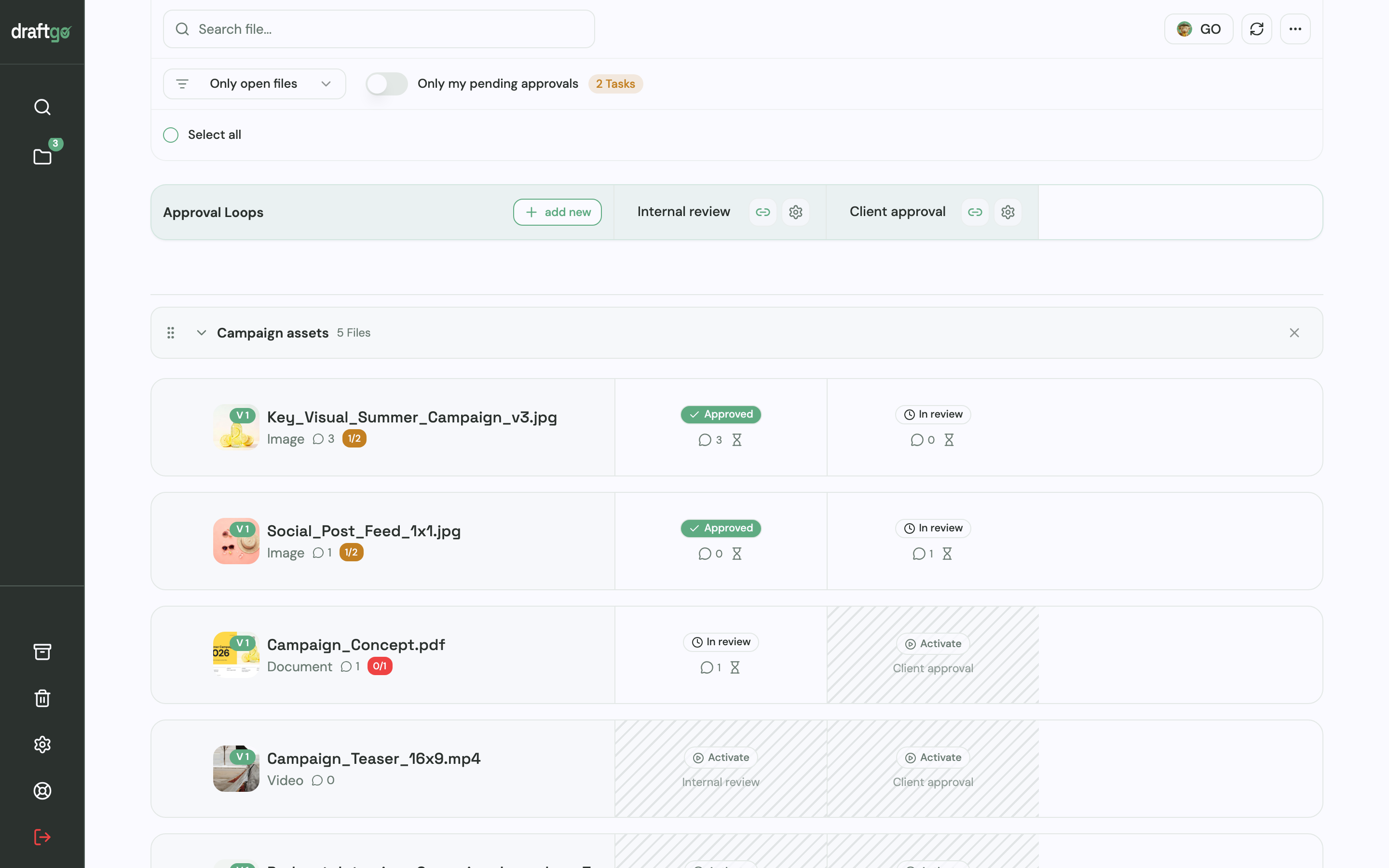
- Set up the loops: Create one loop for the product data check and one for the final sign-off. For each loop, a rule sets whether all approvers, a set number or any one of them must approve, separately for your team and for guests. A project holds one loop on Free, three on Freelancer and as many as you need on Agency and Team.
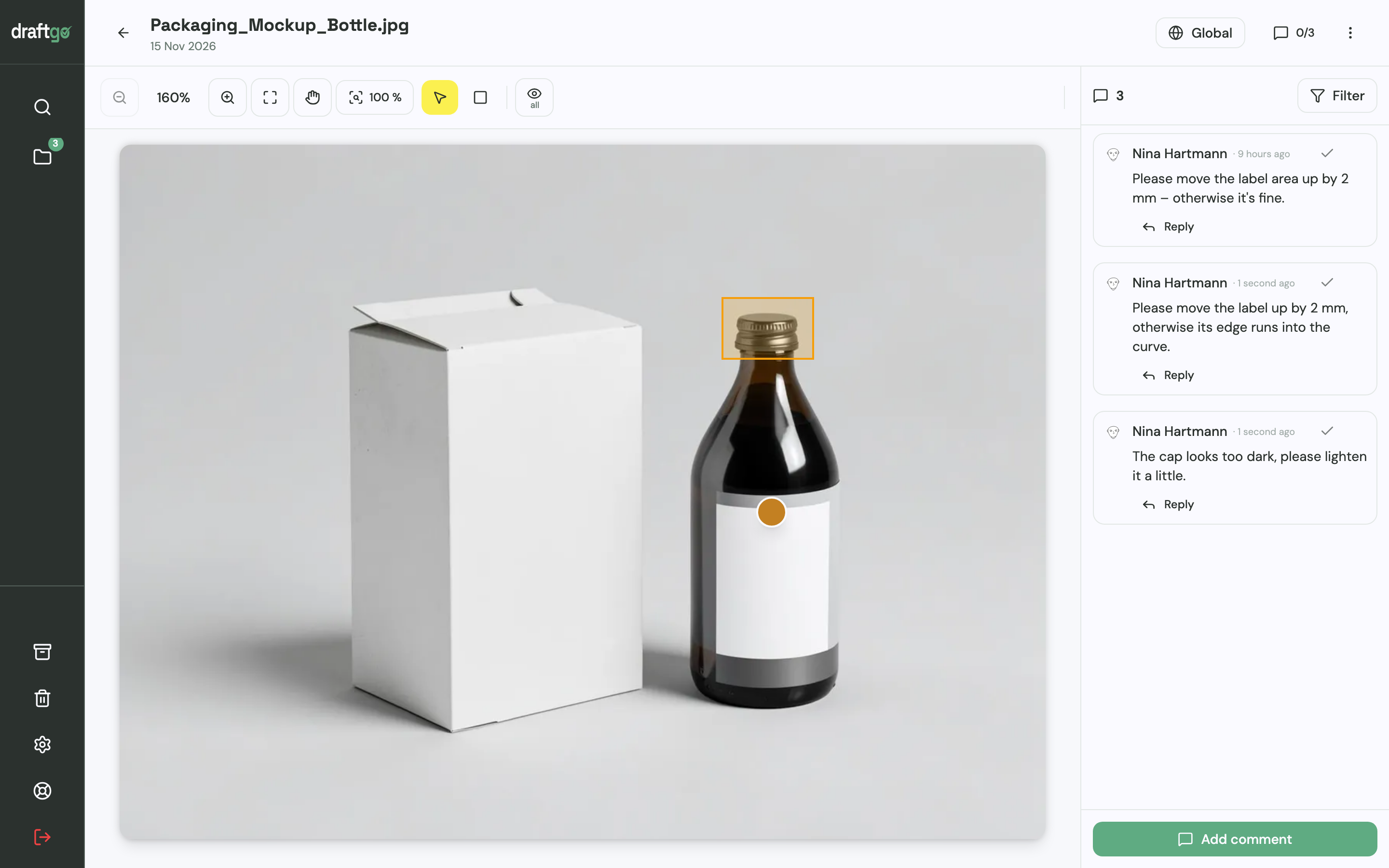
- Comment at the spot: Reviewers place a pin or draw a rectangle on an image, comment at a point in a video or highlight text in a PDF. Once a change is made, you mark its comment as resolved.
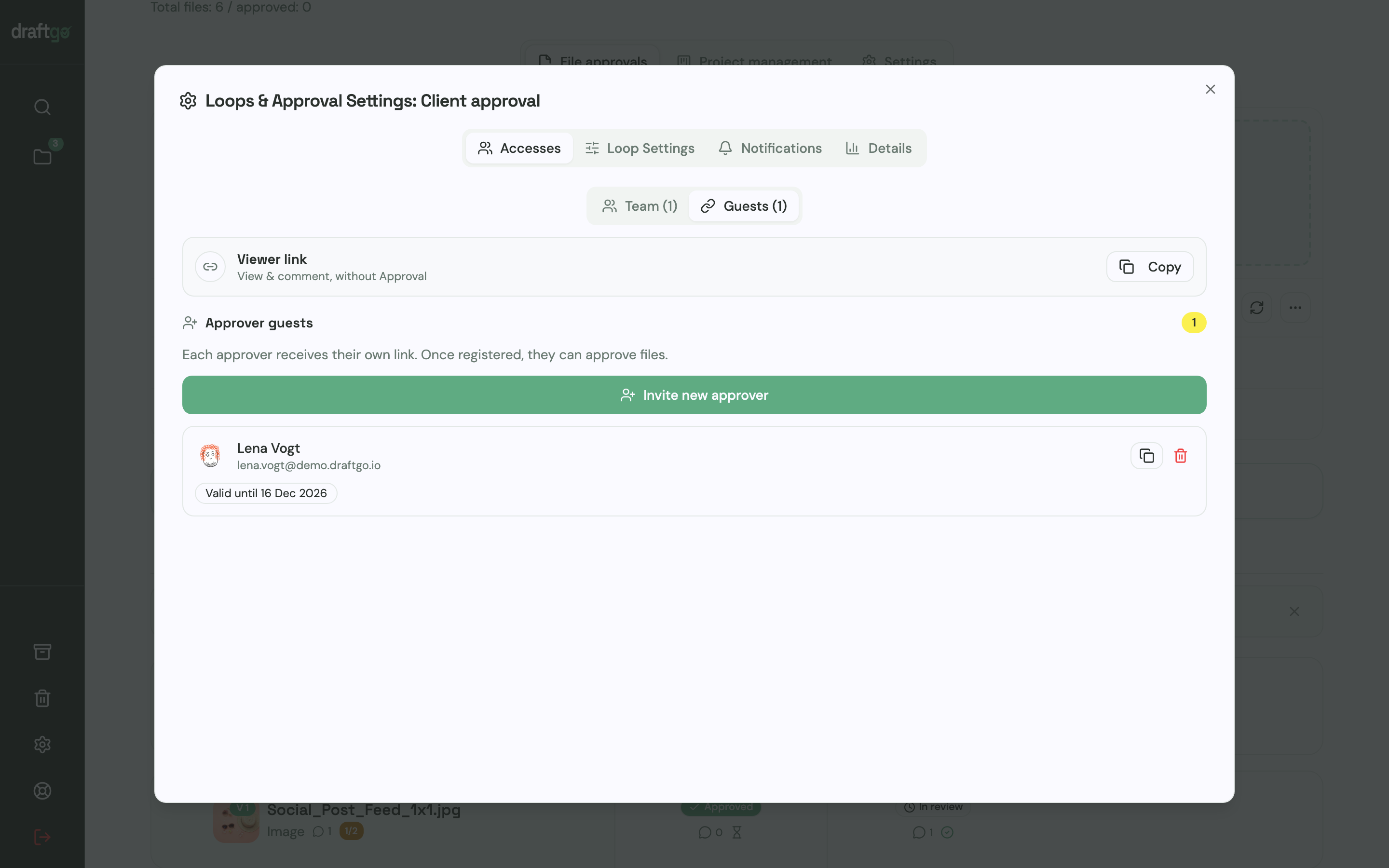
- Invite external contributors: The person who decides gets a personal approver link. Photographers and copywriters get the shared viewer link, enter their name and comment without approving. Per loop, you can let guests upload their own files, and every link can be deactivated.
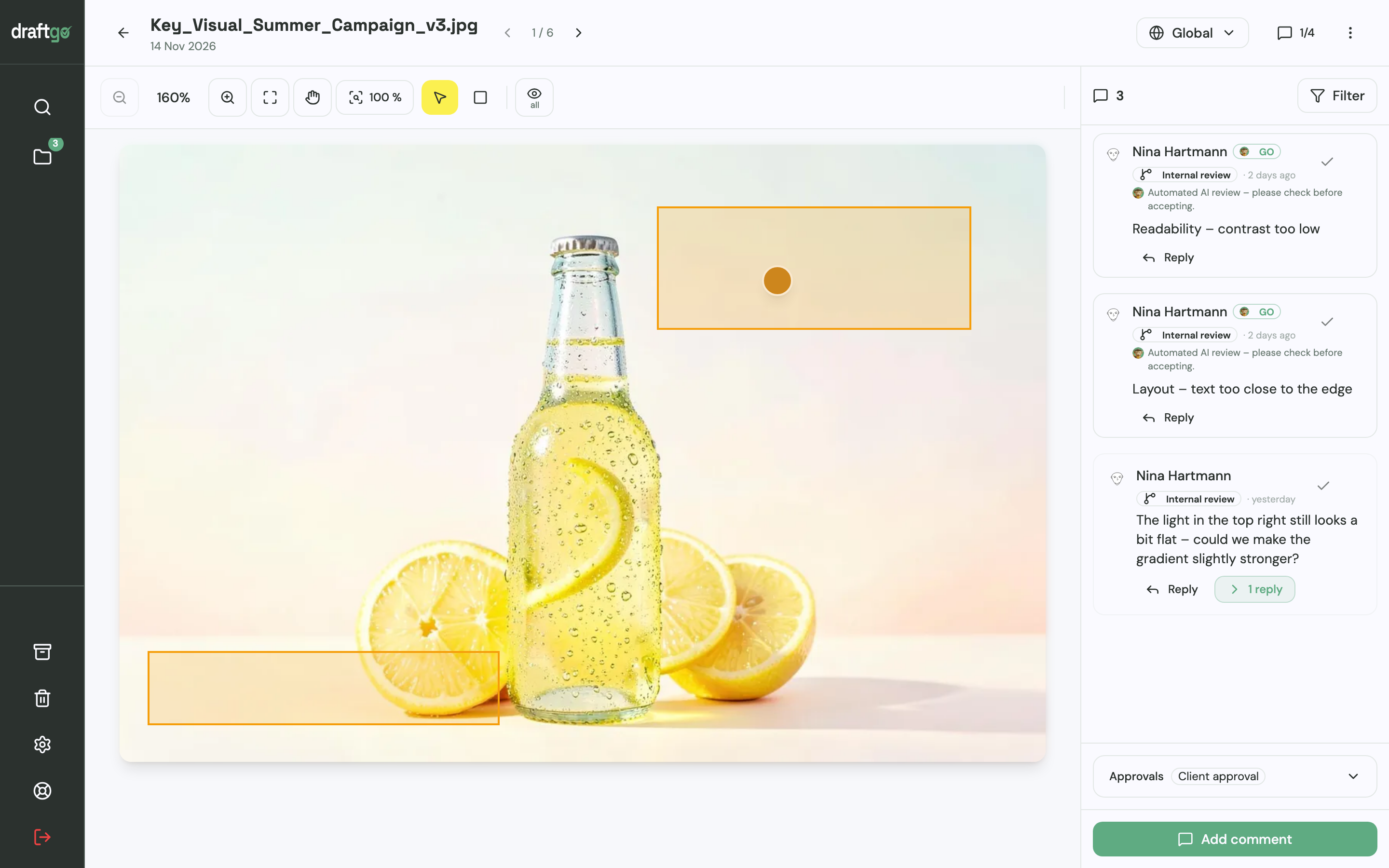
- Upload corrections as versions: A corrected image goes up as a new version of the same file. Earlier versions stay available, comments stay with their version, and the new version starts the approvals again.
- Catch errors before review: You can start the AI review on images, PDFs and social media posts before they go to the reviewers. It looks for errors such as spelling mistakes, cut-off text or very small type, and its findings appear as comments from our AI agent “GO”. AI review pages come with the plans from Freelancer on.
The activity log records every approval with person and time, and you can export it as CSV, JSON or PDF. More on internal approvals is on the page draftgo for in-house teams.
FAQ
What is the difference between ecommerce content and product content?
Product content is the information on the product page itself: images, video, copy and specifications. Ecommerce content is the wider term and also covers banners, ads, newsletters and social media posts that bring shoppers to that page.
How do I review product copy that lives in a spreadsheet?
Export the copy as a PDF or Word document with one product per page, so reviewers can highlight the exact line they mean. Once it is approved, the text goes back into the spreadsheet or shop system.
Is approving product videos different from approving images?
Yes, because feedback on a video needs a point in time, such as “at 0:12 the lid is still open”. Reviewers also check subtitles and the end card. Watch the final cut in the format of the channel, since a vertical crop can cut off the product.
Where is the data stored when I review unreleased products in draftgo?
Stored data is kept on EU servers in the Frankfurt data centre. Every customer receives a data processing agreement under Art. 28 GDPR, which lists the sub-processors.
Conclusion
Ecommerce content is easier to get approved in time when one person decides per content type and all files of a launch sit in one place, with each correction as a new version. Before your next launch, write the shot list and the reviewers into the brief, then work through the five steps in order.
Try it free – draftgo is free for 14 days, no credit card needed.
Written by
Emilia
Content Producer
Ready to streamline your approval processes?
Get started with draftgo today and see how easy professional collaboration can be.