
Your agency's Dropbox holds every project, sorted by client. Then a draft goes out for review: the client downloads the PDF from a shared link, sends three corrections by email, and a colleague adds a fourth in a chat. A week later someone asks which version the client signed off, and the folder only shows the latest file.
When you search for Dropbox alternatives, you usually want either better storage for the team or a clear way to get client feedback and approval. This comparison covers both, with five storage services and three review tools, each checked on the provider's own pages on 17 November 2026.
Why teams look for a Dropbox alternative
The usual reasons are a small free plan, a per-user price that adds up and client feedback that ends up outside the folder. Dropbox Basic gives you 2 GB of storage for free (Dropbox plans), and a Basic account can be logged into up to three devices at a time (Dropbox help centre).
Team storage is priced per person: as shown to us, Standard costs €12 and Advanced €18 per user a month, billed yearly (Dropbox plans). For a six-person agency on Standard that is 6 × €12 × 12 = €864 a year.
Feedback is the third reason. You can pin a comment to a spot in a Dropbox file, but on Basic, Plus, Family and Standard accounts a video comment can only sit at 0:00, and frame comments need the Replay add-on (help article on commenting). Review and approval run in Dropbox Replay: Plus, Standard and Advanced include it for four file uploads (Dropbox plans), and the Replay add-on with unlimited uploads costs €9 per user a month, billed yearly (Dropbox Replay).
Another storage service fixes the space and the price. For feedback, Replay or another review tool lets the client comment on the file and approve it there.
How we evaluated the alternatives
We read each provider's own pricing, plan or help pages on 17 November 2026 and compared the services by free plan, entry price, limits for creative work, client access without an account, and comments and approval on record. draftgo is our product and gets pros and cons like every other tool.
Prices depend on your region, so we give them in the currency and billing period each page showed a visitor from the EU that day; where a page showed no figure or did not load, we link it instead of guessing. The order is not a ranking: storage services are sorted by free storage, review tools by team members on the free plan, ties alphabetically.
Dropbox alternatives compared
The table puts free plans and a paid team plan side by side, as of 17 November 2026; for OneDrive it shows the personal Microsoft 365 Basic, because the business page did not load. Each service name links to the page we checked for its free plan, and each price to the page that showed it.
| Service | Group | Free plan | Paid plan |
|---|---|---|---|
| Google Drive | storage | up to 15 GB | Business Starter, €6.80 per user a month |
| Box | storage | 10 GB, files up to 250 MB | see their pricing page |
| pCloud | storage | up to 10 GB | Business, €9.99 per user a month |
| OneDrive | storage | 5 GB | Microsoft 365 Basic, $1.99 a month for 100 GB |
| Sync.com | storage | 5 GB | Teams 1TB, $4.50 per user a month billed annually, first year |
| Filestage | review | 1 active project, 5 new files a month | Starter, €199 a month billed yearly |
| Frame.io | review | 2 members, 2 GB, 2 projects | Pro, $15 per member a month |
| draftgo | review | 1 user, 2 GB, 2 projects | priced per company, not per user |
Storage and sync services: 5 alternatives
These five store your team's files in the cloud and share them by link, the core of what Dropbox does.
1. Google Drive: for teams that work in Google Docs
Every Google account comes with up to 15 GB of storage (Google One plans), and a single file can be up to 5 TB (Drive help). For teams, Google Workspace Business Starter includes 30 GB of pooled storage per user and Business Standard 2 TB per user (Workspace pricing). A file shared with "Anyone with the link" opens without signing in to a Google account (Drive sharing help).
- Pros: very large single files, links that clients open without an account
- Cons: 30 GB per user on Business Starter fills up fast with video, and expiry dates for a person's access need a work or school account
- Price: Business Starter €6.80 and Business Standard €13.60 per user a month on monthly billing, before tax and introductory discounts (Workspace pricing)
2. Box: for unlimited storage on business plans
Box's free Individual plan has 10 GB of storage and a 250 MB upload limit per file (Box pricing). Business Starter, for three to 10 users, gives 100 GB with uploads up to 2 GB. On the Business plan storage is unlimited, files can be up to 5 GB and Box keeps 50 versions of each file.
- Pros: unlimited storage and 50 versions per file from the Business plan
- Cons: 250 MB per file on the free plan and 2 GB on Business Starter are tight for video
- Price: the plan cards showed us no amounts and the page title says plans start at $5 per user a month, so see their pricing page
Try it yourself: In the demo you work in a real draftgo workspace with sample data.
3. pCloud: for buying storage once, in the EU or the US
A free pCloud account starts with 2 GB, which you can raise to 10 GB (pCloud plan details). At sign-up you choose whether your data is stored in Dallas, Texas or in Luxembourg (pCloud data regions).
In a Black Friday offer, lifetime plans cost a one-time €159 for 500 GB or €379 for 2 TB instead of €279 and €709, and of the lifetime plans only the 3in1 bundle includes pCloud Encryption (pCloud pricing). Business plans add shared folders, access levels, client-side encryption and file versions from up to 180 days back (pCloud Business).
- Pros: pay once for personal storage, choice of data region
- Cons: free storage starts at 2 GB, and on personal plans encryption costs extra outside the 3in1 bundle
- Price: Business at €9.99 per user a month for three users with 3 TB, on monthly billing (pCloud Business)
4. OneDrive: for companies on Microsoft 365
A Microsoft account comes with 5 GB of free cloud storage, shared with Outlook.com attachments (Microsoft storage FAQ). Microsoft 365 Business Basic, Standard and Premium include 1 TB per user (OneDrive service description), and a single file can be up to 250 GB (OneDrive limits).
The same service description calls OneDrive storage for an individual's work files and names SharePoint for departmental data, so shared client folders belong there. People outside your organisation sign in as guests, with an account or an emailed one-time passcode.
- Pros: 1 TB per user on business plans, nothing new to learn for Microsoft 365 teams
- Cons: little free storage, and external guests sign in before they see a file
- Price: Microsoft 365 Basic with 100 GB at $1.99 a month (Microsoft 365 Basic); the business plan pages did not load for us, so see their business plans
5. Sync.com: for end-to-end encrypted team storage
Sync.com's free plan gives one user 5 GB, up to 5 devices and 30 days of file history (Sync.com free plan). Its team plans are end-to-end encrypted and start at three users, and Teams 1TB includes 180 days of file history, password-protected links, expiry dates and download limits (Sync.com pricing).
- Pros: end-to-end encryption on every team plan, detailed controls for shared links
- Cons: a three-user minimum, custom branding only from Teams 2TB
- Price: Teams 1TB at $4.50 per user a month billed annually in the first year (25% off), then $6 (Sync.com pricing)
Client review and approval tools: 3 alternatives
These tools sit next to your storage and handle feedback and approval. Each corrected draft becomes a version of the same file, as our guide to online proofing explains.
6. Filestage: for structured reviews with due dates and reminders
Filestage's free plan includes 10 team members, one active project at a time, five new files a month and 2 GB, and reviewers don't need an account to comment or approve (Filestage pricing). Starter adds unlimited projects, due dates and automated reminders, and Business lets reviewers approve with changes or reject a file.
- Pros: due dates and reminders, many team members on the free plan
- Cons: one active project on the free plan, an entry price aimed at teams rather than freelancers
- Price: Starter €199 a month on yearly billing or €249 on monthly billing, with 1 TB (Filestage pricing). Our Filestage comparison puts it next to draftgo.
7. Frame.io: for teams whose work is mostly video
On its home page, Frame.io mentions feedback on videos, images and docs. Reviewers outside your account open share links without signing up. The free plan covers two members, 2 GB and two projects, and Pro allows up to five members with 2 TB (Frame.io pricing). For more timecode review options, see our comparison of video feedback tools.
- Pros: share links without sign-up, Camera to Cloud and transcription on the free plan
- Cons: priced per member, 2 GB and two projects on the free plan
- Price: Pro at $15 per member a month plus tax, with 13% off on annual billing (Frame.io pricing); see also our Frame.io comparison
8. draftgo: for client approval in stages
draftgo is an online proofing tool and is not meant as plain file storage. You upload images, PDFs, videos and audio files or capture a website as a screenshot, and clients comment by link without an account, right at the spot: a pin on an image, a highlight in a PDF, a comment in the timeline. Approvals run in loops, internal first and the client after that, each with a rule for who approves. The activity log records every approval with person and time. Stored data is kept on EU servers in the Frankfurt data centre.
- Pros: clients comment and approve without an account, loops in stages, unlimited guests from the Freelancer plan, one price per company
- Cons: no replacement for your file archive, files up to 500 MB (videos up to 800 MB are compressed in the browser), one user and one loop per project on the Free plan
- Price: a permanent Free plan, and paid plans priced per company that you can test free for 14 days; details on the pricing page
Dropbox and draftgo compared
Dropbox stores and shares files, and draftgo is where the client reviews a draft and approves it. If your team only needs a shared folder, a storage service fits better.
| As of 17 November 2026 | Dropbox | draftgo |
|---|---|---|
| Built for | storing, syncing and sharing files | client review and approval |
| Team pricing | per user, Standard €12 a month billed yearly (plans) | per company, not per user |
| Comments | pinned to a spot, video timestamps only on some plans (commenting) | pins on images, highlights in PDFs, comments in the video or audio timeline |
| Versions | 30 days of version history on Plus, 180 days on Standard (plans) | each draft a version of the same file, comments stay with their version |
| Approval | in Dropbox Replay, four uploads on paid plans, add-on €9 per user a month billed yearly (Replay) | loops with a rule for who approves, logged with person and time |
You can also keep both: the storage service holds raw files, fonts and finals, and draftgo holds the drafts that still need a decision. Large final files then reach the client by link or through a transfer service, as our comparison of WeTransfer alternatives shows.
Which Dropbox alternative fits you?
If price, space or encryption is the problem, change your storage, and if it is feedback, add a review tool.
| Your situation | Good fit |
|---|---|
| Your team writes in Google Docs and Sheets | Google Drive |
| Your company runs on Microsoft 365 | OneDrive, with SharePoint for shared folders |
| You want unlimited storage on a business plan | Box |
| You'd rather pay once, with EU or US storage | pCloud |
| Files have to be encrypted end to end | Sync.com |
| Clients should comment on drafts and approve them | a review tool such as draftgo |
| Reviews need due dates and automatic reminders | Filestage |
Settle the split when a client project starts: where finals live, where drafts are reviewed and who approves. Our guide to client onboarding for agencies shows where that conversation fits, and the page for agencies shows how client approval runs in draftgo.
Practical example: a small agency keeps Dropbox and moves approvals
A four-person design agency keeps every client in Dropbox, with subfolders for briefs, drafts and finals. For a spring campaign it produces a brochure, six social images and a short video for a retail client. The client's marketing lead reviews everything, and her managing director has the final say.
Until now each round went out as a shared link, and comments came back as an annotated PDF, an email list and a voice message about the video. By round three nobody knew which notes were still open.
For the next campaign the files stay in Dropbox and the drafts go into a review tool. The art director approves in an internal loop, then the marketing lead and the managing director each get a personal link for the client loop. She marks two typos on the brochure page, and he leaves a note at 0:08 in the video. The agency uploads the corrected files as version 2, both approve, and the activity log shows who approved which version and when.
How it works in draftgo
In draftgo the review runs on the file, from the first draft to the approval, while your storage service keeps the archive.
1. Create a project and upload the drafts. Sections such as "Campaign assets" keep a campaign's files together, and each loop appears as a column with the status of every file.
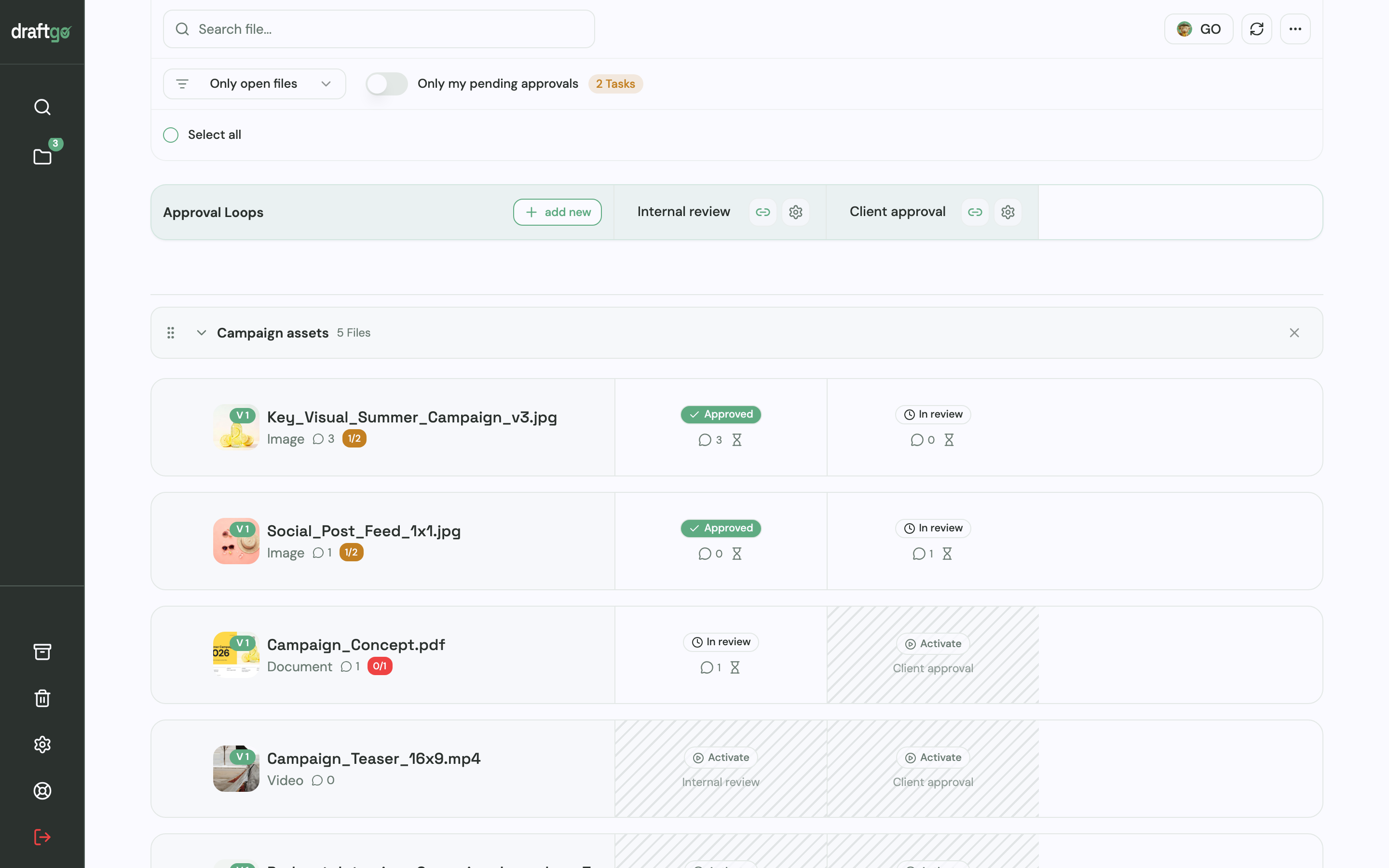
2. Set up the loops. Create an internal loop and a client loop, and decide for each whether everyone, a set number of people or any one of them has to approve, separately for team and guests.
3. Invite the client. Approver guests get a personal link with their name and email address and may approve, while a viewer link lets others comment.
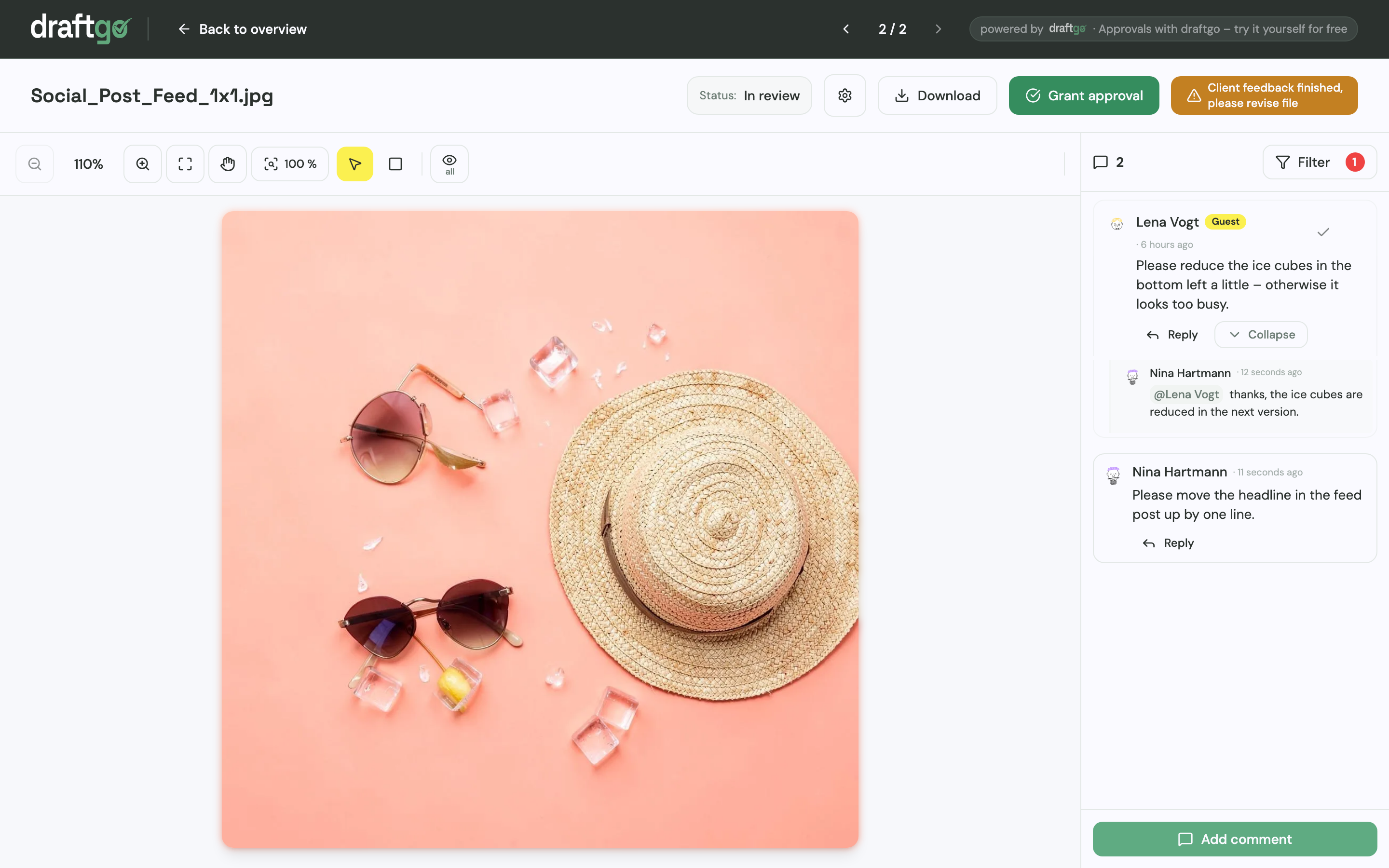
4. Upload corrections as new versions. Earlier versions stay available, each comment belongs to its version, and a new version starts the approvals again.
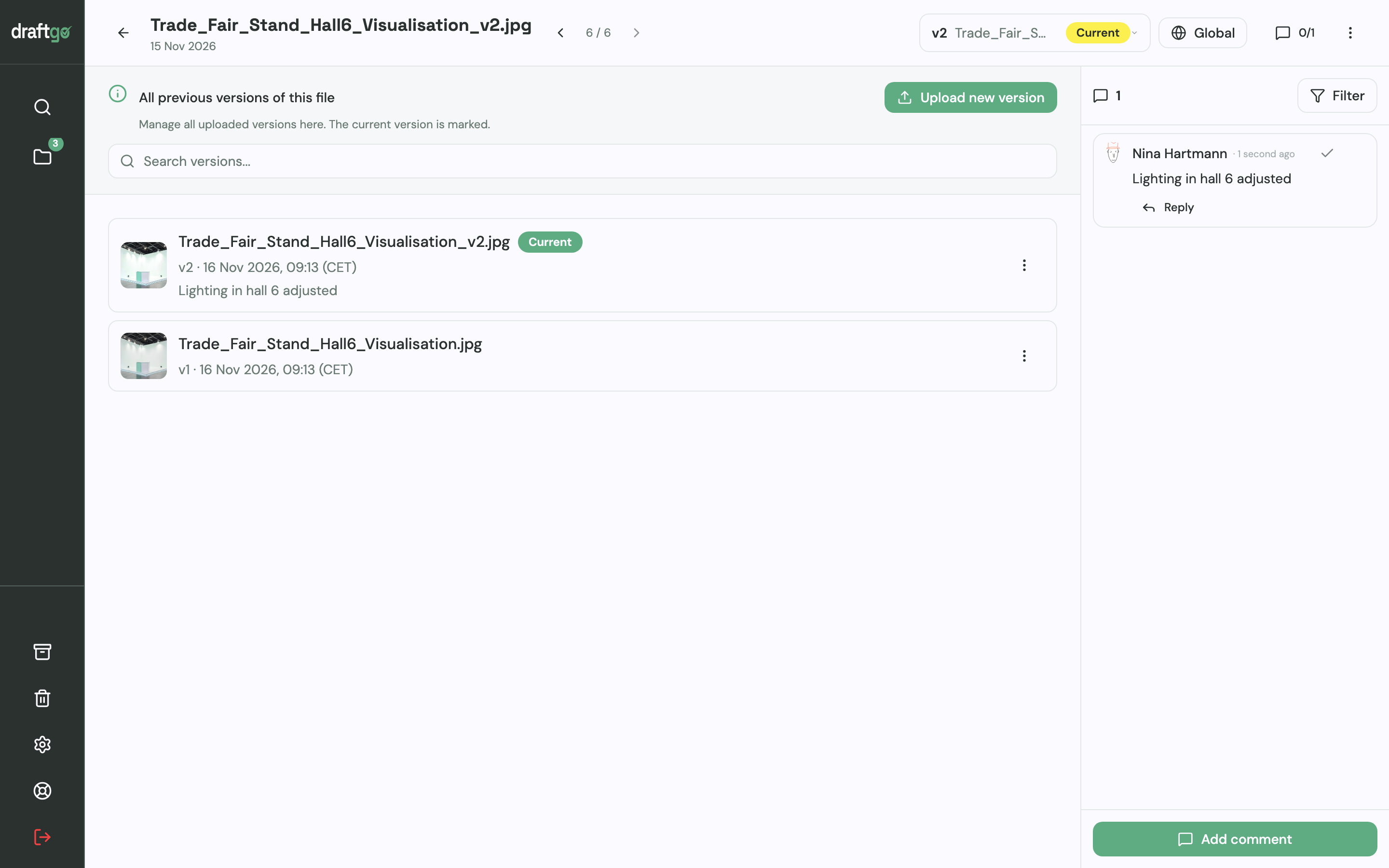
5. Keep the record. The activity log lists approvals, comments and versions with person and time, and you can export it as CSV, JSON or PDF when a client later asks who signed off the final brochure.
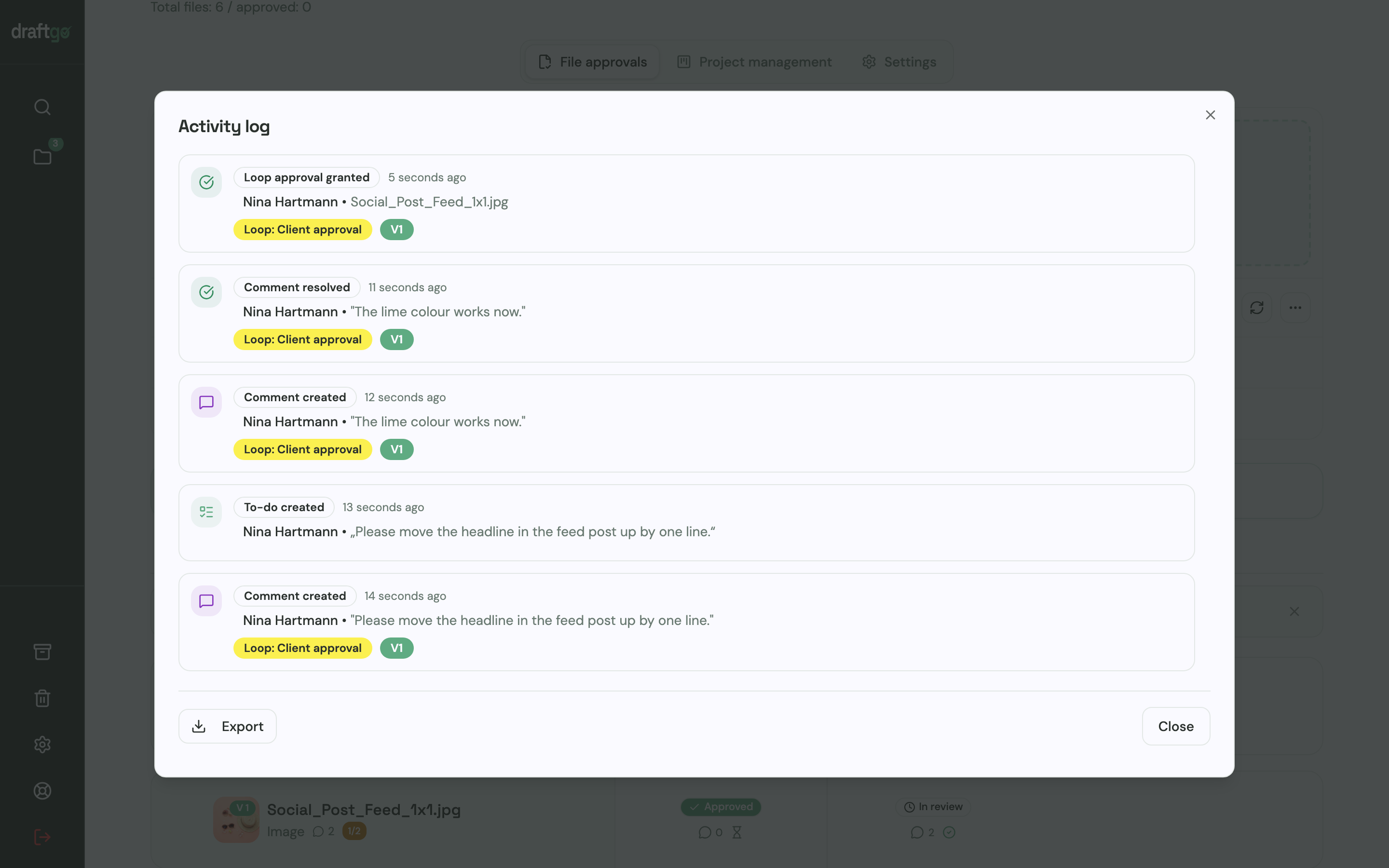
Master files above 500 MB stay in your storage service and go to the client from there.
FAQ
Which Dropbox alternative gives you the most free storage?
In this comparison, Google Drive offers the most, up to 15 GB per Google account (Google One plans). Box gives 10 GB on its free Individual plan (Box pricing) and pCloud up to 10 GB through its tutorial and invitations (pCloud plan details), as of 17 November 2026. The three review tools each have 2 GB on their free plans (Filestage pricing, Frame.io pricing), with one active project on Filestage and two projects on Frame.io and draftgo.
Can draftgo replace Dropbox?
Not as your archive. draftgo is built for reviewing and approving drafts with clients, so keep a storage service for raw files and finals and use draftgo until the approval.
Do clients need an account to review files?
Not with Google Drive, Filestage, Frame.io or draftgo. Google Drive files shared with "Anyone with the link" open without a Google account, and Frame.io and Filestage let reviewers comment without signing up. OneDrive gives people outside your organisation a guest account, and in draftgo clients open a guest link without an account.
Which Dropbox alternative encrypts files end to end?
Sync.com lists end-to-end encryption on all its team plans (Sync.com pricing). pCloud includes client-side encryption in its Business plans (pCloud Business) and sells it separately for personal plans, and Dropbox lists end-to-end encryption on its Advanced plan (Dropbox plans).
Conclusion
If space or price is the problem, pick the storage that matches your tools: Google Drive or OneDrive for Google Workspace or Microsoft 365 teams, Box for unlimited business storage, pCloud for a one-time purchase and Sync.com for encryption. If the problem is scattered comments, keep your storage and move client feedback and sign-off into a review tool. Try it free – draftgo is free for 14 days, no credit card needed.
Written by
Emilia
Content Producer
Ready to streamline your approval processes?
Get started with draftgo today and see how easy professional collaboration can be.