
It’s Wednesday, and the client wants twelve LinkedIn posts with visuals for next week’s launch. A language model drafts the captions in two minutes, and an image generator delivers forty visuals before lunch. Then the real work starts. One caption quotes a figure nobody can trace, three visuals give the client’s chair five legs, and by Friday the client has approved “the second version” in a chat while the designer is on the fourth.
What is AI content creation?
AI content creation is the use of generative AI tools to draft text, images, video or audio that people then check and approve before publication. The model supplies raw material and variants, and the team decides what is true and what goes out under the brand’s name.
Creative teams use it for first drafts, caption and headline variants, image ideas, video outlines and subtitles. The results go through the same approval as any other work.
Why AI content creation goes wrong
AI content creation goes wrong when teams skip the brief before generating and the checks after it. A model produces ten variants in a minute, but checking each one takes as long as before, so the review queue grows.
Fluent text is no proof of accuracy either. Language models write confident sentences that may contain wrong figures, invented quotes or sources that don’t exist. And when drafts and approvals sit in email and chat, nobody can say later who checked the facts or which version the client signed off.
AI content creation in 6 steps
These six steps take content from the first idea to an approved file.
1. Fix goal, audience, format and sources before you prompt
Write down four things before the first prompt: what the piece should achieve, who it is for, which format it needs and which sources the facts come from. Without them, the model fills every gap with a generic choice.
- Goal: “Get sign-ups for the webinar” rather than “raise awareness”.
- Audience: role, prior knowledge and the objection you expect.
- Format: channel, length, structure, aspect ratio and call to action.
- Sources: product sheet, approved claims, campaign report, so the model doesn’t fall back on training data that can be outdated.
Add must-haves and no-gos, such as claims the client may not make. A creative brief template holds all of these, and the approved brief can open your prompt.
2. Build the prompt from five blocks
A usable prompt reads like a work order with five parts: role, task, context, format and tone. Each block removes one guess the model would otherwise make.
- Role: “You are a copywriter for a B2B software company.”
- Task: one deliverable with a verb, such as “Write three LinkedIn captions”.
- Context: the brief from step 1 and the facts the text may use.
- Format: length, structure and call to action; for images the subject, framing, light and aspect ratio.
- Tone: a few adjectives and one sentence the brand has published.
Weak: “Write a LinkedIn post about our webinar.”
Better: “You are a copywriter for a B2B software company. Write three LinkedIn captions of up to 600 characters that invite marketing managers to our webinar on approval workflows. Use only the facts below and tell me if one is missing. Tone: direct, friendly, no buzzwords.”
3. Draft in three rounds
Ask for the structure first, then the draft, then the edit. If the model outlines before it writes, you can correct the direction before reading 800 words that go the wrong way.
Steer each round with one precise instruction, such as “Cut the intro to two sentences”. Prompts that worked go into a shared document, so the next person starts from a tested version.
4. Review text, images and video for facts, rights, brand and bias
Treat every AI output as a first draft from a new colleague: check what it claims, what it borrows, whether it sounds like the brand and who it leaves out.
| Medium | Facts | Rights | Brand | Bias |
|---|---|---|---|---|
| Text | Figures, names, dates, quotes | Passages close to existing texts | Tone of voice, terms, approved claims | Wording that stereotypes groups |
| Image | Product details, hands, text in the image | Look-alikes of real people or brands | Colours, fonts, logo use | Who is shown, and in which role |
| Video | Spoken claims, captions, figures on screen | Music, voices, faces and consent | Intro, outro, typography | Casting, voices, accents |
Try it yourself: In the demo you work in a real draftgo workspace with sample data.
Open every source yourself, because a source the model names may not exist or may not say what the draft claims. Your brand compliance checklist applies to AI drafts like any other asset. For bias, look at the whole set: if every generated manager is a middle-aged man, change the prompt or the selection. Who checks what belongs in your content review process.
5. Check rights and disclosure for your market
Before an AI draft leaves your team, clarify whether you may use it commercially and whether the audience must be told that AI made it. The answers depend on the tool’s terms and on the market you publish in. This article is general information, not legal advice.
Read each tool’s terms on commercial use and rights in the output, and agree with clients what your rights clause means for AI-generated parts.
On copyright, the US Copyright Office concluded in January 2025 that AI output can be protected only where a human author has determined sufficient expressive elements, for example through creative arrangements or modifications of the output, and that prompts alone are not enough. The UK government’s report on copyright and AI of March 2026 proposes removing the special protection for wholly computer-generated works and says copyright should continue to protect works created with AI assistance.
In the EU, the transparency rules in Article 50 of the AI Act have applied since 2 August 2026. Businesses that use AI to create a deepfake must disclose it, and AI-generated text that informs the public on matters of public interest needs a disclosure unless a person has reviewed it and someone holds editorial responsibility. The providers of AI tools must mark synthetic output in a machine-readable way, with a transition until 2 December 2026 for some systems already on the market (AI Act timeline).
In the UK, there is no blanket legal requirement to disclose AI in ads (CAP, 2025), but the advertising codes still apply, and a disclosure is very unlikely to fix a misleading ad. In the US, the FTC’s rule on fake reviews and testimonials (2024) names AI-generated fake reviews as an example of what it bans.
6. Send only a checked selection into approval
Only a short, checked selection should reach the client, because thirty variants turn a decision into a second briefing.
- Pre-select internally: two or three variants per slot, checked against the brief.
- Collect feedback on the file: on the image, the PDF page or the timecode, not in an email.
- Keep approval apart from change requests: “looks good” in a chat is not an approval.
- Save each revision as a new version of the same file.
- Record who approved which version and when, so your audit trail holds up later.
For posts, carousels and reels, the guide on choosing a social media approval tool shows how an approval workflow for social content runs.
Common mistakes and what to do instead
Four mistakes cost AI projects extra rounds, and each has a simple fix.
| Mistake | Better practice |
|---|---|
| Prompting without a brief | Goal, audience, format and sources first |
| Trusting a figure the model produced | Use only figures from a source you have opened |
| Client names or unreleased products in a prompt | Neutral descriptions instead of real names |
| Approval in a chat thread | Approval on the file version, with name and time |
Practical example: a social campaign with AI drafts
Take a five-person agency that runs social media for a furniture retailer. The team generates 24 motif ideas and ten caption variants from one approved brief.
The art director picks six motifs and three captions and checks them against the table from step 4: the right number of cushions on the sofa, the retailer’s colours, people of different ages. The copywriter traces every product detail back to the product sheet. The six posts then go to the retailer’s marketing manager, who comments directly on two images. After one more round, three posts are approved, each with the approver’s name and the time.
How it works in draftgo
draftgo takes over once the AI drafts exist: your team checks them, and the client comments and approves in one place.
- Upload the selection. Images, PDFs, videos and audio go into the project; a social media post holds up to 20 images as a carousel with its caption.
- Start the AI review. On request, our AI agent “GO” checks PDFs, images and social media posts for errors such as spelling mistakes, cut-off text or very small type and leaves its findings as comments that carry the name GO. The pages for the AI review come with the plans from Freelancer upwards, see pricing.
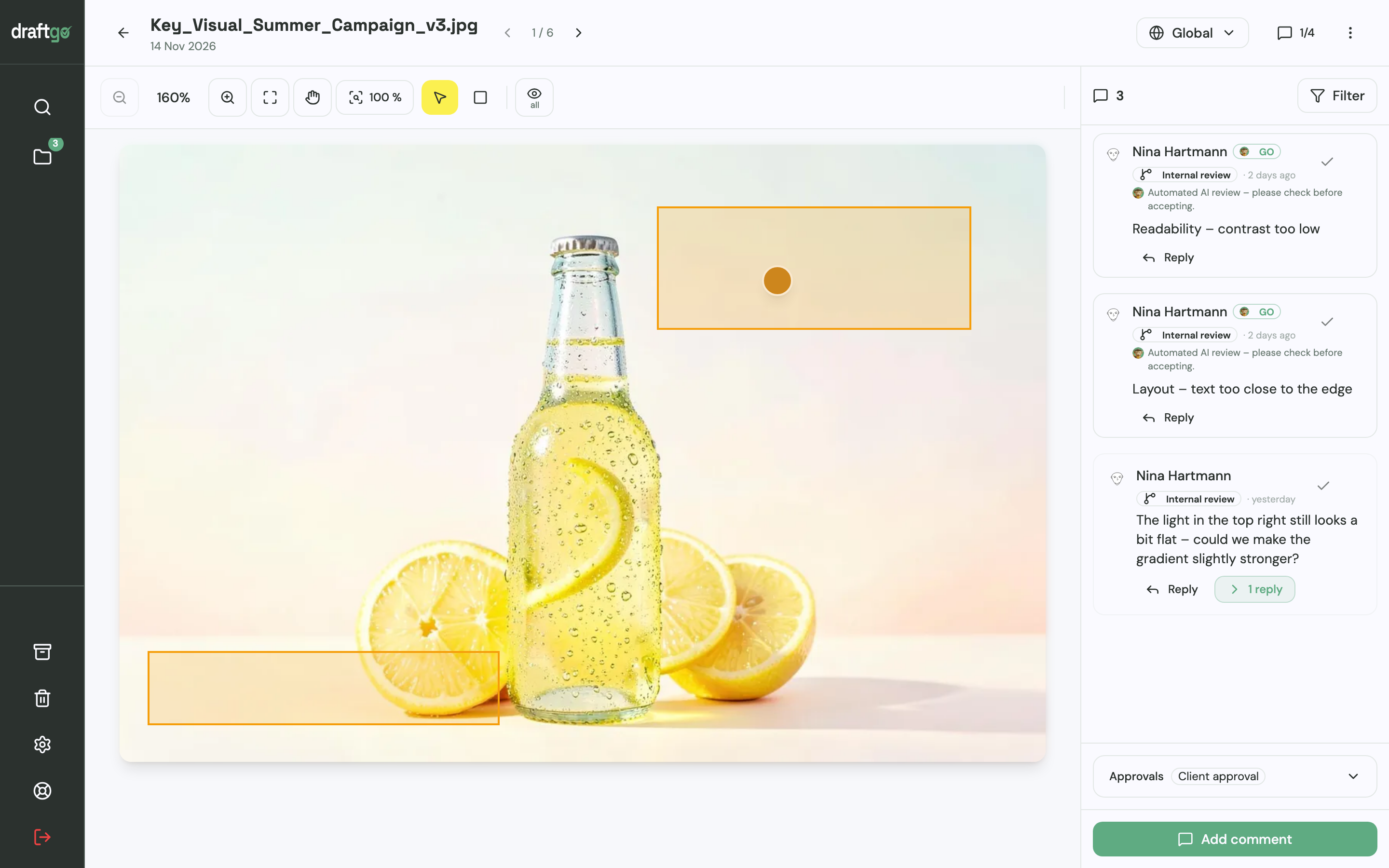
- Approve internally, then with the client. Set up two approval loops, such as “Internal review” and “Client approval”, each with its approvers and a rule: all approvers, a set number or any one of them, separately for team and guests. A project holds 1 loop on Free, 3 on Freelancer and unlimited loops on Agency and Team. Once the team has approved, you activate the file in the client loop.
- Let the client comment without an account. With a personal approver link, the client comments on the image, in the PDF or at a timecode and approves there; a shared viewer link lets colleagues comment without approving.
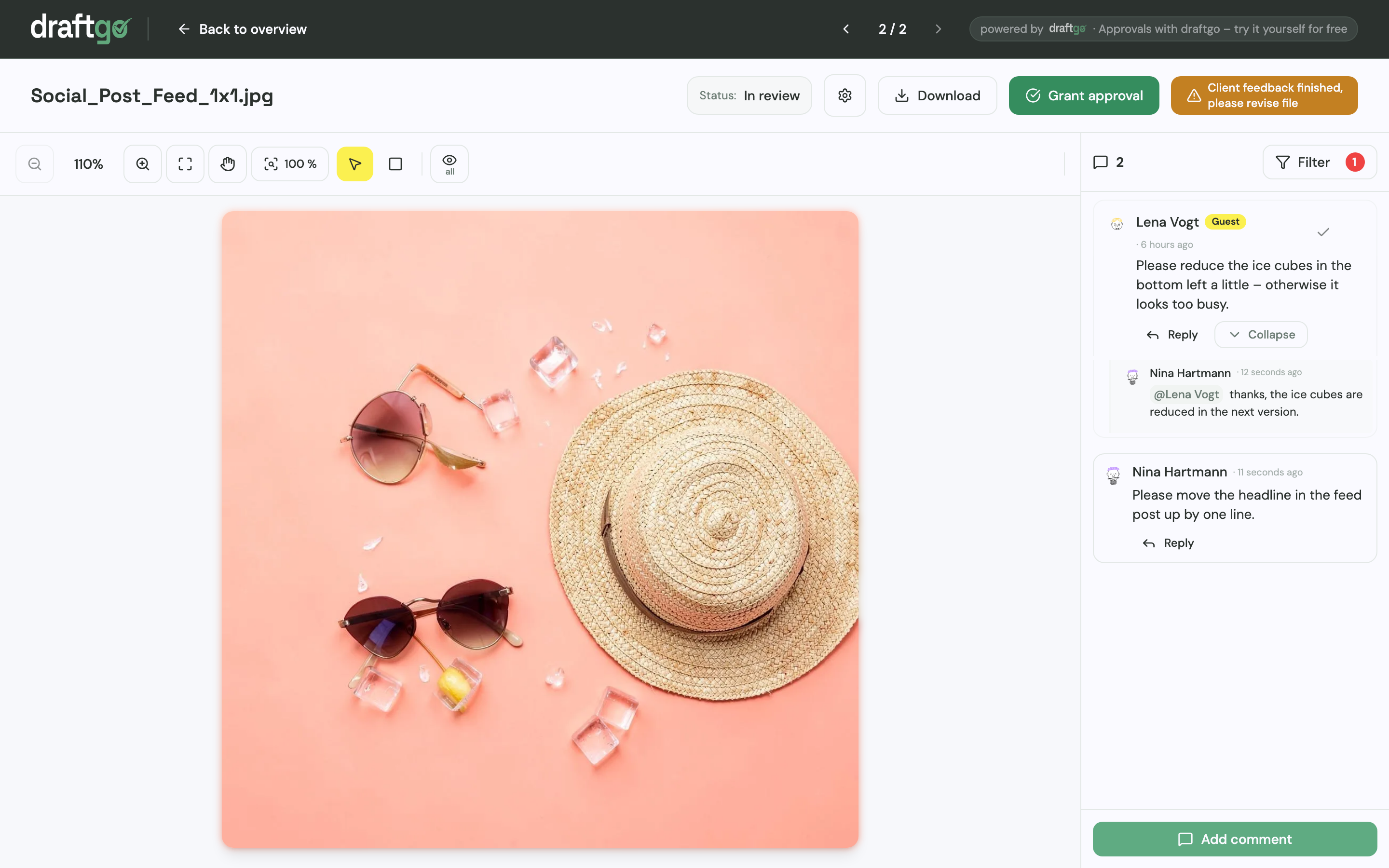
- Ask GO what is still open. GO answers questions about a chosen loop or file in every plan.
- Keep the record. Each revision becomes a new version of the same file, and a new version starts the approvals again. The activity log records approvals, comments and versions with person and time and exports as CSV, JSON or PDF.
draftgo does not use customer content to train AI models. Stored data is kept on EU servers in the Frankfurt data centre. The page for social media and content teams shows how draftgo fits their work.
FAQ
Can AI content creation replace writers and designers?
No. AI tools take over part of the drafting, while a person still checks the facts and decides what gets published under the brand’s name. Plan the time you save on first drafts for the brief, the selection and the edit.
What should not go into a prompt?
Personal data and confidential client material, such as unreleased products, contract terms or customer lists, unless you have checked how the tool processes and stores input. Use descriptions like “an existing client in mechanical engineering” and add the real details in the final edit.
How many AI variants should the client see?
Two or three per slot give the client a real choice without a new round of briefing. Pre-select internally against the brief and send only those.
Conclusion
AI content creation saves time on the first draft if the brief comes before the prompt and a person checks every draft for facts, rights, brand and bias. For your next AI project, write down goal, audience, format and sources, pre-select two or three variants and decide who approves internally and at the client before anything is generated.
Try it free – draftgo is free for 14 days, no credit card needed.
Written by
Emilia
Content Producer
Ready to streamline your approval processes?
Get started with draftgo today and see how easy professional collaboration can be.