
The winery’s new website sits on a preview address, the label for next year’s vintage is a print PDF, and the harvest film runs 40 seconds. The fourteen-person digital agency behind the relaunch has collected website comments for this client in Pastel. Now the owner wants to approve the label and the film in the same place, and the agency’s creative director wants to sign everything off internally before she sees it.
Pastel, the feedback tool at usepastel.com, already handles live websites, images, PDFs, videos, social posts and emails (Pastel FAQ). Whether another tool suits you better depends on what your projects need on top of that.
Why teams look for a Pastel alternative
A Pastel alternative makes sense when a plan limit, the approval process or a file type gets in the way of a project. Check which of these reasons applies to you before you switch.
- Canvases and users: Free includes 1 user and 1 canvas, Pro 2 users and 3 canvases, and Team starts at 5 users with $24 per additional user (billing period not stated) (Pastel plans). An agency that needs more than three active canvases or a third user moves up to Team.
- Bug reports on a board: web teams that fix issues from a task board inside the feedback tool look at bug trackers.
- Approvals in stages: if a file should pass an internal round before the client round, each with its own rule for who has to approve, tools built around approval stages fit better.
- Audio files: Pastel’s FAQ lists websites, images, mockups, PDFs, presentations, videos, social posts, ad creative and emails; audio files are not on the list (Pastel FAQ).
- Where data is stored: clients in the UK or EU may ask. Pastel’s privacy policy says personal information may be processed or stored outside the jurisdiction where it was collected, including outside Canada (Pastel privacy policy).
What Pastel offers as of 17 November 2026
Pastel turns a website address into a canvas: it shows the live site through its own proxy and lays the comments over it, so the canvas updates when the site changes (Pastel help on website reviews). Video comments are tied to timestamps (Pastel help on video), and guests comment with their name and email, without an account (Pastel FAQ).
Every plan, Free included, has a “Finish Review” button: a reviewer approves the canvas or requests changes, and approvals reset when you create a new version (Pastel help on approvals). Once you set a feedback deadline, you can schedule email reminders for it (Pastel help on reminders). Team adds integrations with project management tools, and Enterprise a SOC 2 report and SAML single sign-on (Pastel plans).
- Pros: nothing to install, approve or request changes on every plan, deadlines with reminders.
- Cons: 1 active canvas on Free and 3 on Pro, no audio among the listed file types.
- Price: Pro $29 a month billed yearly ($350 a year) or $35 billed monthly, Team $99 a month billed yearly or $119 billed monthly, with a 14-day trial of the paid plans and no credit card (Pastel plans).
How we evaluated the alternatives
We read each provider’s pricing, product and help pages on 17 November 2026 and compared how a website is reviewed, which other file types work, how clients get in, how approvals work and how the price is calculated. Prices appear in the currency and billing period each page showed us. The tools are listed alphabetically, with draftgo last. draftgo is our product, and it gets pros and cons like the others.
| Tool | Suited for | Website review | Other formats | Entry price (as of 17 November 2026) |
|---|---|---|---|---|
| Pastel | clients who comment on the live site by link | live site through a proxy | images, PDFs, videos, social posts, emails | Pro $29 a month billed yearly (plans) |
| BugHerd | web teams that track feedback as tasks | browser extension or JavaScript snippet | Figma designs, PDFs, images | Standard $42 a month billed yearly for 5 members (pricing) |
| Filestage | approvals with reviewer groups | websites and interactive HTML | videos, images, designs, documents, audio | Starter €199 a month on the yearly plan, €249 on the monthly plan (pricing) |
| ReviewStudio | many formats, priced per user | HTML as ZIP or URL, live web | video, audio, images, documents, 3D | Pro $12 per user a month billed yearly (pricing) |
| draftgo | client approval of every file in a project | screenshot of a public page | images, PDFs, videos, audio, social posts | priced per company, not per user |
The four alternatives in detail
Each tool answers a different reason for leaving Pastel. BugHerd stays close to website bug tracking, while Filestage, ReviewStudio and draftgo also manage approvals across many file types.
1. BugHerd: suited for web teams that turn feedback into tasks
BugHerd collects feedback on websites, Figma designs, PDFs and images, captures screenshots and technical metadata, and makes every comment a task on a Kanban board (BugHerd). Clients comment without an account. Live sites work with the browser extension, staging and internal sites with a JavaScript snippet, and a free trial runs for 7 days.
- Pros: technical data with every report, unlimited client users.
- Cons: an extension or a script before the first review; Jira, Asana, Linear, ClickUp and Monday.com only on Premium (BugHerd pricing).
- Price: Standard $42 a month billed yearly or $50 billed monthly for 5 members, Premium $125 a month billed yearly, with a 60-day money-back guarantee (BugHerd pricing).
Try it yourself: In the demo you work in a real draftgo workspace with sample data.
2. Filestage: suited for approvals with reviewer groups
Filestage is an online proofing tool for videos, images, designs, documents, websites, interactive HTML and audio files (Filestage pricing). Reviewer groups keep internal and external reviews apart, and reviewers comment and approve without an account. Starter adds due dates with reminders and a side-by-side comparison of two versions.
- Pros: approval by reviewer group, audio and interactive HTML in the same tool.
- Cons: the Free plan allows 1 active project and 5 new files a month (Filestage pricing).
- Price: Starter €199 a month on the yearly plan (“2 months free”) or €249 billed monthly, with 10 team members included and a free 14-day trial (Filestage pricing).
3. ReviewStudio: suited for many formats on a per-user price
ReviewStudio reviews video, HTML as a ZIP file or URL, live web pages, audio, images, documents, 3D and 360-degree panoramas (ReviewStudio pricing). Guests are unlimited, and the plan comparison lists approval tracking, multiple approvers, guests as approvers and approval reminders. For video-heavy work, our video feedback tool comparison goes deeper.
- Pros: 3D and panoramas next to web, video and audio; a free Starter plan with unlimited users, 3 active reviews and 5 GB (ReviewStudio pricing).
- Cons: priced per user, so the bill grows with your team; Advanced needs at least 5 users.
- Price: Pro $15 per user a month or $12 billed yearly, Advanced $25 or $20 billed yearly, with a 30-day trial and no credit card (ReviewStudio pricing).
4. draftgo: suited for client approval of every file in a project
draftgo is an online proofing platform for agencies, freelancers and in-house teams; our guide to online proofing explains the approach. For a website, draftgo captures a publicly reachable page as a screenshot, at desktop, tablet or mobile width and optionally as the full page, and reviewers comment on that image. Images, PDFs, videos, audio files and social media posts sit in the same project, and approvals run in loops, for example an internal loop followed by a client loop. Stored data is kept on EU servers in the Frankfurt data centre.
- Pros: web, print, film and audio in one project; each loop with its own approval rule; one price per company with unlimited guests from the Freelancer plan.
- Cons: reviewers comment on a screenshot instead of clicking through the live site, and loops have no deadlines or reminders.
- Price: a permanent Free plan, and paid plans priced per company that you can test free for 14 days; details on draftgo pricing.
Pastel and draftgo compared
Pastel suits you better when clients should click through a live site and your team relies on deadlines, reminders or integrations. draftgo suits you when the website is one of several files a client approves in stages.
| As of 17 November 2026 | Pastel | draftgo |
|---|---|---|
| Website review | live site through a proxy, password-protected sites via browse mode (help) | screenshot of a public page at desktop, tablet or mobile width |
| Other formats | images, PDFs, videos, social posts, emails (FAQ) | images, PDFs, videos, audio, social media posts |
| Approval | reviewers approve or request changes for each version (help) | loops with a rule each: all approvers, a set number or any one of them, separately for team and guests |
| Deadlines and reminders | feedback deadlines with email reminders (help) | none in loops; the optional daily or weekly digest lists pending approvals |
| Integrations | Trello, Asana, Jira, ClickUp, Monday, Zapier on Team (plans) | no ready-made integrations |
| People outside the team | unlimited guest reviewers on every plan (plans) | unlimited guests from the Freelancer plan |
| Price model | per plan with a set number of users (plans) | per company, not per user or guest |
| Stored data | secure cloud servers with encryption in transit and at rest (FAQ) | EU servers (Frankfurt data centre) |
draftgo puts its weight on the approval. A guest approver opens a personal link and approves in the browser, and the decision lands in the activity log with name and time, next to your team’s approvals. Audio files and social media carousels pass the same loops as the website pages.
Which alternative fits your team?
The right choice follows the reason you are looking:
- Developers fix every comment as a task on a Kanban board: BugHerd.
- Approvals run through reviewer groups with due dates, and the budget allows a higher entry price: Filestage.
- You review 3D, panoramas or HTML files and accept a price per user: ReviewStudio.
- You approve a website together with print files, films and audio, in stages and at one price for the company: draftgo.
- Clients keep commenting on the live site, and one or three canvases are enough: stay with Pastel.
The difference between live-site annotation and screenshot review is explained in our guide to the website feedback tool. For other proofing tools side by side, see the draftgo comparison overview.
Example: a winery relaunch in two loops
Take the agency from the start. It creates one draftgo project for the winery and captures the homepage and the shop page from the public preview address, at desktop and mobile width. The label PDF, the harvest film and a 30-second radio spot go into the same project, which gets an internal loop, where the creative director approves, and a client loop. Two loops in one project need the Freelancer plan or higher: Free has 1 loop per project, Freelancer 3, Agency and Team unlimited.
The winery’s owner decides, so she alone gets the personal approver link for the client loop. The marketing manager and the cellar master comment through the shared viewer link; the cellar master marks the grape variety on the label and leaves a comment at 0:12 in the radio spot, where the speaker mispronounces the vineyard’s name. The designer uploads a second version of the label, its approvals start again, and the owner then approves the pages, the label, the film and the spot. When the printer asks who released the label, the activity log shows her name and the date.
How it works in draftgo
In draftgo, the website pages become files of the project, and each file passes the loops until the client approves it.
- Capture the pages. Under “Scan website” you enter the address, choose desktop, tablet or mobile and decide between the visible area and the full page up to 10,000 pixels high. Pages behind a login cannot be captured, so give the review a public preview address.
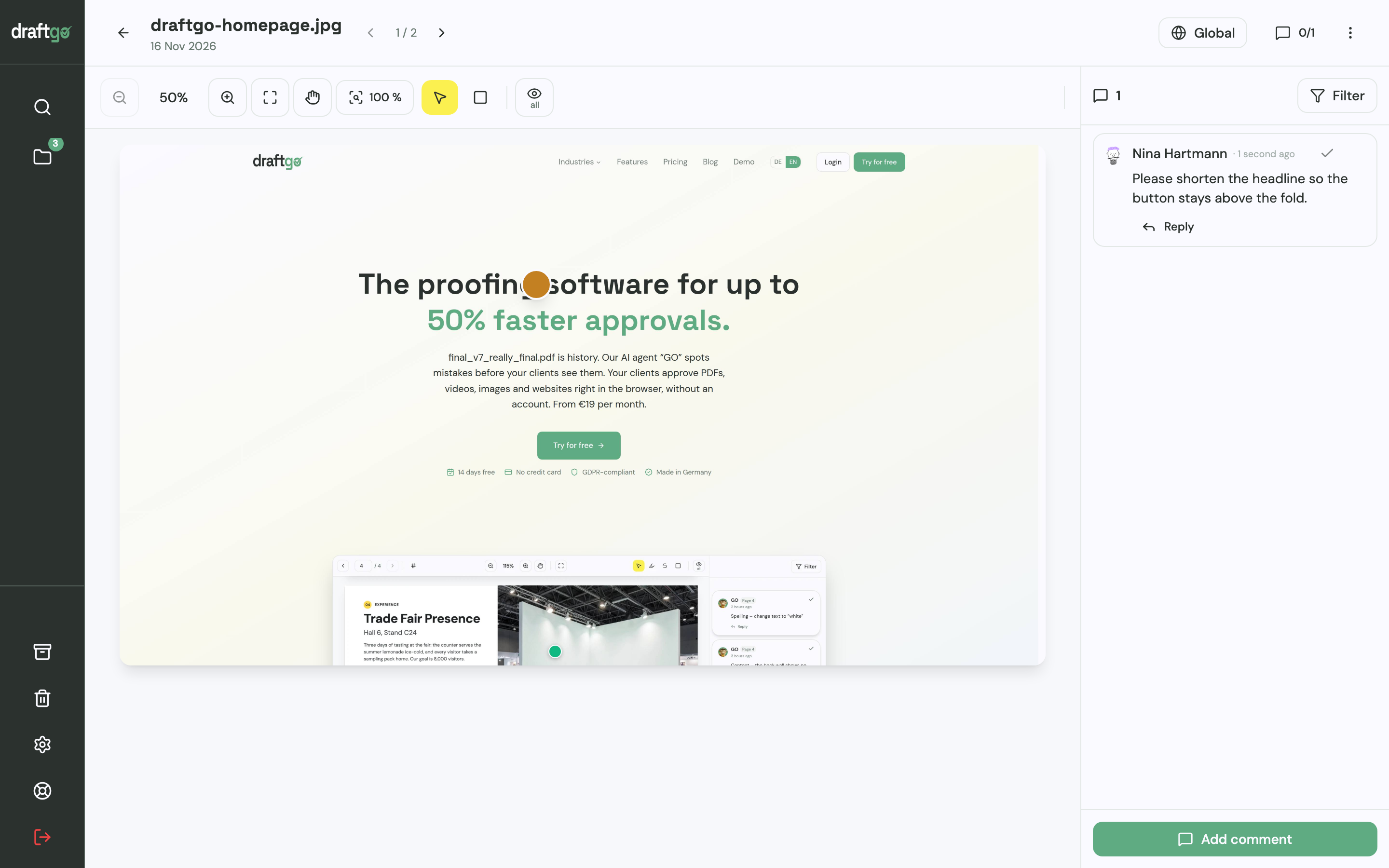
- Add the rest of the launch. Upload the PDFs, images, videos and audio files. Before the client round, you can start the AI review on the print PDF; its findings appear as comments from our AI agent “GO” (AI review pages come with the plans from Freelancer).
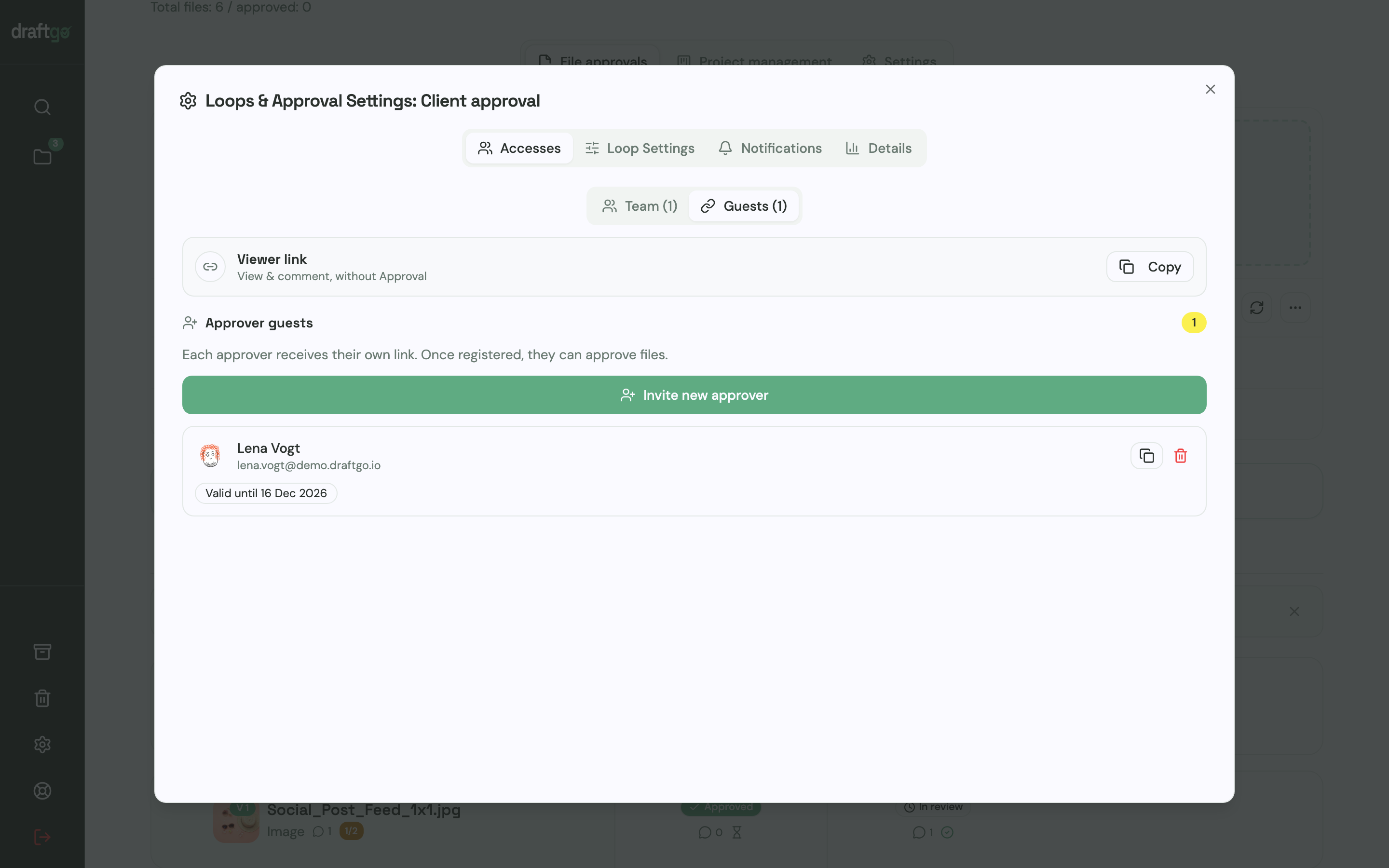
- Set up the loops. Create an internal loop and a client loop, pick the approvers of each and choose the rule: all approvers, a set number or any one of them, separately for team and guests. Then activate the files in the loop.
- Invite the client. The person who decides gets a personal approver link. Everyone else who should comment gets the shared viewer link, which cannot approve. Guests need no account; your team members do.
- Collect comments at the spot. Reviewers place pins and rectangles on pages and images, highlight or strike through text in PDFs and comment at a point in a video or on the audio waveform.
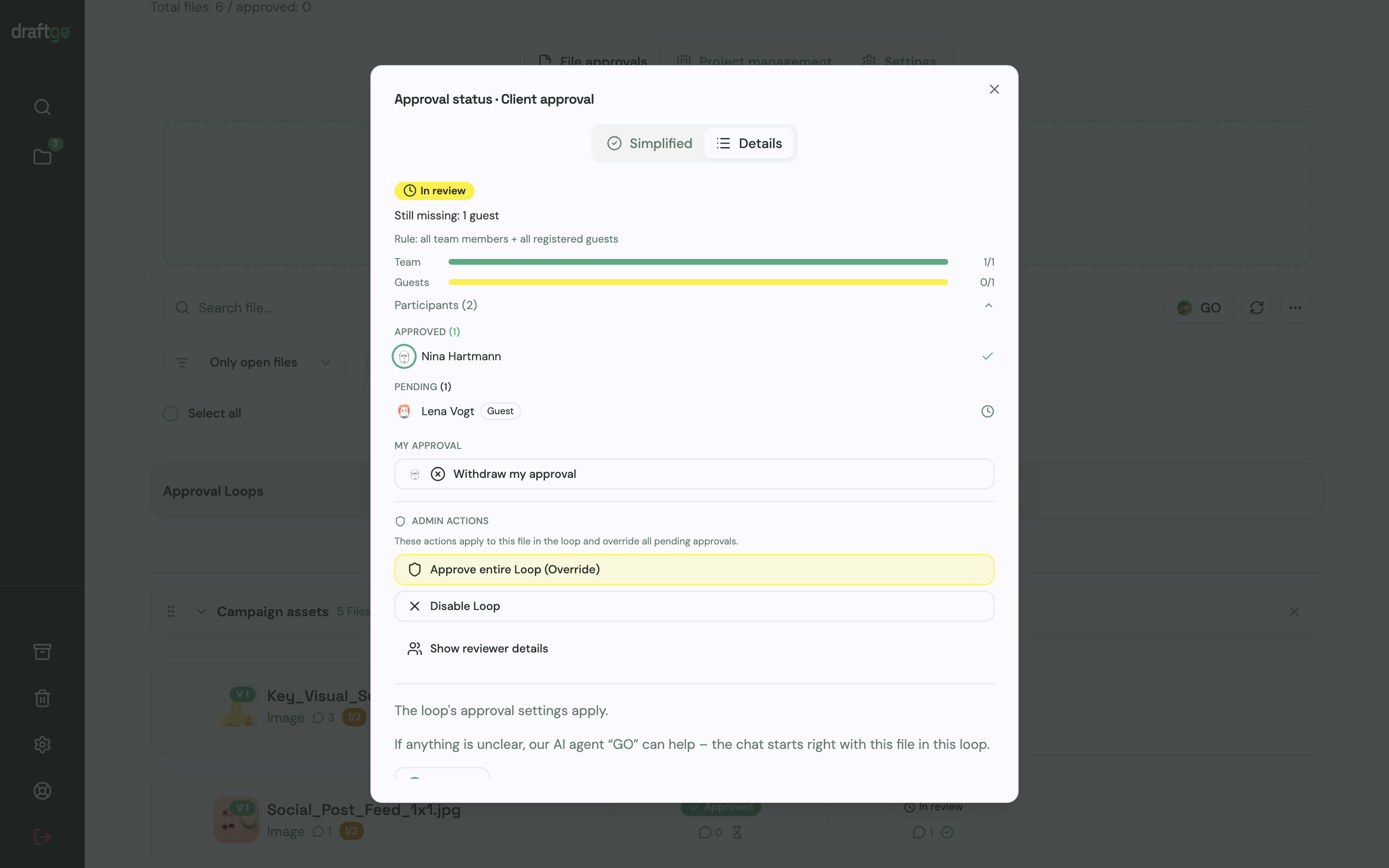
- Follow the approvals. The status dialog lists who has approved and who is still pending. A new version starts the approvals again, and the activity log keeps approvals, comments, versions and downloads with person and time, ready to export as CSV, JSON or PDF. Our guide to the audit trail for creative approvals shows how to keep such a record useful.
Agencies that run website projects this way find the setup on draftgo for web design.
FAQ
Does Pastel have an approval feature?
Yes. On every Pastel plan, reviewers use a “Finish Review” button to approve a canvas or request changes (Pastel help on approvals). The canvas owner sees the state in the Next Steps tab and on the dashboard.
Is there a free Pastel alternative?
Several tools in this comparison have a free plan with limits. ReviewStudio’s Starter includes unlimited users and 3 active reviews (ReviewStudio pricing), and Filestage Free 1 active project and 5 new files a month (Filestage pricing). draftgo’s Free plan stays free for good, with 1 user and 1 loop per project.
How does draftgo review websites?
draftgo captures a publicly reachable page as an image at desktop, tablet or mobile width, and reviewers comment on that image. The approved state stays on record exactly as it was captured. For testing forms, menus or pages behind a login, a live-site tool such as Pastel or BugHerd fits better.
Conclusion
Stay with Pastel if your clients comment on a live site and one plan covers your canvases and users. Choose BugHerd when developers work from a task board, Filestage when reviewer groups and due dates matter most, and ReviewStudio for 3D and HTML files. If the website is one of several files your client approves in an internal and a client loop, run your next relaunch in draftgo.
Try it free – draftgo is free for 14 days, no credit card needed.
Written by
Emilia
Content Producer
Ready to streamline your approval processes?
Get started with draftgo today and see how easy professional collaboration can be.