
Finding an enthusiastic customer review, an unboxing video or a tagged photo on social media is a win for any brand. It feels authentic, converts well and builds social proof without an expensive studio shoot. However, taking that asset and putting it into an email newsletter, on your product page or into a paid ad campaign can quickly lead to legal disputes if you do not hold the proper rights.
This article is general information, not legal advice. Copyright rules and publicity rights vary depending on the jurisdiction and specific US state, and content featuring minors requires separate legal review before any commercial reuse.
To build an effective content engine, marketing teams and agencies need a reliable routine to request consent, document licences and approve assets before publication. Understanding how ugc usage rights work keeps your team creative whilst protecting your business from avoidable legal risks.
UGC and UGC creators: what is the difference?
User-generated content (UGC) refers to organic photos, videos, text reviews and social posts created voluntarily by customers and fans. These creators share their experiences without receiving payment, product briefs or editorial guidance from your company. When you want to reuse their posts for marketing, you are asking for permission after the content already exists.
By contrast, UGC creators are contracted freelancers or influencers who produce content designed to look and feel like organic customer posts. Brands hire them specifically to shoot authentic-style product demos, voiceovers or aesthetic reels.
Because UGC creators work under contract, you agree on usage rights, deliverables, exclusivity, territory and review rounds in advance. Organic UGC requires an entirely separate permissions process because no prior agreement exists between the creator and your brand.
Which rights sit on a user-generated post?
Every piece of user-generated content carries several overlapping legal protections that you must clear before commercial use. Simply being tagged in a post or finding an image in a public feed gives your brand no legal claim to that file.
                    ┌─────────────────────────────────────────────────┐
                    │               Customer UGC Post                 │
                    └───────────────────────┬─────────────────────────┘
                                            │
         ┌──────────────────────────────────┼──────────────────────────────────┐
         ▼                                  ▼                                  ▼
┌─────────────────┐                ┌─────────────────┐                ┌─────────────────┐
│    Copyright    │                │  Right of       │                │  Third-Party    │
│                 │                │  Publicity      │                │  Elements       │
│  Creator owns   │                │  Protects name, │                │  Music, logos,  │
│  exclusive      │                │  image, voice,  │                │  artworks,      │
│  rights         │                │  and likeness   │                │  background     │
└─────────────────┘                └─────────────────┘                └─────────────────┘
1. Copyright ownership
The person who presses the shutter, records the video or writes the copy automatically owns the copyright in that work. Under US copyright law, the owner holds exclusive rights to reproduce the work, prepare derivative works, distribute copies and display the work publicly according to 17 U.S.C. Section 106. A full transfer of copyright ownership requires an instrument in writing signed by the owner under 17 U.S.C. Section 204.
In the United Kingdom, statutory rules establish similar formal requirements. An assignment of copyright is not effective unless it is in writing and signed by or on behalf of the assignor under the Copyright, Designs and Patents Act 1988, s. 90(3). Furthermore, an exclusive licence must be granted in writing and signed by the copyright owner as required by s. 92. Without a written agreement, your brand possesses no enforceable licence to redistribute or monetise the work.
2. Right of publicity and privacy
Copyright only covers the creative expression of the file itself, not the individuals who appear inside it. Commercial reuse of someone's likeness without consent infringes on their right of publicity. According to the Legal Information Institute, the right of publicity prevents unauthorised commercial use of a person's name, image or likeness, and in the United States it is governed primarily by state law, with roughly half of the states recognising it distinctly.
If a happy customer posts a selfie holding your beverage, clearing copyright with the photographer does not waive the privacy or publicity rights of other recognisable people in the frame. Every person visible in the photo or video must agree to commercial usage.
3. Third-party intellectual property
UGC frequently captures background music, visible brand logos on clothing, shop signs or interior artwork. Even if the creator happily grants permission, they cannot license rights they do not own. Incorporating a video that features commercial radio music into a paid social ad can trigger immediate copyright strikes or licensing claims from record labels.
Legal rules in Austria and Switzerland
When sourcing user-generated content across European markets, civil law principles apply in Austria and Switzerland that differ from Anglo-American copyright concepts:
- Licences instead of copyright transfers: In both Austria and Switzerland, moral rights remain permanently with the creator. You cannot acquire full copyright ownership; you can only obtain a contractual right or licence to use the work for specified commercial purposes.
- Right to one's own image: Both jurisdictions place high legal barriers on using a person's likeness commercially. In Austria and Switzerland, publishing a customer's recognisable face or voice in advertising without explicit prior consent infringes their personality rights, even if the image was posted publicly on social media.
- Third-party elements and clear scopes: Swiss and Austrian courts evaluate commercial reuse strictly. If an agreement does not explicitly grant paid advertising or sub-licensing rights, judges interpret the scope narrowly in favour of the creator.
Try it yourself: In the demo you work in a real draftgo workspace with sample data.
Why reposts and ads with UGC go wrong
Marketing teams frequently make legal assumptions that turn customer advocacy into costly disputes. Understanding where teams fail helps you build preventative guardrails into your social media workflows.
- Assuming platform terms grant commercial licences: Social media platforms specify in their terms of service that users grant the platform a licence to host and display content. This licence operates between the user and the platform, not between the user and third-party commercial brands.
- Treating reshares and paid ads as the same thing: Re-sharing a post natively via an in-app repost feature keeps the content hosted within the creator's profile. Downloading the video, adding your brand typography, cutting it into a paid reel and running it through Meta Ads Manager constitutes advertising, which requires explicit commercial clearance.
- Accepting vague emoji responses: Sending a direct message such as "Can we share this?" and receiving a thumbs-up emoji creates ambiguity. It does not define which media channels are covered, whether paid ads are permitted or how long the content can run.
- Losing track of documentation: Fast-moving agencies often collect permissions inside individual staff members' direct message inboxes. When an original poster disputes an ad months later, the agency cannot locate the timestamped proof of consent.
Before scaling your user-generated campaigns, align your team with broader marketing compliance rules so that every published asset adheres to advertising standards.
Getting permission for UGC in five steps
To secure reliable ugc usage rights, replace informal chat replies with a structured outreach protocol. Follow these five sequential steps for every asset you want to repurpose.
1. Identify all rights holders in the asset
Examine the image or video closely before contacting anyone. Confirm who recorded the file, who appears on screen and whether any background elements create liability. If a customer video features two friends unboxing a product, both individuals must be identified and willing to give consent.
2. Send a specific, written request
Contact the creator through direct message or email with a clear, plain-language request. Your message must define the exact scope of reuse rather than asking for general permission. Include the following core parameters:
- Specific content: Link or attach the exact photo, video or review you wish to use.
- Distribution channels: State whether reuse applies to organic social channels, website landing pages, email newsletters or paid advertising.
- Duration and territory: Clarify whether the licence lasts for twelve months or indefinitely, and whether usage is regional or global.
- Permitted adaptations: Specify if you intend to crop dimensions, add captions, translate voiceovers or edit the runtime.
- Attribution: Explain whether and how you will credit their social handle or name.
3. Obtain affirmative confirmation of ownership
Your request must ask the creator to confirm two vital statements in their reply: first, that they personally created the work and own all rights; second, that any recognisable individuals in the content have agreed to this commercial use. Avoid passive consent clauses such as "If you do not reply in 48 hours, we will assume it is fine", as these offer no legal protection.
4. Archive the written consent permanently
Store the creator's affirmative response, including their account handle, email, date and a copy of the original asset, in a central repository. If you work across multiple campaigns, link the permission record directly to the project asset.
5. Log expiration dates and commercial restrictions
Record any conditions agreed with the creator in your campaign asset tracker. If a creator grants permission for organic social media but denies paid ad usage, your paid media team must be blocked from pulling that file into ad sets.
An approval workflow for user-generated content
Securing the licence is only half the battle; your organisation must also ensure the asset moves through editorial, brand and legal checks. Managing these stages through a dedicated social media approval tool ensures no unverified asset reaches publication.
┌──────────────┐     ┌──────────────┐     ┌──────────────┐     ┌──────────────┐     ┌──────────────┐
│  1. Collect  │ ──► │ 2. Verify    │ ──► │  3. Brand &  │ ──► │  4. Adapt   │ ──► │  5. Final    │
│  & Log Asset │     │ Rights Proof │     │  Compliance  │     │  & Cut File  │     │  Sign-Off    │
└──────────────┘     └──────────────┘     └──────────────┘     └──────────────┘     └──────────────┘
- Intake and cataloguing: Download the raw UGC file and log its source URL, creator handle and initial date of discovery.
- Rights verification: Attach the written consent record to the file. A compliance officer or account manager confirms that the licence matches the intended campaign scope.
- Brand and product check: Verify that the product shown is currently in stock, displayed accurately and used safely without misleading claims.
- Creative editing: Adapt the file for campaign specifications, such as trimming pacing, adding brand colour overlays or inserting subtitles.
- Final multi-stakeholder sign-off: Route the final cut through an approval loop where creative directors and legal reviewers inspect the file alongside the proof of consent.
When working with video reviews, using a specialised video feedback tool allows reviewers to leave timestamped notes on pacing, audio clarity and text overlays.
Typical mistakes and better practice
The table below contrasts common shortcuts in UGC workflows with professional clearance practices.
| Common mistake | Risk factor | Better practice |
|---|---|---|
| Reposting customer photos directly without contacting the creator. | Copyright infringement notice or public creator backlash. | Send a clear request specifying channels and obtain affirmative written consent. |
| Asking "Can we share?" and accepting a single emoji reply. | Unclear licence scope; no documented right to run paid ads or alter the file. | Detail exact distribution channels, paid ad rights, edits and attribution in the request. |
| Using content cleared for organic feeds in paid ad campaigns. | Breach of licence terms, potential statutory damages for commercial misuse. | Tag assets with clear licence tiers (organic only vs full commercial ad rights). |
| Storing clearance screenshots in private employee inboxes. | Inability to prove authorisation when challenged months or years later. | Attach written consent proofs directly to the asset in your central review workspace. |
| Ignoring recognisable bystanders or copyrighted background music. | Right of publicity claims or automated copyright takedowns. | Audit videos for third-party audio, logos and people; obtain releases or replace audio. |
Real-world scenario: clearing customer video reviews
A skincare brand launched a community campaign inviting customers to share unboxing videos and morning routines. Within two weeks, dozens of customers tagged the brand on Instagram and TikTok with detailed product demonstrations.
The social media manager flagged a high-performing video review where a customer demonstrated an evening cream. The creator spoke naturally, showed close-up textures and praised the hydration results. The brand's performance marketing agency immediately wanted to run the clip as a paid TikTok ad.
Instead of downloading the clip and launching ads immediately, the marketing manager executed their clearance workflow:
First, they sent a direct message to the customer detailing their request: a 12-month non-exclusive licence covering organic social posts, the brand website and paid social ads in the UK and US, with permission to crop the clip and add captions. They asked the creator to confirm ownership and verify that no other people appeared in the footage.
The creator replied affirmatively within 24 hours, agreeing to the terms in exchange for a skincare bundle and product credit. The social media manager exported the message thread as a PDF and uploaded both the raw video and the PDF proof into their review project.
Before the paid media buyer could publish the ad, the regulatory lead reviewed the file to confirm that the customer's statements did not make unauthorised medical claims. Once approved, the asset launched into the paid ad account with complete legal certainty.
How it works in draftgo
draftgo simplifies how creative agencies, in-house marketing teams and legal reviewers manage content clearances. Instead of scattering feedback across chat threads and email attachments, your entire team evaluates assets and their permissions in one shared workspace.
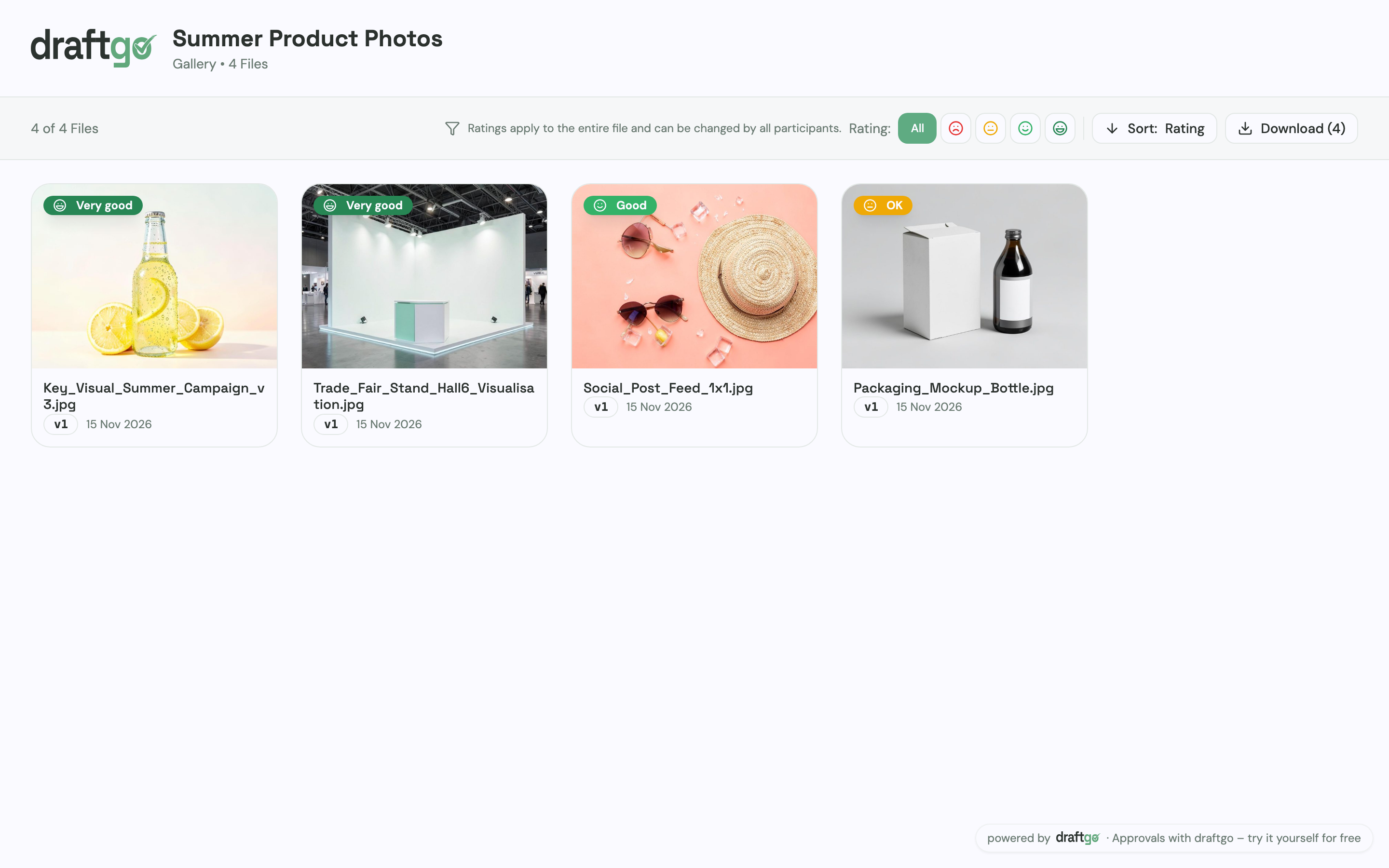
You can upload collected customer images into a gallery where team members and clients rate submissions using four clear smileys and leave contextual comments. This allows creative teams to shortlist the best visual assets before requesting formal usage rights.
When preparing assets for publication, reviews run in structured approval loops. You can define distinct review tiers – for instance, running internal creative edits first, followed by compliance checks, and finishing with final client sign-off. For video content, reviewers add comments at an exact second on the timeline, ensuring that required edits like blurring a background logo or adjusting subtitles are unmistakably clear.
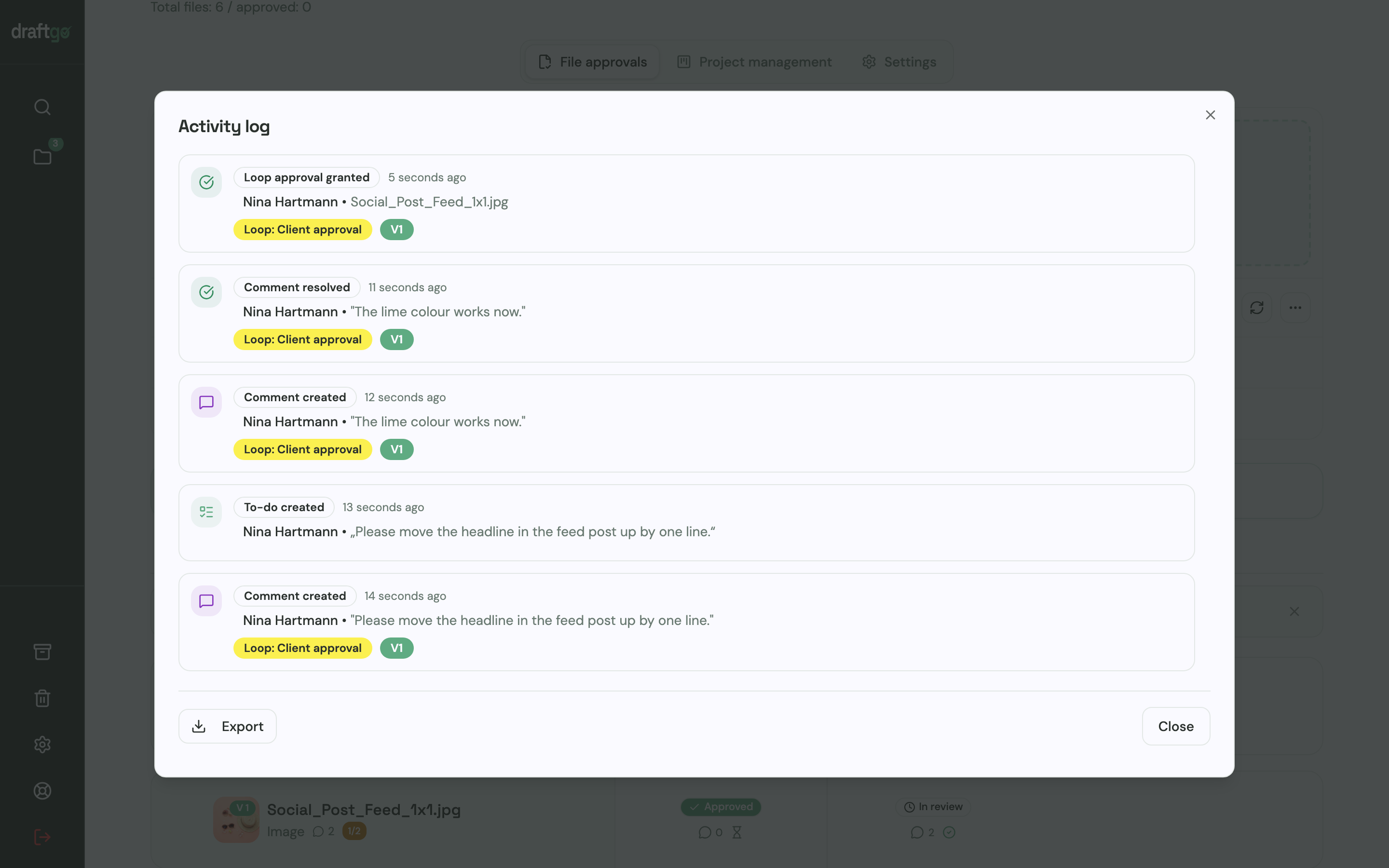
Proof of written consent can be attached directly to a comment on the asset, keeping the permission trail permanently tied to the creative file. The activity log records every comment, new version and approval with the person's name and an exact timestamp, and you can export the full record as a PDF or CSV for audit purposes. Stored data is kept on EU servers in the Frankfurt data centre, giving your organisation a reliable, GDPR-compliant foundation.
For teams managing sensitive brand assets and commercial agreements, discovering how draftgo supports legal and compliance workflows provides a structured way to keep creative execution and risk management aligned.
FAQ
Does crediting the creator protect my brand from copyright infringement?
No, crediting the creator does not replace written permission. Attribution is good professional practice, but using an asset commercially without a licence remains an infringement regardless of whether you tag or mention their username.
Can we use customer reviews from our website in social media ads?
Only if your website's submission terms or post-review communications explicitly secure those commercial advertising rights. If your submission form does not clearly grant a promotional marketing licence, you must contact the reviewer separately before turning their quote into an ad.
What should we do if a creator revokes their permission after an ad launches?
Review the specific terms of your original agreement to see whether the licence was granted for a fixed period or revocable at will. If no formal contract exists and the creator asks you to stop, the safest legal and reputational step is to pause the ad and replace the creative asset promptly.
Is an organic repost using in-app platform features legally safe?
Using native in-app repost or share buttons generally complies with platform terms because the content remains embedded from the original author's profile. However, downloading that media file to upload it natively to your brand account or paid ad manager falls outside native sharing and requires explicit clearance.
Do we need a model release for every person in a customer video?
Yes, any person who is clearly recognisable in visual content possesses a right of publicity over their likeness for commercial endorsements. If a customer video includes family members or friends, each visible individual must agree to the commercial usage before you run it as marketing collateral.
Conclusion
Securing user-generated content rights does not have to slow down your campaign schedule. By establishing a clear five-step outreach routine, storing signed consent proofs alongside your media files and running multi-stage approval loops, you can harness authentic customer stories with complete legal peace of mind.
Try it free – draftgo is free for 14 days, no credit card needed.
Written by
Emilia
Content Producer
Ready to streamline your approval processes?
Get started with draftgo today and see how easy professional collaboration can be.