
The shoot went well, and the edit is in its second day when the client’s marketing lead watches the first cut. She asks where the close-up of the new packaging is. Nobody had drawn that shot, so nobody had agreed on it, and now the choice is between a pick-up shoot and a compromise in the edit.
A storyboard heads off this kind of surprise by putting the film on paper, shot by shot, before anyone films it. Below you get a free storyboard template as PDF and Word, what each field is for, which layout fits which video and how to fill it in. The last part covers the step most templates leave out: the review with your client and the sign-off before production.
Download the free storyboard template (PDF and Word)
Our storyboard template is free to download as a PDF for printing and as a Word file to fill in on screen, with no sign-up and no email address. It is made for commercials, explainer videos, corporate films and social clips, and it takes you from the project details to the final sign-off.
Storyboard template for commercials, explainer videos and social clips
Free template to download
The template contains:
- Project header: project and client, version and date, goal and key message, audience, length, format and channels.
- Twelve landscape panels: one box per shot to sketch in, with a line underneath for the action.
- Shot details: a table for what happens, shot size and camera, sound, voice-over and on-screen text, and duration.
- Cheat sheet: the common shot sizes and camera movements on one page.
- Checklist and sign-off: what to check before sending, who reviews, what changed in this version and who approved which version.
Print the PDF and sketch in pencil, or open the Word file and drop sketches, photos or reference images straight into the panels. If your video has more than twelve shots, take a second copy and carry on numbering.
What is a storyboard?
A storyboard is the planned sequence of shots of a video, drawn as a row of simple sketches, much like a comic strip. Each panel comes with short notes on action, camera, sound and duration, so everyone involved has the same film in mind before the shoot or the animation begins.
A shot is one continuous piece of film between two cuts. The storyboard does not show every movement, only the images the edit will later be built from. The Wikipedia article on storyboards traces the method back to Walt Disney Productions in the early 1930s, where scenes were drawn on separate sheets and pinned to a board in sequence. Today film crews, agencies and freelancers plan commercials, explainers, corporate films, animations and social content this way.
A storyboard gets client, creative team and crew talking about the same video before money goes into a shoot or an animation. A sketch takes minutes to change, while a scene that has already been filmed often needs another shoot day, so order, angles and must-haves such as product and logo are best settled on paper.
Storyboard, script, shot list and animatic compared
Pre-production produces several documents that are easy to mix up. The table shows what each one does and when it is made.
| Document | What it shows | When it is made |
|---|---|---|
| Script or voice-over | what is said and what happens, as text | before the storyboard |
| Storyboard | every shot as a sketch, with notes on camera, sound and duration | after the script, before the shoot |
| Shot list | the same shots as a list without sketches, sorted for the shoot day, for example by location | after the storyboard is approved |
| Animatic | the storyboard panels as a video with timing and scratch sound | after the storyboard, mainly for animation and commercials |
Where the storyboard sits in a whole production, from brief to delivery, is covered in our guide to the video production workflow and its nine phases.
What goes into a storyboard template?
A good storyboard template has a panel for every shot, plus its number, the action, shot size and camera, sound and on-screen text, and the duration. A project header holds what applies to the whole storyboard.
| Field | What you enter | Example |
|---|---|---|
| Number | the running number of the shot, on longer films scene and shot | 4, or 2.3 |
| Panel | a sketch with people, product, background and arrows for movement | stick figure lifting a bike into a repair stand |
| Action | what happens, in one sentence | the mechanic clamps the bike in the stand |
| Shot size and camera | how close the camera is and whether it moves | close-up, slow push in |
| Sound and voice-over | narrator, dialogue, location sound, music and effects | voice-over, soft music |
| On-screen text | titles, captions, logo | logo bottom right |
| Duration | how long the shot runs | 3 seconds |
| Notes | anything the crew or client needs to know | shoot in the workshop |
The header names project and client, version and date, goal and key message, audience, length and format. The format decides how you draw: landscape (16:9) for websites, YouTube and TV, vertical (9:16) for Reels, TikTok and Stories.
Shot sizes: how close is the camera?
The shot size describes how much of a person or a scene the picture shows. For a storyboard, eight sizes from the extreme wide shot to the extreme close-up cover almost every case.
| Shot size | What you see | Typical use |
|---|---|---|
| Extreme wide shot | a landscape or a building, people small within it | opening, change of location |
| Wide shot (long shot) | the whole scene, people with plenty of surroundings | setting the scene, movement |
| Full shot | one person from head to toe | entrances, body language |
| Medium wide shot | one person from about the knees up | walking and talking |
| Medium shot | one person from the waist up | conversation, gestures |
| Medium close-up | head and shoulders, down to the chest | interviews, presenter to camera |
| Close-up | the face fills the picture | emotion, reaction |
| Extreme close-up | a small detail such as eyes, hands or a product | product shots, key information |
Crews do not all use the same names, and the Wikipedia article on shots in filmmaking lists several names for the same framing, such as the American or cowboy shot for the medium wide shot. What counts is that everyone on your project means the same thing, which is why the overview is in the template as well.
Camera movement and angle
Besides the shot size, the storyboard shows whether and how the camera moves: an arrow in the panel, a word in the table. Static means the camera stays put, a pan or tilt turns it on the spot, tracking moves it through the space, and a zoom changes the picture through the lens. For the angle, note eye level, a high angle from above or a low angle from below.
Try it yourself: In the demo you work in a real draftgo workspace with sample data.
Which storyboard layout suits which job?
The right layout depends on what the storyboard has to settle: camera and set-ups for a live-action film, voice-over and screens for an explainer, the opening seconds and on-screen text for a social video, poses and transitions for an animation. The fields stay the same, while the panel shape, the number of panels per page and the column that carries the most weight change.
| Job | Panel shape | Panels per page | What the storyboard settles | Fields to stress |
|---|---|---|---|---|
| Film and commercial (live action) | landscape | fewer, larger panels | framing, camera position and movement, cast and props | shot size and camera, notes on location and props |
| Explainer video | landscape | one panel per voice-over line | how each sentence is shown | voice-over, on-screen text, screens to record |
| Social video | vertical | more, smaller panels | the hook in the first shot, pace, text for viewing without sound | on-screen text and captions, duration |
| Animation | landscape or the delivery format | many panels, including in-between poses | poses, transitions, timing | duration, notes on transitions |
Live-action film and commercials
For a shoot, the storyboard is a working document for the crew as much as a preview for the client. Keep one panel per set-up, so the producer can later sort the shots into a shot list by location. Where several stakeholders sit on the client side, our guide to corporate video production and its sign-offs shows where the storyboard approval fits.
Explainer videos
An explainer follows its voice-over, so the storyboard runs line by line, with the spoken text next to each sketch and screenshots instead of drawn interfaces. In an explainer video production, the storyboard sits between the script and the animatic.
Social video and animation
For Reels, TikTok or Stories, draw a tall frame inside each panel, put the hook in the first shot and write every key message as on-screen text for people watching with the sound off. Animation needs more panels than live action, with key poses and transitions, because nothing appears on screen that nobody has planned.
How to fill in a storyboard template in 7 steps
Fill in the storyboard template in this order, from the goal of the video to the version that goes to the client. The steps work the same way on paper, in Word or on a tablet.
1. Agree on goal, length and format
Before you draw anything, agree with the client what the video should achieve, who it is for, how long it runs and where it will be shown. These answers go into the header, and the length decides how many shots fit. Our creative brief template covers what else a brief should hold.
2. Write the script or voice-over first
The storyboard is built on text: the voice-over, the dialogue or a short description of the action. Write it first, split it into chunks that each carry one thought, and read it aloud with a stopwatch, so you know early on whether it fits the planned length.
3. Break the script into shots
Now turn the text into pictures by asking what the viewer sees while each line is spoken. Every new image without a cut is a shot and gets a number. A wide shot at the start shows where we are, closer shots bring person and product forward, and the message and the logo come at the end.
4. Sketch each panel
Draw each shot into a panel, showing who or what is in it, where the camera stands and what moves. Stick figures and arrows are enough, because the storyboard shows composition and flow rather than finished artwork.
5. Add the shot details
For every number, enter in the table what happens, which shot size and camera movement you plan, what can be heard and which text appears on screen. In the sound column, keep voice-over, location sound, music and effects apart, so the client sees at a glance where the claim is spoken and where it only appears as text.
6. Add up the durations and test the timing
Give every shot a duration and add them up. The total has to match the planned length, and if it does not, you cut text or shots now, before anyone films. For the rhythm, lay the panels with their durations into your editing software with voice-over and music, and even a rough animatic shows whether the timing works.
7. Check it internally and send it for review
Before the client sees the storyboard, a second person on your team checks it against the brief and the checklist in the template. It then goes to the client with a version number, a clear review request and a date for feedback, as described in the section on client feedback below.
Storyboard example: a 20-second vertical ad, filled in
This example shows the filled-in template for a 20-second vertical ad for a local bike workshop that offers a winter service check, made for Instagram Reels and TikTok. Instead of sketches, the second column describes what is drawn in each panel.
| No. | Panel (sketch) | Shot size and camera | Sound and on-screen text | Duration |
|---|---|---|---|---|
| 1 | a muddy chain, rain dripping off the bike | extreme close-up, static | rain, a squeaking pedal; text: “Your bike after a winter outside?” | 2 s |
| 2 | a rider wheels the bike into the workshop and shakes off the rain | medium wide shot, static | door chime, music starts | 2 s |
| 3 | a mechanic clamps the bike into the repair stand | close-up, slow push in | voice-over: “Our winter check sorts it.” | 3 s |
| 4 | the chain is cleaned and oiled | extreme close-up, static | voice-over: “Chain, brakes, lights, tyres.” | 3 s |
| 5 | the mechanic squeezes the brake lever and nods | medium close-up, static | brake click; text: “Brakes checked” | 3 s |
| 6 | the rider cycles off at dusk, lights on | wide shot, pan with the bike | voice-over: “Ready for dark mornings.” | 4 s |
| 7 | end card with logo, address and “Book your winter check” | static graphic | text: logo and address, music ends | 3 s |
What this example gets right
- The hook comes first: the muddy chain and the question on screen open the video, and the logo waits for the end.
- The durations add up: the seven shots come to exactly 20 seconds.
- Sound and picture belong together: each voice-over line sits next to the shot it is heard over, and the problem and the result are also on screen as text for viewing without sound.
- The camera stays calm: only two shots move, which keeps the shoot simple.
Common storyboard mistakes and what works better
Most storyboard problems come from planning and review rather than from the drawing. The table shows typical mistakes, what they lead to and what to do instead.
| Mistake | What happens | Better practice |
|---|---|---|
| Storyboard without a script | pictures and words do not match | write the text first, then draw |
| Too many shots for the length | shots are too short to take in | enter a duration per shot and add them up |
| No sound in the storyboard | the client is surprised by the voice-over in the edit | note voice-over, music and effects for every shot |
| Feedback by email without a reference | “the third picture” means something different to everyone | comments directly on the panel, or at the second in the animatic |
| Approval only by word of mouth | later nobody knows which version counts | record the approval of one specific version |
| Changes after sign-off without a new version | the crew works from an outdated storyboard | every change after approval becomes a new, numbered version |
How to get client feedback on a storyboard and lock it before production
A storyboard is finished only when the client has approved it. Build the review into the plan, with a clear question for the client, comments on the panels themselves and a recorded approval of one version before anyone shoots or animates. Many templates stop at the printer, yet this is the point that decides whether the shoot day runs calmly or the story is still being argued over on set.
What to review at storyboard stage, and what to leave for later
At this stage the review is about story, order and message, not about colours or typefaces. Say so plainly in your review request, or the client will comment on the stick figures instead of the idea.
| Review now | Review later |
|---|---|
| Is the story clear and logical? | colour and grade |
| Does the key message come across? | final typefaces and graphics |
| Is the order of the shots right? | the performance of the actors |
| Are product, logo and claim in the right place? | details of props and set |
| Do shot sizes and angles suit the brand? | final music and voice |
| Does the voice-over fit the planned length? | fine cut and transitions |
Who reviews what, and when?
Several people usually have a say in a storyboard, on your side and on the client’s. Agree before you start who checks what and whose approval counts at the end.
| Role | Checks | When |
|---|---|---|
| Creative lead or director | story, visual style, shots | while drafting |
| Producer | feasibility, locations, cast, effort | before it goes to the client |
| Project lead at the client | message, brand, how the product is shown | in the client round |
| Specialists at the client | facts about the product or service | in the client round, where needed |
| Decision-maker at the client | approves one specific version | at the end of each round |
PDF or animatic: which one should the client review?
A storyboard PDF is the right format for checking composition, order and content. An animatic adds timing and rhythm and pays off above all for animation and for spots that must hit an exact length. Tell the client that the voice and music in the animatic are placeholders, or the feedback ends up being about the scratch voice rather than the timing.
How the review round runs
- One link instead of attachments: everyone sees the same version of the storyboard or animatic.
- A review request with a date: two or three sentences on what this round is for and when you need the feedback.
- Comments on the panel: feedback belongs on the shot it is about, not in a long email.
- Every voice in one round: reviewers on the client side see each other’s comments and settle contradictions before you revise.
- New version, then approval: the revised storyboard gets a new version number, the agreed person approves one specific version, and you record who approved it and when.
A message to the client can look like this:
"Sample message: Hi Maria, here is version 2 of the storyboard for the winter check ad. As we discussed, we have changed the opening shot and the end card. Please look mainly at the order, the message and how the workshop comes across; colours and typefaces follow after the shoot. We need your feedback by Wednesday at noon so that we can confirm the shoot day.
Locking the storyboard before production
Once approved, the storyboard is locked and becomes the reference for the shot list, the shoot schedule and, in animation, the scene plan. Any later change is a new version with a reason, approved by the same person, so the crew always works from the current storyboard. In the edit, a rough cut that departs from it is then a deliberate decision, not a misunderstanding. How to collect feedback on the cuts at the timecode is covered in our guide to choosing a video feedback tool.
Practical example: an animated explainer for an energy cooperative
Take a freelance motion designer who is making a 60-second animated explainer for a regional energy cooperative. The video should show members how to submit their meter readings in the cooperative’s new app. Three people speak for the client: the communications manager, an engineer who checks the scenes with the meters, and the managing director.
On the last job, the storyboard went out as an email attachment, and the managing director saw it only the day before the animation started. He wanted a different opening, and two days of animation work had to be redone. This time the designer goes about it differently:
- Ground rules in the brief: the communications manager decides, the engineer checks the technical scenes, and the managing director takes part from the first round.
- Storyboard in the template: she sketches 14 panels in the Word version, with app screenshots in the panels that show the app. Read aloud with a stopwatch, the voice-over runs long, so two sentences go.
- One link for everyone: all three comment on the panels of the PDF. The managing director wants to open with the member’s problem, a paper card and a torch in a dark cellar, and the communications manager agrees in the same thread.
- Version 2 and the animatic: the revised storyboard goes out as a new version with a rough animatic. The engineer notes at second 34 that the meter on screen is an old model, one panel is redrawn, and the communications manager approves version 2.
The animation starts on the planned date, and the feedback on the first render is only about easing and colour.
How it works in draftgo
In draftgo you review storyboard and animatic with your client in one place, from the first draft to the recorded approval. Your client opens everything through a link, without creating an account.
- Upload the storyboard: as a PDF or an image. A Word file is converted into a PDF on upload, and the animatic goes into the same project as a video.
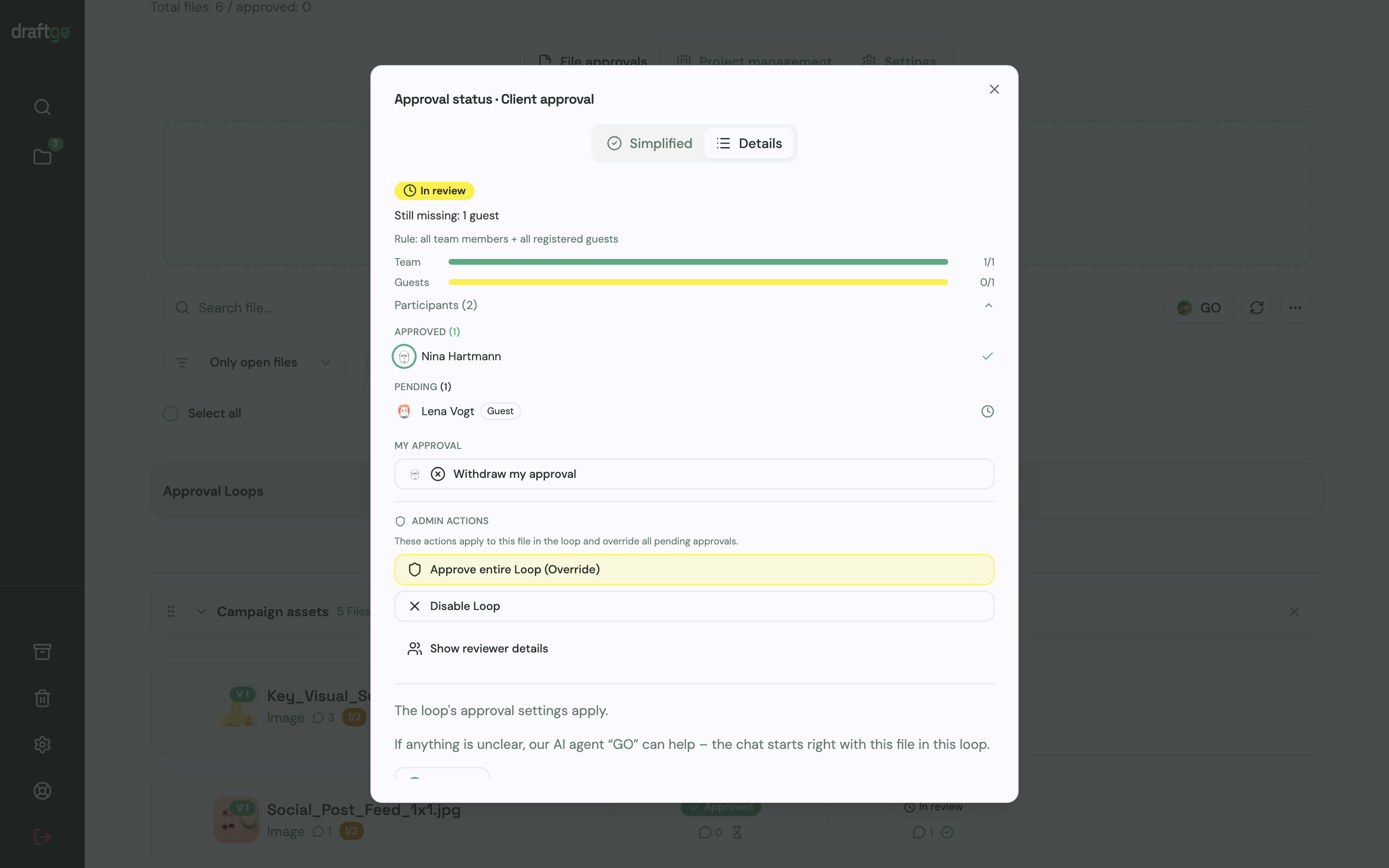
- Loops for team and client: approvals run in loops, for example an internal review first and the client after it. For each loop you decide whether all approvers, a set number of them or any one of them must approve, separately for team and guests.
- The right link for each person: whoever signs off gets a personal approver link with name and email address, and people who only comment use the viewer link, which cannot approve.
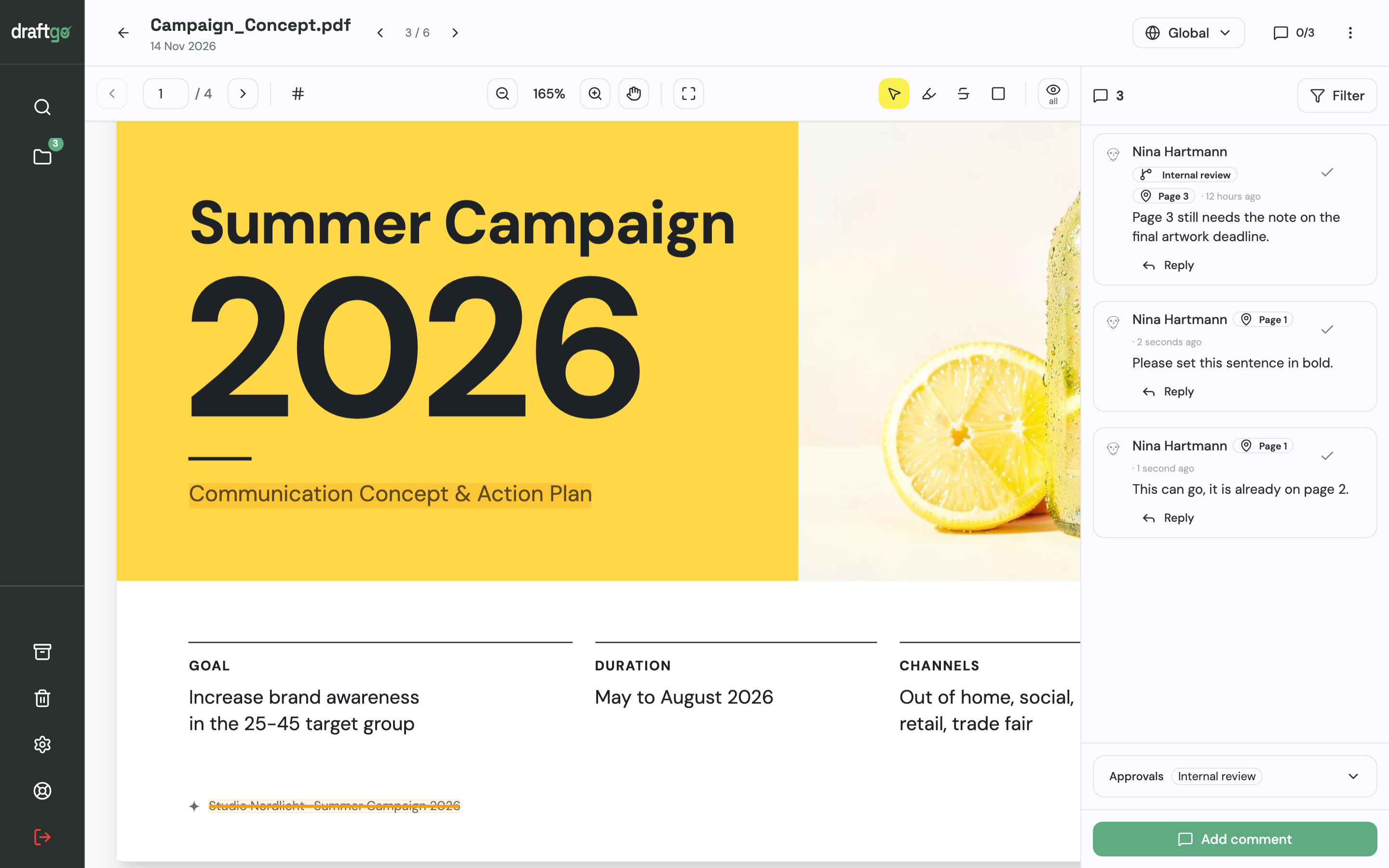
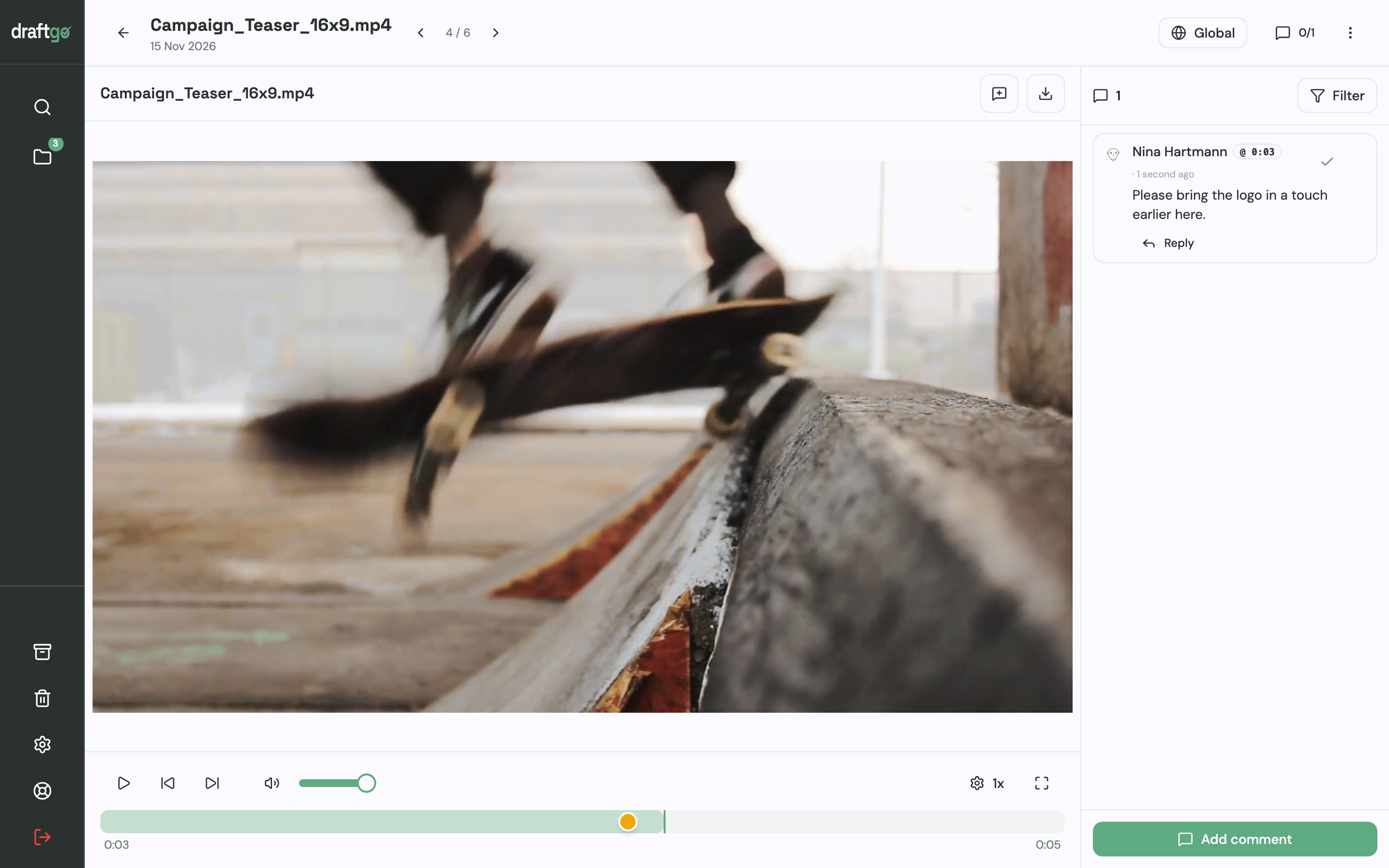
- Comments on the panel and on the timeline: in the PDF, your client places a pin or a rectangle right on the panel, or highlights or strikes through a line of the voice-over. In the animatic, each comment sits at a point on the timeline, to the second, and replies and @mentions keep the discussion on the comment.
- Feedback reported as finished: if you switch it on for the loop, guests use “Client feedback finished” to report that their feedback is complete, so you know when to start revising.
- A new version on the same file: the revised storyboard goes up as a new version of the same file. Earlier versions stay available, comments stay with their version, and the approvals start again for the new one.
- The approval on record: in a loop, each file is “Inactive”, “Under review” or “Approved”. The activity log keeps approvals, comments and versions with person and time, and you can export it as CSV, JSON or PDF.
From the Freelancer plan on, you can run the AI review on the storyboard PDF before it goes to the client, for example to catch spelling mistakes in the voice-over or text that is cut off. Its findings appear as comments from our AI agent “GO” at the affected spot.
Stored data is kept on EU servers in the Frankfurt data centre. How video teams review cuts, animations and spots with their clients is shown on draftgo for video production.
FAQ
Do I need to be able to draw to make a storyboard?
No. Stick figures, simple shapes and arrows are enough. A storyboard shows flow and composition, not finished artwork. You can also use photos of the location, staged phone photos or pictures from an AI image generator as placeholders.
How many panels does a storyboard need?
As many as your video has shots, because each shot gets its own panel. The example on this page uses seven panels for a 20-second ad. For longer videos, use several copies of the template and keep numbering.
Can I use the storyboard template for vertical videos?
Yes. The panels of the template are landscape, so for Reels, TikTok or Stories you draw a tall, narrow frame inside each panel and sketch within it. In the Word file you can also resize the panels to suit your format.
Who should sign off the storyboard?
The person on the client side who is responsible for the video, usually the project or marketing lead. Specialists review in the same round, and you agree beforehand whose approval counts.
Conclusion
A storyboard template turns an idea into a plan that client, creative team and crew read the same way. Download the template, fill it in for your next video with script, sketches and durations, and have your client approve one version before anyone films. Changes then stay on paper, where they cost the least.
Try it free – draftgo is free for 14 days, no credit card needed.
Storyboard template for commercials, explainer videos and social clips
Free template to download
Written by
Emilia
Content Producer
Ready to streamline your approval processes?
Get started with draftgo today and see how easy professional collaboration can be.