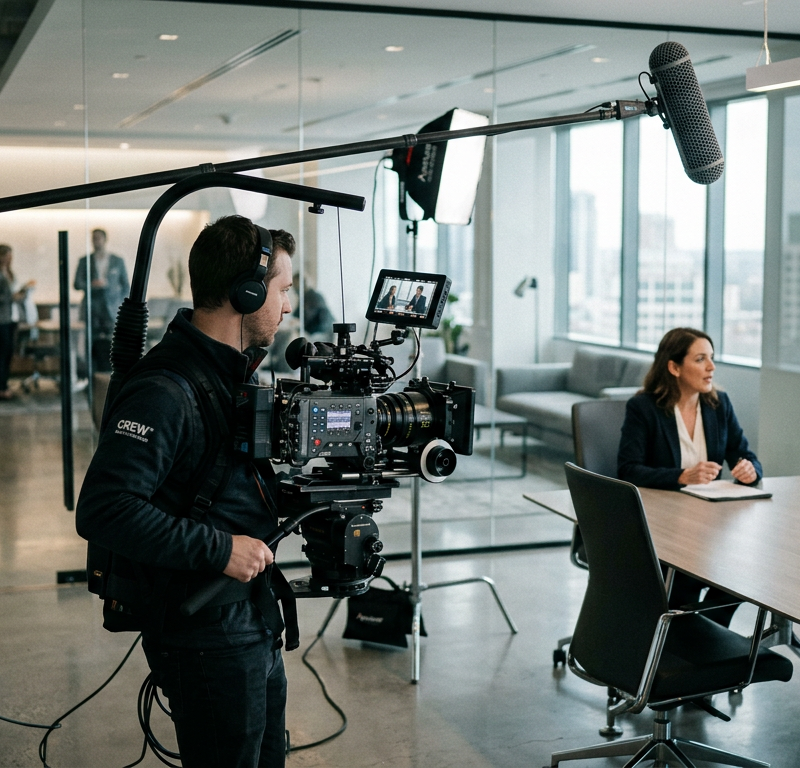
Few creative projects spin out of budget as quickly as corporate video production. An executive watches the rough cut and dislikes the messaging, a location manager revokes permission on the morning of filming, or legal flags an unlicensed music track days before the campaign launch. Suddenly, your production team faces costly reshoots, scrambled editing schedules, and invoices that far exceed the original estimate.
These budget blowouts rarely happen because of equipment failure or poor camera work. They happen because client teams treat video like a text document, assuming that core messages, tone and visual choices can easily be tweaked right up to the final export. Understanding the stages of production and locking in formal approvals at specific milestones is the only reliable way to keep your film on track and on budget.
Why corporate video productions cost more than planned
Video production involves substantial fixed and variable cost drivers: filming days, crew size, camera and lighting hire, location fees, on-screen talent, bespoke animation, voice-over recording, and licensing fees for music and imagery. Producing multiple language versions or specific aspect ratios for various distribution channels adds further editing time.
Yet the single largest financial risk in any corporate video production is late-stage conceptual feedback. When leadership or subject matter experts only see the film during the fine cut, changes require recasting, re-recording voice-overs, rebuilding motion graphics, or booking entire crew days for pick-up shoots. Every structural decision pushed further down the production timeline multiplies the cost of rectifying it.
If you want to understand how systematic reviews safeguard your timeline across all media types, exploring a structured video production workflow provides a solid foundation for managing expectations from day one.
Corporate video production in 10 stages
Breaking a video project into ten sequential stages prevents overlapping work and clarifies what is open for discussion at any given moment.
1. Brief and goal
Every project begins with a clear creative brief. Define who the video needs to reach, what those viewers should understand or feel, and what concrete action they ought to take afterwards. Document technical requirements such as primary channels, aspect ratios and mandatory corporate design standards.
2. Concept or treatment
The production team or agency outlines the visual narrative, tonal direction and pacing in a treatment. This document sketches out how the story unfolds, whether you are using interviews, voice-over narration or acted scenes, and what the overall visual mood should be.
3. Script and storyboard
The script details spoken dialogue, voice-over text and visual descriptions scene by scene. For complex shoots or animation sequences, a storyboard illustrates framing, camera movement and graphic overlays alongside the copy.
Try it yourself: In the demo you work in a real draftgo workspace with sample data.
4. Shoot planning and pre-production
Before a camera is switched on, pre-production locks down the logistics: booking locations, securing filming permits, scheduling crew, and casting actors or confirming company employees on camera. This stage also includes gathering signed releases from everyone who will appear on screen.
5. The shoot
Principal photography executes the agreed shoot plan. A disciplined production team follows the storyboard and call sheet closely to capture all planned scenes, interview responses, cutaways and ambient sound within the booked hours.
6. Rough cut
The editor assembles the recorded footage into a narrative structure according to the approved script. The rough cut focuses entirely on pacing, story flow and message clarity. Colour grading, final sound mixing and polished visual effects are intentionally left out at this stage.
7. Fine cut
Once the narrative sequence is approved, the fine cut refines cut points, trims pauses, adjusts pacing, and integrates draft graphics or placeholder titles.
8. Music, voice-over and graphics
Professional voice-over talent records the narration, background music tracks are selected and edited to picture, and graphic designers build lower thirds, title cards and explanatory animated elements.
9. Finishing: colour and sound mix
In post-production finishing, colourists grade the footage for consistent skin tones and atmosphere. Sound engineers balance dialogue levels, clean up background noise, add sound effects and master the overall audio to meet broadcast and online loudness standards.
10. Final approval and format exports
The client signs off on the finished master file. The production team then renders the required deliverable files: horizontal masters for the corporate website, vertical cut-downs for social media, subtitled versions and trade-show loops.
The 5 approvals that matter
To keep a corporate video production from running in circles, you do not need sign-offs at every minor step. You need firm commitments at five non-negotiable milestones. Once an approval is granted, that phase is closed, and subsequent work builds strictly on top of it.
1. Concept & Treatment  ──►  2. Script & Storyboard  ──►  3. Shoot Plan & Talent
         │                            │                           │
         ▼                            ▼                           ▼
[ Narrative direction ]      [ Word-for-word copy ]       [ Logistics & releases ]
                                                                  │
                                                                  ▼
                             5. Final Master         ◄──  4. Rough Cut
                                    │                             │
                                    ▼                             ▼
                          [ Delivery & exports ]       [ Story flow & pacing ]
- Concept approval: Validates that the visual style, core message and narrative angle match the project objective. Changing direction after this point scraps all subsequent scriptwriting.
- Script approval: Locks down every spoken sentence, voice-over line and planned on-screen action. No filming should take place without a signed-off script.
- Shoot plan approval: Confirms filming locations, company participants, schedule and filming permits. Changes here prevent wasted travel costs and idle crew hours.
- Rough cut approval: Confirms that the story works, interview answers make sense, and the visual sequence conveys the intended message. This is the absolute deadline for restructuring the story.
- Final master approval: Verifies that colour grading, audio mixing, lower-third spellings, logos and legal disclaimers are correct before files are distributed.
Roles on the client side
Disorganised client feedback is among the most frequent reasons video projects stall. Establishing clear responsibilities inside the commissioning organisation avoids conflicting instructions.
- The single decision-maker: Appoint one project lead who gathers all internal thoughts, resolves conflicting requests and delivers consolidated, authoritative feedback to the production team. If three managers send contradictory notes directly to the editor, progress halts immediately.
- Subject matter experts: Involve specialists – such as product engineers, compliance officers or HR managers – exclusively for their area of expertise. An engineer verifies whether a machinery demonstration is technically accurate; they do not dictate the musical tone of the edit.
- Executive leadership: If senior executives have sign-off power over the final video, bring them into the review cycle at stage two (concept) and stage three (script). Presenting a completed video to a managing director who has never seen the concept is an almost certain recipe for expensive re-editing.
Specialised productions require extra attention to internal alignment. For example, creating an employer branding video demands early coordination between HR, marketing and corporate communications to ensure authentic representation alongside corporate standards.
Clearing rights: people, music, images
This article is general information, not legal advice.
A corporate video production can be visually stunning and perfectly edited, yet entirely unusable if third-party rights are neglected.
On-screen talent and personality rights
In the United States, the right of publicity is based on state law and varies from state to state. In Europe, personality rights and privacy laws protect individuals against unauthorised commercial use of their likeness.
Anyone who appears recognisably on camera – whether professional actors or your own employees – must sign a release. A model release is a document signed by the subject granting permission to publish their image, within the terms it states. Ensure these documents cover all planned distribution channels, territories and timeframes before filming commences.
Music licensing and synchronisation rights
You cannot simply lay a commercial track under your corporate video. Putting a composition to picture needs a synchronisation (sync) licence from the holder of the copyright in the composition, alongside a master use licence from the owner of the specific recording. For corporate films, companies typically license tracks from reputable production music libraries that explicitly grant commercial digital and broadcast synchronisation rights.
Third-party images, logos and locations
Background elements require scrutiny. Displaying copyrighted artwork, visible brand logos of other firms or proprietary designs without permission creates legal exposure. Similarly, filming on private property, transport networks or public land usually requires written location agreements and permits from local authorities or property owners.
Common mistakes and better practice
| Phase | Common mistake | Better practice |
|---|---|---|
| Concept & Script | Starting the shoot with bullet points and hoping to find the story in the edit. | Writing a full script with visual cues and securing formal approval before scheduling crew. |
| Stakeholder Management | Showing the video to senior leadership for the first time at the final cut stage. | Involving leadership at the concept and script milestones so strategic expectations are aligned early. |
| Shoot Planning | Relying on verbal agreements with colleagues or location managers. | Gathering signed model releases and written filming permits before production begins. |
| Rough Cut Review | Criticising unfinished colours, temporary graphics or unmixed audio in the rough cut. | Focusing reviews exclusively on story pacing, interview substance and narrative sequence. |
| Feedback Collection | Sending conflicting, uncoordinated feedback emails from multiple departments to the editor. | Funnelling all notes through one internal project lead who consolidates requests and resolves contradictions. |
A realistic scenario: the industrial machinery film
Consider a mid-sized engineering company producing a four-minute product film for an international trade show. In previous years, their marketing manager collected feedback by circulating MP4 files via WeTransfer links. Department heads forwarded the link, resulting in five separate email threads with conflicting timestamps: the head of sales wanted faster pacing, the chief engineer noted that safety guards were missing in a two-second clip, and the CEO rejected the voice-over artist's accent at the final review.
For their latest project, the company changes the workflow. During pre-production, the production agency shares the script as a document for textual review. The head of safety reviews the storyboard and flags that operators must wear protective eyewear in scene four, allowing the crew to provide the right gear on the shoot day.
When the rough cut is ready, the marketing lead shares a single review link with the core team. Instead of drafting vague emails ("change that scene around the middle"), reviewers leave comments directly on the video at the relevant timecode. Contradictory requests are discussed directly within the comment thread before the editor opens the project file. The rough cut is approved within two days, and post-production proceeds without a single pick-up shoot.
How it works in draftgo
Organising video reviews does not require complex project management software or forcing your clients and executives to create new accounts. Specialised solutions like draftgo's video production review bridge the gap between creative teams and non-technical stakeholders.
Your team cuts and polishes footage in dedicated post-production software such as Premiere Pro or DaVinci Resolve, while draftgo hosts every exported cut for structured client and team review, with each comment at its timecode.
- Centralise project assets: Upload your creative concept and script as PDFs, location reference photos as images, and rough cuts as video files into one shared project workspace.
- Comment accurately on the timeline: When team members or clients view a video, they pause and comment directly on the timeline. draftgo automatically attaches the comment to its timecode, eliminating ambiguous emails with inaccurate timecodes.
- Involve external reviewers effortlessly: You share a personal approver link with client stakeholders or senior executives. They open the video in their browser without signing up, review the cut, leave notes, and sign off when satisfied.
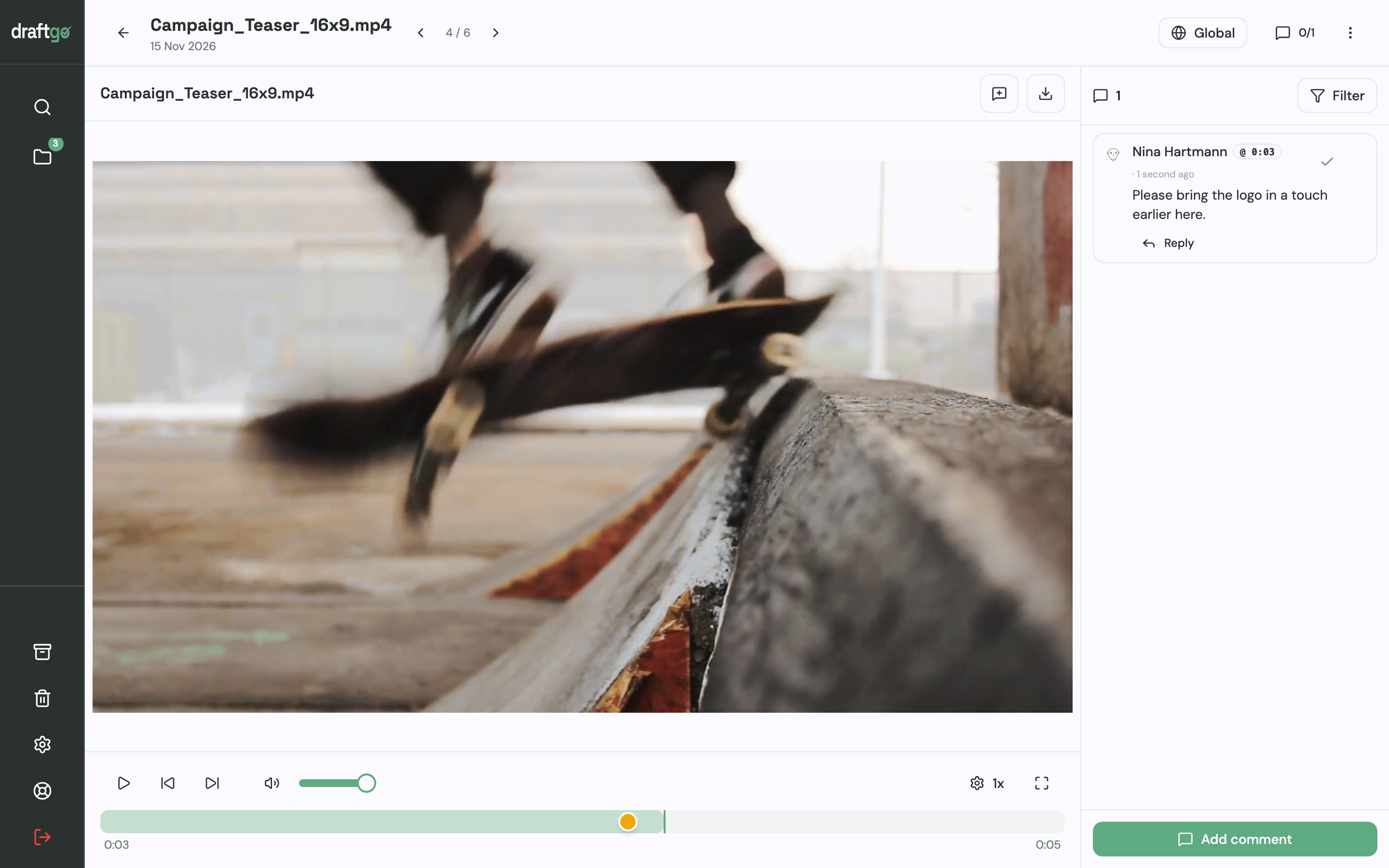
- Separate internal and external approvals with loops: Create an internal review loop for your creative team and video editors first. Once your team has resolved the open points, activate the file in the client approval loop. For each loop you set whether all approvers, a set number of them or any one of them must sign off, separately for team and guests. Free has one loop per project, Freelancer three, Agency and Team unlimited (pricing).
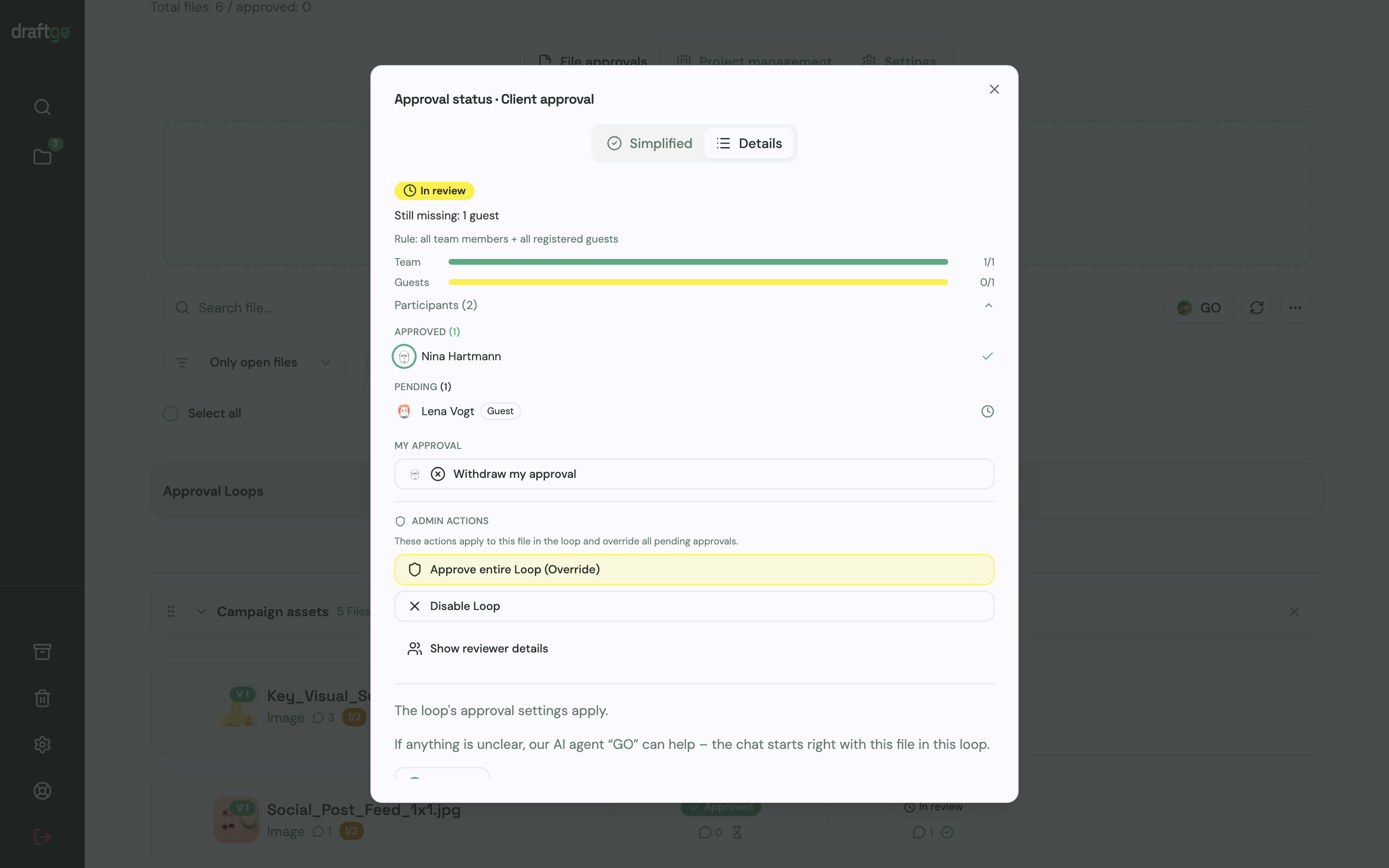
- Maintain version control: When an editor exports an updated cut, upload it as a new version of the existing file. Previous versions remain accessible in the version history, comments stay attached to their respective cuts, and uploading a new version cleanly restarts the approval process.
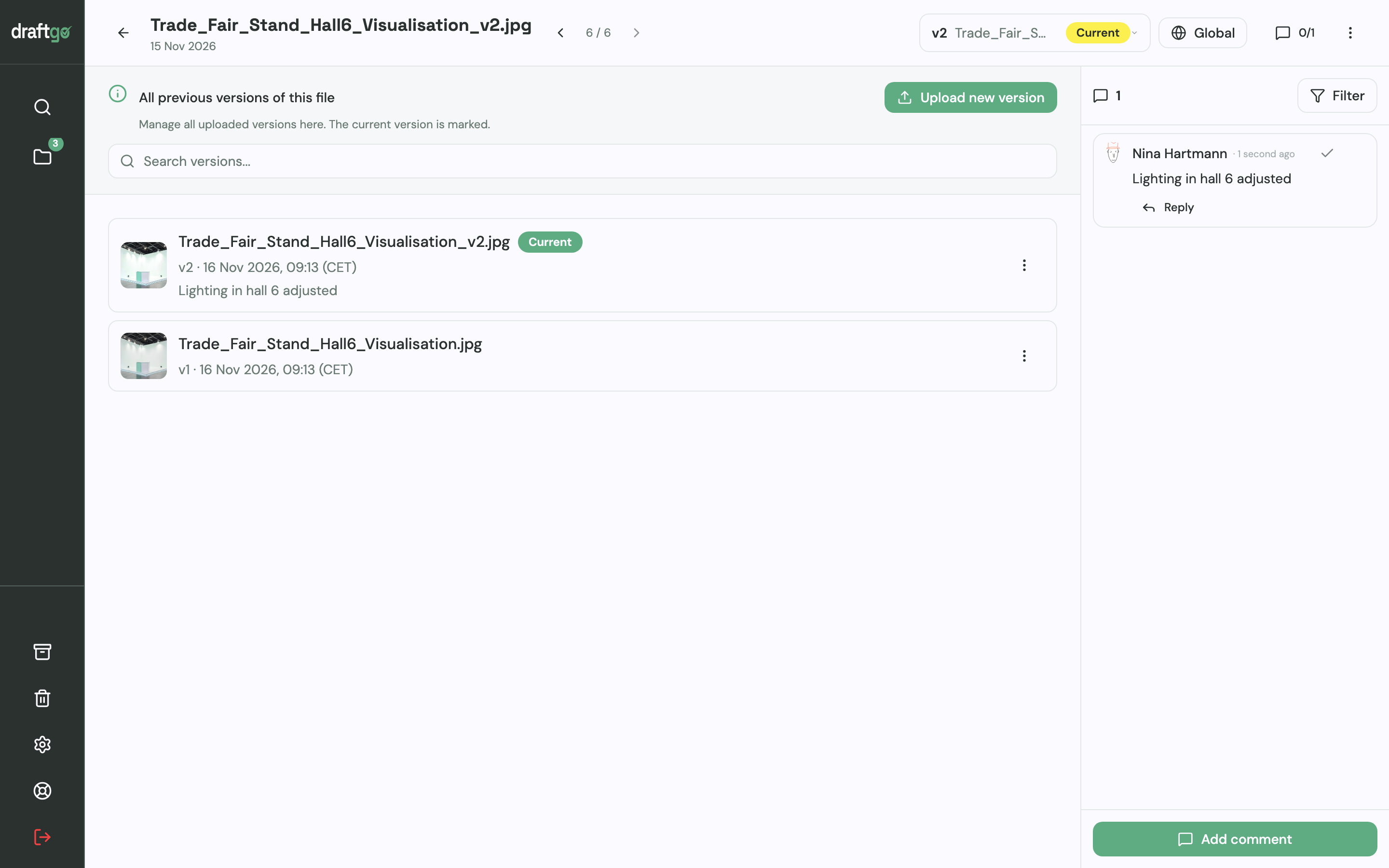
To compare different approaches and see how modern tools handle visual sign-offs, take a look at our overview of video feedback tools.
FAQ
What is the difference between a rough cut and a fine cut?
A rough cut arranges the recorded scenes and interview clips in narrative order to evaluate storytelling, pacing and message clarity. Colour grading, visual effects and audio mastering are intentionally omitted. A fine cut refines individual cut transitions, finalises timing, and incorporates completed graphics and temporary music before finishing begins.
Why is a model release necessary for corporate videos?
A model release is a document signed by the subject granting permission to publish their image within the terms it states. Because personality rights and the right of publicity protect individuals against unauthorised commercial use of their likeness, written consent prevents future disputes, particularly if an employee featured in your video later leaves the company.
Who should sign off on the video script?
The primary client decision-maker and relevant subject matter experts should sign off on the script before filming starts. If senior executives have the authority to veto the video's messaging, they must also review and approve the script to avoid costly reshoots later.
How many revision rounds should a video production include?
Most professional production agreements specify one or two revision rounds per milestone (script, rough cut, fine cut). Clearly separating narrative feedback at the rough cut stage from finishing feedback at the fine cut stage prevents endless revision cycles.
Conclusion
A smooth corporate video production relies on a disciplined sequence of decisions rather than creative luck. By establishing five firm sign-off gates – concept, script, shoot plan, rough cut and final delivery – you protect your budget and save your team from frustrating re-edits. Consolidate your client-side feedback through a single project lead and use precise, timecoded review workflows to keep everyone focused on the current stage.
Try it free – draftgo is free for 14 days, no credit card needed.
Written by
Emilia
Content Producer
Ready to streamline your approval processes?
Get started with draftgo today and see how easy professional collaboration can be.