
Producing digital training content is rarely a straight path. Instructional designers, HR specialists and agency producers juggle dozens of moving parts: concept documents, slide decks, voice-over tracks, animated explainers, software recordings and quiz logic. Yet the biggest bottleneck in any e-learning project almost always sits with subject matter experts (SMEs).
These experts – software engineers, compliance officers, product managers or medical directors – hold the factual knowledge required to make a course credible. However, reviewing training materials is not their primary job. They are pressed for time, unfamiliar with instructional design jargon, and often overwhelmed when handed a finished 40-minute SCORM module and asked for "general feedback". The result is predictable: delayed launches, contradictory markups sent across buried email threads, or expensive re-shoots after audio has already been mastered.
A structured e-learning review process replaces vague requests with clear sign-off gates. When every contributor knows exactly what to review and when, courses launch on schedule and subject matter experts become collaborative partners rather than project roadblocks.
What makes e-learning approvals different
Reviewing an educational module is fundamentally different from signing off a standard marketing video or print brochure. In marketing, approvals largely focus on tone of voice, visual branding and emotional impact. In e-learning, factual accuracy is non-negotiable, and errors can carry serious compliance, operational or safety risks.
Several distinct factors complicate the review of training assets:
- Mixed file formats: A single curriculum often combines concept documents as PDFs, software screencasts, explainer videos, audio narration, illustrated diagrams and interactive assessments. Teams rarely review all of these in a single format.
- Non-creative reviewers: SMEs are specialists in technical or regulatory fields. They often lack experience with media production pipelines and may struggle to interpret early-stage wireframes or rough cuts.
- Distributed stakeholders: Course authors, video editors and internal clients frequently sit in different departments, subsidiaries or external agencies.
- Legal and consent hurdles: When internal staff appear on camera or demonstrate internal systems, data protection and personal rights come into play.
This article is general information, not legal advice. When recording employees for instructional videos, you must secure their prior written consent to capture and distribute their image and voice. In the United States, the right of publicity protects individuals against the unauthorised commercial exploitation of their name and likeness. In European jurisdictions, employee data protection under the GDPR requires clear legal bases – such as voluntary consent agreements – to process personal video recordings. In Germany, Austria and Switzerland, works council agreements (Betriebsvereinbarungen) frequently govern whether and how internal training media featuring staff members can be shared across corporate networks.
Try it yourself: In the demo you work in a real draftgo workspace with sample data.
Review stages from learning objective to LMS
To keep reviewers focused, approvals must follow a strict sequence. Many instructional teams organise their production around the ADDIE model, a classic framework covering analysis, design, development, implementation and evaluation. Breaking the review cycle into eight distinct stages prevents stakeholders from raising structural doubts when the team is already finalising the master export.
1. Learning Objectives → 2. Storyboard & Script → 3. Media Production → 4. SME Accuracy Review
                                                                                 ↓
8. Course Maintenance ← 7. LMS Publishing ← 6. Formal Sign-off ← 5. Instructional Review
1. Learning objectives
Before writing a single word of a script, the training team and the sponsoring department agree on the measurable learning outcomes. This stage aligns expectations: What specific tasks must learners perform after completing the module? Signing off the objectives early prevents scope creep later on.
2. Storyboard and script
The storyboard maps out the visual progression alongside the spoken narration, on-screen text and quiz interactions. This is the most crucial gate for SMEs. Correcting a factual misstatement in a two-column script takes two minutes; correcting it after a voice actor has been recorded and graphics have been rendered costs days.
3. Media production
Once the script is locked, the creative team produces the individual media assets: recording voice-overs, filming live-action presenters, capturing screen interactions and building animations.
4. SME review for accuracy
In this stage, the subject matter expert reviews the assembled media draft. Their remit is strictly limited to factual correctness: Are the software menus up to date? Does the terminology match regulatory standards? Are calculation formulas accurate?
5. Instructional and language review
Parallel to or immediately following the SME review, an instructional designer and a copy editor verify pedagogical flow, readability, accessibility and brand consistency. They check whether text fits on screen without crowding and ensure quiz options test actual comprehension rather than memory tricks.
6. Formal sign-off
The project lead or corporate sponsor confirms that all critical revision points have been resolved and approves the master assets for assembly.
7. Publishing in the LMS
The assembled package – frequently exported using SCORM standards for web-based learning management systems – is uploaded to the staging environment of the LMS. The team tests tracking, bookmarking, completion rules and scoring on desktop and mobile devices before pushing the course live to learners.
8. Updates and maintenance
Software interfaces change, compliance guidelines update and company policies evolve. An effective review system must accommodate rapid versioning so that specific screen captures or audio snippets can be updated without rebuilding the entire curriculum from scratch.
Roles: who checks what
One of the most frequent causes of review paralysis is role ambiguity. When an SME comments on audio mixing or a graphic designer disputes a safety regulation, feedback loops stall. Every participant requires an unambiguous remit.
| Role | Primary focus | What they review | Typical sign-off gate |
|---|---|---|---|
| Subject Matter Expert (SME) | Technical and factual accuracy | Storyboard, script, technical screen captures, quiz answers | Stages 2 and 4 |
| Learning Designer | Pedagogical structure and learner engagement | Concept, learning objectives, instructional flow, question design | Stages 1, 2 and 5 |
| Copy Editor | Grammar, style, clarity and tone | Script, subtitles, on-screen text, reference sheets | Stages 2 and 5 |
| Media Producer / Video Editor | Visual polish, pacing, audio balance and technical specs | Video rough cuts, audio masters, animation timing | Stages 3 and 4 |
| HR / Compliance Lead | Regulatory compliance and personal consent | Presenter consent forms, policy references, legal notices | Stages 2 and 6 |
| Project Owner / Client | Scope, budget, deadlines and final acceptance | Objectives, final draft, deployment approval | Stages 1, 6 and 7 |
To maintain momentum, designate a single project lead who has the authority to arbitrate conflicting feedback. If the SME wants to include ten additional technical details but the learning designer warns that cognitive load will overwhelm learners, the project owner decides which path serves the primary learning objective.
Typical mistakes in the e-learning review
Even experienced teams stumble into predictable traps that delay course delivery. Recognising these patterns early protects your schedule.
- Showing SMEs only the finished video: Waiting until final animation and sound design are complete before involving your expert invites disaster. Discovering a conceptual flaw at Stage 4 leads to demoralising re-work and blown budgets.
- Collecting feedback via email and spreadsheets: Asking reviewers to write emails listing timecodes ("At 03:14 the button is wrong") forces editors to cross-reference multiple inboxes, decipher ambiguous descriptions and chase missing attachments.
- Unfocused review briefs: Inviting an expert to "take a look and tell us what you think" invites subjective critique on colour palettes or speaker cadence rather than rigorous scrutiny of factual accuracy.
- No clear tie-breaker: When marketing, compliance and department heads disagree on phrasing, projects drift into weeks of stalemate without an appointed decision-maker.
- Treating deployment as the end: Software features change within months. If the team leaves no structured archive of source media, a minor UI tweak requires re-recording the entire course.
Best practice for mixed formats and course maintenance
Establishing a reliable review routine requires clear guidelines and practical tools. These five practices keep e-learning workflows on track across different media types:
1. Lock the script before voice-over recording
Treat the script sign-off as a firm boundary. Implement a formal checkpoint where the SME and the client sponsor explicitly sign off the written text. Once the script is locked, subsequent changes that alter narration must be flagged as out-of-scope revisions, as they incur studio and voice-talent re-booking fees.
2. Supply a one-sentence review brief per role
Whenever you share an asset for review, state exactly what you need in a single sentence at the top of the invitation. For an SME reviewing a rough cut, write: "Please verify that the software settings shown between minute 01:00 and 03:30 match our latest release." This simple instruction prevents the expert from spending thirty minutes debating background music.
3. Provide frictionless access without mandatory software accounts
Subject matter experts review courses infrequently and will resist creating new accounts or learning complicated project management interfaces. Provide direct review links that open immediately in any web browser on desktop or tablet. The lower the technical barrier, the faster you receive precise feedback.
4. Agree on fixed turnaround windows
E-learning assets easily get deprioritised behind daily operational emergencies. Establish standard review windows in your initial project kick-off – typically three to five working days per gate. Notify reviewers in advance when an asset will arrive so they can block time in their calendars.
5. Manage screencast iterations through version stacks
Software updates are inevitable. When an interface update renders a demonstration obsolete, capture the new interaction and upload it as an updated version directly onto the existing file record. Keeping older and newer drafts stacked together allows video editors and SMEs to verify that the replacement covers the exact same learning steps.
For teams refining their broader production pipeline, aligning these gates with an established video production workflow provides a solid foundation for both live-action and screen-based training modules.
Practical example: updating a global compliance training module
A mid-sized logistics company needed to update its annual compliance course covering trade regulations, transport safety and data protection. The existing curriculum consisted of three animated videos, two interactive PDF scenario guides and a final quiz hosted in the corporate LMS.
The internal L&D specialist drafted updated scripts reflecting new European transport guidelines. Instead of distributing text files as email attachments, the team uploaded the storyboard PDFs to a central review workspace. The company's legal counsel highlighted two paragraphs directly on page 4 where export definitions had changed, leaving precise corrective wording as a sticky note.
Next, the production team recorded the animated explainers and screen walkthroughs. The updated video drafts were shared with the head of transport logistics via a direct review link. Rather than compiling an email with approximate minute marks, the logistics director paused the video at 02:18 and pinned a comment directly onto a customs document shown on screen: "Replace this clearance form with version 2024-B."
Because all annotations sat directly on the assets, the video editor completed the visual revisions in a single afternoon. The legal counsel approved the revised draft on a mobile tablet without needing to log into an unfamiliar system. The entire sign-off cycle concluded in six working days, avoiding the multi-week email delays that had plagued the previous year's release.
How it works in draftgo
Reviewing mixed media becomes straightforward when scripts, videos, audio tracks and graphic stills live in one structured workspace. Our platform supports creative agencies and training teams with intuitive visual markups across all relevant e-learning formats. You can discover more about our tailored workflows for moving images on our video production solutions page.
To start an e-learning review in draftgo, create a dedicated project for your course module and upload your assets. Whether you are reviewing a script PDF, an MP4 explainer, a WAV voice-over or a PNG infographic, all files sit neatly organised in project sections.
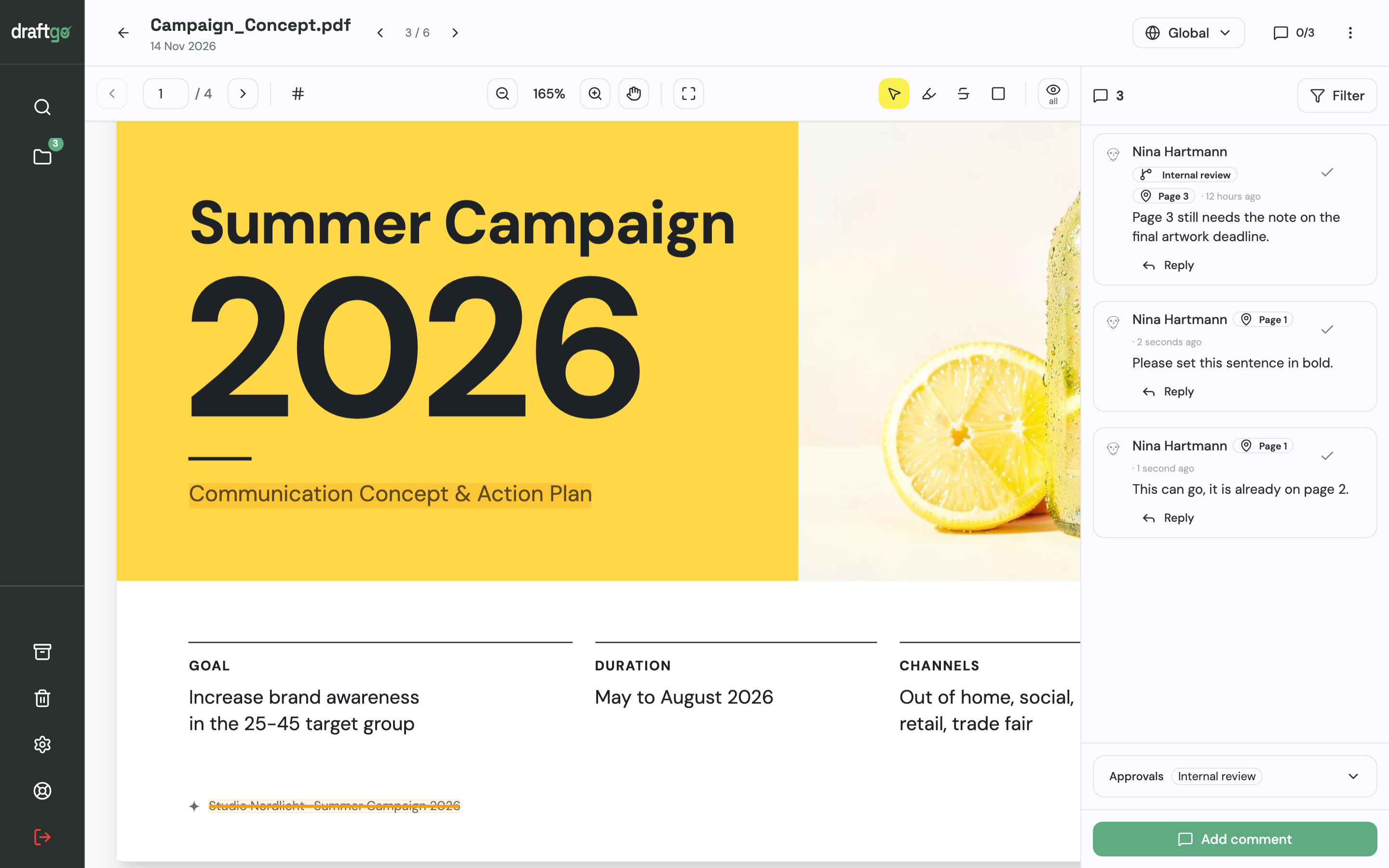
When reviewing storyboard concepts or slide scripts, SMEs mark text directly on the PDF page: highlighting phrases, striking through outdated terminology or drawing rectangular boxes around visual sketches. Every markup links to a distinct comment thread, eliminating ambiguity about which sentence needs refinement.
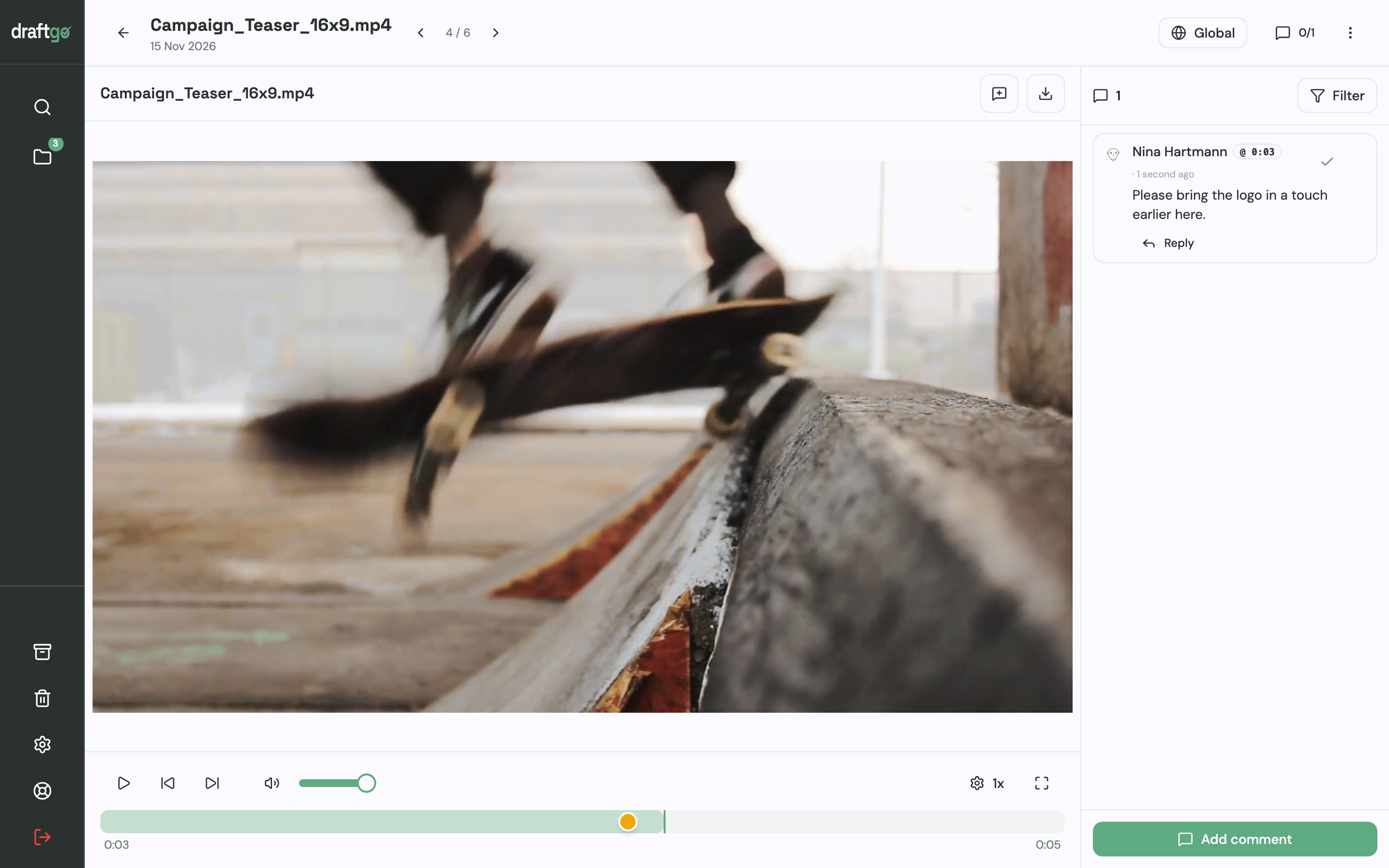
For instructional videos, screencasts and audio narrations, reviewers simply click on the timeline at the relevant second. The video pauses, and the reviewer types their observation. Timecodes accurate to the second attach automatically to each comment, allowing animators and editors to jump straight to the designated cut.
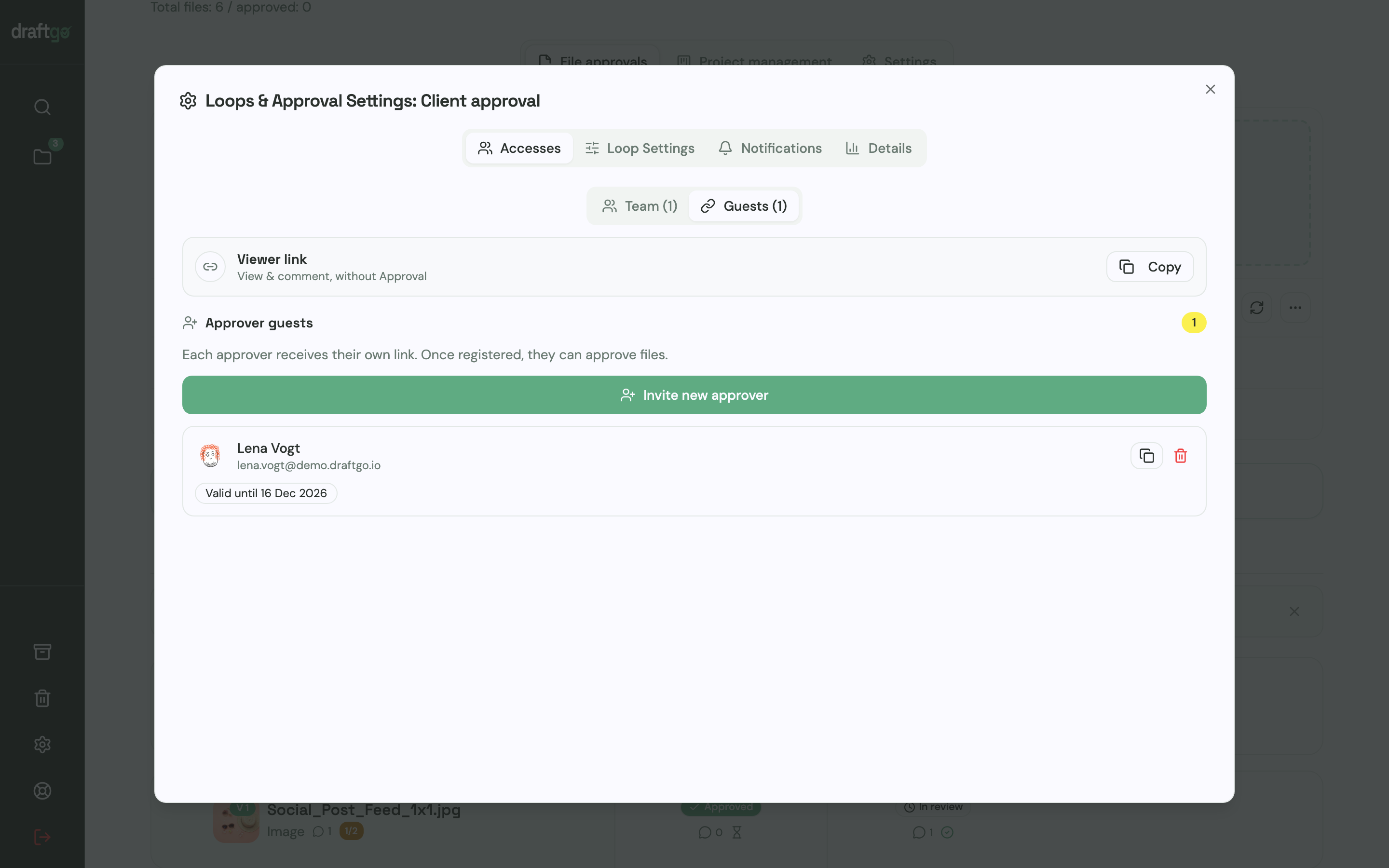
Your subject matter experts do not need to register or remember passwords. You generate a secure guest link for each reviewer. Approver guests receive a personalised link that allows them to leave annotations and register their formal sign-off once their review points are resolved.
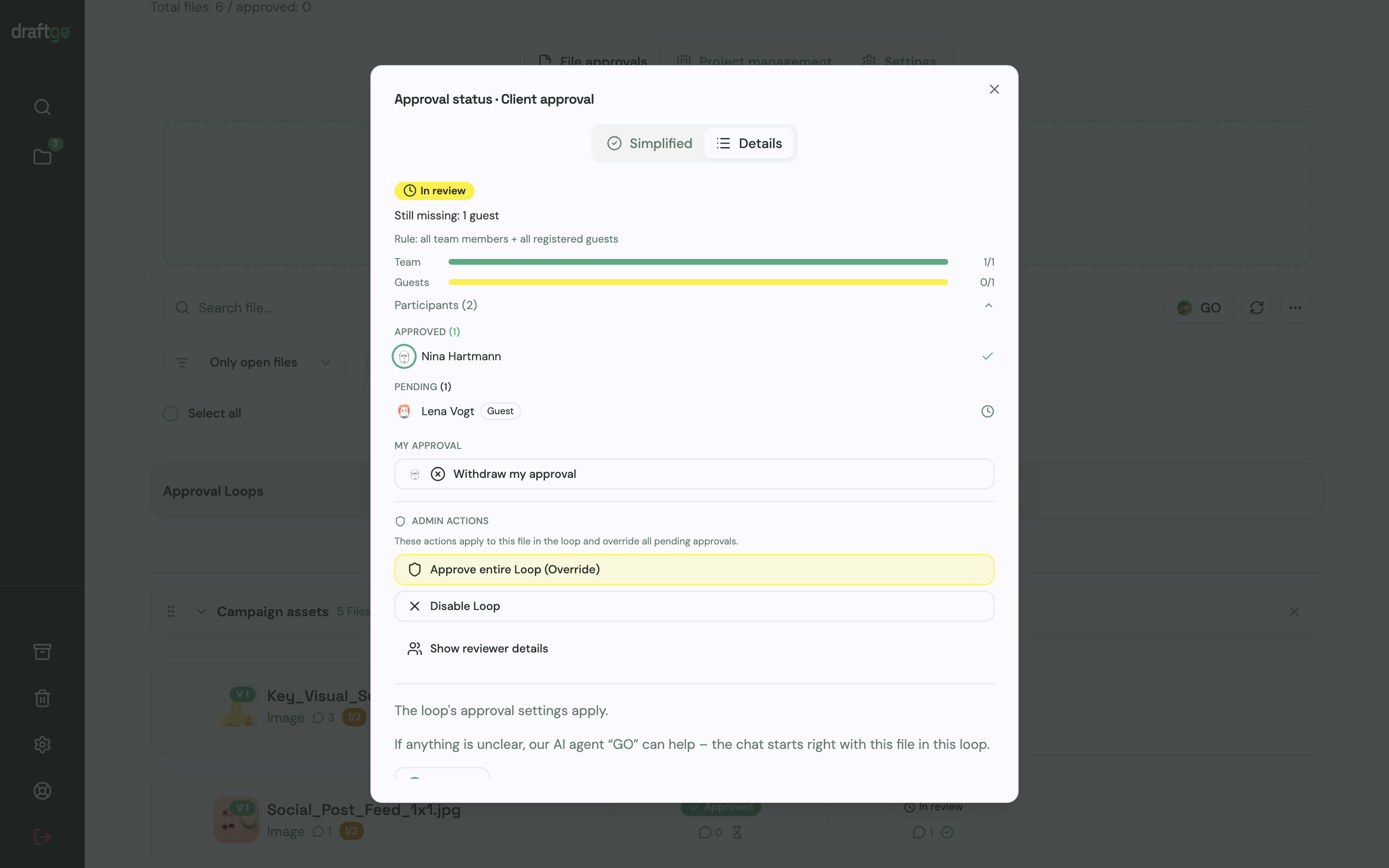
Approvals run in structured loops. For example, you can set up an initial internal review loop for the instructional design team, followed by an expert loop for the SME, and a final sign-off loop for the departmental sponsor. You can configure rules specifying whether every individual approver must sign off or if a single designated lead suffices.
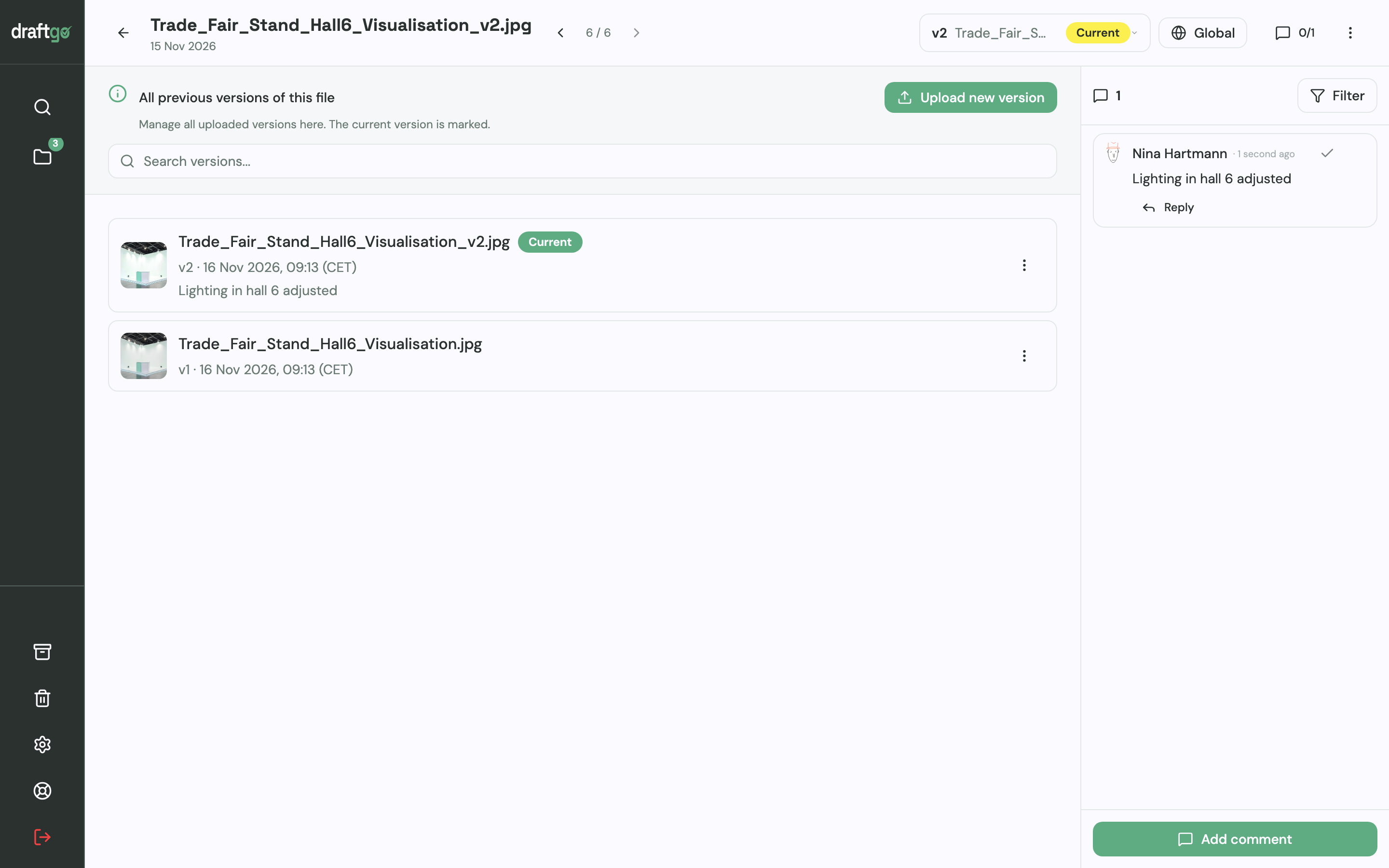
When software updates necessitate revised screen captures, simply upload the new recording as a version of the existing asset. draftgo maintains the full version history, keeping earlier comments attached to their respective iterations while restarting the approval loop for the fresh cut. If your corporate governance requires strict data privacy, stored data is kept on EU servers in the Frankfurt data centre.
A practical limitation to keep in mind: draftgo documents review markups and approvals with detailed audit timestamps, but it does not provide qualified electronic signatures for formal contractual acceptance.
FAQ
What is the most critical stage in an e-learning review?
The script and storyboard sign-off is the most critical checkpoint. Correcting factual errors, instructional flow or terminology in written form takes minimal effort. Once audio has been voiced, screen actions captured and animations rendered, revisions become significantly more expensive and time-consuming.
How do I stop subject matter experts from rewriting instructional design?
Provide a precise, one-sentence review brief whenever you share an asset. Clearly instruct the expert to evaluate only factual accuracy, technical correctness and regulatory compliance. Reassure them that visual layout, pacing and pedagogical techniques are managed by the instructional design team to maximise learner comprehension.
Do we need consent forms when employees appear in training videos?
Yes. Filming employees for internal or external training media requires their prior informed consent, as personal likeness and voice are protected data. In the United States, common law and statutory rights of publicity govern commercial and institutional use of likenesses, while European organisations must adhere to GDPR requirements and consult any applicable works council agreements. For detailed guidance on consent workflows, see our guide on employer branding videos.
How should we handle conflicting feedback from different reviewers?
Appoint a single project lead or product owner who holds final editorial authority. When an SME's demand for exhaustive technical detail conflicts with an instructional designer's concern over cognitive overload, the project owner reviews both comments and makes the final determination based on the agreed learning objectives.
Can we review SCORM packages directly in an online proofing tool?
Online proofing tools review the underlying source media – such as video clips, audio tracks, PDFs and graphic assets. Testing the packaged, interactive SCORM module itself, including tracking variables and LMS score reporting, must take place inside your learning management system's staging environment.
Conclusion
A successful e-learning review hinges on timely involvement, role-specific review boundaries and frictionless tools that let experts comment directly on scripts, videos and audio tracks. By locking scripts before production begins and routing feedback through structured sign-off gates, your training team can deliver accurate, engaging courses without exhausting revision cycles. Try it free – draftgo is free for 14 days, no credit card needed.
Written by
Emilia
Content Producer
Ready to streamline your approval processes?
Get started with draftgo today and see how easy professional collaboration can be.