Three trial accounts are open in three browser tabs. The first pricing page counts users, the second includes fifteen seats whether you fill them or not, and the third charges one flat fee for the whole team. Meanwhile the client who will do most of the reviewing has told you one thing: she won't create another account. This is where comparing proofing software tends to stall, because the feature lists look alike and the bills don't.
This comparison sorts eight tools by what actually separates them: the files they handle, the way they charge and how clients get in. Every price and limit below was checked on the vendors' own pages on 23 November 2026.
What is proofing software?
Proofing software is an application in which a team shares drafts in the browser, reviewers comment on the exact spot they mean, and the person who decides approves one specific version, which the tool records with a name and a time. It replaces feedback that would otherwise arrive as lists in emails, marked-up PDFs and phone calls. You will also see it called online proofing software or online proof approval software, and both names describe the same job.
Two other kinds of software are easy to mix up with it. Proofreading tools check the spelling and grammar of a text, but they don't collect a client's sign-off. Approval workflow tools for purchase orders or holiday requests route a form to the right manager, but they never show a layout or a video. The tools in this list handle creative files: layouts, artwork, PDFs, videos and other drafts that go through rounds of changes.
How the method works step by step, and why it beats feedback by email, is explained in our guide to online proofing. This article picks up where that guide stops and compares the tools.
How we evaluated the tools
We looked at proofing software from the point of view of small and mid-sized teams that review creative files with clients. Each tool was checked against six criteria:
- File types: what the entry plan reviews, and whether video, websites or audio need a higher plan.
- Client access: whether external reviewers can comment and approve without an account, and whether their number is capped.
- Pricing model: per user or member, a plan with a block of seats, a flat price for the team or one price per company.
- Free entry: a free plan without an end date, a trial, or neither.
- Approval structure: stages, rules for who has to approve, and a record of every decision.
- Extras that decide the plan: due dates and reminders, version comparison, integrations and single sign-on.
All details come from the vendors' pricing and product pages as of 23 November 2026. Prices appear in the currency and billing period each page showed, and where a page adds tax, the price says so. draftgo is our product. It gets pros and cons like every other tool in this list.
The order is not a ranking. It runs from specialists for one kind of file to platforms built for multi-stage workflows in larger teams: design first, then video, then tools for mixed media, then the workflow platforms. Within each group the tools appear in alphabetical order.
Proofing software compared: 8 tools
| Tool | Suited for | Free entry | Pricing model | Entry price, as of 23 Nov 2026 |
|---|---|---|---|---|
| GoVisually | small teams reviewing design and packaging | free trial, no free plan | per user | Lite $16 per user a month, annual billing |
| Frame.io | video teams editing in Premiere Pro or Final Cut Pro | free plan: 2 members, 2 GB, 2 projects | per member | Pro $15 per member a month plus tax |
| Wipster | video review with unlimited reviewers | free trial | Light flat, Team per user | Light $9.95 a month, annual billing |
| draftgo | agencies and freelancers with many clients and mixed files | permanent Free plan | per company | see the draftgo entry below |
| ReviewStudio | small teams reviewing many media types | free plan: 3 active reviews, 5 GB | per user | Pro $12 per user a month, yearly billing |
| Filestage | teams with review rounds, due dates and reminders | free plan: 1 active project, 5 new files a month | per plan, 10 team members included | Starter €199 or $199 a month, yearly billing |
| PageProof | larger teams that want one flat price and many reviewing tools | free trial on request | flat per team | Team $2,499 a year or $249 a month |
| Ziflow | marketing departments with multi-stage workflows | free plan: 2 users, 2 GB | per plan, 15 users included | Standard $199 a month, billed annually |
The 8 proofing tools in detail
1. GoVisually: suited for small teams that review design and packaging
GoVisually concentrates on design review: artwork, layouts and packaging, with a separate CPG Compliance AI Suite for consumer goods brands that is priced after a demo. Its pricing page lists Lite at $16 per user a month on annual billing for one to five users, with 15 active projects, up to 15 external reviewers and 50 GB of storage, and it states that Lite has no video or GIF support. Pro costs $33 per user a month on annual billing with a minimum of three users and adds 250 active projects, unlimited external reviewers, 150 GB, video and integrations with Zapier, Slack and Adobe.
- Pros: a low entry for one to five designers, built around static artwork and packaging
- Cons: no free plan; on Lite, no video and a cap on external reviewers
- Price: Lite $16 and Pro $33 per user a month on annual billing, with a free trial (GoVisually pricing)
Our draftgo vs GoVisually comparison goes through the differences point by point.
2. Frame.io: suited for video teams that edit in Premiere Pro or Final Cut Pro
Frame.io belongs to Adobe and is built around video production. The free plan already includes Camera to Cloud, which uploads takes from the set, and the pricing page lists a Premiere integration, a Final Cut Pro integration and a connection to Lightroom. Pro costs $15 per member a month plus tax for up to five members and Team $25 per member a month plus tax for up to fifteen, with a 13% discount on annual plans. People outside your account review through share links without signing up. Pro adds passphrase-protected shares and expiring links, and Team adds internal comments that clients don't see.
- Pros: integrations with editing software, Camera to Cloud on every plan, a free plan for two members
- Cons: the bill grows with every member, and Pro stops at five members
- Price: Pro $15 and Team $25 per member a month plus tax, billed monthly (Frame.io pricing)
When client work goes beyond video, our article on the Frame.io alternative compares four other tools, and draftgo vs Frame.io puts the two side by side.
Try it yourself: In the demo you work in a real draftgo workspace with sample data.
3. Wipster: suited for video review with unlimited reviewers
Wipster reviews video with comments on the timeline, and its plan comparison lists audio, PDFs and images too, along with integrations for Adobe Premiere Pro, After Effects and Slack. According to its pricing page, Light costs $9.95 a month on annual billing or $11.95 on monthly billing, with 50 GB of storage and unlimited projects. Team costs $19.95 per user a month on annual billing or $25 on monthly billing and adds custom branding, team-only comments and storage from 250 GB. Reviewers are unlimited on every plan, and the free trial needs no credit card.
- Pros: unlimited reviewers on all plans, a low flat price for Light, integrations with Premiere Pro and After Effects
- Cons: no free plan, a clear focus on video, and Team is charged per user
- Price: Light $9.95 a month and Team $19.95 per user a month on annual billing (Wipster pricing)
draftgo vs Wipster covers the details, and our comparison of video feedback tools looks at more options for comments at a timecode.
4. draftgo: suited for agencies and freelancers with many clients and mixed files
draftgo is an online proofing platform for agencies, freelancers and in-house teams. Your team uploads images, PDFs, videos and audio files or captures a publicly accessible website as a screenshot, and a social media post holds up to 20 images as a carousel with its caption. Clients comment through a link without an account: as a pin or rectangle on an image, as a highlight or strikethrough in a PDF, or at a point on the timeline in video and audio.
Approvals run in loops, for example an internal loop first and a client loop second. For each loop you decide whether all approvers, a set number of them or any one of them must approve, separately for your team and for guests. The person who decides gets a personal approver link, and everyone who should only comment shares a viewer link. Each corrected draft becomes a version of the same file, and a new version starts the approvals again.
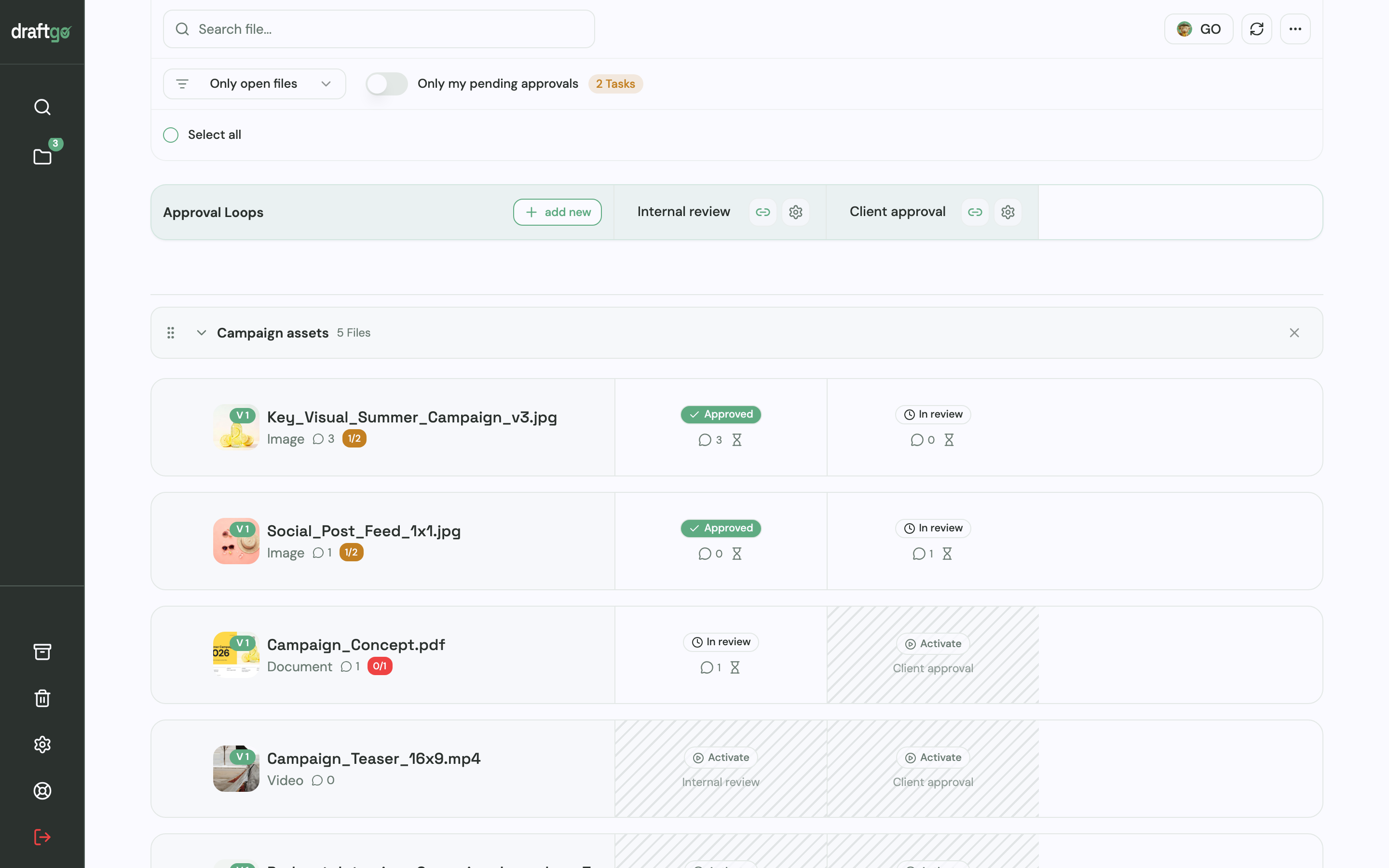
The activity log keeps approvals, comments, versions and downloads with the person and the time, and you export it as CSV, JSON or PDF. From the Freelancer plan, the AI review checks PDFs, images and social media posts for errors such as spelling mistakes, cut-off text or very small type, and its comments carry the name of our AI agent “GO”.
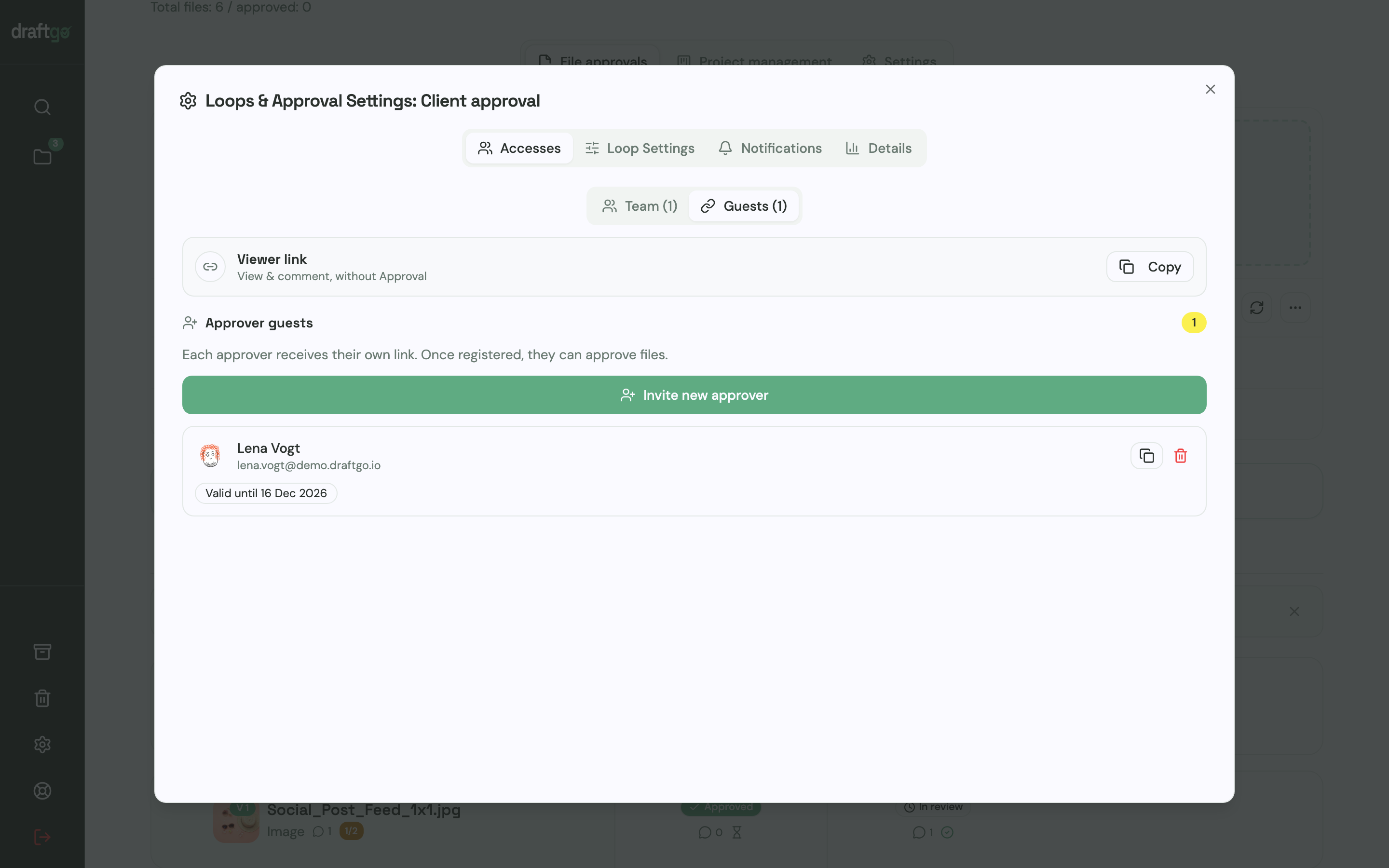
Pricing is per company, not per user or guest. Internal users are capped by plan (Free 1, Freelancer 1, Agency 5, Team 15), guests are unlimited from the Freelancer plan, and the Free plan includes 5 guest accesses, counted as links rather than people. Stored data is kept on EU servers in the Frankfurt data centre.
- Pros: one price per company, unlimited guests from the Freelancer plan, images, PDFs, video, audio, website screenshots and social posts in one project, an approval rule for each loop
- Cons: no due dates or reminders for approvals, no version comparison and no ready-made integrations with design or project management tools
- Price: a permanent Free plan and paid plans you can test free for 14 days, all listed on draftgo pricing
5. ReviewStudio: suited for small teams that review many media types
ReviewStudio puts a broad range of media into one review tool: video, audio, images including PSD, documents such as PDF, Word, PowerPoint and Excel, HTML as a ZIP file, a URL or a live web page, and even 3D and 360-degree panoramas. On its pricing page, Pro costs $12 per user a month on yearly billing or $15 on monthly billing, with 10 active reviews and 25 GB per user. Advanced costs $20 per user a month on yearly billing or $25 monthly, with a minimum of five users and unlimited reviews. Guests are unlimited on every plan and can give approval decisions through a review link, which takes an optional password. The free Starter plan allows 3 active reviews and 5 GB in total, and the paid plans come with a 30-day trial.
- Pros: a broad range of media in one tool, unlimited guests, a low entry price per user
- Cons: the cost grows with every internal user, and Pro limits active reviews per user
- Price: Pro $12 and Advanced $20 per user a month on yearly billing (ReviewStudio pricing)
6. Filestage: suited for teams with review rounds, due dates and reminders
Filestage reviews videos, images, designs, documents, websites, interactive HTML and audio files in one platform, and reviewer groups keep internal and external rounds apart. Reviewers don't need an account to give feedback or approve files. Its pricing page lists Starter at €199 or $199 a month on yearly billing and €249 or $249 on monthly billing, Business at €329 or $329 a month on yearly billing, and every plan, the free one included, comes with 10 team members; more seats come in bundles of five. Starter adds unlimited projects and files, due dates and reminders, version comparison and password-protected review links. The free plan allows one active project and five new files a month, and every sign-up starts with a 14-day Business trial. According to the page's FAQ, files are backed up on ISO 27017 certified servers in Frankfurt.
- Pros: 10 team members on every plan, due dates, reminders and version comparison from Starter
- Cons: a team of two pays the same Starter price as a team of ten, and the free plan fits one project at a time
- Price: Starter €199 and Business €329 a month on yearly billing (Filestage pricing)
What each plan includes, and how to work out a yearly total, is in our breakdown of Filestage pricing. draftgo vs Filestage compares the two tools directly.
7. PageProof: suited for larger teams that want one flat price and many reviewing tools
PageProof charges one flat price for a team instead of a price per user. Its pricing page lists Team at $2,499 a year or $249 a month and Team Plus at $4,999 a year or $499 a month, each with unlimited reviewers, proofs and storage. Automated workflows are part of every plan, and the page's FAQ names version control, compare mode, a barcode scanner, a ruler, spell check and checklists among the reviewing tools. Team Plus adds single sign-on, and Enterprise adds digital signing and a choice of data location, among them the UK, Germany and several US regions.
- Pros: one flat price for the whole team, unlimited storage, compare mode and spell check from the entry plan
- Cons: no free plan, and the entry price is set for teams rather than freelancers
- Price: Team $2,499 a year or $249 a month, with a free trial on request (PageProof pricing)
draftgo vs PageProof lists where the two differ.
8. Ziflow: suited for marketing departments with multi-stage workflows
Ziflow is built for proofs that move through several workflow stages, run one after another or in parallel. Its free plan already reviews more than 1,200 file types, compares versions at pixel level and includes Adobe Creative Cloud plugins and public proof links. On the pricing page, Standard costs $199 a month billed annually with 15 users and two workflow stages, and Pro $329 a month billed annually with 20 users, three stages and integrations with Asana, monday.com, Slack and Microsoft Teams. Extra users come in packs of five. Reviewers are unlimited on every edition, and only the people who create and manage proofs need a user licence. Standard includes proof deadlines with manual reminders, while automatic reminders, e-signatures and single sign-on come with Enterprise.
- Pros: multi-stage workflows, a very wide range of file types, version comparison from the free plan
- Cons: the paid entry includes 15 users, a block sized for larger teams, and the free plan keeps 60 days of review history
- Price: Standard $199 and Pro $329 a month, billed annually (Ziflow pricing)
Leaner options for teams that never fill the Standard block are in our Ziflow alternative comparison, and draftgo vs Ziflow sets out the differences. Our comparisons of draftgo with other proofing tools cover more vendors one at a time.
How proofing software is priced
An entry price tells you little until you put your own team next to it. The eight tools use four pricing models, and each favours a different kind of team.
| Pricing model | How it works | Tools in this list | Works out cheapest for |
|---|---|---|---|
| Per user or member | every internal person who creates or manages proofs pays | GoVisually, Frame.io, ReviewStudio, Wipster Team | one to three internal users |
| Plan with a block of seats | one price includes a set number of users | Filestage (10 team members), Ziflow (15 users on Standard) | teams that fill most of the block |
| Flat price per team | one price, unlimited reviewers and storage | PageProof, Wipster Light | larger teams, or one person on Wipster Light |
| Per company | one price for the company, internal users capped by plan | draftgo | agencies with a small internal team and many clients |
Take a studio in which four people upload drafts. On annual billing, ReviewStudio Pro comes to 4 × $12 = $48 a month and GoVisually Lite to 4 × $16 = $64 a month, while Frame.io Pro on monthly billing comes to 4 × $15 = $60 a month plus tax. Filestage Starter stays at €199 a month on yearly billing whether four or ten people use it (ReviewStudio, GoVisually, Frame.io, Filestage). With eight people uploading, the per-user totals double, while the Filestage price stays where it is.
Clients rarely change the bill. On the paid plans we checked, external reviewers are unlimited everywhere except GoVisually Lite, which allows up to 15, and Frame.io lets anyone outside the account review through share links at no cost. What does change the plan is an extra you can't do without: due dates start on Filestage Starter and Ziflow Standard, video on GoVisually starts with Pro, and single sign-on comes with PageProof Team Plus, as an add-on on Filestage Business and on the enterprise plans of Frame.io, Wipster, Filestage and Ziflow. Find the plan where your must-have feature starts before you compare totals.
Which proofing software fits your team?
Start with two numbers: how many internal people create or manage proofs, and how many clients review with you in a typical month. Then look at the files.
| Your situation | What matters most | Tools to test first |
|---|---|---|
| Agency with many clients and mixed files | guests without an account, a price that doesn't grow with each client | draftgo, Filestage, ReviewStudio |
| Freelancer or two-person studio | a free plan or a low entry, client approval by link | draftgo, ReviewStudio, Wipster Light, GoVisually Lite |
| In-house marketing team | stages, many stakeholders, a record of decisions | Ziflow, Filestage, PageProof |
| Video production | timecode comments, integrations with editing software | Frame.io, Wipster, with draftgo for client sign-off on mixed jobs |
| Design and packaging | detailed artwork review | GoVisually, PageProof, draftgo |
Agencies
An agency works with many clients at once, and each client brings its own people who comment or decide. Check whether those people cost anything and whether the person who decides can approve without signing up. A plan with a seat block only pays off once most of its seats are in use.
Freelancers
On your own you need a free or low entry, every file type your clients send and an approval you can point to later. A permanent free plan lets you run the first client job before you pay, and a 14- or 30-day trial suits a quick side-by-side test.
In-house teams
In a company, product management, legal and senior management often review one after another. Workflow stages, a clear rule for who has the final word and a record you can export matter more here than a low entry price.
How to choose proofing software in 5 steps
1. List the files of the last three months
Write down what went through client review: print PDFs, social posts, videos, websites, audio. Any tool that can't handle a file type you send every month drops out at this point.
2. Count internal users and reviewers
Note how many people create proofs and how many people outside the team comment or approve. Put those numbers into the pricing models above, so you compare real totals rather than entry prices.
3. Shortlist two or three tools
Pick two or three candidates from the comparison table that fit your files and your headcount. More than three trials at once rarely end in a clear decision.
4. Run one live job in each trial
Choose a current job with one or two rounds of changes and a client who is open to trying something new. Upload a corrected version, deactivate or remove one guest link, and look at what the client sees on a phone.
5. Decide by the record
After the job, open each tool's record. Can you see who approved which version and when, and could you hand that export to a client? Pick the tool where the answer took the least searching.
Practical example: a six-person agency picks a tool
Take a six-person agency that looks after a chain of garden centres, a group of dental practices and ten smaller clients. Four people upload drafts. Each month there are flyers and posters as print PDFs and social carousels, and twice a quarter a short video for the garden centres' website. At the garden centre chain, the marketing manager approves and two store managers check the prices.
The agency first puts its numbers into the pricing models. ReviewStudio Pro would come to 4 × $12 = $48 a month on yearly billing, and Filestage Starter to €199 a month on yearly billing, with four of the ten seats in use (ReviewStudio, Filestage).
In draftgo the four uploaders fit the Agency plan with five users and unlimited loops. The agency runs the spring flyer through each trial, and in draftgo the art director approves in an internal loop first. The marketing manager gets a personal approver link for the client loop, and the two store managers share the viewer link, so they can comment on the prices without approving. One store manager marks a wrong price for bark mulch, the designer uploads version 2, and the marketing manager approves it. The activity log shows who approved and when.
Filestage would have won if reminders before the print date had been the deciding point. Because the agency mainly needs clients to approve by link and wants one price for the company however many clients join, it moves its client reviews to draftgo.
FAQ
What is the best proofing software?
No single tool is best for every team, because file types, pricing model and client access differ. For video in Premiere Pro or Final Cut Pro, Frame.io and Wipster are the specialists. For multi-stage workflows in larger teams, look at Ziflow, Filestage and PageProof, and for agencies with many clients and mixed files, at draftgo, Filestage and ReviewStudio.
Is there free proofing software?
Yes, with limits. As of 23 November 2026, draftgo, Filestage, ReviewStudio, Frame.io and Ziflow have free plans, each capped by projects, active reviews, members or storage. GoVisually and Wipster offer free trials, and PageProof offers a free trial on request.
Do clients need an account to review proofs?
Not in Filestage, Frame.io, ReviewStudio or draftgo, where external reviewers work through a link without creating an account. Ziflow states that reviewers need no user licence. For every tool on your shortlist, test the review link with a colleague who plays the client before you decide.
How much does proofing software cost?
The entry prices in this list run from Wipster Light at $9.95 a month on annual billing to PageProof Team at $2,499 a year, as of 23 November 2026 (Wipster, PageProof). Per-user tools start low and grow with every internal user, while seat blocks and flat prices cost the same for a small or a full team. Work out your total with your own headcount before you compare.
Which proofing software works for video?
Frame.io and Wipster are built for video, with comments on the timeline and integrations with editing software. Filestage, ReviewStudio, Ziflow and draftgo review video next to PDFs, images and other files. On GoVisually, video starts with the Pro plan.
Conclusion
Choose proofing software by the files you send out, the number of people who create proofs and how easily clients can approve without an account. Shortlist two or three tools from the table, run one live job in each trial and decide by the record you get at the end.
Try it free – draftgo is free for 14 days, no credit card needed.
Written by
Emilia
Content Producer
Ready to streamline your approval processes?
Get started with draftgo today and see how easy professional collaboration can be.