
It is Thursday afternoon, and eight social media posts for March have to go live on Monday. So far you have a thumbs-up in Slack from the client's marketing manager, two comments by email about last week's version, and a voice message from the managing director asking whether the logo could be bigger. Three files in the shared folder have “final” in their names, and nobody can say for certain which posts the client has actually approved.
An approval workflow sorts this out before the first draft leaves your desk. It decides who reviews, where the feedback goes and how everyone can tell that a version is approved. Below you'll find the roles, seven stages from brief to sign-off, four workflow models with examples and a checklist for your next project.
What is an approval workflow?
An approval workflow is the agreed sequence in which a draft is reviewed, commented on, revised and finally approved by a person who is allowed to decide. It sets who reviews in which order, which channel the feedback comes through and which version counts once it has been approved.
You will also hear approval process, sign-off process or review and approval workflow for the same thing. Finance and purchasing use the term too, for invoices or purchase orders. This guide covers the creative kind: designs, copy, videos, audio, websites, social media posts and print files that a client or another department has to agree to before they go out.
Feedback, approval and sign-off
Three words get mixed up in almost every project, and each mix-up costs a round:
- Feedback is an opinion on a draft. “Looks good” is feedback, however friendly it sounds.
- Approval is explicit consent to one specific version, given by someone who has the right to decide.
- Sign-off usually means the final approval of a whole deliverable, after approvals of interim stages such as the layout.
What is an approval loop?
An approval loop is one defined round in which named people review a set of files, comment on them and approve them. It holds which files are under review, who may approve and what state each file is in. Some teams call it a review round or a revision round. For keeping comments under control from one round to the next, read our guide to feedback management for creative projects.
Why set up an approval workflow at all?
An approval workflow makes sure that only reviewed and explicitly approved work goes out. Feedback arrives in one place, everyone knows who decides, and it is always clear which version is current and which one was approved. An agreed number of rounds also keeps timing and budget predictable. Each extra stage adds time, though, so build in as many reviews as the work needs and no more.
Who is involved in an approval workflow?
Most creative approval workflows involve five active roles plus a group that only needs to hear about the result. One person can hold several roles, but every role needs a name.
| Role | Job in the approval workflow | Example in an agency | Example in an in-house team |
|---|---|---|---|
| Creator | designs the draft and makes the corrections | designer, copywriter, video editor | graphic designer in marketing |
| Coordinator | sends drafts, gathers feedback, keeps an eye on the dates | account or project manager | marketing manager |
| Internal reviewer | checks against the brief and for errors before the client sees it | art director, proofreader | team lead, brand manager |
| Subject-matter reviewer | checks the content from the angle of their field | product manager at the client | legal department, product management |
| Approver | approves the version and has the final say | the client's head of marketing | head of department |
| Informed | hears about the result but has no vote | the client's sales team | management |
Above all, it must be clear for every file whose approval counts. That is either one person or a named group with a rule such as “everyone must agree”. If your team likes matrices, a RACI chart (responsible, accountable, consulted, informed) records the same roles per asset type.
Freelancers often hold the first three roles at once. A second pair of eyes before the client round is then worth arranging, for example a fellow freelancer who checks your files while you check theirs.
Try it yourself: In the demo you work in a real draftgo workspace with sample data.
The approval workflow in 7 stages, from brief to sign-off
A creative approval workflow runs through seven stages, from the brief to a recorded approval. The table gives you the overview, and each stage follows below.
| Stage | Who | Result |
|---|---|---|
| 1. Brief and rules of approval | client and coordinator | goal, date, approver, number of rounds |
| 2. Draft | creator | first version with a clear version name |
| 3. Internal review | internal reviewer | draft matches the brief, no obvious errors |
| 4. Send for approval | coordinator | one link, a review request and a date |
| 5. Feedback | client and subject-matter reviewers | comments on the draft, gathered in one round |
| 6. Revision | creator | new version, every comment dealt with |
| 7. Approval and handover | approver | recorded approval of one version |
Stages 4 to 6 repeat in every round of changes until a version is approved.
1. Agree the brief and the rules of approval
The approval workflow starts with the brief, not with the first draft. Besides goal, audience and timing, settle the rules of approval here: who decides, who has a say, how many rounds of changes the quote includes and which channel the feedback should come through. Put these points in writing. Our creative brief template lists what else a good brief contains.
2. Create the draft and give it a version name
Give every version a clear name from the start, such as “Flyer_Summer_Offer_V1”, and never overwrite a file that someone has already commented on. Our rules for document version control show naming schemes your whole team can follow.
Decide as well what this round should look at. An early layout needs feedback on structure and imagery, not on commas in placeholder copy.
3. Review internally before the client sees it
Before a draft leaves the team, at least one other person checks it against the brief and looks for errors in copy, figures, logo and format. The client should decide on the idea and the design, not on typos, and every error your team catches itself saves a question.
4. Send the draft for approval
Send the draft through a single channel, with a clear review request and a date. A link works best, because the client opens, comments on and approves the file without saving attachments or creating an account. Say what has changed, what to check, when you need the answer and why. “By Thursday, so the printer can start on Monday” carries more weight than a bare date.
"Hi Sarah, the second version of the summer flyer is ready. As agreed, we changed the headline and the photo on the back. Please check the prices and opening hours in particular, and approve the flyer by Thursday at noon so the printer can start on Monday. The link in this email takes you straight to the file.
5. Collect feedback on the draft itself
Feedback belongs where it applies: on the image, on the PDF page, at the second in the video. Then nobody has to guess which logo is meant or where “the text at the top right” is.
When several people at the client have a say, they should all see each other's comments, so contradictions show up before your team starts changing things. Where wishes really clash, the person named as approver in the brief decides. If feedback still arrives by email or phone, copy it onto the draft yourself.
6. Revise and upload a new version
Your team works through every comment and marks it as resolved. The result is a new version, and the old one stays available next to it, so you can always trace which feedback belongs to which version. Clear up open questions before you send the next version.
7. Approve, record and hand over
At the end, the named approver approves one specific version explicitly. The record shows who approved which version and when, so nobody has to guess months later which file was cleared for print. What such a record needs is covered in our guide to the audit trail for creative approvals. Only then does the file move on to the printer or onto the website.
Approval workflow models: how many stages does your work need?
For client projects, plan at least two stages: an internal review first, then the client's approval. Content with technical details, prices or legal statements often adds a stage, for example product management or the legal department.
| Model | How it runs | Suits |
|---|---|---|
| Single-stage | one person reviews and approves | small changes, recurring formats |
| Two-stage | internal review, then the client | most agency and freelance projects |
| Sequential multi-stage | subject experts, then legal, then management | content with prices, product claims or special offers |
| Parallel multi-stage | several people review at once, one person decides | tight dates, many reviewers |
A sequential review takes longer, but it stops management from commenting on a version that the subject experts will change afterwards. A parallel review is faster as long as one person merges the comments at the end. For every stage, decide when it counts as passed: when everyone agrees, when a set number agrees, or when one named person agrees. In in-house teams, a department often takes the client's place, and the workflow stays the same.
Approval workflow examples for creative work
What an approval workflow looks like depends on the asset. These four examples show typical stages for files that creative teams send out every week.
| Asset | Stages | Who approves | Watch out for |
|---|---|---|---|
| Social media post | internal check, then the client | the client's social media manager | review image, caption and video together |
| Print brochure | internal proofreading, client round, printer's proof | the client's head of marketing, with product management checking figures | the printer's proof needs its own approval |
| Video ad | internal review, rough cut and fine cut with the client | the client's head of marketing | music and voice-over agreed before the fine cut |
| Website page | copy approval, design approval, final check by the web team | the client's project lead | approve the copy before the design round |
In all four, the internal check comes first and each stage has one person with the final say.
How many revision rounds belong in an approval workflow?
No single number fits every project. What matters is that the number of rounds is in the quote before work starts and that everyone knows what counts as one round.
A round is the collected feedback on one version, not every single email. If change requests trickle in over several days, one round quickly turns into five. So put this in the quote:
- how many rounds the price includes,
- that the feedback for a round comes collected and by the agreed date,
- how an extra round is charged,
- when a change becomes a new job, for example when the brief changes.
The internal round doesn't count, because it is part of your own quality control.
Deadlines and reminders: how to keep approvals moving
Without a date, a draft waits, usually because something more urgent is on the client's desk. These four habits keep the project moving:
- A date with a reason: give the day, the time and the reason, such as the print date or the campaign launch.
- A reminder before the date: a short message the day before is often enough. Some approval tools send automatic reminders; if you send them yourself, block a fixed slot in your calendar.
- A rule for silence: agree at the kick-off what happens if no answer arrives in time, for example that the schedule moves or the project manager calls the approver.
- A list of open approvals: an overview of every file still waiting for a decision shows you each morning where to follow up.
Running an approval workflow by email, in a project management tool or in proofing software
Any approval workflow can start by email today, but it gets harder to follow with every round and every extra reviewer. Project management tools are good at tasks and dates, while online proofing tools are built for comments on the file and for approving one version.
| Criterion | Email and attachments | Project management tool | Online proofing tool |
|---|---|---|---|
| Getting started | immediate, everyone has an inbox | the team already works in it, clients often need an account | set up once, clients open a link |
| Where feedback lands | spread over emails, chats and calls | in the task's comment thread | on the spot in the draft |
| Current version | compare file names and attachments | attachments on the task | all versions on the same file |
| Proof of approval | a “fine by me” somewhere in the inbox | a task ticked off | an approval with person, time and version |
Many teams combine the two: the task stays on the project board and holds the link to the file in the proofing tool.
You can work out what email coordination costs with your own figures. With assumed values it looks like this: 2 hours a week × 4 weeks = 8 hours a month that appear in no quote as creative work. How online proofing works and when it pays off is explained in our guide to online proofing and how to choose software.
Common approval workflow mistakes and what works better
When an approval workflow gets stuck, the cause usually lies in the coordination around the design.
| Mistake | Result | Better practice |
|---|---|---|
| Feedback through many channels | notes get lost, contradictions surface late | one channel for all comments |
| “Looks good” counts as approval | unclear whether a version is approved, and which one | explicit approval of one version by the named approver |
| Nobody has the final say | conflicting wishes, standstill | one approver or a clear rule named in the brief |
| The client sees unchecked drafts | feedback on typos instead of the idea | an internal round before every client round |
| New voices just before the end | fundamental changes in the last round | name every reviewer at the start and involve them in round one |
Approval workflow checklist to copy
Copy this checklist into your brief or your project template. It follows the seven stages above.
Before the project starts
- Goal, audience, formats and date are in the brief.
- The approver is named, and so is everyone who reviews.
- The number of rounds and the channel for feedback are agreed.
- The date for each round and the rule for silence are agreed.
Before each client round
- The draft matches the brief and the key message.
- Figures, prices, dates, names and contact details are correct.
- Spelling, grammar and punctuation are checked.
- Logo, colours, fonts and imagery match the brand.
- Format, size, resolution and file type fit the purpose.
- The file carries a clear version name.
When you send the draft
- One link instead of attachments spread over several emails.
- A short note on what has changed and what to check.
- A date with day, time and reason.
After the feedback
- All comments collected, contradictions settled.
- Every comment implemented or answered, and marked as resolved.
- New version uploaded, the old one not overwritten.
At approval
- Approval by the named approver, for one specific version.
- Who approved, when and which version is recorded with the project.
- The approved file handed to the printer or the web team.
Example: a spring campaign for a garden centre
A two-person design studio produces a spring campaign for a family-run garden centre: a poster for print, three Instagram posts and a 15-second video for the screens in the shop. The owner has the final say, her marketing assistant checks prices and opening times, and the poster has to reach the printer in ten days.
Last year the campaign ran through WhatsApp, and the poster went to print with a price from an older version, because nobody could tell which screenshot belonged to which file. This year the studio sets up the workflow first:
- Rules in the brief: the owner approves, the assistant reviews prices and dates. The quote includes two rounds of changes, with feedback within three working days.
- Internal review: the second designer checks every file against the checklist and finds last year's opening hours on the poster.
- One link for the client: the owner gets a personal link that lets her approve, the assistant a link to comment. They see each other's notes, so a disagreement about the size of the sale price is settled in the comment thread.
- New version: the studio uploads the corrected poster and posts as new versions of the same files.
- Approval: in round two the owner approves all five files, and the studio sends exactly that version of the poster to the printer.
Agencies with many clients use the same pattern at a larger scale. creategy, a creative agency in Berlin, moved its client feedback from email and Slack to links that clients open without an account. “We now get projects approved 35% faster,” says Chwali Bouman, CEO of creategy GmbH. Peter Schönherr, founder of Loloson Media, which produces image and video content for e-commerce, puts it this way: “With draftgo, our approval rounds are around 50% faster.” You can read both statements on our page comparing draftgo with other proofing tools.
How it works in draftgo
In draftgo you run the whole approval workflow in one project, from the first draft to the recorded approval, and your clients take part through a link without creating an account. You keep designing in the programs you already use.
1. Upload the files
Images, PDFs, videos and audio files go straight into the project, and Word files are converted to PDF on upload. A publicly accessible website comes in as a screenshot, and a social media post as a carousel of up to 20 images with its caption.
2. Create a loop for each stage
Approvals run in loops, for example an internal loop first and a client loop second. For each loop you decide whether all approvers, a set number of them or any one of them must approve, separately for your team and for guests. In a project set to “Without Loops”, you choose the approvers per file instead. A project has one loop on the Free plan, three on the Freelancer plan and as many as you need from the Agency plan.
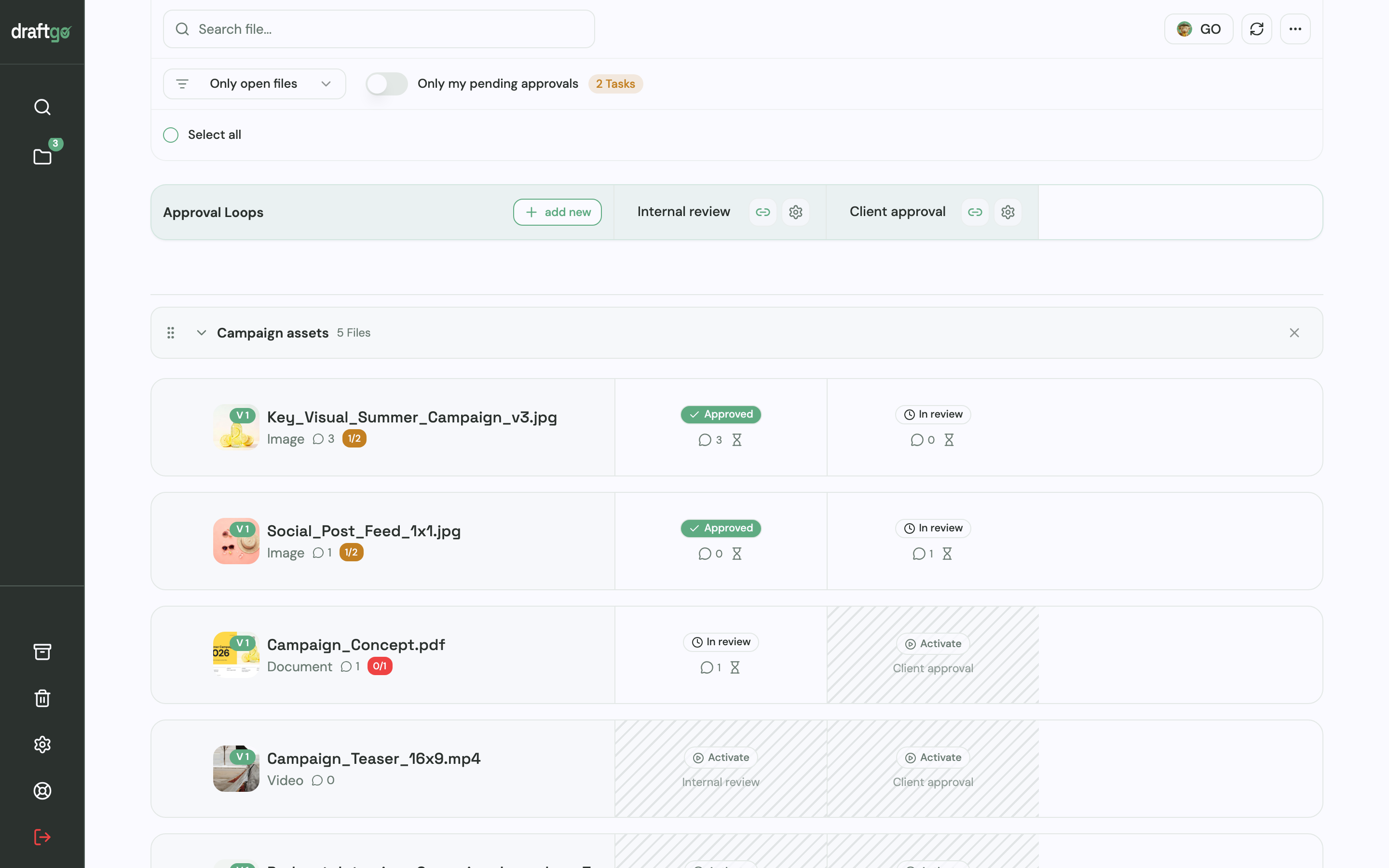
3. Invite reviewers by link
Anyone who should approve gets a personal approver link that asks for their name and email address. Anyone who should only comment gets a shared viewer link for a loop or a file, and a multi-guest link gives several guests fixed seats.
4. Collect feedback on the spot
Comments sit as pins or rectangles on images, PDF pages and website screenshots, as text highlights or strikethroughs in PDFs and at a point on the timeline in video and audio. Reviewers reply and mention each other with @, and you tick off what is resolved. If you switch it on for the loop, guests report with “Client feedback finished” that their feedback is complete.
5. Upload corrections as a new version
You upload the revised draft as a new version of the same file. Earlier versions stay available one by one, comments stay with their version, and the approvals start again for the new version.
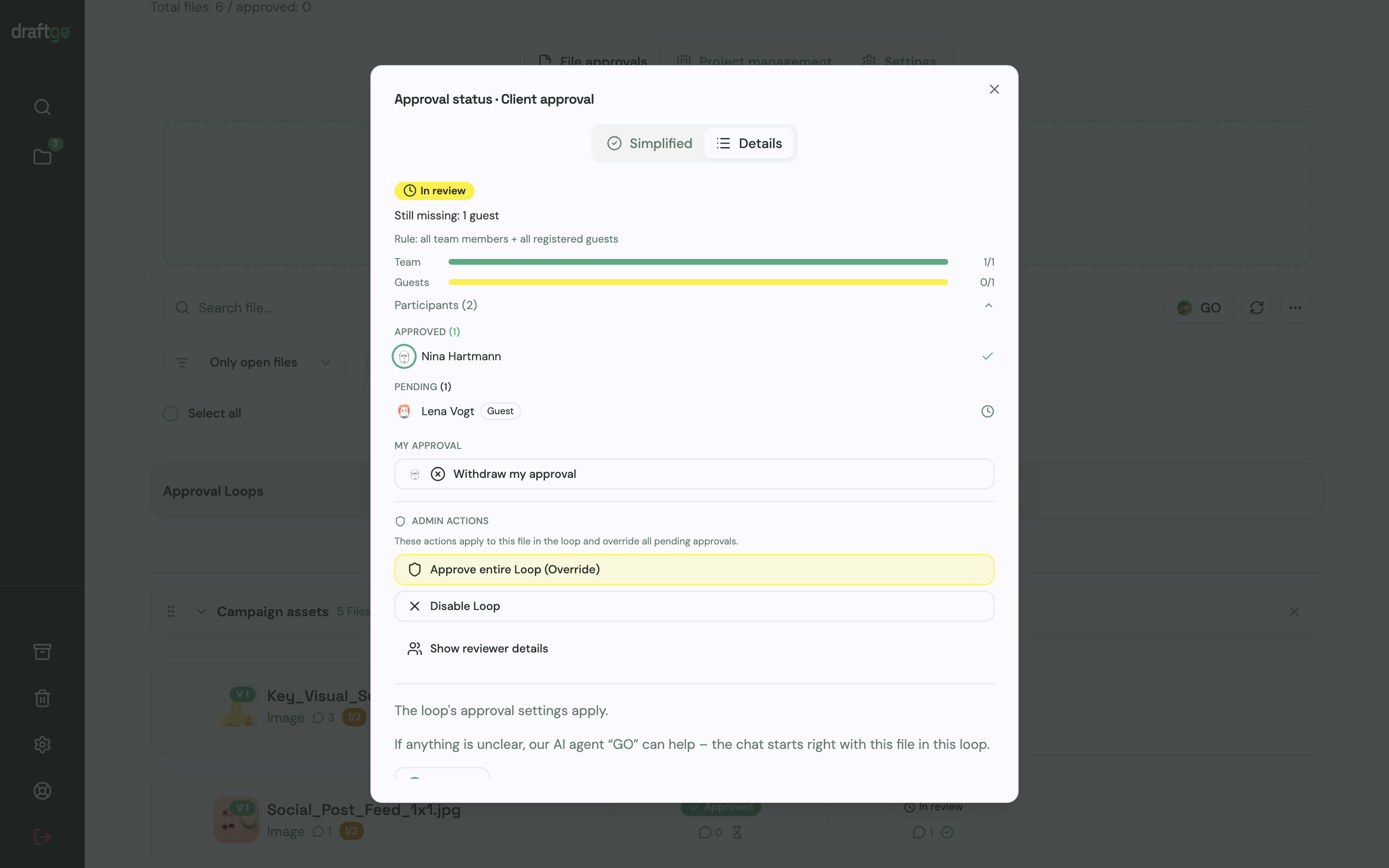
6. See who has approved
In a loop, each file is “Inactive”, “Under review” or “Approved”. People approve or withdraw their approval, and change requests are comments on the file. The approval status of a file lists who has approved and who is still pending, for your team and for guests.
Anything that concerns a person directly arrives by email straight away, and a daily or weekly overview also lists the approvals still waiting.
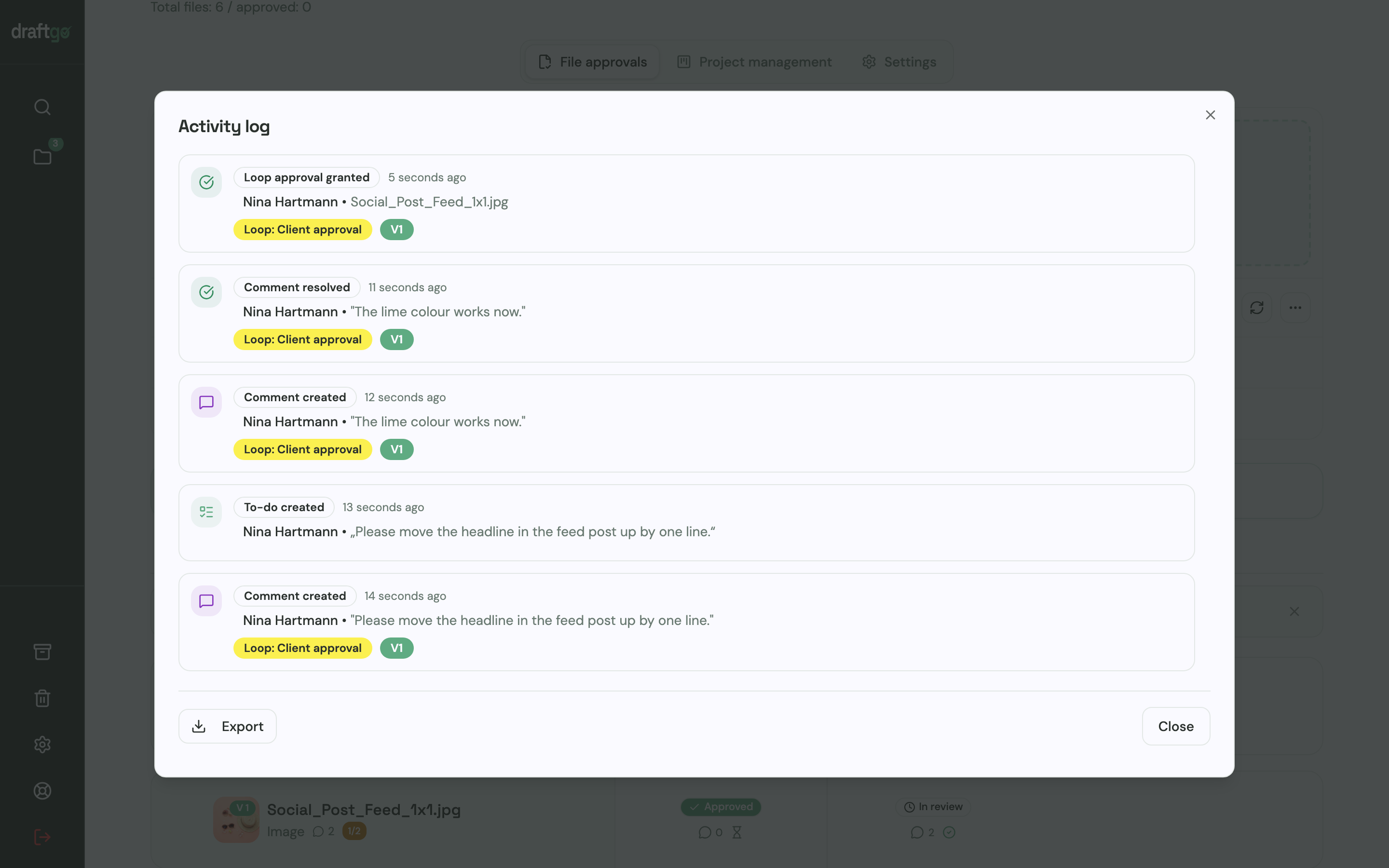
7. Keep the record
The activity log records approvals, comments, versions and downloads with person and time, and you export it as CSV, JSON or PDF. For a single file there is also the review documentation as PDF and CSV.
From the Freelancer plan, the AI review checks PDFs, images and social media posts before the client round for errors such as spelling mistakes, cut-off text or very small type. Its comments carry the name of our AI agent “GO” and sit right on the affected spot, and your team decides what to change.
From the Agency plan, the app and the guest view show your own logo and colours, and the “powered by draftgo” notice disappears. Stored data is kept on EU servers in the Frankfurt data centre. The plans and their limits are on draftgo pricing.
How agencies bring the feedback of many clients into one place is shown on draftgo for agencies, and internal approvals with other departments on draftgo for in-house teams.
FAQ
What is the difference between an approval workflow and an approval process?
In everyday use, both mean the same thing: the agreed path on which drafts are reviewed and approved. If you want to separate them, the approval process is the set of rules about who reviews what and who decides. The approval workflow is then the concrete sequence of steps, often mapped in a tool.
Who should have the final say in an approval workflow?
The final say belongs to the person at the client who is responsible for the result, often the head of marketing or the project lead. Name this person in the brief and ask them to settle conflicting feedback from their own side before it reaches you. If several people have to agree, set a clear rule beforehand, for example that everyone or a set number must approve.
What can I do when a client keeps sending feedback by email?
Copy the feedback onto the right spot in the draft yourself, then reply kindly with the link where future comments should go. That keeps everything in one place, and the client sees how little effort the link takes. If you stay consistent, the link becomes the normal way within a few rounds.
Do clients need an account to approve a file?
Not if your tool supports approval by link. In draftgo, clients open the file through a link, comment and approve without creating an account. Anyone who should approve gets a personal approver link that asks for their name and email address.
Can I use draftgo to approve invoices or purchase orders?
Invoices and purchase orders usually go through accounting or purchasing software, which covers the path from the check to the payment. draftgo is made for approving drafts such as designs, copy, videos and print files.
Conclusion
A good approval workflow has one person with the final say, an internal round before the client sees anything, one place for feedback and versions, and a recorded approval at the end. Copy the checklist into your next project and settle the rules of approval in the brief before the first draft goes out.
Try it free – draftgo is free for 14 days, no credit card needed.
Written by
Emilia
Content Producer
Ready to streamline your approval processes?
Get started with draftgo today and see how easy professional collaboration can be.