
Monday's status call. The brochure is "nearly done", the client's notes on the video sit in two email threads, and nobody can say whether the marketing manager approved the key visual or only said she liked it. Every task in the project management tool is green or orange, but none shows where the client's feedback stands.
Creative project management tools each solve a different part of this. This comparison covers eight of them, from work management platforms to agency software, with prices checked on 23 November 2026, and shows where a proofing tool takes over.
What is creative project management?
Creative project management is the planning and steering of projects whose result is creative work: a campaign, a brochure, a website or a video. The work moves in rounds of draft, feedback and revision, and it is only done when someone approves a specific version. A plan for a creative project therefore holds both the tasks with their owners and dates and the review rounds with their decisions.
The tools for it handle requests, tasks with owners and due dates, timelines, workload, time and feedback on the files. They differ most in the last part, from full proofing to plain file attachments, and that is where extra rounds and scope creep begin. Our guide to the approval workflow covers the review side from brief to sign-off.
How we evaluated the tools
We looked at each tool as an agency or in-house team that plans creative projects and gets them approved, using five criteria:
- Planning: timeline or Gantt views and workload.
- Time and money: time tracking, budgets and invoicing.
- Feedback on files: proofing or markup inside the tool, and from which plan.
- Client access: guests, viewers or client users, and what they cost.
- Pricing model and free entry: per user, per package or per company, and whether a free plan exists.
All details come from the vendors' own pages as of 23 November 2026, in the currency each page showed. draftgo is our product. It gets pros and cons like every other tool. The order is not a ranking: work management platforms first, then agency software, then draftgo as a proofing tool with a project board, alphabetical within each group.
Creative project management tools compared: 8 tools
| Tool | Suited for | Free entry | Time tracking | Entry price, as of 23 Nov 2026 |
|---|---|---|---|---|
| Asana | many projects on a timeline | Personal plan for 2 users | built in from Advanced | Starter $10.99 per user a month, billed annually |
| Basecamp | small teams, one flat price | 1 project, 3 users | from Pro Plus | Freelancer $29 a month for up to 5 users |
| ClickUp | tasks, docs and whiteboards in one place | Free Forever with 60 MB storage | from Core | Core $9 per user a month, billed yearly |
| monday.com | boards built around your own process | up to 2 seats and 3 boards | from Pro | Basic €9 or $9 per seat a month, billed annually |
| Wrike | proofing inside the PM tool | free plan | with Pinnacle | Team $10 per user a month, billed annually |
| Teamwork.com | agencies billing time to clients | up to 5 projects and 5 users | billable time on every plan | Basics $9.99 per user a month, billed yearly |
| Workamajig | projects and accounting in one system | demo on request | included | $49 per user a month from 10 users |
| draftgo | small teams whose work is mostly review | permanent Free plan | no | see the draftgo entry below |
Work management platforms
1. Asana: suited for teams that plan many projects on a timeline
Asana organises work in list, board and calendar views and adds timeline and Gantt views from Starter. Its pricing page lists Personal as free for 2 users, Starter at $10.99 and Advanced at $24.99 per user a month, billed annually. Starter includes unlimited free guests, so clients join projects without a paid licence, and Advanced adds approvals and proofing on PDFs and images, built-in time tracking and resource management.
- Pros: timeline and Gantt views from Starter, unlimited free guests, proofing and time tracking in one plan
- Cons: proofing and built-in time tracking both start with Advanced
- Price: Starter $10.99 and Advanced $24.99 per user a month, billed annually (Asana pricing)
How approval tasks work in practice is covered in our article on Asana approvals.
2. Basecamp: suited for small teams that want one flat price
Basecamp keeps project work in a fixed set of tools, from message boards and to-dos to card tables, chat and a calendar. On its pricing page, Freelancer costs $29 a month with 3 projects and up to 5 users, Pro Plus $99 with 12 projects and 15 users, and Pro Unlimited $199 a month on annual billing with unlimited projects and users. Time tracking comes with Pro Plus, clients count towards the user limit, and paid plans start with a 30-day trial.
- Pros: no per-user fees within a package, a small set of tools that is quick to learn, unlimited users on Pro Unlimited
- Cons: time tracking starts with Pro Plus, and clients count as users below Pro Unlimited
- Price: Freelancer $29 a month, Pro Unlimited $199 a month on annual billing (Basecamp pricing)
Try it yourself: In the demo you work in a real draftgo workspace with sample data.
3. ClickUp: suited for teams that want tasks, docs and whiteboards in one workspace
ClickUp combines tasks, docs, chat, whiteboards and dashboards in one workspace. The pricing page lists Free Forever with unlimited members and 60 MB of storage, Core at $9 per user a month billed yearly with unlimited storage and Gantt charts, and Business at $17 per user a month billed yearly with resource management and timesheets. Time tracking is included from Core and annotations on attachments with Business, and the number of guest seats grows with the number of paid users.
- Pros: a generous free plan, Gantt charts from Core, many views in one tool
- Cons: guest seats grow only with paid users, and annotations on files start with Business
- Price: Core $9 and Business $17 per user a month, billed yearly (ClickUp pricing)
4. monday.com: suited for teams that build their own boards and workflows
monday work management is built around boards that each team sets up for its own process. According to its pricing page, Basic costs €9 or $9 per seat a month billed annually, Standard €12 or $12 and Pro €19 or $19, and plans start from 3 users. The free plan covers up to 2 seats and 3 boards. Basic includes free read-only viewers, Standard adds timeline and Gantt views, guest access and 250 automation actions a month, and Pro adds time tracking.
- Pros: boards you shape to your own process, Gantt views and guest access from Standard, free read-only viewers
- Cons: paid plans start from 3 seats, and time tracking starts with Pro
- Price: from €9 or $9 per seat a month on Basic, billed annually (monday.com pricing)
5. Wrike: suited for marketing and creative teams that want proofing in the PM tool
Wrike combines project plans with online proofing: its proofing page describes feedback on images, documents, videos and web pages, side-by-side version comparison, external reviewers and an Adobe Creative Cloud integration. On the pricing page, Team costs $10 per user a month for 2 to 15 users and adds interactive Gantt charts, and Business costs $25 per user a month for 5 to 200 users, both billed annually. Pinnacle, priced on request, adds capacity planning with time tracking and project budgets.
- Pros: proofing with version comparison, an Adobe integration, Gantt charts from Team
- Cons: time tracking comes with Pinnacle, priced on request, and Team stops at 15 users
- Price: Team $10 and Business $25 per user a month, billed annually (Wrike pricing)
Agency software
Agency software adds time billed to clients, budgets and invoices. Our overview of agency software shows where these tools fit in an agency's setup.
6. Teamwork.com: suited for agencies that bill time to clients
Teamwork.com is built for client work, and every plan organises projects by client and tracks billable time. Its pricing page lists a free plan for up to 5 projects and 5 users, Basics at $9.99 per user a month billed yearly with up to 300 projects, and Accelerate at $24.99 billed yearly. Basics adds client users in projects and 20 proofs a month for file approvals. Accelerate adds timesheets, time budgets and retainers, invoices from logged time and unlimited proofs, and both paid plans come with a 14-day trial.
- Pros: billable time from the free plan, client users from Basics, invoices from logged time on Accelerate
- Cons: Basics caps proofs at 20 a month, and budgets and invoicing start with Accelerate
- Price: Basics $9.99 and Accelerate $24.99 per user a month, billed yearly (Teamwork.com pricing)
Logging hours per client is explained in our guide to agency time tracking.
7. Workamajig: suited for agencies that want projects and accounting in one system
Workamajig is agency management software that runs project management, time tracking, resourcing and scheduling, digital proofing, invoicing and accounting in one system. Its pricing page lists $49 per user a month for 10 or more users, $47 for 25 or more and $45 for 50 or more, with one month free on annual payment, and unlimited client and vendor logins. Training is included, and the page puts a standard implementation at two to three months.
- Pros: projects, time and accounting in one place, unlimited client logins, training included
- Cons: pricing starts at 10 users, and the setup takes months rather than days
- Price: from $49 per user a month for 10 or more users (Workamajig pricing)
Review with a project board
8. draftgo: suited for small teams whose project work is mostly feedback and approval
draftgo is an online proofing platform for agencies, freelancers and in-house teams, and every project on every plan has a project management board. A to-do on the board has one assignee, a due date, attachments and comments. You can turn a comment on a file into a to-do, so a change request becomes a task without retyping it, and "My to-dos" lists your to-dos across all projects. Guests have no access to the board, so it stays the team's workspace.
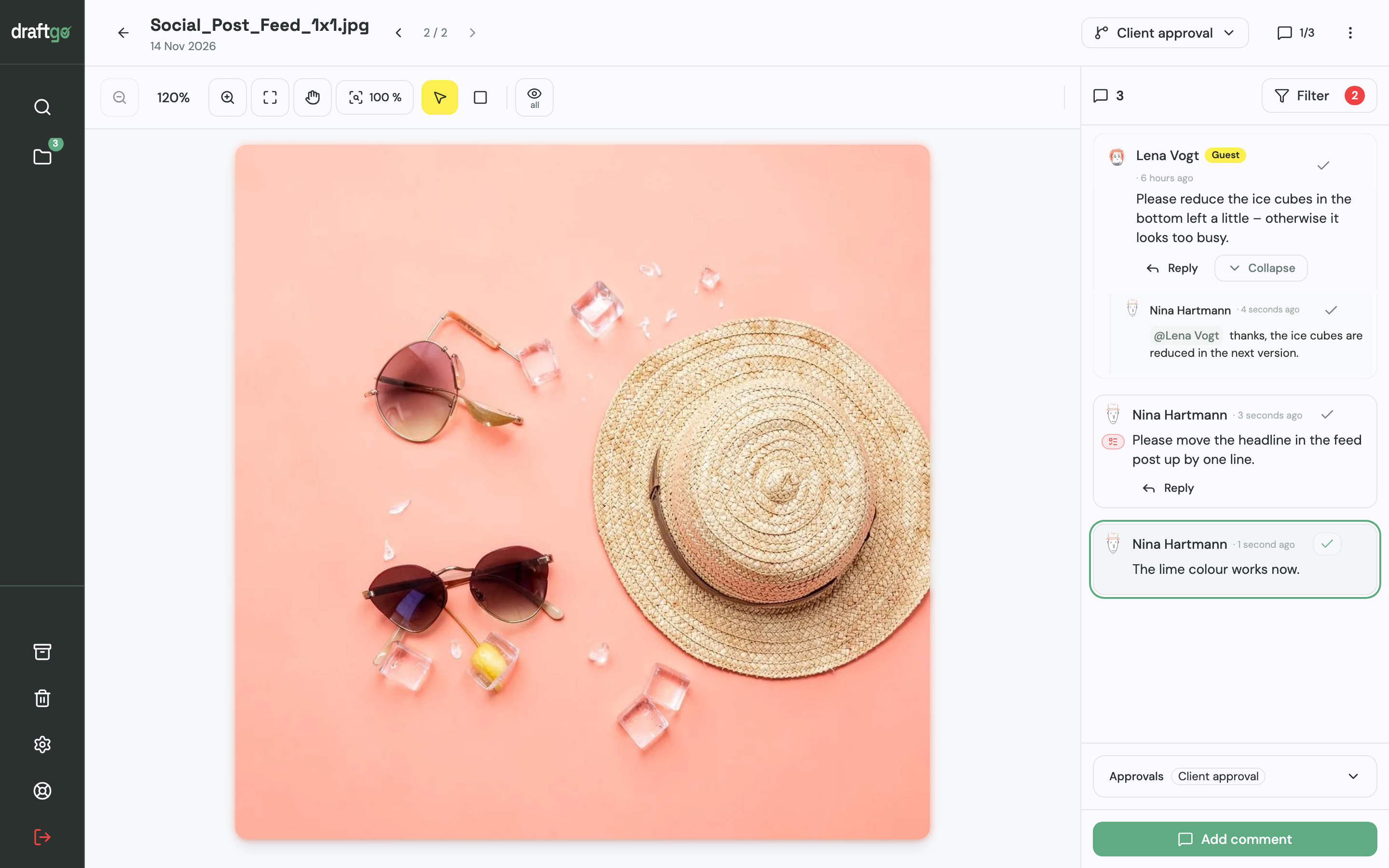
The files sit at the centre of a draftgo project: images, PDFs, videos, audio files and website screenshots, which clients comment on through a link without an account. Approvals run in loops, for example internal first and client second, every correction becomes a new version of the same file, and the activity log records each approval with the person and the time.
Pricing is per company, not per user or guest. Internal users are capped by plan (Free 1, Freelancer 1, Agency 5, Team 15), and guests are unlimited from the Freelancer plan. How agencies set up client projects is shown on draftgo for agencies.
- Pros: to-dos and client approval in the same project, to-dos straight from comments, guests without an account, one price per company
- Cons: the board covers to-dos rather than full project plans, with no Gantt chart or time tracking
- Price: a permanent Free plan and paid plans you can test free for 14 days, all listed on draftgo pricing
Project management tool, proofing tool or both?
Most creative teams end up with one of three setups.
| Setup | Fits when | Watch out for |
|---|---|---|
| A PM tool for planning, a proofing tool for feedback and approval | many people, long timelines, billed hours, many files for client review | two places to check, so agree which one holds the plan and which the approvals |
| A PM tool with built-in proofing | internal reviews, or clients who already work in the tool | which plan includes proofing, whether clients need a seat, how versions are kept |
| draftgo's board on its own | small teams whose project work is mostly drafts and client rounds | a project with many dependent tasks needs a timeline in a PM tool |
If you run the first setup, agree on one rule: a task in the plan closes only when the approval is recorded in the proofing tool. That way nobody ticks off a brochure the client hasn't approved yet.
Which creative project management tool fits your team?
| Your situation | Tools to test first |
|---|---|
| Agency of two to five people whose work is mostly drafts and client rounds | draftgo, Basecamp |
| Agency that bills hours and retainers to clients | Teamwork.com, or Workamajig from 10 users |
| In-house marketing team with many parallel campaigns | Asana, monday.com, Wrike |
| Creative team that wants proofing inside the PM plan | Wrike, Asana Advanced |
Practical example: a five-person agency and a trade fair campaign
A five-person agency prepares a trade fair campaign for a machine builder: a stand graphic, a print brochure and a short video for the stand screen. The client's marketing head approves, and a product manager checks the technical details.
The account manager plans the job in the agency's project management tool, with a timeline back from the fair date and hours logged against the budget. The files go into one draftgo project with an internal loop for the creative director and a client loop. The marketing head gets a personal approver link, and the product manager comments through the viewer link without approving.
The product manager marks a wrong machine type in the brochure. The designer turns his comment into a to-do, uploads version 2, and the marketing head approves it. Only then does the account manager close the brochure task in the plan. A two-person studio with no billed hours could have kept the to-dos on the draftgo board alone.
FAQ
What is the best project management tool for a creative agency?
It depends on what the agency bills and how big it is. Agencies that bill hours look at Teamwork.com and Workamajig, teams with many parallel projects at Asana, monday.com, ClickUp or Wrike. Where most of the work is client review, draftgo's project board can be enough.
Is there a free creative project management tool?
Yes, with limits. As of 23 November 2026, Asana's Personal plan is free for 2 users, monday.com's free plan covers up to 2 seats, ClickUp's Free Forever plan has 60 MB of storage, Teamwork.com's free plan covers 5 projects and 5 users, and Basecamp's free plan holds one project (Asana, monday.com, ClickUp, Teamwork.com, Basecamp). Wrike and draftgo have free plans too.
Do I need a proofing tool if my PM tool has proofing?
Not always. Check three things in the PM tool's proofing: whether clients can approve without a paid seat, which file types it reviews, and whether the record shows who approved which version. Where one of them is missing, a proofing tool next to the PM tool fills the gap.
Conclusion
Choose a creative project management tool by what you need to plan: tasks and timelines, billed hours, or mostly review rounds. Test the hand-off between planning and approval on one live job before you commit.
Try it free – draftgo is free for 14 days, no credit card needed.
Written by
Emilia
Content Producer
Ready to streamline your approval processes?
Get started with draftgo today and see how easy professional collaboration can be.