
The client likes the first draft. “Just one small thing,” they write, and then another one. In the third round of revisions, a sales director who has not been part of the project so far joins the email thread and asks for a French version for a trade fair in Paris. Nobody has mentioned budget, and by the end you have spent many more hours on the job than you quoted.
This is what scope creep looks like in agencies and freelance work. It rarely arrives as one big request but in small steps, each of which feels too small to raise. This guide explains what scope creep means, where it comes from and how to spot it early. It then shows how to keep it in check with your proposal, your revision rounds and a sign-off on each version, with sample wording you can copy.
What is scope creep?
Scope creep is the gradual, unplanned growth of a project beyond its agreed scope while budget, schedule and resources stay the same. The Project Management Institute describes it as “the uncontrolled expansion of product or project scope without adjustments to time, cost, and resources” in its report Pulse of the Profession 2018.
Nobody decides on scope creep on purpose. It grows out of many small yeses: one more variant, an extra round, a format for a channel the brief never mentioned, a second language. Each one takes little time on its own, but together they change the project while the price stays where it was.
Scope creep in creative work
Classic project management sees scope creep mostly in requirements, such as software that should do more than planned. In creative projects it nearly always shows up in the revision loop: rounds of feedback do not end, and new requests sit inside the comments on a draft. “Could the logo be a bit bigger?” arrives in the same email as “Can we have the brochure as a slide deck too?”, and both read like feedback. A correction to agreed content belongs to the job and a new deliverable does not, but in one message the line between them blurs unless you draw it.
Scope creep, change requests and gold plating
Three terms come up again and again when people talk about project scope, and they are easy to mix up. The difference lies less in the request itself than in how it is handled.
| Term | What happens | Who usually starts it | Result |
|---|---|---|---|
| Scope creep | The scope grows without any agreement on budget or dates | the client, new stakeholders, sometimes your own team | unpaid extra work, later delivery |
| Change request | A change is described, estimated and ordered | the client | planned extra work with a price and a date |
| Gold plating | The team delivers more than agreed without being asked | your own team | extra work without an order, new expectations on the client side |
The same request for a French version is scope creep if you quietly do it, and a change request if you name the effort and the price and the client agrees. In the US, the confirmed change is often called a change order. Gold plating comes from your own side: a designer presents three concepts instead of two because another idea came up. It is meant well, but it sets a new standard for the next project.
What scope creep costs
Scope creep eats into your margin first, because every hour you work beyond your estimate lowers the rate you actually earn. Later delivery, overtime and other projects that have to wait add to the bill.
The problem reaches far beyond creative work. In PMI’s Pulse of the Profession 2018, 52% of the projects completed in the previous 12 months experienced scope creep or uncontrolled changes to the project’s scope, up from 43% five years earlier.
Here is what that means on a small fixed-fee job, with assumed figures. You quote a company brochure at 30 hours × $90 = $2,700. Two extra revision rounds and one more format add 9 hours. Your real hourly rate drops to $2,700 ÷ 39 hours = $69.23, and 9 hours × $90 = $810 never reaches an invoice. How to see where such hours go each month is the subject of our guide to billable vs non-billable hours.
Scope creep has other costs that are harder to put a figure on:
- Schedule: each extra round pushes back the end date, and your next job starts later.
- Quality: fixes made under time pressure bring in new mistakes, and the original idea gets worn down by many small compromises.
- Team: unpaid extra work hurts morale, especially once it becomes normal.
- Client relationship: what you do for free once, the client expects next time. A limit you introduce later then feels to them like a worse deal.
Try it yourself: In the demo you work in a real draftgo workspace with sample data.
What causes scope creep?
Scope creep usually has several causes that come together: a vague scope, no agreed route for changes and feedback that arrives through too many channels. In agencies and freelance work, the revision loop is the most common source, because a correction and a new request look almost the same there.
1. A vague scope in the proposal
Anything the proposal leaves out, each side can read differently. “Design of a website” leaves open how many page templates you create, whether you write the copy and who builds the site. “Design of a home page and four page templates for desktop and mobile, copy supplied by the client” leaves far less room. The vaguer the description, the more fits into it later.
2. No fixed number of revision rounds
If the proposal does not say how many rounds the fee covers, there is no limit at all. A fixed number without a definition is almost as risky. When every email counts as fresh feedback, two agreed rounds soon turn into six.
3. New decision-makers in the middle of the project
The project runs with the marketing manager, and in the second-to-last round the managing director sees it for the first time. Their comments often reopen decisions that were settled weeks ago, such as the concept or the choice of photos. How to agree goals, scope and decision rights before work starts is the subject of our guide to stakeholder alignment.
4. Feedback in too many channels
One comment comes by email, one in a call, one as a voice message in a chat app. Whoever collects them loses track of what has been done and what is new. In that mix, extra requests slip through as “corrections”.
5. No sign-off on each version
When nobody confirms that a version is right, everything stays open. Round four then reopens the colour that seemed settled in round one. A recorded sign-off on each version draws that line, so a later change to an approved point becomes a new request.
6. Favours and gold plating
“Sure, we can do that” is easy to say, especially to a client you get on well with. One favour does no harm, but twenty do, and they are hard to take back later. The same goes for extras your own team adds without being asked.
7. A goal that shifts without anyone saying so
Sometimes the purpose of a project changes along the way: the trade fair brochure turns into a sales document for the field team. The change may be sensible, but if nobody names it, it is handled as a correction instead of a new brief. A written brief makes such shifts visible, and our creative brief template gives you the sections to agree before the first draft.
Warning signs of scope creep
Scope creep shows itself long before the budget runs out. If you know the signs, you can act while the conversation with the client is still easy.
| Warning sign | What it looks like | What you can do |
|---|---|---|
| “Just a quick …” requests pile up | small asks outside the agreed rounds, often by phone | collect them and assess them together |
| Feedback contains new tasks | “Could we turn this into a short video too?” | take the request out of the correction and offer it as an extra |
| New people appear late | comments from people the brief did not mention | clarify who decides and reassess anything fundamental |
| Approved points are reopened | discussion of things that were already agreed | point to the approved version |
| More rounds than agreed | nobody has been counting | make the rounds per version visible and raise it |
| Hours outrun progress | much of the time is used, the result is still far off | compare the effort with your estimate and talk early |
| Dates slip without a plan | “Let’s just finish it next week” | record the new date and the reason |
The earliest signal is often your own pause. When you stop to wonder whether a request is still covered, ask at that moment instead of carrying on quietly.
How to prevent scope creep: 6 steps for the proposal and contract
You prevent scope creep most reliably before the project starts, with a precise scope, a fixed number of revision rounds and an agreed route for changes. Once the work is running, a sign-off on each version and one place for feedback keep it in check. If you settle these rules during client onboarding, they are in place before the first draft goes out.
The sample clauses below are starting points for a proposal or a statement of work, and you adapt them to your own terms. This article is general information, not legal advice.
1. Describe the scope precisely
Write down exactly what you deliver: quantities, formats, channels, languages and what you hand over at the end, such as open source files or only print-ready PDFs. What is not included matters just as much. Larger jobs often get a statement of work (SOW) that lists deliverables, assumptions and exclusions, while a small job needs only a clear section in the proposal.
A clause for exclusions can read like this:
"“Not included: copywriting, image research and stock photo licences, translations, and any formats or language versions beyond those listed above.”
2. Set the number of revision rounds and define a round
State how many rounds of revisions the fee includes and what counts as one round. A round is the consolidated feedback on one version, not every single message about it.
"“The fee includes two rounds of revisions. One round is the consolidated feedback on one version, sent within three working days of delivery. Further rounds are charged at the agreed hourly rate and confirmed with you before work starts.”
Your team’s internal check does not count as one of these rounds. It is your own quality control, and it means the client does not spend a round on typos.
3. Name the decision-maker and the reviewers
Agree at the start who has the final word and who else reviews, and ask the decision-maker to settle contradictions on their side before sending feedback. Agree as well what happens when someone joins late: their comments go into the next regular round, and changes to points already approved count as an extra.
4. Agree a route for change requests
A change request does not need a form or a project office. It is a short routine that takes a freelancer a few minutes:
- Write down the request: what exactly should be added or changed?
- Estimate the effort: how many hours, and what happens to the delivery date?
- Offer options: order it as an extra, swap it for something in the current scope or move it to a later phase.
- Get written approval: the client confirms price and date, and a short email is enough.
- Start only then.
In the proposal, one sentence announces this route:
"“Requests beyond the scope described above are estimated for effort and timing before any work starts and carried out once you have approved them.”
5. Get each version signed off
At the end of every round, ask for an explicit sign-off on the current version rather than a “looks good” somewhere in an inbox. Record who approved which version and when. What has been signed off is closed, and changing it later counts as a new request.
6. Collect feedback in one place
Agree one channel for feedback, ideally on the draft itself. Everyone then sees what was said in which round, and new requests stand out because they do not fit a correction. If something still arrives by email, add it to the draft yourself and reply with the link for next time. Our guide to feedback management shows how to keep each round short.
What to do when scope creep has already started
Once a project has grown past its scope, compare it calmly with the proposal and make a clear offer for whatever has been added. The earlier you have this conversation, the easier it is.
- Pause and take stock: how many rounds have there been, which requests came in and how much time has gone?
- Compare with the proposal: what was agreed and what is new? Separate corrections to agreed content from new tasks.
- Talk to the client: raise it directly, factually and with a view to the next step. Often the client has not noticed how much has been added.
- Offer the extra as a change: with effort, price and date, and with options such as swapping or postponing.
- Confirm the new agreement in writing: scope, price and date, before you carry on.
A reply to an extra request can sound like this:
"“Thanks for the idea of a French version, that makes sense for the Paris fair. It wasn’t part of the original scope, so I’ll estimate the effort and send you a short quote with a price and a new date by tomorrow. Does that work for you?”
You take the request seriously, say clearly where the scope ends and offer a way forward in the same message, so nobody has to say no.
How to price extra revision rounds fairly
Three pricing models work well for rounds beyond the quote. Which one fits depends on how well you can estimate a round in advance.
| Model | How it works | Fits when |
|---|---|---|
| Time and materials | hours spent on the round, multiplied by your hourly rate | the size of a round varies a lot |
| Fixed fee per round | a set amount for each extra round, named in the proposal | rounds are similar in size, for example in a series |
| Hours bank | a block of hours for changes that you draw down as you go | the client asks for small changes regularly |
For a fixed fee, estimate the typical effort of a round and multiply it by your rate, for example 4 hours × $90 = $360 per extra round. Whatever the model, the client knows the price before the round begins.
Fair also means that your own mistakes cost the client nothing. A round that only fixes errors on your side, such as a product name the brief gave correctly, does not count towards the client’s rounds and does not go on the invoice.
Common mistakes with scope creep
Many agencies and freelancers know the problem and still fall into the same traps. The table shows the common ones and what works better.
| Mistake | What happens | Better practice |
|---|---|---|
| Scope described only roughly | each side reads something different | quantities, formats, channels and exclusions in the proposal |
| “Two rounds” without a definition | every email counts as new feedback | define a round as the consolidated feedback on one version |
| Doing extras quietly | the client expects them for free next time | name the request and offer it as a change |
| Raising extra work only on the invoice | arguments at the end of the project | agree price and date before the work starts |
| No decision-maker named | contradicting requests and endless rounds | one person with the final word, written into the brief |
| Sign-offs only in conversation | agreed points get reopened | sign off every version and record it |
| Feedback in many channels | new requests pass as corrections | one place for all comments, on the draft |
Example: a freelance designer brings a brand project back on track
Take a freelance brand designer working for a small craft brewery. Her proposal covers three logo concepts, two rounds of revisions and a 12-page brand guide, and it names the co-founder who runs marketing as her contact. The first round goes well, with feedback on colour and lettering that stays within the scope.
After the second round, the contact forwards an email. The other co-founder, who missed the kick-off, wants a bolder logo, labels for the brewery’s four core beers and a set of social media templates for the launch.
A year ago, the designer would simply have started on all of it. This time she works through it step by step:
- Compare with the proposal: both included rounds are used. Labels and templates were never part of the job, and a new logo direction would undo two approved rounds.
- Call the contact: she explains where the project stands and asks what matters most to the second founder. The labels have to be ready for a beer festival, the templates can wait, and “bolder” turns out to mean a heavier typeface rather than a new concept.
- Send a change quote: the next day, a short quote covers the labels with effort, price and date, calculated as 4 labels × 6 hours × $85 = $2,040. The typeface change becomes one paid extra round, and the templates move to a second phase after the launch.
- Get it signed off: the brewery confirms by email. The designer plans a third round for the logo and the labels and leaves the approved pages of the brand guide as they are.
For her next client she changes two things. Her brief now names the person with the final word and everyone who should see the first round. And her clients now give feedback through a link on the draft, so each round and its comments stay easy to trace.
How it works in draftgo
draftgo makes revision rounds visible: each round is a new version of the same file, feedback sits on the draft, and every approval is recorded with the person and the time. Your clients take part through a link without creating an account. When you raise scope with a client, the versions and approvals are already on record.
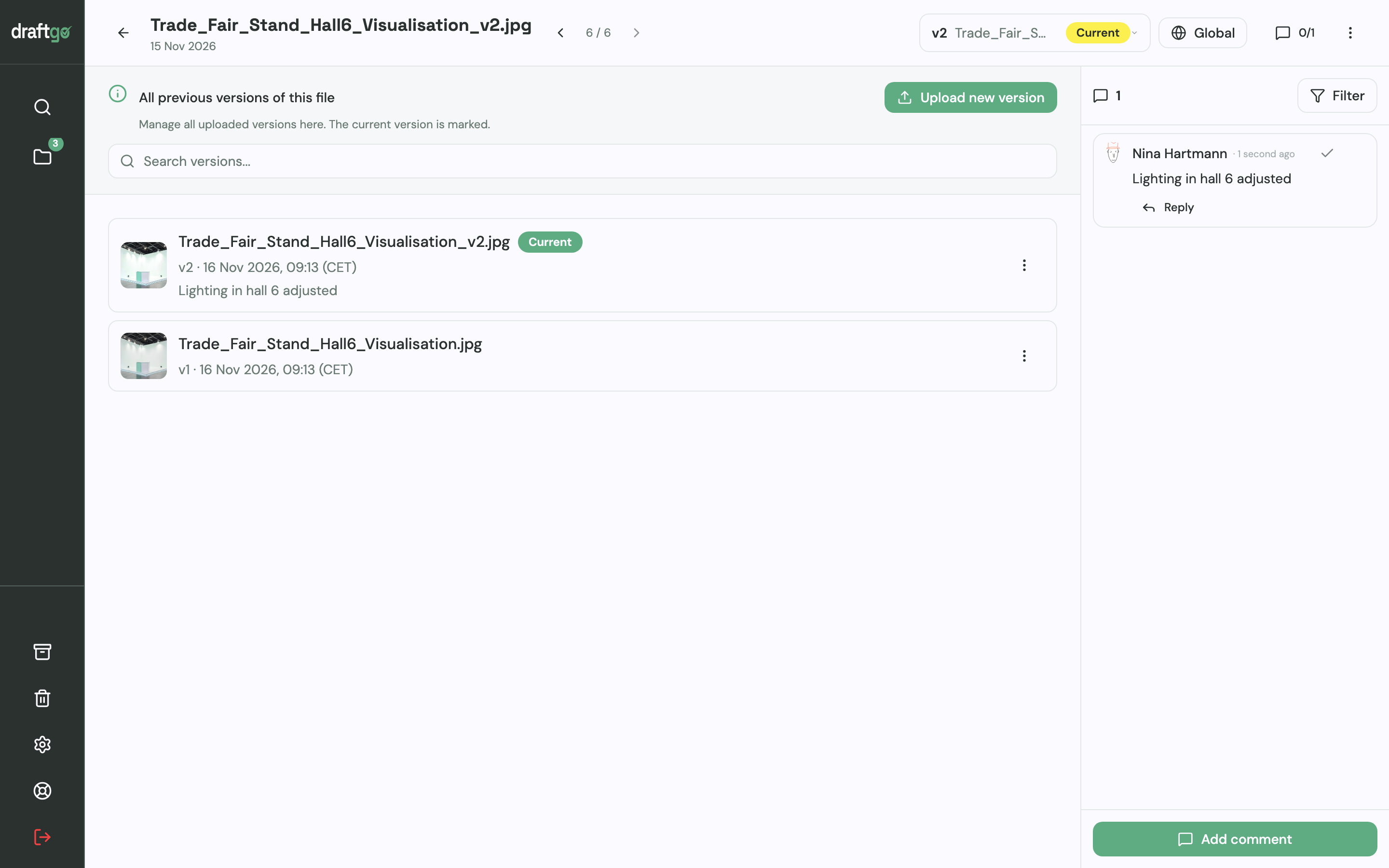
- Upload each round as a new version. Images, PDFs, videos and audio files go straight into the project. Each revised draft becomes a new version of the same file: earlier versions stay available, comments stay with the version they were made on, and approvals start again with the new version. The version history shows how many rounds a file has been through.
- Set up a loop for each stage. Approvals run in loops, for example an internal check first and then the client. For each loop you set whether all approvers, a set number of them or any one of them has to approve, separately for your team and for guests. That settles from the start whose approval counts.
- Separate the decider from the readers. The person who approves gets a personal approver link with their name and email address. Anyone who should only have a say gets the viewer link, which lets them comment without approving.
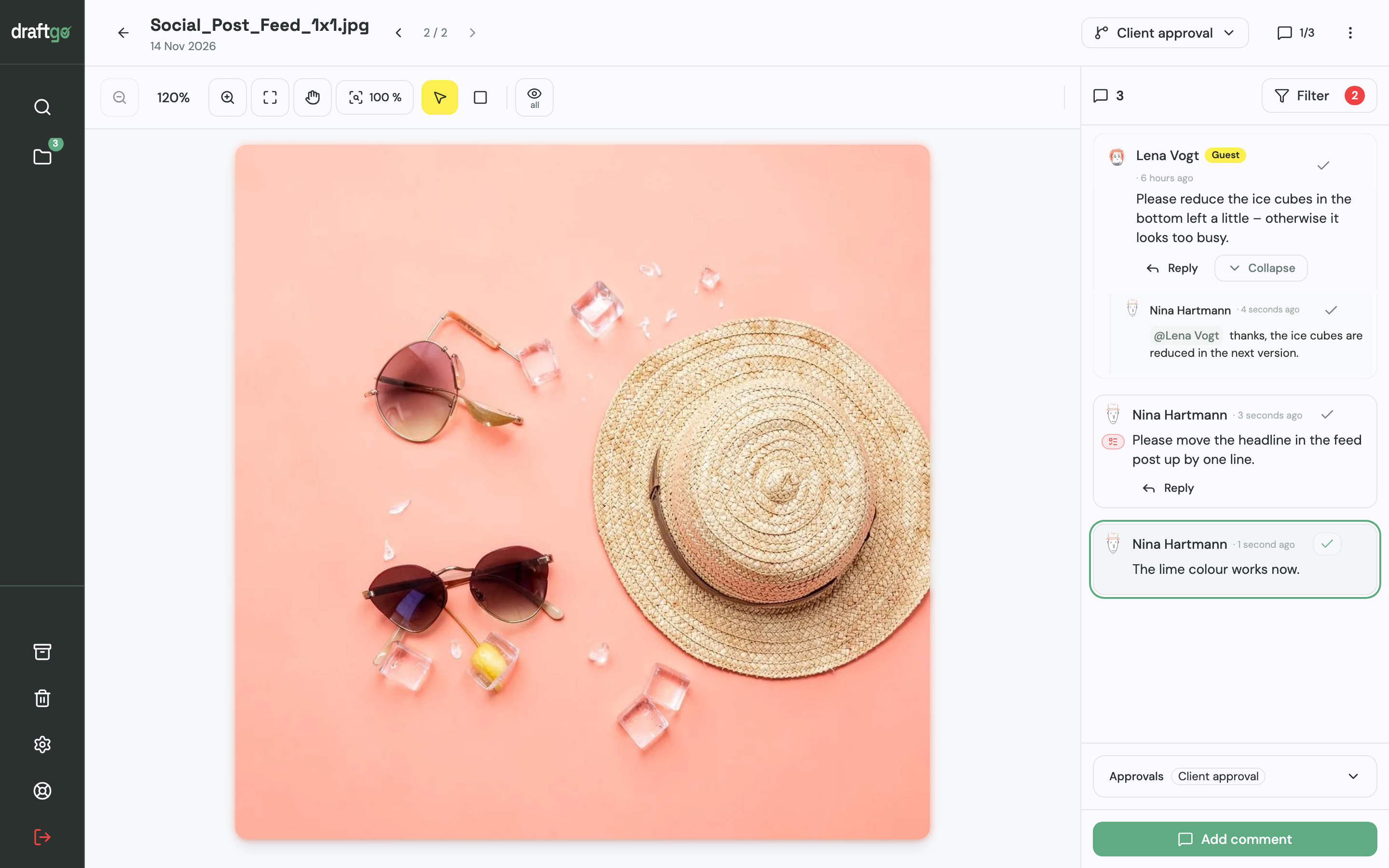
- Keep feedback on the spot. Comments sit as a pin or a rectangle on an image or a PDF page, as a text highlight in a PDF or at a point on the timeline of a video. You reply in the thread, mention people with @ and mark finished points as resolved.
- Turn extra wishes into to-dos. A comment that goes beyond the scope becomes a to-do on the project board, with one person in charge of it. That way you collect such wishes in one place for your next change quote instead of slipping them into the current round.
- Mark the end of a round. If you switch it on for a loop, guests can report that their feedback is complete. You then know the round is finished and start on the revision.
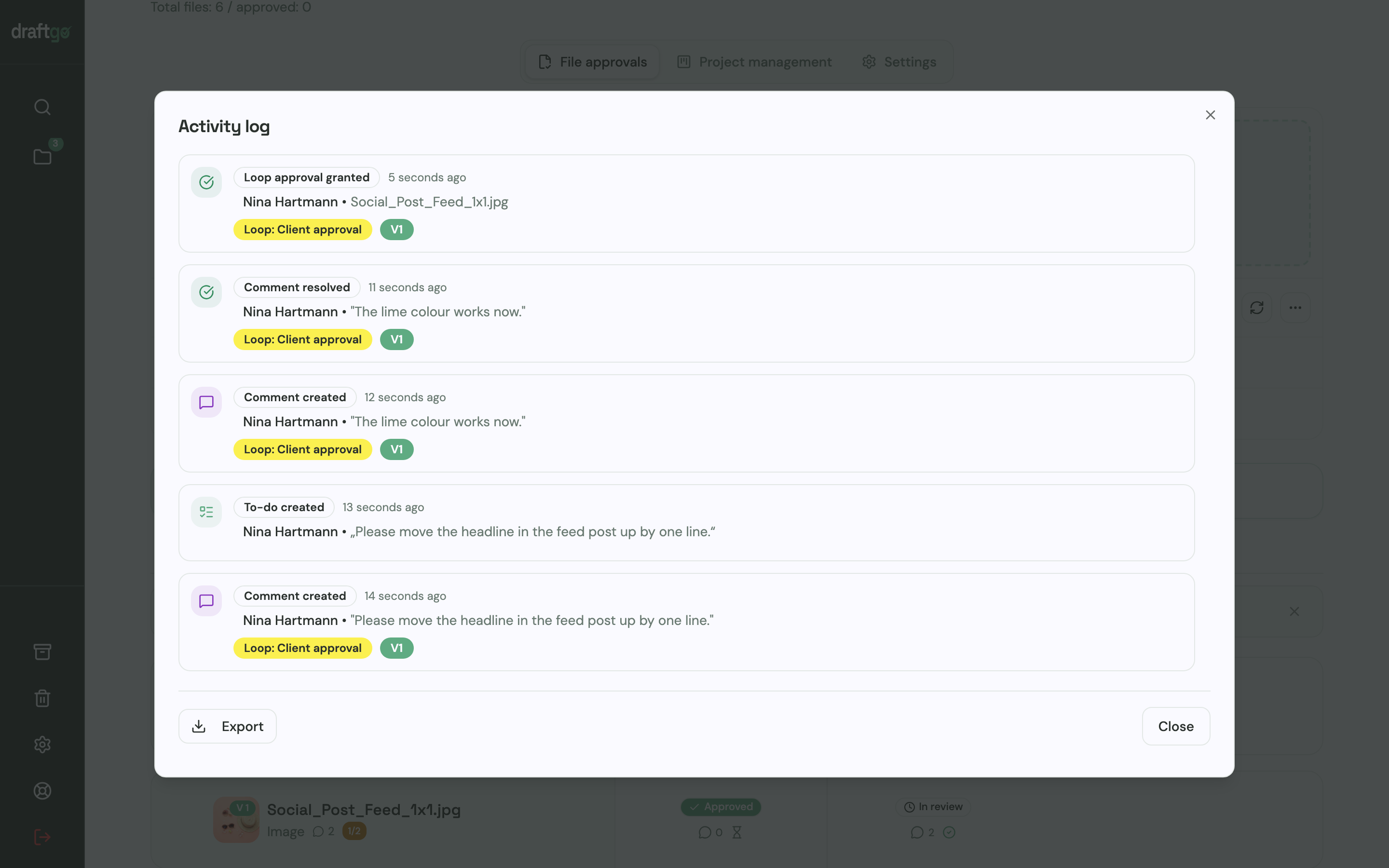
- Keep the record. In each loop a file is inactive, in review or approved. The activity log holds approvals, comments, versions and downloads with person and time, and it exports as CSV, JSON or PDF. When you raise an extra round with a client, the export shows which version was approved and what came after it.
Before a client round, the AI review can check PDFs, images and social media posts for errors such as spelling mistakes, cut-off text or very small type. Its comments carry the name of our AI agent “GO” and sit right where GO found the problem, so your client does not use up a round on typos. The review comes with a monthly page allowance from the Freelancer plan upwards, as the plans and prices show.
Chwali Bouman, CEO of the Berlin creative agency creategy GmbH, puts the result like this: “We now get projects approved 35% faster.”
How agencies bring the feedback of many clients into one place is shown on the page draftgo for agencies. If you work on your own, see draftgo for freelancers.
FAQ
Is scope creep always bad?
Not every change to the scope is a problem. New requests are often sensible because the project has shown something that matters. It becomes a problem when the change happens unnoticed and unpaid. Once it is named, priced and agreed, it is a change request and often extra business.
How many revision rounds should a proposal include?
No number fits every project. Two or three rounds are a reasonable starting point, which you adjust to the size of the job and your experience with the client. The definition matters more than the number: a round is the consolidated feedback on one version, and further rounds have a price stated in advance.
How do I raise scope creep with a client without damaging the relationship?
Raise it early and factually, ideally as soon as a request goes beyond the agreed scope. Thank the client for the idea, say clearly that it was not part of the original scope and offer a solution with price and date in the same message. The conversation is then about options rather than blame, and the client gets clarity about cost.
What is the difference between scope creep and feature creep?
Feature creep is a related term from product and software development. It describes a product that keeps gaining features until it is overloaded and hard to use. Scope creep is broader and covers any unplanned growth of a project, including extra revision rounds, formats and language versions.
Can scope creep happen in agile projects?
Yes, even though agile methods expect change. The difference lies in how changes are handled: new requirements go into a backlog, get prioritised and are planned for a later sprint instead of being pushed into the current one. Scope creep starts where a team bypasses that rule.
Conclusion
Scope creep grows out of many small yeses, and a few clear rules stop it: a precise scope, a defined number of revision rounds, a route for change requests and a sign-off on each version. Take the sample wording from this guide into your next proposal, and agree before the start who on the client’s side has the final word.
Try it free – draftgo is free for 14 days, no credit card needed.
Written by
Emilia
Content Producer
Ready to streamline your approval processes?
Get started with draftgo today and see how easy professional collaboration can be.