
It is Thursday afternoon, and the blog post due on Monday is still not live. The draft exists in two versions, the client's comments are split between an email thread and a call summary, and the designer is waiting for someone to say which headline won. Everyone has been busy all week. What the team never agreed on is who moves the piece to the next step and what counts as finished.
A content workflow answers both questions for every piece you produce, from the brief to the day it goes live.
What is a content workflow?
A content workflow is the fixed, repeatable sequence of stages a piece of content passes through, from the brief through publication to measuring the results. For each stage it names who does the work, who decides and what has to be true before the piece moves on.
Teams often mix it up with the content strategy, which decides what you publish and why. The workflow describes how one piece gets from idea to live, and it is the part that breaks first when the volume goes up.
Where content workflows usually stall
Content usually gets stuck between stages: a draft waits for feedback, comments contradict each other, or nobody knows whether the latest version is approved.
The pressure on teams makes these gaps more expensive. In B2B Content and Marketing Trends: Insights for 2027, a report by the Content Marketing Institute and MarketingProfs published in November 2026, 65% of the 861 B2B marketers surveyed said they had faced increased pressure to produce content faster in the last 12 months. Of those who felt that pressure, 22% reported more internal rework and 15% more errors or accuracy issues.
| Where it stalls | What it costs | Better practice |
|---|---|---|
| The brief was never approved | The first review reopens the angle | Approve the brief before anyone writes |
| Feedback arrives in several channels | Comments contradict each other | All feedback goes onto the file, in one place |
| Many reviewers, nobody decides | Rounds never close | One accountable approver per round |
| Legal or product checks come last | An approved design changes days before launch | Consult them at the brief or first draft |
| Versions are unclear | Reviewers comment on an outdated file | One file that holds every version |
| No agreed review window | The piece sits “with client” for days | Agree the length of a round up front |
Reviewing at the file, the way online proofing works, removes the second and fifth problems. The others are agreements you make once and write down.
The seven stages of a content workflow
A typical content workflow for a marketing team or agency has seven stages, each ending with an output and a condition for moving on.
| Stage | Output | Done when |
|---|---|---|
| 1. Plan | Prioritised topic with format and date | The topic has an owner and a slot |
| 2. Brief | Goal, audience, key message, format and deadline | The person who signs off the brief has approved it |
| 3. Create | First complete draft with assets and links | The draft covers everything in the brief |
| 4. Internal review | Revised draft | All internal comments are resolved |
| 5. Approval | Approved version | The named approver has approved the current version |
| 6. Publish | Live page, scheduled posts or newsletter | The published file is the approved version |
| 7. Measure | Short note on reach, enquiries and reuse ideas | The learnings feed the next plan |
The two review stages do different jobs. Internal review catches everything the team should never send to a client, from wrong figures to a typo in the caption. Approval is the decision of the people who own the message, a client or a stakeholder in your own company, and it applies to one specific version.
Try it yourself: In the demo you work in a real draftgo workspace with sample data.
How to set up a content workflow in 5 steps
You can set up a workflow in one meeting and a pilot of two or three pieces. Work through these steps with the people who will use it.
1. Start with one content type
Pick the format you produce most often, for example the weekly blog post or a client's monthly social package. Cross out the stages from the table that this format does not need, and write your own “done when” sentence for each one that stays. A single social post, for instance, can go from brief straight to creation with the caption already in the brief.
2. Assign roles with a RACI chart
A RACI chart names four roles per stage. Responsible does the work, Accountable makes the final call, Consulted gives input before the decision and Informed hears about the result. The rule that matters most is one accountable person per stage.
| Stage | Responsible | Accountable | Consulted | Informed |
|---|---|---|---|---|
| Plan | Content lead | Head of marketing or client | Sales, SEO | Whole team |
| Brief | Content lead or account manager | Client contact | Writer, designer | Team |
| Create | Writer, designer | Content lead | Subject expert | Account manager |
| Internal review | Editor | Content lead | Designer, subject expert | Writer |
| Approval | Account manager | Client's decision-maker | Client's legal or product team | Content lead |
| Publish | Web editor or social media manager | Content lead | None | Client, sales |
| Measure | Content lead | Head of marketing | Sales | Team, client |
In a small team one person often holds several of these roles.
3. Approve the brief before anyone writes
The brief is the first approval in the workflow and the cheapest one. It fixes goal, audience, key message, format, deadline and the person who signs off the final piece, so the later review checks the draft against something everyone has agreed. A creative brief template gives you the questions to cover.
4. Put internal review before client approval
Run the internal review as a round of its own. The editor checks facts and language, the designer checks layout and brand, and a subject expert or the legal team comes in where claims need checking. Only the revised version goes to the client.
In the client round, everyone on the client's side comments at the same time, and one person approves the message. If a new version follows, it needs approval again, because an approval belongs to the version the approver actually saw. For posts, carousels and reels, the guide to choosing a social media approval tool covers this step in more detail.
5. Agree feedback rules, then test and adjust
Put the rules on one page: where feedback goes, how long a review round may take, who settles contradicting comments and what counts as approval. Client onboarding is a good moment to agree them with a new client.
Then run the workflow on your next two or three pieces and note every point where a piece waited longer than planned. Adjust stages or roles there, and only then extend the workflow to video or campaign assets.
Sample workflow: a blog post and three social posts in one week
A three-person agency writes one blog post and three LinkedIn posts a week for a software client. A content lead who also edits, a writer and a designer share the work, and the client's marketing manager approves.
| When | Stage | Who | Result |
|---|---|---|---|
| Monday morning | Brief | Content lead, client's marketing manager | Brief approved |
| Monday to Wednesday | Create | Writer, designer | Blog draft, three visuals with captions |
| Thursday morning | Internal review | Content lead, designer | Revised draft, internal comments resolved |
| Thursday afternoon to Friday noon | Approval | Marketing manager, product team consulted | Approved versions of post and visuals |
| Following Tuesday | Publish | Writer, content lead | Blog post live, social posts scheduled |
| Four weeks later | Measure | Content lead | Note on reach and enquiries |
The client sees nothing before the internal review is finished, and the product team comments in the same round as the marketing manager. If Friday noon passes without an approval, the content lead calls on Monday morning.
Letting the client review in between other work, instead of in one long session, also helps once the volume grows. Peter Schönherr, founder and managing director of Loloson Media in Portugal, which produces and edits image and video content, mainly e-commerce assets for an international hair care manufacturer, puts it like this: “With 70, 80 or more open assets, our client can now review flexibly in between other tasks instead of having to clear time for a whole mountain of them.”
How it works in draftgo
draftgo covers the two review stages of your content workflow, internal review and approval, and keeps a record of both. Writing stays in your editor and scheduling in your planner or CMS.
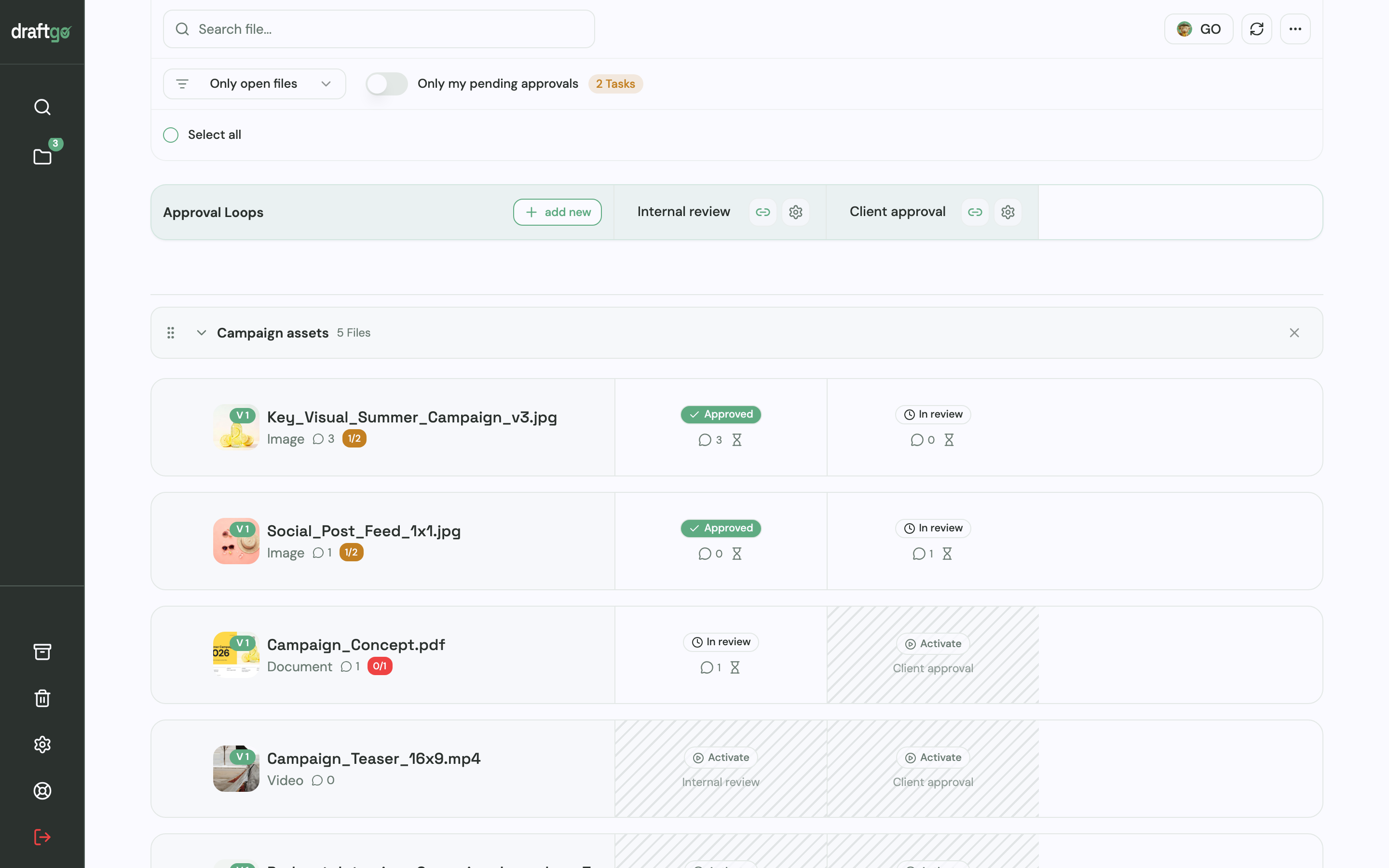
You upload the draft to a project: blog texts as a PDF or a Word file, which draftgo converts into a PDF on upload, along with images, videos, audio files and social posts with up to 20 images and their caption. For the two review stages you create two loops, for example “Internal review” and “Client approval”. A project holds one loop on Free, three on Freelancer and as many as you need on Agency and Team. Each loop has its own rule on whether everyone, a set number of people or any one of them must approve, set separately for the team and for guests.
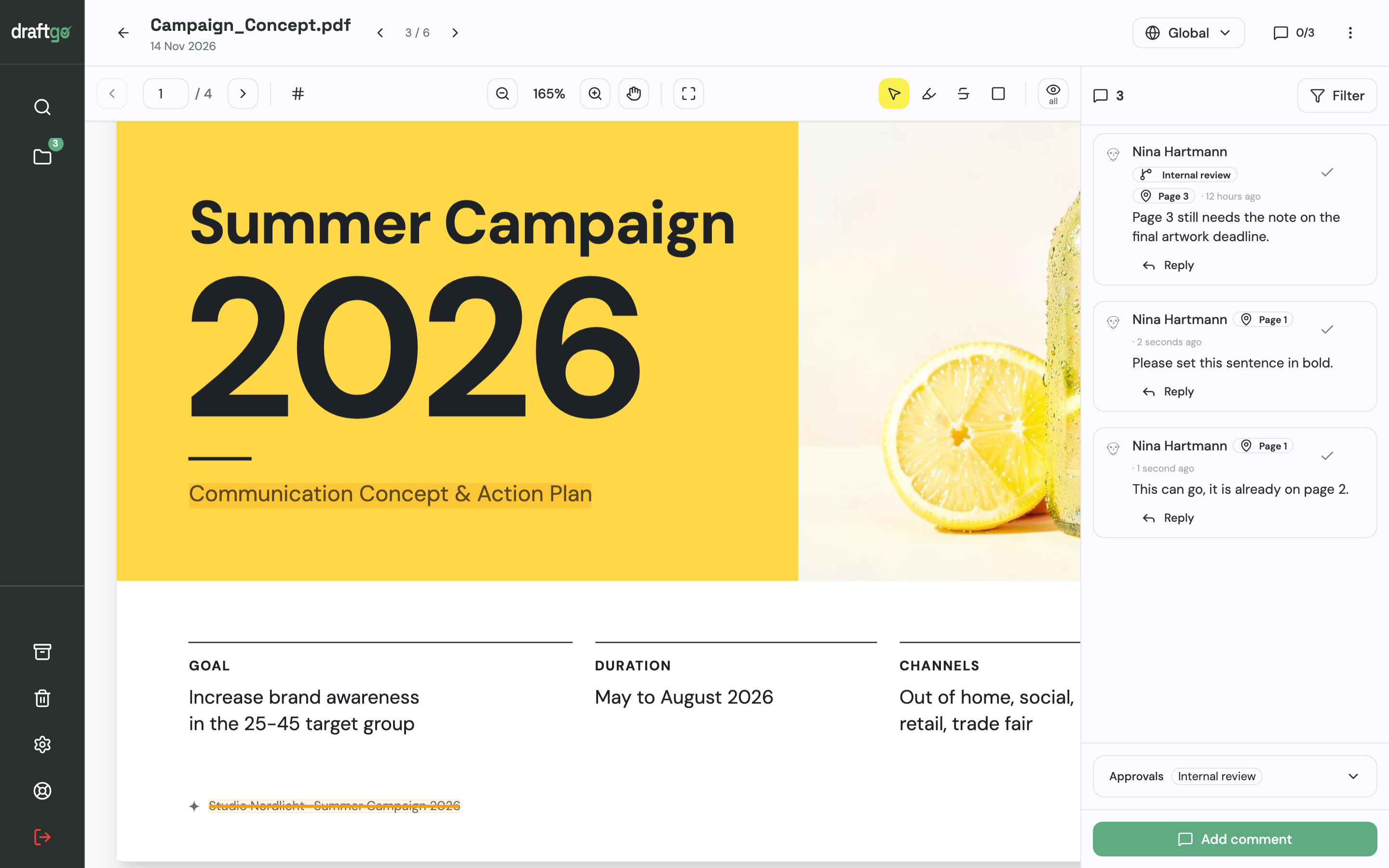
The client opens the file from a link without creating an account and comments at the exact spot: a highlight or strikethrough in the PDF, a pin on an image, a comment at a point in a video. An approver guest gets a personal link that allows approving, while colleagues who only comment use the loop's viewer link. A comment can also become a to-do for the person who makes the change.
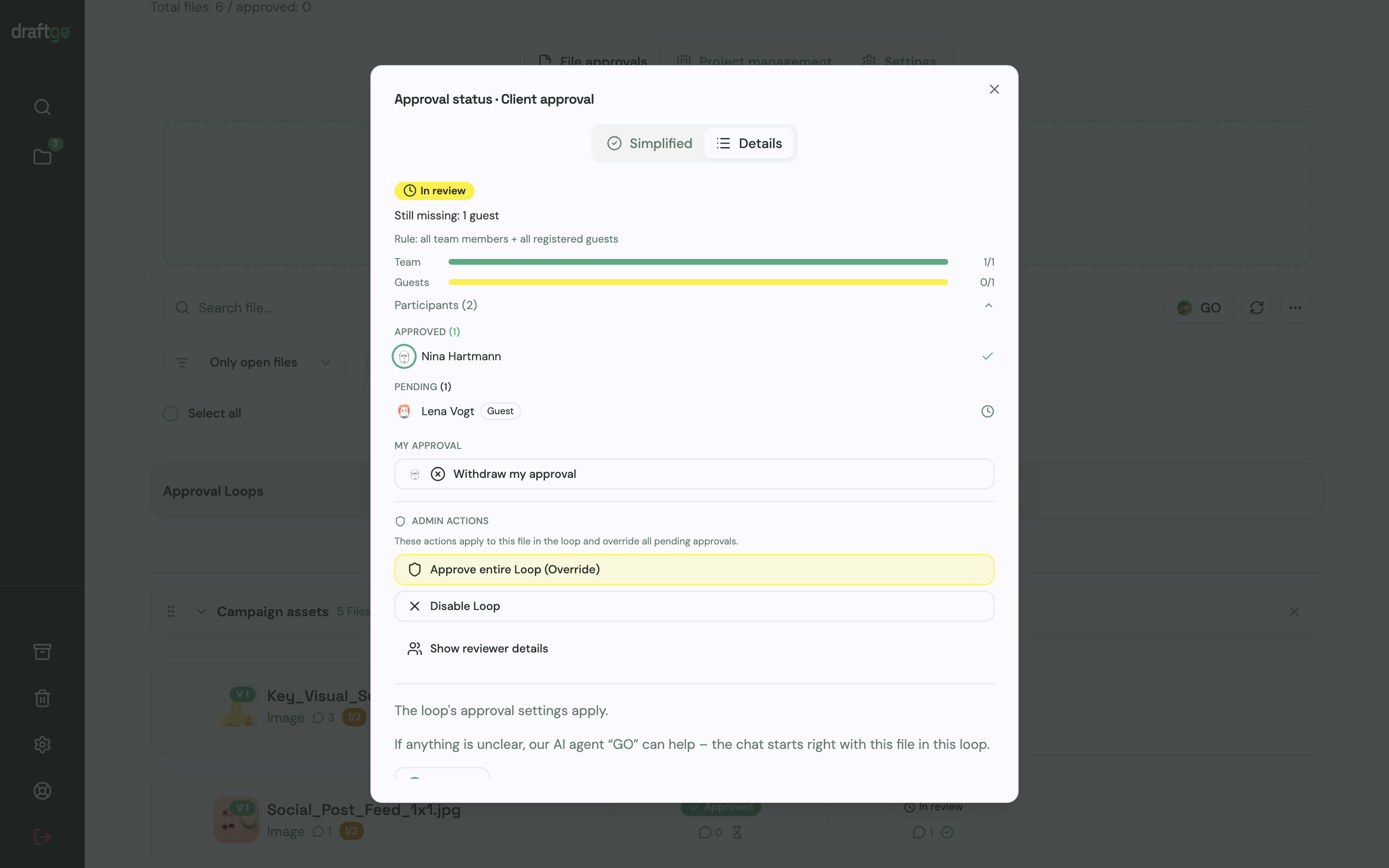
The corrected draft goes onto the same file as a new version. Earlier versions stay available, the new version starts the approvals again, and for each file you see who has approved and who is still pending in each loop.
An optional daily or weekly summary lists the approvals still waiting. The activity log records approvals, comments and versions with name and time and exports as CSV, JSON or PDF. Our AI agent “GO” answers questions about a file or loop, such as what is still open, and the AI review, with a monthly page allowance from the Freelancer plan on, checks PDFs, images and social posts for errors like spelling mistakes or cut-off text before the client sees them. How content teams use draftgo day to day is shown on the page for social media and content teams.
FAQ
What is the difference between a content workflow and a content calendar?
The content calendar says what goes out and when. The workflow describes how each piece gets there, with its stages, people and approvals, and the dates in the calendar only hold when that workflow is clear.
Who should give the final approval on content?
One named person per round who owns the message, usually the client's marketing lead in an agency project or the head of marketing in an in-house team. If several people must approve, agree in advance whether all of them are needed or a set number.
How long should a review round take?
Agree it per content type before work starts. One or two working days is a workable starting point for a blog post or a set of social posts, while a campaign with several stakeholders needs longer. What counts is that everyone knows the window and someone follows up when it passes.
Does a freelancer or a very small team need a content workflow?
Yes, and it can be short. When one person writes, designs and publishes, the workflow mainly fixes the points where someone else comes in: the approved brief and the client's approval of the final version. Writing down those two steps saves the rewrites that start with “that's not what we agreed”.
Conclusion
Set up your content workflow for one format first, with one accountable person per stage, an approved brief and an internal review before the client sees anything. Run it on the next two or three pieces, adjust wherever work waits, and keep every comment and approval at the file.
Try it free – draftgo is free for 14 days, no credit card needed.
Written by
Emilia
Content Producer
Ready to streamline your approval processes?
Get started with draftgo today and see how easy professional collaboration can be.