
Your agency runs its website projects through BugHerd. Clients click a heading on the staging site, type the change, and it lands on the board with browser and screen size attached. Then a sixth person joins the team, and the client wants to approve the brochure and the launch video in the same place as the pages. That is usually when agencies start comparing BugHerd alternatives.
BugHerd does this well, and for many web teams it stays the right tool. Below are six alternatives with pros, cons, entry prices and free options, checked on 23 November 2026.
What BugHerd offers today
BugHerd collects feedback on live sites through a browser extension and on staging sites through a JavaScript snippet. Clients comment by link without an account, and each comment becomes a task on a Kanban board, with a screenshot, the browser, operating system and screen resolution (BugHerd). Every plan includes feedback on Figma designs, PDFs and images, video feedback and unlimited client users. Prices in US dollars, excluding taxes:
| Plan | Billed yearly | Billed monthly | Members | Storage |
|---|---|---|---|---|
| Standard | $42 a month | $50 a month | 5 | 10 GB |
| Studio | $67 a month | $80 a month | 10 | 25 GB |
| Premium | $125 a month | $150 a month | 25 | 50 GB |
Extra members cost $8 each a month, or $6.60 on annual billing (BugHerd pricing). The home page names a 7-day free trial without a credit card, but there is no free plan.
Why teams look for a BugHerd alternative
- Several client features start with Premium. Feedback deadlines for clients, a client task board, member-only comments, custom branding and integrations with Jira, Asana, Linear and ClickUp start with Premium, at $125 a month billed yearly. Standard connects to Trello, Slack and GitHub (BugHerd pricing).
- Members are counted per plan. A sixth member means an extra seat or the next plan.
- There is no free plan. Freelancers with a few website projects a year may prefer one that stays free.
- The client signs off more than a website. Some clients approve layout and copy page by page, together with print files and a video, and the agency wants a record of who approved which version.
How we evaluated the alternatives
We looked at each tool as an agency or freelancer collecting client feedback on a website before launch:
- Review method: a script or extension, a link to the live site, or a screenshot.
- Client access: comments without an account.
- Technical context: browser data, console logs or session replay.
- Files and approvals: other file types, and how a decision is recorded.
- Pricing model and free entry: per user, plan or company, and whether a plan stays free.
Every vendor statement comes from the vendor's own pages, checked on 23 November 2026. draftgo is our product and gets pros and cons like every other tool. The order is not a ranking: it runs from the tools closest to BugHerd to draftgo, which reviews a screenshot.
BugHerd alternatives compared
| Tool | Suited for | Review method | Free entry | Entry price, as of 23 Nov 2026 |
|---|---|---|---|---|
| BugHerd, for reference | feedback as tasks on a board | extension, or a snippet on staging | 7-day trial | Standard $42 a month, billed yearly |
| Marker.io | developers sending reports to their tracker | snippet, WordPress plugin or extension | 15-day trial | Starter $39 a month, billed annually |
| Userback | feedback from the users of an app | widget or browser extension | Free Forever plan | Team $39 a month, billed annually |
| Ruttl | sites and mobile apps without code | paste a URL | free Basic plan | Pro $18 per user a month |
| Pastel | clients who click through the live site | link, shown through a proxy | free plan | Pro $29 a month, billed yearly |
| MarkUp.io | websites, PDFs and videos by link | paste a link, Chrome extension | 14-day trial | Pro from $79 a month |
| draftgo | sign-off next to other files | screenshot of a public page | permanent Free plan | see the draftgo entry below |
Try it yourself: In the demo you work in a real draftgo workspace with sample data.
The 6 BugHerd alternatives in detail
1. Marker.io: suited for developer teams that turn client reports into issues
Marker.io runs through a code snippet, a WordPress plugin or a browser extension, and clients annotate a screenshot of the page without an account (Marker.io). Starter includes 3 team members and integrations such as Trello, Asana, ClickUp and GitHub. Session replay, console logs and Jira are listed from Team, at $149 a month billed annually for 15 members, and eligible agencies can apply for a separate offer at $99 a month billed annually (Marker.io pricing).
- Pros: unlimited free reporters, technical data for developers, a separate plan for agencies
- Cons: a snippet, plugin or extension comes before the first comment, and the developer tools start with Team
- Price: Starter $39 a month billed annually or $59 billed monthly, 15-day trial without a credit card (Marker.io pricing)
Our Marker.io, MarkUp.io and Ruttl alternatives look at the same market from each tool's side.
2. Userback: suited for product teams that collect feedback from the users of a live app
Userback collects feedback through a widget on your site or app and a browser extension, with annotated screenshots and videos (Userback). Reporters are unlimited on every plan, and Business at $89 a month billed annually adds console logs, session replays, user surveys and a two-way sync with Jira and ClickUp (Userback pricing).
- Pros: a free plan, unlimited reporters, surveys and a feature portal on Business
- Cons: the widget has to run on your site or app, and the free plan keeps feedback for one week
- Price: Team $39 a month billed annually or $49 billed monthly, for 5 seats (Userback pricing)
3. Ruttl: suited for teams that review websites and mobile apps without code on the site
In Ruttl you paste the website's URL when you create a project, pin comments on the live page and share a link that lets clients comment without signing up (Ruttl). Images and PDFs take comments too, and mobile apps are reviewed through an NPM package (Ruttl). Pro adds unlimited projects, versioning and 15 device sizes for up to 50 users (Ruttl pricing).
- Pros: nothing to install, a free plan, websites, mobile apps, images and PDFs in one tool
- Cons: Pro is charged per user, and the free plan suits a landing page rather than a whole site
- Price: Pro $18 per user a month (Ruttl pricing)
4. Pastel: suited for clients who click through the live site and comment by link
Pastel lays the comments over your live website through its own proxy, and one canvas holds a whole website (Pastel plans). Reviewers comment without a login, and images and PDFs can be marked up too (Pastel). Approvals, feedback deadlines and a responsive tester come with the Free plan, integrations with Trello, Asana, Jira and ClickUp with Team.
- Pros: nothing to install, approvals and feedback deadlines from the Free plan, unlimited reviewers
- Cons: Free holds 1 active canvas and Pro 3, and integrations start with Team
- Price: Pro $29 a month billed yearly or $35 monthly, Team $99 a month billed yearly from 5 users, 14-day trial (Pastel plans)
Our Usepastel alternative comparison looks at Pastel from the other side.
5. MarkUp.io: suited for link-based reviews of websites, PDFs and videos
In MarkUp you drop a link and comment on the live site, or use the Chrome extension, which attaches a screenshot to each comment (MarkUp). It supports more than 30 file types, including PDFs and videos with comments at timestamps, and guests join without registering. Every plan includes unlimited users and is sized by MarkUps, the items you create for review each month (MarkUp pricing).
- Pros: unlimited users, websites and over 30 file types by link, guests without sign-up
- Cons: no free plan listed, and the monthly MarkUp allowance sets the price
- Price: Pro from $79 a month or $990 a year for 50 to 100 MarkUps a month, 14-day trial (MarkUp pricing)
6. draftgo: suited for layout and copy sign-off next to the project's other files
draftgo is an online proofing platform for agencies, freelancers and in-house teams. It captures a publicly reachable page as a screenshot, as desktop, tablet or mobile, either the full page up to 10,000 pixels high or the visible area, and people comment on the image with a pin or a rectangle.
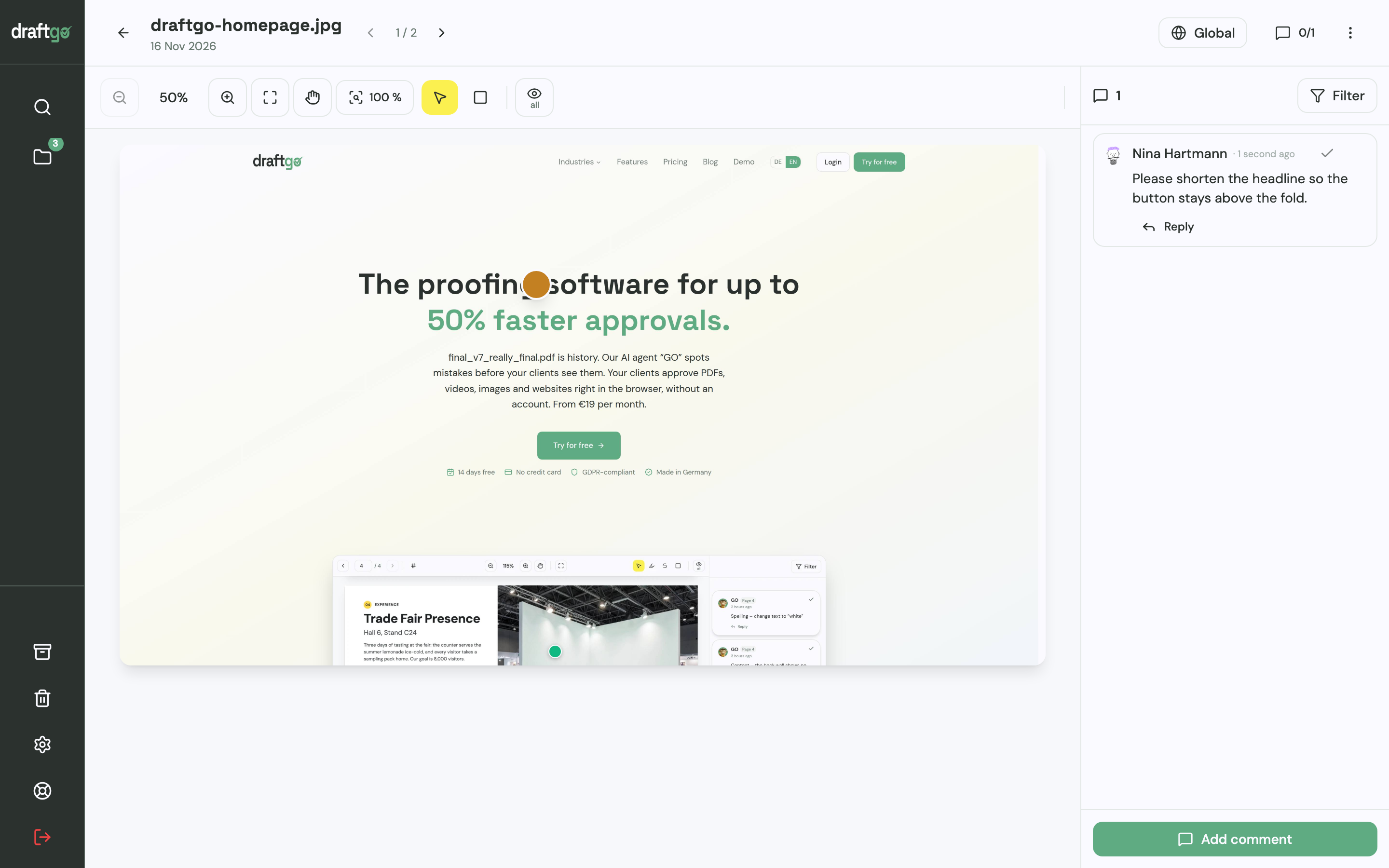
Clients comment by link without an account: the person who decides gets a personal approver link, everyone else a shared viewer link. Approvals run in loops, for example internal first and client second, and for each loop you decide whether all approvers, a set number or any one of them must approve. The same project holds the launch's PDFs, images, videos and social posts, a comment can become a to-do on the project board, and the activity log keeps approvals, comments and versions with person and time.
Pricing is per company, and guests are unlimited from the Freelancer plan. Stored data is kept on EU servers in the Frankfurt data centre.
- Pros: desktop, tablet and mobile views of the full page, an approval rule for each loop, websites next to PDFs, images and videos, one price per company
- Cons: reviewers comment on a screenshot rather than the live site, without a widget, technical data or integrations such as Jira or Trello, and pages behind a login cannot be captured
- Price: a permanent Free plan and paid plans you can test free for 14 days, all listed on draftgo pricing
Free BugHerd alternatives
BugHerd has no free plan. If you need a free BugHerd alternative, four tools here have one, each with a limit that decides whether it carries a client project:
| Tool | Free plan, as of 23 Nov 2026 | What the limit means in practice |
|---|---|---|
| Userback | Free Forever: 2 sites, 2 seats (pricing) | feedback stays in the account for 7 days |
| Ruttl | Basic: 1 project with 5 pages (pricing) | a landing page or a few key pages |
| Pastel | Free: 1 user, 1 active canvas (plans) | one website at a time; archive the canvas to start the next |
| draftgo | Free: 1 user, 2 projects, 1 loop per project, 5 guest accesses | one approval round per project, guests counted as links |
Marker.io and MarkUp.io offer trials of 15 and 14 days, after which both need a paid plan (Marker.io pricing, MarkUp pricing).
BugHerd and draftgo compared
| Criterion | BugHerd, as of 23 Nov 2026 | draftgo |
|---|---|---|
| What clients comment on | the live or staging website (BugHerd) | a screenshot of a public page at desktop, tablet or mobile width |
| Technical context | screenshot, browser, operating system and screen resolution | none, comments sit on the image |
| Files | websites, Figma designs, PDFs, images, video feedback (pricing) | website screenshots, images, PDFs, videos, audio, social media posts |
| Where feedback goes | tasks on a Kanban board; Trello and Slack from Standard, Jira and Asana from Premium | comments on the file, which can become to-dos on the project board; no ready-made integrations |
| Approval | the status of each task until final sign-off (review and approval) | loops with set approvers and a rule per loop, recorded in the activity log |
BugHerd is ahead when developers fix what clients find on a working site, with technical data on every task. draftgo fits better when the client signs off the layout and copy of each page at every device width, together with the print files and videos of the launch, and that sign-off should stay on record. An agency can also run both: our guide to the website feedback tool explains when each kind fits, and the comparison overview sets draftgo against other proofing tools.
Which BugHerd alternative fits you?
| Your situation | Tool to test first |
|---|---|
| Developers want console logs and session replay, sent to Jira | Marker.io on Team, or Userback on Business |
| You review websites and mobile apps and cannot add code to the client's site | Ruttl |
| Clients click through the live site, and you want to start for free | Pastel |
| Clients sign off layout and copy next to PDFs and videos, at one price per company | draftgo |
| Every client comment should land as a task on a board | stay with BugHerd |
Tools for print and video are in our comparison of proofing software, and the website launch checklist lists what to check before go-live.
Practical example: the relaunch of a physiotherapy practice's website
A four-person agency rebuilds the website of a physiotherapy practice on a public preview address. The owner approves, two therapists check the treatment pages, and the launch brings a printed appointment card and a short social video.
The developer keeps BugHerd on staging for the booking form. For the sign-off, the agency captures five pages in draftgo at desktop and mobile width, next to the card and the video. After an internal loop with the designer, the owner gets a personal approver link and the therapists share the viewer link.
One therapist marks an outdated team photo on the mobile view of a location page, and the project manager turns the comment into a to-do. After the fix, the agency captures the page again, and the owner approves pages, card and video, each recorded in the activity log with her name and the time.
How it works in draftgo
- Capture the page: enter the address and choose desktop, tablet or mobile, the full page or the visible area.
- Add the other files: PDFs, images, videos or posts go into the same project.
- Set up the loops: decide who approves internally and for the client, and which rule counts.
- Send the links: an approver link for the person who decides, the viewer link for everyone else.
- Capture again after the fixes: the new state becomes a new version and starts the approvals again.
Agencies find the setup for website projects on draftgo for web design.
FAQ
How much does BugHerd cost?
Standard costs $42 a month billed yearly or $50 billed monthly with 5 members, Studio $67 or $80 with 10, and Premium $125 or $150 with 25, as of 23 November 2026 (BugHerd pricing). Prices are in US dollars and exclude taxes.
Does BugHerd have a free plan?
No. BugHerd offers a 7-day free trial without a credit card and a 60-day money-back guarantee after purchase (BugHerd). Userback, Ruttl, Pastel and draftgo each have a plan that stays free, with limits on sites, projects, canvases or loops.
Do clients need an account to leave feedback in BugHerd?
No. Clients open a link and comment without an account. Guests give feedback and reply on the reports they made, while members see the whole task board (BugHerd).
Conclusion
If developers need technical data on every task, compare BugHerd's Premium plan with Marker.io and Userback, or stay. If you cannot add code to the client's site or want to start for free, test Ruttl or Pastel. If the client signs off layout and copy together with the launch's PDFs and videos, run your next relaunch through draftgo.
Try it free – draftgo is free for 14 days, no credit card needed.
Written by
Emilia
Content Producer
Ready to streamline your approval processes?
Get started with draftgo today and see how easy professional collaboration can be.