
The site goes live on Monday. On Friday afternoon the client notices that the contact form still sends enquiries to the developer’s test inbox and the cookie banner loads the analytics script before anyone has clicked “Accept”. Both are quick to fix. Found after launch, they cost a weekend and some of the client’s trust.
A website launch checklist moves these checks to the week before go-live and gives you and your client one list to sign off against.
Why use a website launch checklist?
A checklist makes sure the same points get checked on every launch, whoever runs it. It also separates two things that tend to blur: the feedback rounds during the build and the final sign-off before go-live.
Without a list, the last check depends on who remembers what: the designer looks at spacing, the developer tests one form and nobody opens the privacy notice. With a list, every point has an owner and every open issue a due date, so the client signs off on something concrete.
Comments on layout and copy belong in the rounds before this point. Our guide to design feedback shows how to get them early and precise.
The website launch checklist in 9 check groups
Work through the groups in this order. Each point is a yes-or-no question, and every “no” is either fixed before launch or goes on the list of open points with an owner and a date. Copy the lists into your project tool or use the download further down.
1. Content and copy
- No placeholder text or sample images are left on any page.
- Headlines, body copy, buttons and the footer are proofread.
- Names, phone numbers, addresses and opening hours match the client’s current details.
- Internal links work, and the 404 page and form messages are written.
2. Design and responsive layout
- The built pages match the approved design: spacing, fonts, colours and icons.
- Buttons and links have hover, focus and active states.
- Every page is checked on a small phone, a tablet and a large monitor, in current versions of the main browsers.
- Menus work on every screen size, and no element runs off the edge.
3. Forms and functionality
- Every form is tested with real entries, and the messages reach the right inbox.
- Error and success messages are easy to understand.
- Confirmation emails to visitors arrive, and you have checked the spam folder too.
- Search, bookings and the shop checkout are run through from start to finish.
Try it yourself: In the demo you work in a real draftgo workspace with sample data.
4. Performance
Google’s Core Web Vitals give you three measures to aim for. A page counts as good when Largest Contentful Paint is 2.5 seconds or less, Interaction to Next Paint 200 milliseconds or less and Cumulative Layout Shift 0.1 or less, measured at the 75th percentile of page loads, according to web.dev (updated 2024).
- Images are compressed and delivered at the size they are shown.
- The main page templates are measured on a mobile connection, for example with PageSpeed Insights.
- No unused scripts or fonts load on every page.
5. SEO and indexing
- Every page has its own title and meta description.
- The noindex setting from the staging site is removed, and robots.txt no longer blocks the site.
- An XML sitemap exists and is submitted in Google Search Console.
- Each page has one H1, and the headings below it follow a logical order.
Check both settings on the live domain. A robots.txt block stops Google from crawling the pages, and a noindex rule keeps them out of the results once Google can crawl them, as its guide to blocking indexing with noindex explains.
6. Accessibility
Most accessibility checks refer to the W3C’s Web Content Accessibility Guidelines (WCAG) 2.2, whose current version dates from December 2024. At level AA, normal text needs a contrast ratio of at least 4.5:1 against its background, as the W3C’s explanation of the contrast criterion shows.
- Text and buttons meet that contrast ratio.
- The whole site can be used with the keyboard alone, with a visible focus.
- Every meaningful image has alt text, and decorative images have an empty one.
- Form fields have visible labels, and errors are described in words, not only in colour.
Which level a site has to meet depends on the client’s sector and country, and these points don’t replace a full audit.
7. Legal pages and cookie consent
- The privacy notice, the terms and any company details the law asks for are linked from every page.
- Non-essential cookies and tracking scripts load only after consent, where consent is required.
- Visitors can change or withdraw their cookie choice later.
The client is responsible for the content of the legal texts, not the agency. Which pages and which kind of consent a site needs depends on where the business and its visitors are. For UK sites, the ICO’s guidance on cookies and similar technologies explains when consent is needed. This article is general information, not legal advice.
8. Analytics and tracking
- Analytics is set up for the live domain, not for the staging address.
- Page views and key events, such as a sent form or a booking, are tested and appear in the reports.
- Conversion tags for ads fire once per action, not twice.
- The client has access to analytics and Search Console with their own account.
9. Backups, redirects and go-live
- A full backup of files and database exists, and you know how to restore it.
- Every old URL that changes has a permanent redirect to its new page.
- Domain, DNS and the SSL certificate are set up, and every address variant redirects to the main one.
- The staging password is removed from the live site, and the staging site stays out of search.
For a relaunch, export the list of old URLs before the old site goes offline. Google recommends redirecting each old URL straight to its new counterpart and keeping the redirects for at least a year, in its guide on moving a site with URL changes.
Who checks what, and when
Content is checked first, the technical groups follow on the live server, and the client’s sign-off comes last.
| Check group | Who checks | When |
|---|---|---|
| Content and copy | Client and copywriter | Once all copy is in |
| Design and responsive layout | Designer | After the build, before the client review |
| Forms and functionality | Developer, then the client with real entries | After the build |
| Performance | Developer | On the live server, before launch |
| SEO and indexing | Developer or SEO lead | Before launch and again on launch day |
| Accessibility | Designer and developer | After the build |
| Legal pages and cookie consent | Client, with the developer for the banner | Before the sign-off |
| Analytics and tracking | Developer or marketing lead | On launch day and the day after |
| Backups, redirects and go-live | Developer | On launch day |
| Final sign-off | The client’s decision-maker | Before the site goes live |
Agree at the start of the project who on the client’s side gives the final go, ideally during client onboarding. If several people have a say, settle the decision rights before the final review, as our guide to stakeholder alignment describes.
Client sign-off before launch
The sign-off is the client’s written confirmation that the site may go live in the state they checked. It only works if both sides know which state that is, so the record names the date and the pages it refers to.
A sign-off record holds:
- the project, the live address and the launch date
- the people who checked, on both sides
- the pages or captures the client reviewed
- the result: signed off, signed off with open points, or not signed off
- each open point, marked as a blocker or minor, with an owner and a due date
- the name of the person who signs off, and the date
Blocker or minor? If a core function doesn’t work, such as the contact form or the checkout, the site isn’t ready. A typo on a sub-page or a missing favicon is minor: the client can sign off with open points that you fix by an agreed date.
What the sign-off means under your contract depends on what you agreed, so write into your proposal what counts as acceptance and how issues found after launch are handled.
Download the website launch checklist
The checklist with all nine groups, a table for open points and the sign-off is free to download as PDF and Word, without an email address.
Website launch checklist: check your site before go-live
Free template to download
Example: a relaunch for a small architecture practice
A freelance designer and a developer relaunch the website of a small architecture practice. The new site has fewer pages, so the developer exports the old URL list first and sets up a redirect for every page that changes.
A week before launch, the designer captures the six main pages on desktop and mobile and sends the client a link. The client comments on two project photos that are cropped on the phone and an old phone number in the footer. On the staging server, the developer finds that the contact form still sends to her own test inbox.
On launch day they run groups 5, 8 and 9 again on the live domain. The client signs off with one open point, a missing project photo, due by the end of the week.
How it works in draftgo
In draftgo your client reviews content and layout through a link, without an account, and you keep a record of who approved what.
1. Capture the pages
Capture each publicly reachable page as a screenshot, as desktop, tablet or mobile, either the visible area or the full page up to 10,000 pixels high. Each capture becomes an image file in the project.
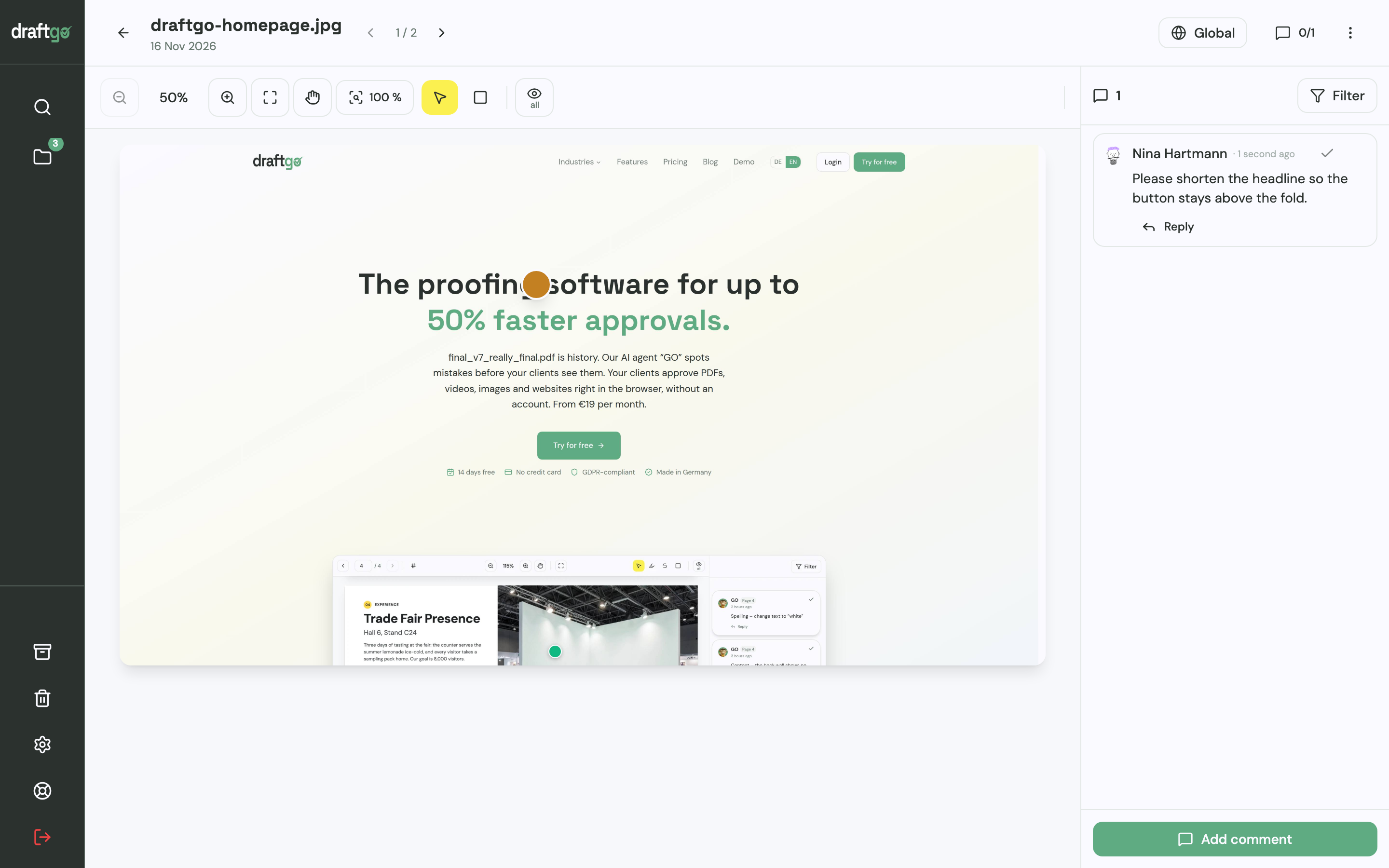
2. Collect comments on the image
Your client places a pin or draws a rectangle on the part of the page they mean and writes the comment next to it. You reply in the thread and mark a comment as resolved once it is fixed.
3. Capture again after the fixes
Capture the page again once the fixes are on the site. The new capture becomes a new version of the same file, earlier versions stay available, and the approvals start again for the current version.
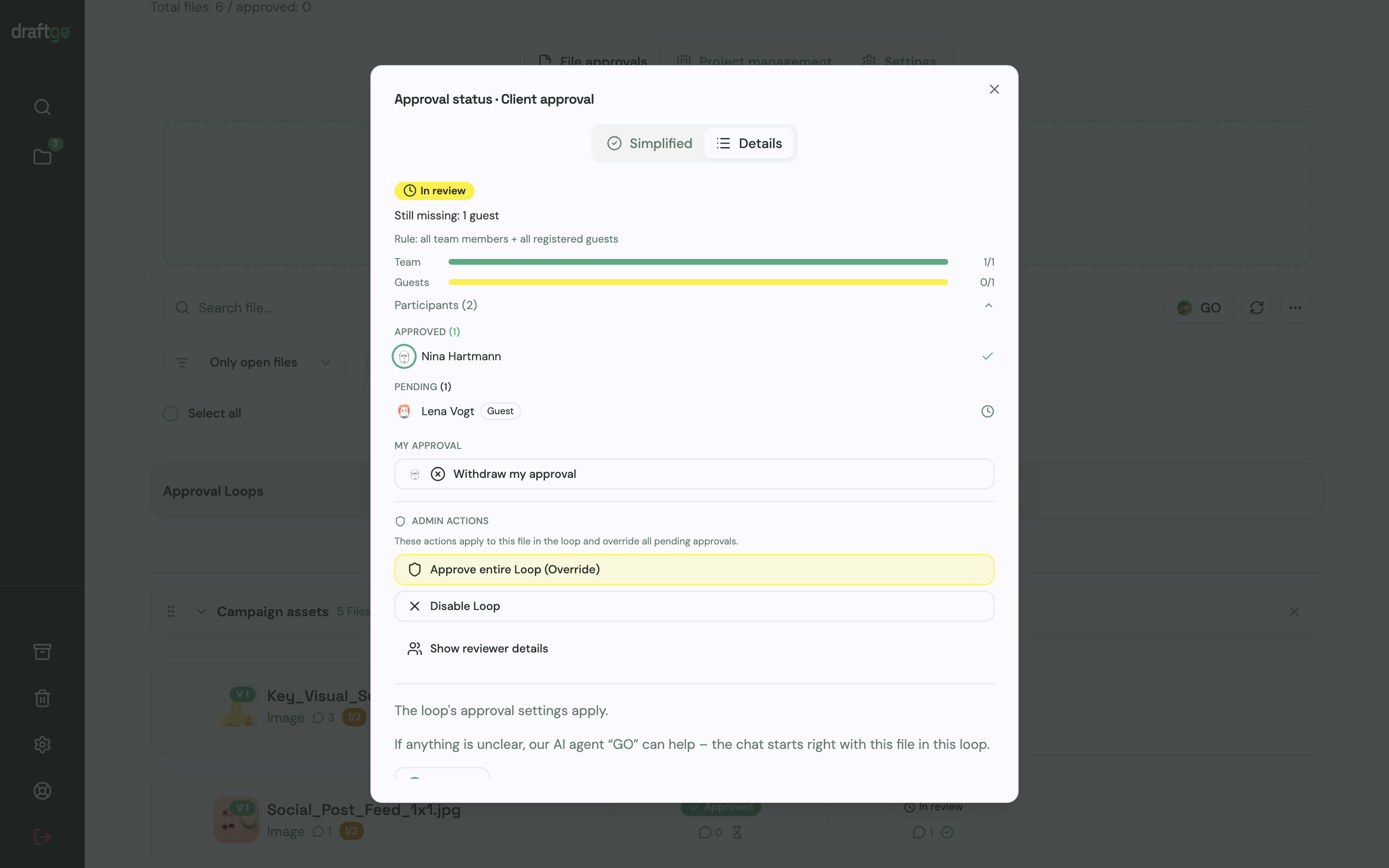
4. Record the sign-off
Invite the decision-maker to the client approval loop with a personal approver link. You see who has approved and who is still pending, and the activity log records approvals, comments and versions with person and time, exportable as CSV, JSON or PDF.
draftgo works with an image of each page, so forms, links and the checkout are tested on the site itself. Our comparison of website feedback tools explains live-site and screenshot review, and the page on web design review shows the workflow for agencies.
FAQ
Who should sign off a website before launch?
One person on the client’s side should sign off: someone who is allowed to decide and was named at the start of the project. Others can comment during the review, but only that person’s name and date go on the record.
Is there a website launch checklist template?
Yes, the checklist in this article is free to download as PDF and Word, without an email address. It contains the nine check groups, a table for open points and fields for the sign-off.
What should you check after launch?
On the day after launch, look at analytics and Search Console for errors and send a test entry through every form on the live domain. Check the 404 report for old addresses that still lack a redirect.
Conclusion
Agree at the start who signs off, work through the nine groups in the launch week and run the technical ones again on the live domain. Record open points with an owner and a date, and let the client sign off on the state they actually checked.
Try it free – draftgo is free for 14 days, no credit card needed.
Website launch checklist: check your site before go-live
Free template to download
Written by
Emilia
Content Producer
Ready to streamline your approval processes?
Get started with draftgo today and see how easy professional collaboration can be.