
The carton for the new oat drink is on version seven. Regulatory approved the nutrition panel in version five, marketing asked for a bigger claim on the front in version six, and the printer wants the final PDF by Friday. Nobody can say for sure whether the allergen line on the back is still the one regulatory signed off, because that approval sits in an email thread about an older file.
This comparison looks at eight tools, from packaging specialists to general proofing tools. Every feature and price below was checked on the vendors' own pages on 23 November 2026.
What is artwork approval software?
Artwork approval software is an application in which designers, brand managers, regulatory reviewers and printers review the same artwork file, comment on the exact spot they mean and approve one specific version, which the tool records with a name and a time. You will also see it called an artwork approval system.
The market splits into two kinds of tool. Artwork management systems such as Esko WebCenter or ManageArtworks run the whole packaging process: label copy for every market, dielines, checks of text and colours, approvals and the hand-over to the printer. Online proofing tools concentrate on the review itself: markup, versions, stages and the record of who approved what. How that method works is covered in our guide to online proofing.
How we evaluated the tools
We looked at each tool from the point of view of packaging, label, print and brand teams, in-house or at an agency, using six criteria:
- Artwork checks: whether the tool checks text, colours, barcodes or versions itself.
- Copy and compliance: whether label copy and regulatory rules live in the tool.
- Approval structure: stages, serial and parallel routes, rules for who must approve.
- External reviewers: whether clients, suppliers and printers review without an account.
- Record: what the tool keeps about every decision.
- Pricing and free entry: a public price, a free plan or a trial.
All information comes from the vendors' pages as of 23 November 2026. draftgo is our product, and it gets pros and cons like every other tool here. The order is not a ranking: the two artwork management systems come first, then five proofing tools in alphabetical order, then Adobe Workfront, where proofing is part of a work management platform.
Artwork approval software compared: 8 tools
| Tool | Suited for | Free entry | Pricing model | Entry price, as of 23 Nov 2026 |
|---|---|---|---|---|
| Esko WebCenter | brands and converters running packaging end to end | product tour | on request | not published, discovery call |
| ManageArtworks | brands with many SKUs and label copy | 14-day free trial | per plan, up to 10 users | PRO $399 a month, monthly pricing |
| draftgo | agencies approving artwork with clients in stages | permanent Free plan | per company | see the draftgo entry below |
| Filestage | staged reviews with AI review agents | free plan: 1 active project | per plan, 10 team members included | Starter €199 or $199 a month, yearly billing |
| GoVisually | small design teams and CPG brands | free trial, no free plan | per user | Lite $16 per user a month, annual billing |
| PageProof | colour and barcode tools in the proof | free trial on request | flat per team | Team $2,499 a year or $249 a month |
| Ziflow | multi-stage workflows | free plan: 2 users, 2 GB, 1 stage | per plan, 15 users on Standard | Standard $199 a month, billed annually |
| Adobe Workfront | teams that plan their work in Adobe | none stated | Workfront licences | on request |
The 8 artwork approval tools in detail
1. Esko WebCenter: suited for brands and converters that run packaging end to end
WebCenter comes in three versions: Pack for packaging converters, Go for growing brands and Enterprise for complex workflows (Esko WebCenter). WebCenter Go runs serial and parallel approvals, proofreads pack copy in 38 languages, validates fonts, detects CMYK and Pantone colours, inspects overprints and compares versions side by side, as flicker or as a difference view (WebCenter Go). It includes unlimited users, and an add-on checks artwork against custom rules such as allergen declarations.
- Pros: text, colour and version checks built for packaging, unlimited users on WebCenter Go
- Cons: no public prices, and the page leads to a discovery call rather than a self-service sign-up
- Price: not published; book a discovery call on the WebCenter page
2. ManageArtworks: suited for brands that manage label copy across many SKUs
ManageArtworks from Karomi serves FMCG, pharma, cosmetics and alcoholic drinks brands (ManageArtworks). Its modules cover serial and parallel approvals with an audit trail, proofing that compares versions and verifies text, barcodes, fonts and colour, a print inspection against the approved file, a copy manager with an Illustrator and InDesign plugin, and more than 3,000 dielines. ComplAI checks nutrition facts, allergens and claims against FDA, EU and FSSAI requirements.
On the pricing page, PRO costs $399 and Growth $499 a month on monthly pricing, or $359 and $459 with yearly pricing, each with up to 10 users. Copy management and dielines come with the Custom plan.
- Pros: copy management, print inspection and label checks in one system, a 14-day free trial without card details
- Cons: the listed plans stop at 10 users, and copy management needs the Custom plan
- Price: PRO $399 and Growth $499 a month on monthly pricing (ManageArtworks pricing)
Try it yourself: In the demo you work in a real draftgo workspace with sample data.
3. draftgo: suited for agencies and brand teams that approve artwork with clients in stages
draftgo is an online proofing platform for agencies, freelancers and in-house teams. Your team uploads print PDFs and packaging mock-ups, and a Word file becomes a PDF on upload. Reviewers highlight or strike through text in a PDF, place a pin or a rectangle on a page or an image and attach files to a comment. Clients, suppliers and printers comment through a link without an account.
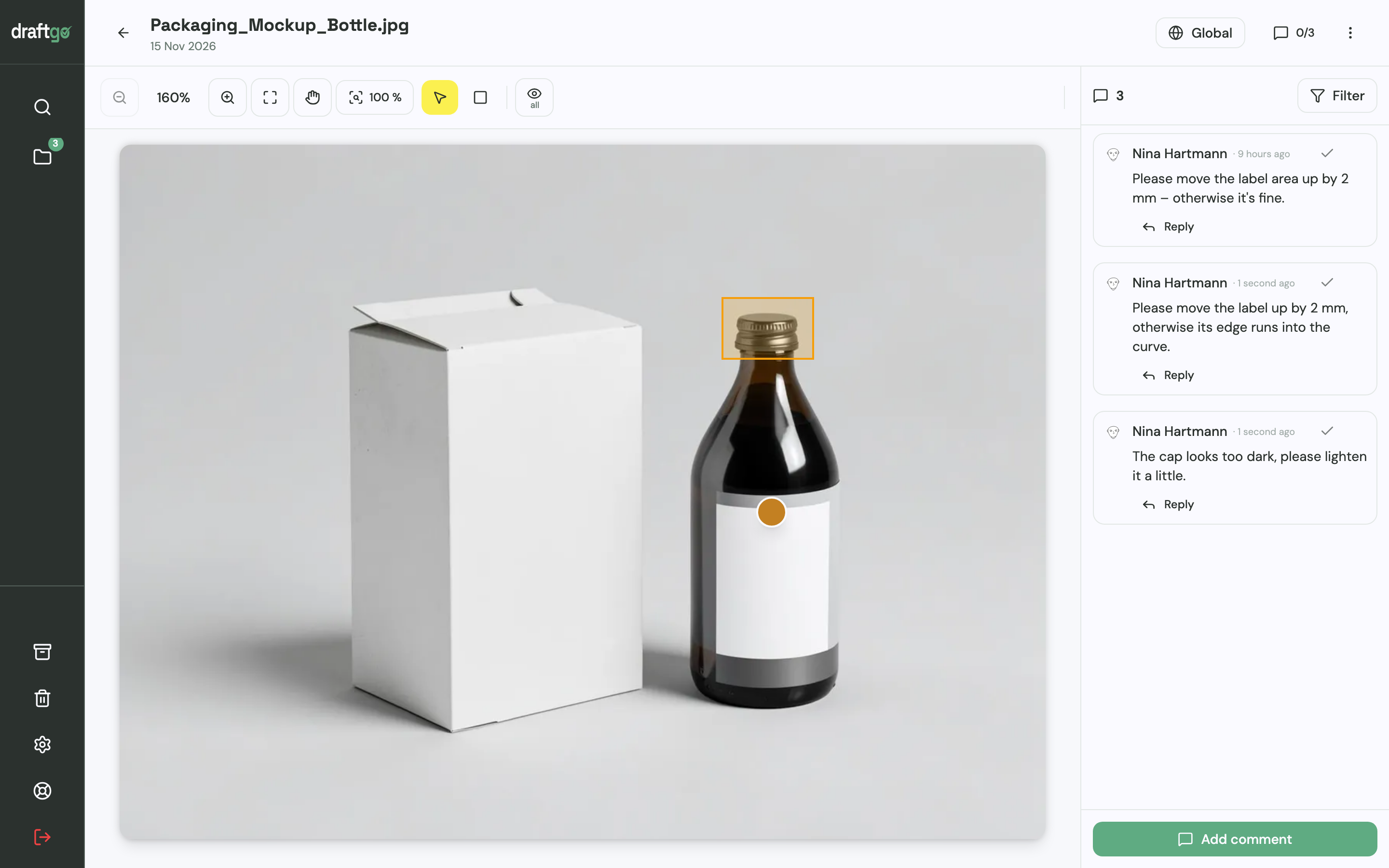
Approvals run in loops, for example an internal loop for the studio and a client loop for brand and regulatory. For each loop you decide whether all approvers, a set number or any one of them must approve, separately for your team and for guests. A corrected file becomes a new version of the same file, and the new version starts the approvals again.
From the Freelancer plan, the AI review checks print PDFs for errors such as spelling mistakes, cut-off text or very small type and measures image resolution, and its comments carry the name of our AI agent “GO”. The activity log records approvals, comments, versions and downloads with person and time and exports as CSV, JSON or PDF. Pricing is per company, and guests are unlimited from the Freelancer plan. Stored data is kept on EU servers in the Frankfurt data centre.
- Pros: approval loops in stages with a rule for each, guests without an account, AI review of print PDFs including image resolution
- Cons: specialist packaging work such as colour-accurate proofing, preflight or managing regulatory label copy belongs in a dedicated artwork system
- Price: a permanent Free plan and paid plans you can test free for 14 days, all listed on draftgo pricing
How teams set up these reviews is shown on draftgo for packaging and draftgo for print and advertising.
4. Filestage: suited for teams with reviewer groups and AI review agents
Filestage reviews artwork, labels, documents and videos, and reviewers approve without an account. Its packaging page describes reviewer groups that take a file from design to compliance in stages. On the pricing page, Starter costs €199 or $199 a month on yearly billing and adds due dates, reminders and version comparison. Business costs €329 or $329 a month and adds review agents that check grammar and style and verify QR codes, barcodes and mandatory images.
- Pros: staged reviewer groups, version comparison from Starter, barcode checks and overlay compare on Business
- Cons: a team of two pays the same Starter price as a team of ten, and the free plan holds one active project
- Price: Starter €199 and Business €329 a month on yearly billing (Filestage pricing)
draftgo vs Filestage compares the two tools point by point.
5. GoVisually: suited for small design teams and CPG brands
GoVisually focuses on design review for artwork and packaging. Its CPG Compliance AI Suite checks artwork against custom rules and more than 20 regulatory frameworks and verifies barcodes, priced after a demo (GoVisually pricing). Lite costs $16 per user a month on annual billing for one to five users, with up to 15 external reviewers and no video support. Pro costs $33 per user a month on annual billing, with a minimum of three users and unlimited external reviewers.
- Pros: a low entry for small teams, a compliance suite for consumer goods labels
- Cons: no free plan, and the compliance checks sit in a separately priced suite
- Price: Lite $16 and Pro $33 per user a month on annual billing, with a free trial (GoVisually pricing)
More in draftgo vs GoVisually.
6. PageProof: suited for print and packaging teams that want colour and barcode tools in the proof
PageProof's packaging page names ColorSep, which previews colour separation plates and ink coverage, a barcode scanner, Smart Check for file dimensions, fonts and colour profiles, and smart compare between versions. An Adobe Illustrator integration sends artwork straight into a proof. On the pricing page, Team costs $2,499 a year or $249 a month, with unlimited reviewers, proofs and storage.
- Pros: colour separations, barcode scanner and smart compare in the viewer, one flat price
- Cons: no free plan, and a trial only on request
- Price: Team $2,499 a year or $249 a month (PageProof pricing)
draftgo vs PageProof sets out where the two differ.
7. Ziflow: suited for brand teams with multi-stage workflows
Ziflow routes proofs through stages that run one after another or in parallel, and its packaging page names checklists and colour separation for CMYK and Pantone colours. On the pricing page, the free plan covers 2 users and one workflow stage. Standard costs $199 a month billed annually with 15 users and two stages, and Pro $329 with 20 users, three stages and colour separation. Reviewers are unlimited on every plan, and ReviewAI and automatic deadline reminders come with Enterprise.
- Pros: sequential and parallel stages, colour separation on Pro, a free plan
- Cons: colour separation starts with Pro, and Standard's 15-user block suits larger teams
- Price: Standard $199 and Pro $329 a month, billed annually (Ziflow pricing)
draftgo vs Ziflow puts the two side by side.
8. Adobe Workfront: suited for organisations that plan and approve their work in Adobe
Workfront is Adobe's work management platform, and proofing comes with every Workfront licence. In the Workfront Proof viewer, automated workflows split a proof into stages, and two versions can be compared (Adobe Experience League). With unified review and approval, reviews move into the Frame.io viewer, one approval holds up to 30 paths and 100 stages, and external reviewers are prompted to create a Frame.io login (Adobe Experience League).
- Pros: approvals next to the projects and tasks planned in Workfront, many parallel paths and stages
- Cons: a large platform if you only need review and approval, and external reviewers need a Frame.io login
- Price: three packages (Select, Prime and Ultimate), each priced on request (Workfront pricing)
Which artwork approval software fits your team?
If your team writes and controls regulated label copy itself, look at an artwork management system first. If it mainly reviews designs and collects approvals, a proofing tool is enough.
| Your situation | What matters most | Tools to test first |
|---|---|---|
| Brand with many SKUs and labels for several markets | label copy, text and barcode checks | ManageArtworks, Esko WebCenter |
| Converter or printer approving customer files | a version built for converters | Esko WebCenter Pack |
| Brand team with print and packaging proofs | colour separations, compare, stages | PageProof, Ziflow, Filestage |
| Small design team | a low entry per user | GoVisually |
| Agency approving artwork with clients in two rounds | guests without an account, a rule per round | draftgo, Filestage |
| Organisation that already plans in Workfront | approvals next to tasks | Adobe Workfront |
Whichever tool you pick, the printer still checks the final files against its specifications: see our preflight checklist for print files and our guide to prepress.
Practical example: a hot sauce brand and its agency
A four-person design agency refreshes the labels of six hot sauces for a small food brand. The marketing manager approves, the food technologist checks ingredients and allergens, and a sales manager wants to comment.
The agency works on the Agency plan in draftgo with two loops, and the art director approves first in the internal one. Before the client loop starts, the designer runs the AI review on the six print PDFs, and GO flags very small type in one ingredient list and a product photo with low resolution. In the client loop, the rule says all guests must approve. The marketing manager and the food technologist each get a personal approver link, and the sales manager uses the shared viewer link.
The food technologist highlights the allergen line on the mango label and asks for mustard to be set in bold. The designer uploads version 2, the approvals start again, and both approvers approve. The agency exports the activity log for the job file, as our guide to the approval audit trail recommends. If the brand sold four hundred products in twelve languages, a system with central label copy such as ManageArtworks or Esko WebCenter would be the better choice.
FAQ
What is the difference between artwork approval software and artwork management software?
Artwork approval software covers the review: markup, versions, stages and the record of every approval. Artwork management software adds label copy for every market, dielines and checks of text, colours and barcodes. With a few products, the review part may be all you need.
Is there free artwork approval software?
Yes, with limits. As of 23 November 2026, Ziflow, Filestage and draftgo have free plans, each capped by users, projects or files. ManageArtworks and GoVisually offer free trials, PageProof a trial on request, and Esko a product tour.
Can artwork approval software check colours and barcodes?
Some tools can. PageProof previews colour separations and scans barcodes, Ziflow offers colour separation on Pro, WebCenter Go detects CMYK and Pantone colours, and ManageArtworks verifies barcodes and colour. For colour-critical jobs, agree with your printer how the final colours are proofed.
Do reviewers need an account to approve artwork?
In Filestage and draftgo, external reviewers comment and approve through a link without an account. In Workfront's unified review and approval, external reviewers are prompted to create a Frame.io login.
Conclusion
If your team controls label copy for many products, compare Esko WebCenter and ManageArtworks in a demo. If you mainly review designs and collect approvals from clients, regulatory and printers, shortlist two proofing tools from the table and run one real label job through each trial.
Try it free – draftgo is free for 14 days, no credit card needed.
Written by
Emilia
Content Producer
Ready to streamline your approval processes?
Get started with draftgo today and see how easy professional collaboration can be.