
The final PDF is approved, the project invoice is sent, and then an unexpected message lands in your inbox: the client asks for the original InDesign package, layered Photoshop assets or raw Figma files. For many agencies and freelancers, this request triggers an uncomfortable dilemma. If you hand everything over without terms, you surrender valuable production templates, risk font copyright breaches and potentially lose future retainer work. If you refuse, you risk frustrating a client who feels entitled to every file produced during the project.
This tension usually happens because neither party defined the boundary between deliverables and working files before work began. To prevent misunderstandings, you need to establish clear rules in your contract and align your team on standard delivery routines.
This article is general information, not legal advice.
Final files or source files: what do you owe?
You only owe editable working files if your signed agreement explicitly states that they are part of the scope of work. In creative production, source files and design assets are the native, layered production environments used to build the work, such as Adobe Illustrator files (.ai), InDesign packages (.indd), Photoshop documents (.psd), After Effects projects or Figma team boards. Deliverables, by contrast, are the flattened, rendered or exported end products agreed upon in the brief, such as print-ready PDFs, web-optimised JPGs, PNGs or MP4 video renders.
Unless a contract specifies otherwise, a standard creative agreement covers only the finished deliverables. Under US copyright principles, copyright ownership vests initially in the author who creates the work, as outlined in Title 17 of the US Code, unless the relationship qualifies strictly as a work made for hire. Furthermore, any assignment or transfer of copyright ownership requires a signed instrument in writing under statutory transfer provisions. Simply paying an invoice for a marketing campaign or brochure design does not automatically grant a client ownership of the underlying working assets.
When an agreement states that the client receives a brochure design, you meet your contractual duty by delivering the high-resolution, print-ready PDF. Handing over editable working files requires an explicit contractual clause that defines the exact scope, transfer of rights and delivery format.
Why disputes about source files start
Disputes over source files usually occur because clients and creative professionals approach the finished project with fundamentally different assumptions.
Clients typically want long-term independence. They want internal team members or future external contractors to fix typos, change dates, translate text or swap images without paying agency rates for minor revisions. In their view, paying for the design work should entitle them to the complete project archive.
Creative professionals, on the other hand, look at source files as their production workshop. A native file contains custom grids, master styles, proprietary layering systems, pre-press setups and workflow know-how accumulated over years of practice. When an agency surrenders raw files, it forfeits control over visual consistency. Clients or third-party freelancers may alter layouts improperly, use the wrong colour profiles or distort typography, compromising brand standards that still carry the agency's name in industry portfolios.
Without early stakeholder alignment, these differing expectations remain hidden until delivery, turning what should be a successful project launch into a tense negotiation over intellectual property.
Try it yourself: In the demo you work in a real draftgo workspace with sample data.
5 steps to a clear clause in the proposal
Setting clear terms from the outset protects your work and eliminates uncomfortable debates at project sign-off. You can introduce clear handover terms into your standard proposals using five structured steps.
1. Select your commercial model
Decide early which commercial approach fits your business model and state it clearly in your quote:
- Source files excluded: The scope covers only agreed export formats (such as PDF, SVG, PNG or MP4). Working files remain agency property and will not be released.
- Source files for an additional fee: The client can acquire the native files for a specified buyout or packaging fee, compensating the studio for lost future maintenance work.
- Source files included: The project fee already covers native working files, which makes sense for comprehensive brand identity systems or design system handovers.
2. Define exact file formats and versions
Avoid vague phrasing such as “all digital assets”. List the specific software environments and formats you will provide, such as Adobe Illustrator 2026 (.ai) or Figma project files. If you work in specialised tools, clarify whether files will be delivered as native packages or exported interchange formats like IDML.
3. Tie file delivery to full payment
Never release editable source files before receiving complete payment for the project. Include a clause stating that any agreed transfer of editable files or licensing rights takes effect only after all project invoices have been settled in full. This prevents clients from taking working files to another contractor before your bills are cleared.
4. Regulate third-party editing rights
Clarify who is permitted to modify the source files once delivered. Specify whether the files are for internal client use only or whether outside agencies and freelancers may adapt them. Define whether the client may use your proprietary layout frameworks to generate derivative sub-brands without additional compensation.
5. Establish the handover milestone in your workflow
Integrate the handover step into your formal agency workflow. The transition from draft approvals to final source file preparation should happen only after the review team has signed off on the exported artwork. Using a formal process during client onboarding ensures everyone understands that review rounds happen on exported proofs, not within working files.
Fonts and images at handover
A frequent trap during file handover involves third-party assets, particularly typography and commercial imagery. Many clients assume that receiving an InDesign package or Illustrator archive automatically gives them the right to use every font and stock photograph embedded inside it.
Typography is governed strictly by software licences. Desktop font licences generally allow the purchasing agency to install the font on a specific number of internal workstations. Passing those font files to a client so they can open an InDesign package usually violates the font foundry’s licensing agreement. Unless you purchased a specific multi-seat corporate licence on behalf of the client, you cannot legally share the font files. Instead, provide a typography guide specifying the font names, weights and foundry links where the client can purchase their own licences.
The same principle applies to commercial photography and illustration. Stock agencies grant licences to the purchaser, and sub-licensing raw image files to third parties is rarely permitted under standard terms. In your handover documentation, include an asset list with direct source links, image IDs and licensing details so the client can purchase appropriate usage rights directly.
Legal situation in Austria and Switzerland
In Austria and Switzerland, creative work is similarly protected by copyright principles that place initial rights firmly with the creator. A client commissioning design work acquires only the specific usage permissions necessary to fulfil the agreed purpose of the project.
Unless explicitly stipulated in the contract, agencies and freelancers are under no statutory obligation to deliver editable working files, raw project archives or master layout files. In both jurisdictions, modifying an existing design or producing derivative work requires clear authorisation from the original author. If clients in Austria or Switzerland require editable source data for internal revisions or subsequent agency handovers, the agreement must define the scope of rights transfer and the corresponding licensing fee in advance.
Handover checklist for source files
When your agreement includes native files, package them cleanly to ensure professional handoff:
- Agreed final exports: Include all flattened deliverables (PDF, PNG, JPG, MP4) organised by resolution and colour profile.
- Clean working files: Remove unused layers, hidden test artboards, broken links and scratchpad notes from the source documents.
- Linked imagery: Include all linked high-resolution images, textures and vector graphics in a dedicated asset folder.
- Font and asset index: Provide a text file listing all used typefaces, font foundries, stock photo IDs and required purchase links.
- System documentation: Include a concise readme file stating the exact software applications and version numbers used to build the files.
- Approval verification: Confirm that the packaged source file corresponds precisely to the draft approved during the final review cycle.
Common mistakes and better practice
Unclear handover terms often lead to project friction, unbillable administrative hours and copyright complications.
| Typical mistake | Operational risk | Better practice |
|---|---|---|
| Addressing source files only after project completion | High risk of disputes, awkward negotiations and delayed final payments | Define source file inclusion, buyout fees and delivery formats directly in the initial proposal |
| Handing over raw font files and stock photos in the package | Copyright infringement and licence violations with font foundries and stock libraries | Provide an asset reference list with links for the client to acquire their own required licences |
| Releasing editable files before final invoice settlement | Loss of commercial leverage if the client disputes subsequent payments | Link the release of native files explicitly to the receipt of full payment in the contract terms |
| Unclear version status between proof and source file | The client edits an outdated draft, creating inconsistencies in production | Keep a structured activity record of the final approved export before packaging the source archive |
| Letting clients request edits inside raw working files during review rounds | Accidental file damage, lost layouts and uncontrolled scope creep | Conduct review cycles on exported proofs, keeping production files safely within your creative team |
A practical scenario: the unexpected brochure request
Consider an independent design studio hired to produce a 24-page recruitment brochure for a growing logistics company. The proposal stated that deliverables would include a print-ready PDF with printer marks and a light, screen-optimised PDF for online download. The project proceeded smoothly through drafting and stakeholder review.
Once the final PDF was approved and the print invoice cleared, the client’s marketing manager asked for the original InDesign package. The manager explained that their internal team wanted to tweak dates and speaker profiles for subsequent recruitment events.
Because the studio had not defined source file rights in the original quote, both sides entered an uncomfortable debate. The studio felt their layout grid, paragraph styles and pre-press setup represented valuable intellectual property that warranted an additional licensing fee. The client felt that paying for the brochure design meant they already owned everything created for it.
Had the studio defined source files and design terms upfront, the situation would have been straightforward. The proposal would have stated that native InDesign files were available for a defined packaging and licensing fee of 50 per cent of the design cost, excluding third-party fonts. The client could then make an informed commercial decision without questioning the studio's integrity or delaying the project conclusion.
How it works in draftgo
During creative review stages, keeping your working files separate from client feedback cycles avoids confusion and protects production files. In draftgo, agencies and creative teams upload exported proofs (such as multi-page PDFs, high-resolution images, audio recordings or video cuts) so clients can review and approve work directly in their browser without registering an account.
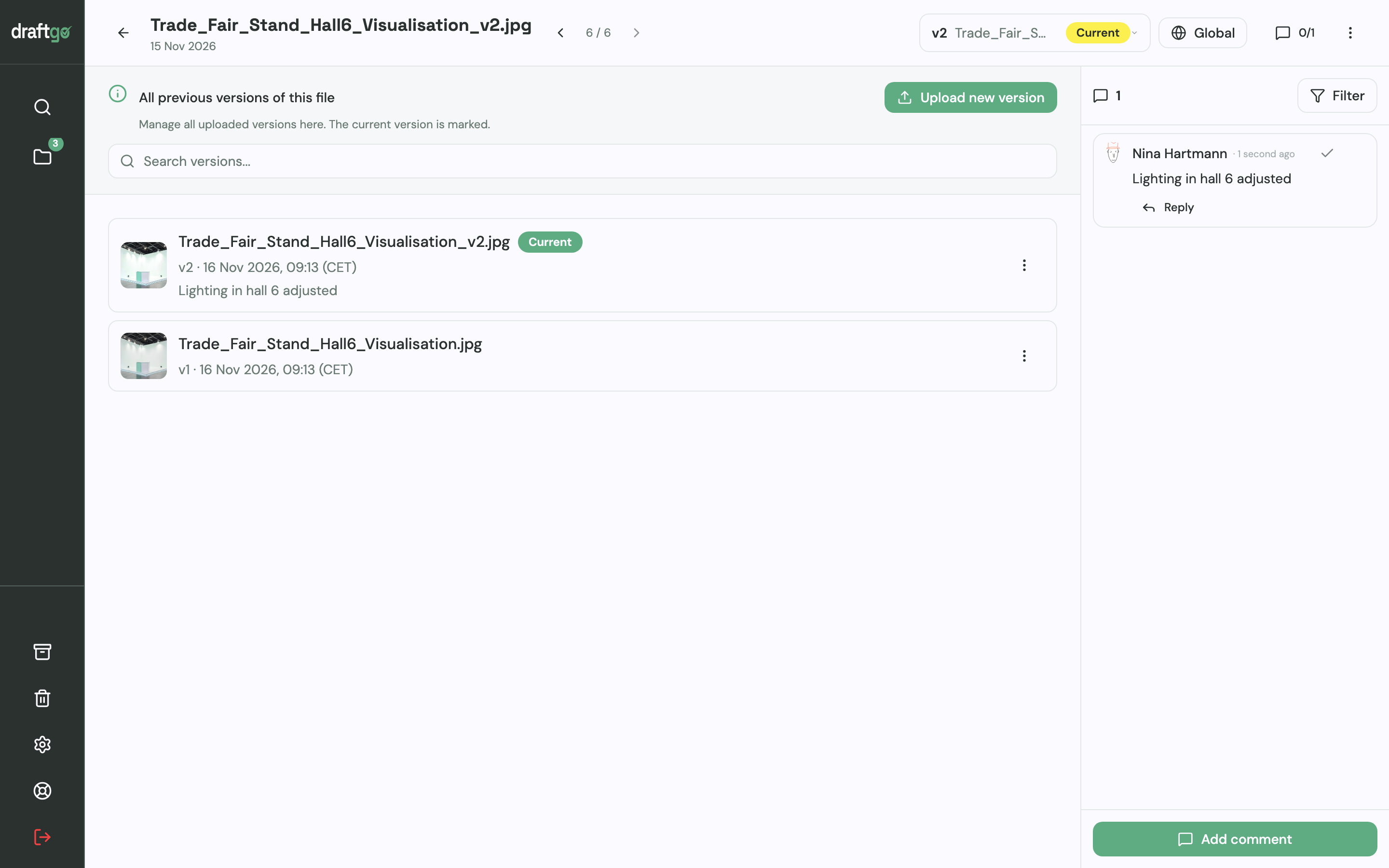
When revisions are required, the studio updates the native source files internally and uploads the revised export as a new version. The version history keeps every draft accessible in sequence, while comments remain attached to the specific version where they were made. This ensures your internal working files remain untouched while feedback is collected accurately via pins, rectangles and text marks.
Once the client signs off, the project activity log documents exactly who approved which file version with an immutable timestamp.
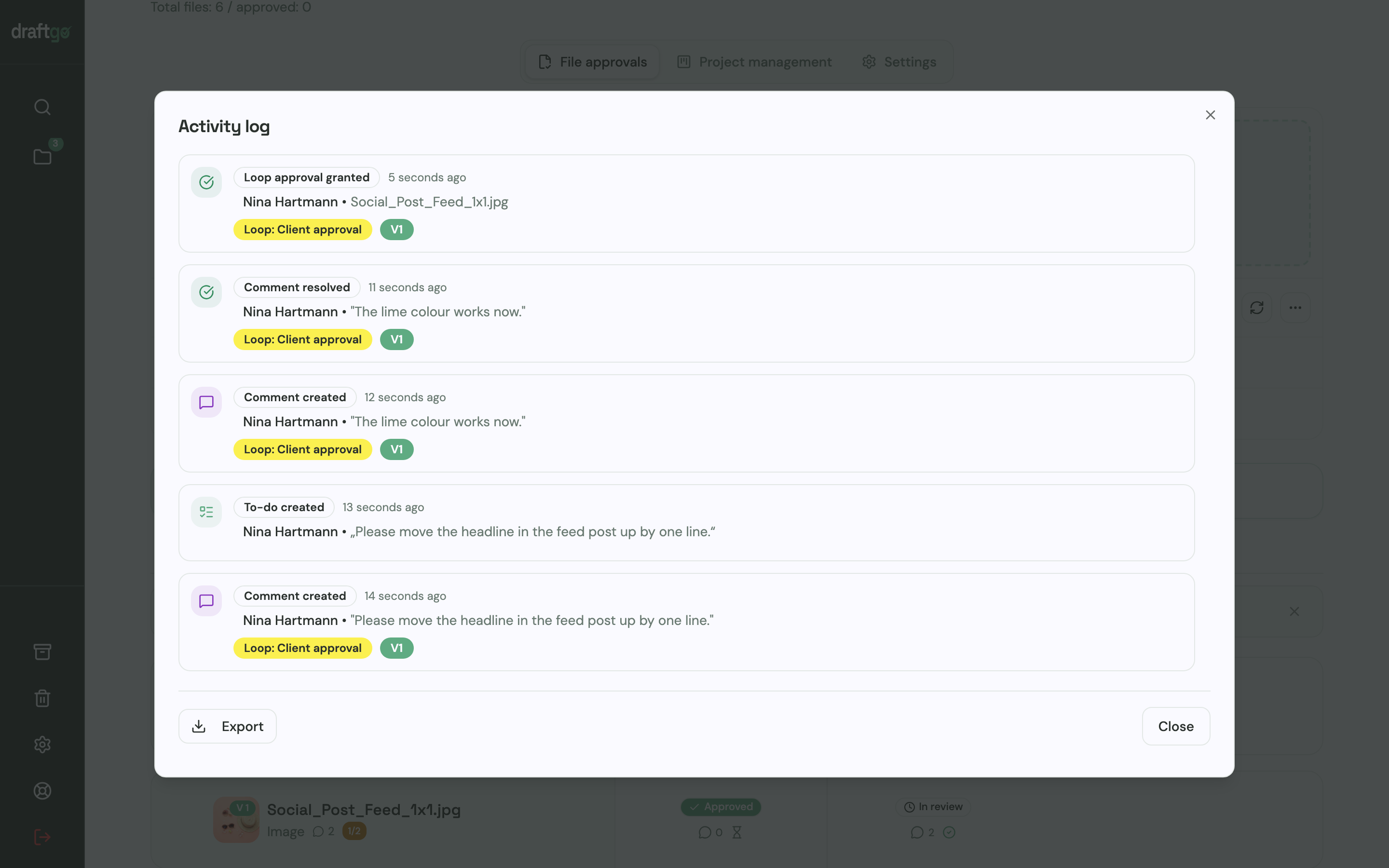
You can export this audit trail as a PDF or CSV record to confirm that the source files you package match the exact file version approved by the client. Teams working in tools like Adobe Creative Cloud or Figma export their review files to draftgo, keeping raw production assets safely under agency control until formal delivery terms are met. For creative firms handling continuous client work, draftgo provides an organised workflow that simplifies creative operations on solutions for agencies.
FAQ
Does a client automatically own source files once they pay an invoice?
No. Paying for a creative project covers the agreed deliverables, not the underlying source files, unless your agreement explicitly states otherwise. Under US copyright law, ownership of creative work remains with the author unless formally transferred in writing or produced under a valid work-made-for-hire agreement.
Can I share font files with my client if they ask for the source package?
You generally cannot share font files unless your specific font licence permits redistribution. Most desktop font licences cover only the agency’s internal workstations. You should instead provide a font list with foundry links so the client can purchase their own licences.
How much should I charge for handing over source files?
Buyout fees typically range from 50 to 200 per cent of the original project design fee, depending on the commercial value of the asset. Charging a buyout fee compensates your business for the loss of future adaptation work and the transfer of your proprietary production setups.
What should I do if a client demands source files that were not agreed upon?
Politely refer to the deliverable list in your signed agreement and explain that the fee covered the finished export files. Offer to prepare and release the native files for a separate packaging and licensing fee, or offer to carry out the future file adjustments yourself under an agreed hourly rate.
Conclusion
Handing over source files and design assets should never be left to chance or negotiated when a project is ending. By setting out clear file definitions, licensing terms and commercial options in your initial proposal, you protect your studio's technical know-how and avoid disputes. Ensure your review cycles happen on structured exported proofs before packaging clean native files upon final payment.
Try it free – draftgo is free for 14 days, no credit card needed.
Written by
Emilia
Content Producer
Ready to streamline your approval processes?
Get started with draftgo today and see how easy professional collaboration can be.