
It is Thursday morning, and you share your screen with three logo routes you have worked on all week. Two minutes in, the marketing manager asks whether the green could look more like a competitor’s blue. The managing director joins late, and the call ends with “We’ll discuss it internally.” A week later the feedback arrives in four emails that contradict each other.
The routes may well be strong. What went wrong is the way they were presented, and you can plan that part. This guide covers the client presentation of creative work, such as a logo, a campaign or a website design, in front of a client who has to decide on it. It is not about sales pitches for new accounts.
Why client presentations end without a decision
A client presentation ends without a decision when the client sees the work before the goal it has to meet. Without that yardstick, everyone in the room judges by personal taste, and different tastes do not add up to a decision.
Open with the design and describe what is on screen, and you invite a debate about colour. Show eight variations and close with “What do you think?”, and you hand the client a choice they cannot make. If the person who signs off is not in the room, every agreement stays provisional.
A clear structure changes the question. Instead of “Do I like it?”, the discussion turns to “Does this solve the problem we agreed on?”, and that question can be answered with arguments.
How to structure a client presentation in 6 steps
A client presentation that ends with a decision follows six steps: restate the goal, show the idea, explain the reasoning, show two or three options, recommend one and agree the next steps. Keep the order, because each step prepares the ground for the next one.
1. Restate the context and the goal
Open with two or three sentences on the starting point, the task and the goal you agreed in the brief. This shows that you listened and sets the standard your work will be measured against. If the goal was never written down, a creative brief template helps you fix that before the next project.
Example phrase: “You asked for a label that stands out on a crowded supermarket shelf and still feels like a family bakery. Everything we show today is measured against that.”
2. Show the idea
Show the work without an apology first, because “This is only a rough draft” makes the client look for flaws. Give the design a few seconds on screen before you speak, and show it where it will be used: the label on the jar, the post in a phone frame.
Example phrase: “Here is the first route. Take a moment to look at it on the jar before we go into the details.”
3. Explain the reasoning
Explain why you made each decision instead of describing what is on screen, and link every decision to the goal from step 1. Spend the bulk of your preparation time on this step, because here the discussion moves from taste to strategy.
- “We chose a heavy sans-serif because the brand should feel modern and easy to approach.”
- “The green comes from the bakery’s shopfront, so regular customers recognise the label at a glance.”
4. Show two or three options
Show two or three routes that differ in their idea, not only in colour or typeface. A long row of variations looks like hard work, but it hands the preselection back to the client, who hired you to make it. A meta-analysis of 99 observations by Chernev, Böckenholt and Goodman identified four factors under which a larger set of options leads to more choice overload: a complex set of options, a difficult decision, uncertain preferences and the goal of deciding with little effort (Journal of Consumer Psychology, 2015). Choosing between the first routes for a new brand is complex and difficult, and the client may not yet know what they prefer.
Example phrase: “We developed five directions internally and are showing you the two that fit the brief.”
Try it yourself: In the demo you work in a real draftgo workspace with sample data.
5. Give a clear recommendation
Say which route you recommend and why, in one sentence that links back to the goal. Clients pay for your judgement, so a presentation without a recommendation holds back the part they paid for.
Example phrase: “Because the brief is about reaching younger customers without losing the regulars, we recommend route A.”
6. Agree the next steps
End with what you need from the client, by when the feedback comes and when you deliver the next version, and write it down while everyone is still in the meeting. If you agreed during client onboarding how and where feedback arrives, this step takes a minute.
Example phrase: “Could you add your comments on route A by Wednesday? We’ll send the revised version on Friday.”
How to answer taste feedback in the meeting
You answer taste feedback, a remark about liking or disliking something without a reason, by asking for the goal behind it. The client is entitled to a feeling, and your job is to turn it into a requirement you can design for.
| What the client says | What you can reply |
|---|---|
| “I don’t like the green.” | “What should the colour do for the brand? Then we can check whether another shade does it better.” |
| “Can you make it pop more?” | “Should it stand out more on the shelf, or be easier to read from a distance?” |
| “My business partner prefers the other route.” | “Which part of the brief does that route meet better for them?” |
| “Let’s combine route A and route B.” | “Which element of route B should we keep? We’ll test it inside route A.” |
Client presentation mistakes and what works better
Use this table as a check the day before the meeting. Each row pairs a habit that leads to a taste debate with one that leads to a decision.
| Mistake | What works better |
|---|---|
| Opening with the design | Restating the goal and the task first |
| Showing every variation you made | Two or three routes, each with its own idea |
| Apologising for the draft | Showing the work with confidence, in its setting |
| Reading the slides aloud | Explaining the reasons the slides do not show |
| Running out of time before the recommendation | Planning the agenda backwards from the decision |
After the meeting: collect the feedback in one place
Collect all feedback on the file itself, by a fixed date. Spoken remarks are easy to lose: two people remember the same sentence differently, and anyone who missed the call hears it second hand.
Send a short recap the same day with the chosen route, the changes, the feedback date and the person who gives the final approval, and ask everyone to comment on the design instead of in emails or chat threads. When the client marks a spot on the image, you know which headline or photo they mean. The guide to feedback management shows how to settle comments that contradict each other, and online proofing explains how review in the browser works.
Practical example: a campaign presentation that ends with a decision
Take a three-person agency that presents the key visual for a garden centre’s spring campaign to the owner and her store manager. The agency lead opens with the goal from the brief: more visits from young families, and a visual that works on a large poster and on Instagram. Then the designer shows two routes, a family photo and an illustration, on a poster mock-up and in a phone frame.
When the store manager asks for “more colour”, the designer asks what it should achieve, and they agree that the opening date must be readable from across the car park. The agency recommends the illustrated route because it stays clear on a small screen, and the owner agrees.
Before the call ends, the agency lead names the next steps: the owner’s comments by Tuesday, the revised visual on Thursday. That afternoon the agency uploads the visual, sends the owner a personal approver link and the store manager a viewer link, and both leave their notes on the design.
How it works in draftgo
In draftgo, the feedback after your presentation lands on the file you presented, and the client needs no account to give it.
- Upload the presented work. Add images, PDFs, videos or audio files to a project, or capture a web page as a screenshot. Export a slide deck as a PDF first, so the client can mark up each page.
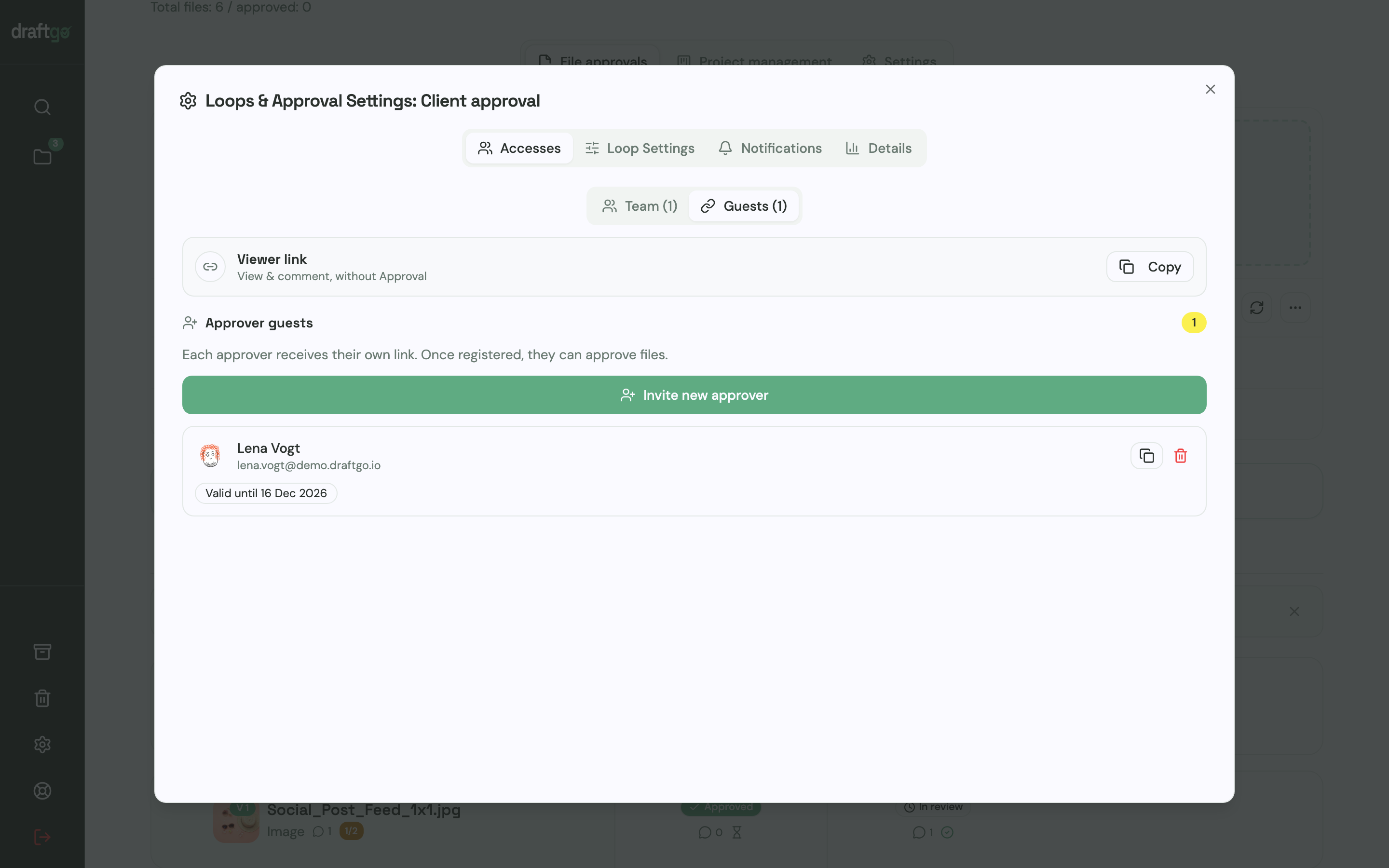
- Invite the client. The person who signs off gets a personal approver link with their name and email address, and colleagues who only comment use the shared viewer link of the loop.
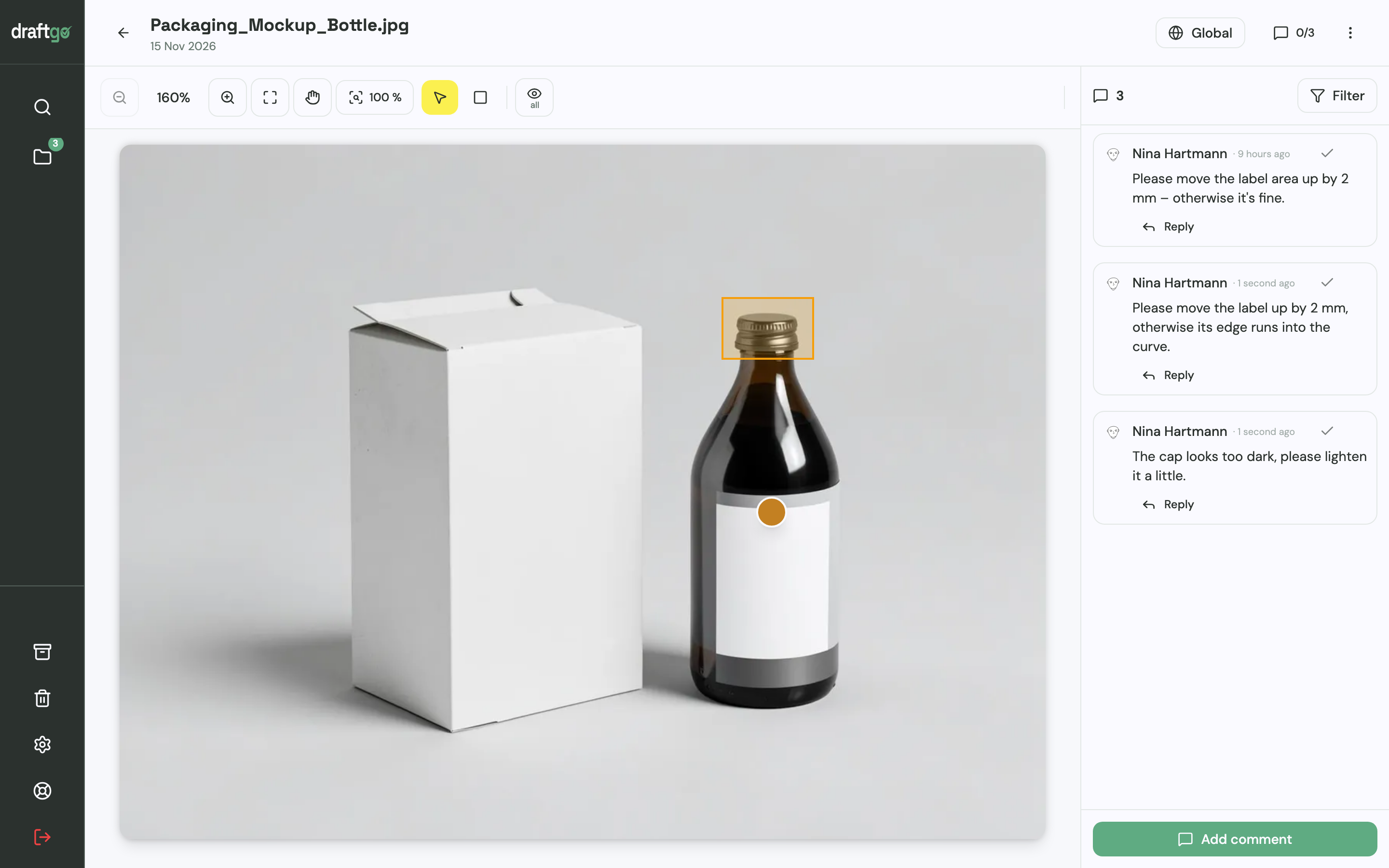
- Let the client comment at the spot. Clients place a pin or a rectangle on an image, highlight or strike through text in a PDF, or comment at a point in a video. You reply in the thread and mention colleagues with @.
- Know when the feedback is complete. If you switch it on for the loop, guests can report that their feedback is complete.
- Upload the revision as a new version. The revised design goes onto the same file. Earlier versions stay available with their comments, and the approvals start again.
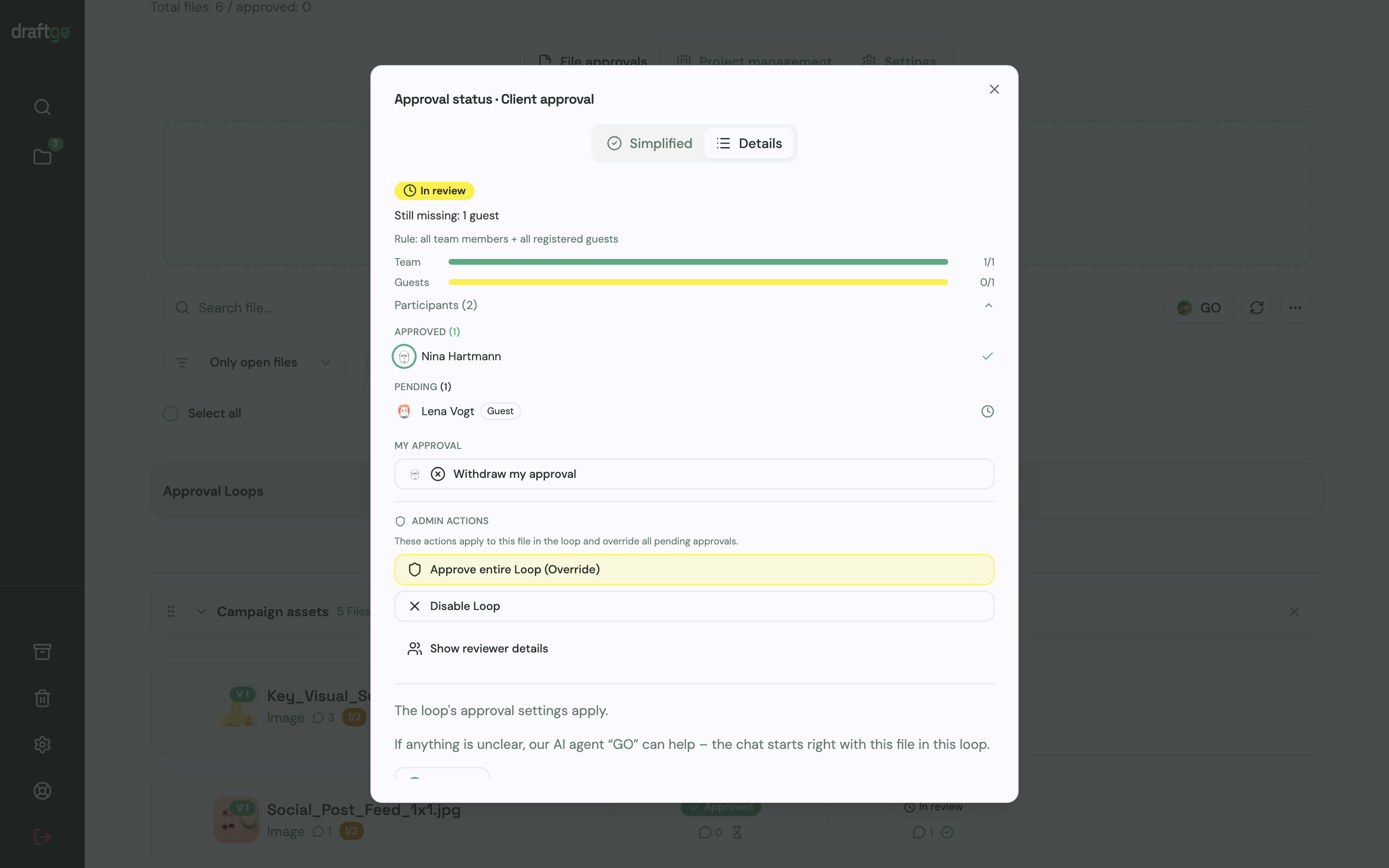
- Follow the approval. The loop shows who has approved and who is still pending, and the activity log records each approval with the person and the time.
“Instead of endless PowerPoints, my client sees every new version straight away and approves it directly,” says Peter Schönherr, founder and managing director of Loloson Media LDA., an image and video production company in Portugal.
The pages draftgo for agencies and draftgo for freelancers show the workflow for teams and for designers who work alone.
FAQ
How many slides does a client presentation need?
There is no fixed number. Each slide should move the story forward, from the goal to the recommendation and the next steps, and a few clear slides work better than many full ones.
Should I present live or send the file?
Present live for the first concept and for milestones, in person or on a video call, so you can tell the story and answer questions straight away. For interim versions, sending the file with a short note on the goal and the reasoning is enough.
What if the client rejects every option?
Ask which goal the routes miss in their view, and listen before you defend the work. A rejection of every route can point to a gap in the brief, such as an unclear audience, which a short rebrief closes before the next round.
Should I make changes live during the meeting?
Avoid it where you can, because changes made on the spot lead to gut decisions. Note the request, check it against the goal afterwards and show the result in the next version.
Who should attend a client presentation?
The person who gives the final approval should be there, together with the people whose opinion that person relies on. If the decision-maker cannot attend, move the date or agree beforehand that the meeting only collects input.
Conclusion
Build your next client presentation around six steps: goal, idea, reasoning, two or three options, a recommendation and the next steps. Before the meeting, write one sentence for each design decision that links it to the goal, and after the meeting, ask for written feedback on the file by a fixed date.
Try it free – draftgo is free for 14 days, no credit card needed.
Written by
Emilia
Content Producer
Ready to streamline your approval processes?
Get started with draftgo today and see how easy professional collaboration can be.